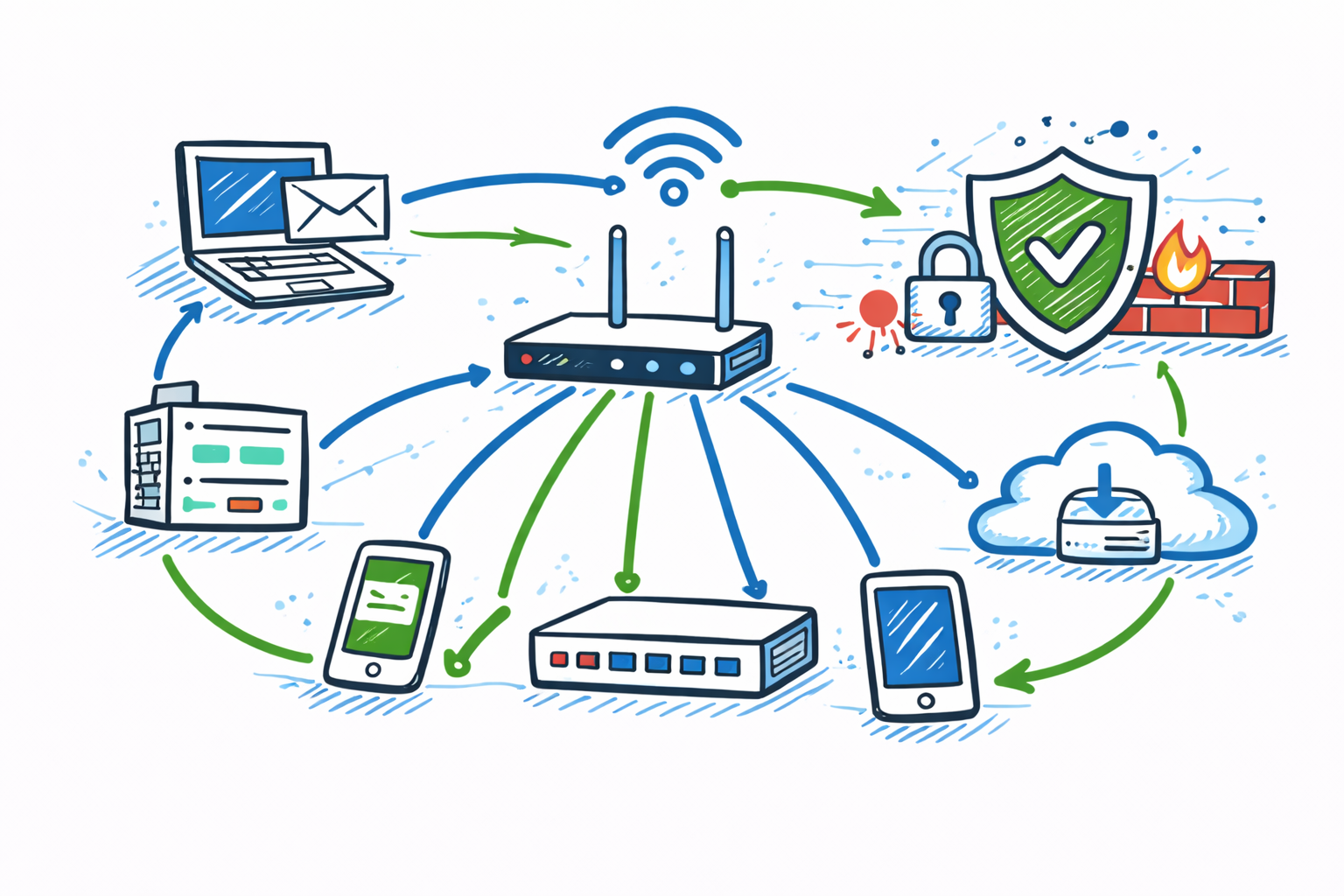
Understanding how computer networks work is the first step toward learning Computer Network Security. Whether you are a student, an IT professional, or someone interested in technology, learning the Network Security Basics will help you understand how devices communicate, how data travels across networks, and how organizations protect their digital infrastructure from cyber threats.
In this guide, you’ll learn what computer networks are, how network security works, why it is important, common network security threats, essential security devices, and best practices. Each topic is explained in simple, easy-to-understand language, making this guide suitable for beginners and anyone looking to build a strong foundation in networking and cybersecurity.
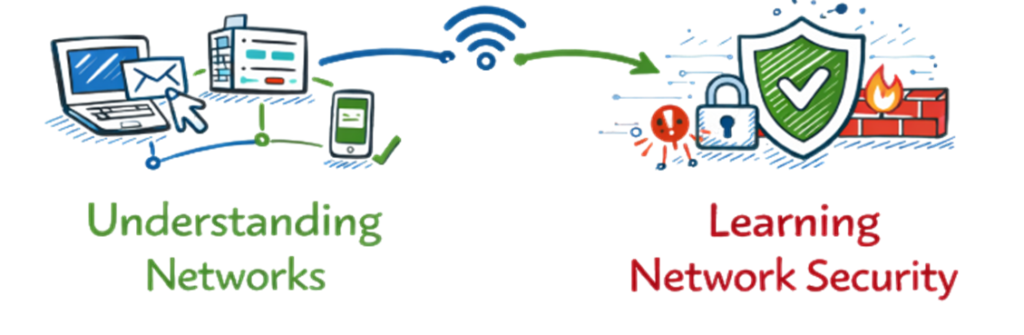
We’ll explain each concept in simple, easy-to-understand language, covering network components, communication methods, common security threats, and the best practices used to protect modern networks. By the end of this guide, you’ll have a solid foundation in computer networking and network security, making it easier to explore more advanced cybersecurity topics.
1. Understanding Computer Networks Before Learning Network Security
What Is a Computer Network?
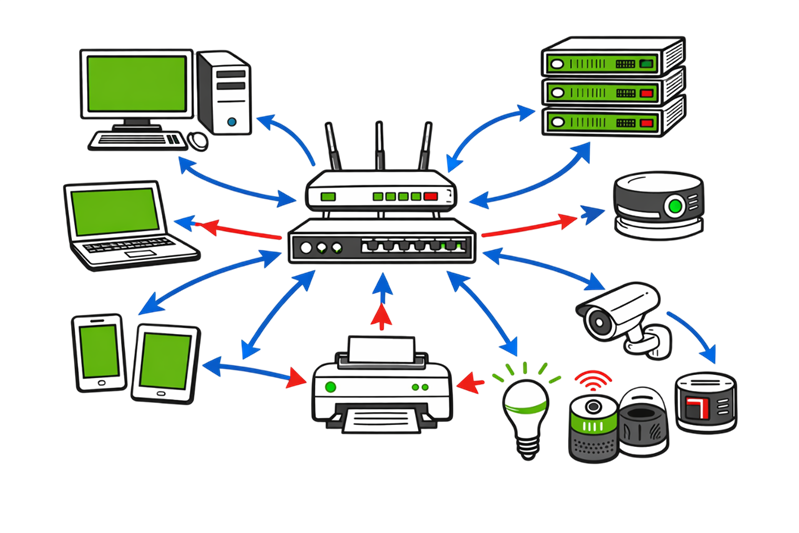
A computer network is a group of interconnected devices that communicate with each other to share data, resources, and services. These devices include computers, servers, smartphones, routers, switches, printers, and Internet of Things (IoT) devices connected through wired or wireless networks.
As organizations become more connected, Network Security Basics play a critical role in protecting networks from cyber threats, unauthorized access, malware, and data breaches. Understanding Network Security Basics helps individuals and businesses build secure, reliable, and efficient network environments.
Example of a Computer Network
Imagine two computers connected using a network cable to exchange files. This is one of the simplest examples of a computer network. When additional devices such as a router, switch, printer, Wi-Fi access point, and an internet connection are added, the network expands to support multiple users and services.
Understanding Network Security Basics ensures that these devices communicate securely while protecting sensitive information from attackers.
Why Are Computer Networks Important?
Computer networks make communication, collaboration, and resource sharing faster and more efficient. Learning Network Security Basics is equally important because every connected device can become a potential target for cyber attacks if proper security controls are not in place.
A computer network allows users to:
- Share files, documents, and business data securely.
- Access shared resources such as printers, storage devices, and internet connections.
- Communicate through email, instant messaging, voice calls, and video conferencing.
- Access cloud applications and online services from anywhere.
- Support collaboration between remote teams and multiple office locations.
- Connect IoT devices and enterprise systems efficiently.
As businesses continue adopting cloud computing, remote work, and IoT technologies, Network Security Basics become essential for protecting confidential information, maintaining business continuity, and preventing cyber attacks.
Whether you are a student, network administrator, or cybersecurity professional, learning Network Security Basics helps you understand how networks operate, how attackers target them, and how security controls such as firewalls, intrusion detection systems, and network segmentation protect modern enterprise environments.
Building a strong foundation in Network Security Basics also prepares you for networking certifications, cybersecurity interviews, and real-world IT security roles. Before exploring advanced topics such as firewalls, VPNs, intrusion prevention systems, and Zero Trust Architecture, every beginner should first understand Network Security Basics.
By mastering Network Security Basics, Computer Network Security, and general Network Security concepts, you can design, manage, and protect networks more effectively while reducing security risks in both home and enterprise environments.
2. Types of Networks in Network Security (LAN, WAN, MAN, PAN).
Computer networks are classified based on their size, geographical coverage, and purpose. Understanding these network types is one of the Network Security Basics because each type has different security requirements and is used in different environments.
1. Local Area Network (LAN)
A Local Area Network (LAN) connects devices within a limited geographical area, such as a home, school, office, or building. LANs provide high-speed communication and allow users to share files, printers, internet connections, and other network resources efficiently.
Example: Your home Wi-Fi network, where laptops, smartphones, smart TVs, and printers are connected to the same router.
2. Wide Area Network (WAN)
A Wide Area Network (WAN) connects multiple LANs across cities, countries, or even continents. WANs enable communication between geographically distributed locations using public or private communication links. The internet is the world’s largest and most widely used WAN.
Example: A company with offices in Hyderabad, London, and New York connected through a secure corporate network.
3. Metropolitan Area Network (MAN)
A Metropolitan Area Network (MAN) covers a larger area than a LAN but a smaller area than a WAN. It is commonly used to connect multiple buildings, campuses, or offices within the same city.
Example: A university connecting several campus buildings or a bank linking branches across a metropolitan area.
4. Personal Area Network (PAN)
A Personal Area Network (PAN) connects devices used by a single person over a short distance. These connections typically use Bluetooth, USB, or Wi-Fi Direct to exchange data between personal devices.
Example: Connecting your smartphone to wireless earbuds, a smartwatch, or a laptop using Bluetooth.
Real-World Example
Imagine you connect your laptop, smartphone, smart TV, and printer to your home Wi-Fi router. All of these devices can communicate with each other and share the same internet connection, forming a Local Area Network (LAN). Now, when you open a website hosted on a server in another country, your request travels across the internet, which is the world’s largest Wide Area Network (WAN), before reaching the destination server and returning the requested information to your device.
This example demonstrates how different types of computer networks work together to enable everyday activities such as web browsing, video streaming, online gaming, cloud storage, and video conferencing from virtually anywhere in the world.
3. How Networks Work
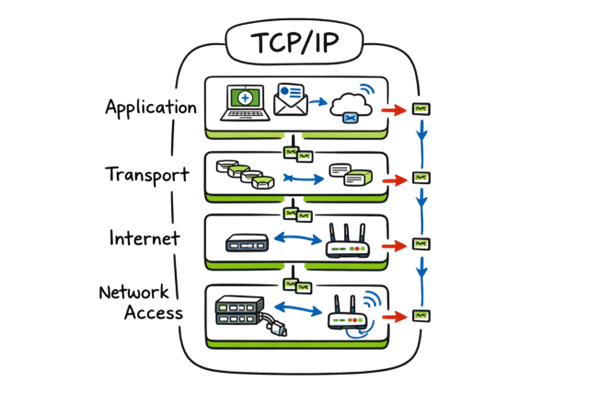
Computer networks allow devices to communicate and exchange information by following a common set of communication rules known as network protocols. These protocols define how data is transmitted, received, and interpreted between devices, ensuring reliable and accurate communication. One of the most widely used protocol suites is TCP/IP (Transmission Control Protocol/Internet Protocol), which forms the foundation of modern internet communication.
How Data Travels Across a Network
When you visit a website, the communication process happens in just a few seconds:
- You enter a website address (URL) into your web browser.
- Your device sends a request to the destination server using the TCP/IP protocol suite.
- The server processes the request, locates the requested web page or resource, and breaks the data into small units called packets.
- The data packets travel across the network through routers and switches until they reach your device.
- Your browser reassembles the packets in the correct order and displays the web page on your screen.
This entire process happens almost instantly, allowing you to browse websites, stream videos, send emails, and access cloud applications quickly and securely over computer networks.
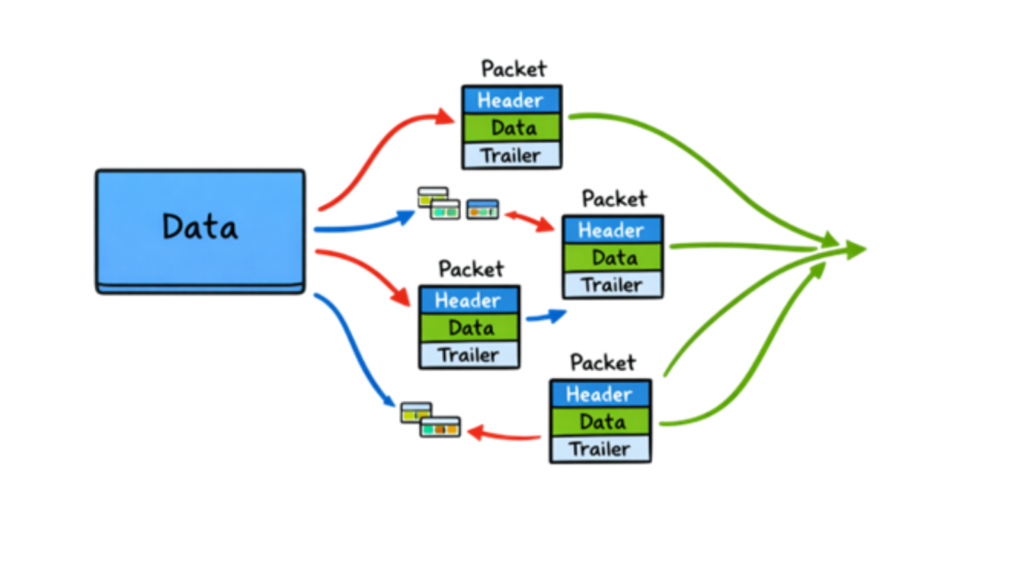
Data Packet:
Data transmitted across a computer network is divided into small units called packets. Instead of sending an entire file or message at once, the network breaks it into multiple packets, making data transmission faster, more reliable, and easier to manage.
Each packet contains important information, including the source address, destination address, packet sequence number, and a portion of the actual data. These packets may travel through different network paths before reaching their destination, where they are reassembled in the correct order to recreate the original message or file. This packet-based communication is a fundamental concept of TCP/IP networking and enables efficient data transfer across the internet.
4. Network Devices Used in Network Security
A computer network relies on several hardware devices to connect systems, manage data traffic, and ensure reliable communication. Understanding the role of these devices is an important part of learning Network Security Basics.
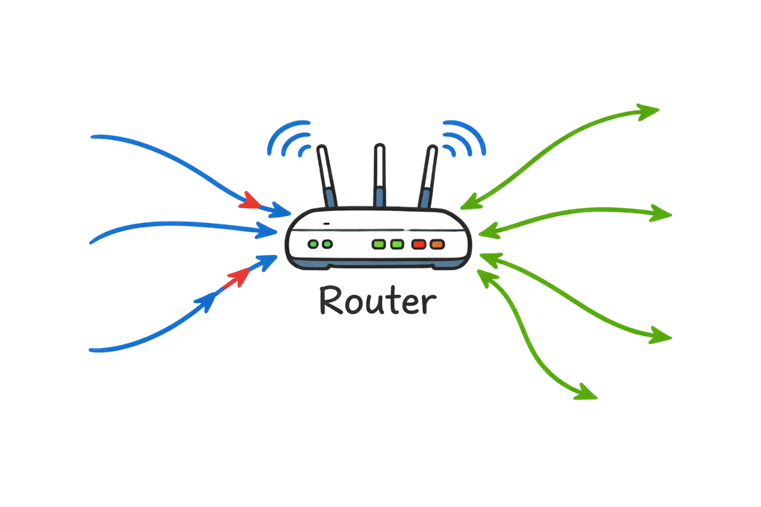
1. Router
A router is a networking device that connects different networks, such as your home or office network to the internet. It analyzes data packets and determines the most efficient path for them to reach their destination, enabling communication between local devices and external networks.
Modern routers also include built-in security features such as Network Address Translation (NAT), firewall capabilities, traffic management, and Wi-Fi security to help protect connected devices from unauthorized access.
Example: Your home Wi-Fi router connects your laptops, smartphones, smart TVs, and other devices to your Internet Service Provider (ISP), allowing them to communicate with websites and online services worldwide.
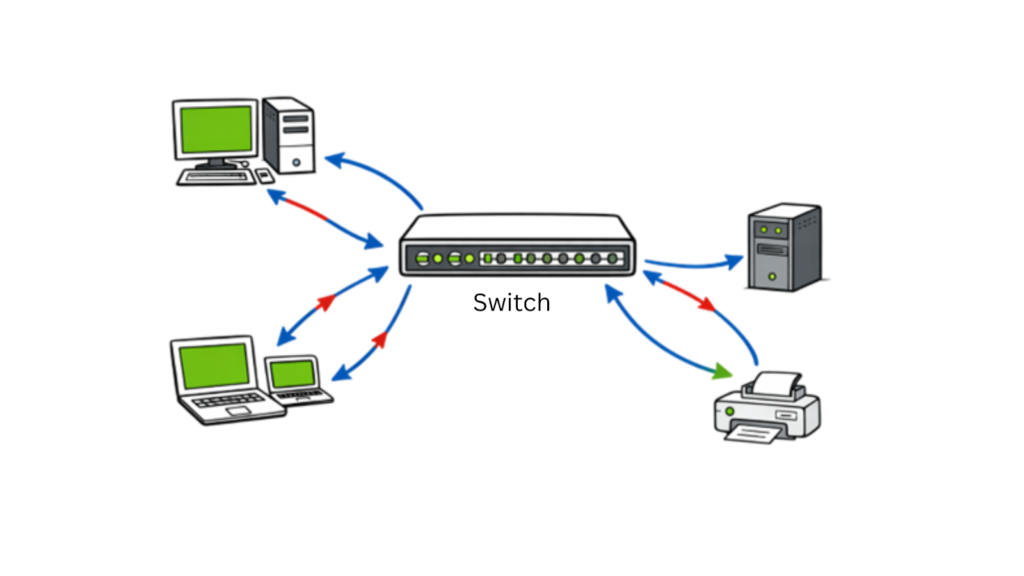
2. Switch
A switch is a networking device that connects multiple devices within a Local Area Network (LAN), such as computers, printers, servers, and IP phones. Unlike a hub, a switch intelligently forwards data only to the intended destination device by using MAC addresses, improving network performance, reducing unnecessary traffic, and increasing communication efficiency.
Switches are commonly used in homes, offices, schools, and data centers to provide fast, reliable, and secure communication between connected devices.
Example: In an office network, a switch connects employees’ computers, printers, and servers, ensuring that data sent from one computer reaches only the intended recipient instead of every device on the network.
3. Hub
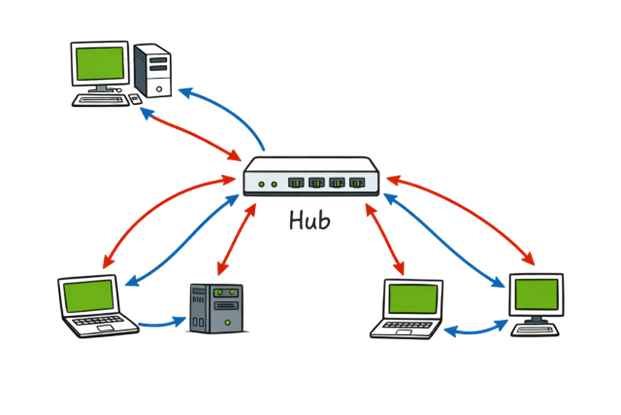
A hub is a basic networking device that connects multiple devices within a Local Area Network (LAN). Unlike a switch, a hub does not identify the intended destination of incoming data. Instead, it broadcasts every data packet to all connected devices, regardless of which device requested the information.
Because a hub sends data to every connected device, it creates unnecessary network traffic, reduces performance, and offers limited security. For this reason, hubs have largely been replaced by switches in modern computer networks.
Example: If one computer sends a file through a hub, every connected device receives the data packet. Only the intended device processes the information, while the other devices simply ignore it.
4. Firewall
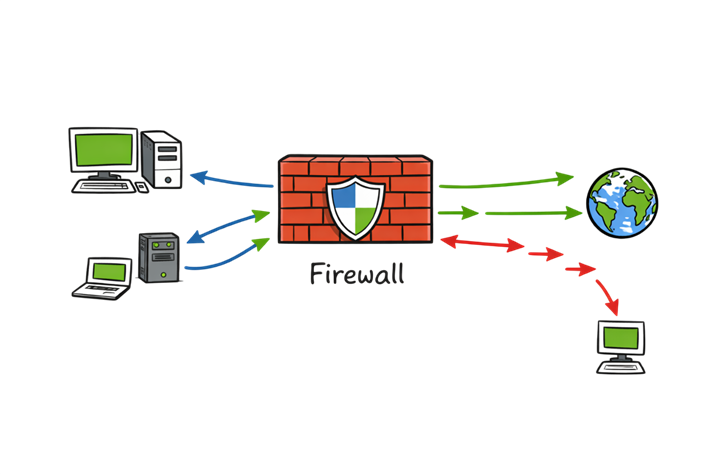
A firewall is a network security device or software that monitors, filters, and controls incoming and outgoing network traffic based on predefined security rules. It acts as the first line of defense between a trusted internal network and untrusted external networks, such as the internet, helping to block unauthorized access while allowing legitimate communication.
Firewalls inspect data packets and determine whether they should be allowed or blocked based on factors such as IP addresses, ports, protocols, and security policies. Organizations use firewalls to prevent cyber threats, including malware, ransomware, unauthorized access attempts, and other network-based attacks.
There are different types of firewalls, including packet-filtering firewalls, stateful inspection firewalls, proxy firewalls, and Next-Generation Firewalls (NGFWs). Modern firewalls often include advanced features such as intrusion prevention, application control, web filtering, VPN support, and threat intelligence to provide stronger network protection.
Example: When a hacker attempts to access a company’s internal network, the firewall analyzes the incoming request. If the traffic violates the organization’s security policies or originates from a suspicious source, the firewall blocks the connection before it reaches internal systems.
5. Access Point (AP)
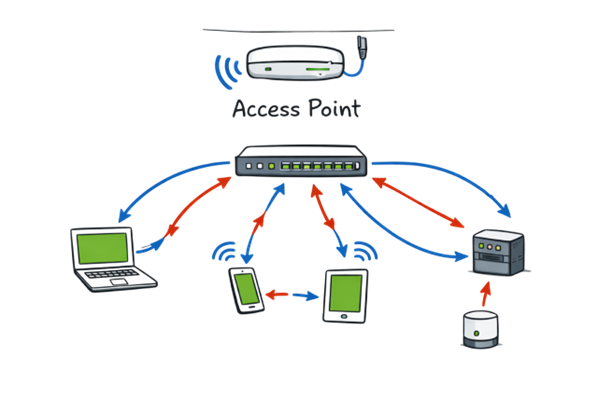
An Access Point (AP) is a networking device that enables wireless devices to connect to a wired network using Wi-Fi. It acts as a bridge between wired and wireless networks, allowing devices such as laptops, smartphones, tablets, and other wireless devices to communicate with network resources and access the internet.
Access points are commonly deployed in homes, offices, schools, hospitals, and public places to extend wireless network coverage and support multiple users simultaneously. Modern wireless access points support advanced security features such as WPA2, WPA3 encryption, user authentication, guest networks, and centralized management to help protect wireless communications from unauthorized access.
Example: In a corporate office, employees connect their laptops and smartphones to the organization’s Wi-Fi through wireless access points, allowing them to securely access internal applications, shared files, and internet services without using network cables.
6. Modem
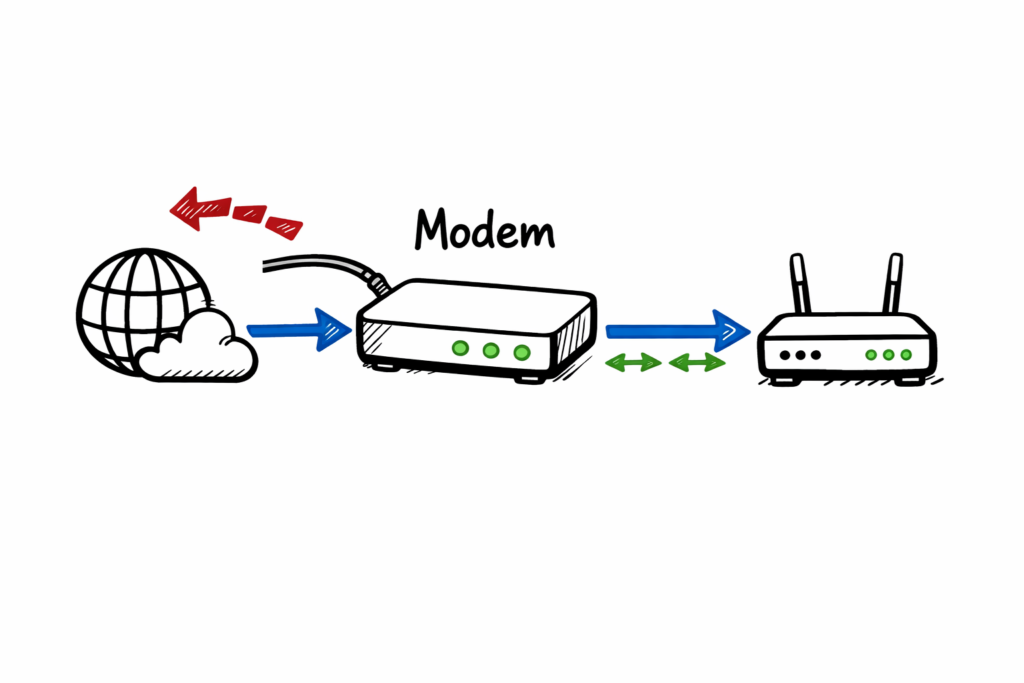
A modem (Modulator-Demodulator) is a networking device that connects your home or office network to your Internet Service Provider (ISP). It converts digital data from your router or computer into signals that can travel over telephone, cable, or fiber-optic lines, and converts incoming signals back into digital data that your devices can understand.
In most home networks, the modem works together with a router. The modem establishes the internet connection with the ISP, while the router distributes that connection to multiple wired and wireless devices within the local network. Some modern devices combine both modem and router functionality into a single unit.
Example: When you subscribe to an internet service, your ISP installs a modem in your home. The modem connects to the ISP’s network, while your router connects to the modem, allowing laptops, smartphones, smart TVs, and other devices to access the internet simultaneously.
5. Why Network Security Matters
Network Security is the practice of protecting computer networks, connected devices, and the data transmitted between them from unauthorized access, cyberattacks, and other security threats. It combines security technologies, policies, and monitoring processes to maintain the confidentiality, integrity, and availability of network resources.
Without effective network security, attackers can exploit vulnerabilities to steal sensitive information, spread malware or ransomware, disrupt business operations, or gain unauthorized control of network systems. To reduce these risks, organizations implement security measures such as firewalls, intrusion detection and prevention systems (IDS/IPS), encryption, access controls, and continuous network monitoring.
Whether it is a home Wi-Fi network or a large enterprise infrastructure, network security plays a critical role in protecting digital assets, ensuring business continuity, and maintaining a safe and reliable computing environment.

Common Threats in Network Security:
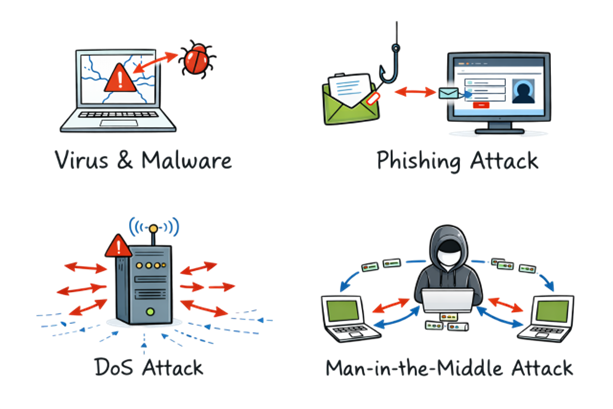
1. Viruses and Malware
Viruses and malware are malicious software programs designed to infect computers, servers, and other network-connected devices. They can steal sensitive information, damage files, encrypt data, monitor user activity, or disrupt normal system operations. Common types of malware include viruses, worms, trojans, spyware, adware, and ransomware.
Example: A user unknowingly downloads an infected email attachment, allowing malware to spread across the organization’s network.
2. Phishing Attacks
Phishing attacks use fraudulent emails, text messages, phone calls, or fake websites to trick users into revealing sensitive information such as usernames, passwords, banking details, or one-time passwords (OTPs). Phishing remains one of the most common methods used by cybercriminals to gain unauthorized access to systems.
Example: An attacker sends an email pretending to be from a bank, asking the user to verify their account through a fake login page.
3. Denial-of-Service (DoS) Attacks
A Denial-of-Service (DoS) attack attempts to overwhelm a server or network with excessive traffic, preventing legitimate users from accessing websites, applications, or online services. When the attack originates from thousands of compromised devices simultaneously, it is known as a Distributed Denial-of-Service (DDoS) attack.
Example: An e-commerce website becomes unavailable because attackers flood its servers with millions of fake requests.
4. Man-in-the-Middle (MitM) Attacks
A Man-in-the-Middle (MitM) attack occurs when an attacker secretly intercepts and potentially alters the communication between two parties without their knowledge. This type of attack is commonly associated with unsecured public Wi-Fi networks and can expose sensitive information such as login credentials, financial details, and personal data.
Example: A hacker intercepts data transmitted between a user’s laptop and a public Wi-Fi hotspot to capture usernames and passwords.
6. Key Principles of Network Security
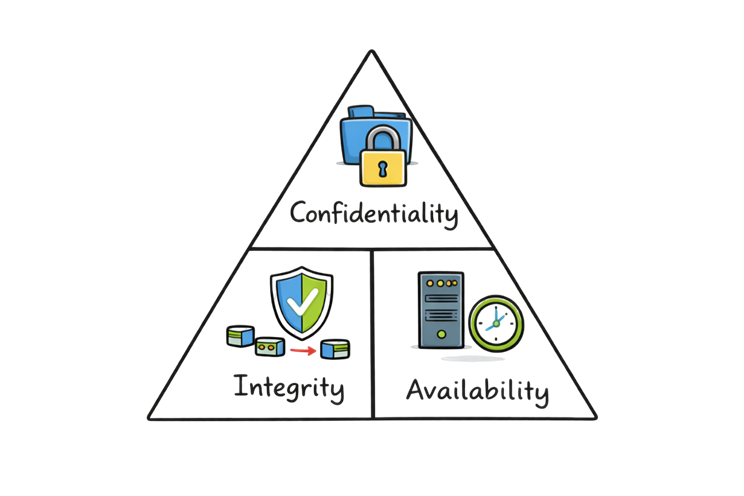
The CIA Triad: Core Principles of Network Security
The CIA Triad is the foundation of modern Network Security and Cybersecurity. It consists of three core principles that help organizations protect their networks, systems, and sensitive information. Every security control, policy, and technology is designed to support one or more of these principles.
1. Confidentiality
Confidentiality ensures that sensitive information is accessible only to authorized users. It protects personal data, financial records, business information, and other confidential resources from unauthorized access or disclosure.
Common security controls:
- Strong passwords
- Multi-Factor Authentication (MFA)
- Data encryption
- Access control policies
Example: Only employees in the finance department can access the organization’s payroll records.
2. Integrity
Integrity ensures that data remains accurate, complete, and unchanged during storage or transmission. It protects information from unauthorized modification, accidental corruption, or tampering.
Common security controls:
- Hashing algorithms
- Checksums
- Digital signatures
- File integrity monitoring
Example: A downloaded software file is verified using a hash value to ensure it has not been modified by an attacker.
3. Availability
Availability ensures that networks, applications, and data remain accessible whenever authorized users need them. Organizations implement measures to minimize downtime and maintain business continuity, even during hardware failures or cyberattacks.
Common security controls:
- Backup and disaster recovery
- Redundant servers
- Load balancing
- DDoS protection
- High availability systems
Example: If one web server fails, another server automatically takes over to keep the website available without interruption.
7. Types of Network Security Measures
Organizations use a combination of security technologies and controls to protect their networks from cyber threats, unauthorized access, and data breaches. The following are some of the most widely used network security technologies.
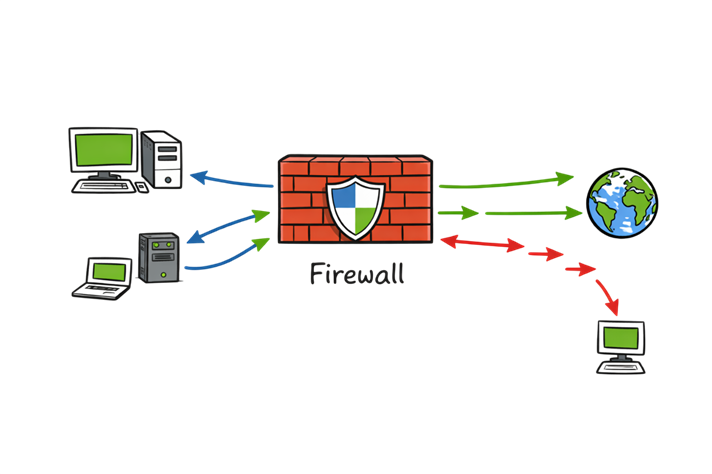
1. Firewalls
A firewall is a network security device or software that monitors and filters incoming and outgoing network traffic based on predefined security rules. It serves as the first line of defense by inspecting data packets and deciding whether to allow or block traffic entering or leaving the network.
Firewalls evaluate network traffic using factors such as IP addresses, port numbers, network protocols, and security policies. By allowing only trusted communication and blocking suspicious or unauthorized connections, firewalls help protect networks from malware, ransomware, hackers, and other cyber threats.
Modern organizations use different types of firewalls, including packet-filtering firewalls, stateful inspection firewalls, proxy firewalls, and Next-Generation Firewalls (NGFWs). Advanced firewalls also provide features such as intrusion prevention, application awareness, web filtering, VPN support, and threat intelligence to strengthen network security.
Example: When an employee accesses a company website, the firewall examines the request. If the traffic complies with the organization’s security policies, it is allowed. If the request originates from a malicious IP address or attempts to access restricted services, the firewall blocks the connection before it reaches the internal network.
2. Antivirus Software
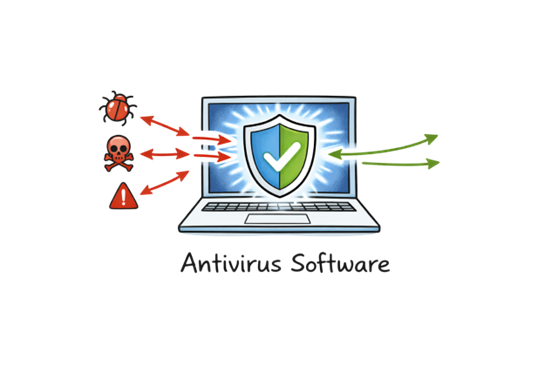
Antivirus software is a security solution designed to detect, block, and remove malicious software (malware) from computers, laptops, servers, and other network-connected devices. It continuously monitors files, applications, downloads, and system activities to identify potential security threats before they can damage the system or steal sensitive information.
Modern antivirus solutions use signature-based detection, behavior analysis, heuristic scanning, and real-time protection to defend against a wide range of threats, including viruses, worms, trojans, spyware, ransomware, and other forms of malware. Regular software updates ensure the antivirus can recognize and respond to newly discovered threats.
Example: If a user downloads an infected email attachment, the antivirus software scans the file before it is opened. If malicious code is detected, the file is quarantined or deleted, preventing the malware from infecting the system or spreading across the network.
3. Intrusion Detection and Prevention Systems (IDS/IPS)
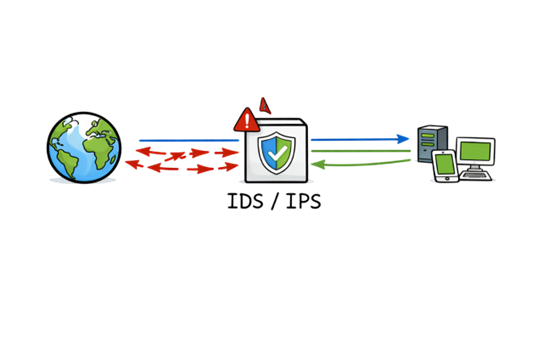
Intrusion Detection Systems (IDS) and Intrusion Prevention Systems (IPS) are network security technologies that monitor network traffic for suspicious activities, malicious behavior, and known cyber threats. They help organizations identify, analyze, and respond to potential security incidents before they cause significant damage.
An Intrusion Detection System (IDS) continuously monitors network traffic and generates alerts when it detects suspicious or unauthorized activity. It helps security teams investigate potential attacks but does not automatically block the traffic.
An Intrusion Prevention System (IPS) builds upon IDS capabilities by not only detecting threats but also taking immediate action to stop them. It can automatically block malicious traffic, terminate suspicious network sessions, or prevent attackers from exploiting known vulnerabilities in real time.
Example: If an attacker attempts to exploit a web server vulnerability, the IDS alerts the security team about the suspicious activity, while the IPS immediately blocks the malicious traffic before it reaches the server.
IDS vs. IPS
| Feature | IDS | IPS |
|---|---|---|
| Primary Function | Detects suspicious activity | Detects and blocks threats |
| Deployment | Monitors network traffic | Positioned inline with network traffic |
| Response | Generates alerts | Automatically blocks malicious traffic |
| Best Use | Threat detection and monitoring | Real-time threat prevention |
4. Virtual Private Network (VPN)
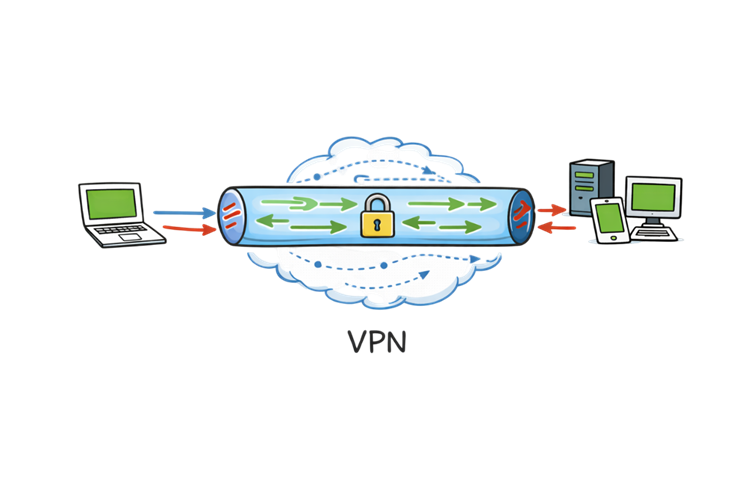
A Virtual Private Network (VPN) is a security technology that creates an encrypted connection between a user’s device and a remote network over the internet. By encrypting data during transmission, a VPN protects sensitive information from hackers, eavesdroppers, and other unauthorized parties, especially when using public or unsecured Wi-Fi networks.
Organizations commonly use VPNs to provide employees with secure remote access to internal applications, files, and corporate resources. VPNs also help protect user privacy by masking IP addresses and securing internet traffic from interception.
Example: An employee working from home connects to the company’s VPN before accessing internal applications. The VPN encrypts all communication between the employee’s laptop and the corporate network, ensuring that sensitive business data remains secure even when using a public internet connection.
5. Access Control
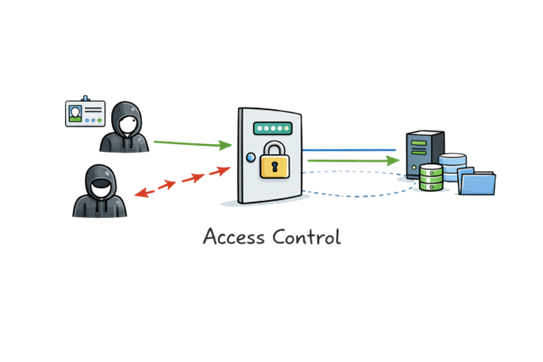
Access Control is a network security mechanism that restricts access to systems, applications, and data by ensuring that only authorized users can view or modify protected resources. It verifies user identities and assigns permissions based on roles, responsibilities, or security policies, helping organizations prevent unauthorized access and protect sensitive information.
Modern access control systems use security measures such as user accounts, strong passwords, Multi-Factor Authentication (MFA), Role-Based Access Control (RBAC), biometric authentication, and the Principle of Least Privilege (PoLP) to strengthen security. These controls reduce the risk of insider threats, account compromise, and accidental data exposure.
Example: In a company, employees in the Human Resources department can access payroll records, while other employees are restricted from viewing or modifying that information based on their assigned permissions.
6. Encryption
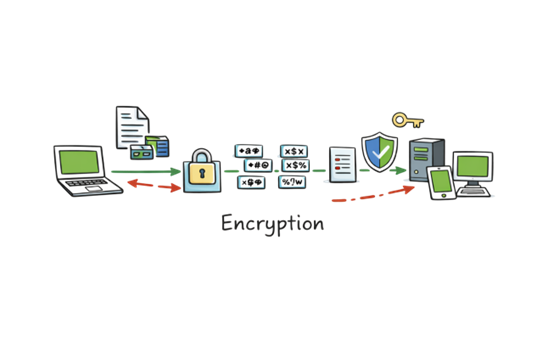
Encryption is the process of converting readable information, known as plaintext, into an unreadable format called ciphertext. The encrypted data can only be decrypted and read by someone who has the correct cryptographic key, ensuring that sensitive information remains protected even if it is intercepted during transmission or storage.
Encryption is widely used to secure online banking, e-commerce transactions, emails, cloud storage, messaging applications, and Virtual Private Networks (VPNs). It plays a critical role in protecting confidential information from unauthorized access, data breaches, and cyberattacks while maintaining data privacy and integrity.
Example: When you access your bank’s website using HTTPS, your login credentials and financial information are encrypted before being transmitted over the internet. Even if an attacker intercepts the data, they cannot read it without the appropriate decryption key.
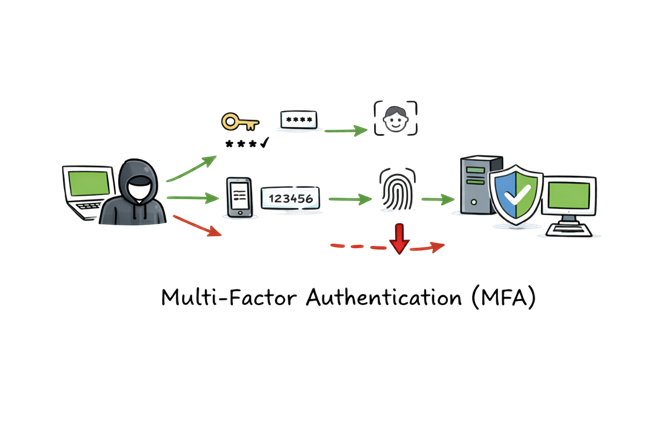
7. Multi-Factor Authentication (MFA)
Multi-Factor Authentication (MFA) is a security mechanism that requires users to verify their identity using two or more authentication factors before accessing a system, application, or online account. By adding an extra layer of security beyond a password, MFA significantly reduces the risk of unauthorized access, even if login credentials are compromised.
Authentication factors typically include something you know (such as a password or PIN), something you have (such as a one-time password (OTP), authentication app, or security token), and something you are (such as a fingerprint or facial recognition). Combining multiple verification methods makes it much more difficult for attackers to gain access to sensitive information.
Example: When you sign in to your online banking account, you enter your password and then verify your identity using a one-time password (OTP) sent to your mobile device or generated by an authentication app before access is granted.
8. Network Security Best Practices
Whether you manage a home network, a small business, or a large enterprise environment, following network security best practices can significantly reduce the risk of cyberattacks and data breaches.
1. Use Strong and Unique Passwords
Create strong passwords that combine uppercase and lowercase letters, numbers, and special characters. Avoid reusing passwords across multiple accounts, and consider using a password manager to generate and store complex passwords securely.
2. Keep Software and Firmware Updated
Regularly update operating systems, applications, routers, firewalls, and other network devices. Security updates often include patches for newly discovered vulnerabilities that attackers may attempt to exploit.
3. Implement Least Privilege Access
Grant users only the permissions they need to perform their job responsibilities. Limiting access reduces the risk of unauthorized data exposure and minimizes the impact of compromised accounts.
4. Use Network Segmentation
Divide large networks into smaller, isolated segments to prevent cyber threats from spreading across the entire environment. Network segmentation is particularly effective in protecting critical systems and sensitive data.
5. Educate Users About Cybersecurity
Provide regular security awareness training to help users recognize phishing emails, social engineering attacks, malicious websites, and other common cyber threats. Well-informed users are one of the strongest defenses against cyberattacks.
6. Monitor Network Traffic
Continuously monitor network traffic using security tools such as firewalls, Intrusion Detection Systems (IDS), Intrusion Prevention Systems (IPS), and Security Information and Event Management (SIEM) solutions. Early detection of suspicious activity enables faster incident response and reduces potential damage.
7. Back Up Important Data Regularly
Maintain regular backups of critical data and verify that backup copies can be restored successfully. Reliable backups help organizations recover quickly from ransomware attacks, hardware failures, accidental deletion, and other unexpected incidents.
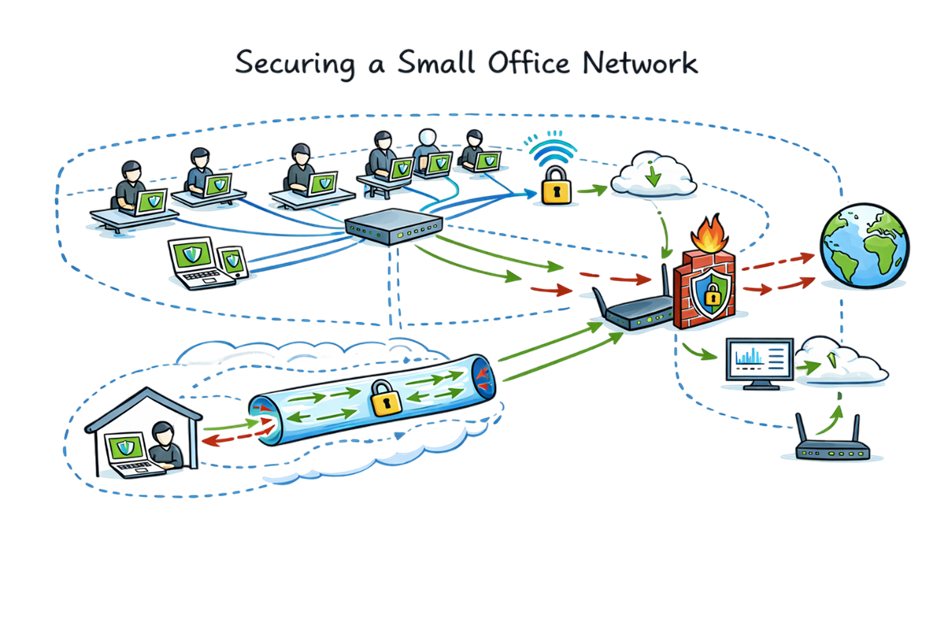
9. Real-Life Example: Securing a Small Office Network
Imagine you own a small business with 10 employees. Everyone uses laptops to access company applications, and important business data is stored on a local server. Without proper security controls, a single cyberattack could compromise sensitive information, disrupt operations, or cause financial losses.
A secure network for this business could include the following components:
- Managed Switch: Connects employee computers, printers, servers, and other devices while efficiently directing network traffic.
- Router with a Built-in Firewall: Connects the office network to the internet and filters malicious or unauthorized traffic before it reaches internal systems.
- Secure Wi-Fi: Protects the wireless network using WPA3 encryption, changes the default administrator password, and disables unnecessary features to prevent unauthorized access.
- Endpoint Protection: Installs antivirus and Endpoint Detection and Response (EDR) software on every laptop to detect and stop malware, ransomware, and other cyber threats.
- Virtual Private Network (VPN): Provides employees working remotely with an encrypted connection to securely access company resources over the internet.
- Access Control and Multi-Factor Authentication (MFA): Ensures employees can access only the systems and data required for their roles while adding an extra layer of account protection.
- Network Monitoring: Regularly reviews firewall logs, network traffic, and security alerts to detect suspicious activities and respond quickly to potential threats.
- Automated Backups: Schedules encrypted backups to secure cloud storage or an offsite location, enabling the business to recover quickly from ransomware attacks, hardware failures, or accidental data loss.
By combining these security measures, the business builds multiple layers of protection that reduce cyber risks, protect sensitive information, support business continuity, and help maintain a secure and reliable network environment.
10. The Future of Network Security
As cyber threats continue to evolve, network security technologies are becoming more intelligent, automated, and cloud-driven. Organizations are adopting modern security architectures and advanced technologies to protect users, devices, applications, and data in increasingly complex digital environments.
1. Zero Trust Architecture
Zero Trust follows the principle of “Never Trust, Always Verify.” Instead of automatically trusting users or devices inside a network, every access request is continuously verified based on identity, device health, location, and other security factors. This approach helps reduce the risk of unauthorized access and limits the impact of compromised accounts.
2. Cloud Security
As businesses migrate applications and data to the cloud, Cloud Security has become a critical part of modern network security. Cloud-based security platforms provide scalable protection for users, applications, and workloads by offering secure web gateways, cloud firewalls, data protection, and continuous threat monitoring.
3. Artificial Intelligence (AI) and Machine Learning (ML)
Artificial Intelligence (AI) and Machine Learning (ML) enable security systems to analyze massive volumes of network traffic, identify unusual behavior, and detect emerging cyber threats in real time. These technologies improve threat detection, reduce false positives, and accelerate incident response by identifying attack patterns that traditional security tools may miss.
4. Secure Access Service Edge (SASE)
Secure Access Service Edge (SASE) combines networking and security services into a unified cloud-delivered platform. It integrates technologies such as SD-WAN, Zero Trust Network Access (ZTNA), secure web gateways, cloud firewalls, and data protection to provide secure access for users regardless of their location.
5. Quantum-Resistant Cryptography
As quantum computing continues to advance, researchers are developing quantum-resistant cryptography to protect sensitive data from future attacks. These next-generation encryption algorithms are designed to remain secure against the computational capabilities of quantum computers and will play an important role in the future of cybersecurity.
Frequently Asked Questions (FAQs)
1. What is network security?
Network security is the practice of protecting computer networks, connected devices, and data from unauthorized access, cyberattacks, and security threats using technologies, policies, and security controls.
2. Why is network security important?
Network security helps protect sensitive information, prevents cyberattacks, ensures business continuity, and maintains the confidentiality, integrity, and availability of network resources.
3. What are the main types of computer networks?
The four common types of computer networks are Local Area Network (LAN), Wide Area Network (WAN), Metropolitan Area Network (MAN), and Personal Area Network (PAN).
4. What is the difference between LAN and WAN?
A LAN connects devices within a limited area such as a home or office, while a WAN connects multiple LANs across cities, countries, or continents.
5. What is a firewall?
A firewall is a network security device or software that monitors and filters incoming and outgoing network traffic based on predefined security rules.
6. What is the difference between a router and a switch?
A router connects different networks, while a switch connects multiple devices within the same local network.
7. What is the purpose of a VPN?
A Virtual Private Network (VPN) encrypts internet traffic and provides secure remote access to a private network.
8. What is the CIA Triad?
The CIA Triad consists of Confidentiality, Integrity, and Availability, which are the three core principles of cybersecurity and network security.
9. What are common network security threats?
Common threats include malware, ransomware, phishing, Denial-of-Service (DoS) attacks, Distributed Denial-of-Service (DDoS) attacks, and Man-in-the-Middle (MitM) attacks.
10. What is network segmentation?
Network segmentation divides a network into smaller sections to improve security and prevent threats from spreading across the environment.
11. What is IDS and IPS?
An Intrusion Detection System (IDS) detects suspicious activities, while an Intrusion Prevention System (IPS) detects and automatically blocks malicious traffic.
12. How does encryption improve network security?
Encryption converts readable information into ciphertext, ensuring that only authorized users with the correct decryption key can access the data.
13. What is Multi-Factor Authentication (MFA)?
MFA requires users to verify their identity using two or more authentication methods before granting access to a system or application.
14. What are network security best practices?
Strong passwords, regular updates, network segmentation, firewalls, antivirus software, MFA, employee awareness training, and continuous monitoring are among the most effective practices.
15. Can small businesses benefit from network security?
Yes. Small businesses are frequent targets of cyberattacks, making firewalls, endpoint protection, secure Wi-Fi, backups, and employee awareness essential for protecting business operations.
Network Security Interview Questions
Basic Questions
- What is network security?
- Why is network security important?
- What are the goals of network security?
- What is the CIA Triad?
- What is the difference between cybersecurity and network security?
- What is a computer network?
- What are the different types of computer networks?
- What is LAN?
- What is WAN?
- What is MAN?
- What is PAN?
Network Devices
- What is a router?
- What is a switch?
- What is a hub?
- What is the difference between a hub and a switch?
- What is a modem?
- What is an access point?
- What is a gateway?
- What is a firewall?
- What is a proxy server?
Security Technologies
- What is antivirus software?
- What is IDS?
- What is IPS?
- What is the difference between IDS and IPS?
- What is a VPN?
- What is encryption?
- What is network segmentation?
- What is access control?
- What is Multi-Factor Authentication (MFA)?
- What is Zero Trust Architecture?
Threats and Attacks
- What is malware?
- What is ransomware?
- What is phishing?
- What is a Man-in-the-Middle (MitM) attack?
- What is a Denial-of-Service (DoS) attack?
- What is a Distributed Denial-of-Service (DDoS) attack?
- What is social engineering?
- What is spoofing?
- What is packet sniffing?
- How can organizations prevent network attacks?
Practical and Scenario-Based Questions
- How would you secure a small office network?
- What steps would you take after detecting suspicious network traffic?
- How would you investigate a firewall alert?
- How can you secure public Wi-Fi?
- Why should software and firmware be updated regularly?
- How does network monitoring improve security?
- What are the benefits of network segmentation?
- How does Zero Trust improve network security?
- What are the latest trends in network security?
- Which network security tools have you used, and how do they help protect an organization’s network?
11. Summary
Computer networks are the foundation of today’s connected world, enabling communication, online services, cloud computing, remote work, and digital collaboration. As organizations and individuals become increasingly dependent on these networks, protecting them from cyber threats has become a critical responsibility.
Network Security plays a vital role in safeguarding sensitive data, preventing unauthorized access, and ensuring the confidentiality, integrity, and availability of network resources. By implementing security controls such as firewalls, Virtual Private Networks (VPNs), encryption, Multi-Factor Authentication (MFA), network segmentation, and continuous monitoring, organizations can significantly reduce the risk of cyberattacks and maintain a secure network environment.
Whether you are a student, an IT professional, a business owner, or someone beginning a career in cybersecurity, understanding Network Security Basics is an essential first step. As technology continues to evolve, staying informed about emerging threats and following network security best practices will help you build stronger, more resilient, and more secure digital networks for the future.
Related Articles
Reference Links
| Reference | URL |
|---|---|
| NIST Cybersecurity Framework | https://www.nist.gov/cyberframework |
| Cybersecurity and Infrastructure Security Agency (CISA) | https://www.cisa.gov/cybersecurity |
| OWASP Top 10 | https://owasp.org/www-project-top-ten/ |
| MITRE ATT&CK Framework | https://attack.mitre.org/ |
| ISO/IEC 27001 Information Security Management | https://www.iso.org/isoiec-27001-information-security.html |
| Microsoft Learn Security | https://learn.microsoft.com/security/ |
Important Note: This article is based on hands-on cybersecurity experience and research from reliable sources. While every effort has been made to ensure accuracy, you should validate the information based on your specific environment and security requirements before applying it.








17 thoughts on “Complete Network Security Basics Guide for Beginners 2026”