You are sitting in a Security Operations Center at 3 AM. Your screen is flashing with alerts from a banking client in Singapore. A database server is sending 50 GB of data to an external IP address with no reputation. You have five minutes to decide if this is a backup or a data breach.
If you start recalling the seven layers of the OSI model, you lose time. In real cybersecurity work, you rely on the TCP IP model to understand what is actually happening in the network.
The TCP IP model is not a theory. It is the engine of the internet. You use it to trace traffic, detect attacks, and fix broken connections under pressure.
What is the TCP IP model
The TCP IP model is the standard framework for network communication. It organizes protocols into four functional layers that control how data moves across networks.
Unlike academic models, the TCP IP model was built by engineers to solve real communication problems on the early internet. It defines how data is formatted, addressed, transmitted, and received.
Every time you send a message on WhatsApp or access a cloud server in the AWS Mumbai region, you are using the TCP IP model. It allows a Windows system in Dubai to communicate with a Linux server in Chennai using the same set of rules.
How it Works: The Mechanics of Encapsulation
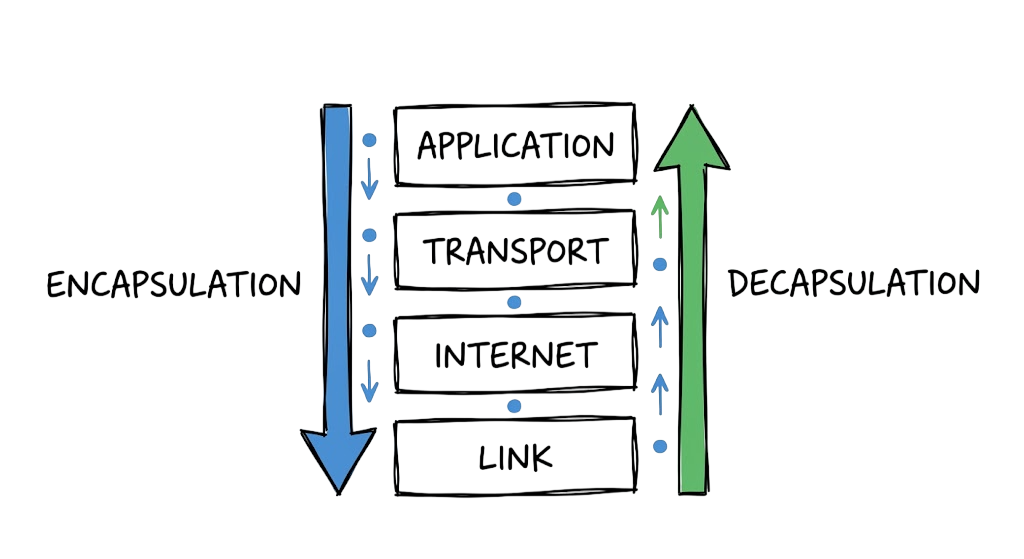
Data moves through the TCP IP model using a process called encapsulation. Your actual data, like an email, starts at the top layer and moves downward.
At each layer, the data is wrapped with additional information called headers. These headers contain instructions that help the data reach the correct destination.
When the data reaches the destination, the system performs decapsulation. It removes each header step by step and passes the data up through the layers.
This process helps you troubleshoot issues quickly. If a ping works, the lower layers are functioning correctly. If a web page fails to load, the issue is usually at the application or transport layer.
Technical Flow: From Bit to Byte
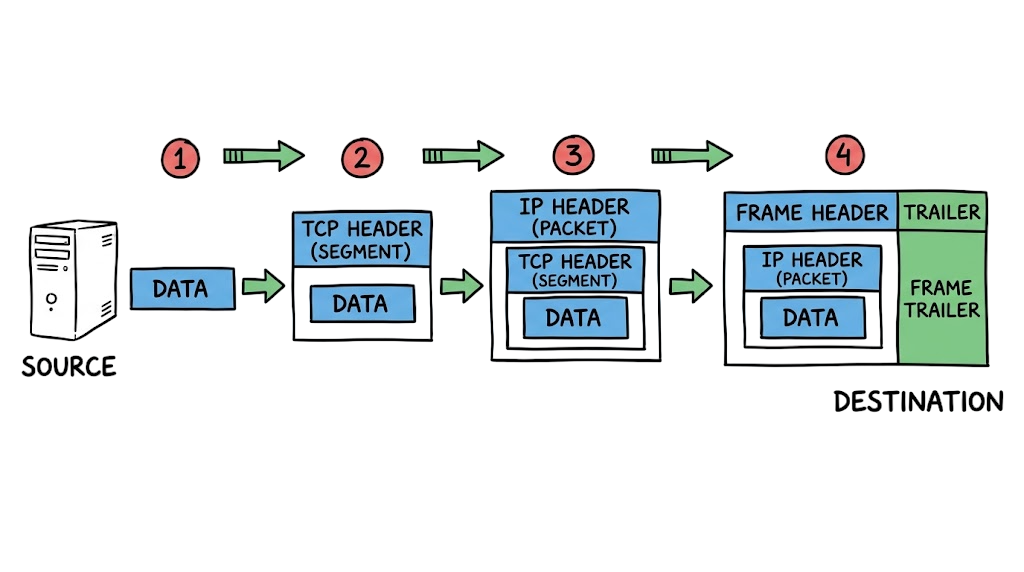
Data flow in the TCP IP model follows a clear chain. At the top, the application layer creates a request based on user input.
This request moves to the transport layer, where it is divided into smaller pieces called segments. Each segment gets a sequence number so the receiving system can reassemble the data correctly.
The segments then move to the internet layer, where IP addresses are added for routing across networks. Finally, the data reaches the link layer, where it is converted into signals and transmitted over the network.
In real environments, this process is not always smooth. A dropped packet or a wrong configuration at any layer can break the connection.
As a security analyst, you need to understand this flow. It helps you identify where traffic is failing and where an attacker may be hiding.
Key Components of the Stack
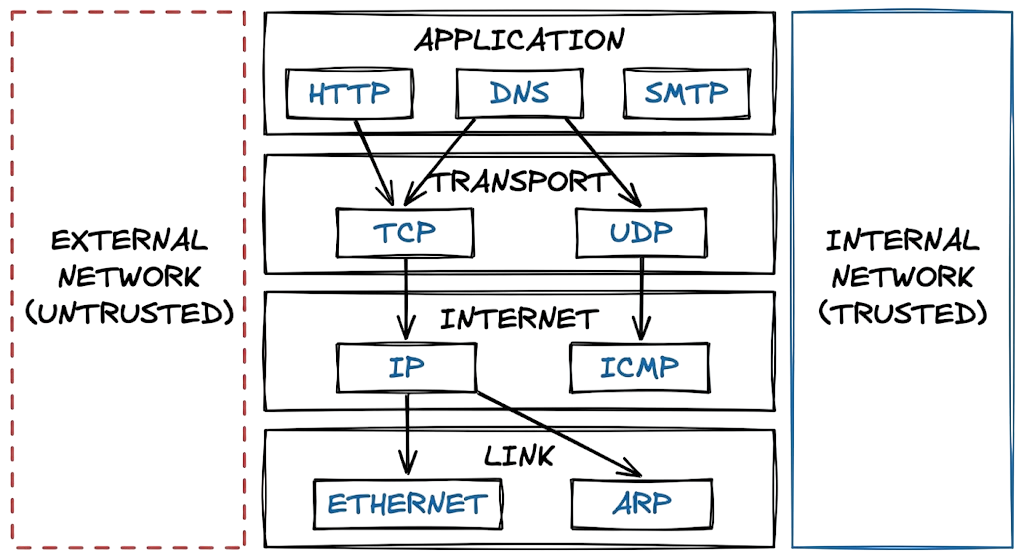
To manage a network, you need to know which protocols live at which level. This is where most people get confused. They try to associate everything with the OSI model and get lost in the details. Focus on these core components that you will see in your logs every day.
- Transmission Control Protocol: It ensures that data is delivered reliably and in the correct order.
- Internet Protocol: It handles the routing of packets between different networks using logical addresses. To understand how IP addresses are structured and assigned, check this guide: https://technaga.com/ip-address-essential-concepts-guide-2026/
- Ethernet: It defines the physical frames that travel over your local network cables.
- Domain Name System: It acts as the phonebook of the internet, turning names into IP addresses.
- Address Resolution Protocol: It bridges the gap between your logical IP and your physical hardware address.
- HyperText Transfer Protocol: It is the standard for moving data between a web browser and a server.
The Link Layer
The Link Layer in the TCP IP model is the foundation of network communication. It handles the physical transmission of data frames across local hardware like switches and network cables.
You focus on this layer when dealing with local connectivity issues or physical network problems. It is also critical when investigating internal network attacks.
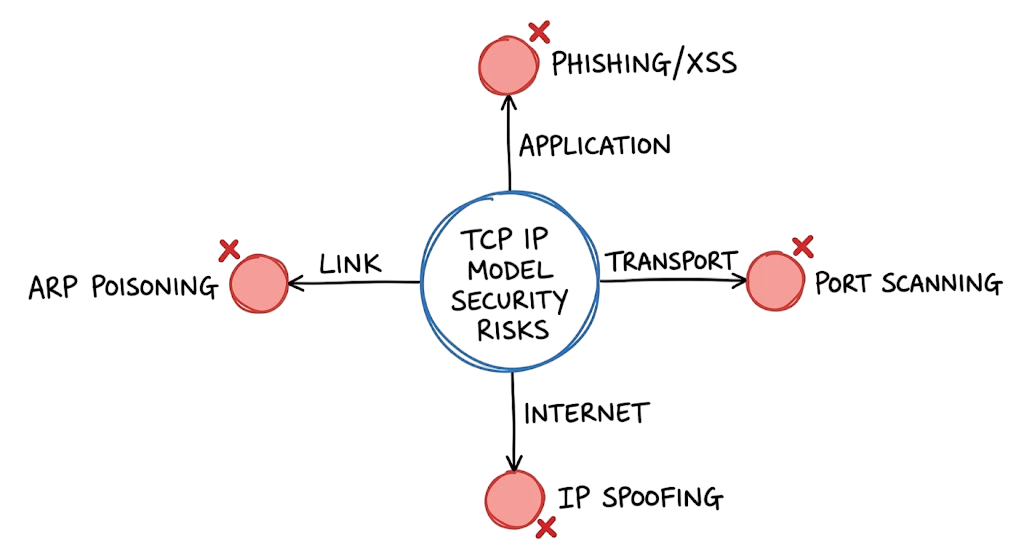
Attacks at this layer target hardware-level communication. One common example is ARP poisoning, where an attacker sends fake ARP messages to associate their MAC address with a legitimate IP address.
This allows the attacker to intercept or modify traffic within the local network.
You can detect this by monitoring MAC address tables on switches and looking for unexpected or frequent changes.
The Internet Layer
The Internet Layer in the TCP IP model is responsible for routing data between different networks. It ensures that packets reach the correct destination across multiple hops.
The main protocol at this layer is the Internet Protocol (IP). It takes segments from the transport layer and converts them into packets by adding source and destination IP addresses.
Routers operate at this layer. They examine the destination IP and use routing tables to forward packets to the next hop in the path.
This layer also includes the Internet Control Message Protocol (ICMP), which is used for diagnostics. When you run a ping command, you are sending an ICMP Echo Request to test connectivity.
From a security perspective, you need to monitor for IP spoofing. In this attack, an attacker modifies the source IP address to bypass filters or hide their identity.
The Transport Layer
The Transport Layer in the TCP IP model manages communication between two systems. It ensures that data is delivered correctly and in the right order.
The two main protocols at this layer are TCP and UDP. TCP is connection-oriented. It uses a three-way handshake before sending data and tracks each packet with acknowledgments. If a packet is lost, TCP retransmits it.
UDP is connectionless. It sends data without checking delivery or order. This makes it faster and suitable for use cases like video calls, streaming, and online gaming.
From a security perspective, this layer is where you monitor port numbers. HTTPS uses port 443, and SSH uses port 22.
If you notice unusual traffic on non-standard ports like 4444, it can indicate malware activity or unauthorized communication.
The Application Layer
The Application Layer in the TCP IP model is the top layer that interacts directly with users. It handles protocols like HTTP, DNS, and SMTP.
This is the layer where most user activity happens, which makes it a primary target for attackers. Phishing attacks use SMTP, while web-based attacks like SQL injection target HTTP traffic.
To defend this layer, you use tools like web application firewalls (WAFs) to inspect requests and block malicious patterns.
Even if the lower layers are secure, a vulnerability at the application layer can expose the entire system.
In many real-world breaches, attackers exploit application flaws to gain full access to sensitive data.
Real World Example: Reading the Logs
To see how these layers work together, look at this packet capture from a firewall. You are seeing a connection attempt from a workstation to a server.
09:15:33.120405 IP 10.10.1.25.55210 > 172.16.0.5.443: Flags [S], seq 30214582, win 65535, options [mss 1460]
09:15:33.120510 IP 172.16.0.5.443 > 10.10.1.25.55210: Flags [S.], seq 98452103, ack 30214583, win 28960
09:15:33.120615 IP 10.10.1.25.55210 > 172.16.0.5.443: Flags [.], ack 98452104, win 65535
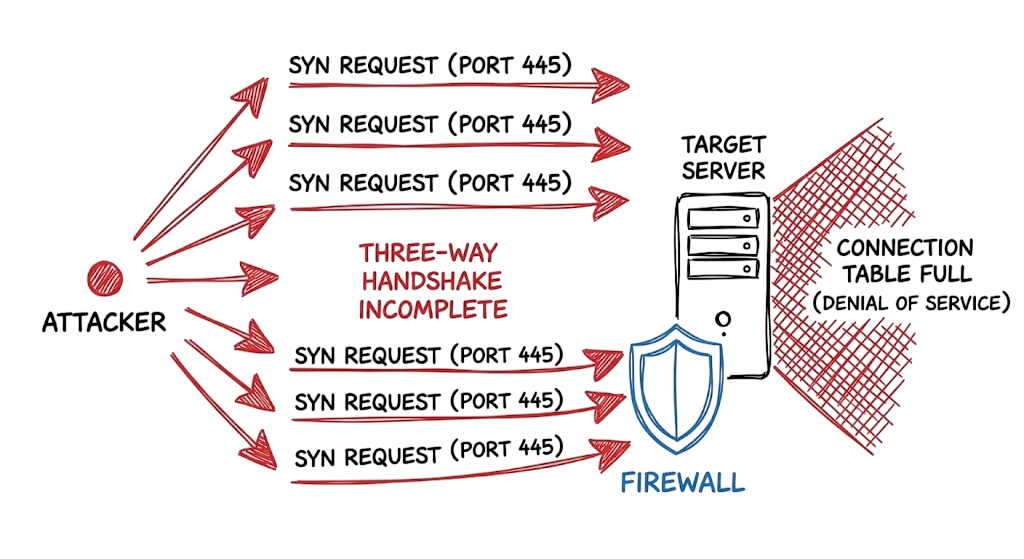
This is a successful three way handshake. The first line is the SYN packet (Flag [S]). The second is the SYN-ACK from the server. The third is the final ACK. If you saw thousands of these SYN packets from one IP to different ports on your server without ever seeing the ACK, you would know you are under a SYN flood attack. This is a common way for attackers to crash a server by filling its connection table.
Practical Implementation: Securing Your Network
When you are setting up a new network segment for a client, you must defend every layer of the TCP IP model. You cannot rely on a single firewall.
- Start at the link layer by disabling unused ports on your switches and enabling sticky MAC addresses to prevent unauthorized hardware from connecting.
- Use VLANs to separate your user traffic from your server traffic, which prevents an attacker from moving laterally if they compromise a single laptop.
- Configure your routers at the internet layer to drop any packets that claim to be from your internal network but arrive on an external interface.
- Implement strict firewall rules that only allow the specific IP addresses and ports required for your business applications to function.
- At the transport layer, use a stateful firewall that can track the status of connections and block packets that do not belong to an active session.
- Force the use of encrypted protocols like HTTPS and SSH to ensure that your data is not readable if it is intercepted at the link layer.
- Deploy a DNS filter to block requests to known malicious domains, which stops malware from communicating with its control server.
- Enable logging on every device and use a central system to look for patterns that indicate an attack is in progress across multiple layers.
Advantages and Limitations
The TCP IP model is simple and flexible. It was designed to keep working even if parts of the network were destroyed. This is why the internet is so reliable. However, this flexibility means it has no built in security. When these protocols were created, everyone on the network was trusted. This is why we have to add encryption and firewalls as extra layers. In a busy environment, like a government network in India, the process of inspecting every packet can slow down your connection. You have to find the right balance between being secure and being fast.
Common Mistakes: Where Juniors Trip Up
Most junior analysts focus only on the application layer. They check the website logs and the user accounts, but they forget the lower levels. They might miss a subtle attack where the data is being sent out over a non standard port or hidden inside ICMP packets. Another big mistake is ignoring the physical link. If your server room door is unlocked, your digital firewalls don’t matter. I have also seen many people struggle with MTU issues. If your packets are too big for a specific router on the path, they will be dropped. This often happens with VPNs because the encryption adds extra bytes to the header.
Best Practices from the Field
Always use the most secure version of a protocol. Use SSH instead of Telnet. Use SFTP instead of FTP. These older protocols send your passwords in plain text. Any person on your local network can see them. You should also establish a baseline for your network. You need to know what a normal Tuesday afternoon looks like in your SOC. If you don’t know your normal traffic levels, you won’t recognize when a massive data exfiltration is happening. Use automated tools to monitor your routing tables for unauthorized changes.
Troubleshooting Scenario: The Office Connectivity Mystery
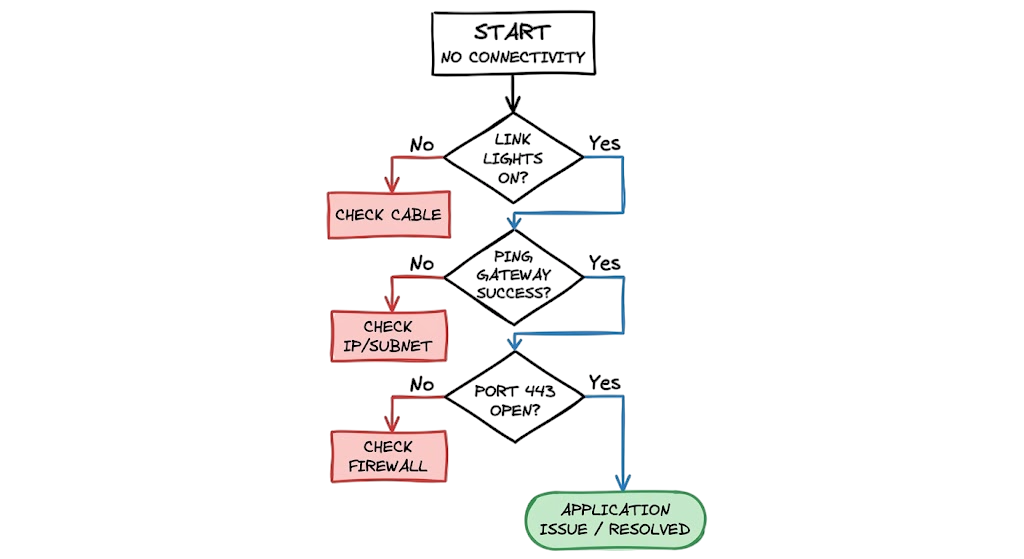
An office in Manila reports that their internet is down. A junior analyst spends two hours checking the DNS settings and the browser cache. Nothing works. When you take over, you use a systematic approach. You start at the link layer. You check the switch and see that the uplink port is dark. You find out that a cleaning crew accidentally pulled out a fiber cable. By starting at the bottom of the stack, you find the problem in two minutes instead of two hours. Always check your physical connections and your link layer status before you start digging into complex software settings.
Interview Questions
Q: What is the purpose of the three way handshake?
A: It establishes a reliable connection between two hosts and synchronizes their sequence numbers. This ensures both sides are ready to send and receive data before any actual information is transmitted.
Q: How does a router use the internet layer?
A: A router examines the destination IP address in the packet header and compares it to its routing table. It then decides the best next hop to get that packet closer to its final destination.
Q: What is the difference between an IP address and a MAC address?
A: An IP address is a logical address that can change and is used for routing across different networks. A MAC address is a physical address burned into the network card and is used for communication on a local network segment.
Q: Why would you use UDP instead of TCP?
A: You use UDP when speed is more important than reliability, such as in streaming video or online gaming. It has less overhead because it does not require acknowledgments or retransmissions.
Q: What happens during encapsulation?
A: Each layer adds its own header information to the data as it moves down the stack. This header contains the instructions needed for that layer to perform its specific task at the destination.
Future Trends (2026 and Beyond)
We are seeing a major shift toward IPv6 in the GCC and Southeast Asia regions as the number of connected devices continues to grow. This version of the protocol has better security features and a much larger address space. We are also seeing the rise of Software Defined Networking. This allows you to manage your network layers using code, which makes it easier to respond to threats automatically. In the next few years, your security tools will use machine learning to identify anomalous behavior at the transport and internet layers in real time, allowing you to stop attacks before they reach your applications.
FAQ
Q: Is the TCP IP model better than the OSI model?
A: Neither is better, but TCP IP is what is actually used to build networks. The OSI model is a useful reference for learning, but it does not represent how modern software is written.
Q: Can an attacker hide data in the TCP headers?
A: Yes, sophisticated attackers can use unused fields in the headers to sneak small amounts of data past your security tools. This is why you need to inspect the headers, not just the payload.
Q: How do I learn to read packet captures?
A: Start by using a tool like Wireshark on your own computer. Look at your own web traffic and try to identify the headers for each layer of the model.
Q: What is the most important layer for security?
A: Every layer is important. An attacker only needs to find one weak point in your stack to get into your network. You must defend from the link layer up to the application layer.
Q: Does Zscaler use the TCP IP model?
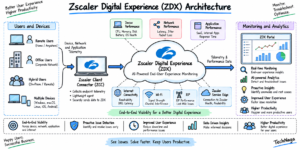
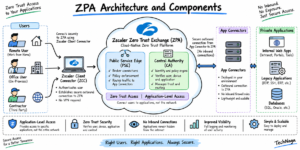
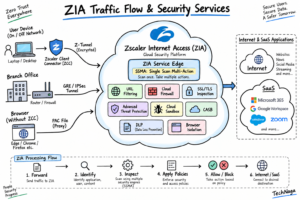
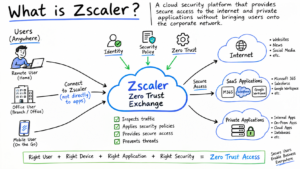
A: Yes, Zscaler operates by intercepting traffic at the internet and transport layers and tunneling it securely to a cloud inspection point.
Conclusion
The TCP IP model is one of the most important networking frameworks every cybersecurity professional should understand. By learning how data flows through its four layers, how protocols communicate, and how encapsulation packages information during transmission, you can troubleshoot network issues faster and identify security threats more effectively.
Instead of viewing the TCP IP model as just another networking concept, use it as a practical framework for analyzing traffic, diagnosing connectivity problems, and understanding how enterprise networks operate. Whether you’re working with firewalls, packet captures, or cloud security platforms, a solid understanding of the TCP IP model will improve your troubleshooting and incident response skills.
Today, open your terminal and run a traceroute, ping, or Wireshark packet capture against one of your servers. Observe how packets travel across the network, how encapsulation adds and removes headers at each layer, and how different protocols work together to deliver data reliably. Developing this habit is one of the fastest ways to start thinking like a senior network or cybersecurity engineer.
Continue learning with these networking and cybersecurity guides from Tech Naga:
- Complete Network Security Basics Guide for Beginners 2026
https://technaga.com/what-is-networks-and-network-security-basics-2026/ - OSI Model Explained: 7 Powerful Layers Every Engineer Must Know
https://technaga.com/osi-model-7-layers-troubleshooting-guide/ - TCP 3-Way Handshake Explained: Complete Guide for Beginners
https://technaga.com/tcp-3-way-handshake-guide/ - IP Address Guide: 12 Essential Concepts Every Network Engineer Should Know
https://technaga.com/ip-address-essential-concepts-guide-2026/ - What Are Network Devices? Types, Functions, and OSI Layers Explained
https://technaga.com/network-devices-functions-osi-layers/ - What is Firewall in Cybersecurity? Types, Examples and How It Works
https://technaga.com/firewall-in-cybersecurity-types-examples-explained/ - Network Segmentation Explained with Real-World Examples
https://technaga.com/network-segmentation-guide-ransomware-prevention/ - Zero Trust Security Guide: Architecture and Implementation
https://technaga.com/zero-trust-security-2026-guide/ - Cloud Security Basics: Complete Beginner Guide
https://technaga.com/cloud-security-basics-2026/ - What Is Cybersecurity and Why It Is Important Today
https://technaga.com/what-is-cybersecurity-and-why-it-is-important-today/
References (External Links)
- RFC 9293: Transmission Control Protocol (TCP)
https://www.rfc-editor.org/rfc/rfc9293 - RFC 791: Internet Protocol (IP)
https://www.rfc-editor.org/rfc/rfc791 - RFC 768: User Datagram Protocol (UDP)
https://www.rfc-editor.org/rfc/rfc768 - RFC Editor
https://www.rfc-editor.org/ - IETF (Internet Engineering Task Force)
https://www.ietf.org/ - Cisco Networking Academy
https://www.netacad.com/ - Microsoft Learn: Networking Fundamentals
https://learn.microsoft.com/ - Cloudflare Learning Center: TCP/IP
https://www.cloudflare.com/learning/network-layer/what-is-the-tcp-ip-model/ - IBM: TCP/IP Model Explained
https://www.ibm.com/topics/tcp-ip - Wireshark Documentation
https://www.wireshark.org/docs/

2 thoughts on “4 Secrets of the TCP IP Model for Security Analysts”