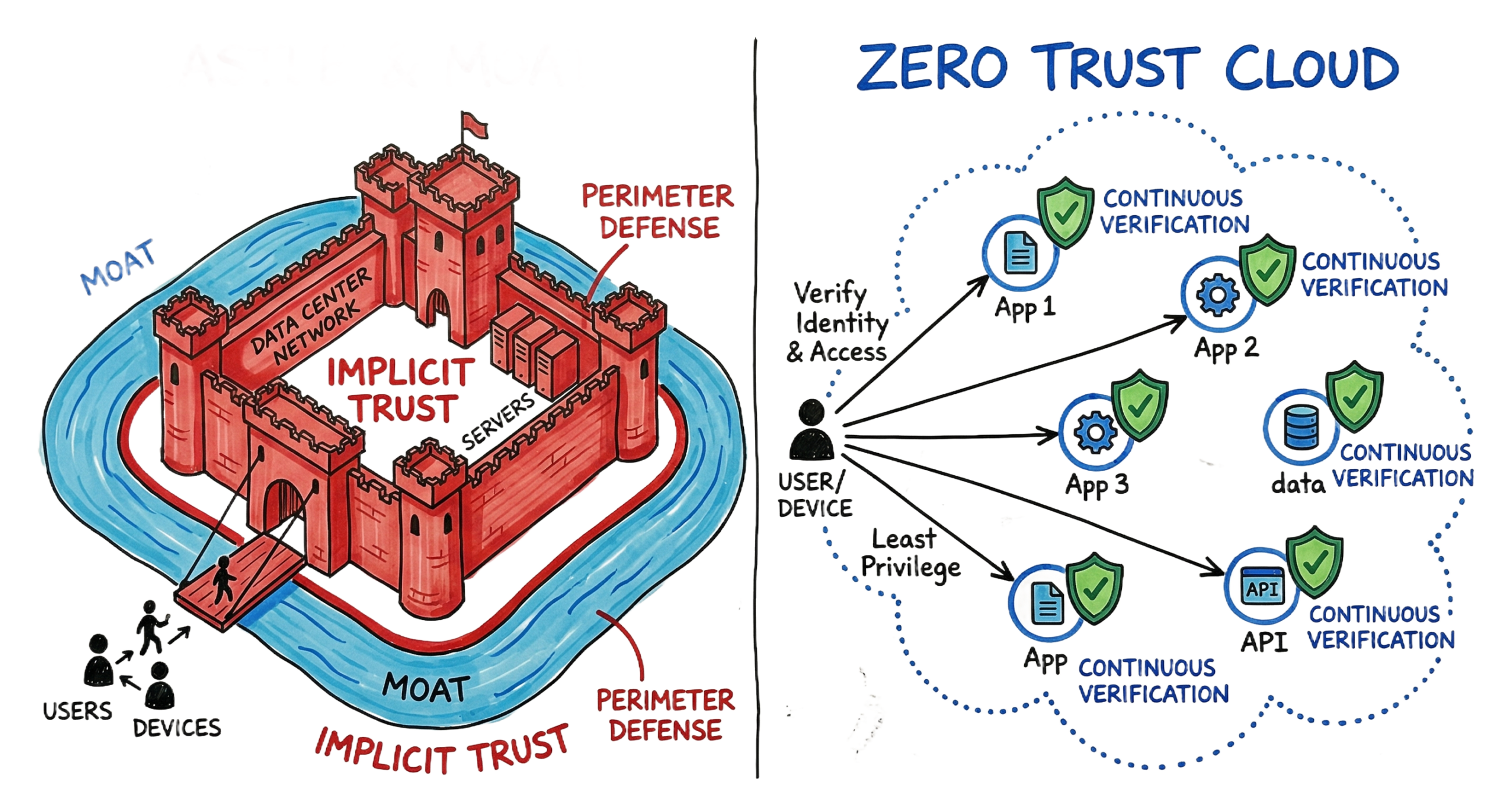
Zero Trust vs Traditional Security is one of the biggest changes in cybersecurity today. As organizations move to cloud environments, remote work, and SaaS applications, traditional network security is no longer enough to defend against modern cyber threats. Instead of trusting users simply because they are inside the corporate network, organizations now rely on Zero Trust Architecture, where every user, device, and application must continuously prove its identity before accessing resources.
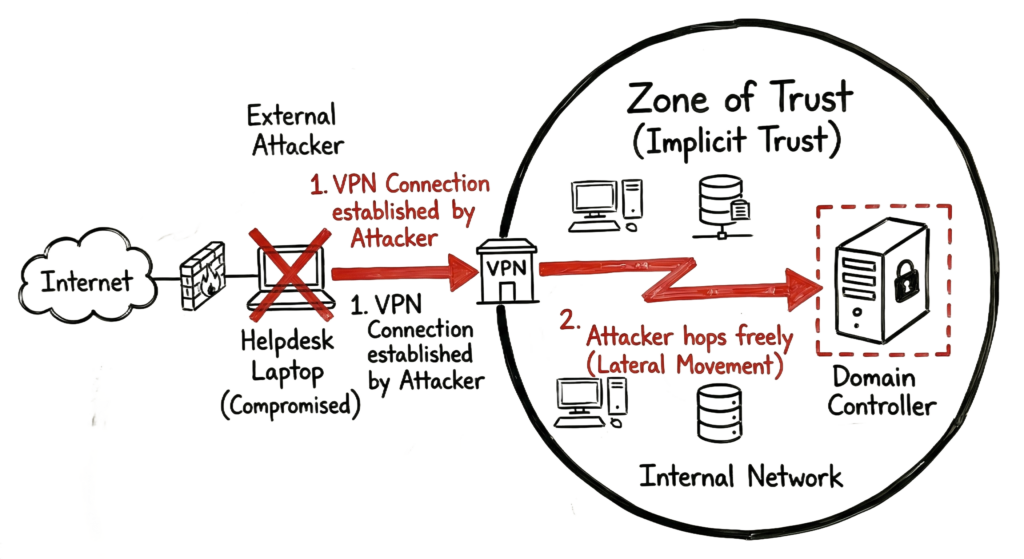
I still remember a 2:00 AM incident back in 2023. While monitoring Microsoft Defender for Identity, a high-severity alert appeared showing a service account performing a suspicious DCSync attack. The attacker had entered the environment through a legacy VPN using compromised credentials. Because the user was already inside the corporate network, the existing traditional network security model automatically trusted the connection.
Within less than twenty minutes, the attacker moved laterally from a helpdesk laptop to a domain controller, attempting to harvest Active Directory credentials. The firewall never blocked the activity because the traffic originated from a trusted internal device. This incident demonstrated one of the biggest weaknesses in traditional network security: once attackers gain access, they can often move freely throughout the environment.
A modern Zero Trust Architecture would have handled the situation very differently. Every access request would have been continuously verified based on user identity, device posture, location, and risk. Using Zero Trust Network Access (ZTNA), the compromised account would have been restricted to only the specific application it was authorized to access, preventing the attacker from discovering internal servers or moving laterally across the network.
This real-world example clearly demonstrates why organizations are replacing legacy security models. Throughout this guide, you’ll learn the key differences between Zero Trust vs Traditional Security, understand how Zero Trust Architecture works, explore the role of Zero Trust Network Access (ZTNA), and discover why continuous identity verification has become the foundation of modern enterprise security in 2026.
What Is Traditional Network Security?
To understand Zero Trust vs Traditional Security, you first need to understand how Traditional Network Security works.
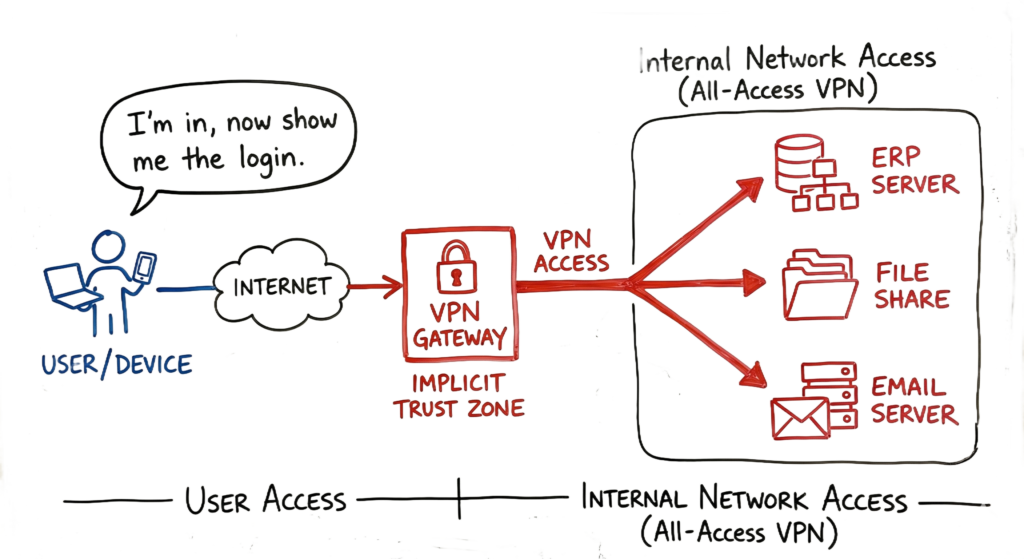
Traditional Network Security is built around the concept of a trusted network perimeter. Organizations protect their internal environment using firewalls, web gateways, intrusion prevention systems (IPS), and Virtual Private Networks (VPNs). The primary assumption is simple: once a user successfully authenticates and enters the corporate network, they can generally be trusted.
This approach is known as implicit trust. After providing valid credentials, users often receive broad network access instead of access to only the applications they require. The network assumes that authenticated users are legitimate, even though attackers may be using stolen credentials.
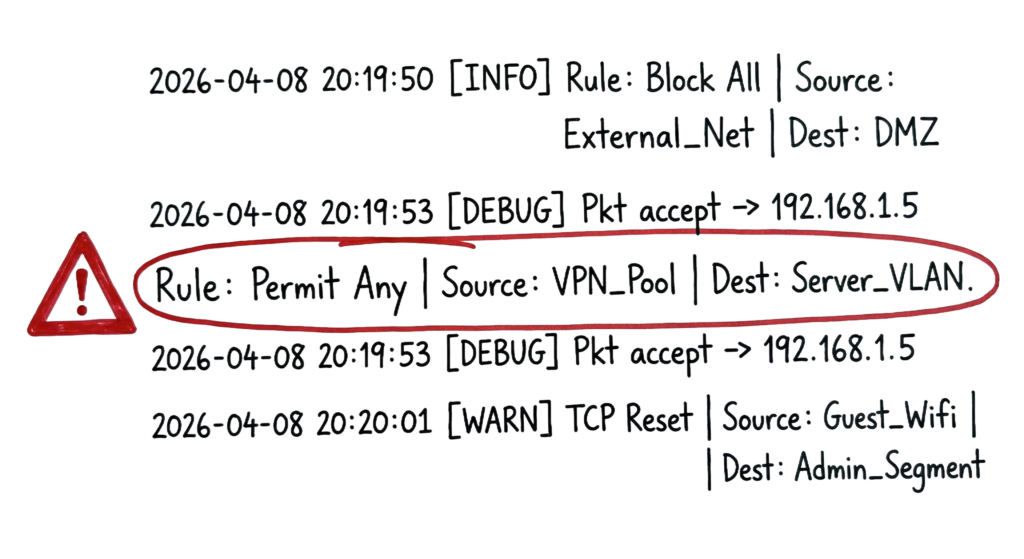
In many legacy environments, the internal network is treated as a trusted zone. Employees connected through office Wi-Fi or a VPN can often discover servers, printers, databases, and other systems simply because they are connected to the internal network. During security assessments, it is common to find firewall rules such as “Permit Any” between the VPN subnet and server VLANs, allowing users to communicate with large portions of the network without additional verification.
This is one of the biggest weaknesses highlighted in the Zero Trust vs Traditional Security comparison. Once an attacker compromises a single account or endpoint, they can perform network discovery, scan internal systems, exploit vulnerabilities, and move laterally until they reach valuable assets such as domain controllers, databases, or file servers.
Modern cyberattacks have demonstrated that perimeter-based security is no longer sufficient. Stolen credentials, phishing attacks, ransomware, malicious insiders, and compromised service accounts can all bypass traditional defenses because the network continues to trust users after the initial login.
Unlike Zero Trust Architecture, Traditional Network Security performs security checks mainly during authentication. It does not continuously verify user identity, device health, or session risk after access has been granted. This is why organizations are increasingly replacing VPN-centric access with Zero Trust Network Access (ZTNA), which verifies every request, limits access to specific applications, and significantly reduces opportunities for lateral movement.
What Is Zero Trust?
When comparing Zero Trust vs Traditional Security, the biggest difference is that Zero Trust Architecture completely removes the concept of a trusted internal network. Instead of assuming that users or devices inside the corporate environment are trustworthy, every access request is verified before access is granted.
The Zero Trust Security approach follows one simple principle: “Never Trust, Always Verify.” Every request is treated as though it originates from an untrusted source, regardless of whether it comes from an employee working at headquarters, a remote user connecting from home, or a workload running inside the cloud.
Unlike Traditional Network Security, which grants broad access after a successful VPN login, Zero Trust Architecture continuously validates every session. The system verifies user identity, device compliance, application sensitivity, location, network context, and real-time risk before allowing access to protected resources.
By 2026, Zero Trust Architecture has become the standard security model for modern enterprises. Organizations no longer make access decisions based solely on IP addresses or network location. Instead, they focus on identity, device posture, user behavior, and contextual risk signals. A user connecting from the corporate office receives the same security evaluation as someone connecting from a public Wi-Fi network.
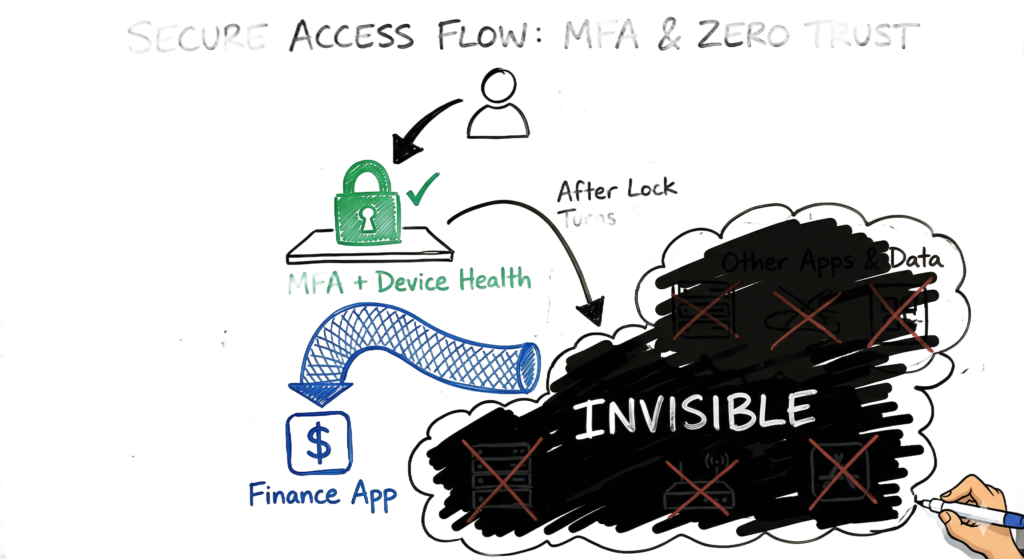
One of the core technologies enabling this approach is Zero Trust Network Access (ZTNA). Instead of connecting users to an entire corporate network like a traditional VPN, ZTNA provides secure, application-level access only to the specific resource the user is authorized to use. Users cannot discover internal servers, scan network segments, or move laterally across the environment because the rest of the infrastructure remains invisible.
How Zero Trust Works
Understanding Zero Trust vs Traditional Security starts with understanding how access decisions are made. Unlike Traditional Network Security, which grants broad network access after a successful login, Zero Trust Architecture evaluates every connection request before access is established.
Whenever a user, device, or application attempts to access a file, database, API, or cloud service, the request goes through multiple security checks. The system continuously verifies identity, device posture, location, application sensitivity, and risk level before making an access decision. This process happens every time a protected resource is requested, not just during the initial login.
One of the biggest differences in the Zero Trust vs Traditional Security comparison is the authentication flow.
In Traditional Network Security, organizations typically follow a “connect first, authenticate later” model. A user establishes a VPN connection to the corporate network, and only then begins authenticating to internal applications. Once connected, many systems become visible, giving attackers opportunities to scan networks and move laterally if credentials are compromised.
Zero Trust Architecture reverses this process by following an “authenticate first, connect later” model. The user must prove their identity, complete Multi-Factor Authentication (MFA), and demonstrate that their device complies with security policies before any connection is established.
A key technology enabling this approach is Zero Trust Network Access (ZTNA). Instead of exposing the internal network, ZTNA makes applications invisible until authentication and authorization are complete. Users receive access only to the specific application they are permitted to use. They cannot browse internal servers, perform network discovery, scan IP ranges, or communicate with other systems unless explicitly authorized.
Technical Flow and Architecture
The architecture follows the NIST 800-207 standard. This standard defines several components you will interact with daily.
First, you have the Policy Decision Point. This is the brain of the operation. It looks at the policy you wrote and decides if the user should get in. It considers the user’s role, the time of day, and the sensitivity of the data.
Second, you have the Policy Enforcement Point. This is the muscle. It is usually a gateway or a piece of software on the endpoint. If the brain says “yes,” the muscle opens a tiny, encrypted tunnel specifically for that one application.
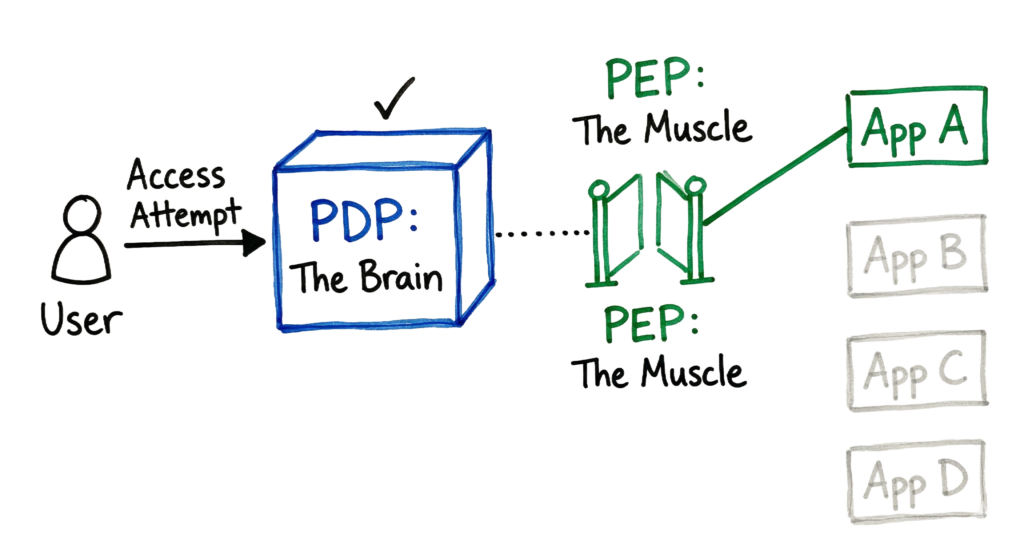
Now here’s where it gets interesting. In a real 2026 environment, this flow happens in milliseconds. You might use Zscaler Private Access or Microsoft Entra Private Access. The user clicks a link, the client checks the device posture, the controller verifies the identity, and the gateway connects them to the app. The user never sees a “VPN Connecting” progress bar.
Key Components
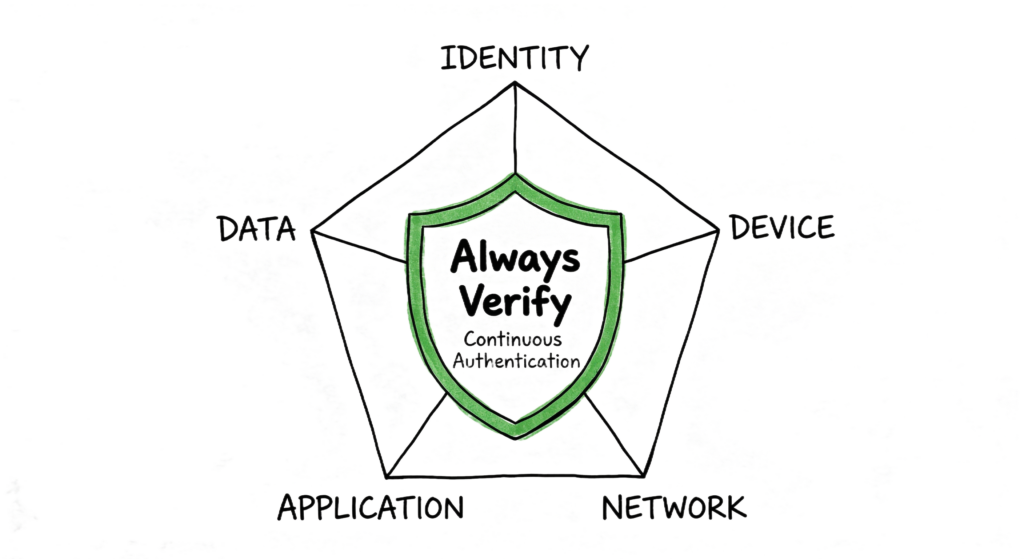
You need to know these five pillars to manage a Zero Trust environment effectively.
- Identity: This is your primary anchor. You use phishing-resistant Multi-Factor Authentication (MFA) like FIDO2 keys or platform authenticators. In 2026, identity also includes non-human identities like AI agents and service accounts.
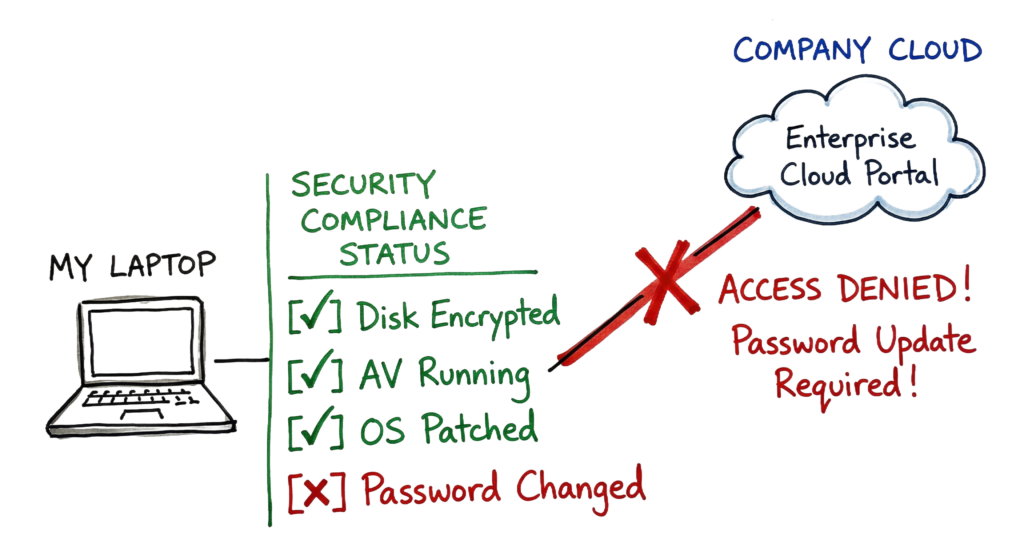
- Device: You must verify the health of the hardware. Is the antivirus running? Is the disk encrypted? Is the OS patched?
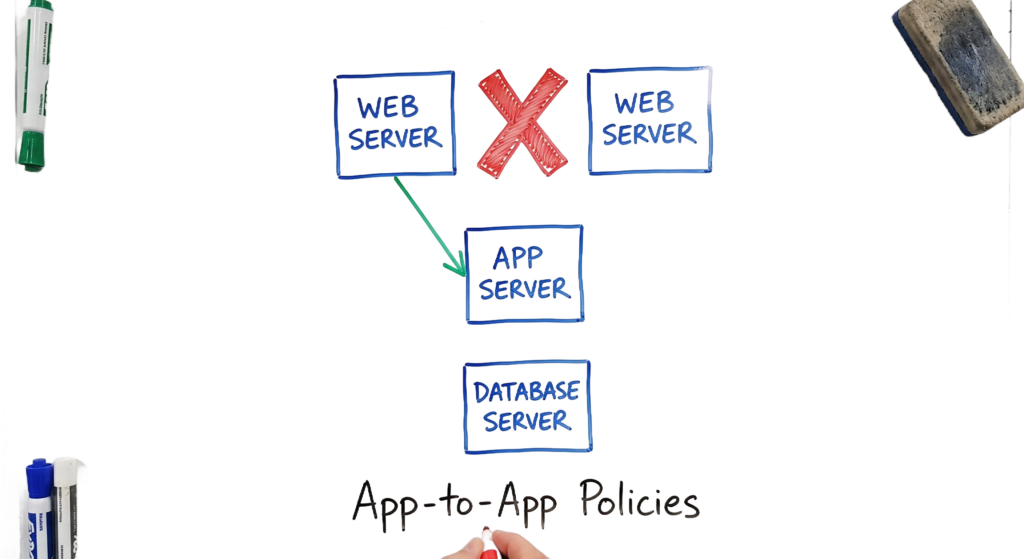
- Network: You use microsegmentation to isolate workloads. You stop talking about “VLANs” and start talking about “App-to-App” policies.
- Application: You hide applications behind a proxy. They do not listen on public IP addresses.
- Data: You classify and encrypt data at rest and in transit.
Real-World Example
Let’s look at a log comparison. This is where most people get confused.
A traditional VPN log looks like this: Feb 12 08:30:12 Firewall-01: VPN_User_John connected from 203.0.113.5. Assigned Internal IP 10.50.1.10.
That tells you nothing about John’s device or what he is doing. Now, look at a ZTNA log from a Zscaler or Entra dashboard: User: john@company.com | Device: Win11-Laptop-04 | Posture: Compliant | App: Finance-ERP-01 | Action: Allow | Reason: Identity verified, Device patched, User in Finance group.
If John’s laptop suddenly misses a security update, the next request will show Action: Block | Reason: Device non-compliant (Old OS Version). That is the power of continuous verification.
Practical Implementation
You cannot flip a switch and get Zero Trust. It is a journey. I recommend a phased approach.
Start with identity. Move your users to a modern Identity Provider (IdP) and enforce MFA for every single login. I once worked with a company that tried to do network segmentation first. It was a disaster because they didn’t know who was talking to what.
Next, identify your “crown jewel” applications. These are your most sensitive data stores. Move them behind a Zero Trust Network Access (ZTNA) gateway. This allows you to kill your old VPN for those specific apps.
Finally, implement microsegmentation. This is the hardest part. You use tools to map your traffic flows and then write rules that only allow necessary communication. For example, your web servers should talk to your database servers on port 1433, but they should never talk to each other.
Advantages and Limitations
Advantages: Zero Trust stops lateral movement. If an attacker steals a password, they are still stuck on one device with no health certificate. It also provides better visibility. You see every application access, not just network connections.
Limitations: Complexity is the biggest hurdle. You have to manage many more policies than a traditional firewall. It can also break legacy applications. Some old software expects to be on a flat network and fails when you put it behind a proxy.
In real environments, it doesn’t work this cleanly. You will always have that one 20-year-old server that can’t run a modern agent. You have to put that in a special “isolated” segment with extra monitoring.
Common Mistakes
The biggest mistake is thinking Zero Trust is a product. Vendors will try to sell you a “Zero Trust Box.” There is no such thing. Zero Trust is a way of designing your system.
Another mistake is neglecting service accounts. Engineers often focus on human users but leave old API keys and service accounts with broad permissions. Attackers love this. I saw an incident where an attacker used an old Jenkins service account to dump an entire AWS S3 bucket because no one applied Zero Trust principles to that machine identity.
Best Practices
- Use the principle of least privilege. Give users access only to what they need for their job.
- Automate your responses. If a device posture fails, the system should block access automatically without a human in the loop.
- Monitor everything. Send your ZTNA and IdP logs to a SIEM like Microsoft Sentinel or Splunk.
- Educate your users. They need to understand why their access is blocked when they don’t update their phones.
Troubleshooting Scenario
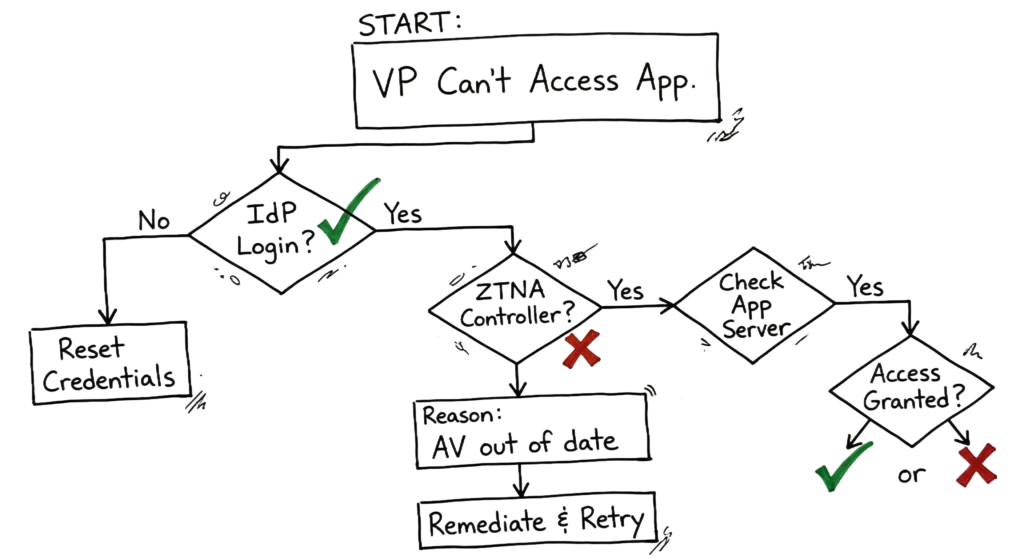
Imagine a junior engineer tells you that the Marketing VP cannot access the internal CMS.
Your first step is to check the IdP logs. Is the login successful? Yes. Next, check the ZTNA controller. You see a block. The reason code is DEVICE_POSTURE_FAILURE. You look closer and see the VP’s laptop hasn’t reported an antivirus scan in three days. In a traditional world, the VP would be on the VPN and might be spreading a worm. In a Zero Trust world, the VP is blocked, and you have a clear reason why. You tell the VP to run a scan, and once the report syncs, access is restored.
Interview Questions
- How does ZTNA differ from a traditional VPN?
- Explain the difference between a Policy Decision Point and a Policy Enforcement Point.
- What is microsegmentation and why does it matter?
- How do you handle legacy applications in a Zero Trust environment?
- What are three signals you would use to calculate a device posture score?
- Why is identity considered the new perimeter?
Future Trends (2026)
By 2026, we are seeing the rise of Agentic AI. These are AI agents that perform tasks on behalf of users. You have to treat these agents as identities. They need their own roles, permissions, and health checks.
We are also moving toward “ambient” security. This is where the security checks are so integrated into the operating system and the browser that the user never knows they are happening. The browser is becoming a primary Policy Enforcement Point.
FAQ
Q: Does Zero Trust replace my firewall? A: Not entirely. You still need a firewall for basic traffic filtering, but the ZTNA gateway handles your application access.
Q: Is Zero Trust only for cloud apps? A: No. You can apply it to on-premises servers using local gateways.
Q: How long does implementation take? A: For an enterprise, it usually takes two to three years to reach a high maturity level.
Q: Does Zero Trust slow down the network? A: Usually, no. Because ZTNA often uses global edges, it can actually be faster than backhauling traffic to a central office VPN.
Q: What happens if the IdP goes down? A: This is a risk. You need a highly available IdP and a “break-glass” process for emergencies.
Conclusion
Transitioning to Zero Trust is a massive shift in mindset. You are moving from a world of “trust but verify” to “never trust, always verify.” It is more work upfront, but it makes your environment much more resilient.
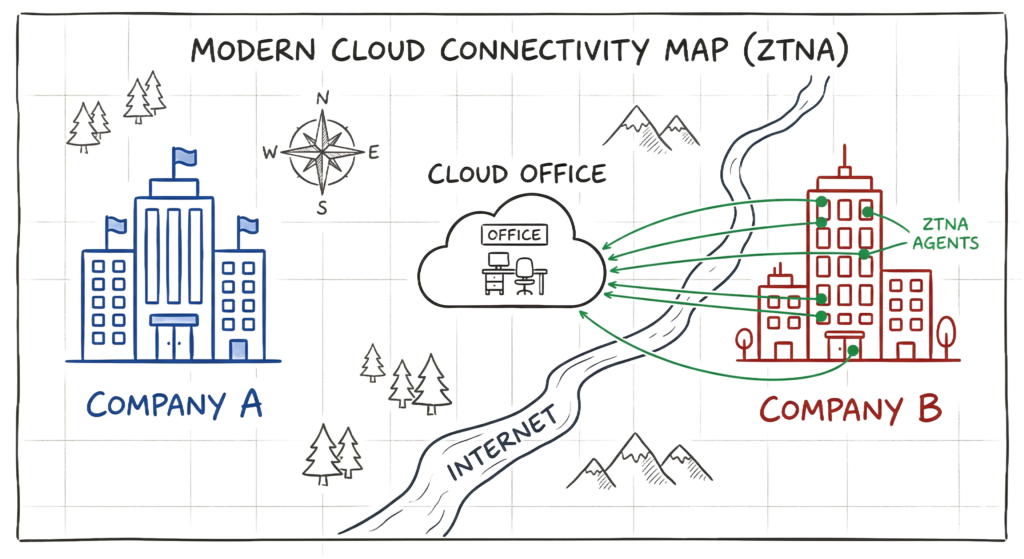
An enterprise-level scenario I often see is a company acquiring a smaller firm. In the old days, you would spend months setting up a site-to-site VPN and worrying about overlapping IP ranges. Today, you just install a ZTNA agent on the new employees’ laptops, and they have secure access to your apps in hours. Stay focused on identity and device health, and you will be ahead of the curve.
Related Articles
- What Is Cybersecurity and Why It Is Important Today
https://technaga.com/what-is-cybersecurity-and-why-it-is-important-today/ - Zero Trust Security 2026: Architecture, Real Examples, and Implementation Guide
https://technaga.com/zero-trust-security-2026-guide/ - Identity and Access Management (IAM): Complete Guide 2026
https://technaga.com/identity-and-access-management-cloud-security-2026/ - Multi-Factor Authentication (MFA): Complete Guide 2026
https://technaga.com/multi-factor-authentication-mfa-guide-2026/ - Network Segmentation: Best Practices to Stop Lateral Movement
https://technaga.com/network-segmentation-best-practices-2026/ - Cloud Security Basics 2026: Complete Beginner Guide
https://technaga.com/cloud-security-basics-2026/ - API Security Explained: Best Practices, Risks, and Authentication (2026)
https://technaga.com/api-security-best-practices-2026/ - Identity and Access Management (IAM): Authentication vs Authorization Explained
https://technaga.com/identity-and-access-management-cloud-security-2026/ - Essential Endpoint Security Guide 2026 for Every Organization
https://technaga.com/endpoint-security-2026-guide/ - Top 10 Cybersecurity Best Practices for 2026
https://technaga.com/top-10-cybersecurity-best-practices-2026/ - Security Information and Event Management (SIEM): Complete Guide 2026
https://technaga.com/security-information-and-event-management-siem-guide-2026/ - Initial Access in Cybersecurity: Top Attack Vectors You Must Know
https://technaga.com/initial-access-cybersecurity-attack-vectors-2026/
External References
- NIST SP 800-207: Zero Trust Architecture
https://csrc.nist.gov/pubs/sp/800/207/final - CISA Zero Trust Maturity Model
https://www.cisa.gov/resources-tools/resources/zero-trust-maturity-model - Microsoft Zero Trust Guidance
https://learn.microsoft.com/security/zero-trust/ - Microsoft Zero Trust Adoption Framework
https://learn.microsoft.com/security/zero-trust/adopt/ - Google BeyondCorp Enterprise
https://cloud.google.com/beyondcorp-enterprise - Zscaler Zero Trust Exchange
https://www.zscaler.com/products/zero-trust-exchange - NIST Cybersecurity Framework (CSF 2.0)
https://www.nist.gov/cyberframework - MITRE ATT&CK Framework
https://attack.mitre.org/ - OWASP Zero Trust Architecture Project
https://owasp.org/www-project-zero-trust-architecture/ - Microsoft Entra ID Documentation
https://learn.microsoft.com/entra/ - FIDO Alliance
https://fidoalliance.org/ - OAuth 2.0 Framework (RFC 6749)
https://datatracker.ietf.org/doc/html/rfc6749 - OpenID Connect (OIDC)
https://openid.net/connect/








1 thought on “Forget the Perimeter: Zero Trust vs Traditional Security Technical Comparison 2026”