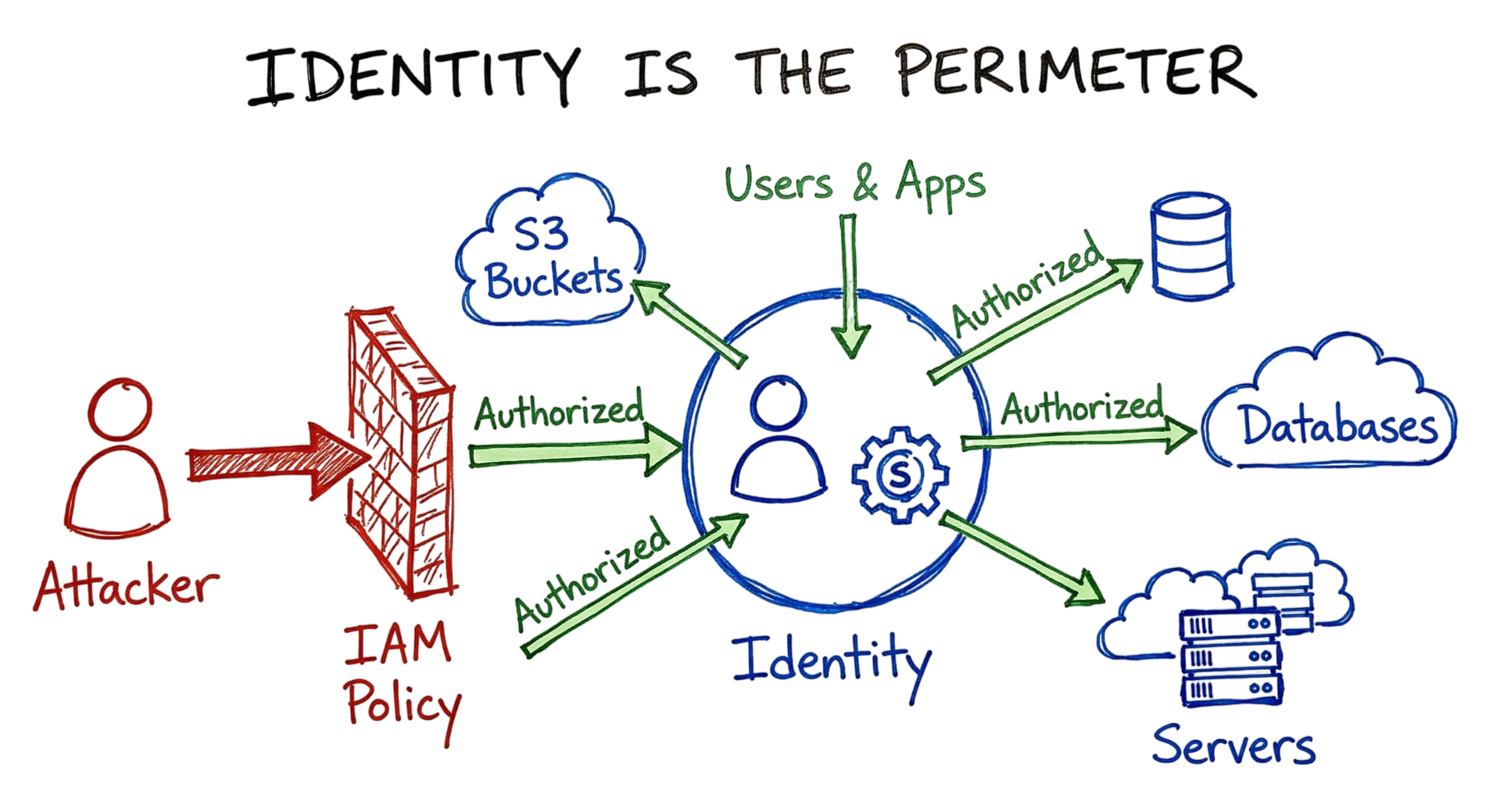
It is 2:14 AM, and I’m staring at the Security Information and Event Management (SIEM) dashboard after receiving a high-severity alert from our production AWS environment.
The log entry reads:
{
  "userIdentity": {
    "type": "AssumedRole",
    "principalId": "AROA52EXAMPLE:session-name"
  },
  "eventName": "ModifyInstanceAttribute",
  "errorCode": "AccessDenied",
  "errorMessage": "User is not authorized to perform: ec2:ModifyInstanceAttribute"
}
At first glance, it appears to be nothing more than a routine permissions error caused by an IAM policy. However, after investigating the CloudTrail logs, I discover that the request originated from an IP address assigned to a server that had been decommissioned nearly a year ago.
This is exactly why Identity and Access Management (IAM) has become one of the most important pillars of modern cybersecurity. A single misconfigured IAM role, excessive permission, or forgotten service account can quickly become the entry point for a serious security incident. Attackers no longer need to exploit firewalls when they can abuse legitimate identities that already have access to critical resources.
In 2026, organizations are shifting away from traditional perimeter-based security toward Zero Trust Identity, where every authentication request is continuously verified before access is granted. Modern Identity and Access Management Architecture focuses on authenticating users, validating devices, enforcing least privilege, and monitoring every access request in real time. Following strong IAM Best Practices, including role-based access control, continuous access reviews, and Privileged Access Management (PAM), helps organizations reduce the risk of credential abuse, insider threats, and unauthorized access across cloud and hybrid environments.
In this guide, you’ll learn what Identity and Access Management is, how it works, the core architectural components, real-world implementation strategies, common security mistakes, and the best practices every organization should adopt to secure identities in 2026.
What is Identity and Access Management
Identity and Access Management (IAM) is the framework of policies, technologies, and processes used to ensure that the right users, applications, and systems have the appropriate level of access to the right resources at the right time. Modern Identity and Access Management protects cloud environments by verifying identities, enforcing access controls, and continuously monitoring authentication and authorization activities.
In today’s cloud-first world, Identity and Access Management extends far beyond human users with usernames and passwords. Modern IAM platforms also manage service accounts, containers, Lambda functions, virtual machines, applications, APIs, bots, and other machine identities. Every identity, whether human or non-human, must be authenticated, authorized, and monitored before accessing sensitive resources.
A well-designed Identity and Access Management Architecture enables organizations to control who can access cloud resources, what actions they can perform, under which conditions access is permitted, and how those permissions are continuously reviewed throughout the user lifecycle.
Authentication and Authorization
At its core, Identity and Access Management consists of two fundamental security processes.
Authentication
Authentication answers a single question:
“Are you really who you claim to be?”
The system verifies identity using one or more authentication methods, including:
- Passwords
- Multi-Factor Authentication (MFA)
- Passkeys
- FIDO2 security keys
- Biometrics
- Digital certificates
- Security tokens
Strong authentication is one of the most important IAM Best Practices because compromised credentials remain one of the leading causes of cloud security incidents.
Authorization
Once identity has been verified, authorization determines:
“What resources can you access, and what actions are you allowed to perform?”
Authorization decisions are based on security controls such as:
- Role-Based Access Control (RBAC)
- Attribute-Based Access Control (ABAC)
- Least Privilege
- Conditional Access
- Risk-Based Authentication
- Privileged Access Management (PAM)
These controls ensure users receive only the permissions required to perform their assigned responsibilities while reducing the overall attack surface.
Why IAM Is Critical
When Identity and Access Management is misconfigured, attackers can exploit excessive permissions, compromised service accounts, or stolen credentials to move laterally across cloud environments and access sensitive business resources.
Weak identity controls remain one of the most common causes of modern cloud breaches. Unlike traditional attacks that focus on bypassing firewalls, today’s threat actors often abuse legitimate identities that already possess authorized access.
This is why organizations are increasingly adopting Zero Trust Identity, where every authentication request, device, application, and workload must be continuously verified before access is granted. Trust is never assumed simply because a user is inside the corporate network.
I have personally seen organizations invest heavily in firewalls, intrusion prevention systems, and endpoint security while overlooking identity security. In one real-world investigation, a service account with AdministratorAccess permissions had its credentials accidentally committed to a public GitHub repository. Within hours, automated scanning tools discovered the exposed credentials, giving attackers the opportunity to access cloud resources using legitimate permissions.
This example demonstrates why following IAM Best Practices, implementing least privilege, performing regular access reviews, and deploying Privileged Access Management (PAM) are essential for protecting modern cloud environments. No firewall can compensate for poor Identity and Access Management, because once an attacker successfully authenticates with valid credentials, they often appear to be a legitimate user.
The Core Mechanics of Identity and Access Management
Every request in the cloud follows a specific path. When a developer runs a command like aws s3 ls, the cloud provider does not just give them the data. It initiates a complex evaluation process. The provider looks at the identity making the request. It checks if the identity is active. It then gathers every policy attached to that identity. It also looks at the policies attached to the resource itself, like an S3 bucket policy.
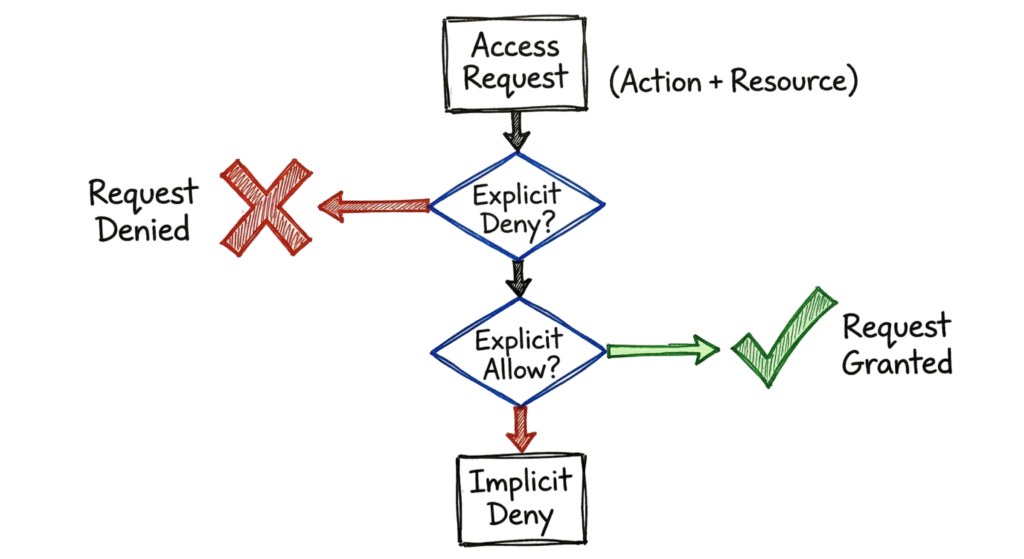
The engine then runs these policies through an evaluation logic. This logic is simple but strict. If there is an explicit “Deny” anywhere in the chain, the request fails immediately. If there is no “Allow” statement, the request also fails. This is called an implicit deny. You must explicitly grant permission for anything to happen. This creates a secure baseline, but it also makes troubleshooting a nightmare if you do not know how the policy evaluation flows.
Technical Flow and Architecture
When an entity makes a request, the cloud provider creates an authorization context. In Identity and Access Management (IAM), this context includes the identity, action, resource, and environment data such as source IP or time of day.
The IAM system then evaluates this context against your JSON policies. This is where IAM decides whether the request should be allowed or denied.
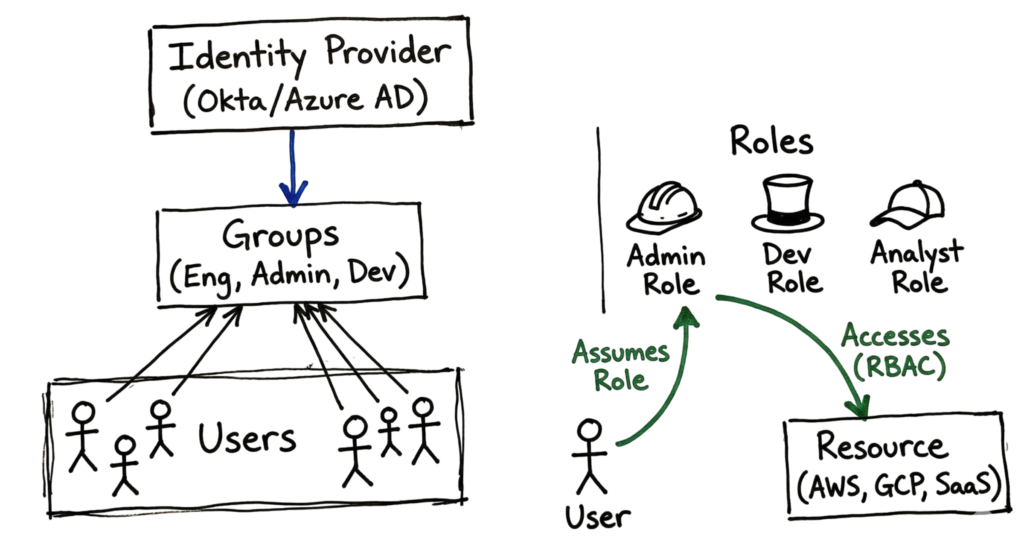
In modern cloud environments, IAM also supports identity federation. This allows identities to come from external providers like Okta or Microsoft Entra ID.
With Identity and Access Management federation, the identity provider verifies the user instead of the cloud provider. After successful authentication, IAM issues a temporary token that expires after a fixed duration.
This is a critical IAM security feature. Temporary credentials reduce the risk of long-term exposure.
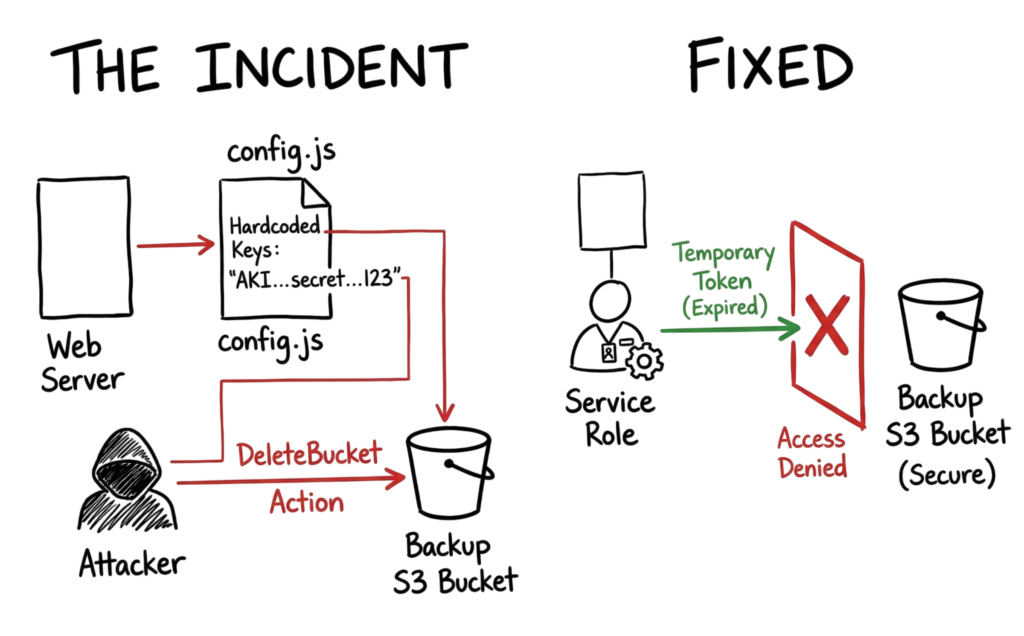
Now consider the earlier incident at 2 AM. The attacker gained access using a permanent access key. This is a common IAM mistake.
If proper IAM practices were followed, the developer would have used a temporary role instead of a static key. In that case, even if the token was exposed, it would expire quickly.
Strong Identity and Access Management controls can prevent this type of attack completely.
Key Components of the Identity System
To manage access effectively, you need to understand the core building blocks of Identity and Access Management (IAM).
In any IAM system, the root account has full control. You should avoid using the root account for daily tasks because it creates a high security risk.
IAM users represent human identities with long-term credentials. These users typically authenticate using passwords and multi-factor authentication.
IAM groups help you manage permissions at scale. Instead of assigning access individually, you attach a policy to a group and add users to that group. For example, if ten engineers need read access to a database, IAM allows you to control this with a single group policy.
One of the most common IAM mistakes is confusing users with roles.
An IAM user is a permanent identity. In contrast, an IAM role provides temporary access for a specific task.
With Identity and Access Management roles, an identity can assume elevated permissions only when required. This reduces the risk of misuse and limits long-term exposure.
IAM policies are JSON documents that define permissions. These policies specify which actions are allowed or denied on specific resources.
Finally, IAM protects resources such as storage buckets, servers, and databases. Every access request is evaluated based on IAM policies before reaching these resources.
Strong Identity and Access Management design ensures that access is controlled, monitored, and limited based on real requirements.
A Real-World Example of Identity Failure
Imagine a finance company running a complex AWS environment. Their web application uploads logs to an S3 bucket.
In this setup, the developer made a critical Identity and Access Management (IAM) mistake. Instead of using an IAM role, they hardcoded IAM user access keys directly into the application code.
The IAM user was also given excessive permissions. The policy allowed s3:*, which means full access to all S3 actions across the account.
This is a serious IAM misconfiguration. The application only needed permission to upload logs, but the IAM user had the ability to delete entire buckets.
The situation became worse when the application was found to have an LFI (Local File Inclusion) vulnerability. The attacker exploited this issue to read the configuration file.
From the config file, the attacker extracted the IAM access keys. Because the IAM permissions were overly broad, the attacker gained full control over S3 resources.
This is a classic example of poor Identity and Access Management design leading to a high-impact risk.
The attack was detected through SIEM alerts. Logs showed suspicious activity such as:
"eventSource": "s3.amazonaws.com""eventName": "DeleteBucket""bucketName": "production-backups"
Strong IAM security practices, such as using temporary roles and least privilege policies, could have prevented this incident completely.
Practical Implementation Steps
To maintain a clean Identity and Access Management system when setting up a new environment, adhere to this procedure.
- To enable users to log in using their business credentials, establish an identity provider connection.
- Define job-function roles like “ReadOnly” and “NetworkAdmin” instead of giving everyone individual permissions.
- Write your policies using the principle of least privilege by specifying exact resource ARNs rather than using wildcards.
- Attach these policies to groups rather than individual users to simplify management.
- Enforce multi-factor authentication for every human user without exception.
Advantages and Limitations
The visibility from the well-defined identity system will be incredibly useful when it comes to tracking every user that makes an API call from your account. You will be able to attribute every action made within your cloud infrastructure to specific users or services. Compliance requirements such as SOC2 and PCI-DSS audits become a breeze.
- Makes it more secure, as you don’t have to deal with constant password rotation.
- Allows for granular control over every resource hosted on the cloud.
- Enables you to track every action taken in your environment.
- Enables automated access reviews via CIEMs.
The main limitation is complexity. As your company grows, you might end up with thousands of roles and policies. This leads to “permission sprawl” where no one really knows who has access to what. Managing this takes constant effort. If you don’t have a dedicated team for it, your security posture will degrade over time.
Common Mistakes to Avoid
One of the biggest mistakes in Identity and Access Management (IAM) is using the root account for daily tasks. The root account has full control over the cloud environment.
If the root account is compromised, the attacker gains complete access. This is a critical IAM security risk.
Another common IAM mistake is using wildcards in policies. Writing Action: "*" or allowing access to all resources removes all restrictions.
In Identity and Access Management, this kind of permission defeats the purpose of access control. It gives more access than required and increases the attack surface.
In real-world environments, IAM decisions are not always straightforward. Developers often request temporary admin access to complete urgent tasks.
You may hear: “Give me admin access for one hour.” In many cases, that temporary IAM access is never revoked.
Over time, these permissions remain active and create hidden risks in the IAM system.
I have seen cases where an IAM role with admin privileges was assigned to a testing bot. The bot only needed read access to a single file.
However, due to poor Identity and Access Management practices, it retained full admin access for two years. This meant it had the ability to shut down critical systems, including billing infrastructure.
Strong IAM controls require strict enforcement of least privilege and regular access reviews.
Best Practices for Cloud Security
You must treat your IAM policies like code. This means storing them in a version control system like Git. When someone wants a new permission, they should submit a pull request. This allows other senior engineers to review the change before it goes live. You should also move toward temporary credentials. In 2026, there is no reason to have a static .csv file with access keys on your laptop.
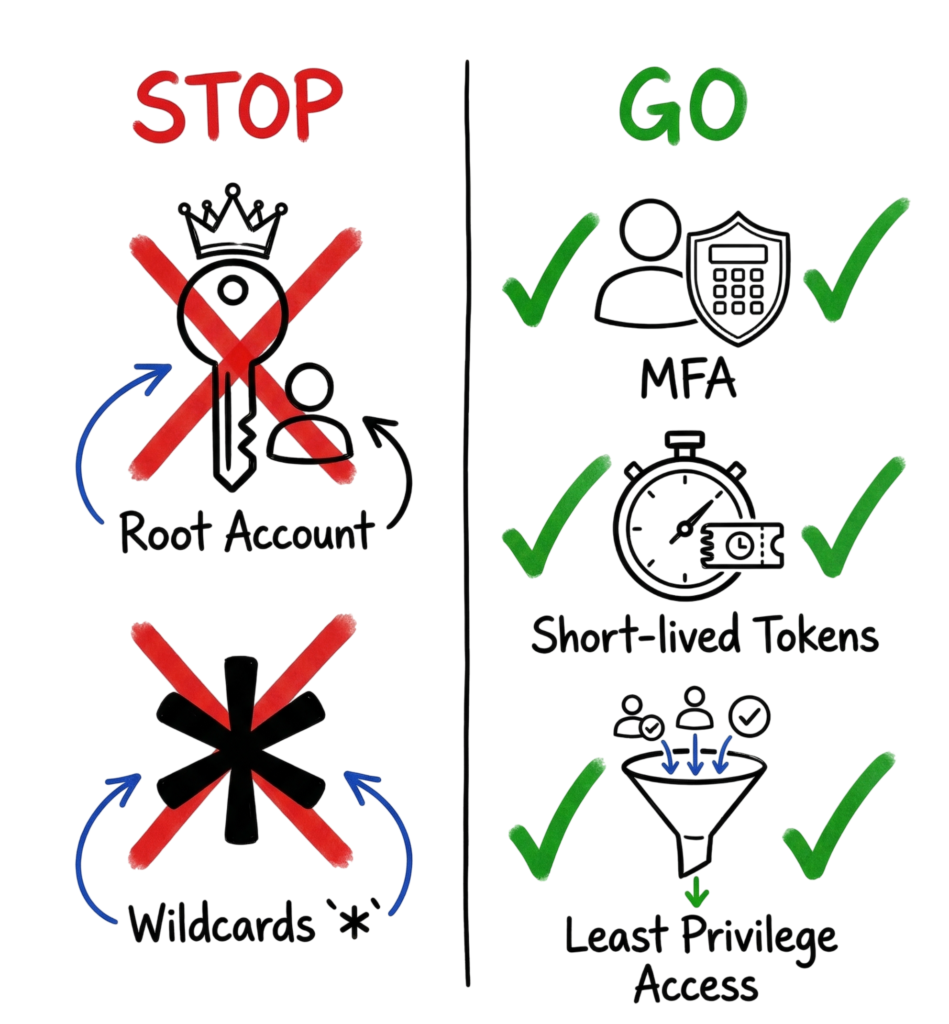
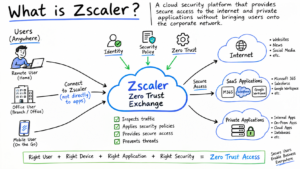
Conditioning your JSON is also a recommended practice. You can condition access such that a role is assumable only if the request is made by your office IP or your Zscaler Private Access Tunnel. Example: “Condition”: {“IpAddress”: {“aws:SourceIp”: “1.2.3.4/32”}}. Conditioning is another level of defense. In case the token is compromised, the attacker cannot assume the role because he does not have the right IP address.
Troubleshooting Scenario
Let’s say a developer tells you they are getting a 403 Forbidden error when trying to start an EC2 instance. They show you their policy, and it clearly says Allow for ec2:StartInstances. You check the role, and the policy is attached. You check the instance, and there is no resource-based policy blocking them.
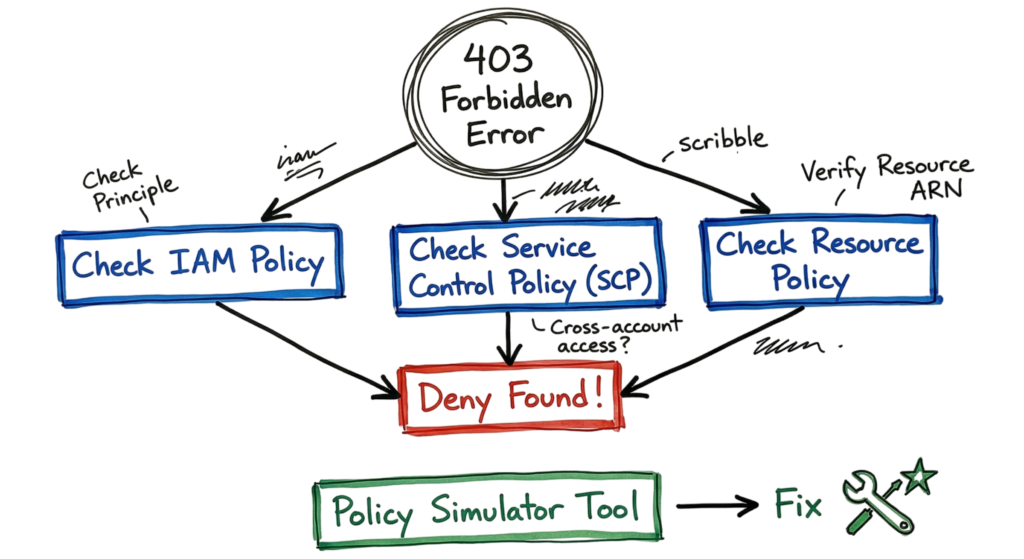
I personally learned from a similar incident that the problem is often higher up the chain. You may have an organization-level Service Control Policy (SCP) in AWS that prohibits EC2 actions in specific regions. You may have an Organization Policy in GCP that limits specific kinds of resources. Use the policy simulator to resolve this. Use a command such as aws iam simulate-principal-policy –action-names ec2:StartInstances –policy-source-arn arn:aws:iam::123456789012:role/DevRole. This will identify the precise policy that is the reason for the “Deny” decision. You can avoid spending hours speculating thanks to it.
Interview Questions and Answers
Q: What is the difference between a Service Account and a User? A: A user represents a human and usually has a password and MFA. A service account is for a piece of code or a virtual machine to interact with other cloud services. You should use service accounts for all automation.
Q: Explain the principle of least privilege. A: It means giving an identity only the exact permissions it needs to perform its job and nothing more. If a script only needs to read one S3 object, you don’t give it access to the whole bucket.
Q: How do you handle a situation where an access key is leaked? A: First, deactivate the key immediately. Second, check the logs to see what actions were taken using that key. Third, rotate all secrets that the key had access to. Finally, issue a new key and investigate how the leak happened.
Q: What is an IAM Role and when would you use it over a User? A: A role provides temporary credentials and does not have a password. You use it when you want to grant permissions to a service or a federated user without creating a permanent set of credentials that could be stolen.
Q: What are Service Control Policies (SCPs)? A: SCPs are guardrails used in organizations to set the maximum permissions available to accounts. They don’t grant permissions, but they can deny them even if an IAM policy inside the account allows the action.
Future Trends for 2026 and Beyond
We are seeing a massive shift toward AI-driven Identity and Access Management. In 2026, systems can now look at behavior patterns to decide access. If a developer usually logs in from London at 9 AM but suddenly tries to delete a database from a VPN in another country at midnight, the system will automatically trigger a step-up MFA challenge or kill the session.
We are also seeing the rise of “Zero Standing Privileges.” This means no one has permissions by default. When you need to do a task, you request access, a manager or an automated bot approves it, and you get a temporary role for two hours. Once the time is up, the permission vanishes. This eliminates the risk of “dormant” admin accounts. Decentralized identity is also becoming a reality, where you own your identity and share only what is needed with the cloud provider, reducing the data they hold about you.
FAQ
Can I use IAM to manage access to my on-premises servers? Yes, by using identity providers or agents that federate into the cloud. Most modern tools allow you to extend cloud identity to your local data center.
Is MFA really necessary for service accounts? MFA is for humans. For service accounts, we use different secrets management or short-lived certificates. You should never hardcode a secret for a service account.
What is CIEM? Cloud Infrastructure Entitlement Management is a tool that scans your environment to find identities with too much power. It helps you find the “gap” between the permissions granted and the permissions actually used.
How often should I review my IAM policies? At least every quarter. However, automated tools can now do this daily by flagging any role that hasn’t been used in 90 days.
What is the fastest way to learn IAM? Start by building a small project in a free-tier cloud account. Try to give a virtual machine access to a storage bucket without using any permanent passwords.
Can a policy have both Allow and Deny? Yes. If both exist, the Deny always wins. This is a fundamental rule of cloud security logic.
Conclusion
Identity and Access Management (IAM) is not a one-time implementation or a checkbox that can be completed and forgotten. It is an ongoing security process that requires continuous monitoring, regular access reviews, policy updates, and permission audits. As organizations grow and cloud environments evolve, identities, roles, and permissions must be reviewed frequently to ensure they align with current business and security requirements.
Following strong IAM Best Practices means regularly auditing user accounts, monitoring authentication logs, reviewing privileged access, and removing unnecessary permissions before they become security risks. Organizations should also enforce the principle of least privilege, rotate temporary credentials, and continuously validate every access request to reduce the attack surface.
A modern Identity and Access Management Architecture should support continuous authentication, adaptive access controls, identity lifecycle management, and real-time monitoring. Combining these capabilities with Zero Trust Identity principles ensures that every user, device, application, and workload is verified before gaining access to sensitive resources.
Organizations should also implement Privileged Access Management (PAM) to protect high-risk accounts, restrict administrative privileges, and monitor privileged sessions. These additional security controls help prevent attackers from abusing elevated permissions even if an account is compromised.
Ultimately, Identity and Access Management has become one of the most important layers of modern cybersecurity. Firewalls and endpoint protection remain essential, but identity is now the primary security perimeter. By adopting strong IAM Best Practices, continuously reviewing permissions, monitoring security logs, and never assuming that a valid password guarantees a trusted user, organizations can stop many cyberattacks before they begin. In 2026 and beyond, effective Identity and Access Management will remain one of the strongest defenses against credential theft, insider threats, and cloud-based cyber attacks.
Related Articles
- What Is Cybersecurity and Why It Is Important Today
https://technaga.com/what-is-cybersecurity-and-why-it-is-important-today/ - Multi-Factor Authentication (MFA): Critical Guide to Secure Your Systems (2026)
https://technaga.com/multi-factor-authentication-mfa-guide-2026/ - Zero Trust Security in 2026: Architecture, Real Examples, and Implementation Guide
https://technaga.com/zero-trust-security-2026-guide/ - Forget the Perimeter: Zero Trust vs Traditional Security Technical Comparison 2026
https://technaga.com/zero-trust-vs-traditional-security-2026/ - Cloud Security Basics 2026: Complete Beginner Guide
https://technaga.com/cloud-security-basics-2026/ - Essential Endpoint Security Guide 2026 for Every Organization
https://technaga.com/endpoint-security-2026-guide/ - Initial Access in Cybersecurity: Top 3 Attack Vectors You Must Know (2026)
https://technaga.com/initial-access-cybersecurity-attack-vectors-2026/ - Top 10 Cybersecurity Best Practices for 2026
https://technaga.com/top-10-cybersecurity-best-practices-2026/ - Security Information and Event Management: Complete SIEM Guide 2026
https://technaga.com/security-information-and-event-management-2026/ - Cloud Misconfiguration: 10 Critical Errors Leading to Data Breaches in 2026
https://technaga.com/cloud-misconfiguration-data-breaches-2026/
External References
- Microsoft Entra ID Documentation
https://learn.microsoft.com/en-us/entra/ - NIST Digital Identity Guidelines (SP 800-63)
https://pages.nist.gov/800-63-4/ - CISA Identity and Access Management Resources
https://www.cisa.gov/topics/cybersecurity-best-practices/identity-and-access-management - MITRE ATT&CK Framework
https://attack.mitre.org/ - OWASP Authentication Cheat Sheet
https://cheatsheetseries.owasp.org/cheatsheets/Authentication_Cheat_Sheet.html - FIDO Alliance
https://fidoalliance.org/ - OpenID Foundation
https://openid.net/ - OAuth 2.0 Framework (IETF RFC 6749)
https://datatracker.ietf.org/doc/html/rfc6749 - SCIM Protocol Specification (RFC 7644)
https://datatracker.ietf.org/doc/html/rfc7644 - Microsoft Zero Trust Guidance
https://learn.microsoft.com/en-us/security/zero-trust/
9 thoughts on “Identity and Access Management in 2026: A Practical Guide for Cloud Security Professionals”