It is 3:00 AM on a Saturday. Your phone starts vibrating with high-priority security alerts. You open your laptop and immediately check the Microsoft Defender for Endpoint dashboard. A high-severity alert catches your attention: “Suspicious sequence of file renames detected.”
As you investigate the process tree, you notice a suspicious script running from the C:\Users\Public directory on an employee’s computer. Within seconds, CPU utilization on three file servers spikes to 100%. Shared folders begin disappearing, and encrypted files start replacing the originals. Every security engineer knows what this means.
This is not just malware. You are witnessing a ransomware attack unfolding in real time.
Modern ransomware attacks move at incredible speed. Attackers can encrypt thousands of files, disable security tools, steal sensitive data, and spread across the network before most users even realize something is wrong. Understanding how ransomware attacks work is essential for security professionals, IT administrators, and organizations looking to reduce the impact of cyber threats.
In this guide, you’ll learn the complete ransomware attack lifecycle, common attack techniques, real-world examples, and the best practices to detect, prevent, and recover from ransomware attacks in 2026.
Welcome to the front lines of cybersecurity. If you’re a beginner, an aspiring SOC analyst, or an IT professional transitioning into security, one of the first things you need to understand is that ransomware has become a highly organized criminal business. Today’s ransomware attacks are no longer carried out by a single hacker working alone. Many ransomware groups operate like legitimate companies, complete with developers, affiliates, customer support teams, and even negotiators who communicate with victims.
Understanding how ransomware attacks work is essential because modern attacks are carefully planned and executed in multiple stages. Attackers spend days or even weeks gaining access, escalating privileges, moving laterally across the network, and stealing sensitive data before deploying ransomware. By the time the ransom note appears, the damage has often already been done.
In this guide, How Ransomware Attacks Work in 2026: Real Examples and Prevention, you’ll learn the complete ransomware attack lifecycle, explore real-world attack scenarios, and discover practical strategies to detect, prevent, and respond to ransomware before it disrupts your organization.
What is How Ransomware Attacks Work (2026): Real Examples and Prevention
A ransomware attack is a type of cyberattack in which attackers encrypt an organization’s files or systems and demand a ransom payment in exchange for a decryption key. However, ransomware in 2026 has evolved far beyond simple file encryption. Modern ransomware groups use double, triple, and even quadruple extortion tactics to increase pressure on victims.
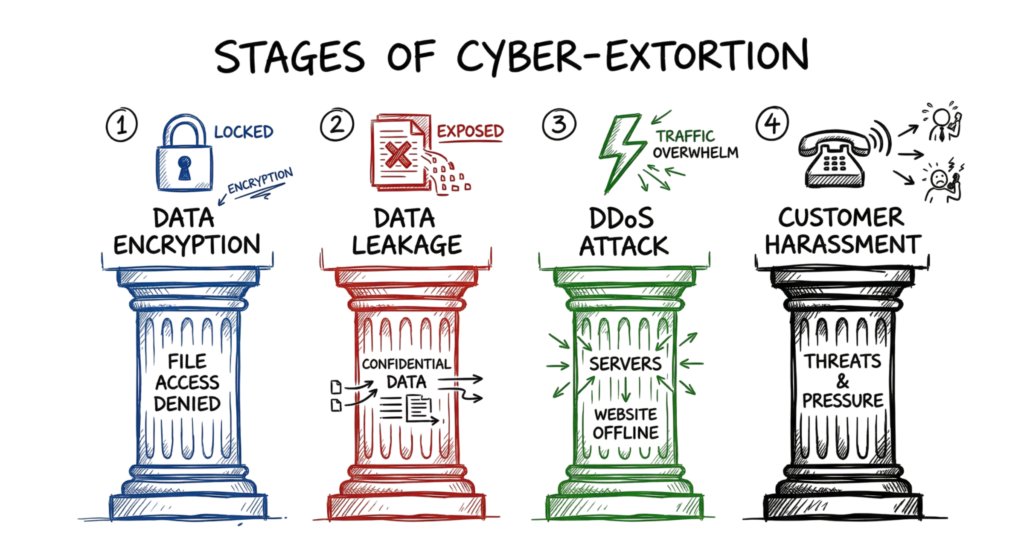
Today’s ransomware attacks typically involve four stages of extortion:
- Data Encryption: Attackers encrypt files, applications, and critical systems, making them inaccessible.
- Data Theft: Before encryption, attackers steal sensitive data and threaten to publish or sell it if the ransom is not paid.
- DDoS Attacks: Some ransomware groups launch Distributed Denial-of-Service (DDoS) attacks against public-facing websites to disrupt business operations.
- Customer or Partner Extortion: Attackers may contact customers, suppliers, or business partners directly, threatening to expose stolen information unless the victim pays the ransom.
Understanding how ransomware attacks work requires looking beyond the final encryption stage. In real-world incidents, ransomware operators rarely announce their presence. Instead, the first indicators are often subtle and easy to overlook. Security teams may notice an unusual login attempt from another country, unexpected PowerShell activity, a suspicious DNS request to an unfamiliar domain, or abnormal authentication behavior detected by a SIEM or endpoint detection solution.
In many ransomware investigations, attackers remain inside the environment for days or even weeks before encrypting any files. During this time, they perform reconnaissance, steal credentials, escalate privileges, move laterally across the network, disable security tools, and exfiltrate sensitive data. By the time the ransom note appears, the attackers have often already achieved their primary objectives.
This is why early detection, continuous monitoring, and proactive threat hunting are essential for preventing ransomware attacks before they reach the encryption stage.
How Ransomware Attacks Work Using RaaS (Ransomware-as-a-Service)
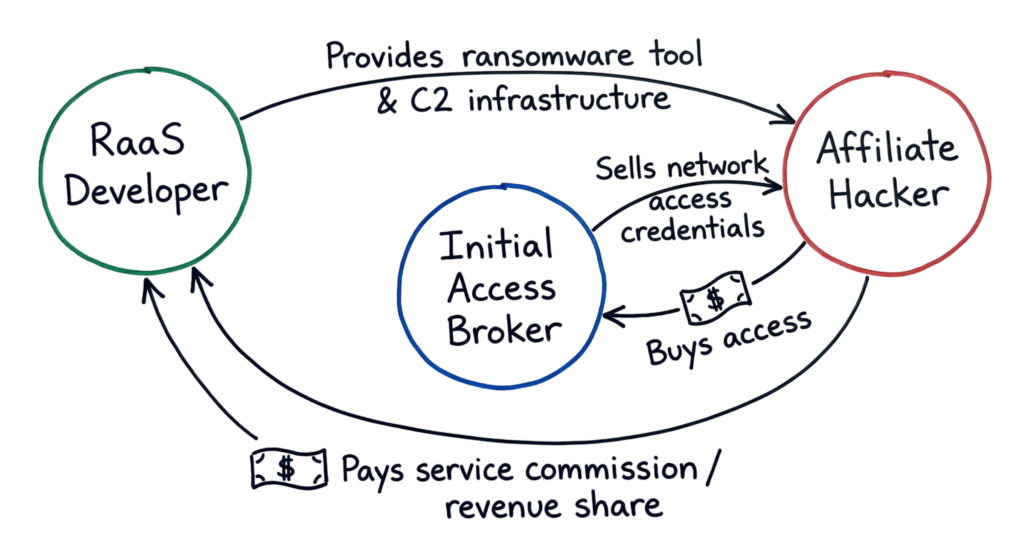
Most ransomware attacks in 2026 follow a Ransomware-as-a-Service (RaaS) model. Instead of a single hacker carrying out every stage of an attack, ransomware groups operate like commercial businesses. They develop ransomware malware, maintain payment portals and data leak websites, provide technical support, and continuously update their tools. These ransomware platforms are then leased to affiliates, who conduct the actual attacks and share a percentage of the ransom with the ransomware operators.
One of the most important parts of understanding how ransomware attacks work is recognizing that the affiliate often isn’t the attacker who first compromised the organization. In many cases, they purchase access from an Initial Access Broker (IAB).
An Initial Access Broker specializes in gaining unauthorized access to corporate networks. They spend their time scanning the internet for vulnerable VPN gateways, exploiting unpatched systems, targeting exposed Remote Desktop Protocol (RDP) services, or stealing credentials through phishing campaigns. Once they successfully compromise an organization, they sell that access on underground cybercrime marketplaces to ransomware affiliates, often for thousands of dollars depending on the size and value of the target.
This cybercrime ecosystem allows different groups to specialize in what they do best. Initial Access Brokers focus on breaking into networks, ransomware developers create and maintain the malware, and affiliates execute the attack. This division of responsibilities has made ransomware campaigns faster, more scalable, and significantly more difficult for organizations to defend against.
How Ransomware Attacks Work: Inside the Technical Architecture
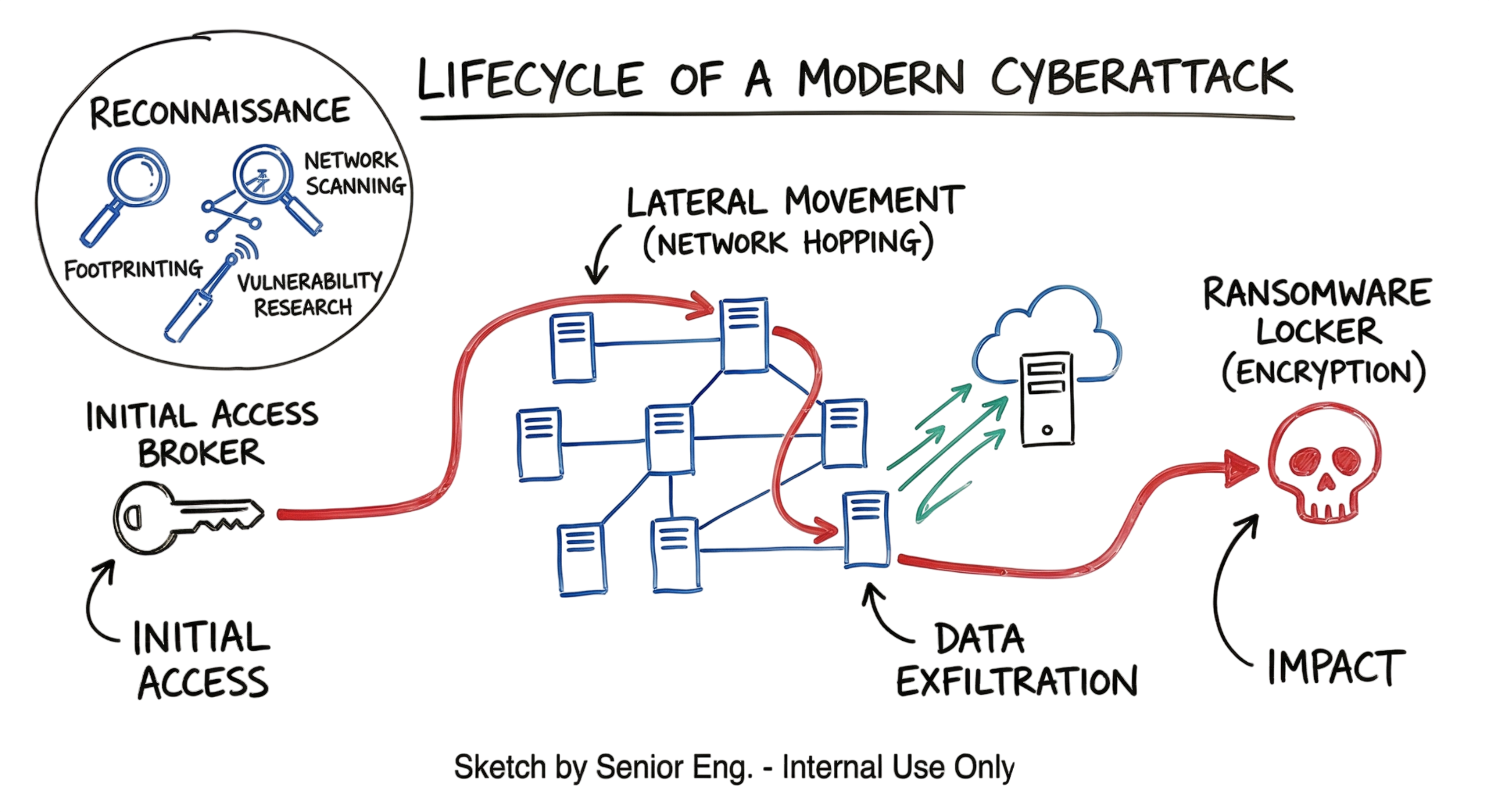
A ransomware attack of 2026 will follow a very specific attack path, It is mapped according to the MITRE ATT&CK framework. Knowing what comes next will enable you to prevent attacks in the early stage of compromise instead of having to restore your data from the backup.
- Initial access: This can be either compromised credentials or exploits in edge devices. For instance, I recently observed a case when a firewall contained a zero day exploit and was used to drop the web shell.
- Reconnaissance: After gaining access, they run a number of commands like whoami, net group “Domain Admins” /domain. This helps them understand who are the key actors in the organization and locate the most valuable data.
- Lateral movement: Here is where people go wrong. They think that lateral movement simply means moving from server to server, but not at all. The attackers use your legitimate tools and protocols like RDP or SMB. They might also deploy Mimikatz to extract passwords from memory from the workstation computer.
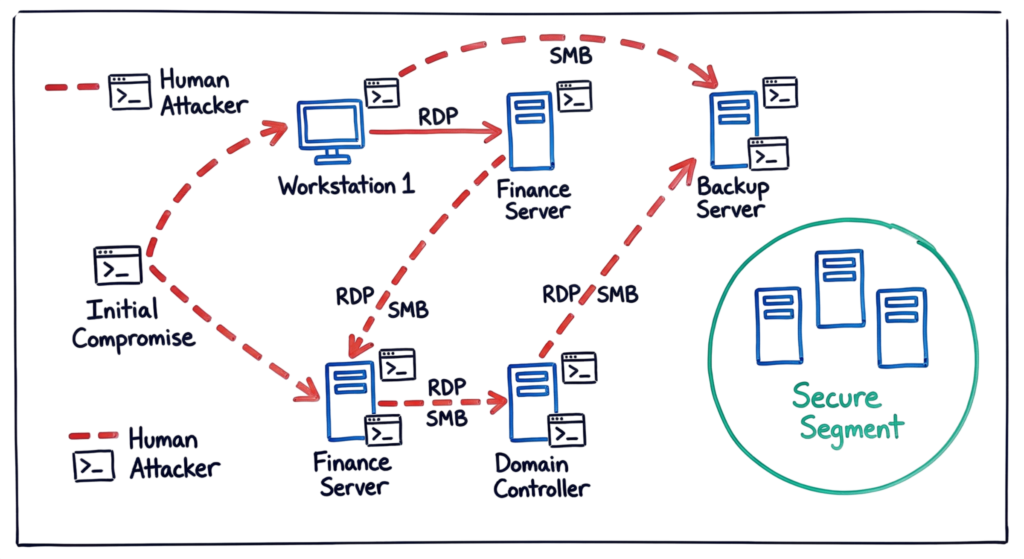
- Exfiltration: Once they find your sensitive files, they upload them to their infrastructure using Rclone or MegaSync.
- Impact: They delete backups with vssadmin.exe delete shadows /all /quiet command and launch the encryption process.
Key Components of a Modern Attack
In 2026, we see three major pieces in every attack. First is the Command and Control (C2) server. This is the “brain” of the operation. The malware on your system talks to this server to get instructions. Second is the exfiltration tool. This is how they steal your data. Third is the locker. This is the actual code that turns your files into unreadable garbage.
This is where I’ve seen a lot of teams fail. They focus only on the locker. But in 2026, data theft is often more dangerous than encryption. If you restore from backups but they still have your client list, they still have power over you.
Real-World Example: The Manufacturing Hit
Let’s look at an enterprise-level scenario. A mid-sized manufacturing company had a junior admin who didn’t use Multi-Factor Authentication (MFA) on his personal account. An attacker used a simple password spray to get into his email. From there, they found a password for the company’s VPN.
The attacker logged in at 2:00 AM. Zscaler logs showed a connection from a residential IP in another country. Because it was a “valid” login, no one looked at it. The attacker moved from the VPN to the Domain Controller in four hours. They sat there for a week, mapping out the backup servers. On a Friday night, they wiped the backups and encrypted the production database. The company lost three days of production time. That cost them nearly two million dollars.
Practical Implementation: Detection and Prevention
If you want to prevent this, you have to look at the logs. You can’t just buy a tool and walk away. Here is how you actually implement a defense.
Technical Logs to Watch
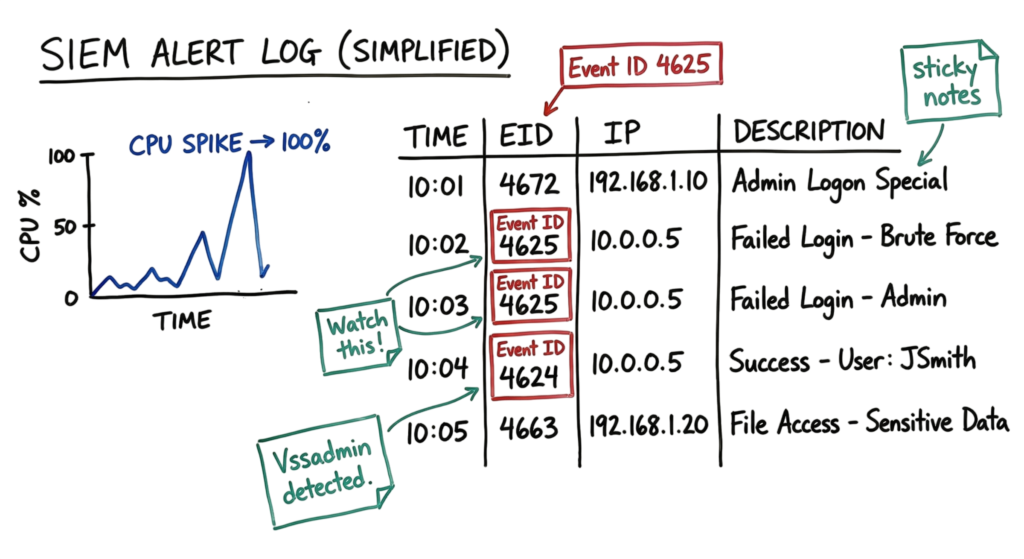
You should have alerts set up for these specific events in your SIEM:
- Event ID 4625: Multiple failed login attempts in a short window.
- Event ID 4624: Successful logins at 3:00 AM from accounts that never work late.
- Process Creation: Watch for vssadmin.exe or bcdedit.exe being used to modify recovery settings.
- Zscaler/Firewall: Look for “Large upload” alerts to unknown domains.
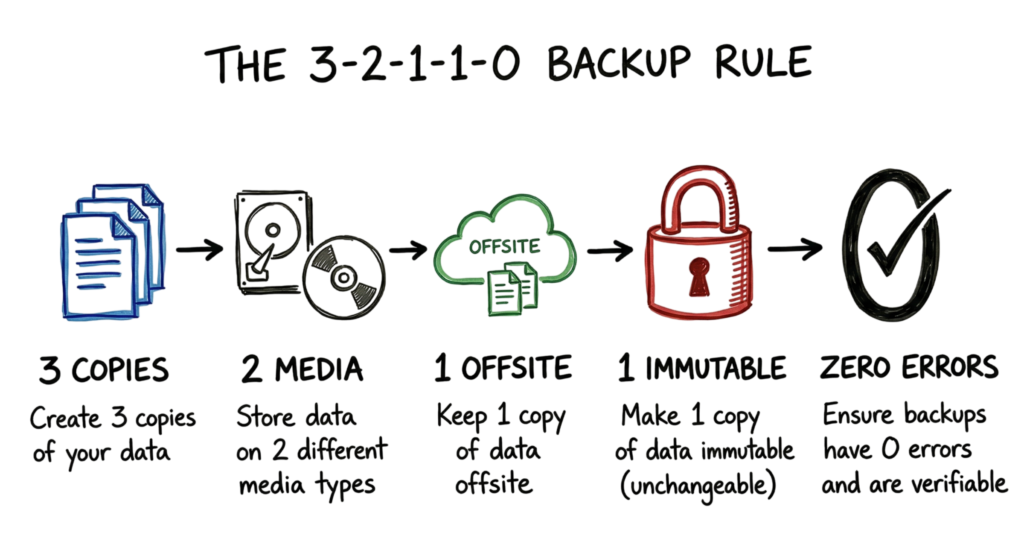
The 3-2-1-1-0 Backup Rule
- Keep 3 copies of your data.
- Store them on 2 different types of media (like cloud and disk).
- Keep 1 copy offsite.
- Keep 1 copy immutable (meaning it cannot be changed or deleted even by an admin).
- Ensure there are 0 errors in your backup recovery tests.
Advantages and Limitations of Modern Security
The advantage of current tools like Microsoft Defender and Zscaler is the ability to see everything. We can see exactly what process started a connection and where that connection is going. We can block known bad IPs instantly across the whole company.
The limitation is that attackers now use “Living off the Land” (LotL) techniques. They use your own PowerShell scripts or admin tools. It is very hard for a tool to know if a PowerShell command is a real admin doing his job or an attacker stealing a database. This is why human oversight is still required. You need to know your environment well enough to spot the “weird” stuff.
Common Mistakes
The biggest mistake I see is thinking that a VPN is a security wall. It isn’t. If I have your VPN password, I am “on the network.” You need to treat your internal network as if it is already compromised. This is the “Zero Trust” model. Never trust, always verify.
Another mistake is ignoring small alerts. I once worked on a case where an engineer saw a “Log Cleared” alert on a server. He thought it was just a system update and closed the ticket. It wasn’t. The attacker had cleared the logs to hide their movement. Two days later, the company was encrypted.
Best Practices for 2026
If you want to stay safe, follow these steps:
- MFA Everywhere: No exceptions. Not for the CEO, not for the service accounts.
- Network Segmentation: Your accounting team should not be able to “ping” the factory floor machines.
- Endpoint Hardening: Disable things you don’t use. If your users don’t need PowerShell, block it for them.
- Regular Patching: Attackers love old bugs. If a patch comes out for your VPN or firewall, install it immediately.
- Immutable Backups: This is your last line of defense. If your backups can be deleted by a domain admin password, you don’t have backups. You have a target.
Advantages and Limitations of Modern Security Troubleshooting Scenario: The “Locked” Admin Account
You get a ticket saying a senior admin is locked out of his account. You unlock it, and five minutes later, it is locked again. Most people just assume it is a stuck script.
In a real environment, this is often an attacker trying to brute-force that account. I’ve seen this happen where an attacker had a list of 10,000 passwords and was trying them one by one. If you see this, do not just unlock the account. Look at the “Source Network Address” in the security logs. If that address is coming from a printer or a guest Wi-Fi laptop, you have an infected device on your network that is attacking your admin.
Interview Questions
- How does the RaaS affiliate model change the way we do incident response?
- Answer: It means we are fighting a human, not just a static file. We have to look for lateral movement and credential theft, not just a “virus signature.”
- What is the first command an attacker might run after gaining initial access?
- Answer: Usually whoami to check their privileges or ipconfig /all to see the network layout.
- Why is exfiltration often done before encryption?
- Answer: It gives the attacker more leverage. Even if the victim restores their files, the attacker can still leak the data to damage the victim’s reputation.
- How do you detect “Living off the Land” attacks?
- Answer: By monitoring for unusual parent-child process relationships. For example, Word starting a PowerShell process is almost always an attack.
- What is an immutable backup and why does it matter?
- Answer: It is a backup that cannot be modified or deleted for a set time. It prevents ransomware from wiping your recovery options even if they get admin rights.
Future Trends (2026)
We are starting to see AI-automated attacks. Attackers are using LLMs to write phishing emails that look exactly like your company’s internal newsletters. They also use AI to scan your code for bugs faster than your team can patch them.
We are also seeing an increase in attacks on the supply chain. Instead of hitting you directly, they hit the software you use to manage your servers. If they get into your RMM (Remote Monitoring and Management) tool, they have access to every one of your clients instantly.
FAQ
1. Should we pay the ransom? I’ve never seen a good reason to pay. Even if you pay, you are just telling the attackers that you are a “good customer.” They might leave a back door and hit you again in six months.
2. Is a standard antivirus enough? No. You need an EDR (Endpoint Detection and Response) tool. Antivirus looks for files it knows are bad. EDR looks for behaviors that are suspicious, which is how you catch new ransomware.
3. How do attackers find our VPN? They use search engines like Shodan. These tools show every device connected to the internet. If your VPN is visible, they will find it.
4. Can ransomware hit my cloud data? Yes. If you sync your laptop to OneDrive or Google Drive, and your files get encrypted, those “bad” files will sync to the cloud and overwrite your good ones.
5. How long does a ransomware investigation take? The initial cleanup might take a few days, but a full investigation to find the root cause usually takes weeks. You have to look through thousands of lines of logs to be sure they are truly gone.
Conclusion
How Ransomware Works: Real Cases and Mitigation Measures is the first lesson on your journey to becoming an excellent security engineer. It is a game of hide-and-seek. You don’t need to be flawless; just more difficult to exploit than your competitors.
From my own experience, it comes down to preparation. The teams that were ready had performed tabletops and tested their backups monthly. Don’t wait until the midnight phone call telling you that your recovery procedure doesn’t work. Maintain your logs in order, patch timely, and ensure immutability of your backups. If you have any SIEM or Zscaler setup questions, do not hesitate to contact us.
- What Is Cybersecurity and Why It Is Important Today
https://technaga.com/what-is-cybersecurity-and-why-it-is-important-today/ - How to Identify Phishing Attacks in 2026 (Complete Guide)
https://technaga.com/how-to-identify-phishing-attacks-in-2026/ - Essential Endpoint Security Guide 2026 for Every Organization
https://technaga.com/endpoint-security-2026-guide/ - Network Segmentation Explained with Real-World Example
https://technaga.com/network-segmentation-guide-ransomware-prevention/ - Zero Trust Security in 2026: Architecture, Real Examples, and Implementation Guide
https://technaga.com/zero-trust-security-2026-guide/ - Identity and Access Management in 2026: A Practical Guide for Cloud Security Professionals
https://technaga.com/identity-and-access-management-cloud-security-2026/ - Top 10 Cybersecurity Best Practices for 2026
https://technaga.com/top-10-cybersecurity-best-practices-2026/ - Security Information and Event Management (SIEM): Complete Guide 2026
https://technaga.com/security-information-and-event-management-2026/
References
- CISA Stop Ransomware
https://www.cisa.gov/stopransomware - NIST Cybersecurity Framework (CSF 2.0)
https://www.nist.gov/cyberframework - MITRE ATT&CK Framework
https://attack.mitre.org/ - OWASP
https://owasp.org/







