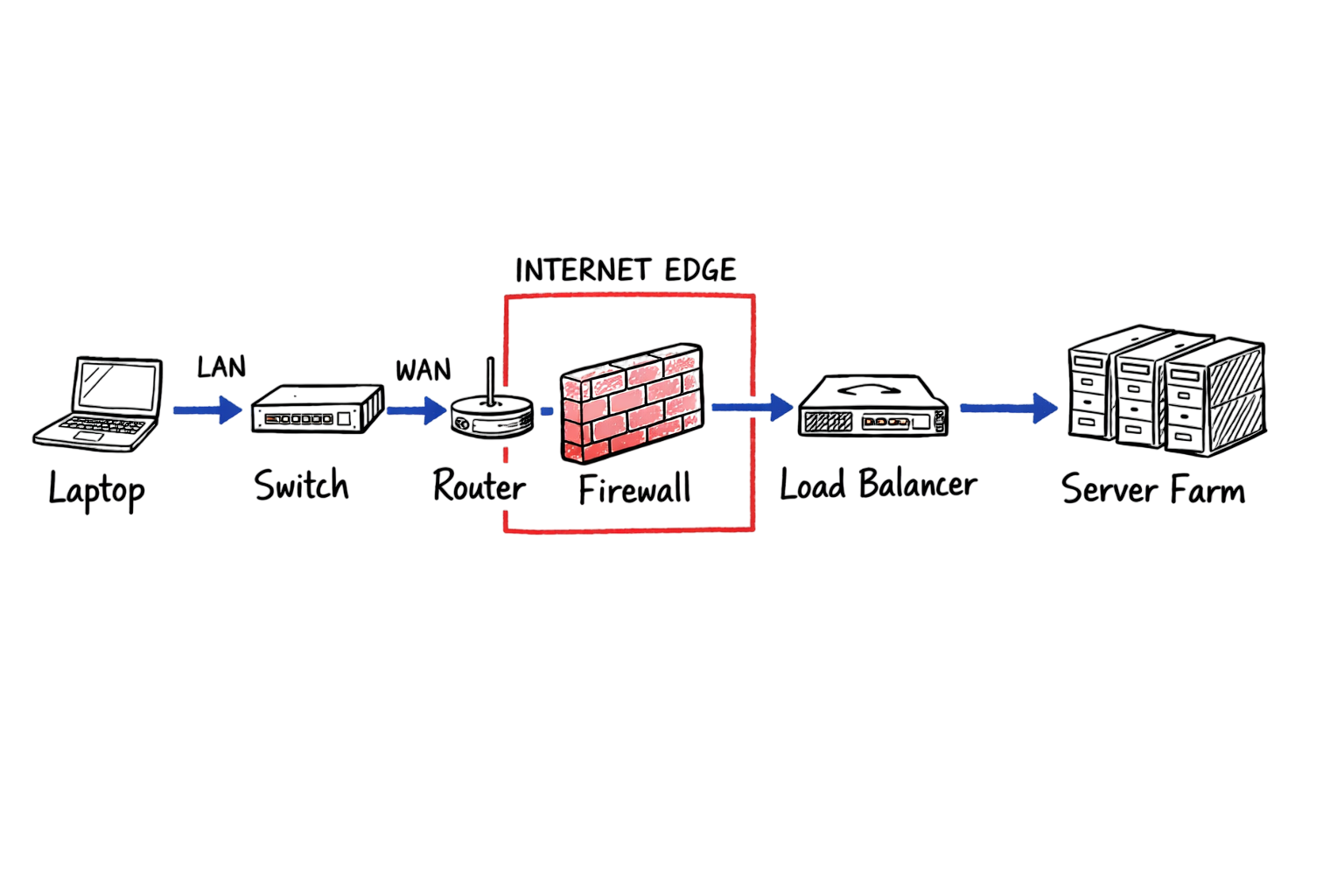
Network devices are the physical or virtual components that move data, control network access, and enable communication between computers, servers, and cloud resources. Every modern network depends on these devices to forward traffic, improve performance, and protect sensitive data.
Understanding network devices is essential for network administrators, cybersecurity professionals, and anyone preparing for networking certifications. Once you know what each device does and which OSI model layer it operates on, troubleshooting becomes faster and more accurate.
In this guide, you’ll learn the most common network devices, how they work, their functions, and where they are used in real-world enterprise networks.
What Are Network Devices?
Network devices are hardware or virtual appliances that forward, filter, translate, manage, or secure network traffic between endpoints, servers, and external networks. Each device performs a specific function to ensure reliable communication across a network.
Different network devices operate at different layers of the OSI model. Some function at Layer 1 (Physical), while others work at Layer 2 (Data Link), Layer 3 (Network), or even Layer 7 (Application).
Understanding the OSI layer of each device is important because it determines what the device can inspect and control. For example, a network switch forwards frames using MAC addresses, while a router makes forwarding decisions based on IP addresses. A modern firewall can inspect applications, users, and encrypted traffic in addition to network ports.
Mapping network devices to their OSI layers makes troubleshooting significantly easier and helps identify where communication problems occur.
Why the OSI Model Matters
The OSI model is more than a networking concept used in certification exams. It provides a structured framework for understanding where network traffic is processed, blocked, translated, or delayed.
For example:
- If a network link fails, start by checking physical connectivity, cables, transceivers, interface speed, and duplex settings (Layer 1).
- If devices in different VLANs cannot communicate, investigate switching and routing at Layers 2 and 3.
- If users can reach the default gateway but cannot access an application, examine firewall policies, NAT, DNS, or load balancer configurations at the upper layers.
Following the OSI model allows engineers to isolate problems systematically instead of troubleshooting by trial and error.
How Network Devices Work
Each of the major network devices is designed to solve a specific networking challenge.
A hub repeats every incoming frame to all connected devices. A network switch learns MAC addresses and forwards frames only to the intended destination, reducing unnecessary traffic.
A router connects different networks and selects the best forwarding path based on routing tables and IP addresses. If you’re new to networking, understanding IP addresses before learning routing concepts will make the process much easier.
A firewall inspects network traffic and determines whether connections should be allowed or blocked based on security policies. Modern firewalls can also inspect applications, users, and encrypted traffic.
A load balancer distributes client requests across multiple healthy servers to improve performance, reliability, and application availability.
A wireless access point (WAP) connects Wi-Fi devices to a wired Ethernet network, allowing laptops, smartphones, and other wireless clients to communicate with internal resources.
Each of these network devices performs a specialized role. Together, they provide the speed, scalability, segmentation, and security required to build modern enterprise networks.
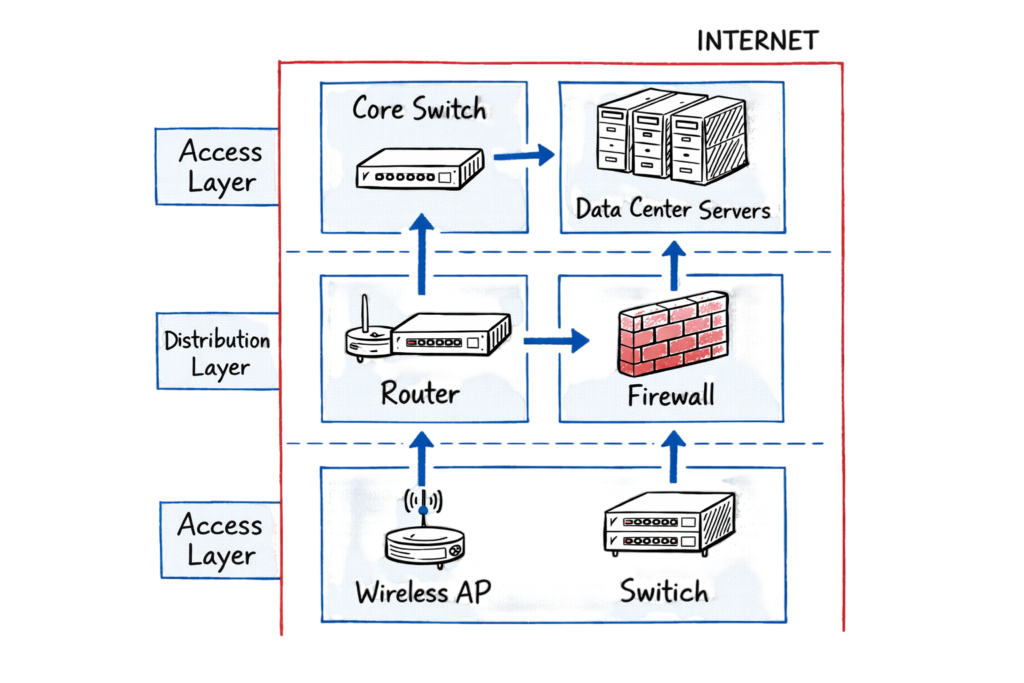
Technical Flow: How Network Devices Deliver Traffic from an Endpoint to an Application
Understanding how network devices work together helps you troubleshoot connectivity issues more efficiently. A typical user request passes through multiple networking devices before reaching the destination application.
The process begins when a user’s laptop sends a request to its default gateway. A network switch forwards the Ethernet frame within the local area network (LAN) using MAC addresses. If the destination is outside the local subnet, a router receives the packet and determines the best forwarding path based on its routing table.
Before the traffic reaches the internet or another network, a firewall inspects the packet against configured security policies. Modern firewalls can also perform application awareness, intrusion prevention, and SSL inspection to detect malicious traffic.
If the application is hosted across multiple servers, a load balancer distributes the request to the healthiest available backend server, ensuring high availability and optimal performance. Once the application processes the request, the response follows the reverse path through the same network devices, where features such as Network Address Translation (NAT), firewall inspection, and routing policies are applied again before the data reaches the user’s device.
The following simplified flow represents how network devices handle enterprise network traffic:
Laptop → Network Switch → Router → Firewall → Load Balancer → Application Server
                                   ← Response Returns Through the Same Path
Why This Matters
A network is only as reliable as its weakest component. Even if every other network device is functioning correctly, a single misconfigured switch, router, firewall, or load balancer can interrupt the entire communication path.
Understanding how these network devices interact enables network engineers to isolate faults faster, improve performance, and reduce downtime in production environments.
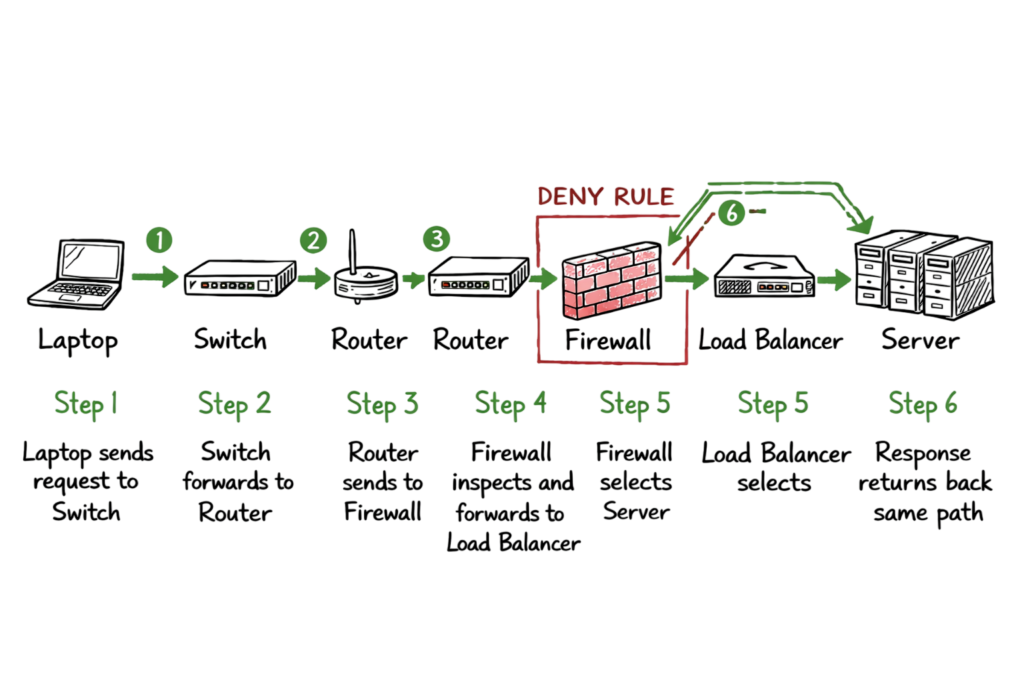
Core Network Devices You Should Know
Understanding the most common network devices is essential for building, managing, and troubleshooting modern enterprise networks. Each device performs a specific function and operates at one or more layers of the OSI model.
Hub
A hub is a Layer 1 (Physical Layer) device that repeats incoming signals to every connected port without examining the destination. Because it broadcasts traffic to all devices, hubs create unnecessary network congestion and are rarely used in modern networks.
Network Switch
A network switch is a Layer 2 (Data Link Layer) device that forwards Ethernet frames using MAC addresses. It builds a MAC address table to send traffic only to the intended destination, improving network efficiency and reducing collisions. Layer 3 switches can also perform routing between VLANs.
Router
A router is a Layer 3 (Network Layer) device that connects multiple networks and forwards packets based on IP addresses and routing tables. Routers enable communication between LANs, WANs, and the internet while selecting the most efficient path for network traffic.
Bridge
A bridge is a Layer 2 device that connects two network segments and filters traffic using MAC addresses. Although modern switches have largely replaced standalone bridges, they introduced the concept of intelligent traffic forwarding.
Repeater
A repeater is a Layer 1 device that regenerates and amplifies weak network signals, allowing data to travel longer distances without significant signal degradation.
Gateway
A gateway connects networks or systems that use different communication protocols. It translates data between incompatible networks, enabling communication between devices that would otherwise be unable to exchange information.
Firewall
A firewall is a network security device that monitors and filters incoming and outgoing traffic based on predefined security policies. Modern Next-Generation Firewalls (NGFWs) can inspect applications, users, and encrypted traffic to defend against advanced cyber threats.
Load Balancer (Application Delivery Controller)
A load balancer, also known as an Application Delivery Controller (ADC), distributes client requests across multiple servers. It continuously monitors server health to improve application performance, scalability, and high availability while preventing individual servers from becoming overloaded.
Wireless Access Point (WAP)
A Wireless Access Point (WAP) connects Wi-Fi-enabled devices such as laptops, smartphones, and tablets to a wired Ethernet network. It extends wireless coverage and provides secure access to network resources for mobile users.
How Switches, Routers, and Firewalls Work in Production
Among all network devices, network switches, routers, and firewalls are the three components that keep enterprise networks connected, secure, and performing efficiently. Although each device has a distinct role, they work together to ensure reliable communication between users, applications, and external networks.
Network Switches
A network switch is the foundation of most Local Area Networks (LANs). Operating primarily at Layer 2 of the OSI model, it forwards Ethernet frames using MAC addresses, ensuring that traffic reaches only the intended destination instead of every connected device. This intelligent forwarding reduces unnecessary broadcasts, improves network performance, and minimizes congestion.
In modern data centers, organizations commonly deploy multilayer switches (Layer 3 switches). These advanced network devices combine high-speed switching with routing capabilities, allowing communication between VLANs while reducing latency for server-to-server traffic.
Routers
A router connects different IP networks and forwards packets based on routing tables and IP addresses. It enables communication between branch offices, corporate data centers, cloud environments, and the public internet.
Whether connecting an internal subnet to the internet edge or linking remote offices through a WAN, routers ensure that traffic follows the most efficient path. Without routers, individual networks would remain isolated and unable to communicate with one another.
Firewalls
A firewall is a critical network security device that sits at points where security policies must be enforced. It determines whether network traffic should be allowed, denied, or inspected based on predefined access rules.
Modern Next-Generation Firewalls (NGFWs) go far beyond traditional port-based filtering. They provide advanced security capabilities such as:
- Application Control to identify and manage applications.
- URL Filtering to block malicious or inappropriate websites.
- SSL/TLS Inspection to analyze encrypted traffic.
- Intrusion Prevention System (IPS) to stop known exploits.
- Threat Prevention to detect malware, ransomware, and command-and-control (C2) communications.
These advanced capabilities make firewalls one of the most important network devices for protecting enterprise infrastructure against modern cyber threats.
Why These Network Devices Are Essential
In production environments, network switches, routers, and firewalls work together to deliver fast, reliable, and secure network connectivity. Switches optimize local traffic within the LAN, routers connect multiple networks and determine the best path for data, while firewalls enforce security policies and protect against cyber attacks. Understanding how these network devices interact is essential for designing resilient networks and troubleshooting connectivity or security issues efficiently.
A real enterprise example
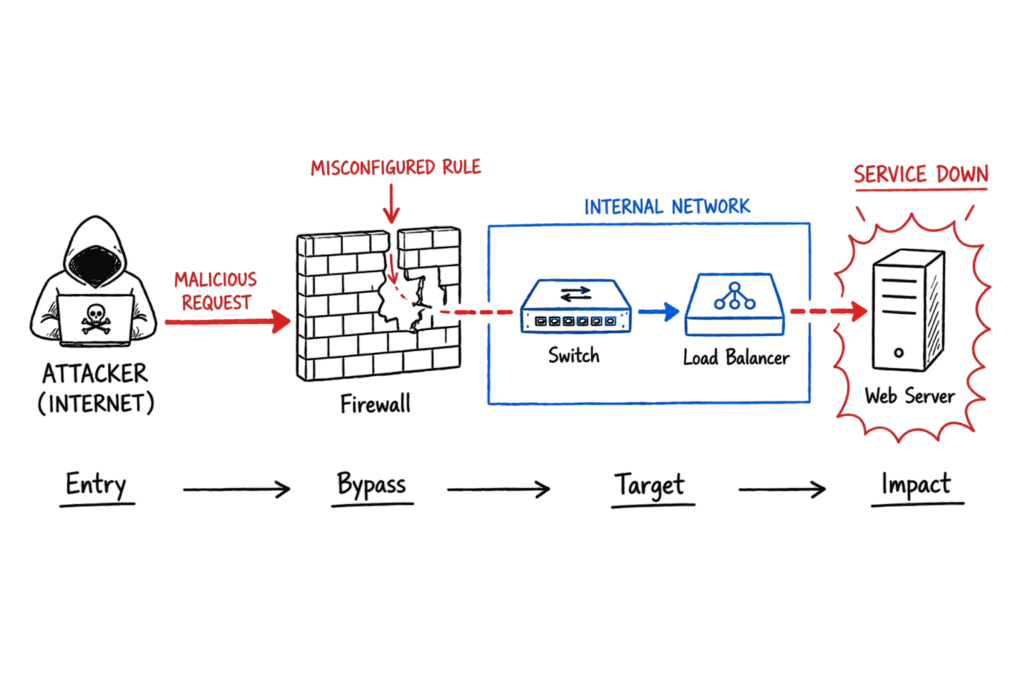
In a banking environment, the branch office network was up, but users could not open the internal loan portal. The switch showed green links, the router had a route, and DNS was resolving correctly. The first guess was server failure.
The actual issue was on the firewall path after a backend change. The portal traffic had moved to a new subnet, but the security policy and NAT rule were still pointed to the old range. The team updated the rule, verified the backend health on the load balancer, and restored access without touching the branch switches.
When I was working on a client environment in a banking setup, we ran into exactly this kind of issue after a maintenance change. The network looked fine at the edge, but one policy object was still pointing at an outdated server group. That is why you should always check policy objects, not just connectivity.
Practical implementation steps
- Start with the endpoint and confirm the symptom. Do not jump straight to the firewall.
- Check the local link first. Verify speed, duplex, VLAN, and IP settings.
- Confirm the switch MAC table and port status. A bad VLAN assignment often looks like an application issue.
- Validate routing. Make sure the router or gateway has a path to the next network.
- Review firewall policy, NAT, and logging. If traffic reaches the firewall but gets dropped, the logs will usually tell you why.
- Check the load balancer or server health if the request reaches the application layer but fails later.
- Test from a second user or subnet. That helps you separate device problems from client-specific problems.
The main habit here is to move layer by layer instead of guessing.
Common mistakes and best practices
Most people troubleshoot from the wrong end. They start with the server, then the firewall, then the router, and finally the user laptop. That wastes time. Start where the traffic enters the network and follow the path in order.
Another common mistake is treating every device as if it works the same way. A switch does not inspect policy like a firewall. A router does not solve application issues by itself. A load balancer does not fix a broken DNS record.
A practical production rule: always check logs before making changes. In live environments, logs usually tell you whether the issue is a deny rule, a health check failure, a route miss, or a mis-tagged VLAN. That saves you from breaking something that already works.
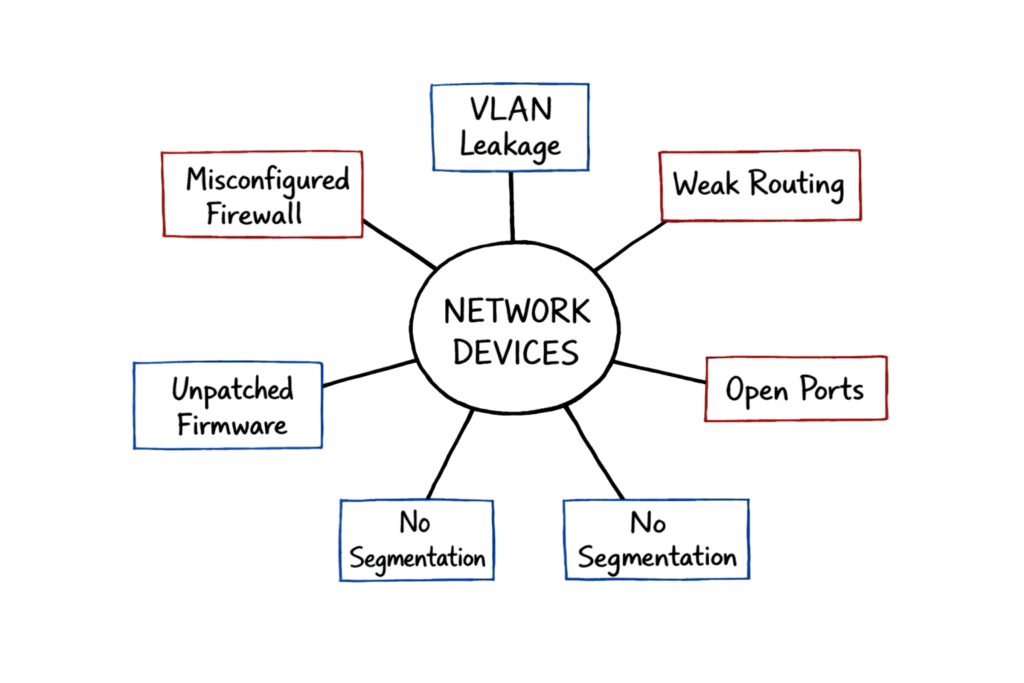
Troubleshooting scenario
Symptom: users see this in the browser, but only from one site office:
ERR_CONNECTION_TIMED_OUT
The wrong assumption is that the internet is down. In most cases, it is not. The problem is often local routing, firewall policy, or a bad return path from the application.
The fix is to trace the path in order. Check the local gateway, verify the firewall logs, confirm the NAT rule, and test the backend server health. If the timeout happens only from one subnet, the issue is usually network-specific rather than application-wide.
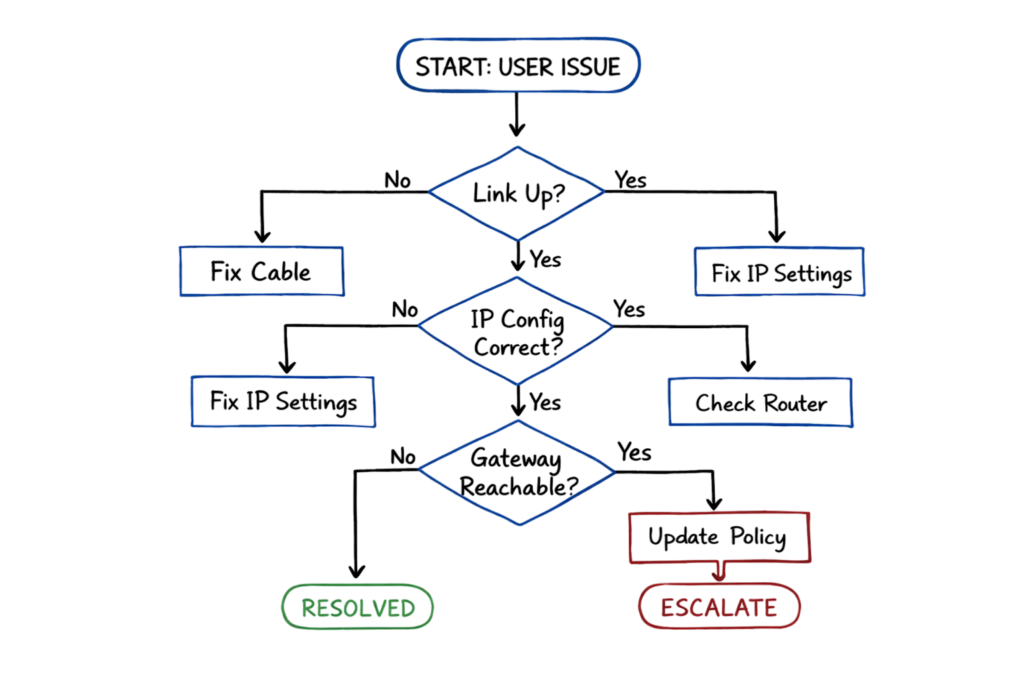
Why load balancers and access points matter
Load balancers are not just for huge websites. Any time you have multiple servers behind one service name, a load balancer helps distribute traffic and remove failed nodes from rotation. It keeps requests flowing when one backend dies.
Wireless access points matter because most users connect through Wi-Fi before they ever touch a wired path. In offices, hospitals, campuses, and stadiums, AP density, channel planning, and roaming behavior directly affect user experience. If Wi-Fi feels unstable, the issue may be design, not the internet link.
Interview questions you should be ready for
Q: What is the main difference between a switch and a router?
A: A switch forwards traffic within the same network using MAC addresses. A router forwards traffic between different networks using IP routes.
Q: Why do we still need firewalls if routers already forward traffic?
A: Routers move packets. Firewalls decide whether the packets should be allowed, denied, or inspected based on policy.
Q: What happens when a switch learns a MAC address?
A: It stores the address in its MAC table and forwards future frames for that device to the correct port.
Q: Why do load balancers check server health?
A: So they send traffic only to servers that can actually respond. That prevents outages caused by failed backends.
Q: What is a gateway in a practical network?
A: It is the point that connects one network to another, often between a local subnet and an external network or a different protocol domain.
Q: Why is a hub considered obsolete?
A: It repeats traffic to every port, creates collisions, and offers no traffic intelligence.
Q: How do you troubleshoot a user who can ping the gateway but not open an app?
A: Check routing, firewall rules, NAT, DNS, and the backend server path in that order.
FAQ
What is the most important network device to understand first?
Start with the switch, router, and firewall. Those three devices appear in almost every enterprise path and solve most real troubleshooting cases.
Are bridges still used today?
They exist, but they are rare in modern enterprise networks. Switches replaced most bridge use cases because they are faster and more scalable.
What is the difference between a gateway and a router?
A router forwards traffic between IP networks. A gateway can also translate between different protocols or systems.
Why do users sometimes blame the firewall when the real issue is elsewhere?
Because the firewall is often the first device that logs denied traffic. That does not mean it caused the problem. It may only be where the failure became visible.
Do wireless access points replace switches?
No. APs connect wireless clients into the wired network, but they still depend on switches and routing underneath.
What should a junior engineer check first during a connectivity issue?
Check link status, IP settings, VLAN, gateway, DNS, and logs. That order avoids random guessing.
Conclusion
Network devices are easier to understand when you stop looking at them as separate boxes and start seeing the job each one does in the traffic path. Switches move frames, routers move packets, firewalls control access, and load balancers keep services available. Once you know where each device sits in the network, network devices become much easier to design, troubleshoot, and explain in interviews.
Related Articles
- Complete Network Security Basics Guide for Beginners
- What Is Firewall in Cybersecurity? Types, Examples & How It Works
- IP Address: 12 Essential Concepts Ultimate Guide
- OSI Model Explained
- TCP/IP Model Explained
- Network Protocols and Ports Explained
- Next Generation Firewall (NGFW) Guide
- Network Segmentation Explained
- Zero Trust Security Explained
- Cybersecurity Best Practices








5 thoughts on “Network Devices Made Easy: Complete Beginner’s Guide (2026”