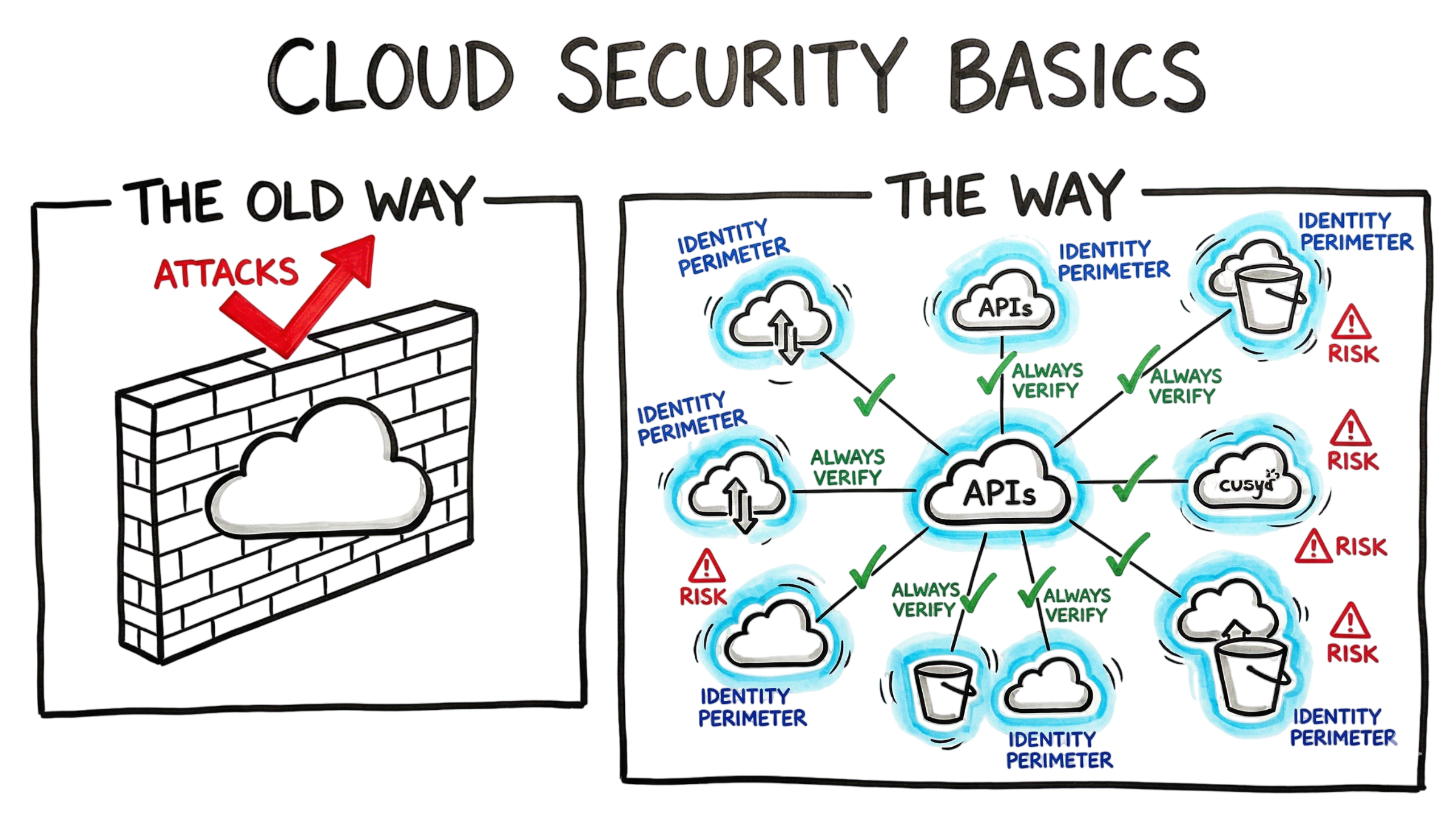
Last Tuesday, I logged into our Security Information and Event Management (SIEM) dashboard and was greeted by what looked like a solid wall of red alerts. An automated detection rule had flagged a machine identity attempting to access data from a storage volume that is normally left empty. Every second, the logs recorded hundreds of failed attempts to read a single sensitive directory, indicating an automated attack rather than normal user activity.
No human can generate requests at that speed. The activity originated from an automated bot using a compromised service account to search for weaknesses in the environment. Today, machine identities such as service accounts, APIs, containers, and automation tools significantly outnumber human users, making them an attractive target for attackers. If these identities are not properly managed, they can become one of the biggest Cloud Security Risks facing modern organizations.
This example highlights why understanding Cloud Security Basics is essential for every organization moving to the cloud. Protecting identities, controlling permissions, and continuously monitoring access are fundamental security requirements. Under the Shared Responsibility Model, cloud providers secure the underlying infrastructure, while customers remain responsible for protecting their applications, identities, configurations, and data. Following proven Cloud Security Best Practices, such as enforcing least privilege, enabling Multi-Factor Authentication (MFA), rotating access keys, and continuously monitoring cloud activity, can significantly reduce the risk of unauthorized access and data breaches.
What is Cloud Security Basics (2026)
Cloud Security Basics refer to the technologies, processes, and security controls used to protect data, applications, workloads, and cloud infrastructure from cyber threats. These controls help maintain the confidentiality, integrity, and availability of cloud resources while ensuring organizations can securely operate in public, private, and hybrid cloud environments.
In 2026, cloud security is no longer about building a strong network perimeter. Modern cloud environments are dynamic, with virtual machines, containers, and cloud services being created and removed within seconds. As a result, security must be integrated throughout the entire application lifecycle, from development and deployment to continuous monitoring and incident response.
When implementing Cloud Security Basics, organizations should focus on protecting three critical assets: identities, data, and workloads. Traditional security strategies relied heavily on firewalls and network boundaries, but today’s cloud platforms place identity at the center of security. A single exposed service account, API key, or access token can bypass multiple security controls if proper safeguards are not in place.
This is where the Shared Responsibility Model becomes essential. Cloud service providers secure the underlying infrastructure, while customers are responsible for protecting their identities, applications, operating systems, configurations, and sensitive data. Understanding this shared approach helps organizations reduce Cloud Security Risks caused by misconfigurations, excessive permissions, insecure APIs, and weak identity management.
Following established Cloud Security Best Practices, such as implementing least privilege access, enabling Multi-Factor Authentication (MFA), encrypting sensitive data, and continuously monitoring cloud activity, helps ensure that even if one component is compromised, the overall cloud environment remains secure and resilient against modern cyber threats.
How it Works: The Shared Responsibility Model
One of the biggest misconceptions in cloud computing is believing that the cloud provider is responsible for every aspect of security. In reality, securing a cloud environment is a shared effort between the cloud provider and the customer. This concept is known as the Shared Responsibility Model, and understanding it is one of the most important Cloud Security Basics for organizations using cloud services.
Under the Shared Responsibility Model, the cloud provider is responsible for the security of the cloud. This includes protecting physical data centers, networking infrastructure, storage hardware, hypervisors, and the core cloud services that keep the platform running. Providers such as Amazon Web Services (AWS), Microsoft Azure, and Google Cloud Platform (GCP) invest heavily in securing this underlying infrastructure.
Customers, however, are responsible for the security in the cloud. This includes protecting uploaded data, managing user identities, securing service accounts, configuring virtual networks, implementing firewall rules, and controlling access permissions. If a storage bucket, virtual machine, or database is accidentally exposed to the public internet, the responsibility lies with the customer rather than the cloud provider.
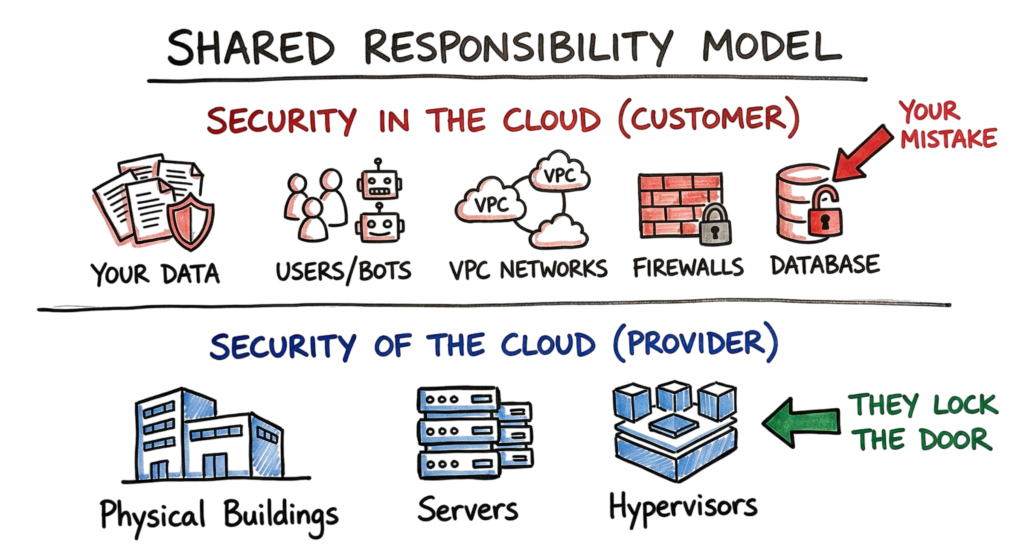
Many of today’s Cloud Security Risks result from configuration errors rather than failures of the cloud platform itself. Publicly accessible storage buckets, excessive Identity and Access Management (IAM) permissions, exposed API keys, and weak authentication policies are among the most common causes of cloud data breaches.
Following established Cloud Security Best Practices helps reduce these risks. Organizations should enforce the principle of least privilege, enable Multi-Factor Authentication (MFA), regularly review IAM permissions, encrypt sensitive data, and continuously monitor cloud resources for misconfigurations and suspicious activity. The cloud provider gives you the tools to secure your environment, but it is your responsibility to configure and use them correctly.
Technical Flow and Architecture
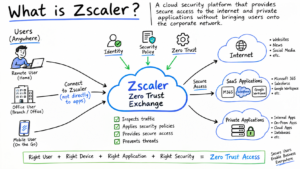
In enterprise environments, cloud security is far more complex than a textbook architecture diagram. Modern organizations adopt a Zero Trust approach, where every user, device, application, and workload must be continuously verified before access is granted. This mindset has become one of the fundamental Cloud Security Best Practices for protecting cloud environments against evolving cyber threats.
The core principle of Zero Trust is “Never Trust, Always Verify.” Every request to access cloud resources is authenticated, authorized, and continuously evaluated, regardless of whether it originates from inside or outside the corporate network. Instead of assuming internal traffic is safe, organizations validate user identity, device health, access permissions, and risk level before allowing access to sensitive data or applications.
This security model aligns closely with Cloud Security Basics and complements the Shared Responsibility Model. While cloud providers secure the underlying infrastructure, organizations remain responsible for implementing Zero Trust policies, enforcing least privilege access, protecting identities, and continuously monitoring user activity. Adopting these practices significantly reduces Cloud Security Risks such as credential theft, insider threats, compromised service accounts, and unauthorized access to cloud resources.
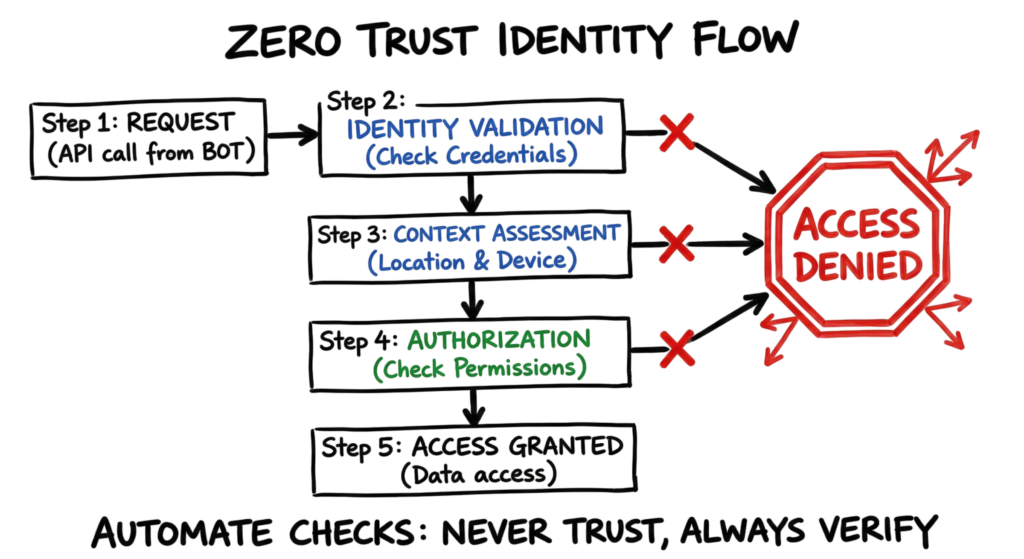
Every time a user, application, or automated service attempts to access a cloud resource, multiple security checks occur before access is granted. These verification steps are essential for protecting sensitive data and reducing unauthorized access.
1. Request
The process begins when a user, application, API, or automated service account sends a request to access a cloud resource such as a virtual machine, storage bucket, database, or web application.
2. Identity Validation
The request is authenticated through an Identity Provider (IdP), which verifies the identity using credentials such as passwords, Multi-Factor Authentication (MFA), certificates, or access tokens. Validating identities is one of the most important Cloud Security Best Practices because compromised credentials remain one of the leading causes of cloud breaches.
3. Context Assessment
After authentication, additional context is evaluated before access is approved. Security platforms analyze factors such as:
- User or service identity
- Geographic location
- Device health and compliance
- IP reputation
- Time of access
- Risk score
If the request appears suspicious, additional verification or access restrictions can be applied automatically.
4. Authorization
Finally, the cloud platform verifies whether the user or workload has permission to perform the requested action. Access decisions are based on Identity and Access Management (IAM) policies and the principle of least privilege, ensuring users receive only the permissions required for their roles.
In large enterprise environments, this entire process happens thousands of times every minute. Manual verification is impossible, which is why cloud platforms rely on automation, AI-driven analytics, and continuous monitoring to make access decisions in real time. These automated controls form an essential part of Cloud Security Basics and help organizations reduce Cloud Security Risks before they become security incidents.
Key Components of Cloud Security
Modern cloud environments require multiple security technologies working together to protect applications, workloads, identities, and sensitive data.
Cloud-Native Application Protection Platform (CNAPP)
A Cloud-Native Application Protection Platform (CNAPP) provides centralized visibility across cloud environments by combining multiple security capabilities into a single platform. Rather than relying on separate tools, CNAPP integrates security posture management, workload protection, vulnerability management, identity analysis, and compliance monitoring.
One of its primary functions is identifying cloud misconfigurations before attackers can exploit them. Examples include publicly exposed storage buckets, excessive IAM permissions, unencrypted resources, and vulnerable workloads. Modern CNAPP solutions also use artificial intelligence to prioritize alerts based on business impact and attack likelihood, allowing security teams to focus on the highest-risk issues first instead of investigating thousands of low-priority notifications.
Implementing CNAPP is considered one of the leading Cloud Security Best Practices because it provides continuous visibility and proactive risk management across complex cloud infrastructures.
Non-Human Identity (NHI) Management
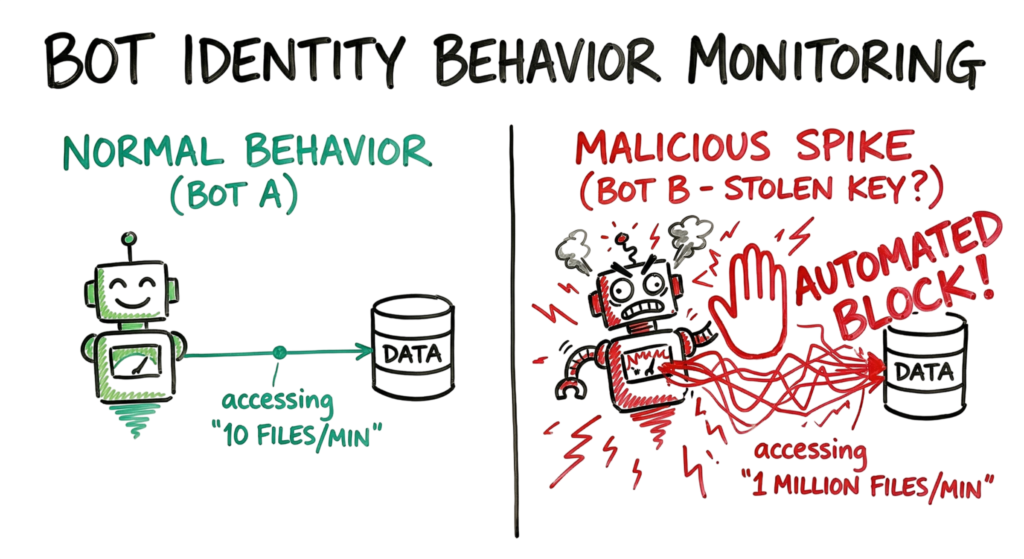
As organizations automate more business processes, Non-Human Identities (NHIs) such as service accounts, API keys, containers, applications, bots, and automation scripts now outnumber human users in many cloud environments.
These identities often have elevated permissions that allow them to access critical cloud resources. If compromised, they can provide attackers with extensive access without triggering traditional user-based security controls, making them one of today’s most significant Cloud Security Risks.
Effective NHI management includes:
- Maintaining an inventory of all service accounts and machine identities.
- Rotating API keys, secrets, and access tokens regularly.
- Removing unused or inactive service accounts.
- Applying the principle of least privilege.
- Continuously monitoring machine identities for unusual activity.
For example, if a service account has not been used for more than 30 days, organizations should review its business purpose and disable or remove it if it is no longer required. Managing non-human identities effectively strengthens overall cloud security and helps reduce the risk of unauthorized access to critical workloads and sensitive data.
Data Security Posture Management (DSPM)
Data Security Posture Management (DSPM) helps organizations discover, classify, and protect sensitive data stored across cloud environments. As businesses adopt multiple cloud services, it becomes increasingly difficult to track where confidential information is stored and who has access to it.
One of the biggest Cloud Security Risks is the presence of forgotten or unmanaged data. For example, developers often create copies of production databases for testing, troubleshooting, or application development and then forget to remove them after the project is complete. These unmanaged datasets, commonly referred to as shadow databases, may contain sensitive customer information, financial records, or intellectual property, making them attractive targets for attackers.
DSPM solutions continuously scan cloud environments to identify sensitive data, detect excessive permissions, discover publicly accessible storage, and alert security teams about potential data exposure. Implementing DSPM is considered one of the essential Cloud Security Best Practices because it provides continuous visibility into where sensitive information resides and helps organizations reduce the risk of accidental data leaks.
Real-World Example: The Toxic Cloud Trilogy
During a recent security investigation, Microsoft Defender for Cloud generated a high-severity alert after detecting unusual API activity originating from a containerized workload. Further analysis showed repeated HTTP GET requests to the cloud Instance Metadata Service (IMDS), a technique frequently used by attackers to obtain temporary access tokens and cloud credentials.
This type of activity is often associated with the Toxic Cloud Trilogy, a common attack pattern observed in cloud environments. The attack typically begins when a workload is compromised through an application vulnerability or misconfiguration. The attacker then queries the metadata service to obtain temporary credentials before using those permissions to access storage accounts, databases, or other cloud resources.
This example demonstrates how weaknesses in identity management, excessive permissions, and cloud misconfigurations can quickly become serious Cloud Security Risks. Understanding Cloud Security Basics, implementing the Shared Responsibility Model, and following strong Cloud Security Best Practices such as least privilege access, workload monitoring, and continuous threat detection help organizations identify these attacks early and prevent unauthorized access to sensitive cloud resources.
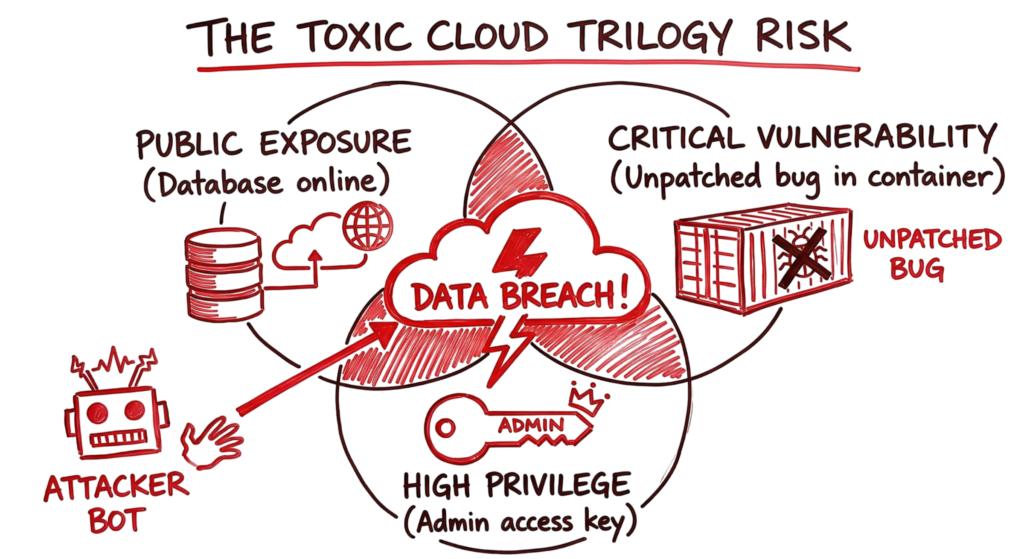
The Toxic Cloud Trilogy
One of the most dangerous combinations in cloud security is known as the Toxic Cloud Trilogy. A successful attack often occurs when these three conditions exist simultaneously:
1. Internet Accessibility
A cloud workload, virtual machine, database, or application is directly accessible from the public internet without adequate security controls. Internet-facing resources are continuously scanned by attackers looking for exposed services and vulnerable systems.
2. Unpatched Vulnerability
The exposed resource contains a known software vulnerability or security misconfiguration that attackers can exploit to gain unauthorized access. Delayed patching remains one of the leading Cloud Security Risks in enterprise environments.
3. Administrator Privileges
The compromised workload has excessive permissions, such as administrator or privileged service account access. Once attackers gain these privileges, they can move across the cloud environment, steal sensitive information, modify resources, or deploy ransomware.
When these three conditions exist together, attackers can quickly compromise a workload, escalate privileges, and access critical business data. Modern cloud security platforms continuously monitor for these high-risk combinations, allowing security teams to remediate them before they are exploited. Identifying and eliminating the Toxic Cloud Trilogy is one of the most effective Cloud Security Best Practices for reducing organizational risk.
Practical Implementation
Securing a cloud environment begins with establishing strong identity controls, secure configurations, and continuous monitoring. The following practices provide a solid foundation.
Enable Multi-Factor Authentication (MFA)
Passwords alone are no longer sufficient to protect cloud accounts. Enable Multi-Factor Authentication (MFA) for administrators, developers, and privileged users to reduce the risk of compromised credentials and account takeover.
Centralize Identity Management
Manage all cloud identities through a single Identity Provider (IdP) such as Microsoft Entra ID (Azure AD) or Okta. Centralized identity management simplifies user provisioning, access reviews, and permission revocation when employees change roles or leave the organization.
Secure Secrets Management
Never store passwords, API keys, certificates, or access tokens inside application source code or configuration files. Use dedicated secrets management solutions such as HashiCorp Vault, AWS Secrets Manager, or Azure Key Vault to securely store and rotate sensitive credentials.
Scan Infrastructure as Code (IaC)
Infrastructure should be validated before deployment. If your organization uses Terraform, AWS CloudFormation, or similar Infrastructure as Code (IaC) tools, automatically scan templates for security misconfigurations, excessive permissions, and compliance violations before changes reach production.
These practices strengthen Cloud Security Basics by preventing configuration errors before cloud resources are deployed.
Advantages and Limitations
Advantages
Automation
Cloud security platforms automatically detect misconfigurations, suspicious activity, compliance violations, and security threats, reducing manual effort and improving response times.
Complete Visibility
Centralized logging provides security teams with detailed insight into user activity, API calls, workload behavior, and configuration changes across cloud environments.
Faster Response
Security patches, configuration updates, and policy changes can be deployed simultaneously across hundreds or thousands of cloud resources, helping organizations respond rapidly to emerging threats.
Limitations
Operational Complexity
Managing security across multiple cloud providers, hybrid environments, and numerous cloud services requires careful planning and continuous administration.
Alert Fatigue
Large cloud environments can generate thousands of security alerts every day. Without proper alert prioritization, analysts may overlook high-priority incidents that require immediate attention.
Cost
Basic security controls are relatively inexpensive to implement, but advanced capabilities such as Cloud Security Posture Management (CSPM), CNAPP, threat detection, and continuous compliance monitoring require additional investment.
Common Mistakes
Organizations frequently repeat the same mistakes when implementing Cloud Security Basics, leaving cloud environments vulnerable to attack.
Trusting AI-Generated Code Without Validation
AI coding assistants can improve developer productivity, but generated code should never be deployed without review. AI-generated applications may contain insecure functions, vulnerable libraries, hardcoded API keys, or insecure authentication logic. Treat AI-generated code as third-party software and validate it through code reviews and security testing before deployment.
Leaving Orphaned Cloud Resources
Unused virtual machines, storage accounts, databases, snapshots, and containers often remain active long after projects are completed. Attackers actively search for these forgotten resources because they frequently contain outdated software or weak security configurations, making them significant Cloud Security Risks.
Granting Excessive Permissions
Providing administrator privileges to every developer or cloud administrator significantly increases the attack surface. Apply the principle of least privilege so users, applications, and service accounts receive only the permissions required to perform their assigned tasks.
Cloud Security Best Practices for 2026
Strong security requires continuous improvement rather than one-time configuration. The following Cloud Security Best Practices help organizations reduce risk while improving visibility and control.
Rotate API Keys and Passwords Regularly
Automatically rotate API keys, passwords, certificates, and access tokens every 60 to 90 days or immediately after a suspected compromise.
Implement Just-in-Time (JIT) Access
Avoid granting permanent privileged access. Instead, provide administrative permissions only when required and automatically revoke them after a predefined period, such as two hours.
Continuously Monitor Machine Identities
Monitor the behavior of service accounts, applications, and automation tools. For example, if a service account normally accesses ten files per day but suddenly attempts to read one million records, investigate the activity immediately.
Centralize Logging and Monitoring
Collect logs from cloud platforms, applications, IAM systems, and security tools into a centralized monitoring platform. Comprehensive logging enables faster threat detection, simplifies investigations, and supports compliance requirements.
Continuously Review Cloud Configurations
Regularly audit cloud resources to identify excessive permissions, publicly exposed services, inactive accounts, and security misconfigurations. Continuous configuration assessments help reduce Cloud Security Risks before attackers can exploit them.
Troubleshooting Scenario: The Blocked API Request
Here’s a typical challenge that you might come across. The developer says that the application cannot connect to the database. It is assumed to be a security challenge. This should be resolved using this troubleshooting guide.
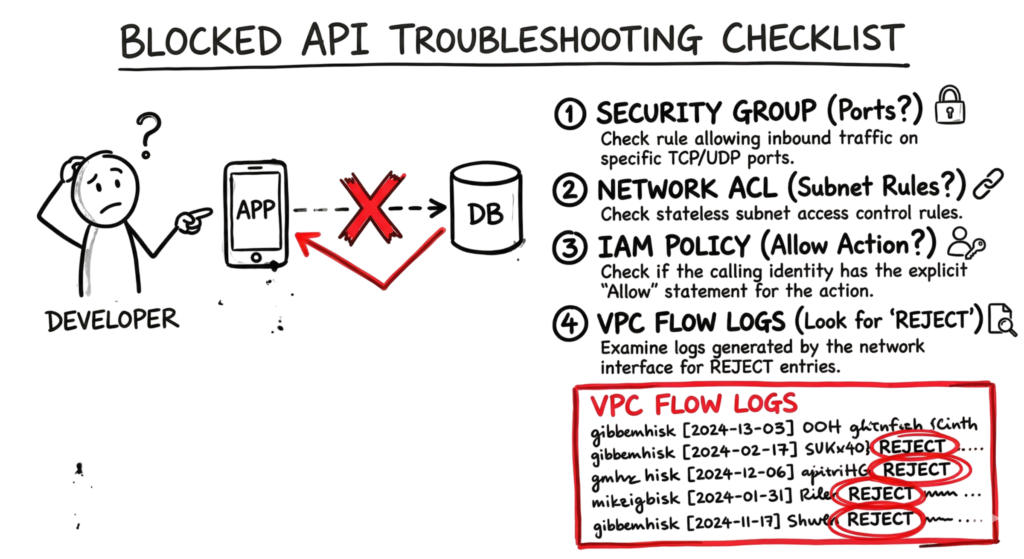
- Security Group: Ensure that the database has rules that allow access via the relevant port.
- Network Access Control List (ACL): Ensure that the relevant subnet has rules that are not specifically denying the application’s IP address.
- IAM policy: Ensure that the application has permissions with an “Allow” effect on the database services.
- VPC Flow Logs: Check the VPC flow logs for the term “REJECT.” When you find a rejected entry, then this suggests that the network is blocking access to the database port.
Interview Questions
- What is the difference between CSPM and CWPP? Answer: CSPM looks at the configuration of your cloud, while CWPP protects the actual workloads like containers and virtual machines.
- How do you handle a “Toxic Cloud Trilogy” risk? Answer: You fix the vulnerability, remove the public exposure, or reduce the permissions of the identity.
- Why is the metadata service a target for attackers? Answer: It often contains temporary credentials that an attacker can use to gain higher privileges.
- What is microsegmentation? Answer: It is the practice of breaking your network into small, isolated zones to stop an attacker from moving between systems.
- What is the Shared Responsibility Model? Answer: It is the division of security tasks between the cloud provider and the customer.
Future Trends
As part of evolving cloud security basics, we are moving toward agentic AI security. This involves AI agents that can detect and fix security issues automatically without waiting for human approval. This reduces response time and helps handle threats at machine speed.
Another key trend in cloud security basics is data sovereignty. Many countries now require data to stay within their borders due to regulatory laws. To support this, cloud security tools are improving visibility so you can track exactly where your data is stored and processed.
FAQ
Q: Do I need a firewall if I am in the cloud? A: Yes. You still need to control which traffic can enter and leave your network. Cloud firewalls are easier to manage but still required.
Q: Is the cloud more secure than an on-premises data center? A: It can be. Cloud providers have more resources for security than most companies, but you must configure your part correctly.
Q: What is a machine identity? A: It is a digital identity for a non-human entity like a server, a bot, or an application.
Q: How do I stop attackers from stealing my storage bucket data? A: Enable encryption, use private endpoints, and ensure you have disabled public access.
Q: What is “Shift-Left” security? A: It is the practice of moving security checks to the beginning of the software development process.
Conclusion
In 2026, cloud security basics focus on managing complexity at the speed of business. Security is no longer about locking a single entry point. You need to secure identities and data that change constantly.
Start with the fundamentals. Protect identities, enforce least privilege, and monitor logs for anomalies. Attacks are automated, so your response must be automated as well. Following cloud security basics will help you stay prepared and reduce the risk of breaches.
Related Cybersecurity Guides
Continue learning with these in-depth cybersecurity guides from TechNaga.
- What Is Cybersecurity and Why It Is Important Today
https://technaga.com/what-is-cybersecurity-and-why-it-is-important-today/ - Identity and Access Management in 2026: A Practical Guide for Cloud Security Professionals
https://technaga.com/identity-and-access-management-cloud-security-2026/ - Multi-Factor Authentication (MFA): Critical Guide to Secure Your Systems (2026)
https://technaga.com/multi-factor-authentication-mfa-guide-2026/ - Critical API Security Risks in the Cloud and Best Practices for 2026
https://technaga.com/api-security-cloud-risks-best-practices-2026/ - Cloud Misconfiguration: 10 Critical Errors Leading to Data Breaches in 2026
https://technaga.com/cloud-misconfiguration-data-breaches-2026/ - Zero Trust Security in 2026: Architecture, Real Examples, and Implementation Guide
https://technaga.com/zero-trust-security-2026-guide/ - Forget the Perimeter: Zero Trust vs Traditional Security Technical Comparison 2026
https://technaga.com/zero-trust-vs-traditional-security-2026/ - Essential Endpoint Security Guide 2026 for Every Organization
https://technaga.com/endpoint-security-2026-guide/ - Security Information and Event Management: Complete SIEM Guide 2026
https://technaga.com/security-information-and-event-management-2026/
External References
- AWS Security Best Practices
https://aws.amazon.com/security/security-learning/ - Microsoft Defender for Cloud Documentation
https://learn.microsoft.com/azure/defender-for-cloud/ - Google Cloud Security Foundation
https://cloud.google.com/security - NIST Cybersecurity Framework (CSF 2.0)
https://www.nist.gov/cyberframework - CISA Secure by Design
https://www.cisa.gov/securebydesign - OWASP Cloud Security
https://owasp.org/www-project-cloud-security/ - CIS Critical Security Controls v8
https://www.cisecurity.org/controls - HashiCorp Vault Documentation
https://developer.hashicorp.com/vault/docs - MITRE ATT&CK Framework
https://attack.mitre.org/
4 thoughts on “Cloud Security Basics 2026: Complete Beginner Guide”