It is 3:00 AM. Your phone vibrates on the nightstand. A high-priority alert from your Security Information and Event Management (SIEM) platform wakes you up. An administrative account has just logged in from an IP address in a country where your organization has no employees. You immediately review the authentication logs. The password is correct, and the Multi-Factor Authentication (MFA) challenge was also approved.
At first glance, everything appears legitimate, but something is wrong.
Welcome to modern cybersecurity. Passwords alone no longer provide sufficient protection, and even poorly implemented Multi-Factor Authentication (MFA) can be bypassed through sophisticated attacks such as MFA fatigue, adversary-in-the-middle (AiTM) phishing, and session hijacking. Understanding How Multi-Factor Authentication Works is essential for building stronger identity protection against modern threats.
In this guide, you’ll learn How Multi-Factor Authentication Works, explore the different Types of Multi-Factor Authentication, discover common attack techniques used by cybercriminals, and understand the MFA Best Practices organizations should implement to protect users and critical business systems in 2026.
What Is Multi-Factor Authentication (MFA)?
Multi-Factor Authentication (MFA) is an authentication method that requires users to verify their identity using two or more independent authentication factors before access is granted. Rather than relying only on a password, Multi-Factor Authentication (MFA) combines multiple verification methods, making it significantly more difficult for attackers to gain unauthorized access even if credentials are stolen.
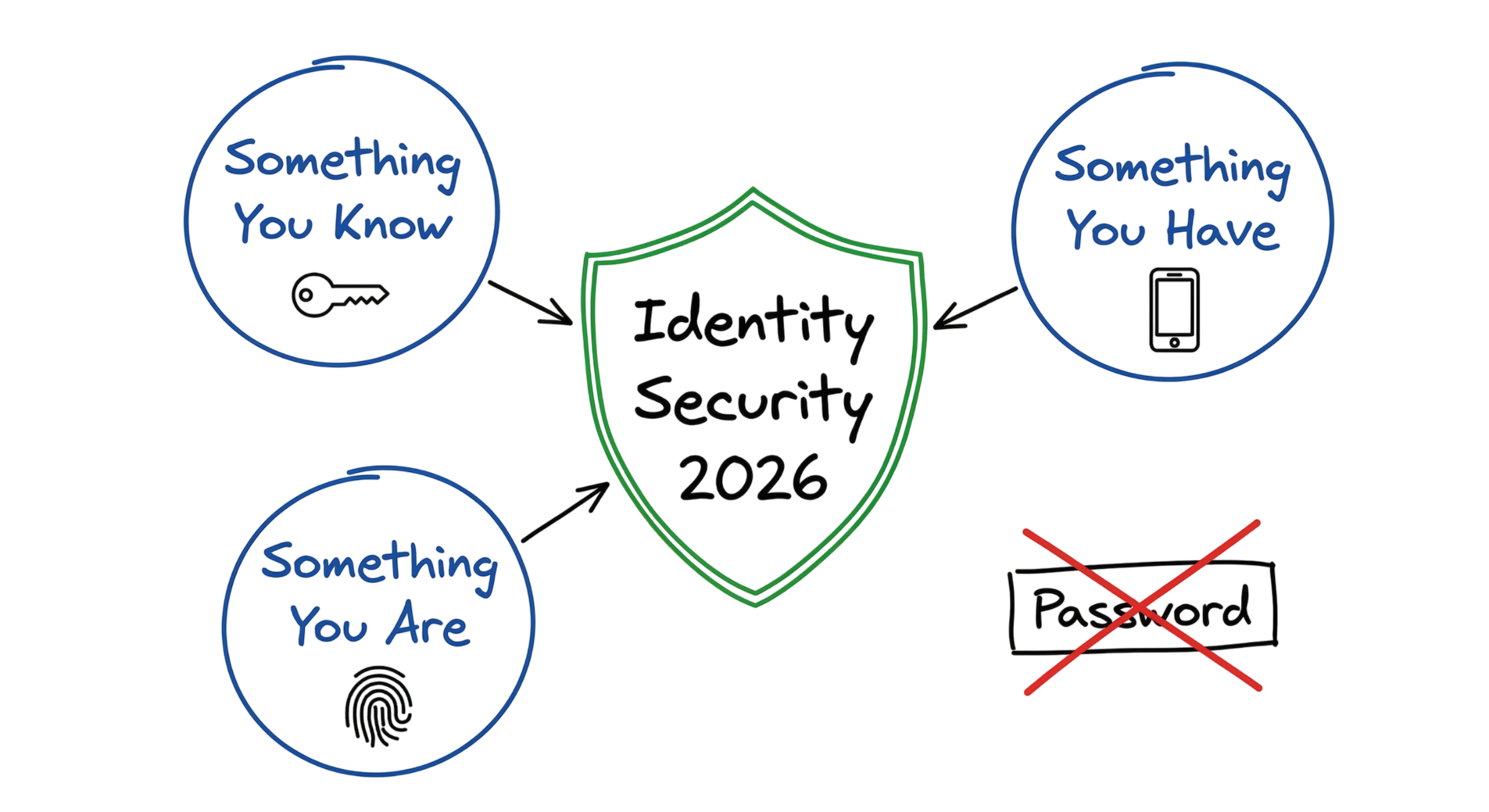
Traditionally, organizations relied on a single authentication factor, commonly known as “something you know,” such as a password or PIN. Modern identity security now combines multiple verification factors to provide stronger protection.
The primary Types of Multi-Factor Authentication include:
Something You Know
Information only the user should know.
- Password
- PIN
- Security question
Something You Have
A physical device or trusted possession.
- FIDO2 security key
- Authenticator application
- Hardware token
- Smart card
- Mobile phone
Something You Are
Unique biometric characteristics.
- Fingerprint
- Facial recognition
- Retina scan
- Voice recognition
By combining two or more of these authentication factors, Multi-Factor Authentication (MFA) significantly reduces the likelihood of account compromise. Even if attackers successfully steal a password through phishing or credential stuffing, they cannot easily authenticate without the user’s trusted device or biometric verification.
How Multi-Factor Authentication Works
Understanding How Multi-Factor Authentication Works helps explain why it remains one of the strongest identity protection mechanisms available today.
When a user attempts to access an application, they first enter their username and password. Instead of immediately granting access, the authentication process pauses while the identity platform determines whether additional verification is required.
The authentication server reviews the user’s account configuration, evaluates security policies, and verifies that Multi-Factor Authentication (MFA) is enabled. Depending on the organization’s security policy, the user may receive a push notification, enter a one-time password (OTP), approve a request through an authenticator application, or tap a FIDO2 security key.
Only after the second authentication factor has been successfully verified does the identity provider issue an authentication token and allow access to the requested application.
Following modern MFA Best Practices, organizations should avoid relying solely on SMS-based verification and instead adopt phishing-resistant authentication methods such as FIDO2 security keys, passkeys, and biometric authentication.
Multi-Factor Authentication (MFA) Technical Flow and Architecture
Many people believe Multi-Factor Authentication (MFA) is simply a notification appearing on a mobile phone. In reality, it is a secure authentication workflow involving multiple identity services, security policies, and authentication protocols.
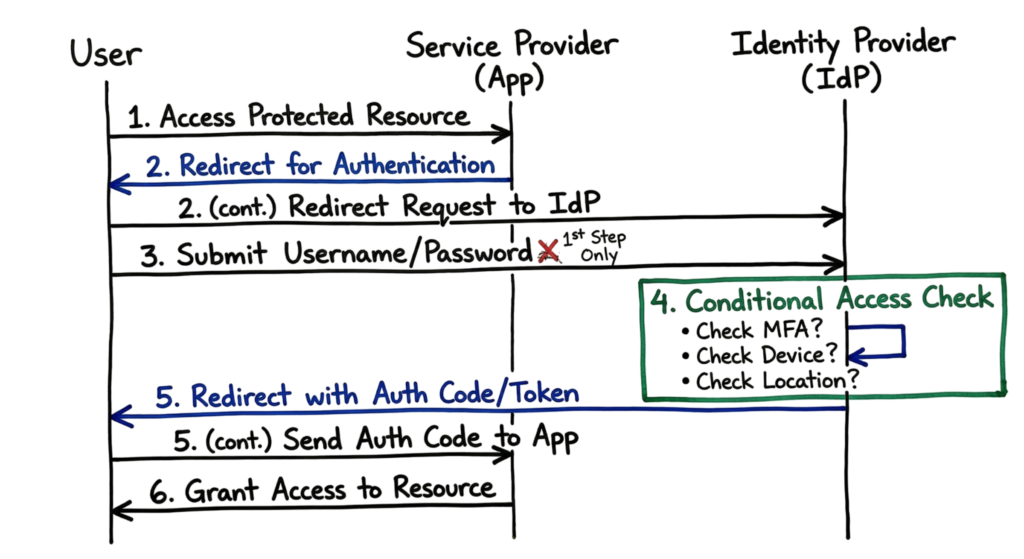
Modern enterprise environments typically use protocols such as SAML (Security Assertion Markup Language) or OpenID Connect (OIDC) to securely exchange authentication information between applications and Identity Providers (IdPs).
A typical How Multi-Factor Authentication Works process follows these steps:
- The user attempts to access an application (Service Provider) using their username and password.
- The application redirects the authentication request to an Identity Provider (IdP) such as Microsoft Entra ID, Okta, or Ping Identity.
- The Identity Provider validates the user’s primary credentials.
- The IdP evaluates Conditional Access policies by checking factors such as:
- User location
- Device compliance
- IP reputation
- Device health
- Risk score
- Sign-in behavior
- If additional verification is required, the Identity Provider generates a Multi-Factor Authentication (MFA) challenge.
- The user completes the authentication request using one of the supported Types of Multi-Factor Authentication, such as a FIDO2 security key, authenticator application, passkey, hardware token, or biometric verification.
- After successful verification, the Identity Provider generates a digitally signed authentication token.
- The signed token is securely returned to the application.
- The application validates the token and establishes a secure user session.
Modern identity platforms use cloud-native authentication protocols such as SAML and OpenID Connect (OIDC). However, many organizations still rely on legacy applications that cannot support these modern standards. In these environments, Multi-Factor Authentication (MFA) is commonly integrated using the Remote Authentication Dial-In User Service (RADIUS) protocol.
With RADIUS authentication, the firewall, VPN gateway, or network access server acts as an intermediary between the user and the Multi-Factor Authentication (MFA) system. After the user enters their credentials, the device forwards the authentication request to the Identity Provider or authentication server for additional verification.
Although this approach successfully adds an extra layer of security, it provides less contextual information than modern cloud identity platforms. Unlike Zero Trust architectures, RADIUS-based authentication typically cannot evaluate device compliance, user behavior, risk scores, or Conditional Access policies. Understanding How Multi-Factor Authentication Works in both legacy and modern environments helps organizations choose the most appropriate authentication architecture while planning future upgrades.
Key Components of Multi-Factor Authentication (MFA)
Building a secure identity platform requires several technologies working together. These components form the foundation of modern Multi-Factor Authentication (MFA) deployments and support organizations implementing strong MFA Best Practices.
1. Identity Provider (IdP)
The Identity Provider (IdP) serves as the central authentication authority responsible for verifying user identities and enforcing security policies. Every authentication request passes through the IdP before access is granted.
Popular Identity Providers include:
- Microsoft Entra ID (formerly Azure Active Directory)
- Okta
- Ping Identity
- Google Cloud Identity
The IdP manages:
- User authentication
- Single Sign-On (SSO)
- Conditional Access
- Risk-based authentication
- Identity lifecycle management
- Multi-Factor Authentication (MFA) policies
A secure Identity Provider is essential because it determines How Multi-Factor Authentication Works across enterprise applications.
2. Authenticators
Authenticators are the devices or applications users employ to verify their identity after entering their password.
Common authenticators include:
- Authenticator applications
- Hardware security keys
- Smart cards
- Mobile devices
- Biometrics
- Passkeys
Selecting the right authenticator is an important part of implementing MFA Best Practices, as stronger authenticators provide greater resistance against phishing and credential theft.
3. Time-Based One-Time Password (TOTP)
One of the most common Types of Multi-Factor Authentication is the Time-Based One-Time Password (TOTP).
Applications such as:
- Microsoft Authenticator
- Google Authenticator
- Cisco Duo Mobile
generate six-digit codes that change every 30 seconds.
Although TOTP authentication offers much stronger protection than passwords alone or SMS verification, attackers can still steal these codes through phishing proxies and Adversary-in-the-Middle (AiTM) attacks. Because of this limitation, modern MFA Best Practices recommend using phishing-resistant authentication whenever possible.
4. Push Notification Authentication
Push notification authentication allows users to approve login requests directly from a trusted mobile device with a single tap.
While convenient, this method has become a frequent target of MFA Fatigue Attacks, where attackers repeatedly send authentication prompts hoping users will eventually approve one by mistake.
To reduce this risk, organizations should implement number matching, location verification, and user context within push notifications. These controls significantly improve Multi-Factor Authentication (MFA) security while maintaining a good user experience.
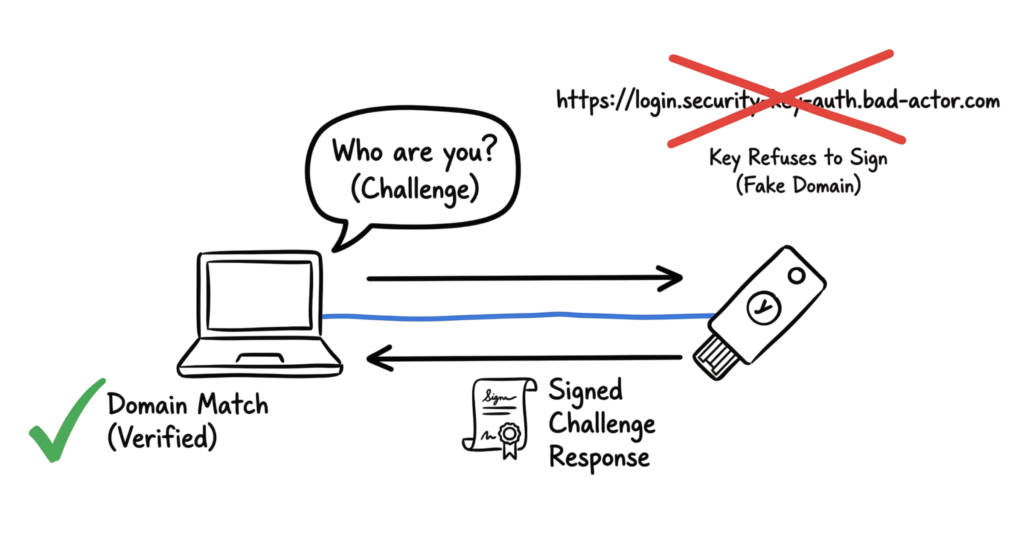
5. FIDO2 and WebAuthn
Among all Types of Multi-Factor Authentication, FIDO2 and WebAuthn provide the strongest protection against phishing attacks.
Instead of relying on temporary verification codes, these standards use cryptographic authentication tied directly to a trusted hardware device.
Examples include:
- YubiKey security keys
- Windows Hello
- Apple Touch ID
- Face ID
- Platform passkeys
Because authentication occurs through public-key cryptography, attackers cannot reuse stolen credentials on fake websites or proxy authentication sessions.
For this reason, FIDO2, passkeys, and WebAuthn have become central to MFA Best Practices and are widely recommended for implementing phishing-resistant Multi-Factor Authentication (MFA) in 2026.
Conditional Access Policies
Conditional Access Policies use If-Then logic to make real-time access decisions based on predefined security conditions. Instead of applying the same authentication requirements to every user, the system evaluates the context of each login attempt before granting access.
Examples include:
- If the user signs in from an unmanaged device, then require authentication using a FIDO2 security key.
- If the login originates from a high-risk country, then block access or require additional verification.
- If the device is not compliant with security policies, then deny access.
- If the user attempts to access sensitive applications outside business hours, then require step-up authentication.
These policies continuously evaluate user identity, device compliance, location, risk level, and application sensitivity to reduce unauthorized access while improving security.
Real-World Example
During a security investigation, I analyzed an account compromise involving a senior software developer. The attacker used a phishing framework called Evilginx, which acts as a reverse proxy between the victim and the legitimate Microsoft sign-in page.
The developer unknowingly visited the fake login page and entered both their password and six-digit Time-Based One-Time Password (TOTP). Evilginx immediately forwarded these credentials to the genuine Microsoft authentication service in real time, making the login appear completely legitimate.
After the authentication process completed successfully, Microsoft issued a valid session cookie. Instead of stealing only the password or OTP, the attacker intercepted this session cookie and reused it to access the developer’s account without needing to authenticate again.
This type of attack demonstrates why traditional TOTP-based authentication can still be vulnerable to Adversary-in-the-Middle (AiTM) phishing attacks. It also explains why many organizations are moving toward phishing-resistant authentication methods such as FIDO2 security keys, passkeys, and WebAuthn, which prevent attackers from replaying authentication sessions through proxy-based phishing attacks.
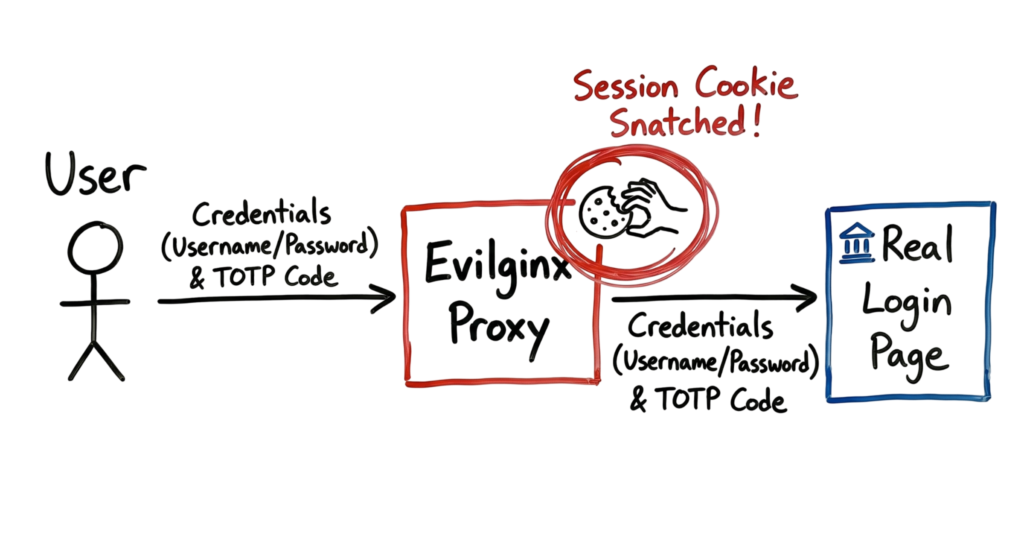
One lesson I learned from investigating real security incidents is that six-digit TOTP codes are no longer enough against targeted phishing attacks. They protect you if someone guesses or steals your password, but they do not protect against sophisticated proxy-based phishing frameworks such as Evilginx.
In one investigation, the authentication logs showed a successful Multi-Factor Authentication (MFA) login from the developer’s home IP address. Seconds later, the authenticated session was being used from a cloud data center in Europe. The attacker never stole the password alone; they intercepted the authenticated session and reused the session cookie to bypass additional authentication. This is why organizations are moving toward phishing-resistant authentication methods such as FIDO2 security keys and passkeys.
Practical Implementation
If you’re deploying Multi-Factor Authentication (MFA) across your organization, begin with these practical steps.
1. Audit Your Current Authentication Methods
Generate a report from your Identity Provider (IdP) to identify which authentication methods users currently rely on. Prioritize replacing SMS-based verification because it is vulnerable to SIM swapping, social engineering, and interception attacks.
2. Enable Number Matching
Traditional push notifications that display only Approve or Deny are vulnerable to MFA fatigue attacks. Instead, enable Number Matching, where users must enter a number displayed on the login screen into their authenticator application. This significantly reduces accidental approvals.
3. Deploy FIDO2 Security Keys
Register phishing-resistant FIDO2 security keys for privileged users first. Focus on:
- System administrators
- Security administrators
- Executives
- Developers with production access
- Cloud administrators
This approach follows modern MFA Best Practices by protecting the accounts most frequently targeted by attackers.
4. Configure Geographic Access Policies
If your organization operates only in specific countries or regions, implement Conditional Access policies that block or challenge authentication attempts from unexpected locations. Combining geo-blocking with risk-based authentication provides another layer of protection against unauthorized access.
Advantages and Limitations
Advantages
Blocks Most Automated Attacks
Properly implemented Multi-Factor Authentication (MFA) prevents the overwhelming majority of password-based attacks, including credential stuffing, password spraying, and brute-force attempts.
Supports Regulatory Compliance
Many cybersecurity frameworks and cyber insurance providers require MFA to protect internet-facing applications, privileged accounts, and cloud services.
Protects Stolen Credentials
Even if attackers obtain valid usernames and passwords, additional authentication factors significantly reduce the likelihood of unauthorized access.
Limitations
User Experience
Requesting authentication too frequently can frustrate users and contribute to MFA fatigue. Security controls should balance protection with usability.
Identity Provider Dependency
If the Identity Provider becomes unavailable, users may be unable to authenticate. Organizations should maintain carefully protected emergency break-glass accounts for disaster recovery situations.
Cost and Administration
Hardware security keys such as YubiKeys provide excellent protection but require purchasing, inventory management, user enrollment, and replacement procedures for lost devices.
Common Mistakes
Assuming MFA Alone Solves Every Problem
Simply enabling Multi-Factor Authentication (MFA) does not guarantee strong security. If users authenticate through SMS or other weak methods, they remain vulnerable to phishing and SIM-swapping attacks. Modern MFA Best Practices recommend phishing-resistant authentication wherever possible.
Forgetting Important Entry Points
Organizations frequently secure cloud applications while overlooking VPN gateways, Remote Desktop services, SSH servers, legacy applications, and third-party administrative portals. Attackers often target the one service that lacks strong authentication.
Ignoring Service Accounts
Service accounts, automation tools, APIs, and machine identities often possess elevated privileges but cannot always use interactive authentication methods. These accounts require separate security controls such as secret rotation, least privilege, and continuous monitoring because many legacy applications still lack support for modern authentication protocols.
MFA Best Practices
Strong authentication requires more than simply enabling MFA. Organizations should continuously improve their authentication strategy as new threats emerge.
Adopt Passwordless Authentication
Replace passwords with passkeys, FIDO2 security keys, or Windows Hello wherever possible. Passwordless authentication improves both security and user experience by eliminating stolen password attacks.
Verify Device Trust
Authentication should succeed only when the device meets organizational security requirements. Verify operating system updates, endpoint protection, disk encryption, and device compliance before granting access.
Use Adaptive Authentication
Authentication should adjust according to risk. For example, users signing in from their usual office location on a trusted device may require fewer prompts, while logins from unfamiliar countries, unmanaged devices, or unusual times should require stronger authentication or additional verification.
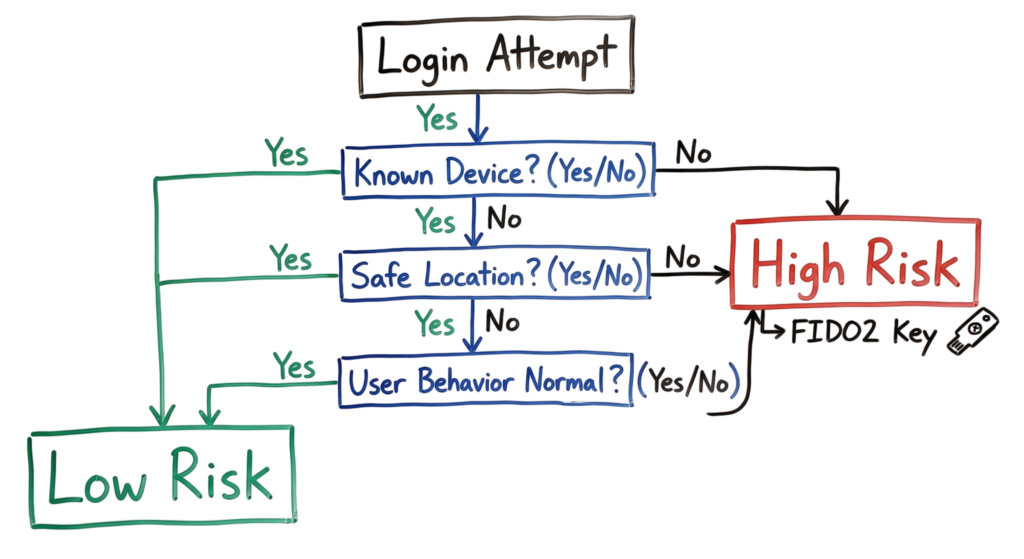
- Log Everything: You need to see MFA failures in your SIEM. Ten failed MFA prompts in one minute is a clear sign of an attack.
Troubleshooting Scenario
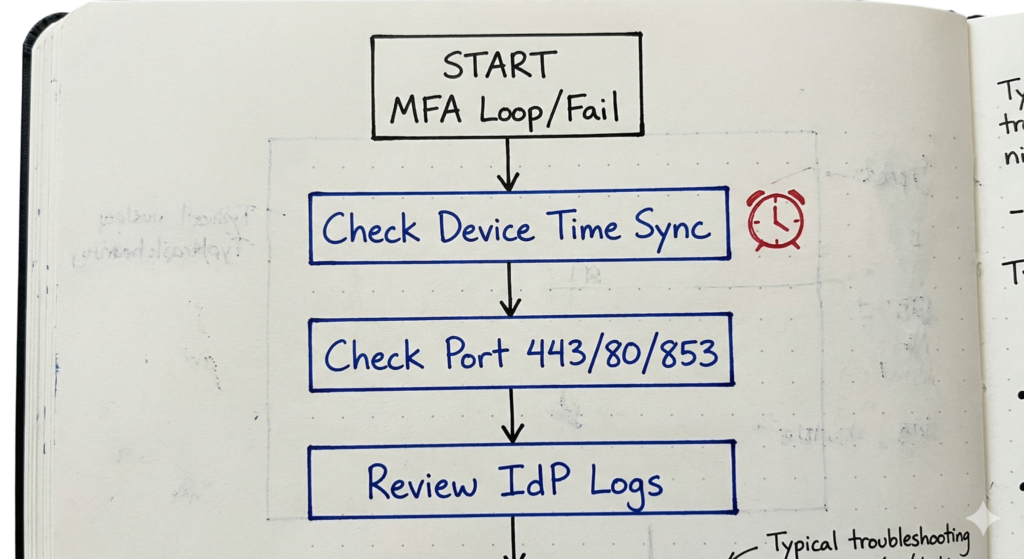
Imagine the situation when someone phones you as they have fallen into an “MFA loop.” The user puts in the code and the page reloads asking for it again.
First, being a senior engineer, I would check the current time on their gadget. Indeed, time correlation plays a critical role in generating MFA codes. In case of any differences between the server time and their time exceeding two minutes, the codes would be considered invalid.
After that, I would examine firewall logs checking for possible blocks on specific ports. Indeed, it may happen that company networks block connections to such services as the Apple Notification Service or Google Notification Protocol. Thus, the prompt would appear on an LTE connection, however, the “approve” signal will not reach IdP since blocked by the Wi-Fi at work.
Interview Questions
- How is TOTP different from HOTP? TOTP relies on time, whereas HOTP relies on counters. TOTP is widely used as compared to HOTP as it offers a lower likelihood of going “out of sync,” even when codes are generated but not used.
- Explain MFA fatigue attack. When conducting a MFA fatigue attack, the attacker sends tens of authentication requests to the phone of the victim and hopes that the user becomes tired of receiving push notifications, thereby clicking “Approve” to stop the flood of requests.
- Why is FIDO2 resistant to phishing attacks? FIDO2 mandates that the user authenticates only in connection with the domain name of the website. The hardware key will not provide a credential for microsoft-login-fake.com as it has been authorized only for login.microsoftonline.com.
- Explain the significance of “session token” after the MFA has completed. Once the multi-factor authentication has been completed, the server gives the client (i.e., browser) a session token (cookie). It is the session token and not the credentials that the attacker steals in the end as it skips the MFA check.
- Explain “Conditional Access.” Conditional Access refers to a policy system used by organizations for assessing the risk posed by each login attempt and approving/denying or adding extra requirements based on the risk.
Future Trends (2026)
Adaptive Authentication with AI: The systems are now considering “behavioral biometrics.” This implies that the system will track your mouse movements and typing speed. If there is a change in your typing pattern, then MFA will be prompted.
The Death of the Password: We are moving toward a world where you don’t even have a password to steal. You will just use a passkey stored on your phone or laptop.
Deepfake Protection: As attackers use AI to spoof voices and faces, MFA providers are building “liveness” checks. These force you to blink or turn your head during a face scan to prove you are a real human and not a video.
FAQ
Q: May I use my personal phone for MFA for work purposes? A: Yes, but some organizations nowadays issue employees a small amount of money or even a hardware key in order not to violate users’ privacy.
Q: What should I do if I lose my MFA device? A: Therefore, you will need a recovery procedure. As a rule, a company’s IT admin verifies the user’s identity and issues him/her a one-time bypass code.
Q: Which of the following is more secure: a fingerprint or a hardware key? A: Both are equal in security terms. The biometric solution represents “something you are,” whereas the hardware key implies “something you have.” In case of any compromise, it is easier to revoke access to the latter.
Q: Is it possible to apply MFA to command-line interfaces (e.g., SSH)? A: Yes. You may deploy the required PAM modules that will ask you for the respective TOTP code or a FIDO2 key upon connecting to the machine in question via SSH.
Q: Why do some websites still allow SMS-based MFA? A: Because this option is better than having no MFA at all and also works universally on every existing phone around the world.
Conclusion
Multi-Factor Authentication (MFA) remains one of the most effective defenses against unauthorized access, but it should never be treated as a “set it and forget it” security control. As cyber threats continue to evolve, attackers are finding new ways to bypass traditional authentication methods through MFA fatigue attacks, adversary-in-the-middle (AiTM) phishing, session hijacking, and stolen authentication cookies.
Understanding How Multi-Factor Authentication Works helps organizations identify these evolving threats and deploy stronger authentication strategies. While traditional methods such as SMS codes and TOTP applications still provide additional protection compared to passwords alone, they are no longer sufficient against sophisticated phishing attacks. Organizations should prioritize phishing-resistant authentication methods such as FIDO2 security keys, passkeys, and WebAuthn to strengthen identity security.
Implementing the right Types of Multi-Factor Authentication based on user roles, device trust, and business requirements significantly reduces the risk of account compromise. Administrators should also continuously monitor authentication logs, investigate impossible travel alerts, review suspicious login activity, and take every unexpected MFA prompt seriously. A user reporting an authentication request they did not initiate is often one of the earliest indicators of an active attack.
Following modern MFA Best Practices means continuously reviewing authentication policies, enforcing Conditional Access, adopting passwordless authentication where possible, and regularly updating security controls to defend against emerging threats. As organizations continue embracing Zero Trust architectures in 2026, Multi-Factor Authentication (MFA) remains a critical layer of defense for protecting identities, applications, and sensitive business data.
Related Cybersecurity Guides
Continue learning with these in-depth cybersecurity guides from TechNaga.
- What Is Cybersecurity and Why It Is Important Today
https://technaga.com/what-is-cybersecurity-and-why-it-is-important-today/ - Password Security Guide 2026: 10 Essential Tips
https://technaga.com/password-security-guide-2026/ - How to Identify Phishing Attacks in 2026 (Complete Guide)
https://technaga.com/how-to-identify-phishing-attacks-in-2026/ - Identity and Access Management in 2026: A Practical Guide for Cloud Security Professionals
https://technaga.com/identity-and-access-management-cloud-security-2026/ - Essential Endpoint Security Guide 2026 for Every Organization
https://technaga.com/endpoint-security-2026-guide/ - Zero Trust Security in 2026: Architecture, Real Examples, and Implementation Guide
https://technaga.com/zero-trust-security-2026-guide/ - Forget the Perimeter: Zero Trust vs Traditional Security Technical Comparison 2026
https://technaga.com/zero-trust-vs-traditional-security-2026/ - Cloud Security Basics 2026: Complete Beginner Guide
https://technaga.com/cloud-security-basics-2026/ - Initial Access in Cybersecurity: Top 3 Attack Vectors You Must Know (2026)
https://technaga.com/initial-access-cybersecurity-attack-vectors-2026/ - Top 10 Cybersecurity Best Practices for 2026
https://technaga.com/top-10-cybersecurity-best-practices-2026/
External References
- NIST Digital Identity Guidelines (SP 800-63)
https://pages.nist.gov/800-63-4/ - FIDO Alliance
https://fidoalliance.org/ - OWASP Authentication Cheat Sheet
https://cheatsheetseries.owasp.org/cheatsheets/Authentication_Cheat_Sheet.html - Microsoft Entra ID Documentation
https://learn.microsoft.com/entra/ - CISA Cybersecurity Resources
https://www.cisa.gov/ - MITRE ATT&CK Framework
https://attack.mitre.org/ - Okta Developer Documentation
https://developer.okta.com/ - Ping Identity Documentation
https://docs.pingidentity.com/ - Yubico Developer Guide
https://developers.yubico.com/

7 thoughts on “Multi-Factor Authentication (MFA): Critical Guide to Secure Your Systems (2026)”