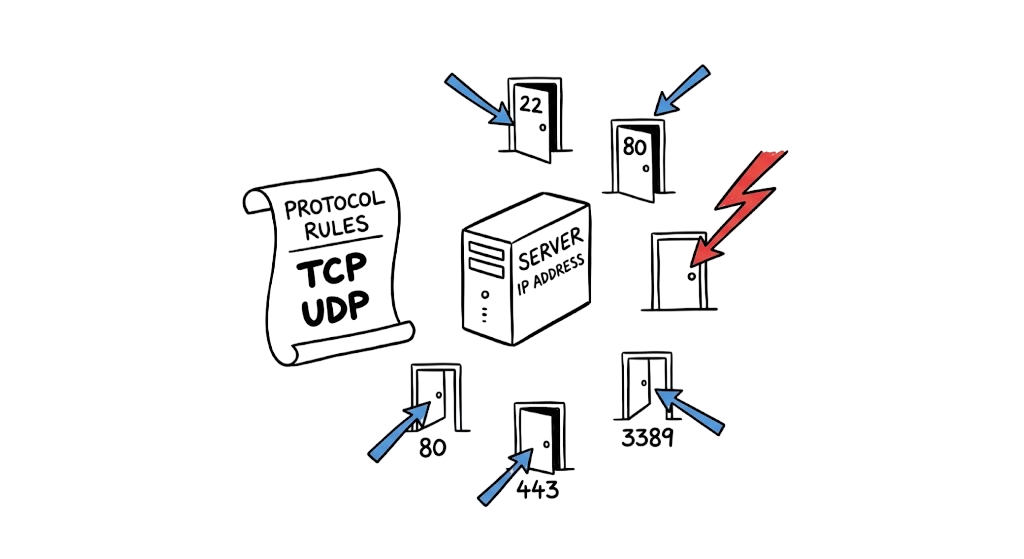
Imagine you’ve just deployed a new web server, but users cannot access it from the public internet. Your first instinct might be to open every port on the firewall to see if the problem disappears. While this may temporarily restore connectivity, it also exposes your infrastructure to cyber threats, malware, and ransomware attacks.
Understanding network protocols and ports is essential for building secure, reliable, and high-performing networks. Rather than opening every service, network administrators should know exactly which network protocols and port numbers are required for each application.
In this guide, you’ll learn how network protocols and ports work together, the difference between TCP and UDP ports, and how to reduce your attack surface by exposing only the services your organization actually needs.
What Are Network Protocols and Ports?
Network protocols and ports work together to enable communication between devices across a network. A network protocol defines the rules for formatting, transmitting, and receiving data, ensuring that devices can communicate reliably regardless of their operating system or hardware.
A port number is a logical communication endpoint that allows multiple applications to share the same IP address. While an IP address identifies the destination device, the port number identifies the specific service or application that should receive the incoming traffic.
For example:
- HTTPS uses TCP port 443
- HTTP uses TCP port 80
- DNS typically uses UDP port 53
- SSH uses TCP port 22
Every successful network connection depends on the correct combination of an IP address, a supported network protocol, and the appropriate port number.
Understanding Transport Protocols: TCP vs. UDP
Among all network protocols, the two most widely used transport protocols are Transmission Control Protocol (TCP) and User Datagram Protocol (UDP). Understanding the differences between TCP and UDP ports is fundamental for network troubleshooting and cybersecurity.
Transmission Control Protocol (TCP) is a connection-oriented protocol that establishes a reliable communication session before transmitting data. It uses acknowledgments, retransmissions, and sequencing to ensure that packets arrive accurately and in the correct order.
User Datagram Protocol (UDP) is a connectionless protocol that sends data without establishing a session or waiting for acknowledgments. This reduces latency, making UDP ideal for real-time applications where speed is more important than perfect reliability.
A simple way to remember the difference is:
- TCP prioritizes reliability and data integrity.
- UDP prioritizes speed and low latency.
Applications such as web browsing, email, and file transfers rely on TCP, while online gaming, Voice over IP (VoIP), video conferencing, and live streaming commonly use UDP.
Technical Flow: The TCP Three-Way Handshake
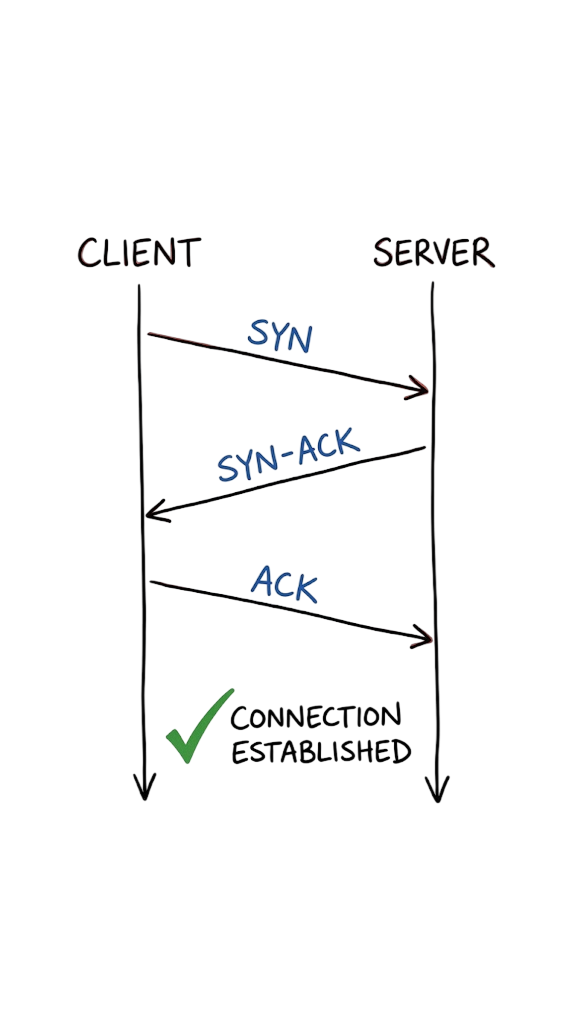
One of the most important concepts in network protocols and ports is the TCP three-way handshake, which establishes a reliable connection before data transfer begins.
The process follows three steps:
- SYN (Synchronize): The client sends a SYN packet to the server, requesting a connection on a specific TCP port.
- SYN-ACK (Synchronize-Acknowledgment): If the destination port number is open and the service is listening, the server responds with a SYN-ACK packet.
- ACK (Acknowledgment): The client sends an ACK packet, completing the handshake and establishing the TCP session.
If the server responds with a RST (Reset) packet or does not respond at all, the requested TCP port may be closed, blocked by a firewall, or filtered by an access control policy.
Unlike TCP, User Datagram Protocol (UDP) eliminates the connection setup and error-checking process. Instead of confirming that every packet reaches its destination, UDP simply sends the data without waiting for acknowledgments or retransmissions. This lightweight approach reduces latency and makes UDP ideal for applications where speed is more important than perfect reliability.
Because of its low overhead, UDP is commonly used for:
- Live video and audio streaming
- Voice over IP (VoIP)
- Online gaming
- DNS lookups
- Real-time communication services
While some packets may be lost during transmission, these applications can tolerate occasional data loss without significantly affecting the user experience.
TCP vs. UDP: Key Differences
Understanding the differences between TCP and UDP ports is essential when working with network protocols and ports.
| Feature | TCP | UDP |
|---|---|---|
| Connection | Connection-oriented | Connectionless |
| Reliability | Guaranteed packet delivery | No delivery guarantee |
| Packet Order | Maintains packet sequence | No packet ordering |
| Error Checking | Yes | Minimal |
| Speed | Slower due to acknowledgments | Faster with lower latency |
| Common Uses | HTTP, HTTPS, SSH, FTP, SMTP | DNS, VoIP, Streaming, Gaming |
Quick Summary
- TCP → Reliable, ordered communication with built-in error checking.
- UDP → Fast, low-latency communication without connection overhead.
- TCP Three-Way Handshake → Establishes a reliable connection before data transfer begins.
- Packet Sequencing → Ensures TCP packets are delivered and reassembled in the correct order.
The Three Port Number Ranges
One of the most important concepts in network protocols and ports is understanding how port numbers are organized.
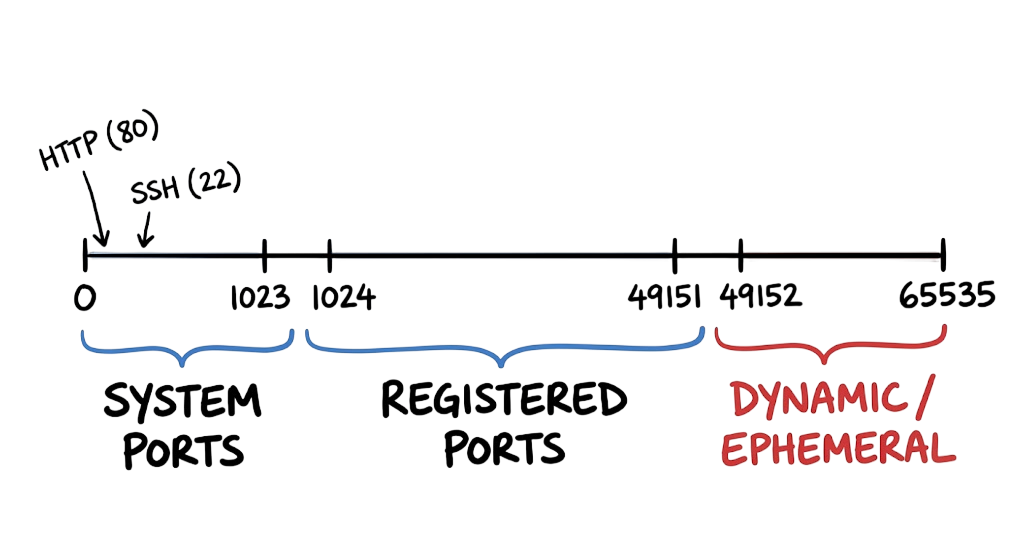
The Internet Assigned Numbers Authority (IANA) manages 65,535 port numbers, which are divided into three standardized ranges. These ranges help identify which services use specific ports and prevent conflicts between applications.
1. Well-Known Ports (0–1023)
Well-known ports are reserved for widely used services and standard network protocols.
Examples include:
- HTTP – TCP 80
- HTTPS – TCP 443
- DNS – UDP/TCP 53
- SSH – TCP 22
- FTP – TCP 21
- SMTP – TCP 25
These are the common network ports that every network administrator and cybersecurity professional should know.
2. Registered Ports (1024–49151)
Registered ports are assigned by IANA for commercial applications and vendor-specific services.
Examples include:
- Microsoft SQL Server – TCP 1433
- PostgreSQL – TCP 5432
- MySQL – TCP 3306
- Remote Desktop (RDP) – TCP 3389
3. Dynamic or Private Ports (49152–65535)
Dynamic (also called ephemeral or private) ports are temporarily assigned by the operating system for outbound client connections.
For example, when your browser connects to a website on HTTPS (TCP 443), your computer automatically selects a random dynamic port number such as 52134 for the source connection.
These temporary port numbers are released once the session ends.
Securing Common Network Ports
Every open port is a potential hole in your defense. Some protocols are inherently dangerous because they send data in cleartext. If you use FTP (Port 21) or Telnet (Port 23), anyone on the network path can see your passwords. You should replace these with SFTP (Port 22) and SSH (Port 22) immediately.
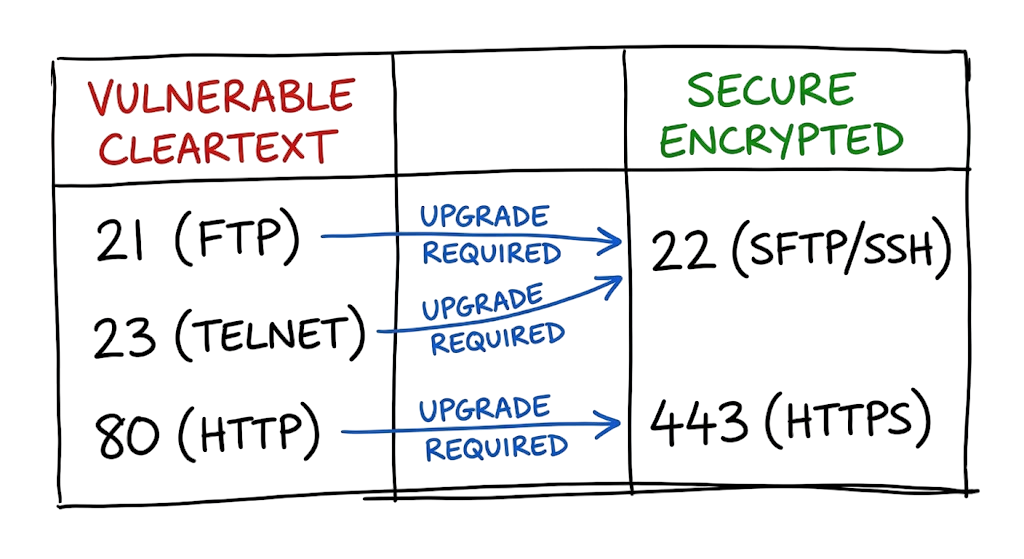
Encryption is not optional in a production environment.
The Attack Surface of Common Services
Security Risks of Common Network Ports
Understanding the security risks associated with network protocols and ports is just as important as knowing their functions. Cybercriminals frequently target common network ports to exploit vulnerabilities, launch attacks, or gain unauthorized access to enterprise networks. Securing unnecessary port numbers significantly reduces an organization’s attack surface.
DNS (Port 53)
The Domain Name System (DNS) typically uses UDP Port 53 for fast domain name resolution and TCP Port 53 for larger responses, such as zone transfers. Because DNS commonly relies on UDP, attackers can abuse it to perform DNS amplification attacks, a type of Distributed Denial-of-Service (DDoS) attack that overwhelms victims with massive amounts of traffic.
To reduce this risk:
- Disable open DNS resolvers.
- Restrict recursive DNS queries.
- Monitor unusual DNS traffic.
- Use DNS security features such as DNSSEC where appropriate.
HTTP (Port 80) and HTTPS (Port 443)
HTTP (TCP Port 80) transmits data in plain text and should only be used to redirect users to HTTPS (TCP Port 443), which encrypts communications using TLS (Transport Layer Security).
Even after implementing HTTPS, organizations should remain vigilant against SSL stripping attacks, where attackers attempt to downgrade encrypted connections to unencrypted HTTP traffic.
Security best practices include:
- Redirect all HTTP requests to HTTPS.
- Enable HTTP Strict Transport Security (HSTS).
- Use modern TLS versions and strong cipher suites.
- Regularly renew and monitor SSL/TLS certificates.
SMB (Port 445)
Server Message Block (SMB) uses TCP Port 445 for file sharing, printer sharing, and remote administration in Windows environments. It is one of the most frequently targeted common network ports because vulnerabilities in SMB have been exploited by major ransomware families.
For example, the WannaCry ransomware spread rapidly by exploiting the EternalBlue vulnerability in SMB, infecting thousands of systems worldwide within hours.
To secure SMB Port 445:
- Never expose TCP Port 445 directly to the public internet.
- Restrict SMB access using internal firewall rules.
- Apply operating system security updates promptly.
- Disable SMBv1 wherever possible.
- Use a VPN or a Zero Trust Network Access (ZTNA) solution for secure remote access instead of exposing SMB services.
Best Practices for Securing Network Protocols and Ports
Protecting network protocols and ports requires more than simply blocking suspicious traffic. Organizations should follow the principle of least privilege, allowing only the port numbers and services required for business operations.
Recommended best practices include:
Review firewall rules and access control lists (ACLs) regularly.
Close unused or unnecessary common network ports.
Allow only approved applications through firewall policies.
Regularly scan for exposed services using vulnerability assessment tools.
Monitor network traffic for unusual activity.
Segment networks to reduce lateral movement.
Use Multi-Factor Authentication (MFA) for remote access.
Keep operating systems and applications fully patched.
Troubleshooting Scenario: The AWS Ephemeral Port Mystery
When I was working on a client environment in a secure cloud setup, we ran into an issue where an EC2 instance could not receive return traffic. The engineer had allowed Port 22 inbound but the connection kept timing out. They assumed the server was down. The actual cause was the stateless nature of AWS Network ACLs.
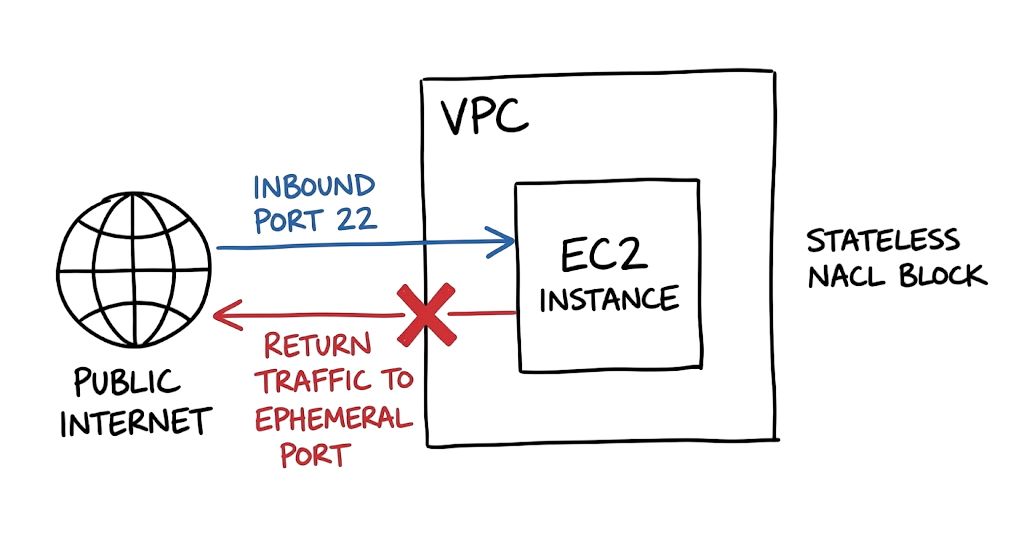
Most engineers forget that outbound traffic needs a path back to the client.
When you connect to a server on Port 22, your computer picks a random port in the ephemeral range (like 52341) to receive the response. If your Network ACL blocks outbound traffic to the ephemeral range, the server can see your request but cannot reply. You must add an outbound rule allowing traffic to the 49152 to 65535 range to fix this.
Identifying stateless vs stateful firewalls is a core skill for any network engineer.
Practical Implementation: Port Auditing
You should regularly audit your servers to see which ports are actually listening. If you find a port open that you did not authorize, it could be a sign of a misconfiguration or a compromise. You can use native Linux tools to see this information in real time.
- Log into your server via SSH.
- Run ss -tuln to see all listening TCP and UDP sockets.
- Check the “Local Address” column for unexpected port numbers.
- If you see an unknown port, run lsof -i :[port_number] to find the process ID.
- Investigate the process and kill it if it is unauthorized.
When you use the ss command, you get a clean look at the network state without the overhead of older tools. You can find more details on these commands in our guide on Linux Command Line Essentials.
Real World Enterprise Scenario: The Banking Leak
A major fintech provider recently suffered a data leak because an internal database used Port 3306 without encryption. The team assumed that because the server was “internal,” they did not need to secure the protocol. An attacker gained access to a low level employee workstation and used a packet sniffer to capture database credentials in plain text.
The team eventually fixed this by enforcing TLS for all internal database connections and moving the service to a non standard port. This did not stop the attack, but it made the data unreadable to the sniffer. Never trust your internal network to be secure by default.
Common Mistakes and Best Practices
One common mistake is using Port 80 for “internal” health checks because it is easier to set up. This creates a cleartext path that attackers can exploit if they pivot into your network. Another mistake is ignoring the source IP in firewall rules. If a service only needs to talk to one other server, do not open the port to the entire subnet.
- Always use SSH keys instead of passwords on Port 22.
- Disable Port 23 and Port 21 across the entire organization.
- Limit RDP access to specific management IP addresses.
- Use netstat or ss weekly to verify your listening services.
If a junior engineer tells you they need to open Port 445 to the internet for a “quick test,” the answer is always no.
Interview Questions
Q: What is the main difference between a stateful and a stateless firewall?
A: A stateful firewall remembers the state of active connections and automatically allows return traffic. A stateless firewall treats every packet in isolation, so you must manually create rules for both inbound and outbound traffic.
Q: Which protocol would you use for a real time voice application and why?
A: You would use UDP because it has lower latency. In voice applications, a dropped packet is better than a delayed packet that makes the audio sound out of sync.
Q: How do you check which process is using Port 443 on a Linux server?
A: You use the command lsof -i :443 or ss -tulpn | grep 443. This shows the process name and its PID.
Q: Why is DNS on Port 53 a security risk?
A: DNS uses UDP, which allows attackers to spoof source IP addresses. This is used in amplification attacks to reflect large amounts of traffic onto a victim.
Q: What is the range of well known ports and who manages them?
A: The range is 0 to 1023. They are managed by the Internet Assigned Numbers Authority (IANA).
FAQ
What is an ephemeral port?
An ephemeral port is a short lived transport protocol port for IP communications. It is allocated automatically from a predefined range by the IP stack software.
Can a single port use both TCP and UDP?
Yes. DNS is a prime example as it uses UDP for small queries and TCP for large zone transfers. Both operate on Port 53.
Is it safer to run services on non standard ports?
This is known as security by obscurity. It stops basic automated scanners but will not stop a determined attacker who performs a full port scan.
Why does my firewall show a port is “filtered”?
A filtered status means the firewall dropped the packet without sending a response. The scanner cannot determine if the port is open or closed.
What is Port 0 used for?
Port 0 is a reserved port and is not used for network traffic. In programming, requesting Port 0 often tells the system to allocate the next available dynamic port.
Conclusion
Understanding network protocols and ports is a fundamental skill for network administrators, cybersecurity professionals, and IT engineers. Every secure network depends on knowing which network protocols are running, which port numbers are open, and whether those services are truly required for business operations.
Regularly auditing common network ports, reviewing firewall rules, and disabling unnecessary services are some of the most effective ways to reduce your organization’s attack surface. On Linux systems, tools such as ss, netstat, and lsof can help identify active connections and listening ports, making it easier to detect unauthorized or unnecessary services.
Remember that every open port number represents a potential entry point for attackers. By understanding TCP and UDP ports, implementing the principle of least privilege, and exposing only the services your organization needs, you can significantly improve your overall security posture.
Whether you’re preparing for a networking certification, managing enterprise infrastructure, or strengthening your cybersecurity defenses, mastering network protocols and ports is an essential step toward building secure, reliable, and resilient networks.
Related Articles
- Complete Network Security Basics Guide for Beginners
- Network Devices: 9 Essential Types, Functions & OSI Model Guide
- OSI Model Explained: 7 Layers with Real-World Examples
- TCP/IP Model Explained: Layers, Protocols & Architecture
- TCP Three-Way Handshake Explained
- IP Address: 12 Essential Concepts Ultimate Guide
- What Is Firewall in Cybersecurity? Types, Examples & How It Works
- Next Generation Firewall (NGFW): Complete Guide
- Network Segmentation Explained
- What Is Zero Trust Security?
- API Security: Best Practices & Common Risks
- Cybersecurity Best Practices
References
- IANA – Service Names and Port Numbers Registry
- Cloudflare – What Are Network Protocols?
- Cloudflare – What Is a Network Port?
- Microsoft Learn – Windows Networking Documentation
- Cisco – Networking & Security Resources
- Fortinet – Network Protocols Explained
- NIST Cybersecurity Framework (CSF)
- CISA Cybersecurity Resources
- MITRE ATT&CK Framework
- IETF RFC Editor








2 thoughts on “Network Protocols and Ports: 10 Critical Security Facts”