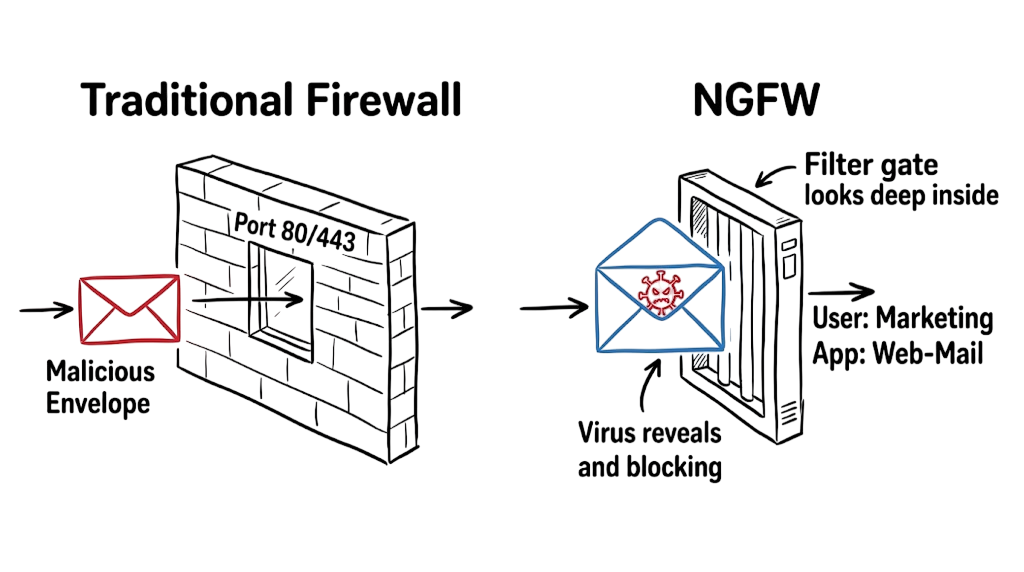
Next Generation Firewall (NGFW) technology has become one of the most important security controls for protecting modern enterprise networks. Unlike a traditional firewall that only performs packet filtering based on IP addresses and ports, a Next Generation Firewall inspects applications, users, and encrypted traffic to stop advanced cyber threats.
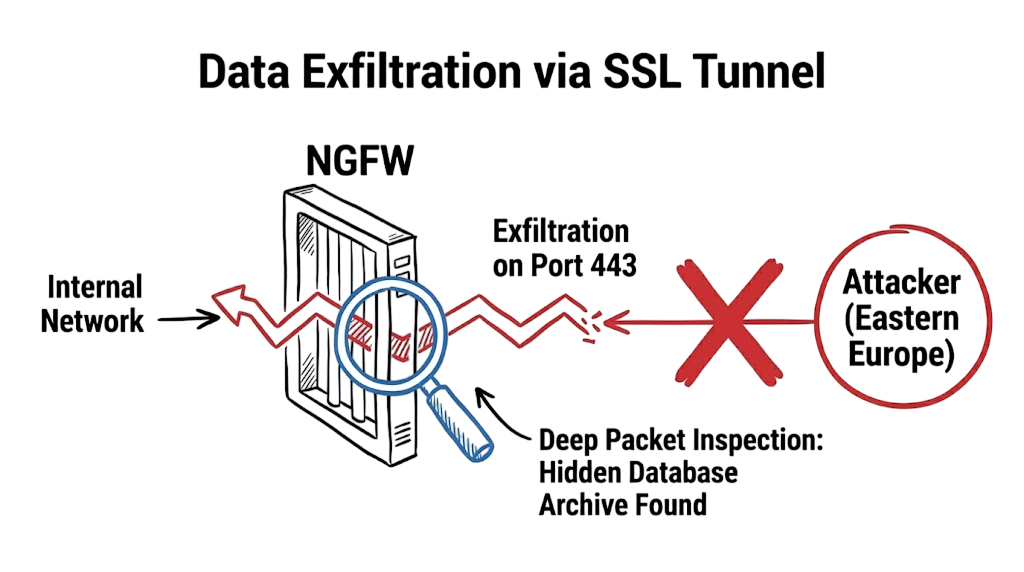
It is 2:00 PM on a Tuesday. You are monitoring your Security Operations Center (SOC) dashboard in Bangalore when an alert catches your attention. An internal server is sending 500 Mbps of encrypted traffic to an unfamiliar IP address in Eastern Europe over port 443. At first glance, everything appears to be normal HTTPS traffic.
This is exactly where a traditional firewall reaches its limits and an NGFW (Next-Generation Firewall) becomes essential.
A traditional firewall can verify IP addresses, ports, and protocols, but it cannot always determine what is happening inside encrypted traffic. By the time you discover that the seemingly legitimate HTTPS session is actually a compressed archive containing sensitive customer data being exfiltrated to an attacker, the breach has already occurred.
An NGFW goes beyond basic packet filtering by combining deep packet inspection (DPI), application awareness, intrusion prevention (IPS), SSL/TLS inspection, and real-time threat intelligence. These capabilities allow organizations to identify malicious applications, block sophisticated cyberattacks, and stop data exfiltration before critical information leaves the network.
In this guide, you’ll learn how an NGFW works, how it differs from a traditional firewall, and why it has become an essential security appliance for defending modern enterprise networks against today’s advanced threats.
Why Traditional Firewalls Are No Longer Enough
For many years, organizations relied on a traditional firewall as the first line of defense against cyber threats. A traditional firewall acted as a basic gatekeeper by inspecting the source IP address, destination IP address, protocol, and port number before deciding whether to allow or block network traffic.
For example, if a security policy allowed HTTP traffic over port 80 or HTTPS traffic over port 443, the firewall permitted the connection without examining the contents of the traffic. This basic packet filtering approach was effective against older network threats but is no longer sufficient for today’s sophisticated cyberattacks.
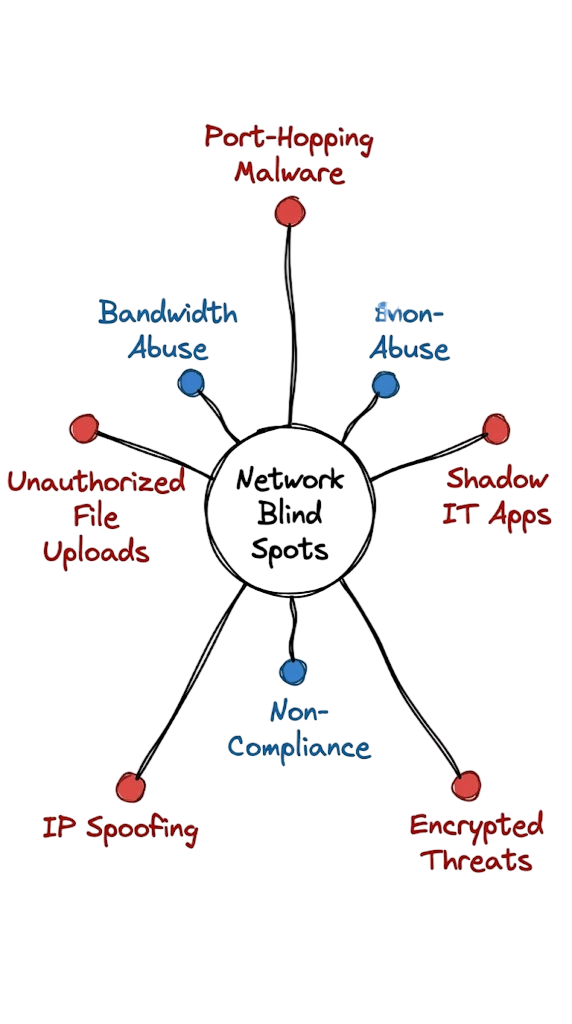
Modern attackers hide malware, ransomware, command-and-control (C2) traffic, and data exfiltration inside legitimate encrypted web traffic. Since a traditional firewall cannot inspect application behavior or encrypted payloads, malicious traffic often passes through undetected.
What Is an NGFW?
An NGFW (Next-Generation Firewall) is an advanced security appliance that combines multiple security technologies into a single platform. Unlike a traditional firewall that focuses only on IP addresses and ports, an NGFW analyzes the actual content of network traffic before allowing it into the network.
An NGFW provides advanced capabilities such as:
- Deep Packet Inspection (DPI)
- Application Awareness and Control
- Intrusion Prevention System (IPS)
- SSL/TLS Traffic Inspection
- User Identity Awareness
- Malware Detection
- Threat Intelligence Integration
Instead of making security decisions based only on ports and protocols, an NGFW understands which application is communicating, who initiated the connection, and whether the traffic contains malicious code. This contextual awareness allows security teams to block advanced threats before they reach critical business systems.
How an NGFW Security Engine Works
The core technology behind an NGFW is Deep Packet Inspection (DPI). Unlike traditional packet filtering, which examines only the packet header, Deep Packet Inspection analyzes both the packet header and its payload.
When network traffic reaches the firewall, the security engine reconstructs the complete session and examines the transmitted data. It compares the traffic against threat signatures, behavioral analytics, application fingerprints, and known attack patterns to determine whether the connection is legitimate or malicious.
For example, an NGFW can distinguish between:
- A user downloading business documents from Microsoft OneDrive.
- A user uploading confidential company files to a personal Dropbox account.
Although both services use HTTPS over port 443, the NGFW identifies the specific application and applies different security policies based on business requirements.
High-Performance Hardware Enables Real-Time Protection
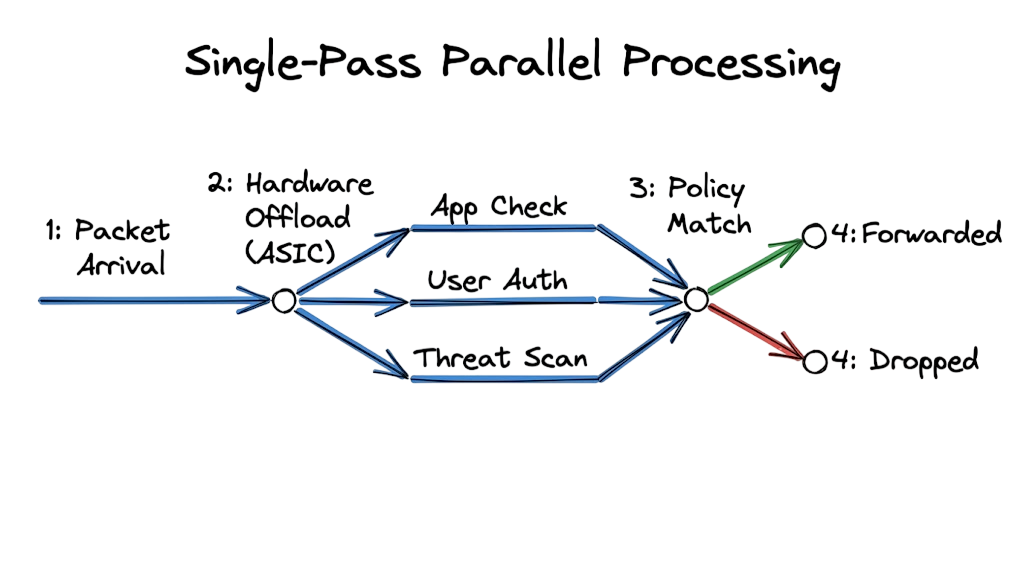
Inspecting every packet at high speed requires significant processing power. Enterprise-grade NGFW solutions often use dedicated Application-Specific Integrated Circuits (ASICs) instead of relying entirely on general-purpose CPUs.
These specialized processors accelerate:
- Deep Packet Inspection
- SSL/TLS Decryption
- Malware Scanning
- Intrusion Prevention
- Application Identification
- Threat Detection
Because ASICs are purpose-built for network security, they enable the security appliance to inspect gigabits of traffic in real time while maintaining low latency for users.
Technical Flow and Data Path
The technical path of a packet through the system is logical and fast. First, the packet hits the ingress interface. The system performs a basic check at the data link and network layers to verify MAC and IP addresses. If it passes, the device checks if the packet belongs to an existing session. If it is a new session, the system must identify the application.
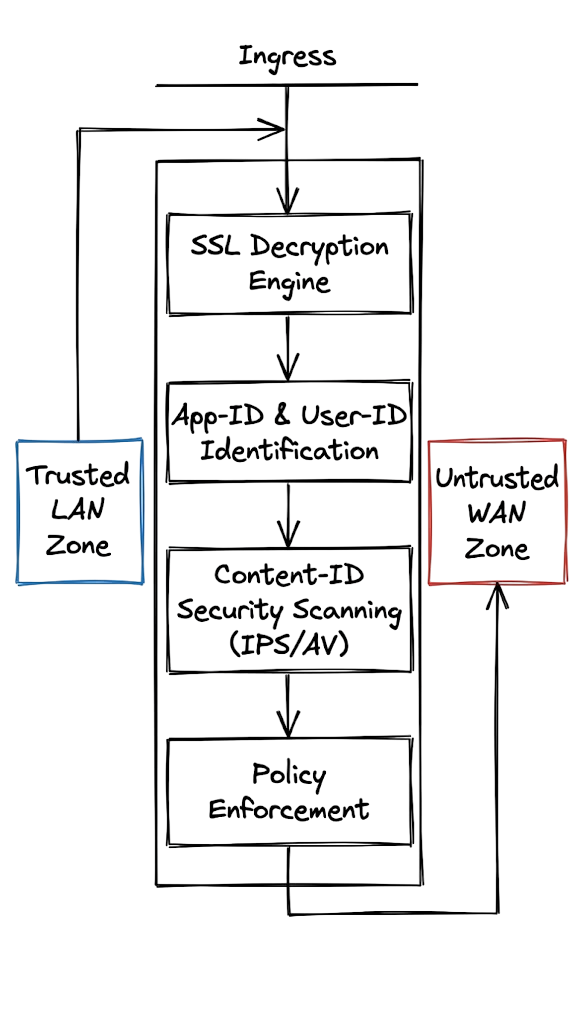
Now here’s where it gets interesting. The device might need to decrypt the traffic if it is using SSLHow SSL Inspection Works in an NGFW
Today, most web traffic is encrypted using HTTPS or TLS. While encryption protects sensitive information, it also allows attackers to hide malware, ransomware, and command-and-control (C2) traffic inside secure connections. Without SSL/TLS decryption, even an NGFW cannot inspect the contents of encrypted traffic.
An NGFW solves this challenge by temporarily decrypting the traffic, inspecting its contents, and comparing the data against millions of known malware signatures, threat intelligence feeds, and security policies. The firewall also verifies the user’s identity and checks whether the requested application is permitted.
If the traffic complies with your organization’s security policy, the security appliance re-encrypts the data before forwarding it to its destination. This entire process occurs in milliseconds and remains transparent to end users.
Key Components of an NGFW
A modern Next-Generation Firewall (NGFW) combines multiple security technologies into a single security appliance.
App-ID
App-ID identifies applications by analyzing traffic patterns, protocols, and behavior instead of relying only on port numbers. This enables the firewall to distinguish between legitimate business applications and unauthorized software, even when both use the same port.
User-ID
User-ID integrates with identity providers such as Microsoft Active Directory or LDAP to identify the user behind every connection. Instead of viewing only an IP address, administrators can create security policies based on departments, user groups, or individual employees.
Content-ID
Content-ID scans files and network traffic for malware, ransomware, prohibited file types, and sensitive information such as financial records or personally identifiable information (PII). It helps organizations prevent data loss while detecting malicious content before it reaches endpoints.
Threat Prevention
The integrated Threat Prevention engine blocks known exploits, spyware, ransomware, command-and-control (C2) communications, and other advanced cyber threats before they compromise internal systems.
SSL/TLS Decryption
SSL/TLS Decryption allows the NGFW to inspect encrypted HTTPS traffic for hidden threats. Without this capability, malware can easily bypass a traditional firewall by hiding inside encrypted network sessions.
Real-World Example: Analyzing an NGFW Traffic Log
When investigating blocked connections, security administrators often review traffic logs generated by the firewall.
date=2026-04-18
time=11:36:00
devname="Naga-FW-01"
srcip=192.168.50.12
dstip=93.184.216.34
dstport=443
action="deny"
app="BitTorrent"
user="amit.sharma"
group="Accounting"
appcat="P2P"
reason="app-ctrl-deny"
This log provides valuable context.
An employee named Amit Sharma from the Accounting department attempted to use BitTorrent over HTTPS (port 443). A traditional firewall would likely allow the connection because HTTPS traffic is generally permitted.
However, the NGFW identified the actual application as BitTorrent using App-ID and blocked the session because the organization’s Application Control policy prohibits peer-to-peer (P2P) software for Accounting users.
This level of visibility helps organizations prevent:
- Shadow IT
- Unauthorized applications
- Bandwidth abuse
- Data leakage
- Malware infections
How to Deploy an NGFW
Deploying an NGFW requires careful planning to maximize security while maintaining network performance.
1. Define Security Zones
Separate internal users, servers, DMZ networks, guest Wi-Fi, and cloud workloads into dedicated security zones.
2. Configure Network Interfaces
Assign IP addresses to LAN and WAN interfaces, configure routing, and verify internet connectivity before applying security policies.
3. Integrate with Identity Services
Connect the firewall to Microsoft Active Directory, LDAP, or another identity provider to create user-based security policies.
4. Enable SSL Inspection
Deploy your organization’s trusted certificate to managed devices so the firewall can inspect encrypted traffic without generating browser certificate warnings.
5. Create Application-Based Policies
Replace simple port-based rules with application-aware policies. For example, allow Microsoft Teams while blocking unauthorized peer-to-peer applications.
6. Enable Security Profiles
Attach Antivirus, Intrusion Prevention (IPS), URL Filtering, DNS Security, Anti-Spyware, and Application Control profiles to security policies.
7. Configure Logging and Monitoring
Forward firewall logs to a centralized SIEM platform such as Microsoft Sentinel or Splunk and configure alerts for high-severity security events.
Advantages of an NGFW
Organizations deploy NGFWs because they provide security capabilities beyond simple packet filtering.
Improved Visibility
Administrators can identify applications, users, devices, and threats instead of relying only on IP addresses and ports.
Stronger Threat Protection
Deep Packet Inspection, IPS, malware detection, and SSL inspection help stop ransomware, phishing, and advanced persistent threats before they reach internal systems.
Application Control
Security teams can allow business applications while blocking risky software such as BitTorrent, Tor, or unauthorized cloud storage services.
User-Based Policies
Rules can be created for departments, security groups, or individual users instead of entire IP ranges.
Compliance Support
Granular logging and policy enforcement help organizations meet compliance requirements such as SAMA, PCI DSS, ISO 27001, and NIST Cybersecurity Framework.
Limitations of an NGFW
Although an NGFW provides significantly better protection than a traditional firewall, organizations should also consider its limitations.
Performance Overhead
Deep Packet Inspection, SSL decryption, and malware scanning consume processing resources. Enabling every security feature can reduce firewall throughput considerably.
For example, a firewall rated for 1 Gbps throughput may deliver only 300 to 500 Mbps when all advanced inspection features are enabled.
Higher Cost
Enterprise NGFW solutions require hardware, software licenses, and annual threat intelligence subscriptions. Without regular updates, threat detection capabilities become less effective.
Increased Management Complexity
Advanced security features require ongoing tuning, policy optimization, certificate management, and log monitoring to avoid false positives and maintain performance.
Common Mistakes Engineers Make
The most common mistake I see is “Set and Forget.” Engineers install the unit, create a few rules, and never look at it again. Security is not a product; it is a process. If you do not update your firmware, you are leaving the door open for hackers.
Another massive mistake is ignoring SSL decryption. Over 90% of web traffic is encrypted today. If you are not decrypting that traffic, your expensive security engine is only scanning 10% of your data. You are essentially paying for an X-ray machine and then refusing to turn it on.
This is where most people get confused: they think a more expensive device means they can be lazy. A complex system requires more tuning. If you don’t spend time refining your rules, you will deal with thousands of false positives that drown out the real alerts.
Best Practices for Your Environment
Always use the principle of least privilege. Do not allow your servers to talk to the whole internet. If a server only needs to download updates from Microsoft, write a rule that only allows that specific destination.
In real environments, it doesn’t work this cleanly because developers often ask for “Any-Any” rules. You must be blunt with them. Explain that an open rule is a liability. Use the Application Identification feature to give them what they need without opening unnecessary holes. Also, make sure you are logging every session. Even “Allowed” sessions should be logged because they provide the trail you need during an incident response.
Troubleshooting Scenario: The Slow Internet Complaint
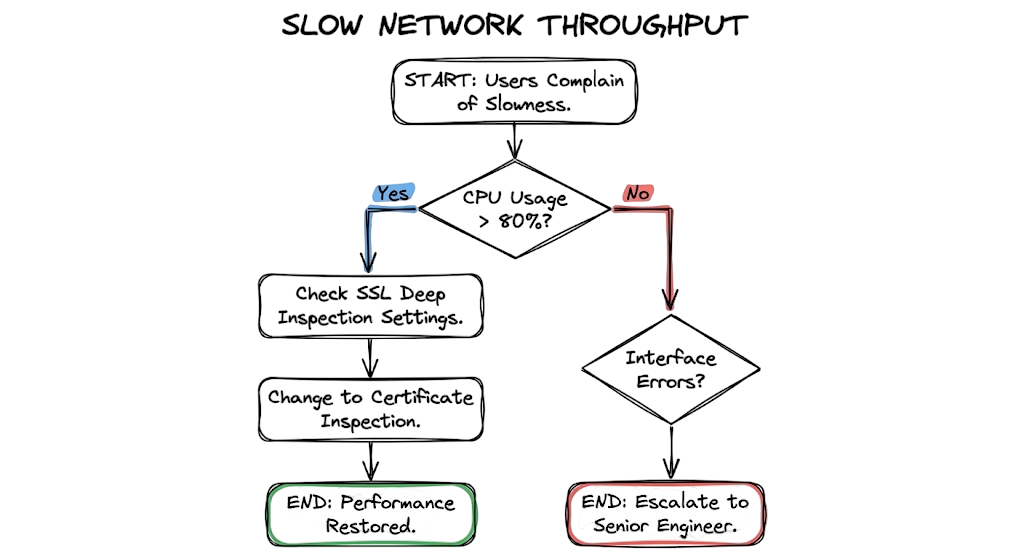
Symptom: Your users are complaining that the internet is extremely slow. The ISP says the line is clean.
Wrong Assumption: Most junior engineers assume the firewall hardware is failing or the ISP is lying. They restart the device and hope the problem goes away.
The Fix: Look at the CPU usage of the device. On a Fortinet system, use the command get system performance status. If you see the device is in “Preserve Mode,” it means it has run out of memory and is dropping packets to stay alive. Check your SSL inspection settings. You might be trying to decrypt high-bandwidth video streams from Netflix or YouTube. Add these categories to an “Exempt” list. Your CPU usage will drop immediately, and the internet will feel fast again.
Interview Questions to Expect
Q: What is the difference between a stateful firewall and an NGFW?
A: A stateful system only looks at the connection state, IPs, and ports. An NGFW performs deep packet inspection to identify applications, users, and specific threats within the data payload.
Q: How does an NGFW handle encrypted traffic?
A: It uses SSL/SSH decryption. The device acts as a transparent proxy, decrypting the traffic to scan it for malware and then re-encrypting it before sending it to the final destination.
Q: Why is application identification better than port filtering?
A: Hackers can run any application on any port. Application identification looks at the “fingerprint” of the data, so it can detect and block Skype even if someone tries to run it over port 80.
Q: What happens to performance when you enable full threat prevention?
A: Performance usually drops because the device has to use more CPU cycles to scan the data. You must size your hardware correctly based on the “Threat Protection Throughput” listed in the data sheet, not just the “Firewall Throughput.”
Future Trends for 2026
We are seeing a massive shift toward AI-driven policy management. Instead of you manually writing every rule, the system learns what is “normal” for your network and suggests blocks for weird behavior. This will be critical for meeting the strict auditing requirements of the RBI in India as they push for more automated security responses.
Another trend is the integration of SD-WAN directly into the security appliance. Companies are moving away from expensive MPLS lines and using standard internet links. The device manages the security and the routing at the same time. This is becoming the standard for retail chains and bank branches across Southeast Asia.
Frequently Asked Questions
Can I use an NGFW without a subscription?
Yes, but you will only get basic port filtering and routing. You will not receive updates for viruses, IPS signatures, or application definitions, which makes the device much less effective.
Does SSL inspection break privacy?
It can. This is why you should configure your policy to exempt sensitive categories like “Banking,” “Healthcare,” and “Government” from decryption.
What is the difference between an NGFW and a WAF?
A Web Application Firewall (WAF) is specialized for protecting web servers from specific web attacks like SQL injection. An NGFW is a general-purpose device meant to protect an entire network of users.
Do I still need antivirus on my laptops if I have an NGFW?
Yes. A security guard at the gate does not replace a bodyguard for the VIP. If someone plugs in an infected USB drive, the network guard cannot stop the virus from spreading locally.
How often should I review my logs?
You should have an automated system for high-priority alerts, but a human should perform a manual review of traffic patterns at least once a week to spot trends that the automated system might miss.
Conclusion
The transition from a traditional firewall to an NGFW is the single most important step you can take to secure your infrastructure. You cannot defend what you cannot see. By using application awareness and identity-based rules, you turn a blind gate into a smart security system. Stop relying on port numbers and start looking at the actual data. Your first task today should be to check your outbound traffic logs and see how many “unknown” applications are currently running on your network.
Related Articles
- What is Firewall in Cybersecurity? Types, Examples and How it Works in 2026
- Complete Network Security Basics Guide for Beginners 2026
- Network Protocols and Ports: 10 Critical Security Facts
- What Are Network Devices? 9 Essential Types & OSI Model Guide
- Network Segmentation Explained with Real-World Example
- Zero Trust Security in 2026: Architecture, Real Examples, and Implementation Guide
- Cloud Security Basics 2026: Complete Beginner Guide
- Critical API Security Risks in the Cloud and Best Practices for 2026
- Top 10 Cybersecurity Best Practices for 2026
- Identity and Access Management in 2026: A Practical Guide for Cloud Security Professionals








1 thought on “NGFW Guide 2026: How Next-Generation Firewalls Stop Modern Cyber Attacks”