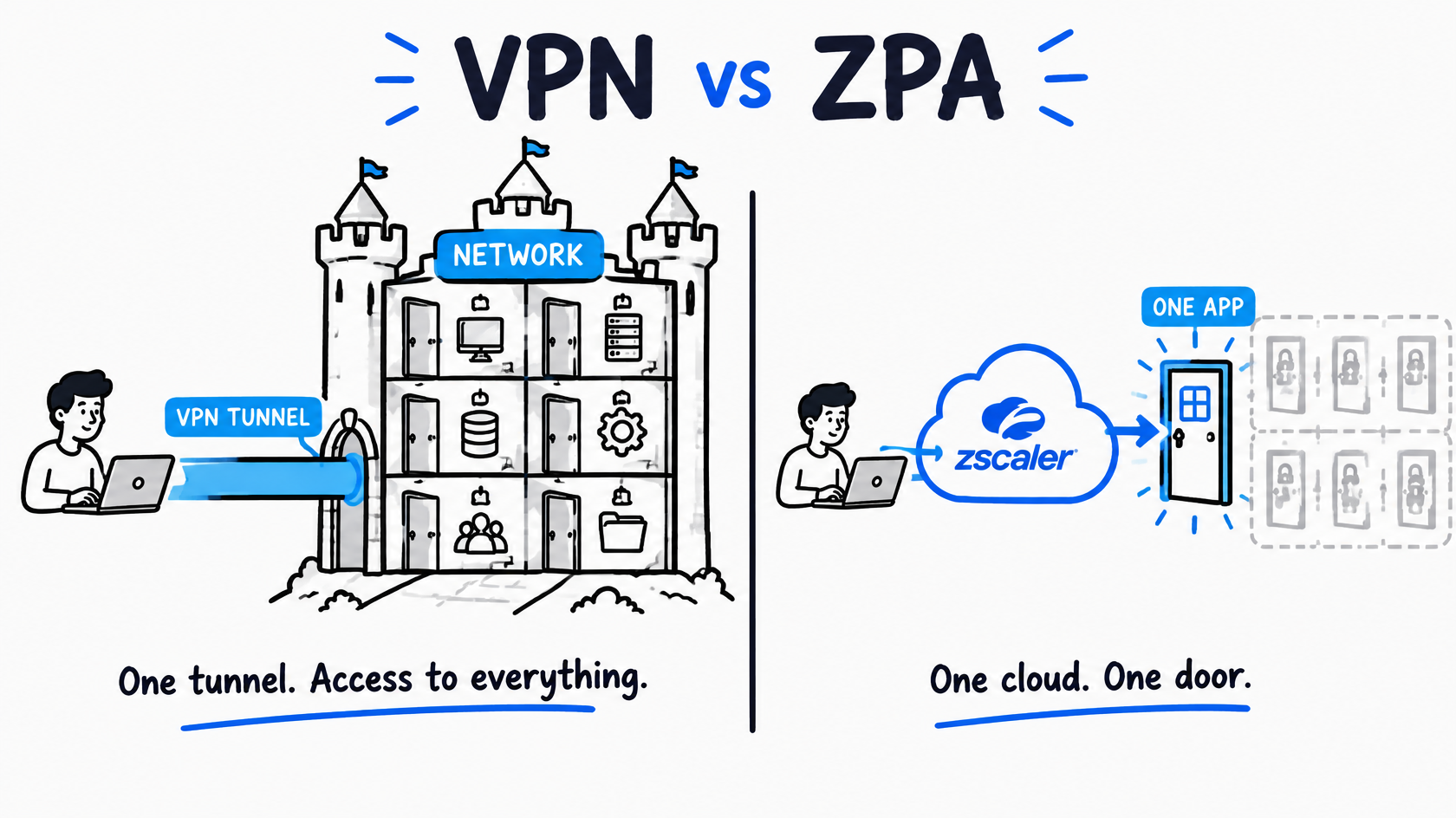
For years, the VPN was the standard way to give remote employees access to internal applications. You log in, the tunnel comes up, and you are “inside” the corporate network. That last part is exactly the problem.
Attackers know that one stolen VPN password can open a path to the whole network. That is why so many organisations are now comparing VPN vs ZPA (Zscaler Private Access) and moving to Zero Trust Network Access.
In this VPN vs ZPA guide, I explain how each model works, where VPNs fall short and how ZPA connects users to applications instead of networks. I also walk through three real scenarios where the difference matters. At the end, I share the exact checklist I follow in production when a user says, “I can’t reach the application.”
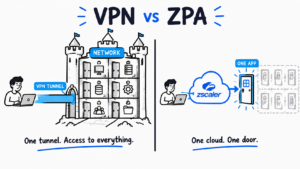
Quick answer: VPN vs ZPA A VPN connects your device to the corporate network, so after login you can usually reach far more than you need. ZPA connects you only to the applications your policy allows, after checking your identity and device. Your device never joins the network, and your applications stay hidden from the internet.
How a VPN Works (and Why It Struggles Today)
A Virtual Private Network (VPN) creates an encrypted tunnel between a device and the corporate network. Organisations use two main types:
- Site-to-site VPN: permanently links branch offices to the data centre.
- Remote access VPN: lets individual employees connect from home or while travelling.
Full tunnel vs split tunnel
With a remote access VPN, you decide how traffic is routed:
- Full tunnel sends all traffic, including normal internet browsing, through the corporate network. Security checks stay central, but users feel the slowdown because every request travels back to the data centre first.
- Split tunnel sends only corporate traffic through the VPN. Internet traffic goes straight out, which is faster, but the corporate security stack no longer inspects it.
The real problem: implicit trust
After you authenticate, the VPN gives your device an internal IP address. From that moment, the network largely treats your device as trusted, and you can often see far more than your job needs.
If an attacker steals a user’s credentials, they get the same position. They can scan connected subnets, find weak servers and move laterally towards sensitive systems. This is how many ransomware attacks spread, using the network pivoting techniques we covered earlier.
A VPN also needs a public gateway that listens for incoming connections. Attackers constantly scan the internet for these gateways and exploit unpatched vulnerabilities in them. The device meant to protect the network can become the way in. This weakness is the starting point of every VPN vs ZPA comparison

How Zero Trust Network Access (ZTNA) Works
Zero Trust Network Access follows one rule: never trust, always verify. That single rule is the heart of the VPN vs ZPA difference. No user or device is trusted just because of where it connects from, whether that is home, a café or the office.
With ZTNA:
- Your device never joins the corporate network.
- You connect to specific applications, not to subnets.
- Your identity and device posture are checked before access, and policy is evaluated again for each new application connection.
For example, a posture rule can require a running endpoint security agent or a company certificate on the laptop. If the device fails the check, access to sensitive applications can be blocked until it is fixed.
The model is formally described in NIST SP 800-207: Zero Trust Architecture. If the concept is new to you, start with our Zero Trust security guide.
VPN vs ZPA: 8 Key Differences at a Glance
| Feature | VPN | ZPA (Zero Trust Network Access) |
|---|---|---|
| What you connect to | The corporate network | Only the applications your policy allows |
| Trust model | Trusted after login | Verified per user, device and application |
| Device on the network | Yes, gets an internal IP address | No |
| What users can see | Other servers and subnets | Only their assigned applications |
| Inbound exposure | Public VPN gateway listening on the internet | None: App Connectors connect outbound only |
| Lateral movement risk | High if credentials are stolen | Limited to the apps the user is allowed |
| Third-party access | Usually needs a VPN client on their device | Browser-based access, no agent needed |
| User experience | Traffic often travels back through the data centre | Users connect through the nearest Zscaler service edge |
How Zscaler Private Access Works: The 3 Core Components
To understand VPN vs ZPA properly, you need to know how ZPA is built. Zscaler Private Access is Zscaler’s cloud-delivered ZTNA service. It is built on three components:
- Zscaler Client Connector (ZCC): the agent on the user’s laptop or phone. It authenticates the user through your identity provider, shares device posture and forwards private application traffic to the Zscaler cloud. Our Zscaler Client Connector interview questions explain it in depth.
- Zero Trust Exchange (ZPA Public Service Edge): the cloud broker. It checks the user’s identity, groups and posture against your access policy, then stitches the connection between the user and the right App Connector. This is where policy is enforced.
- App Connectors: lightweight software, usually deployed as virtual machines, that sit close to your applications in the data centre or public cloud. They open outbound connections to the Zscaler cloud, so you need no inbound firewall rules.
Here is what happens when a user opens an internal application such as erp.company.local:
- Client Connector sends the request to the nearest ZPA service edge.
- The service edge checks the user’s identity, SCIM groups, device posture and access policy.
- If access is allowed, it brokers the connection to an App Connector near the application.
- The App Connector connects to the application server, and the two halves of the session are joined.
The user reaches that one application and nothing else. The rest of the network stays invisible. You can read Zscaler’s own overview in What Is Private Access?

Why Companies Are Moving from VPN to ZPA
In most VPN vs ZPA discussions I have been part of, the same four reasons come up.
1. It stops lateral movement. Users connect to named applications, not networks, so a compromised laptop cannot scan or reach neighbouring servers. Each application gets its own boundary. You get the benefit of network segmentation without redesigning the network.
2. It removes the public attack surface. App Connectors build inside-out connections to the Zscaler cloud. Your applications need no public IP address and no open inbound port. Attackers cannot attack what they cannot find.
3. It gives third parties safe, limited access. With Browser Access, contractors reach approved web applications through a normal browser, with no agent on their unmanaged laptops. For RDP and SSH, Privileged Remote Access gives browser-based sessions to specific servers only.
4. It can inspect private application traffic. AppProtection inspects traffic to your private applications inline and can block common web attacks such as SQL injection and cross-site scripting.
VPN vs ZPA in 3 Real-World Scenarios
Here is how the VPN vs ZPA difference plays out in situations security teams face every week.
1. Giving a contractor access to one application
You hire an accounting firm to audit your financial records. The auditors need your internal billing application.
With a VPN, you create accounts and ask the auditors to install a VPN client on their own laptops. Once connected, their unmanaged devices sit on your internal network. If one laptop carries malware, it now has a path to your servers.
With Zscaler Private Access, you create a policy that allows that one billing application through Browser Access. The auditors log in from a browser and reach only that application. Their devices never touch your network.
2. Containing a phishing compromise
An employee clicks a link in a phishing email, and an attacker gains remote control of the laptop.
With a VPN, the attacker uses the active tunnel to scan the network. They find an outdated server, steal admin credentials and deploy ransomware across the company.
With ZPA, the scan goes nowhere, because ZPA does not route raw network traffic. The attacker sees only the few applications that employee is allowed to use. You isolate the laptop, reset the account and the damage stays contained.
3. Connecting two networks after a merger
Your company acquires a smaller business. Both data centres use the same private IP address range.
With a VPN, network engineers spend weeks or months on NAT rules and re-addressing servers to avoid conflicts, and users wait.
With ZPA, you deploy App Connectors in the acquired data centre and define its applications by domain name. Because each connector group reaches only its own environment, overlapping IP ranges cause far fewer problems. Users can often get access much sooner, while the longer network integration happens in the background.
From the Field: How I Design and Troubleshoot ZPA Access
The VPN vs ZPA theory is useful, but… Here is how we handle Zscaler Private Access in production.
Separate access policies for employees and third parties
We keep separate access policies for our own users and for third-party users:
- Employees reach applications through Zscaler Client Connector, from the office or remotely.
- Third-party users get access only through Privileged Remote Access (for RDP) or browser-level access, never through a full client.
Keeping the two groups apart makes it much easier to restrict third parties tightly and to review who can reach what.
My checklist when users can’t reach an application
When an incident comes in, I follow the same order every time:
- Check the scope. How many users are affected? One user usually points to that device or account. Many users point to a policy, connector or application problem.
- Check the network location. Is the user on a trusted (office) network or an off-trusted network? Client Connector can forward traffic differently on each, so this narrows things down quickly.
- Check the logs for that user and application. In my experience, the ZPA user activity logs point to the cause in almost every case. Search by user and application, and read the status and error.
- Check the access policy. If the policy blocks the user, confirm they are in the right SCIM group from your identity provider. Often the fix is simply adding them to the correct group.
- Check the application segment. Is the application’s domain defined, and is the required port included? A missing port is one of the most common causes.
- Check the path, hop by hop:
- User machine to Zscaler cloud: is Client Connector connected and ZPA authenticated?
- Zscaler cloud to App Connector: is the connector healthy and in the right connector group?
- App Connector to application: can the connector resolve the name and reach the port?
Tip: Work through the path in that order. It stops you blaming the application when the real issue is a missing SCIM group or port.

Want to go deeper into app segments, server groups and connector groups? Our ZPA interview questions guide covers them with real examples.
Before You Switch: What to Plan For
ZPA is not a one-click replacement. Before you act on your VPN vs ZPA decision, plan for these points:
- Application discovery: you need to know which applications users really access, so you can define application segments.
- Legacy applications: some older applications, especially ones that start connections from the server side, need extra testing.
- Phased rollout: many companies run VPN and ZPA side by side for a while and move user groups in stages.
- Licensing: ZPA is a paid subscription, so compare it with the full cost of running and patching VPN gateways.
Frequently Asked Questions
Is ZPA a VPN?
No. A VPN places your device on the corporate network. ZPA connects you only to approved applications and never gives your device network-level access.
VPN vs ZPA: which is more secure?
For access to private applications, ZPA is generally the stronger design. It removes the exposed VPN gateway, checks identity and device posture, and limits each user to approved applications. Like any tool, it still depends on good policies and regular reviews.
VPN vs ZPA: which is easier for users?
For most users, ZPA feels simpler. Client Connector runs in the background, so there is no tunnel to start or reconnect, and applications open the same way from the office or from home.
What is the difference between ZTNA and ZPA?
ZTNA (Zero Trust Network Access) is the security model. ZPA is Zscaler’s product that delivers ZTNA for private applications.
Does ZPA need inbound firewall ports?
No. App Connectors make outbound connections to the Zscaler cloud, so your applications need no public IP address or open inbound port.
Can contractors use ZPA without installing software?
Yes. Browser Access gives agentless access to web applications, and Privileged Remote Access provides browser-based RDP and SSH sessions.
Do companies still need a VPN after moving to ZPA?
Often only for a transition period, or for cases such as site-to-site links between offices. For user access to private applications, ZPA is designed to replace the remote access VPN.
Conclusion: VPN vs ZPA
The VPN vs ZPA choice comes down to trust. A VPN trusts the device once it is on the network. Zscaler Private Access verifies every user, device and application connection, keeps applications hidden from the internet and limits what an attacker can reach.
If you are preparing for a Zscaler role, try our ZPA interview questions next, or see how this fits the bigger picture in Zero Trust vs traditional security.
Have you moved from VPN to ZPA in your organisation? Share what surprised you most in the comments below.