Incident response is a critical cybersecurity function focused on identifying, analyzing, containing, eradicating, and recovering from security incidents. Security teams use incident response processes to handle events such as malware infections, ransomware, phishing, compromised accounts, data breaches, insider threats, and unauthorized access.
If you are preparing for a SOC Analyst, Cybersecurity Analyst, Incident Response Analyst, Security Engineer, or Incident Responder interview, you should understand both incident response fundamentals and practical investigation scenarios.
This guide covers 50 Incident Response Interview Questions and Answers 2026, from basic concepts and incident response phases to evidence collection, containment, malware investigations, ransomware, threat hunting, digital forensics, and real-world scenarios.
1. What is Incident Response?
Incident response is the structured process an organization follows to detect, investigate, contain, eradicate, and recover from cybersecurity incidents.
Examples of security incidents include:
- Malware infections
- Ransomware
- Phishing attacks
- Compromised accounts
- Data breaches
- Unauthorized access
- Insider threats
- Denial-of-service attacks
- Privilege escalation
The goal is to reduce the impact of the incident and restore normal operations while preserving evidence and documenting what happened.
2. What is a security incident?
A security incident is an event that threatens the confidentiality, integrity, or availability of information systems or data.
Examples include:
- Unauthorized access to an account
- Malware execution
- Sensitive data exposure
- Suspicious administrator activity
- Ransomware encryption
- Unauthorized system modification
Not every security event is an incident.
For example, a single failed login may be a normal event. Hundreds of failed logins followed by a successful login could require incident investigation.
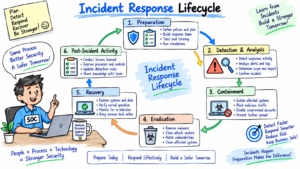
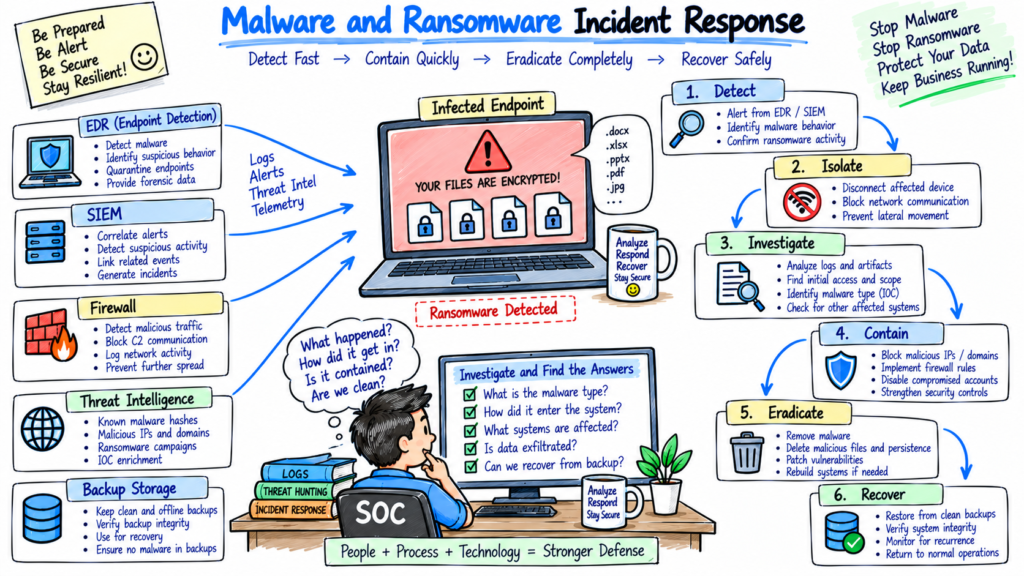
3. What are the main phases of incident response?
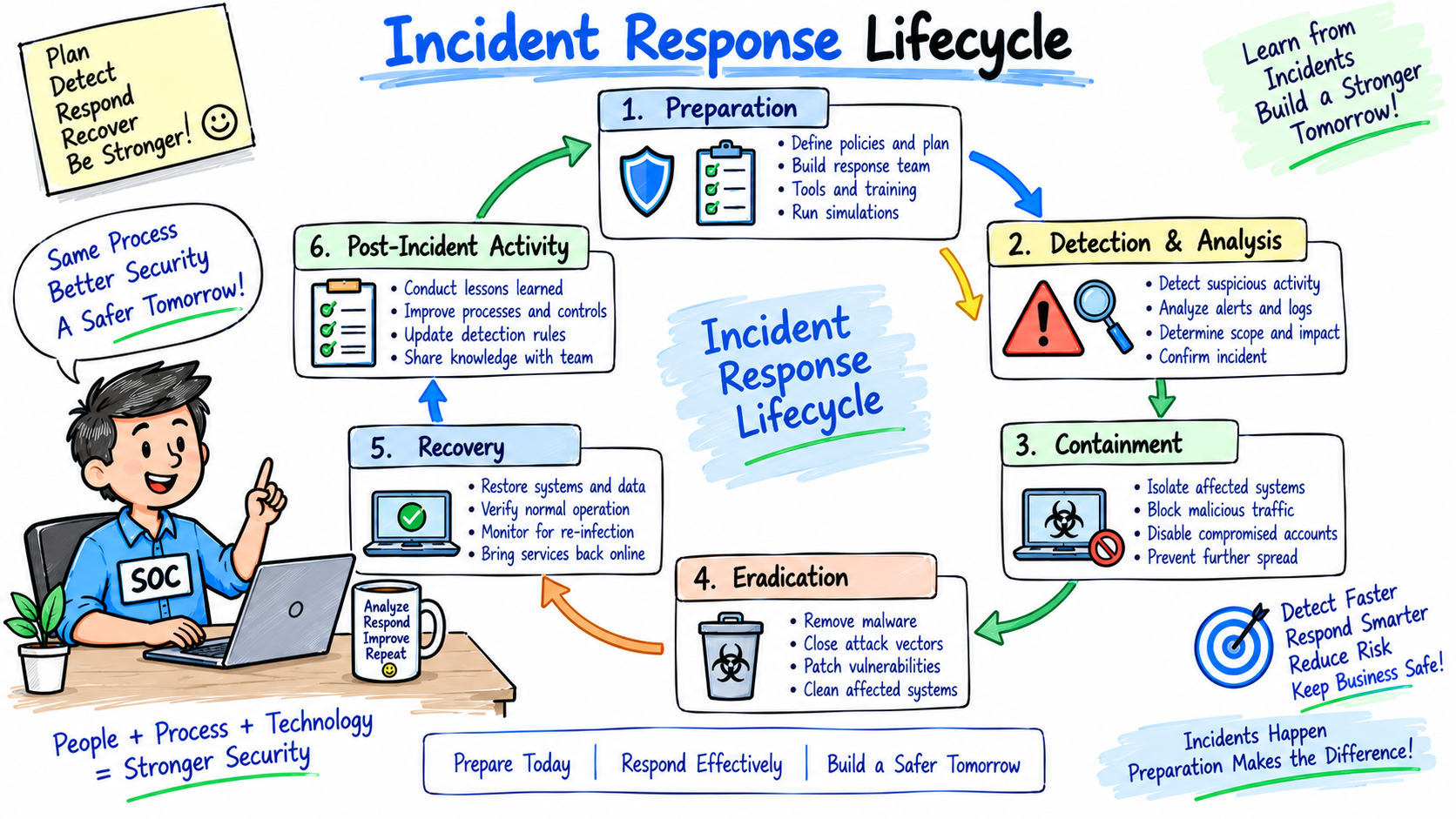
A commonly used incident response lifecycle includes:
- Preparation
- Detection and Analysis
- Containment
- Eradication
- Recovery
- Post-Incident Activity
The exact terminology can vary between organizations and incident response frameworks.
A simple interview explanation is:
Prepare → Detect → Analyze → Contain → Eradicate → Recover → Learn
4. What is incident response preparation?
Preparation involves getting the organization ready to handle security incidents before they occur.
Preparation includes:
- Incident response policies
- Playbooks
- Contact lists
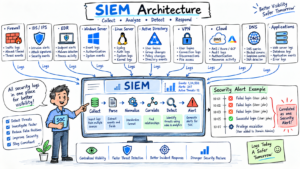
- SIEM
- EDR
- Network monitoring
- Backup systems
- Forensic tools
- Security training
- Communication procedures
- Access to critical systems
The organization should also regularly test its incident response procedures.
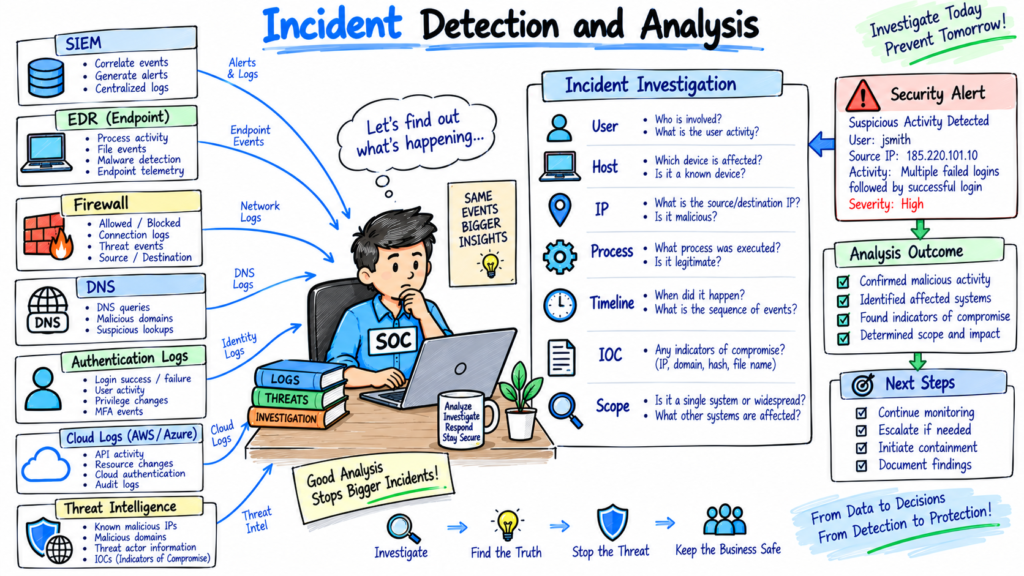
5. What is incident detection?
Incident detection is the process of identifying potentially malicious or unauthorized activity.
Detection sources can include:
- SIEM alerts
- EDR alerts
- Firewall logs
- IDS/IPS
- Email security
- Cloud security platforms
- Threat intelligence
- User reports
- Vulnerability scanners
For example, an EDR alert showing suspicious PowerShell execution could initiate an investigation.
6. What is incident analysis?
Incident analysis determines what happened, how it happened, which systems were affected, and whether the activity is malicious.
An analyst may investigate:
- User
- Hostname
- IP address
- Process
- Command line
- File hash
- Network connections
- Authentication logs
- DNS requests
- Timeline
- Threat intelligence
The objective is to understand the incident before selecting appropriate containment and remediation actions.
7. What is incident containment?
Containment limits the attacker’s ability to continue the incident or spread to additional systems.
Examples include:
- Isolating an endpoint
- Disabling a compromised account
- Blocking a malicious IP
- Blocking a domain
- Removing a compromised device from the network
- Revoking active sessions
- Restricting network access
Containment should follow organizational procedures because an aggressive action can affect legitimate business operations.
8. What is the difference between short-term and long-term containment?
Short-term containment
Immediate action taken to limit damage.
Example:
Isolate an infected laptop from the network.
Long-term containment
More controlled measures that allow investigation and business continuity.
Example:
Move affected systems into a restricted network segment while forensic analysis continues.
The exact approach depends on the incident and business requirements.
9. What is incident eradication?
Eradication removes the root cause and malicious components of an incident.
Examples include:
- Removing malware
- Deleting malicious accounts
- Removing persistence mechanisms
- Patching vulnerabilities
- Resetting compromised credentials
- Removing malicious scheduled tasks
- Blocking attacker infrastructure
The analyst should verify that the threat has been removed before moving to recovery.
10. What is incident recovery?
Recovery restores affected systems to normal operation.
Recovery activities may include:
- Restoring systems from clean backups
- Rebuilding compromised machines
- Resetting credentials
- Monitoring restored systems
- Validating applications
- Removing temporary containment controls
Enhanced monitoring should continue after recovery to identify possible reinfection.
11. What is a post-incident review?
A post-incident review examines what happened and identifies improvements.
It may document:
- Root cause
- Attack timeline
- Affected systems
- Detection gaps
- Response actions
- Recovery actions
- Business impact
- Lessons learned
- Recommended improvements
The objective is to improve future detection and response.
12. What is an incident response plan?
An incident response plan is a documented procedure describing how an organization handles cybersecurity incidents.
It typically includes:
- Incident classification
- Roles and responsibilities
- Escalation procedures
- Communication procedures
- Investigation steps
- Containment procedures
- Recovery procedures
- Evidence handling
- Reporting requirements
The plan should be reviewed and tested regularly.
13. What is an incident response playbook?
A playbook provides detailed steps for handling a specific type of security incident.
Examples include:
- Phishing playbook
- Ransomware playbook
- Malware playbook
- Compromised account playbook
- Data breach playbook
- DDoS playbook
- Insider threat playbook
For example, a compromised-account playbook may include:
- Validate the alert.
- Review authentication history.
- Revoke active sessions.
- Reset credentials.
- Check MFA activity.
- Investigate accessed resources.
- Search for persistence.
- Document findings.
14. What is incident classification?
Incident classification categorizes an incident based on its characteristics and potential impact.
Common categories include:
- Malware
- Phishing
- Account compromise
- Unauthorized access
- Data breach
- Ransomware
- Denial of service
- Insider activity
Classification helps determine the appropriate response process.
15. What is incident severity?
Severity indicates the potential impact and urgency of an incident.
Organizations may use levels such as:
- Low
- Medium
- High
- Critical
For example:
A malware alert on an isolated test system may receive a different priority from confirmed ransomware affecting critical production servers.
Severity should be based on the organization’s defined criteria.
16. What is the difference between an event, alert, and incident?
Event
An individual recorded activity.
Example:
User failed authentication.
Alert
A security detection generated because an event or group of events matches a detection condition.
Example:
50 failed authentication attempts detected.
Incident
A confirmed or suspected security event requiring formal investigation and response.
Example:
Compromised account used to access sensitive systems.
17. What is an IOC?
IOC stands for Indicator of Compromise.
An IOC is an artifact that may indicate malicious activity.
Examples include:
- Malicious IP address
- Malicious domain
- File hash
- Suspicious URL
- Malicious email address
- File path
- Registry entry
Analysts use IOCs to search for related activity across the environment.
18. What is an IOA?
IOA stands for Indicator of Attack.
IOAs focus on attacker behavior rather than a specific artifact.
Examples include:
- Credential dumping
- Suspicious PowerShell execution
- Lateral movement
- Privilege escalation
- Persistence attempts
IOA-based detection can help identify malicious behavior even when the specific malware or infrastructure is unknown.
19. What is a TTP?
TTP stands for Tactics, Techniques, and Procedures.
TTPs describe how attackers operate.
For example:
Tactic: Credential Access
Technique: OS Credential Dumping
Procedure: An attacker uses a credential-dumping tool to obtain authentication material.
Security teams can use TTP information to improve detection and threat hunting.
20. What is MITRE ATT&CK?
MITRE ATT&CK is a knowledge base that describes adversary tactics and techniques based on observed attacker behavior.
Incident responders can use ATT&CK to:
- Understand attacker behavior
- Map observed activity
- Build detection rules
- Perform threat hunting
- Identify detection gaps
- Document incidents
For example, suspicious PowerShell activity can be mapped to the relevant ATT&CK technique.
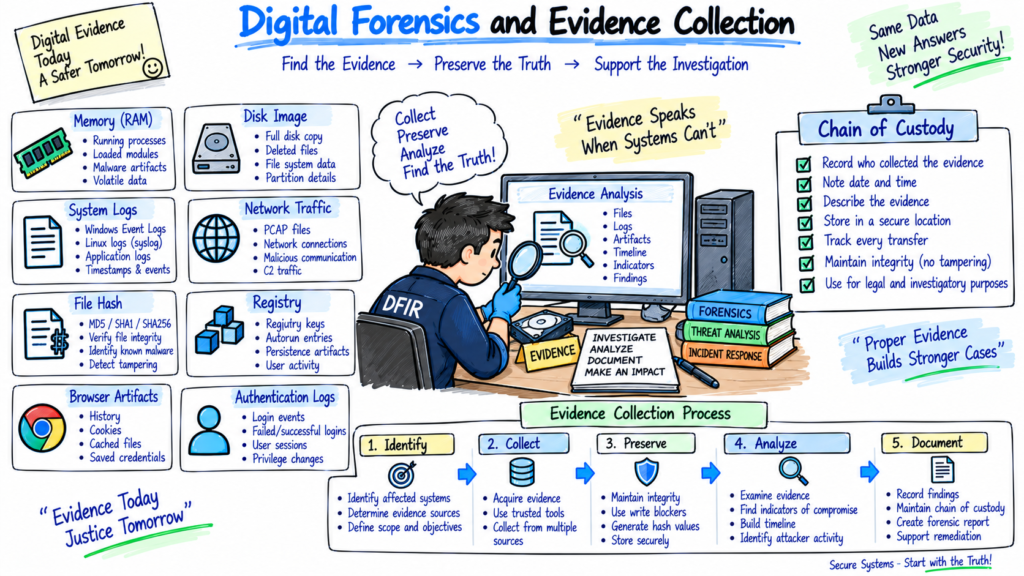
21. What is digital forensics in incident response?
Digital forensics involves collecting and analyzing digital evidence to understand what happened during an incident.
Evidence may include:
- Disk images
- Memory captures
- System logs
- Browser artifacts
- File metadata
- Registry data
- Network traffic
- Authentication logs
Forensic procedures should preserve evidence integrity.
22. What is chain of custody?
Chain of custody is the documented history of how evidence was:
- Collected
- Handled
- Transferred
- Stored
- Analyzed
For each evidence item, investigators may record:
- Who collected it
- When it was collected
- Where it came from
- How it was transferred
- Who accessed it
Proper evidence handling helps maintain confidence in the integrity of the investigation.
23. What is volatile data?
Volatile data is information that can disappear when a system is shut down or changes state.
Examples include:
- RAM contents
- Active network connections
- Running processes
- Logged-in users
- Open files
- Active sessions
When appropriate, responders may collect volatile evidence before shutting down or rebooting a system.
24. Why is memory forensics important?
Memory forensics analyzes the contents of RAM.
It can reveal:
- Running processes
- Network connections
- Injected code
- Loaded modules
- Credentials or authentication material
- Malware activity
Memory analysis can be particularly useful when malicious files are not easily visible on disk.
25. What is root cause analysis?
Root cause analysis identifies the underlying reason an incident occurred.
For example:
Phishing email
      ↓
User clicked malicious link
      ↓
Credentials stolen
      ↓
Attacker logged in
      ↓
MFA session compromised
      ↓
Cloud resources accessed
The root cause may involve phishing, credential theft, or another weakness identified during the investigation.
The analysis should distinguish the initial access method from later attacker activity.
26. How do you investigate a phishing incident?
I would follow a structured process.
Step 1: Analyze the email
Check:
- Sender
- Recipient
- Subject
- URLs
- Attachments
- Email headers
- Sending infrastructure
Step 2: Analyze URLs or attachments
Check:
- Domain reputation
- File hash
- Malware analysis
- Threat intelligence
Step 3: Identify affected users
Determine who received or interacted with the message.
Step 4: Check authentication activity
Look for suspicious logins after the user interacted with the phishing message.
Step 5: Contain
Depending on the organization’s procedures:
- Remove the email
- Block malicious URLs
- Reset compromised credentials
- Revoke sessions
Step 6: Hunt
Search for the same indicators across the environment.
27. How would you respond to a malware infection?
I would:
- Validate the alert.
- Identify the affected endpoint.
- Isolate the endpoint if required.
- Collect relevant evidence.
- Identify the malware.
- Check persistence mechanisms.
- Search for related IOCs.
- Determine whether other systems are affected.
- Remove the malware or rebuild the system.
- Restore the system.
- Monitor for reinfection.
- Document the incident.
EDR, SIEM, DNS, firewall, and proxy data can be correlated during the investigation.
28. How would you respond to ransomware?
Ransomware requires rapid containment and coordinated response.
I would:
- Validate the ransomware activity.
- Identify affected systems.
- Isolate infected endpoints and servers.
- Restrict network communication where appropriate.
- Protect unaffected systems.
- Preserve relevant evidence.
- Identify the initial access method.
- Determine the scope of encryption.
- Check backup integrity.
- Remove the attacker and persistence mechanisms.
- Rebuild or restore systems according to the recovery plan.
- Monitor restored systems.
- Document the incident.
Communication with management, legal, and other appropriate teams should follow the organization’s incident response plan.
29. How do you investigate a compromised account?
I would review:
- Authentication logs
- Source IP addresses
- Geolocation
- MFA events
- Device information
- VPN activity
- Cloud application activity
- Password changes
- Privilege changes
- Resource access
Then I would determine:
- When the compromise started
- How the account was compromised
- What systems were accessed
- Whether data was accessed or modified
- Whether persistence was established
30. How would you investigate a suspicious login?
First, I would validate whether the login is actually unusual.
I would check:
- Username
- Source IP
- Device
- Location
- Login time
- Authentication method
- MFA result
- Previous login history
- VPN or proxy usage
Then I would correlate the login with endpoint, identity, cloud, and network activity.
If the evidence indicates compromise, I would follow the organization’s account containment procedure.
31. How would you investigate privilege escalation?
I would look for:
- Administrator group membership changes
- New privileged accounts
- Permission changes
sudoactivity- Windows security events
- IAM role changes
- Suspicious administrative commands
Then I would identify:
- Who performed the change?
- When did it happen?
- From which device?
- Was it authorized?
- What actions occurred afterward?
This helps determine whether the privilege change was legitimate or malicious.
32. How would you investigate lateral movement?
I would review authentication and network activity between systems.
Important data sources include:
- Windows authentication logs
- RDP logs
- SMB activity
- SSH
- WinRM
- VPN
- Firewall logs
- EDR telemetry
I would build a timeline showing:
Compromised Endpoint
        ↓
Compromised Account
        ↓
Server Access
        ↓
Additional System Access
        ↓
Privileged Activity
Then I would determine the scope of affected systems.
33. How would you investigate data exfiltration?
I would look for unusual outbound data transfers.
Sources include:
- Firewall
- Proxy
- DLP
- Cloud logs
- DNS
- VPN
- EDR
- Network traffic
I would investigate:
- Destination
- Amount of data
- User
- Source device
- Time
- File types
- Application used
- Previous behavior
The objective is to determine whether data was transferred without authorization.
34. What is containment versus eradication?
Containment stops or limits the incident.
Example:
Isolating an infected endpoint.
Eradication removes the underlying threat.
Example:
Removing malware and persistence mechanisms.
Containment happens to control the immediate risk. Eradication focuses on removing the attacker or malicious components.
35. What is eradication versus recovery?
Eradication:
Remove the cause of the compromise.
Examples:
- Remove malware
- Remove persistence
- Patch vulnerability
- Disable malicious accounts
Recovery:
Return systems to normal operation.
Examples:
- Restore from clean backups
- Rebuild systems
- Validate services
- Monitor restored systems
36. What is threat hunting during incident response?
Threat hunting is the proactive search for additional malicious activity.
During an incident, analysts may search for:
- Same IP address
- Same domain
- Same file hash
- Similar command lines
- Similar processes
- Similar authentication behavior
- Same malware artifacts
For example, after discovering malware on one endpoint, the analyst can search EDR and SIEM data for the same hash across all endpoints.
37. What is an incident timeline?
An incident timeline is a chronological record of relevant activities.
Example:
08:30  Phishing email received
08:42  User clicked malicious link
08:45  Credentials submitted
09:02  Suspicious login detected
09:10  Endpoint activity detected
09:18  Account contained
09:30  Investigation started
A timeline helps responders understand the sequence of events and identify the initial access point.
38. What is the difference between containment and isolation?
Isolation is a specific containment action.
For example:
Disconnecting an infected endpoint from the network is endpoint isolation.
Containment is broader and can include:
- Account disabling
- IP blocking
- Network segmentation
- Session revocation
- Endpoint isolation
39. What tools are commonly used during incident response?
Common tools include:
SIEM
- Splunk
- Microsoft Sentinel
- IBM QRadar
- Google Security Operations
- Elastic Security
EDR
- Microsoft Defender for Endpoint
- CrowdStrike
- SentinelOne
Network
- Wireshark
- Zeek
- Firewall platforms
- IDS/IPS
Forensics
- Volatility
- Autopsy
- FTK
- EnCase
Threat Intelligence
- VirusTotal
- MISP
- Commercial threat intelligence platforms
The specific tools depend on the organization’s environment.
40. What is SOAR and how does it support incident response?
SOAR stands for Security Orchestration, Automation, and Response.
SOAR platforms can automate repetitive incident response tasks.
For example:
SIEM Alert
    ↓
SOAR Playbook
    ↓
Check Threat Intelligence
    ↓
Block Malicious IP
    ↓
Create Ticket
    ↓
Notify SOC Team
Automation can reduce manual work, but actions should be designed and tested carefully to avoid disrupting legitimate activity.
41. How do you prioritize multiple security incidents?
I would prioritize incidents based on factors defined by the organization’s incident management process, including:
- Business impact
- Asset criticality
- Data sensitivity
- Scope
- Number of affected systems
- Privilege level
- Active attacker presence
- Potential for further damage
For example, confirmed ransomware affecting critical production systems would require a different response priority from a low-confidence suspicious event on a non-critical test system.
42. What is an incident response SLA?
An incident response SLA defines expected response or handling times for different incident priorities.
For example, an organization might define different response targets for:
- Critical incidents
- High-severity incidents
- Medium incidents
- Low-severity incidents
The actual SLA depends on the organization’s policies and contractual requirements.
43. What should be included in an incident report?
An incident report can include:
- Incident ID
- Date and time
- Detection source
- Incident type
- Severity
- Affected systems
- Affected users
- Initial access
- Indicators of compromise
- Timeline
- Investigation findings
- Containment actions
- Eradication actions
- Recovery actions
- Business impact
- Root cause
- Recommendations
- Evidence references
The report should be factual and clearly distinguish confirmed findings from assumptions.
44. What are common incident response challenges?
Common challenges include:
- Incomplete logs
- Missing endpoint telemetry
- High alert volume
- False positives
- Lack of asset visibility
- Poor documentation
- Delayed escalation
- Insufficient evidence
- Weak backup procedures
- Poor communication
- Unclear ownership
Good preparation and regular testing can identify many of these problems before a major incident occurs.
45. What would you do if an endpoint is infected but cannot be isolated?
I would follow the organization’s emergency containment procedure.
Possible actions may include:
- Confirm the endpoint identity.
- Determine the malware activity.
- Restrict network access using available network controls.
- Block malicious destinations.
- Disable compromised accounts if necessary.
- Coordinate with the endpoint or network team.
- Preserve relevant evidence.
- Continue monitoring the endpoint.
The exact action depends on the available controls and business requirements.
46. What would you do if you discovered that an attacker has compromised a Domain Administrator account?
I would treat this as a high-priority security incident according to the organization’s incident classification process.
I would:
- Validate the compromise.
- Identify attacker activity.
- Review authentication history.
- Identify systems accessed.
- Check privilege changes.
- Review persistence mechanisms.
- Contain the account according to the organization’s procedures.
- Revoke active sessions where appropriate.
- Investigate affected systems.
- Search for additional compromised accounts.
- Rotate credentials according to the organization’s privileged-account recovery procedure.
- Continue threat hunting.
Because a highly privileged account may provide broad access, scope determination is particularly important.
47. What would you do if SIEM logs were missing during an incident?
I would first determine why the logs are missing.
I would check:
- Log source status
- Collector status
- Network connectivity
- Agent status
- Storage
- Parsing
- Configuration
- Recent changes
Then I would identify alternative evidence sources such as:
- EDR
- Firewall
- DNS
- Proxy
- Cloud logs
- Endpoint logs
- Authentication systems
I would document the visibility gap because missing logs can affect the accuracy of the investigation.
48. How do you preserve evidence during incident response?
Evidence should be handled according to the organization’s forensic procedures.
Important practices include:
- Record collection time
- Identify the evidence source
- Maintain chain of custody
- Calculate hashes where appropriate
- Use approved storage
- Restrict access
- Document transfers
- Avoid unnecessary modification of evidence
Forensic procedures should be followed carefully, especially when evidence may be required for legal or regulatory purposes.
49. What is a tabletop exercise?
A tabletop exercise is a discussion-based exercise used to test an organization’s incident response plans.
For example, the organization may simulate:
A ransomware attack has encrypted several production servers.
Teams then discuss:
- Who responds?
- Who makes containment decisions?
- Who communicates with management?
- How are backups validated?
- Who handles legal requirements?
- How is business continuity maintained?
Tabletop exercises help identify gaps in processes, communication, and responsibilities.
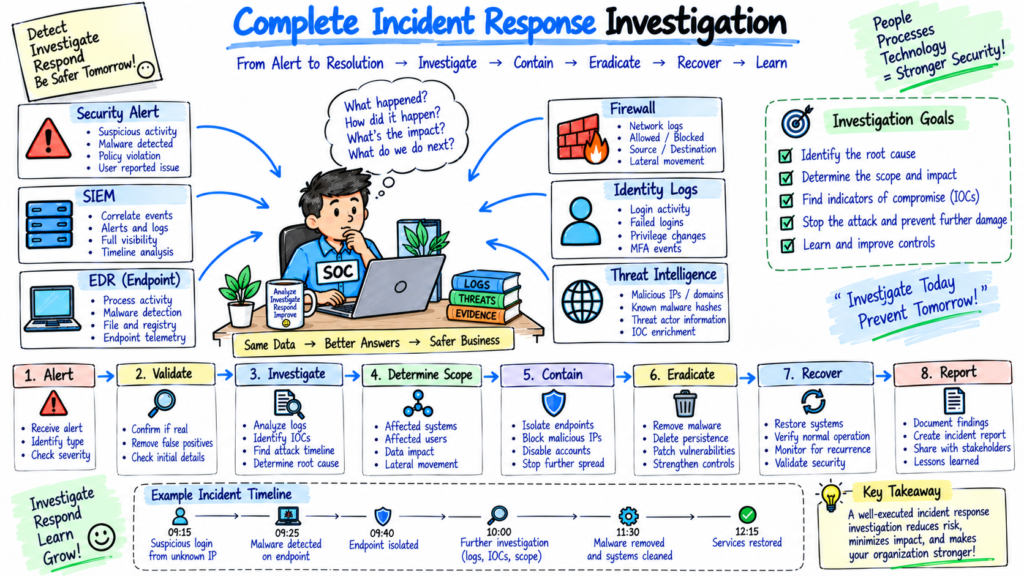
50. Explain a complete incident response process with a real-world example.
Suppose an EDR detects ransomware behavior on an employee workstation.
Step 1: Detection
The EDR generates an alert for suspicious file encryption activity.
Step 2: Analysis
The analyst checks:
- Hostname
- User
- Process
- Command line
- File activity
- Network connections
- Hashes
- Authentication activity
Step 3: Containment
The workstation is isolated from the network.
Step 4: Investigation
The analyst searches SIEM, EDR, firewall, DNS, and identity logs for related activity.
Step 5: Scope determination
The team checks whether other endpoints or servers show similar indicators.
Step 6: Eradication
Malicious files and persistence mechanisms are removed, or affected systems are rebuilt according to the recovery plan.
Step 7: Recovery
Systems are restored from known-good backups where required.
Step 8: Monitoring
Restored systems are monitored for suspicious activity.
Step 9: Root cause analysis
The team determines how the attacker gained access.
Step 10: Post-incident review
The organization documents the incident, identifies security gaps, and updates detection rules and response procedures.
This demonstrates the complete incident response lifecycle:
Prepare → Detect → Analyze → Contain → Eradicate → Recover → Improve
Conclusion
Incident response is a critical cybersecurity capability that helps organizations handle security incidents in a structured way. For interviews, you should understand the complete process from preparation and detection through containment, eradication, recovery, and post-incident improvement.
You should also practice real-world scenarios involving phishing, malware, ransomware, compromised accounts, privilege escalation, lateral movement, data exfiltration, and suspicious authentication.
The most important skill is being able to explain how you would investigate an incident, determine its scope, preserve evidence, contain the threat, remove the root cause, and restore affected systems.
If you can explain these steps clearly and connect them to tools such as SIEM, EDR, SOAR, firewalls, identity platforms, and threat intelligence, you will be better prepared for technical and scenario-based Incident Response interviews.
Related Cybersecurity Articles
- Security Information and Event Management: Complete SIEM Guide 2026
- SOC Analyst Roadmap 2026: L1, L2, and L3 Roles, Skills, and Tools
- Endpoint Security Guide 2026 for Every Organization
- EDR vs XDR vs MDR Comparison 2026
- Identity and Access Management in 2026
- Cloud Security Basics 2026: Complete Beginner Guide
- Firewall in Cybersecurity: Types, Examples and How It Works
- Network Security Basics Guide for Beginners 2026
These are the most relevant links from the list you provided for this article.
External Resources
- NIST Computer Security Incident Handling Guide
- NIST Cybersecurity Framework
- MITRE ATT&CK
- CISA Cybersecurity Resources
- Microsoft Security Documentation
Disclaimer
The information provided in this Incident Response Interview Questions and Answers 2026 guide is intended for educational and interview preparation purposes only. Incident response procedures, cybersecurity technologies, forensic techniques, and security practices can vary between organizations and may change over time.
The examples and explanations in these Incident Response Interview Questions and Answers 2026 are simplified for learning purposes and may not apply to every security incident or environment. Always follow your organization’s approved incident response policies, security procedures, legal requirements, and security guidelines when investigating or responding to cybersecurity incidents.
TechNaga does not guarantee employment, interview success, certification results, or any specific outcome based on the information provided in this article. Always refer to official documentation and qualified security professionals when handling real-world security incidents.