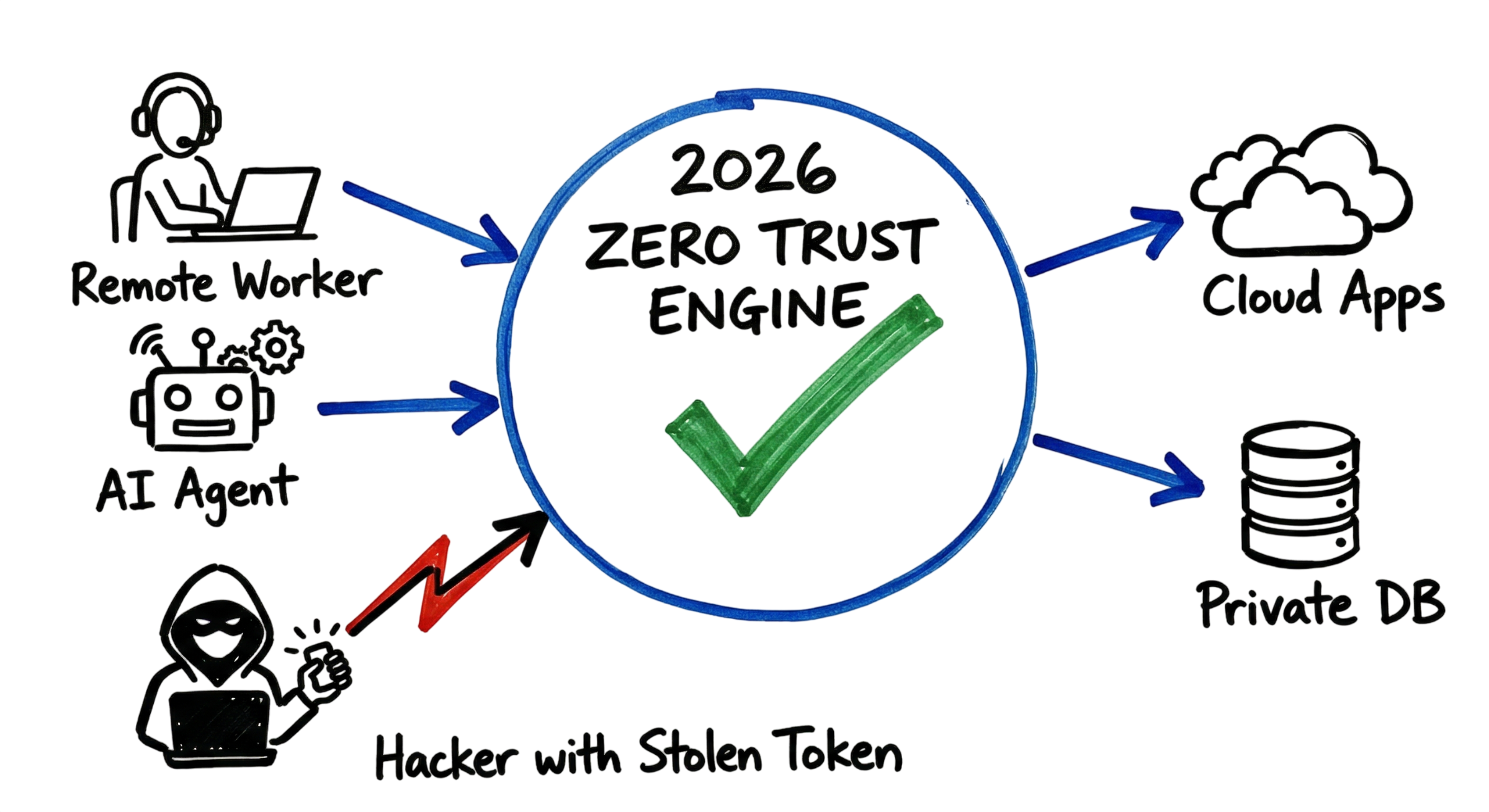
Cybersecurity Best Practices are more important than ever in 2026 as cyberattacks become faster, more automated, and increasingly difficult to detect. Organizations of every size face threats from ransomware, phishing, identity theft, AI-powered attacks, and cloud misconfigurations, making a proactive security strategy essential.
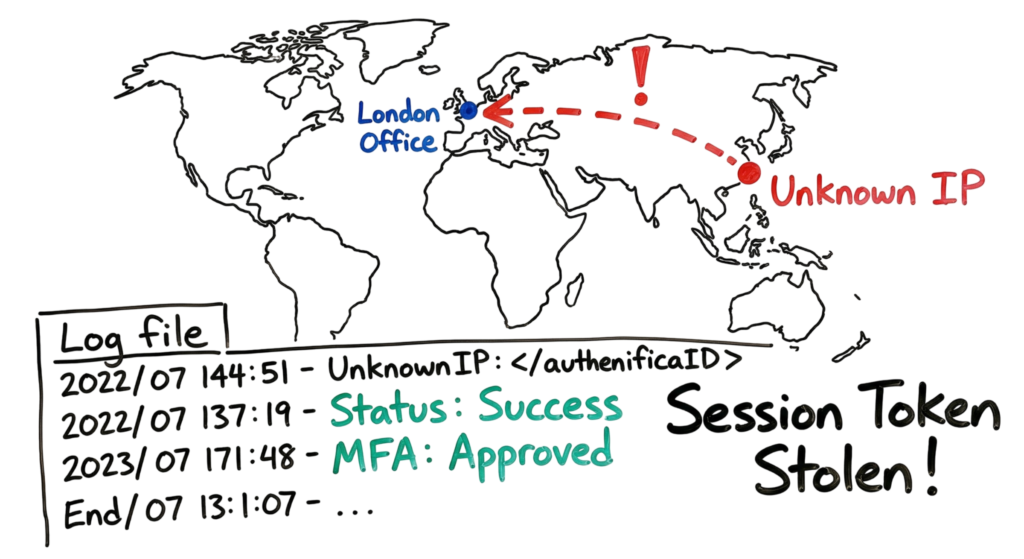
Imagine receiving an alert showing a successful login from an IP address in a country where your organization has no business operations. Five minutes later, the same account begins executing PowerShell scripts on a production database server. You review the logs and find that authentication succeeded. The user had a strong password and even enabled Multi-Factor Authentication (MFA). Yet the attacker still gained access.
This real-world scenario demonstrates why following Cybersecurity Best Practices 2026 is no longer optional. Modern attackers rarely spend weeks attempting to bypass firewalls. Instead, they exploit stolen session tokens, AI-generated phishing campaigns, compromised third-party software, misconfigured cloud resources, and weak identity controls. Once they gain access, they move quickly to steal data, deploy ransomware, or disrupt business operations.
Whether you are an IT professional, business owner, student, or someone looking for Cybersecurity for Beginners, understanding the latest security strategies is essential for protecting your systems and sensitive information. Following practical Cybersecurity Tips, maintaining a comprehensive Cybersecurity Checklist, and adopting a layered security approach can significantly reduce your organization’s risk of a successful cyberattack.
In this guide, you’ll learn the top Cybersecurity Best Practices every individual and organization should implement in 2026. From securing identities and endpoints to protecting cloud environments and responding to modern threats, these recommendations will help you build a stronger and more resilient cybersecurity posture.
What Are Modern Cybersecurity Best Practices?
Cybersecurity Best Practices are a collection of security strategies, technologies, and processes that help individuals and organizations protect their systems, networks, applications, and data from cyber threats. Unlike traditional security models that focused mainly on protecting the network perimeter, modern cybersecurity prioritizes identity, devices, cloud resources, and data regardless of where they are located.
In Cybersecurity Best Practices 2026, organizations operate in hybrid and cloud-first environments where employees work remotely, applications run across multiple cloud platforms, and sensitive information is accessed from anywhere. As a result, security is no longer based on trusting users inside the corporate network. Instead, every access request must be continuously verified before permission is granted.
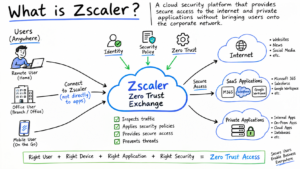
This modern approach is built on the Zero Trust security model, which follows the principle of “Never Trust, Always Verify.” Every user, device, application, and workload must prove its identity before accessing business resources. Adopting this mindset is one of the most effective Cybersecurity Tips for reducing the risk of unauthorized access and data breaches.
Whether you are an IT professional or looking for Cybersecurity for Beginners, understanding these core security principles provides a strong foundation for protecting modern digital environments.
How Cybersecurity Best Practices Work
Modern security begins the moment a user, device, or application requests access to a business resource. Instead of relying only on usernames and passwords, organizations following Cybersecurity Best Practices evaluate multiple security signals before allowing access.
The authentication system first verifies the user’s identity using passwords, Multi-Factor Authentication (MFA), certificates, or passwordless authentication methods. It then checks the health of the connecting device to ensure antivirus software is active, the operating system is fully updated, disk encryption is enabled, and required security policies are applied.
Next, the system evaluates contextual information such as the user’s geographic location, IP reputation, device type, network connection, and previous login behavior. For example, if a user normally signs in from India but suddenly attempts to log in from another country, the activity is treated as suspicious and may require additional verification.
Behavioral analytics adds another layer of protection by continuously monitoring user activity throughout the session. Security platforms analyze login times, applications accessed, file downloads, administrative actions, and data transfer patterns. If a user suddenly attempts to download sensitive information, execute privileged PowerShell commands, or access systems outside their normal responsibilities, the system can generate alerts, require additional authentication, or automatically block the session.
Many organizations also apply continuous risk assessment using device compliance, network trust levels, threat intelligence, and AI-driven risk scoring. Access decisions are re-evaluated throughout the session rather than only during login, making it much harder for attackers to abuse stolen credentials or hijacked sessions.
Following these Cybersecurity Best Practices 2026 significantly improves an organization’s ability to detect suspicious behavior before it becomes a security incident. As part of a practical Cybersecurity Checklist, organizations should regularly review access permissions, enable MFA, monitor user activity, keep systems updated, and implement Zero Trust security controls. These simple yet effective Cybersecurity Tips help reduce cyber risk and strengthen the overall security posture of individuals and businesses alike.
Technical Flow and Architecture
Modern Cybersecurity Best Practices rely on continuous verification instead of trusting users after a single login. Every request is validated before access is granted, helping organizations reduce the risk of identity-based attacks and unauthorized access.
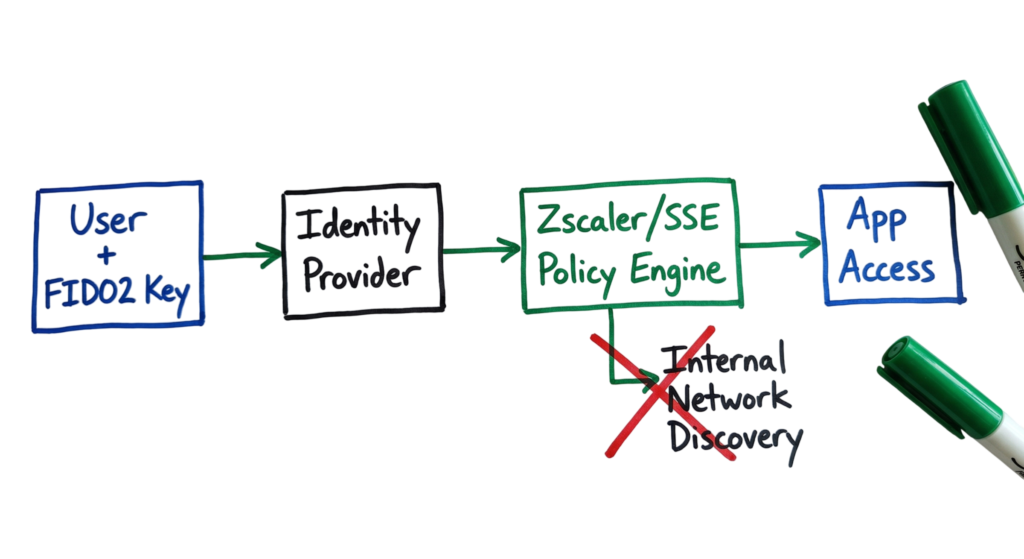
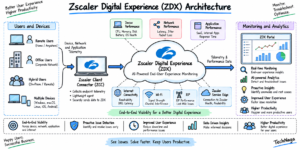
The process begins when a user opens an application such as Slack, Microsoft Teams, Salesforce, or a private database. Instead of connecting directly to the application, the request is first sent to an Identity Provider (IdP) such as Microsoft Entra ID (Azure AD), Okta, or Google Cloud Identity. The IdP authenticates the user by verifying credentials using a username, FIDO2 security key, passkey, or Multi-Factor Authentication (MFA).
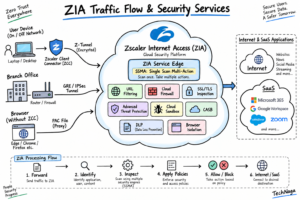
After successful authentication, the request is forwarded to a Security Service Edge (SSE) platform or cloud security proxy such as Zscaler. This is where access policies are enforced.
The policy engine evaluates several security signals before allowing access, including:
- Device health and compliance
- Antivirus or Endpoint Detection and Response (EDR) status
- Disk encryption
- Operating system updates
- Geographic location
- IP reputation
- User risk score
If the device is unmanaged, compromised, or fails compliance checks, the connection is blocked immediately.
When the device satisfies all security requirements, the policy engine evaluates authorization policies. Instead of providing access to the entire corporate network, users receive access only to the specific application or resource required for their job. This application-level access significantly reduces the risk of lateral movement and limits an attacker’s ability to compromise additional systems.
Finally, the connection is encrypted using secure communication protocols before data is exchanged with the requested application. This continuous verification model has become one of the most important Cybersecurity Best Practices 2026 for protecting cloud-first and hybrid work environments.
Key Components
Building a secure environment requires several core security technologies working together. These components form the foundation of modern Cybersecurity Best Practices.
1. Identity Provider (IdP)
A strong Identity Provider (IdP) serves as the central authority for authentication and identity management. Solutions such as Microsoft Entra ID (Azure AD), Okta, and Ping Identity verify every login request before granting access to cloud applications or enterprise resources.
Modern IdPs support:
- Multi-Factor Authentication (MFA)
- FIDO2 security keys
- Passkeys
- Conditional Access
- Risk-based authentication
- Single Sign-On (SSO)
A secure identity platform is the first layer of defense because every access request depends on trusted identity verification.
2. Endpoint Detection and Response (EDR)
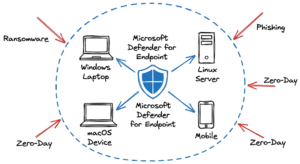
An Endpoint Detection and Response (EDR) solution protects laptops, desktops, servers, and mobile devices by continuously monitoring endpoint activity.
EDR platforms detect:
- Suspicious PowerShell commands
- Malware execution
- Fileless attacks
- Registry modifications
- Credential theft
- Privilege escalation
- Command-and-control communication
When malicious activity is detected, the EDR platform can automatically isolate the affected device, terminate malicious processes, and notify the Security Operations Center (SOC). Protecting endpoints remains one of the most practical Cybersecurity Tips for reducing enterprise risk.
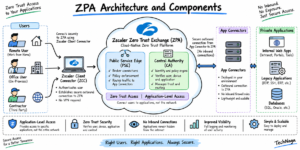
3. Zero Trust Network Access (ZTNA)
Zero Trust Network Access (ZTNA) replaces traditional VPNs by providing secure application-level access instead of full network connectivity.
Rather than allowing users to see every internal resource, ZTNA verifies user identity, device posture, location, and access policies before establishing a secure connection to a single application.
For example, an employee accessing a finance application receives access only to that application and cannot browse file servers, domain controllers, or development systems.
Solutions such as Zscaler Private Access (ZPA) implement this architecture by continuously validating every connection request.
Together, these three technologies create a layered security model:
- Identity verifies the user.
- EDR verifies the device.
- ZTNA verifies application access.
This layered approach is considered one of the core Cybersecurity Best Practices for modern enterprises.
Real-World Example
During a security review, I discovered that a junior administrator had accidentally exposed an RDP (Remote Desktop Protocol) port to the public internet on a test server.
Within four hours, automated scanning bots identified the exposed service. The attacker successfully authenticated using credentials leaked from an unrelated website through a credential stuffing attack.
Because the test server shared the same network as production systems, the attacker quickly moved laterally, discovered a file share containing unencrypted backups, and gained access to sensitive business data.
Had the organization implemented network segmentation, Zero Trust, and least-privilege access controls, the compromised server would have remained isolated, preventing the attacker from moving beyond that single system.
This example demonstrates why following Cybersecurity Best Practices 2026 is critical for reducing the impact of security incidents.
1. Use Phishing-Resistant MFA
One of the most important Cybersecurity Best Practices is implementing phishing-resistant authentication.
Traditional SMS verification codes and push notifications are increasingly targeted through MFA fatigue attacks, where attackers repeatedly send authentication requests until users accidentally approve one.
Modern authentication should instead rely on:
- FIDO2 security keys
- Passkeys
- Windows Hello
- Touch ID
- Face ID
- Hardware-backed biometrics
These authentication methods are cryptographically tied to trusted hardware, making them significantly more resistant to phishing, credential theft, and session hijacking.
Adding phishing-resistant authentication should be one of the first items on every organization’s Cybersecurity Checklist.
2. Follow Modern Password Guidelines
Password security has changed significantly in recent years.
Older policies required users to change passwords every 60 or 90 days and include complex combinations of uppercase letters, numbers, and symbols. Unfortunately, these rules often encouraged predictable passwords such as:
- Spring2026!
- Welcome@123
- Password#01
Modern guidance from NIST recommends using long, memorable passphrases containing 12 to 16 or more characters. Passwords should only be changed when there is evidence of compromise rather than on a fixed schedule.
Organizations should also:
Require MFA for privileged accounts.
Block commonly used passwords.
Screen passwords against breached credential databases.
Encourage password managers.

3. Secure AI Agents and Automation
Artificial intelligence has become an integral part of modern business operations. Organizations now use AI agents to summarize emails, analyze documents, automate workflows, generate code, and interact with cloud applications. While these capabilities improve productivity, they also introduce new security challenges that organizations cannot ignore.
One emerging threat is prompt injection, where attackers craft malicious instructions designed to manipulate an AI model into performing unintended actions. For example, a carefully crafted email or document could instruct an AI assistant to reveal confidential information, access unauthorized files, or send sensitive data to an external server.
As part of Cybersecurity Best Practices 2026, AI agents should be treated like privileged users rather than ordinary software. They should receive only the minimum permissions necessary to perform their assigned tasks and should never have unrestricted access to sensitive systems or business-critical data.
Organizations should also:
- Apply the principle of least privilege to AI agents.
- Monitor AI activity logs for unusual behavior.
- Restrict access to confidential information.
- Review outbound connections made by AI-powered applications.
- Detect abnormal activities such as mass file downloads or unexpected API requests.
Protecting AI systems is becoming one of the most important Cybersecurity Tips as businesses increasingly integrate generative AI into their daily operations.
4. Implement Microsegmentation
Traditional perimeter security is no longer sufficient for protecting modern enterprise environments. Networks often contain legacy servers, unmanaged devices, and business-critical systems that cannot be patched immediately. Rather than exposing these systems to unnecessary risk, organizations should isolate them using microsegmentation.
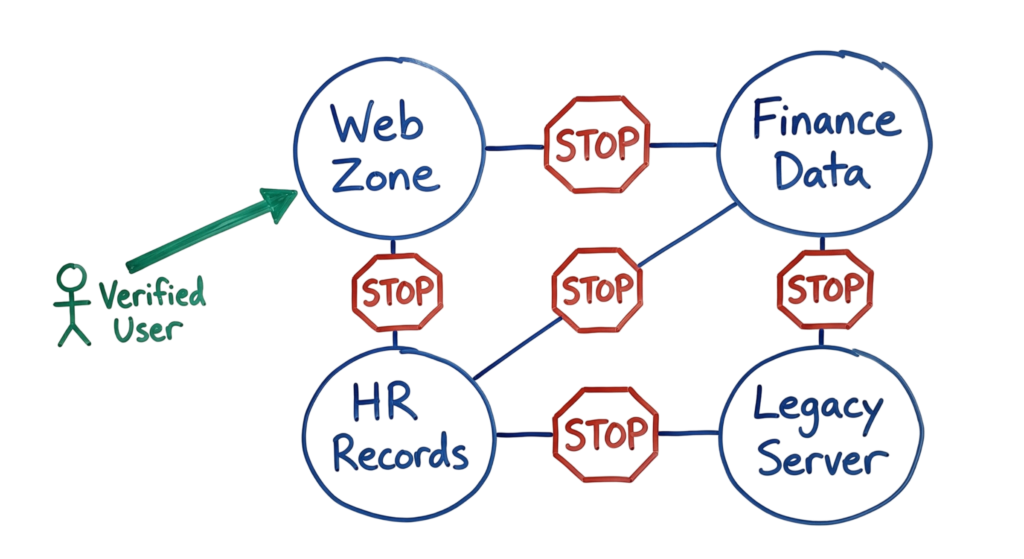
Microsegmentation divides the network into smaller security zones and enforces granular access controls between workloads, applications, and servers. Instead of allowing unrestricted communication, every connection must be explicitly authorized based on business requirements.
For example, a public-facing web server should never communicate directly with an HR database unless a specific business application requires that connection. If attackers compromise the web server, properly configured segmentation policies prevent them from moving laterally to other critical systems.
Implementing microsegmentation is now considered one of the essential Cybersecurity Best Practices because it significantly reduces the attack surface and limits the impact of ransomware, insider threats, and compromised endpoints.
As part of your Cybersecurity Checklist, review firewall policies, cloud security groups, and application communication paths regularly. Remove unnecessary network access, isolate legacy systems, and enforce the principle of least privilege between workloads. These proactive measures strengthen your organization’s security posture and make it much more difficult for attackers to move across the environment after gaining initial access.
5. Manage Machine Identities
One of the most overlooked Cybersecurity Best Practices is securing machine identities. Modern organizations now manage significantly more service accounts, bots, API keys, and application identities than human users. Unlike employees, these identities cannot use traditional Multi-Factor Authentication (MFA), making them attractive targets for attackers.
If an API key for your AWS environment is hardcoded into a script and accidentally pushed to GitHub, attackers can gain immediate access to cloud resources. As part of Cybersecurity Best Practices 2026, organizations should store secrets in dedicated secrets management platforms, rotate API keys every 30 to 90 days, and continuously monitor service accounts for suspicious activity. Following these Cybersecurity Tips helps reduce the risk of credential theft and unauthorized cloud access.
6. Perform Continuous Device Posture Checks
Strong authentication alone is not enough. Modern Cybersecurity Best Practices require organizations to verify the health of every device before allowing access to business applications.
Security platforms such as Zscaler, Microsoft Entra ID, and modern VPN solutions evaluate device compliance by checking antivirus status, operating system updates, firewall configuration, disk encryption, and endpoint security policies. If a device becomes non-compliant during an active session, access should be restricted automatically.
Adding continuous device compliance verification to your Cybersecurity Checklist significantly reduces the likelihood of compromised endpoints accessing sensitive business resources.
7. Detect Shadow AI and Shadow IT
Employees frequently install cloud applications or AI tools without approval from the security team. This practice, commonly known as Shadow IT, introduces significant security risks because sensitive business data may be uploaded to unauthorized services.
For example, an employee might upload confidential customer information to a public AI platform to summarize a spreadsheet without realizing the data is leaving the organization’s control.
One of the most effective Cybersecurity Best Practices is deploying a Cloud Access Security Broker (CASB) to discover unauthorized cloud applications, monitor user activity, block high-risk services, and provide approved alternatives. These proactive Cybersecurity Tips help organizations maintain visibility across cloud environments.
8. Verify and Protect Backups
Backups remain one of the strongest defenses against ransomware, but attackers increasingly target backup infrastructure before encrypting production systems.
Modern ransomware groups actively search for backup repositories and attempt to delete or encrypt them before launching the primary attack. To reduce this risk, organizations should implement immutable backups that cannot be modified or deleted for a predefined retention period.
As part of Cybersecurity Best Practices 2026, backup restoration should be tested regularly. An untested backup cannot be trusted during a real security incident. Every Cybersecurity Checklist should include scheduled backup validation and recovery testing.
9. Monitor DNS Activity
DNS traffic is frequently overlooked during security monitoring, yet it provides valuable insight into attacker behavior.
Threat actors often use DNS for command-and-control communication, malware delivery, and covert data exfiltration. A workstation generating thousands of DNS queries to long or suspicious domain names may indicate malicious activity.
One of the most practical Cybersecurity Tips is enabling protective DNS services that automatically block known malicious domains while forwarding DNS logs to your SIEM for continuous monitoring and threat hunting. This simple control strengthens overall Cybersecurity Best Practices by improving visibility into network activity.
10. Prioritize Known Exploited Vulnerabilities
Thousands of new vulnerabilities are disclosed every year, making it impossible to patch everything immediately. Instead of treating every vulnerability equally, organizations should prioritize vulnerabilities that attackers are actively exploiting.
The Known Exploited Vulnerabilities (KEV) Catalog maintained by CISA identifies vulnerabilities currently being used in real-world attacks. If one of these vulnerabilities exists within your environment, it should receive immediate attention.
Following Cybersecurity Best Practices 2026, organizations should review the KEV Catalog every week, prioritize critical vulnerabilities, and patch internet-facing systems as quickly as possible. Incorporating KEV monitoring into your regular Cybersecurity Checklist helps security teams focus on the vulnerabilities that present the highest risk instead of attempting to address every issue with the same urgency.
Practical Implementation
Cybersecurity in 2026 is fast and constantly changing. There is no single tool or simple checklist that can fully protect your organization. Instead, you need to follow strong cybersecurity best practices and treat authentication, devices, and data as one connected system.
Start with the basics. Secure your credentials using strong passphrases. Enable the right form of multi-factor authentication. Segment your network to limit access between systems. These steps alone will put you ahead of most organizations.
Make it a habit to review logs regularly. Watch for unusual login attempts, abnormal traffic, or unexpected system behavior. Every alert on your dashboard represents a potential security event that needs attention.
Advantages and Limitations
The advantage of following modern cybersecurity best practices is that they stop the most common attacks early. Techniques like phishing-resistant MFA and network segmentation reduce the risk of credential stuffing and prevent attackers from moving across systems. You also gain better visibility. With proper logging and monitoring, you can clearly see who is accessing what, when, and from where.
Another key benefit is faster response. When your systems are well configured, alerts are more accurate. Your security team can quickly detect unusual behavior and take action before damage spreads.
The limitation is complexity. Implementing these cybersecurity best practices takes time and effort. Setting up micro segmentation, identity policies, and device posture checks requires planning and testing. If you apply rules that are too strict, you can block legitimate users or break applications.
You need to find the right balance. Start with critical systems and high-risk users. Test policies in stages before applying them across the organization. Keep security controls strong, but make sure users can still do their work without constant friction.
Common Mistakes
The biggest mistake I see is the “set it and forget it” approach. Teams spend months implementing tools and configurations, then stop monitoring them. But strong cybersecurity best practices require continuous attention. Firewall rules, SIEM alerts, and endpoint logs need regular review. Threats change daily, and your defenses must adapt.
Another common mistake is ignoring the human factor. If your security controls are too complex or slow down work, users will find ways around them. They may switch to personal email, upload files to unauthorized cloud apps, or use unmanaged devices. This creates shadow IT and increases risk.
You need to design security that people can follow. Keep access simple and clear. Use automation where possible. For example, enable single sign-on (SSO) with strong authentication so users don’t struggle with multiple logins. Provide approved tools that meet business needs, so employees don’t look for unsafe alternatives.
Good security is not just about blocking threats. It’s about making the secure way the easiest way for users to work.
Troubleshooting Scenario
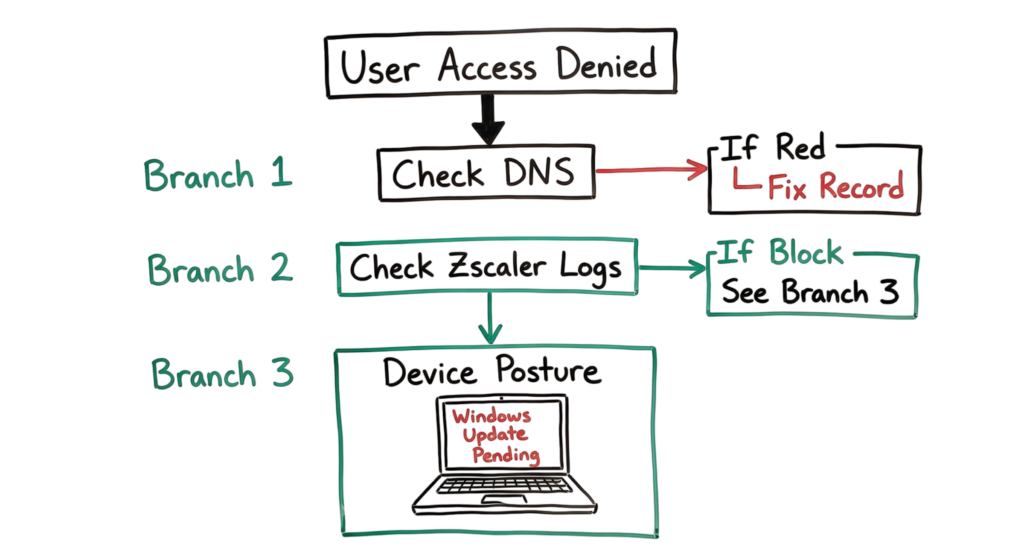
Imagine a user says they cannot access the internal finance portal. First, check the DNS. Can they resolve the hostname? If they can, check your Zscaler logs. Look for a “Deny” or “Block” message. Often, the issue is that the user’s device posture is failing. Maybe their Windows Update is stuck. You will see a log entry that says “Device untrusted” or “Posture check failed.” Fixing the laptop is often the solution, not changing the network rules.
Interview Questions for 2026
- How do you protect an AI agent from a prompt injection attack?
- Why is FIDO2 better than a standard push notification for MFA?
- Describe the steps you would take if you found a leaked API key on a public website.
- What is the difference between a traditional VPN and ZTNA?
- How does micro segmentation help during a ransomware outbreak?
- If a user is failing a posture check in Zscaler, what are the first three things you check on their device?
Future Trends (2026 and Beyond)
We are moving toward “Agentic Security.” This is where AI defenders automatically change firewall rules or isolate laptops in real time based on threat intelligence. We are also preparing for post quantum cryptography. Standard encryption will eventually be broken by quantum computers, so we are starting to use new algorithms that can resist these attacks.
FAQ
Q: Do I still need a firewall if I use Zero Trust? A: Yes. You still need to protect your cloud offices and data centers. Zero trust is an extra layer, not a total replacement for network security.
Q: Is 16 characters for a password really necessary? A: Modern computers can crack short passwords in minutes. 16 characters makes it much harder for an attacker to use “brute force” methods.
Q: Why is SMS MFA considered unsafe now? A: Attackers can perform “SIM swapping” where they trick your phone company into moving your number to their phone. They then get all your security codes.
Q: What is a “non-person entity” in security? A: This refers to bots, service accounts, and AI agents. They need identities just like humans.
Q: How often should we run vulnerability scans? A: You should run them continuously. Periodic scans miss the windows of time when new “zero day” bugs are found.
Conclusion
Cybersecurity in 2026 is fast and unpredictable. You cannot rely on a single tool or a simple checklist. Instead, you need to follow proven cybersecurity best practices and treat identity, devices, and data as one connected system.
Start with the basics. Use strong passphrases for your accounts. Enable phishing-resistant multi-factor authentication. Segment your network so systems cannot freely communicate. These steps alone will put you ahead of most organizations.
Stay consistent with monitoring. Review your logs daily. Look for unusual logins, unexpected access attempts, or abnormal system behavior. Every alert on your dashboard represents a potential security event that needs investigation.
Related Cybersecurity Guides
Continue learning with these in-depth cybersecurity guides from TechNaga.
- What Is Cybersecurity and Why It Is Important Today
https://technaga.com/what-is-cybersecurity-and-why-it-is-important-today/ - Password Security Guide 2026: 10 Essential Tips
https://technaga.com/password-security-guide-2026/ - How to Identify Phishing Attacks in 2026 (Complete Guide)
https://technaga.com/how-to-identify-phishing-attacks-in-2026/ - Multi-Factor Authentication (MFA): Critical Guide to Secure Your Systems (2026)
https://technaga.com/multi-factor-authentication-mfa-guide-2026/ - Identity and Access Management in 2026: A Practical Guide for Cloud Security Professionals
https://technaga.com/identity-and-access-management-cloud-security-2026/ - Essential Endpoint Security Guide 2026 for Every Organization
https://technaga.com/endpoint-security-2026-guide/ - Cloud Security Basics 2026: Complete Beginner Guide
https://technaga.com/cloud-security-basics-2026/ - Network Segmentation Explained with Real-World Example
https://technaga.com/network-segmentation-guide-ransomware-prevention/ - Security Information and Event Management: Complete SIEM Guide 2026
https://technaga.com/security-information-and-event-management-2026/ - Zero Trust Security in 2026: Architecture, Real Examples, and Implementation Guide
https://technaga.com/zero-trust-security-2026-guide/
External References
- NIST Cybersecurity Framework (CSF 2.0)
https://www.nist.gov/cyberframework - CISA Cybersecurity Resources
https://www.cisa.gov/ - CISA Known Exploited Vulnerabilities (KEV) Catalog
https://www.cisa.gov/known-exploited-vulnerabilities-catalog - MITRE ATT&CK Framework
https://attack.mitre.org/ - CIS Critical Security Controls v8
https://www.cisecurity.org/controls - OWASP Top 10
https://owasp.org/www-project-top-ten/ - Microsoft Security
https://www.microsoft.com/security - Google Cloud Security
https://cloud.google.com/security - AWS Security Best Practices
https://aws.amazon.com/security/security-learning/ - Zscaler ThreatLabz Research
https://www.zscaler.com/resources/security-research
3 thoughts on “Top 10 Cybersecurity Best Practices for 2026”