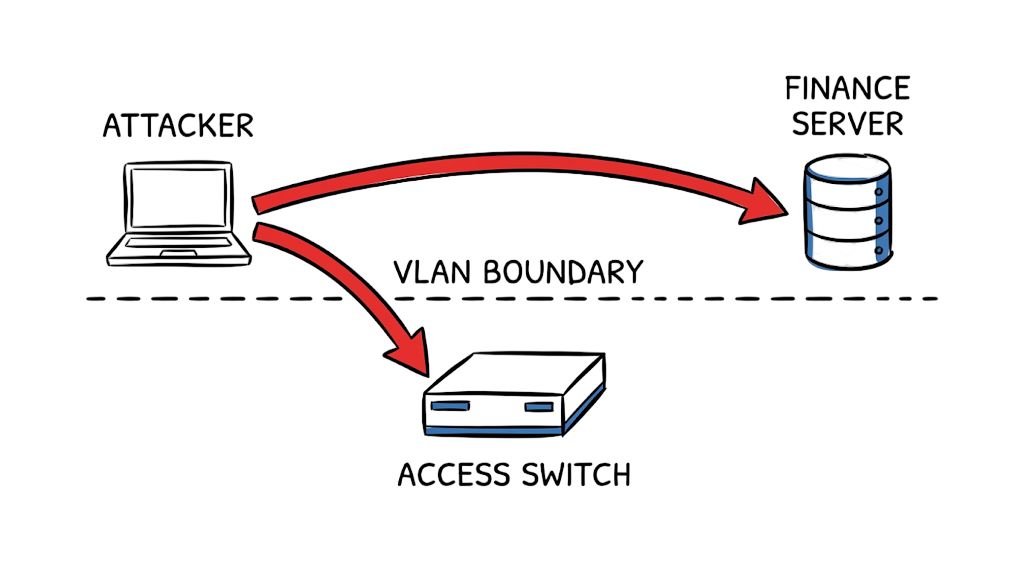
When I was working on a security assessment for a regional fintech firm, I found a vulnerability that completely bypassed their multi-million-dollar perimeter defenses. I plugged a laptop into a wall jack in an empty conference room and immediately started capturing traffic from their core payment processing servers.
The organization had invested heavily in endpoint detection, firewalls, and monitoring tools. However, they had completely overlooked their Layer 2 switching infrastructure. That single oversight exposed sensitive systems that were supposed to be isolated from unauthorized access.
VLAN Hopping Attacks in Enterprise Networks remain one of the most dangerous and overlooked threats in modern network security. Attackers do not need a zero-day exploit or advanced malware to bypass network segmentation. In many cases, a misconfigured switch port is enough.
In this guide, you will learn how VLAN Hopping Attacks in Enterprise Networks work, the difference between switch spoofing and double tagging attacks, real-world examples, detection methods, and proven prevention techniques to secure your network in 2026 and beyond.
What Are VLAN Hopping Attacks in Enterprise Networks?
VLAN hopping is a Layer 2 exploit where a malicious device bypasses logical network boundaries to access data on a different Virtual Local Area Network (VLAN). A VLAN normally acts as a logical wall, keeping untrusted guest traffic separated from sensitive corporate databases. By exploiting default or lazy switch configurations, an attacker tricks the network hardware into tearing down that wall. They achieve this unauthorized access by either manipulating the trunking protocols—the rules switches use to pass traffic for multiple networks over a single cable—or by forging the 802.1Q tags attached to the Ethernet frames.
How VLAN Hopping Attacks in Enterprise Networks Work
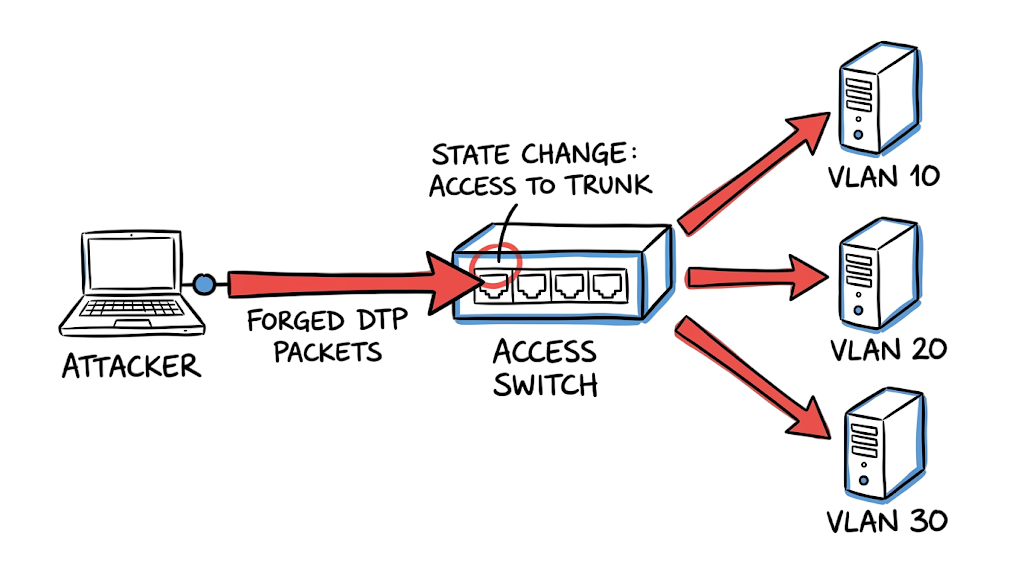
The mechanics of these attacks rely entirely on exploiting default switch behaviors designed for plug-and-play convenience. If a switch port receives a request to form a trunk—a high-capacity link carrying multiple VLANs—it usually agrees by default. An attacker exploits this by sending forged Dynamic Trunking Protocol (DTP) packets into an edge port. When the switch receives these packets, it transitions the standard access port into a trunk link. Because a trunk carries traffic for all allowed networks by design, the attacker immediately gains visibility into packets originating from restricted segments.
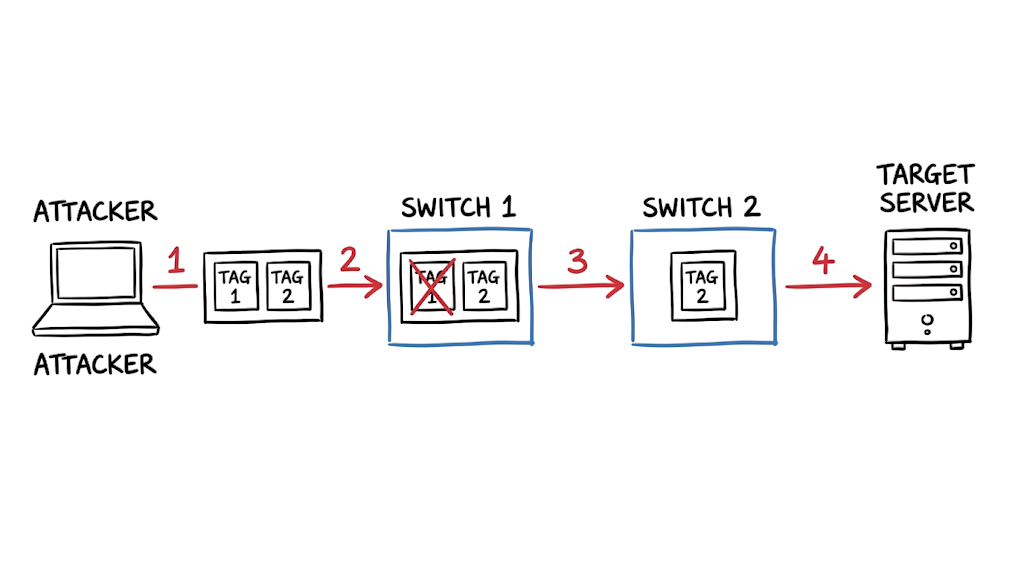
If disabling DTP blocks that path, attackers pivot to abusing frame tags. Switches identify which network a packet belongs to by reading a specific tag inserted into the Ethernet frame. If an attacker encapsulates their data inside two nested tags, the first switch strips the outer tag and forwards the inner, malicious tag to the next switch. That second switch reads the remaining tag and dumps the packet directly into the target network. The switch assumes the packet was already validated, bypassing all firewall routing and segmentation entirely.
Technical Flow of VLAN Hopping Attacks in Enterprise Networks
Let us walk through what a double tagging attack actually looks like on the wire. The attacker sits on a native VLAN, which is the default network segment that transmits traffic without any identifying tags. They craft a malicious packet and attach two VLAN tags to it: an outer tag matching their current native VLAN, and an inner tag matching the restricted target network.
Now here’s where it gets interesting. The first switch receives the packet, sees the outer tag matches the native VLAN, strips that outer tag off as per standard protocol, and blindly forwards the packet across the trunk link to the next switch. The packet arrives at the second switch. Because the first tag was removed, the second switch only sees the inner tag. It assumes the packet legitimately belongs to the restricted network and routes it directly to the target server. The attacker just punched through your enterprise network security without ever touching a routed firewall.
Key Components Used in VLAN Hopping Attacks
- VLAN (Virtual Local Area Network) — A logical segment that isolates broadcast traffic and groups devices securely regardless of their physical location.
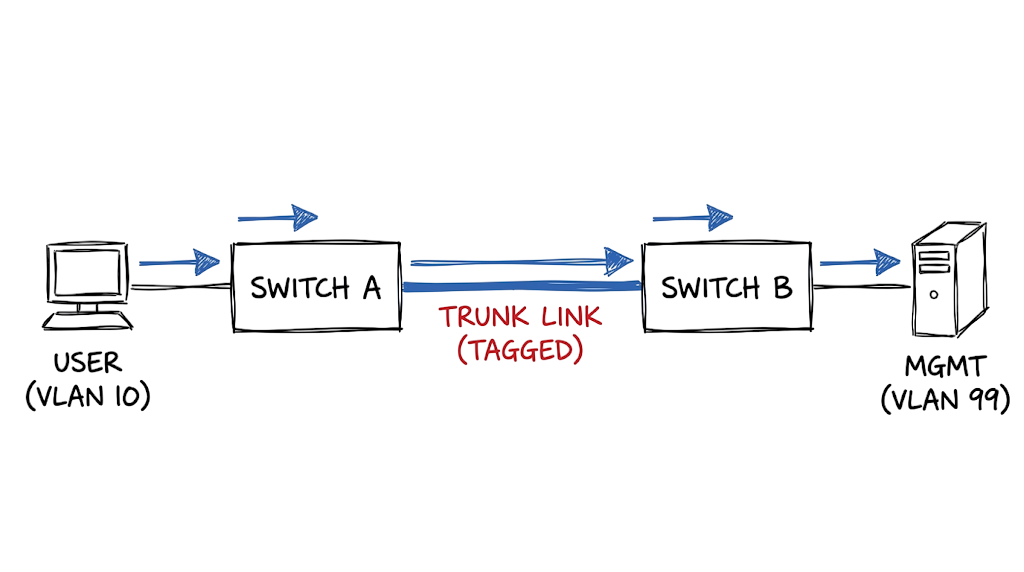
- Trunk Link — A high-capacity connection between switches configured to carry tagged traffic for multiple VLANs simultaneously.
- DTP (Dynamic Trunking Protocol) — A proprietary protocol that automatically negotiates trunking on a link, which attackers exploit to force unauthorized trunks.
- Native VLAN — A specific network designated on a trunk to carry untagged traffic, creating severe vulnerabilities if left at default settings.
- Access Port — A switch interface assigned to exactly one VLAN, explicitly designed for connecting end-user devices rather than network hardware.
Real-World Example of a VLAN Hopping Attack
Let us look at what this actually looks like when a switch spoofing attack hits your infrastructure. During an incident investigation, you might pull the following output from your access layer switch:
Plaintext
%DTP-5-TRUNKPORTON: Port Fa0/14 has become dot1q trunk
%LINEPROTO-5-UPDOWN: Line protocol on Interface FastEthernet0/14, changed state to up
%MAC_LIMIT-4-EXCEEDED: Mac address limit exceeded on port Fa0/14.
%PORT_SECURITY-2-PSECURE_VIOLATION: Security violation occurred, caused by MAC address 000c.29b3.141a
This log tells a clear, chronological story. The first line indicates that FastEthernet0/14—a port that should strictly serve standard employee laptops—just successfully negotiated a trunk connection. The switch received DTP frames from the connected device and automatically upgraded the port’s privileges. The subsequent MAC limit warning confirms the attacker is now injecting traffic using multiple spoofed MAC addresses across the newly accessible VLANs. When you see this sequence, you must immediately administratively shut down the interface, trace the physical location of the rogue device, and audit your Cisco switch security templates.
Practical Implementation for Preventing VLAN Hopping Attacks
Securing your switches against VLAN attack prevention failures is straightforward if you follow strict configuration standards.
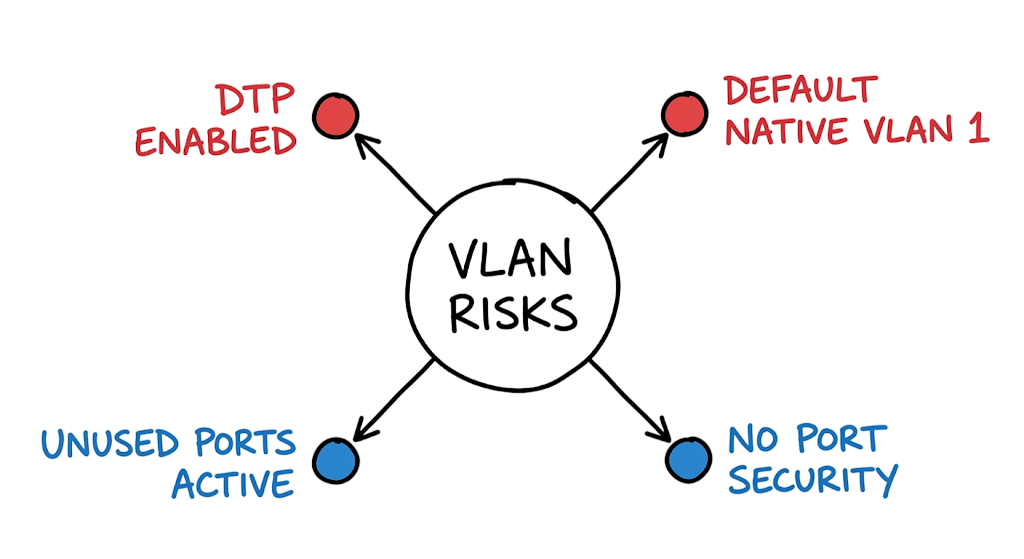
- Hardcode your port mode. Do not leave the switchport in dynamic auto or dynamic desirable. You must explicitly configure switchport mode access so the hardware physically rejects any attempt to form a trunk from an endpoint.
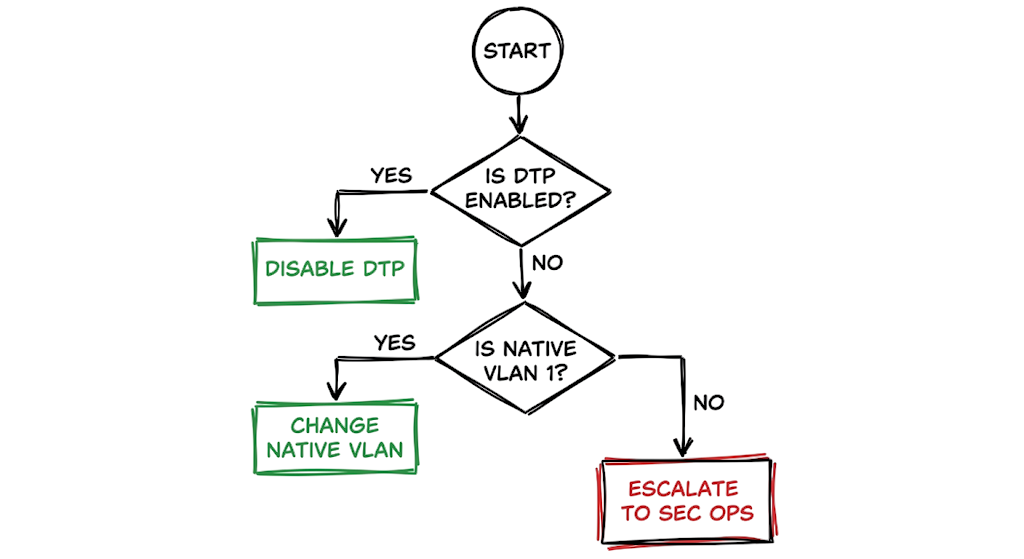
- Kill the negotiation protocol. Setting the port to access mode is not enough because the protocol still runs in the background. Apply switchport nonegotiate to completely mute DTP advertisements on that interface.
- Bury the native VLAN. If you leave the native VLAN as 1, you are keeping the door open for tag manipulation. Change the native VLAN on all your trunks to a dead, non-routable ID like 999 using switchport trunk native vlan 999.
- Restrict trunk traffic. Do not let trunks carry every network by default. Use switchport trunk allowed vlan to explicitly declare which tags are permitted to cross the link, dropping all unexpected traffic.
- Shut down dead ports. Leaving an empty wall jack active is an open invitation. Find every unused interface, assign it to an isolated quarantine network, and issue the shutdown command.
- Lock the MAC limit. Do not let an endpoint spoof twenty different virtual machines to map your subnets. Use port security to restrict the interface to a single MAC address, cutting off attackers trying to inject multiple identities.
Advantages and Limitations of VLAN Hopping Attack Prevention
Implementing strict VLAN security drastically reduces your internal attack surface. By enforcing hardcoded port modes and disabling dynamic protocols, you effectively eliminate switch spoofing as a viable vector. Strong network segmentation forces attackers to route their traffic through your firewalls, where your intrusion detection systems can actually inspect and block the payloads.
However, Layer 2 security controls have hard technical limitations. Double tagging attacks are notoriously difficult to stop if your architecture inherently requires using the native VLAN for management or specific legacy applications. Furthermore, port security controls create significant operational friction. If an employee moves desks or plugs in a legitimate desktop virtualization tool, static MAC restrictions will trigger false positives and lock them out. You also cannot rely on these switch-level protections alone, as they offer absolutely no defense against an attacker who has already compromised a legitimate machine inside the target network.
Common Configuration Mistakes That Enable VLAN Hopping Attacks
I consistently see administrators deploying brand-new switches without touching the default operational settings. They plug everything in, verify the link lights turn green, and move on to the next ticket. Leaving interfaces in dynamic desirable mode is practically handing the keys to an attacker. Another frequent error is using a single network segment for both user traffic and management infrastructure.
This is where most people get confused. They assume that because they assigned static IP addresses to their network switches, those management interfaces are hidden from the DHCP-assigned employee laptops. In reality, if they share the same broadcast domain, any compromised user machine can directly attack the switch management plane. Finally, engineers often secure the active ports but completely ignore the empty ones. An attacker walking into a lobby only needs one active, unsecured wall jack to initiate a trunk negotiation and map the internal environment.
Best Practices to Prevent VLAN Hopping Attacks in Enterprise Networks
Stop treating your internal switches like dumb pipes and start treating them as security boundaries. Disable dynamic protocols globally across your entire environment. If a link needs to be a trunk, manually configure it as a trunk. If it connects to a printer, lock it down as an access port. Always implement a least-privilege design where your management traffic lives on an isolated, non-routable segment that standard users cannot physically reach.
A few years ago, while reviewing switch configurations during a security assessment, I noticed several access ports still operating with default settings. The environment had strong perimeter security, but VLAN security controls were weak; an attacker could have bypassed the firewall entirely just by speaking DTP. You must rely on Network Access Control (NAC) solutions to authenticate the actual device identity using 802.1X rather than blindly trusting whatever hardware gets plugged into the port.
Troubleshooting VLAN Hopping Attacks in Enterprise Networks
Symptom: A security analyst detects traffic from a guest network IP address directly hitting an internal finance server.
Wrong Assumption: The network team immediately blames the perimeter firewall, assuming a misconfigured access control list or a routing leak is permitting cross-subnet traffic. They waste hours auditing firewall rules that are perfectly fine.
Actual Root Cause: In real environments, it doesn’t work this cleanly. The firewall never saw the traffic. An attacker in the lobby unplugged a smart TV, connected their laptop, and sent double-tagged frames. Because the guest network and the trunk link shared the same native VLAN, the distribution switches stripped the outer tag and routed the malicious payload directly to the finance segment at Layer 2.
Fix: You must change the native VLAN on all trunk links to a dedicated, unused ID. Furthermore, you must explicitly tag the native VLAN traffic globally using vlan dot1q tag native to ensure no untagged frames are ever processed blindly by the switching infrastructure.
VLAN Hopping Attack Interview Questions and Answers
Q: What exactly is a VLAN hopping attack?
A: It is a Layer 2 exploit where an attacker manipulates switch protocols to inject or receive traffic from a network segment they are not authorized to access. This allows them to bypass internal firewalls and logical isolation.
Q: What is the mechanical difference between a switch spoofing attack and a double tagging attack?
A: Switch spoofing manipulates DTP to turn a standard port into a trunk, granting access to all networks. Double tagging encapsulates frames with two 802.1Q tags to trick switches into forwarding malicious packets across existing trunks to an isolated network.
Q: Why is leaving the native VLAN at its default setting a security risk?
A: The default native VLAN carries untagged traffic across trunks. If user ports also reside on this default network, attackers can easily craft double-tagged packets to punch through to other segments.
Q: How do you permanently prevent a switch spoofing attack?
A: You must explicitly configure all end-user interfaces as access ports and explicitly disable DTP negotiation using the switchport nonegotiate command.
Q: Can a double tagging attack establish a persistent, two-way connection?
A: No. Double tagging is strictly a unidirectional attack. The attacker can inject malicious payloads into the target network, but returning traffic cannot route back because the inner tag is stripped upon delivery.
Future Trends in VLAN Security and VLAN Hopping Prevention (2026 and Beyond)
The reliance on traditional static segmentation is rapidly shifting toward Zero Trust Network Access (ZTNA). Instead of trusting a device because it resides on a specific switch port, modern architectures require continuous identity verification before granting access to internal applications.
We are also seeing strict regulatory enforcement driving Layer 2 security. Frameworks like the Singapore MAS TRM now explicitly require financial institutions to implement granular micro-segmentation and demonstrate robust internal network access controls to prevent lateral movement.
Finally, Software-Defined Networking (SDN) is replacing manual switch configuration. Controllers automatically provision ports with exact security profiles based on the authenticated device type, effectively eliminating the manual configuration drift that enables these legacy Layer 2 exploits.
VLAN Hopping Attack FAQ
Can a VLAN hopping attack compromise modern enterprise switches?
Yes. While modern switch hardware is highly advanced, it still ships with legacy protocols enabled for backward compatibility. If an administrator fails to manually harden the port configurations, the latest switches remain just as vulnerable as older models.
Does network segmentation replace the need for internal firewalls?
No. VLANs provide logical broadcast separation, but they do not inspect traffic payloads or enforce stateful security policies. You still need internal firewalls to inspect the traffic routed between your different network segments.
Why is VLAN 1 considered dangerous in enterprise networking?
VLAN 1 is not inherently malicious, but it is the default assignment for all unconfigured ports and control plane traffic. Mixing user traffic with switch management traffic on a single default network vastly increases your exposure to unauthorized access.
Are cloud computing environments vulnerable to double tagging?
Generally, no. Traditional double tagging and switch spoofing attacks rely on physical networking protocols like 802.1Q and DTP. Cloud providers utilize entirely different software-defined encapsulation methods that are immune to these specific hardware-level exploits.
How can security teams detect unauthorized trunk negotiations?
Security teams should forward all switch syslog data to their SIEM platform. By monitoring for unexpected port state changes, DTP protocol alerts, and MAC address limit violations, analysts can rapidly identify and isolate rogue devices.
Conclusion: Protecting Enterprise Networks from VLAN Hopping Attacks
Understanding VLAN Hopping Attacks in Enterprise Networks is critical because these exploits succeed solely when administrators prioritize connectivity over baseline security. A single lazy port configuration can render millions of dollars of perimeter firewall investments completely useless. Pull your switch configurations today and verify that switchport nonegotiate is actively applied to every single user-facing interface.
External Resources
IEEE 802.1Q VLAN Standard
Learn about the VLAN tagging standard used in enterprise networks.
Cisco VLAN Security Best Practices
Official Cisco guidance on securing VLANs, trunk ports, and switch infrastructure.
Cisco Dynamic Trunking Protocol (DTP) Documentation
Detailed explanation of DTP and trunk negotiation.
https://www.cisco.com/c/en/us/support/docs/lan-switching/dynamic-trunking-protocol-dtp
NIST Cybersecurity Framework
Network segmentation and internal security recommendations.
https://www.nist.gov/cyberframework
CISA Network Security Guidance
Best practices for protecting enterprise networks against lateral movement attacks.
MITRE ATT&CK Framework
Reference for adversary tactics and techniques related to network discovery and lateral movement.
OWASP Network Segmentation Guidance
Additional security recommendations for network isolation.
Palo Alto Networks Network Segmentation Guide
Enterprise segmentation and Zero Trust recommendations.
https://www.paloaltonetworks.com
Fortinet VLAN Security Best Practices
Guidance on securing VLAN environments and switch configurations.
Microsoft Zero Trust Architecture
Modern approaches to identity-based segmentation and network access control.
https://learn.microsoft.com/security/zero-trust
Related Articles
- Network Segmentation Explained with Real-World Example
https://technaga.com/network-segmentation-guide-ransomware-prevention/ - Complete Network Security Basics Guide for Beginners 2026
https://technaga.com/what-is-networks-and-network-security-basics-2026/ - What is Firewall in Cybersecurity? Types, Examples and How it Works in 2026
https://technaga.com/firewall-in-cybersecurity-types-examples-explained/ - OSI Model Guide: 7 Powerful Layers Every Engineer Must Know
https://technaga.com/osi-model-7-layers-troubleshooting-guide/ - 4 Secrets of the TCP IP Model for Security Analysts
https://technaga.com/tcp-ip-model-security-guide/ - 3-Way Handshake Troubleshooting: Critical Guide for Security Analysts
https://technaga.com/tcp-3-way-handshake-security-analyst-guide/ - Cloud Security Basics 2026: Complete Beginner Guide
https://technaga.com/cloud-security-basics-2026/ - Zero Trust Security in 2026: Architecture, Real Examples, and Implementation Guide
https://technaga.com/zero-trust-security-2026-guide/ - Identity and Access Management in 2026: A Practical Guide for Cloud Security Professionals
https://technaga.com/identity-and-access-management-cloud-security-2026/ - Top 10 Cybersecurity Best Practices for 2026
https://technaga.com/top-10-cybersecurity-best-practices-2026/







