ZPA Fundamentals
1. What is Zscaler Private Access (ZPA)?
Zscaler Private Access (ZPA) is a Zero Trust Network Access (ZTNA) platform that provides secure, policy-based access to private applications.
Instead of placing users directly on the corporate network, ZPA provides application-specific access based on identity, device context, and security policies. ZPA uses components such as Zscaler Client Connector, Service Edges, and App Connectors to establish secure connections to private applications.
2. Why is ZPA used in an enterprise environment?
Organizations use ZPA to provide secure access to private applications without extending the corporate network to remote users.
Key benefits include:
- Application-level access instead of broad network access
- Reduced dependence on traditional VPN infrastructure
- Outbound-only connectivity from App Connectors
- Reduced exposure of private applications to the internet
- Identity-based access control
- Device posture-based access
- Support for remote users, contractors, and third parties
This is one of the main reasons ZPA interview questions often compare ZPA with traditional VPN solutions.
3. How is ZPA different from a traditional VPN?
A traditional VPN generally provides network-level connectivity to a corporate network.
ZPA provides application-level access. Users receive access only to applications authorized by policy rather than broad access to the underlying network.
VPN:
User → VPN Gateway → Corporate Network
ZPA:
User → ZPA → Authorized Application
ZPA therefore follows a more granular Zero Trust access model.
4. What is Zero Trust Network Access (ZTNA)?
Zero Trust Network Access is an architecture based on the principle that users and devices should not receive implicit trust simply because they are connected to a particular network.
ZTNA verifies identity and context before granting access and applies least-privilege access to specific applications or resources.
ZTNA is a fundamental concept in ZPA interview preparation because ZPA is built around this model.
5. How does ZPA implement Zero Trust principles?
ZPA applies Zero Trust principles by evaluating the user’s identity, device information, application request, and configured access policies before providing access.
If the request is authorized, ZPA establishes an application-specific connection through the Service Edge and App Connector.
The user does not receive general access to the private network.
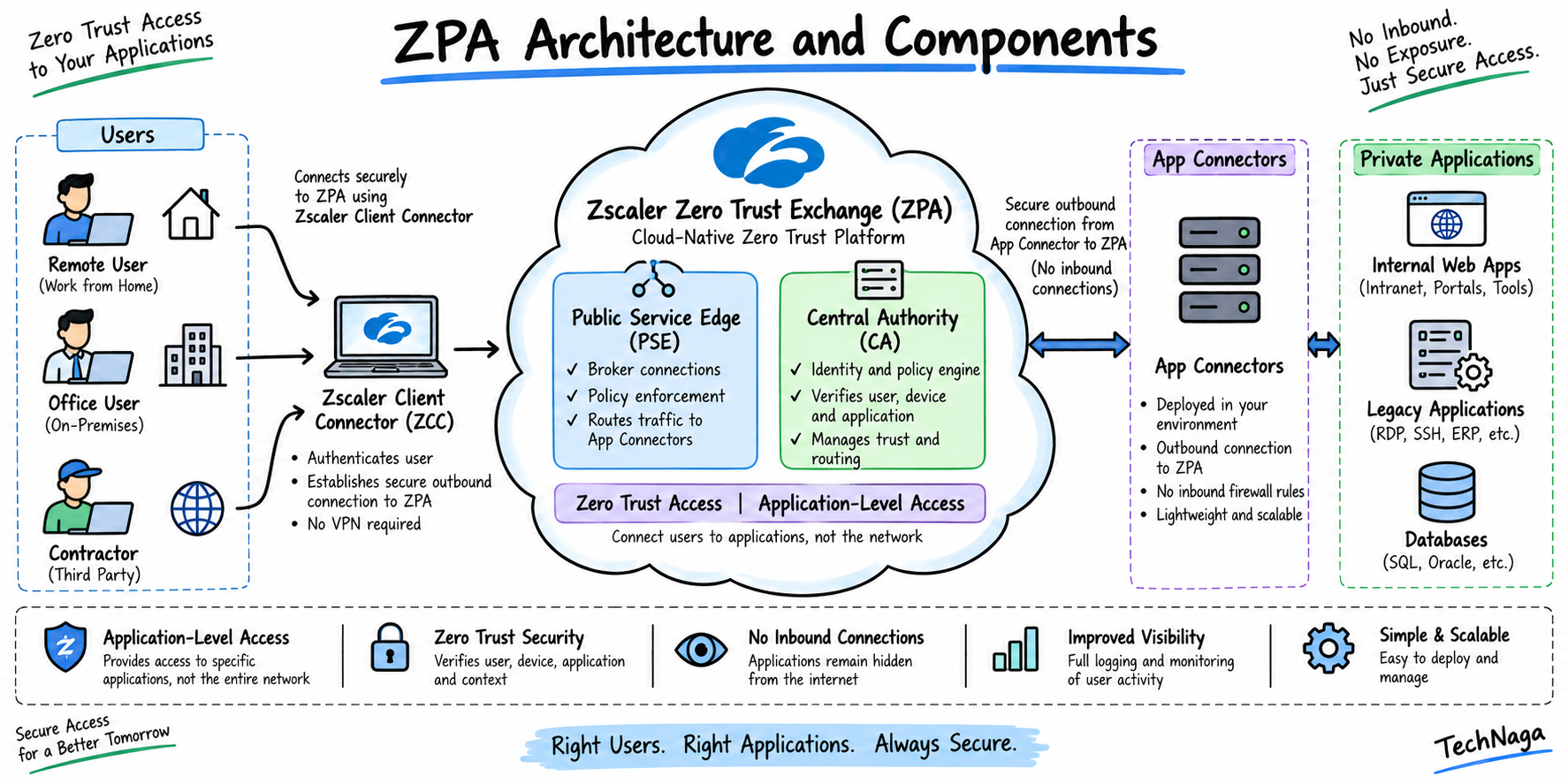
6. What are the main components of ZPA?
The main ZPA components include:
- Zscaler Client Connector: Endpoint software used to provide access to private applications.
- Identity Provider: Provides user authentication and identity information.
- Public Service Edge: Zscaler-hosted component that enforces policies and provides secure transport.
- Private Service Edge: Customer-hosted ZPA Service Edge.
- App Connector: Provides secure connectivity between private applications and the ZPA cloud.
- Central Authority: Provides centralized policy and configuration management.
These components form the foundation of Zscaler Private Access.
7. What is the ZPA cloud architecture?
ZPA uses a distributed architecture consisting of the Central Authority, Public Service Edges, Private Service Edges, App Connectors, and Zscaler Client Connector.
The Central Authority manages policy and configuration. Service Edges enforce policies and manage Microtunnels, while App Connectors provide the secure interface between private applications and the ZPA cloud.
8. What is the role of the Zero Trust Exchange in ZPA?
The Zero Trust Exchange (ZTE) provides the cloud platform through which ZPA components communicate and application access is brokered.
For ZPA, the Service Edge evaluates the user’s request, applies the configured policy, and coordinates connectivity between the Client Connector and appropriate App Connector.
The user is not placed directly on the private network.
9. What is a ZPA Public Service Edge?
A ZPA Public Service Edge is a Zscaler-hosted component that provides policy enforcement and secure transport between Zscaler Client Connector and App Connectors.
It also manages Microtunnels, including their authentication, setup, policy enforcement, and data forwarding.
10. What is a ZPA Private Service Edge?
A ZPA Private Service Edge is a ZPA Service Edge deployed within an organization’s environment.
It provides functionality similar to a Public Service Edge, including policy enforcement and secure transport between users and App Connectors.
Private Service Edges can be useful when an organization requires local ZPA infrastructure within its own data center or cloud environment.
ZPA Architecture and Components
11. What is an App Connector in ZPA?
An App Connector is a software component deployed in an environment that has connectivity to private applications.
It provides the authenticated and secure interface between the private application environment and the ZPA cloud.
App Connectors initiate outbound communication toward ZPA and do not require inbound connections from the internet.
12. What is an App Connector Group?
An App Connector Group is a logical grouping of App Connectors.
Multiple App Connectors can be grouped together to provide redundancy, scalability, and application connectivity.
When an application is requested, ZPA can select an appropriate App Connector from the available connectors that can reach the application.
13. How does an App Connector communicate with the ZPA cloud?
App Connectors establish authenticated outbound TLS connections to the ZPA cloud.
ZPA uses certificate-based authentication between its components, helping ensure that only authorized Client Connector and App Connector instances communicate with the ZPA infrastructure.
14. Why does ZPA use outbound-only connections from App Connectors?
Outbound-only connectivity means the App Connector does not need to accept inbound connections from the internet.
This reduces the externally exposed attack surface and avoids the need to publish private applications through inbound firewall or NAT rules.
It is one of the important architectural differences discussed in ZPA interview questions about ZPA versus VPN.
15. How does ZPA prevent inbound connections to private applications?
ZPA uses App Connectors that initiate connections from the private environment toward the ZPA cloud.
When an authorized user requests an application, ZPA coordinates the Client Connector, Service Edge, and App Connector to establish the application-specific connection.
The private application therefore does not need to expose an inbound gateway to the public internet.
16. What is the difference between an App Connector and a Service Edge?
An App Connector operates close to the private application and provides connectivity between the application environment and ZPA.
A Service Edge operates within the ZPA infrastructure and handles functions such as policy enforcement, authentication, Microtunnel management, and secure transport.
Simple explanation:
App Connector = connects to private applications
Service Edge = brokers and enforces access
17. How does ZPA select the appropriate App Connector?
ZPA selects an appropriate App Connector based on application reachability and factors such as the user’s location and connectivity characteristics.
The selected App Connector must be able to reach the requested private application.
This allows ZPA to establish the appropriate application path without requiring users to know where the application is physically hosted.
18. What is the role of the Central Authority (CA) in ZPA?
The Central Authority (CA) provides centralized management for ZPA policies, configuration settings, software updates, and database updates.
It also distributes policy information throughout the ZPA infrastructure.
The CA is therefore an important management component of the ZPA architecture.
19. What is the role of Zscaler Client Connector in ZPA?
Zscaler Client Connector is the endpoint software that enables users to access private applications through ZPA.
It identifies traffic destined for protected applications, communicates with the ZPA infrastructure, and participates in establishing application-specific Microtunnels.
Client Connector also participates in device posture evaluation when posture-based policies are configured.
20. What is the difference between a Public Service Edge and Private Service Edge?
A Public Service Edge is hosted by Zscaler as part of the ZPA cloud.
A Private Service Edge is deployed within the organization’s environment.
Both can provide ZPA policy enforcement, secure transport, and Microtunnel management.
The main difference is where the Service Edge is hosted and managed.
ZPA Traffic Flow
21. How does ZPA traffic flow from a user to a private application?
A simplified ZPA traffic flow is:
User Device
↓
Zscaler Client Connector
↓
ZPA Service Edge
↓
Policy Evaluation
↓
App Connector Selection
↓
Microtunnel
↓
Private Application
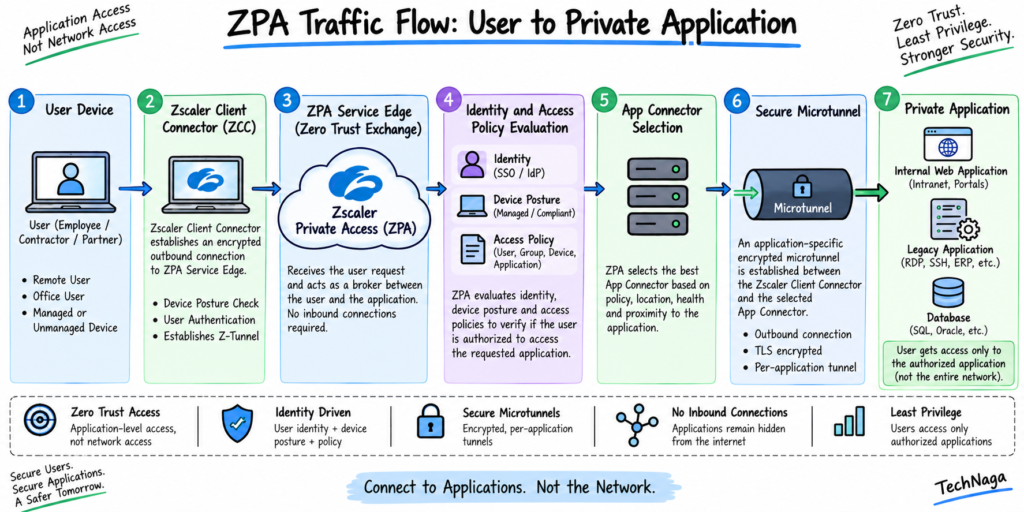
The Service Edge evaluates the request and coordinates the appropriate App Connector before application access is established.
22. What happens when a user tries to access a private application through ZPA?
Client Connector identifies the request as traffic for a protected private application.
The request reaches the ZPA Service Edge, where the user’s identity and applicable access policies are evaluated.
If access is allowed, ZPA establishes a Microtunnel through the appropriate App Connector to the private application.
23. How does ZPA authenticate a user before providing application access?
ZPA integrates with an organization’s Identity Provider (IdP) for user authentication.
SAML 2.0 is one supported mechanism for user authentication and identity information.
ZPA also uses certificate-based authentication between components such as Client Connector, App Connectors, and Service Edges.
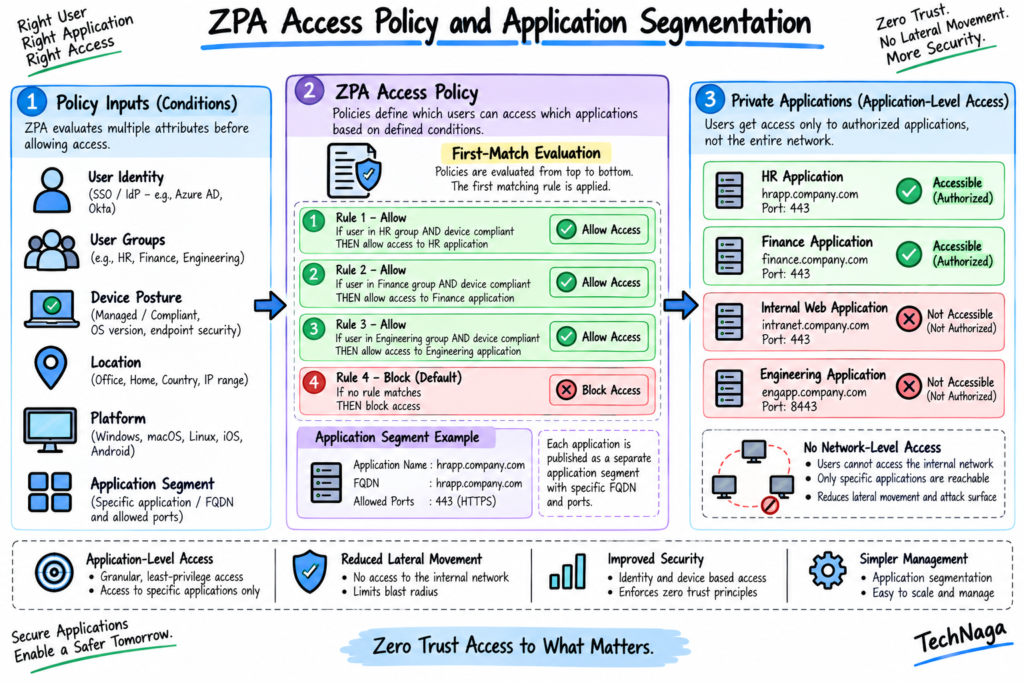
24. How does ZPA determine whether a user is authorized to access an application?
ZPA evaluates the user’s request against configured Access Policies.
Policies can use criteria such as:
- User identity
- User groups
- Application segments
- Device posture
- Platform
- Location
- Other supported attributes
If an applicable policy allows access, ZPA establishes application connectivity. If access is denied, the connection is not established.
25. What is a ZPA Microtunnel?
A Microtunnel (M-Tunnel) is an end-to-end communication channel created on demand between Zscaler Client Connector and a private application through a Service Edge and App Connector.
Each application connection can have its own Microtunnel, keeping application traffic logically separated.
26. How is a Microtunnel established between the user and private application?
When Client Connector detects traffic for a protected application, the request reaches the ZPA Service Edge.
After policy authorization, the Service Edge coordinates Client Connector and the appropriate App Connector.
The Microtunnel is then established through the Service Edge and App Connector to the private application.
27. Does ZPA put the user on the corporate network?
No.
ZPA provides application-level access rather than network-level access.
The user receives access only to the applications authorized by policy instead of receiving broad connectivity to the corporate network.
This is one of the most important concepts to understand during ZPA interview preparation.
28. How does ZPA prevent lateral movement between private applications?
ZPA restricts users to the specific applications authorized by policy.
Application Segments can restrict access to particular applications and ports, while Access Policies determine which users or groups can access them.
Because users are not given general network access, access to one application does not automatically provide access to other internal applications.
29. What happens when a user is not authorized to access a private application?
If an Access Policy does not authorize the user, ZPA denies access to the application.
Depending on the application and configuration, the protected application may also remain undiscoverable or unresolved to the unauthorized user.
ZPA policies can explicitly allow or block application access, and access policies use a first-match evaluation model.
30. How does ZPA handle application access when a user moves between networks?
Zscaler Client Connector continues to provide ZPA connectivity as the user changes networks.
The user can move between environments such as a corporate network, home network, or public Wi-Fi while ZPA continues evaluating access according to the configured policies.
If the organization uses device posture or trusted-network conditions, those conditions can also influence access.
Application Segments and Application Discovery
31. What is an Application Segment in ZPA?
An Application Segment is a logical definition used to group and configure private applications.
Applications can be defined using attributes such as:
- FQDN
- Local domain
- IP address
- Port
Application Segments can then be referenced by Access Policies and other security features.
32. What is the difference between an Application Segment and an App Connector Group?
An Application Segment defines the private application and its access characteristics.
An App Connector Group contains App Connectors that provide connectivity to those applications.
In simple terms:
Application Segment = What application is being protected?
App Connector Group = Which connectors can reach the application?
33. How do you configure an Application Segment?
When creating an Application Segment, you define the application information, such as:
- Application name
- FQDN or IP address
- Ports
- Protocol
- Server Group
- App Connector Group
You can then use the Application Segment in ZPA Access Policies.
34. What are the components of an Application Segment?
An Application Segment can contain information defining:
- Application FQDNs or IP addresses
- Ports
- Protocols
- Server Groups
- App Connector Groups
- Application-specific security capabilities
Application Segments allow organizations to restrict access to only the required ports and applications, reducing unnecessary attack surface.
35. What are Server Groups in ZPA?
A Server Group is a logical grouping of application servers.
Server Groups can be associated with Application Segments so ZPA knows which servers provide a particular application.
This helps organize application infrastructure and control which App Connector Groups can reach those servers.
36. How do Application Segments, Server Groups, and App Connector Groups work together?
A simple relationship is:
Application Segment
↓
Server Group
↓
App Connector Group
The Application Segment defines the application, the Server Group identifies the servers hosting it, and the App Connector Group identifies the connectors that can provide access to those servers.
37. What is Application Discovery in ZPA?
Application Discovery allows ZPA to discover applications based on configured discovery definitions rather than requiring every application to be explicitly defined individually.
Organizations can use wildcard FQDNs or IP subnets for application discovery.
This can simplify onboarding when many applications need to be protected.
38. What is the difference between explicitly defined applications and Application Discovery?
With an explicitly defined application, the administrator specifies the application characteristics directly.
With Application Discovery, ZPA can dynamically identify applications based on configured discovery definitions.
Explicit application definitions provide more granular control, while Application Discovery can simplify deployment for larger environments.
39. How does ZPA handle overlapping Application Segments?
When multiple Application Segments overlap, Zscaler Client Connector attempts to match traffic to the more granular Application Segment.
Administrators should avoid unnecessary overlap because conflicting application definitions can make policy behavior more difficult to understand.
Zscaler specifically documents more-granular matching for overlapping application segments.
40. How do you restrict access to specific ports and protocols using Application Segments?
Administrators can define the required ports and protocols within the Application Segment.
For example, an application can be restricted to:
Application → TCP → Port 443
Instead of allowing unnecessary ports, administrators can define only the ports required by the application.
This reduces the application’s exposed attack surface.
ZPA Policy and Access Control
41. What is an Access Policy in ZPA?
An Access Policy determines whether users are allowed to access specific private applications.
ZPA Access Policies support role-based access control and can use criteria such as application segments, user attributes, device posture, and other supported conditions.
42. How does ZPA Access Policy determine whether a user can access an application?
ZPA compares the user’s request against the configured Access Policy rules.
The policy can evaluate information such as:
- User identity
- SAML/SCIM attributes
- Application Segment
- Device posture
- Platform
- Location
- Client type
If a matching rule allows access, ZPA permits the application connection. Otherwise, access is denied according to the policy configuration.
43. What policy criteria can be used in ZPA?
Depending on the deployment and enabled features, ZPA policies can use criteria including:
- Application Segments
- Segment Groups
- SAML and SCIM attributes
- Client Connector Posture Profiles
- Platforms
- Locations
- Trusted Networks
- Machine Groups
- Other supported identity and device attributes
This allows organizations to create granular application access policies.
44. What is Device Posture in ZPA?
Device Posture allows ZPA to evaluate whether an endpoint meets defined security requirements before allowing access to private applications.
Posture checks can include characteristics of the endpoint and security controls defined by the organization.
The resulting posture information can be used as a condition in ZPA Access Policies.
45. How can ZPA use user identity, groups, and SAML attributes in access policies?
ZPA can use identity information from the configured Identity Provider in Access Policies.
For example, an organization can create a policy that allows users with a specific SAML group attribute to access a particular Application Segment.
Example:
SAML Group = Finance
↓
Application Segment = Finance Application
↓
Allow Access
Zscaler documents SAML attributes as supported criteria for Access Policies.
46. What happens when a ZPA policy denies application access?
When an Access Policy denies the request, ZPA does not establish the authorized application connection.
The user therefore cannot access the protected application through ZPA.
ZPA policies use a first-match principle, so policy rule ordering is important when multiple rules could match the same request.
ZPA Security and Advanced Features
47. What is AppProtection in ZPA?
AppProtection is a ZPA security capability that allows organizations to inspect traffic to supported private web applications.
Administrators can create AppProtection policies based on criteria such as Application Segments, Client Connector Posture Profiles, and identity attributes.
AppProtection controls can help protect private web applications from attacks such as SQL injection and cross-site scripting.
48. How does ZPA AppProtection inspect private web applications?
AppProtection policies determine which private web application traffic should be inspected.
Administrators can configure an AppProtection profile containing security controls and associate that profile with an AppProtection policy.
The controls can include protections based on OWASP, custom HTTP controls, and WebSocket controls.
For example:
User → ZPA → Private Web Application → AppProtection → Allow/Block
This is an important advanced topic for ZPA interview questions because it demonstrates that ZPA can provide more than basic application connectivity.
49. What is Double Encryption in ZPA?
Double Encryption is a ZPA application-segment capability that provides an additional layer of encryption for supported application traffic.
It can be configured at the Application Segment level when supported and licensed.
This is separate from the normal encrypted communication used between ZPA components.
Application Segments can be configured with advanced capabilities such as Double Encryption depending on the organization’s ZPA subscription and configuration.
50. How do you troubleshoot a ZPA application that a user cannot access?
A structured ZPA troubleshooting process should start with the following checks:
- Check user authentication
Confirm that the user successfully authenticated through the configured IdP. - Check Client Connector
Verify that Client Connector is running and connected to ZPA. - Check Application Segment
Confirm the application FQDN/IP, ports, and protocols are configured correctly. - Check Server Group
Verify that the correct application servers are associated with the Server Group. - Check App Connector Group
Confirm that the appropriate App Connector Group is associated with the application. - Check App Connector health
Verify that the App Connectors are online and can reach the application servers. - Check Access Policy
Verify that the user’s identity, group, device posture, and application match the expected policy. - Check policy order
Remember that ZPA Access Policies use a first-match evaluation model. - Check DNS/application discovery
Verify that the application is correctly defined or discovered. - Check the application itself
Confirm that the application server is listening on the expected port and that network connectivity exists between the App Connector and application. - Check Microtunnel establishment
Determine whether the Microtunnel is being created successfully between Client Connector, Service Edge, App Connector, and the application.
Use these TechNaga articles:
- Zscaler Interview Questions and Answers: Fundamentals
Zscaler Interview Questions and Answers: Fundamentals - What Is Cybersecurity and Why It Is Important Today
What Is Cybersecurity and Why It Is Important Today - Complete Network Security Basics Guide for Beginners 2026
Complete Network Security Basics Guide for Beginners 2026 - Firewall in Cybersecurity: Types, Examples and How It Works
Firewall in Cybersecurity: Types, Examples and How It Works
For this ZPA article, use official Zscaler sources rather than third-party websites.
- Zscaler Private Access (ZPA)
Zscaler Private Access - Understanding ZPA Cloud Architecture
ZPA Cloud Architecture Documentation - About Applications and Application Segments
ZPA Application Documentation - Configuring ZPA Access Policies
ZPA Access Policy Documentation - Configuring Application Segments
ZPA Application Segment Documentation - ZPA AppProtection
ZPA AppProtection Documentation
Disclaimer:
This article is based on my own professional experience working with Zscaler, along with knowledge gained through multiple Zscaler-related interviews and technical discussions. The questions and answers are provided for educational and interview-preparation purposes and may not represent the exact questions asked by every organization.
Zscaler features, product capabilities, documentation, and terminology can change over time. Always verify technical details, supported features, configurations, and current product behavior against the official Zscaler documentation before implementing any configuration in a production environment.







