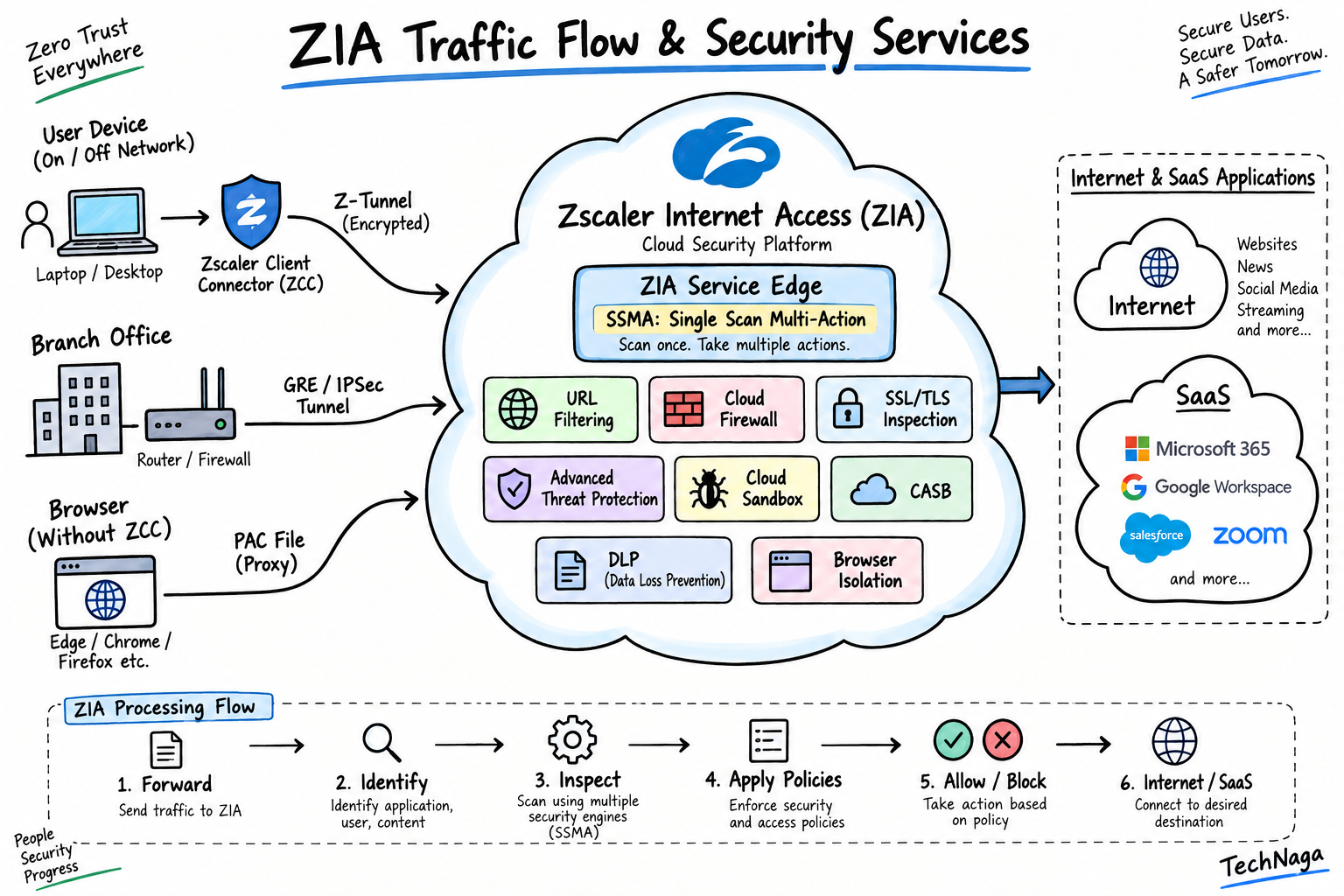
ZIA interview questions are commonly asked in cybersecurity and network security interviews for roles involving Zscaler Internet Access. This guide covers ZIA architecture, traffic forwarding, ZIA traffic flow, SSMA, URL Filtering, SSL/TLS Inspection, Cloud Firewall, CASB, DLP, Advanced Threat Protection, Sandbox, and Browser Isolation.
ZIA Fundamentals
1. What is Zscaler Internet Access (ZIA)?
Zscaler Internet Access (ZIA) is a cloud-delivered Security Service Edge (SSE) platform that secures users’ access to the internet and SaaS applications.
ZIA provides security capabilities such as Secure Web Gateway (SWG), URL Filtering, Cloud Firewall, SSL/TLS Inspection, Advanced Threat Protection, Cloud Sandbox, CASB, and DLP without requiring organizations to route users through traditional on-premises security appliances.
2. Why is ZIA used in an enterprise environment?
Organizations use ZIA to protect users, applications, and sensitive data when accessing the internet and cloud services.
ZIA provides centralized security policies regardless of where users connect from and can reduce dependency on traditional security appliances and unnecessary traffic backhauling through corporate data centers.
3. What are the main features of ZIA?
Major ZIA capabilities include:
- Secure Web Gateway
- URL Filtering
- Cloud Firewall
- SSL/TLS Inspection
- Advanced Threat Protection
- Cloud Sandbox
- Cloud Access Security Broker
- Data Loss Prevention
- Browser Isolation
- Malware protection
4. How does ZIA differ from a traditional Secure Web Gateway?
A traditional Secure Web Gateway is commonly deployed as an on-premises appliance or virtual appliance, while ZIA is delivered as a globally distributed cloud service.
ZIA allows security policies to follow users regardless of their location and provides cloud-based security services without requiring all internet traffic to be backhauled through a corporate data center.
5. What is the ZIA architecture?
The ZIA cloud architecture consists of three major components:
- Central Authority (CA): Manages configuration, policies, software updates, databases, and threat intelligence.
- Public Service Edges: Inline security gateways that inspect internet and SaaS traffic and enforce policies.
- Nanolog Clusters: Store and provide access to transaction logs and reporting data.
6. What is a ZIA Service Edge?
A ZIA Service Edge is an inline security gateway that processes traffic forwarded to the Zscaler cloud.
It performs traffic inspection and policy enforcement and can provide services such as firewall, URL filtering, SSL inspection, threat protection, and other configured security controls.
Depending on the deployment, organizations can use Public, Private, or Virtual Service Edges.
7. How does ZIA process user traffic?
User traffic is forwarded to the Zscaler service using a supported forwarding method such as Zscaler Client Connector, GRE, IPSec, or PAC.
The traffic reaches a ZIA Service Edge, where Zscaler identifies the traffic and applies the relevant security and access policies. Allowed traffic is then forwarded to the internet or SaaS destination, while blocked traffic is denied and logged.
8. What types of traffic can ZIA secure?
ZIA can secure internet-bound traffic across supported ports and protocols.
Depending on the forwarding method and configuration, ZIA can handle web traffic as well as non-web traffic. Zscaler recommends forwarding internet traffic for all protocols and ports so that the service can apply the appropriate security policies.
9. How does ZIA protect users accessing internet and SaaS applications?
ZIA combines multiple security controls to protect internet and SaaS access.
These include URL Filtering, SSL/TLS Inspection, Cloud App Control, CASB, DLP, Advanced Threat Protection, malware protection, sandboxing, and other configured security policies.
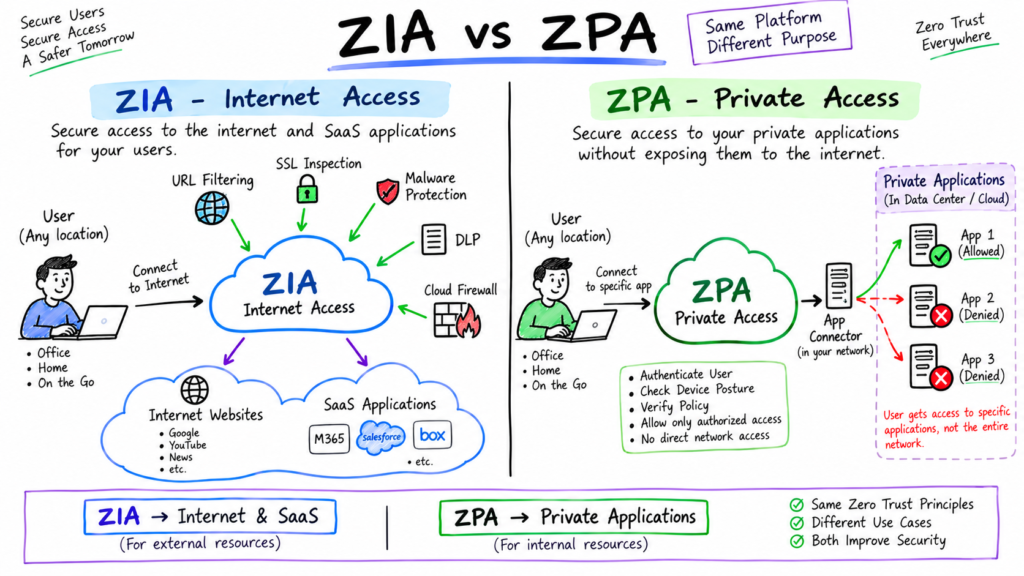
10. What is the difference between ZIA and ZPA?
ZIA primarily secures access to public internet and SaaS applications.
ZPA provides Zero Trust access to private applications hosted in data centers, private clouds, or public clouds.
In simple terms:
ZIA = Secure Internet and SaaS Access
ZPA = Secure Private Application Access
ZIA Interview Questions: Traffic Forwarding Methods
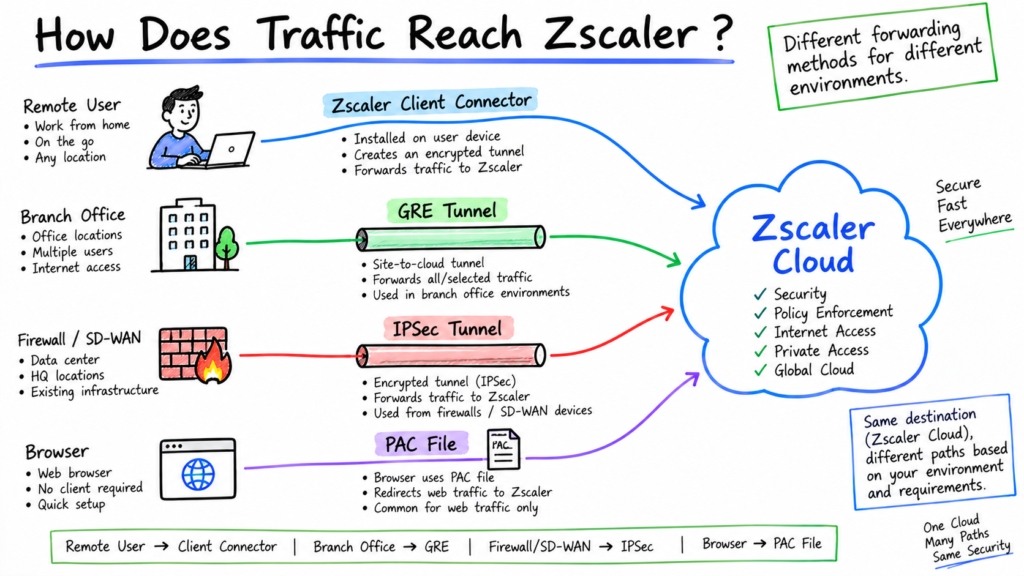
11. What are the different methods of forwarding traffic to ZIA?
Zscaler supports several traffic-forwarding methods, including:
- Zscaler Client Connector
- GRE tunnels
- IPSec tunnels
- PAC files
- Zscaler Cloud Connector
Zscaler recommends combining forwarding methods based on the organization’s environment and requirements.
12. How does Zscaler Client Connector forward traffic to ZIA?
Zscaler Client Connector is installed on supported user devices and forwards traffic to the Zscaler cloud.
For internet security, Client Connector can protect users both inside and outside corporate networks, allowing organizational security policies to follow users regardless of their location.
13. What is Z-Tunnel?
A Z-Tunnel is a tunneling mechanism used by Zscaler Client Connector to forward device traffic to the Zscaler cloud for security inspection and policy enforcement.
Zscaler supports Z-Tunnel 1.0 and Z-Tunnel 2.0.
14. What is Z-Tunnel 1.0?
Z-Tunnel 1.0 is a legacy forwarding mode that works similarly to a traditional proxy.
It uses proxy-based forwarding for supported web traffic and is more limited than Z-Tunnel 2.0.
15. What is Z-Tunnel 2.0?
Z-Tunnel 2.0 is a newer tunneling architecture used by Zscaler Client Connector to forward broader device traffic to the Zscaler service.
It supports tunneling using DTLS or TLS and can support traffic across ports and protocols.
16. What is the difference between Z-Tunnel 1.0 and Z-Tunnel 2.0?
| Z-Tunnel 1.0 | Z-Tunnel 2.0 |
|---|---|
| Legacy forwarding mode | Newer tunneling architecture |
| Proxy-oriented | Tunnel-oriented |
| More limited traffic coverage | Broader traffic coverage |
| Primarily web/proxy traffic | Supports broader ports and protocols |
| Less suitable for comprehensive device traffic | Designed for broader device traffic forwarding |
17. What is a GRE tunnel in ZIA?
A Generic Routing Encapsulation (GRE) tunnel encapsulates traffic from a corporate network and forwards it to the Zscaler service.
GRE is commonly used for fixed corporate locations and branches. It does not encrypt the payload itself.
18. How does a GRE tunnel work with ZIA?
The organization’s router or firewall encapsulates internet-bound traffic inside GRE packets and forwards the traffic to a ZIA Service Edge.
ZIA decapsulates the traffic, applies the configured security policies, and forwards permitted traffic to the destination.
Organizations commonly configure primary and secondary GRE tunnels for redundancy.
19. What is an IPSec tunnel in ZIA?
An IPSec tunnel is an encrypted site-to-site VPN connection between an organization’s network gateway and the Zscaler service.
IPSec can be used when the gateway does not support GRE or when the organization uses dynamic public IP addresses.
20. How does an IPSec tunnel work with ZIA?
The organization’s firewall or router establishes an IPSec VPN tunnel with the Zscaler service.
Internet-bound traffic from the protected network is sent through the encrypted tunnel to ZIA, where the traffic is inspected and applicable policies are enforced before permitted traffic reaches the destination.
21. GRE vs IPSec for ZIA: What is the difference?
| GRE | IPSec |
|---|---|
| Encapsulates traffic | Encrypts traffic |
| Lower processing overhead | Additional encryption overhead |
| Commonly used with static public IP | Supports dynamic IP environments |
| Requires GRE support | Uses IPSec/IKE |
| Up to 1 Gbps per tunnel when not NATed | 400 Mbps per public source IP |
| GRE itself does not encrypt payload | Provides encrypted tunnel |
Zscaler documents a maximum of 1 Gbps per GRE tunnel when the tunnel endpoint is not source-NATed, and up to 250 Mbps when source-NATed. IPSec supports up to 400 Mbps per public source IP.
22. What is a PAC file?
A Proxy Auto-Configuration (PAC) file is a JavaScript-based text file that tells a browser which proxy to use for a particular web request.
A PAC file can also specify conditions under which traffic should bypass the proxy.
23. How does a PAC file forward traffic to ZIA?
The browser downloads the PAC file and executes its JavaScript instructions.
When a request matches the PAC rule, the browser forwards the traffic to the specified ZIA Public Service Edge instead of connecting directly to the destination.
Zscaler’s default PAC file uses geolocation to select appropriate Public Service Edges.
24. When would you use PAC files instead of Zscaler Client Connector?
PAC files can be useful for:
- Unmanaged devices
- Guest environments
- Browser-only traffic
- Certain server workloads
- Environments where endpoint software cannot be installed
PAC files are mainly browser-oriented, whereas Client Connector provides broader endpoint traffic forwarding.
25. How do you decide which ZIA traffic-forwarding method to use?
The decision depends on the device, network architecture, public IP configuration, application requirements, and whether endpoint software can be deployed.
- Client Connector: Managed endpoints and remote users
- GRE: Fixed sites with suitable GRE-capable gateways and static public IPs
- IPSec: Sites where GRE is unavailable or dynamic IP addressing is required
- PAC: Browser-based or specific web traffic
- Cloud Connector: Cloud and branch traffic-forwarding scenarios
Organizations can combine multiple methods to provide complete coverage.
ZIA Traffic Flow
26. How does traffic flow through ZIA?
A typical ZIA traffic flow looks like this:
User Device / Branch Network
↓
Traffic Forwarding Method
Client Connector / GRE / IPSec / PAC
↓
ZIA Public Service Edge
↓
User and Location Identification
↓
Policy Evaluation
↓
SSL/TLS Inspection, if applicable
↓
Security Inspection
URL Filtering → Cloud Firewall → ATP → Sandbox → CASB → DLP → Other applicable controls
↓
Policy Action
Allow / Block / Redirect / Other configured action
↓
Internet or SaaS Application
The exact processing path depends on the traffic type, forwarding method, and policies configured in the ZIA environment.
27. What happens when a user accesses an HTTPS website through ZIA?
The user’s HTTPS traffic is forwarded to the ZIA Service Edge.
If SSL/TLS inspection applies, ZIA performs proxy-based TLS inspection, allowing applicable security controls to inspect the decrypted traffic.
ZIA evaluates the traffic against the relevant policies. If the request is allowed, ZIA establishes or continues the appropriate connection to the destination website and returns the response to the user.
28. What happens if SSL inspection is not enabled?
If SSL/TLS inspection is not applied, ZIA has less visibility into the encrypted content.
ZIA can still apply controls based on information available from the connection, such as destination information and other metadata, but it cannot inspect the encrypted payload in the same way as decrypted traffic.
29. What happens when ZIA blocks a request?
When traffic matches a blocking policy, ZIA prevents the request from reaching the destination.
Depending on the policy and service involved, ZIA can generate a block page or other configured response, and the transaction can be logged for reporting and investigation.
30. What is the role of the ZIA Public Service Edge in traffic processing?
The Public Service Edge is the primary inline processing point for traffic sent to the Zscaler cloud.
It terminates or receives forwarded traffic, performs applicable security inspection, enforces policies, and forwards permitted traffic toward the destination.
Zscaler describes Public Service Edges as full-featured inline internet security gateways.
ZIA Interview Questions: Policy and Traffic Processing
31. How does ZIA policy processing work?
ZIA centrally manages policy configuration through the Zscaler administration platform.
When traffic reaches a Service Edge, the applicable policy modules evaluate the traffic based on factors such as user, group, location, device, application, destination, URL category, and traffic characteristics.
The Service Edge then applies the configured policy action.
32. What is Single Scan Multi-Action (SSMA) in ZIA?
Single Scan Multi-Action (SSMA) is Zscaler’s architecture for processing traffic through multiple security engines efficiently.
Instead of sending traffic through separate security appliances one after another, SSMA allows multiple security engines to inspect the same traffic during a single inspection process.
33. Why is SSMA important in ZIA?
SSMA is important because it reduces the need for sequential security processing.
In a traditional chained security architecture, traffic may pass through multiple independent appliances, with each appliance performing its own inspection. Each additional processing stage can add latency.
With SSMA, Zscaler’s security engines can inspect the same content through a shared processing architecture, helping ZIA apply multiple security controls efficiently with minimal additional latency.
Interview answer:
“SSMA is important because ZIA can apply multiple security inspections during a single scan instead of forcing traffic through a chain of independent security appliances. This improves processing efficiency and helps reduce additional latency.”
34. What is URL Filtering in ZIA?
URL Filtering controls access to websites and web resources based on URL categories and configured policy criteria.
Administrators can allow or block destinations according to organizational requirements.
35. How does ZIA URL Filtering work?
ZIA identifies the requested web destination and evaluates it against URL Filtering policies.
Based on the configured rule, ZIA can allow or block access or apply another supported policy action.
For HTTPS traffic, SSL/TLS inspection can provide additional visibility into the traffic.
36. What is Cloud App Control in ZIA?
Cloud App Control provides visibility and control over cloud and SaaS applications.
It can help administrators identify cloud applications, control application usage, apply tenant restrictions, and manage sanctioned and unsanctioned cloud services.
37. What is the ZIA Cloud Firewall?
The ZIA Cloud Firewall provides cloud-based firewall controls for outbound traffic.
It supports controls for traffic such as TCP, UDP, and ICMP and allows administrators to enforce network-level security policies.
38. What is the difference between URL Filtering and Cloud Firewall?
URL Filtering primarily controls web access based on destinations and URL categories.
Cloud Firewall provides broader network traffic controls based on network characteristics such as protocols, ports, source, destination, and other supported criteria.
SSL/TLS Inspection
39. What is SSL/TLS Inspection in ZIA?
SSL/TLS Inspection allows ZIA to decrypt supported encrypted traffic, inspect it using configured security policies, and then establish the appropriate encrypted connection to the destination.
It provides visibility into encrypted traffic that would otherwise hide its content from security inspection.
40. How does ZIA SSL/TLS Inspection work?
ZIA acts as a forward proxy for inspected HTTPS traffic.
The client establishes a TLS connection with ZIA, while ZIA establishes a separate TLS connection with the destination server.
ZIA can inspect the traffic between these connections and then forward the permitted traffic securely.
41. What are SSL inspection exclusions?
SSL inspection exclusions are policy rules that prevent selected traffic from being decrypted and inspected.
Organizations may configure exclusions for application compatibility, certificate pinning, privacy, compliance, or other requirements.
42. Why might an application break after SSL inspection is enabled?
Applications can fail when they do not support proxy-based TLS interception.
Common causes include:
- Certificate pinning
- Custom certificate trust stores
- Mutual TLS
- Unsupported TLS behavior
- Applications that do not trust the organization’s CA certificate
A controlled SSL inspection bypass may be required for compatible operation.
ZIA Security Services
43. What is Data Loss Prevention (DLP) in ZIA?
DLP identifies sensitive information in traffic and helps prevent unauthorized transmission of that information.
Organizations can create policies for sensitive information such as credit card data, personally identifiable information, source code, and confidential documents.
When a transaction matches a DLP policy, ZIA applies the configured action.
44. What is Cloud Access Security Broker (CASB) in ZIA?
CASB provides visibility and control over cloud applications and SaaS usage.
ZIA can use CASB capabilities to identify applications, control cloud application activity, apply tenant restrictions, and protect data in cloud services.
45. What is the difference between CASB and DLP in ZIA?
CASB focuses on cloud application visibility and control.
DLP focuses on identifying and protecting sensitive information.
For example, CASB can control access to an unsanctioned SaaS application, while DLP can inspect a file being uploaded to an approved SaaS application and determine whether it contains sensitive information.
46. What is Advanced Cloud Sandbox in ZIA?
Advanced Cloud Sandbox analyzes suspicious or unknown files in an isolated environment.
It uses behavioral analysis to identify malicious activity that may not be detected through traditional signature-based techniques.
If a file is determined to be malicious, ZIA can block it according to the configured policy.
47. How does ZIA protect users from malware and advanced threats?
ZIA uses multiple security controls, including:
- URL Filtering
- Malware protection
- Advanced Threat Protection
- IPS
- SSL/TLS Inspection
- Cloud Sandbox
- CASB
- DLP
- Browser Isolation
These controls can work together to detect, block, and prevent different types of web-based threats.
48. What is Browser Isolation in ZIA?
Browser Isolation executes web content in a remote isolated environment rather than directly on the user’s endpoint.
This reduces the exposure of the local device to malicious websites, scripts, and browser-based attacks.
49. What is Advanced Threat Protection in ZIA?
Advanced Threat Protection is a collection of security controls designed to protect users from advanced web-based threats.
Depending on the configuration, it can protect against threats such as phishing, malicious active content, botnets, fraud, browser exploits, and other malicious activity.
Zscaler also uses risk-based analysis such as Page Risk to help identify potentially dangerous web destinations.
50. How does ZIA provide layered security for internet traffic?
ZIA combines multiple security controls within its cloud security architecture.
Depending on the traffic and configured policies, ZIA can apply:
URL Filtering → Cloud Firewall → SSL/TLS Inspection → Advanced Threat Protection → Sandbox → CASB → DLP → Browser Isolation
Not every transaction passes through every service. The controls applied depend on the traffic, policy configuration, forwarding method, and security services enabled.
The SSMA architecture allows applicable security engines to inspect traffic efficiently within the ZIA Service Edge rather than requiring traffic to pass sequentially through separate security appliances.
Disclaimer
This article is based on my own professional experience working with Zscaler, along with knowledge gained through multiple Zscaler-related interviews and technical discussions. The interview questions and answers are written for educational and interview-preparation purposes and may not represent the exact questions asked by every organization.
Zscaler features, product capabilities, documentation, and terminology can change over time. Always verify technical details, supported features, configurations, and current product behaviour against the official Zscaler documentation before implementing any configuration in a production environment.
My Another blog or Interview Questions
Zscaler Fundamentals Interview Questions and Answers
https://technaga.com/zscaler-interview-questions-fundamentals/
External Links
Zscaler Internet Access (ZIA)
https://www.zscaler.com/products-and-solutions/zscaler-internet-access
ZIA Official Documentation
Zscaler Internet Access Documentation
Zscaler Internet Access Data Sheet
ZIA Data Sheet







