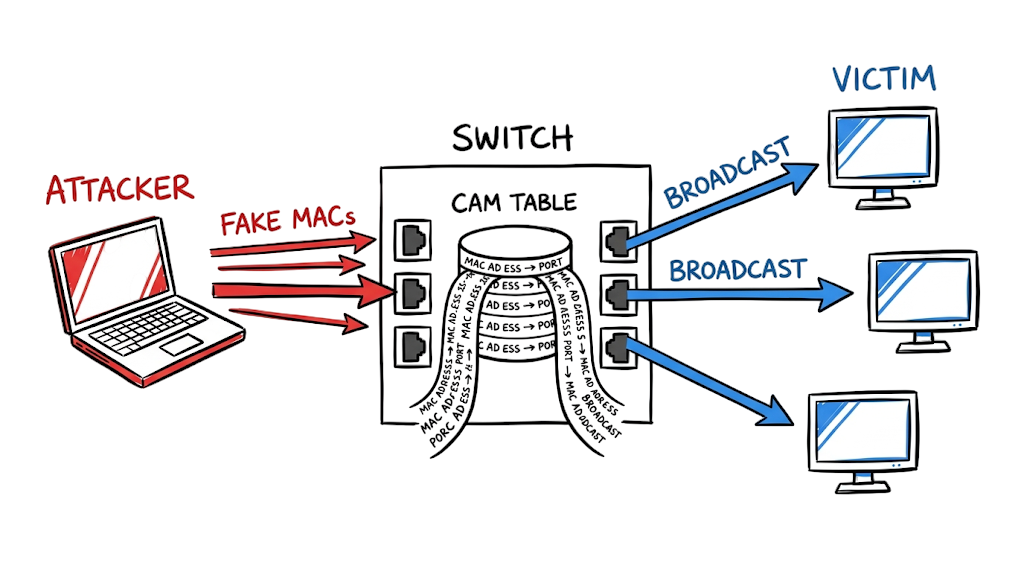
A MAC flooding attack is one of the simplest Layer 2 attacks, and it still appears in CCNA, Security+ and SOC interviews. It needs no exploit and no malware: just a laptop plugged into an unprotected switch port. This guide explains what happens inside the switch, how to spot an attack, and the exact switch configuration that stops it.
Quick answer: A MAC flooding attack (also called a CAM table overflow attack) sends thousands of Ethernet frames with fake source MAC addresses to a switch. When the switch’s MAC address table is full, it cannot learn new addresses, so it floods frames for unknown destinations out of every port in the VLAN. The switch starts behaving like a hub, and the attacker can capture traffic meant for other devices. The main defence is port security, which limits how many MAC addresses each switch port can learn.
What is a MAC flooding attack?
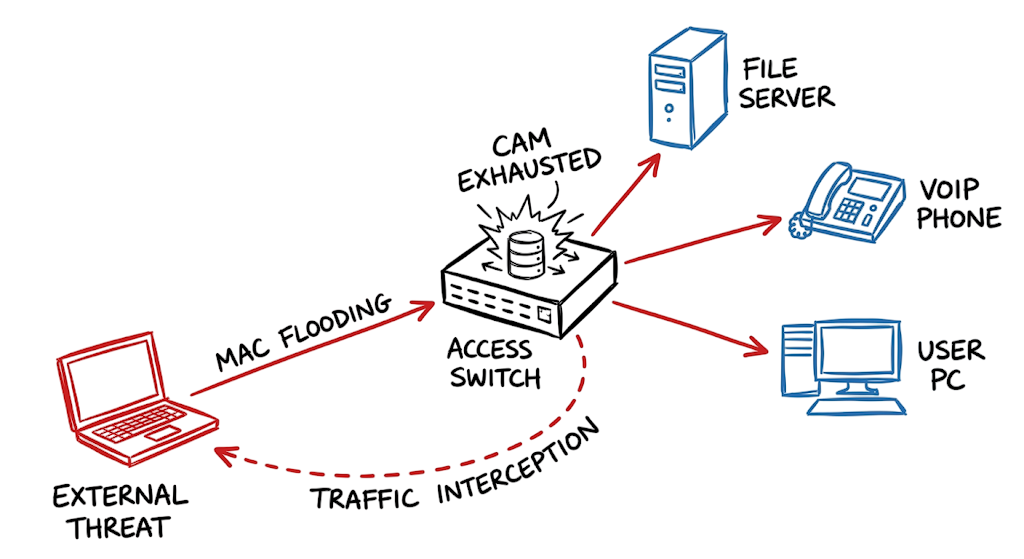
A MAC flooding attack targets the MAC address table of a network switch. Cisco calls this table the CAM table (Content Addressable Memory). The table maps each MAC address to the switch port where that device is connected, so the switch can send each frame only where it needs to go.
The table has a fixed size. Depending on the model, a switch can store from a few thousand to a few hundred thousand entries. An attacker who fills it with fake entries breaks the switch’s ability to forward traffic privately.
The attack works only on the local network segment. The attacker must be connected to the same VLAN, either through a physical switch port or a bridged connection. It cannot be launched across the internet.
How a switch normally learns MAC addresses
To understand the attack, first look at normal switch behaviour. Every time a frame arrives, the switch does two things:
- Learn: it reads the source MAC address and records which port it came from.
- Forward: it looks up the destination MAC address in the table.
- If the destination is in the table, the frame goes out of that one port only.
- If the destination is unknown, the switch floods the frame out of every port in the same VLAN, except the one it came in on.
Here is what a healthy table looks like on a Cisco switch (show mac address-table):
Vlan    Mac Address       Type        Ports
----    -----------       --------    -----
  10    0050.56a1.1b2c    DYNAMIC     Gi0/1
  10    0050.56a1.4d5e    DYNAMIC     Gi0/2
  10    a0b1.c2d3.e4f5    DYNAMIC     Gi0/24
Flooding unknown destinations is normal and harmless when the table has space, because the switch learns the correct port from the reply and stops flooding. MAC flooding abuses exactly this behaviour.
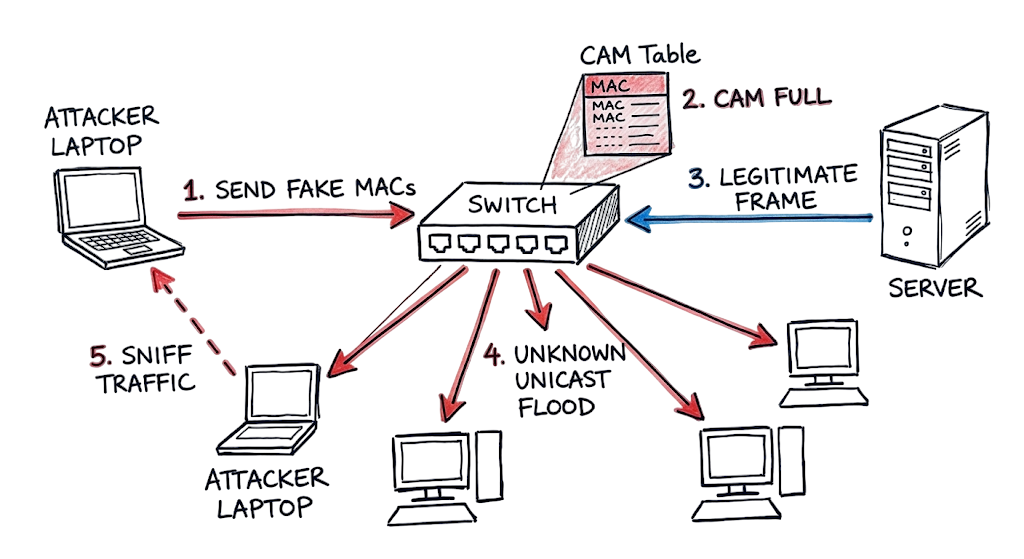
How a MAC flooding attack works, step by step
- The attacker connects to an access port, for example a spare wall jack in a meeting room.
- A tool generates fake frames. The best-known tool is macof, part of the dsniff suite on Kali Linux. It can send many thousands of frames per second, each with a random source MAC address.
- The switch learns every fake address and stores it against the attacker’s port, because it has no way to tell real devices from fake ones.
- The table fills up. Entries that were already learned stay until they age out (300 seconds by default on Cisco switches), but the switch cannot learn any new legitimate address.
- Traffic to unknown destinations is flooded. Any device whose entry ages out, or any new device, now becomes an “unknown destination”. Frames sent to it are flooded to every port in the VLAN, including the attacker’s.
- The attacker captures the traffic with a packet sniffer such as Wireshark or tcpdump.
In short, the switch “fails open”: it falls back to hub-like behaviour instead of dropping traffic. That is why exam questions describe the result as “the switch begins to function as a hub”.
What can an attacker gain, and what are the limits?
A successful attack gives the attacker a copy of traffic they should never see. The real impact depends on what that traffic contains.
What is at risk
- Unencrypted protocols on the VLAN: Telnet, HTTP, FTP, SNMPv1/v2c community strings, unencrypted VoIP (RTP) and some legacy application traffic.
- Network reconnaissance: device MAC and IP addresses, hostnames, and which systems talk to each other.
- Performance: flooded traffic consumes bandwidth on every port in the VLAN, so users may see slow applications and dropped calls.
- A stepping stone: with visibility into the segment, an attacker can prepare an ARP spoofing or other adversary-in-the-middle attack.
What limits the attack
- One VLAN only. Flooding stays inside the broadcast domain the attacker is connected to. Other VLANs are not exposed.
- Encryption still protects content. HTTPS, SSH and other TLS traffic is captured but stays encrypted.
- Local access is required. The attacker needs a port, a compromised device on that VLAN, or a bridged network.
- It is noisy. Thousands of new MAC addresses on one port is easy to spot if anyone is monitoring.
MAC flooding vs ARP spoofing vs MAC spoofing
These three Layer 2 attacks are often confused in interviews.
| MAC flooding | ARP spoofing | MAC spoofing | |
|---|---|---|---|
| What it targets | The switch’s MAC address table | The ARP cache of hosts and gateways | The identity of one specific device |
| How it works | Thousands of fake source MACs fill the table | Fake ARP replies link the attacker’s MAC to another device’s IP | Attacker copies a trusted device’s MAC address |
| Result | Switch floods traffic like a hub | Traffic is redirected through the attacker (man-in-the-middle) | Attacker bypasses MAC-based access rules |
| Main defence | Port security (MAC limits) | Dynamic ARP Inspection with DHCP snooping | 802.1X authentication |
| Read more | This guide | ARP Spoofing Attack Explained | Network Security Basics |
How to detect a MAC flooding attack
Look for these signs on the switch and the network.
1. The MAC table is full or growing fast
On Cisco IOS, check how many entries are in use against the table’s capacity:
Switch# show mac address-table countCompare the dynamic address count with your normal baseline. A sudden jump to the maximum is a strong sign of an attack.
2. One port has learned an abnormal number of addresses
Switch# show mac address-table interface GigabitEthernet0/5A user access port normally has one to three addresses: a PC, maybe an IP phone, maybe a docking station. Hundreds or thousands on one access port is not normal.
3. Port security alerts in syslog or your SIEM
If port security is configured, a violation produces log messages like these:
%PORT_SECURITY-2-PSECURE_VIOLATION: Security violation occurred, caused by MAC address 0011.2233.4455 on port GigabitEthernet0/5.
%PM-4-ERR_DISABLE: psecure-violation error detected on Gi0/5, putting Gi0/5 in err-disable state
Forward these to your SIEM and create an alert for them. See our SIEM guide for how to build such alerts.
4. Symptoms users notice
Slow applications, dropped VoIP calls and high utilisation on access ports that normally carry little traffic. These symptoms look like a broadcast storm or switching loop, so check the MAC table before you start tracing spanning tree.
5. Packet capture evidence
In Wireshark, a capture from the affected VLAN shows a very high rate of frames with random, never-repeating source MAC addresses coming from one port.
How to prevent MAC flooding with port security
Port security is the standard defence. It limits how many MAC addresses a switch port may learn and decides what happens when that limit is crossed.
Recommended configuration for a user access port (Cisco IOS)
interface GigabitEthernet0/5
 description User desk port
 switchport mode access
 switchport access vlan 10
 switchport port-security
 switchport port-security maximum 2
 switchport port-security violation shutdown
 switchport port-security mac-address sticky
What each line does:
switchport mode accessforces the port to access mode. Port security cannot be enabled on a dynamic (DTP) port, and access mode also blocks trunk negotiation used in VLAN hopping attacks.switchport port-securityturns the feature on. The default maximum is 1 MAC address.maximum 2allows a PC plus one more device, such as an IP phone with the PC connected behind it. Set the value to match your real setup.violation shutdownputs the port into err-disabled state when the limit is crossed. This is also the default mode.mac-address stickyremembers the learned addresses and adds them to the running configuration, so a different device on that jack triggers a violation.
Violation modes compared
| Mode | Drops extra traffic | Logs and counts the violation | Shuts the port |
|---|---|---|---|
| protect | Yes | No | No |
| restrict | Yes | Yes | No |
| shutdown (default) | Yes | Yes | Yes (err-disabled) |
Use shutdown where security matters most, and restrict where you cannot afford a user losing the network, for example a shared conference room. Avoid protect: it blocks the attack silently, so nobody knows it happened.
Recover err-disabled ports automatically (optional)
Switch(config)# errdisable recovery cause psecure-violation
Switch(config)# errdisable recovery interval 600
The port comes back after 600 seconds. If the cause is still present, it shuts down again. You can also recover a port manually with shutdown then no shutdown on the interface.
Verify it is working
Switch# show port-security
Switch# show port-security interface GigabitEthernet0/5
Check that “Port Security” is Enabled, the maximum is correct, and the violation count is 0 under normal use.
Other controls that complete the defence
- Shut down unused ports and place them in an unused VLAN. An empty wall jack connected to a live port is the easiest way in.
- Use 802.1X network access control so a device must authenticate before it can send traffic. Port security counts MAC addresses; 802.1X verifies identity.
- Segment the network so a successful attack exposes only one small VLAN. See Network Segmentation Explained.
- Never apply strict limits to uplinks. Trunk ports to other switches, wireless access points and virtualisation hosts legitimately carry many MAC addresses.
- Monitor and alert on port security logs and MAC table utilisation in your SIEM.
- Encrypt management and application traffic (SSH, HTTPS, SNMPv3) so captured traffic is useless to an attacker.
Try it in a lab
The best way to understand MAC flooding is to watch it happen. Use only equipment you own or are authorised to test.
- Build a small topology in GNS3 or EVE-NG with a Cisco IOSvL2 switch, two Linux or Windows hosts and a Kali Linux VM, all in the same VLAN.
- On the switch, run
show mac address-table countand note the baseline. - On Kali, start the flood:
sudo macof -i eth0 - Run
show mac address-table countagain and watch the table fill. - Start Wireshark on Kali and ping between the two hosts. Once their entries age out, you will see their traffic on the attacker’s interface.
- Stop macof, apply the port security configuration above to the Kali port, and repeat. The port should go err-disabled within a second.
While working in enterprise cybersecurity and network troubleshooting, I learned how important it is to investigate unusual network behaviour instead of immediately assuming it is a connectivity issue. During switch troubleshooting exercises, I focused on checking MAC address tables, interface status, and port security violation logs to understand how unauthorized devices could affect network access. One important lesson is that monitoring MAC address learning activity and configuring port security on access ports can help detect suspicious Layer 2 behaviour before it affects other users.
Exam and interview questions on MAC flooding
These are the questions students and candidates search most often.
What happens when a switch’s MAC address table is overwhelmed by a MAC flooding attack? The switch cannot learn new addresses, so it floods frames for unknown destinations out of all ports in the VLAN. It begins to function as a hub.
What technology have most switches implemented to counteract MAC flooding attacks? Port security.
What is the primary goal of a MAC flooding attack? To exhaust the memory used to store the switch’s MAC address table, so the switch floods traffic the attacker can capture.
Why does MAC flooding make network sniffing easier? Because it forces the switch to send traffic to all ports, including the attacker’s, instead of only to the correct destination port.
Which Layer 2 attack results in a switch flooding incoming frames to all ports? A MAC address table overflow attack, also called MAC flooding or CAM table overflow.
How can a security architect reduce MAC flooding from a specific device? Enable port security on the switch port that device connects to, with a low maximum MAC address count and a shutdown or restrict violation mode.
How is MAC flooding different from ARP spoofing? MAC flooding attacks the switch’s table to make it flood traffic. ARP spoofing poisons hosts’ ARP caches to redirect traffic through the attacker.
Frequently asked questions
Does VLAN segmentation stop a MAC flooding attack? No, but it limits the damage. Flooding stays inside the attacker’s VLAN, so smaller VLANs expose fewer devices.
Can modern switches still be MAC flooded? Yes, if port security or a similar MAC limit is not configured. Larger tables only take longer to fill; tools like macof can fill them quickly.
Is MAC flooding also a denial-of-service attack? It can be. Flooded traffic uses bandwidth on every port in the VLAN and can degrade performance, even when the attacker’s main goal is sniffing.
Does port security stop MAC spoofing? Not on its own. An attacker can copy an allowed MAC address. 802.1X authentication is the stronger control for identity.
Why does port security break IP phones? The default maximum is one MAC address. A phone with a PC connected behind it needs at least two. Set the maximum to match the devices on that port.
Related guides on TechNaga
- ARP Spoofing Attack Explained
- DHCP Starvation Attack Explained
- VLAN Hopping Attacks in Enterprise Networks
- Rogue Access Point Attacks
- OSI Model Guide for Troubleshooting
- Network Devices and OSI Layers