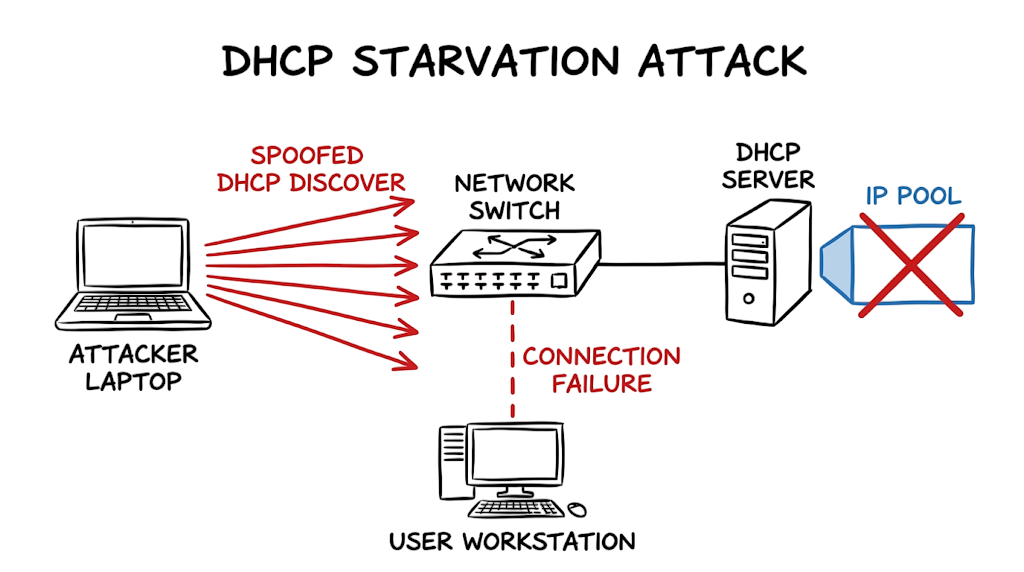
A few years ago, when I was working on a client environment in Mumbai for a fintech startup trying to align with SEBI cloud guidelines, my monitoring dashboard suddenly lit up. Hundreds of DHCP requests were flooding in from a single access-layer switch port. At first glance, the service desk thought a faulty printer was trapped in a reboot loop. After deeper analysis, it turned out to be a simulated DHCP starvation attack run by a junior pentester. The result was immediate and brutal: legitimate users coming back from lunch could no longer obtain IP addresses, completely halting operations on that floor.
This DHCP Starvation Attack Explained guide will show you exactly how this attack exhausts your IP addresses, how to spot it in your logs, and how to lock down your switches so it never happens again. Before we dive into the technical configurations, you might want to check out our recommended YouTube explainer video on “Layer 2 Security Fundamentals” to visualize the traffic flow.
What Is a DHCP Starvation Attack?
A DHCP starvation attack is a targeted Layer 2 network attack where an adversary floods a DHCP server with thousands of fake IP address requests. By continuously asking for new IP addresses using randomized, spoofed hardware addresses, the attacker forces the server to lease out every single IP in its available pool. Once the address pool is depleted, the DHCP server has nothing left to give. Consequently, any new or returning legitimate device that tries to connect to the network is denied an IP address, resulting in a localized denial-of-service (DoS) condition.
How a DHCP Starvation Attack Works
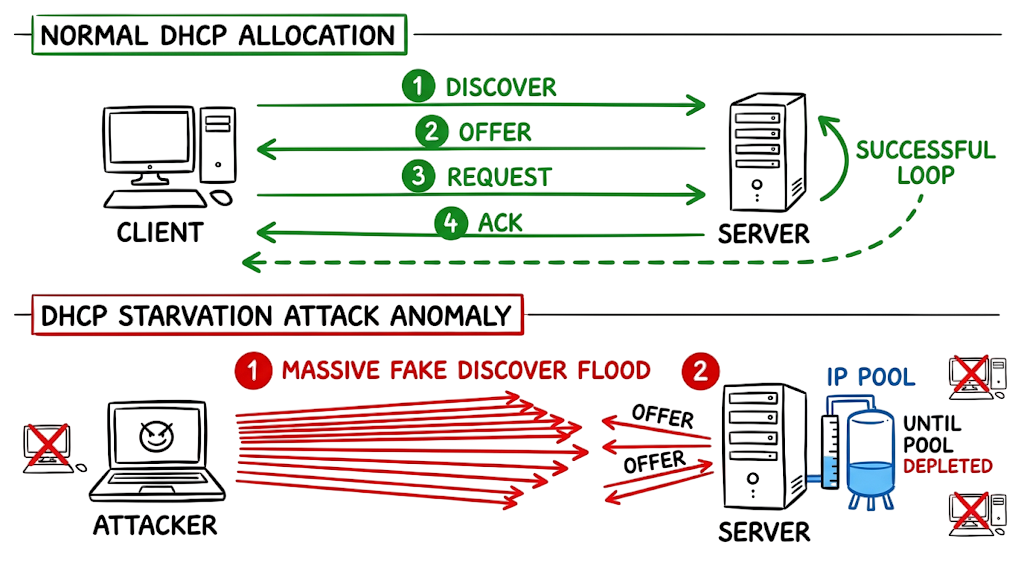
To understand the mechanics, you need to look at the standard DORA process (Discover, Offer, Request, Acknowledge) that dictates how devices get IP addresses. Normally, a device broadcasts a DHCP Discover packet. The server replies with an Offer. The client sends a Request to claim it, and the server finishes with an Acknowledge.
Now here’s where it gets interesting. The attacker doesn’t bother completing a full handshake or genuinely connecting to the network. Instead, using automated scripts, they rapidly generate and broadcast raw DHCP Discover packets. Each packet contains a randomly generated, fake MAC address injected into the Client Hardware Address (CHADDR) field of the DHCP payload. The DHCP server looks at the payload, assumes a massive wave of new laptops or phones just connected, and starts reserving IP addresses for each fake MAC. The server dutifully sends out Offers and marks those IPs as pending or leased. Within seconds, the entire DHCP scope is exhausted.
DHCP Starvation Attack Architecture and Traffic Flow
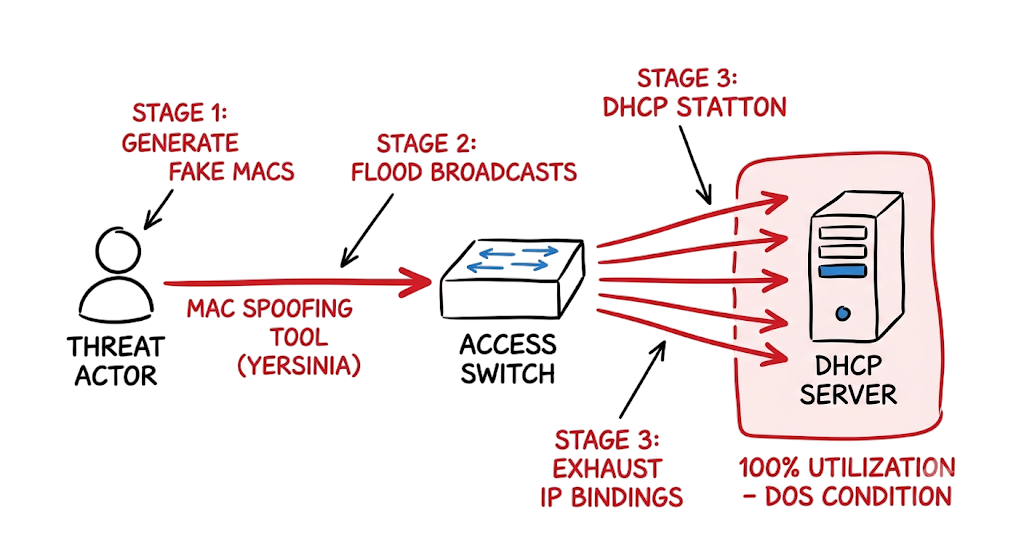
The architecture of this attack relies on the blind trust built into standard, unconfigured access switches. The flow starts at the attacker’s physical or wireless connection to an unsecured access port. The attacker fires up a penetration testing tool designed to craft raw network packets.
These spoofed DHCP Discover packets hit the network switch. Because the switch operates at Layer 2 and lacks specific instructions to inspect DHCP payloads, it treats these packets as legitimate broadcast traffic and floods them out to all ports, including the uplink to the core network. The DHCP server receives this massive influx of broadcasts. Processing them one by one, the server depletes its IP pool and updates its binding database. Finally, when a legitimate employee boots up their workstation and requests an IP, the DHCP server simply ignores the request or sends a NAK (Negative Acknowledgement) because its database shows 100% utilization.
Key Components Involved in a DHCP Starvation Attack
- DHCP Server – The central system responsible for leasing IP addresses and managing the network’s address database.
- DHCP Scope – The predefined pool of available IP addresses allocated for a specific subnet or VLAN.
- Spoofed MAC Address – A randomly generated hardware address used to trick the server into thinking a unique device has connected.
- Attack Tool – Software like Yersinia or DHCPig used to automate the rapid generation of fake DHCP requests.
- Network Switch – The access layer device that blindly forwards these malicious broadcasts if left unsecured.
Real-World DHCP Starvation Attack Example
When a network is under active attack, you won’t just hear complaints from users; your infrastructure will scream at you if you know where to look. Here is an actual log snippet from a Cisco Catalyst switch encountering a starvation attempt where basic port security was finally triggered.
%PORT_SECURITY-2-PSECURE_VIOLATION: Security violation occurred, caused by MAC address 000c.29b3.14f2 on port GigabitEthernet1/0/12. %PM-4-ERR_DISABLE: psecure-violation error detected on Gi1/0/12, putting Gi1/0/12 in err-disable state %DHCP_SNOOPING-5-DHCP_SNOOPING_MATCH_MAC_FAIL: DHCP_SNOOPING drop message because the chaddr doesn’t match src mac, message type: DHCPDISCOVER, chaddr: 0050.56a1.b2c3, MAC sa: 000c.29b3.14f2
In this output, the switch is telling you two things. First, the port security feature caught an excessive number of MAC addresses and shut down port Gi1/0/12. Second, the DHCP Snooping feature detected a mismatch. The attacker was sloppy: the source MAC address in the Ethernet header (000c.29b3.14f2) did not match the client hardware address (0050.56a1.b2c3) inside the DHCP payload. Seeing this mismatch is the ultimate confirmation that someone is running an automated spoofing tool, and you need to investigate the physical location of Gi1/0/12 immediately.
How to Prevent DHCP Starvation Attacks
- Enable DHCP Snooping globally by entering global configuration mode and typing ip dhcp snooping to turn the feature on across the switch.
- Activate snooping on your specific user VLANs by typing ip dhcp snooping vlan 10,20 so the switch knows which broadcast domains to actively monitor.
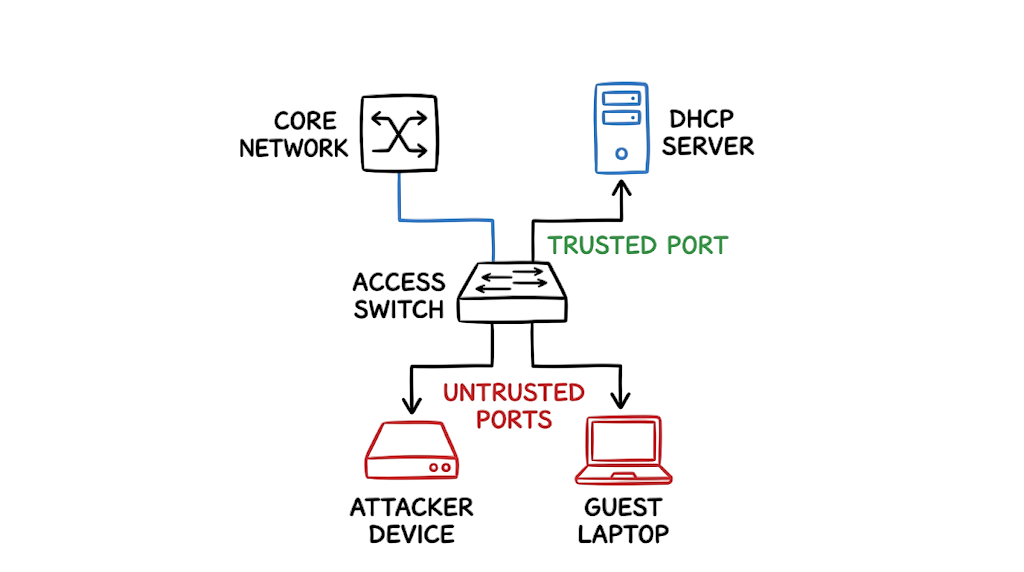
- Configure your trusted uplink ports by navigating to the interface connected to your actual DHCP server and typing ip dhcp snooping trust. Do not skip this, or you will block your own server.
- Apply rate limiting on your untrusted access ports by navigating to the user-facing interfaces and typing ip dhcp snooping limit rate 15 to drop anything exceeding 15 DHCP packets per second.
- Enable basic port security on the access ports by typing switchport port-security and switchport port-security maximum 3 to physically restrict the number of MAC addresses allowed to communicate through that wire.
- Verify your configuration by dropping back to privileged exec mode and typing show ip dhcp snooping to ensure your trust boundaries are exactly where you intended them to be.
Advantages and Limitations of DHCP Security Controls
Implementing these protections gives you massive advantages regarding network stability. DHCP attack prevention mechanisms essentially immunize your access layer against script kiddies and rogue devices. You gain granular visibility into who is requesting what, and your DHCP server remains highly available.
However, in real environments, it doesn’t work this cleanly. Legacy switches in older manufacturing plants or hospitals often lack the ASIC hardware required to perform DHCP Snooping at line rate. If you turn on snooping on a ten-year-old switch, you might accidentally cause a massive CPU spike, effectively causing a self-inflicted denial of service. Furthermore, asymmetric routing or complex redundancy setups (like certain HSRP/VRRP topologies) can sometimes cause DHCP replies to arrive on untrusted ports, resulting in legitimate traffic getting dropped. You have to map your network topology meticulously before flipping the switch on these features.
Common DHCP Starvation Attack Mistakes
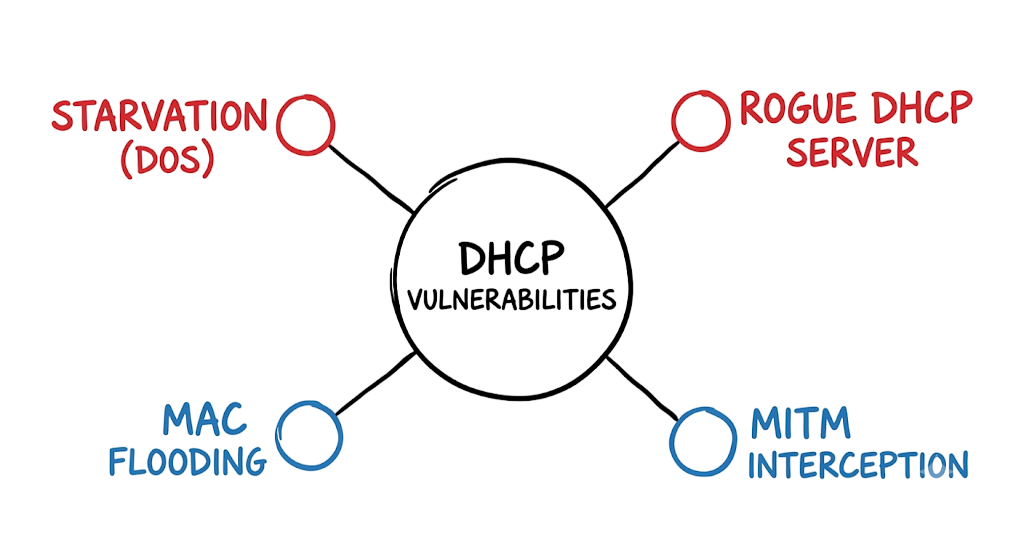
Most people implement port security but completely ignore DHCP Snooping. Port security only looks at the Ethernet frame’s source MAC address. Advanced attack tools can easily bypass basic port security by keeping the Ethernet MAC address the same while only randomizing the CHADDR field inside the DHCP payload. If you only rely on port security, the switch lets the packet through, and your DHCP server still gets starved.
Another frequent failure is applying rate limiting indiscriminately. Setting a limit of 2 DHCP packets per second on a port connected to a downstream unmanaged switch or a wireless access point will immediately break network connectivity for legitimate users trying to roam or boot up simultaneously. Always map out your downstream devices before hardcoding rate limits.
DHCP Security Best Practices
Always treat Layer 2 security as a defense-in-depth exercise. DHCP Snooping should be your baseline, but it must be paired with Dynamic ARP Inspection (DAI) and IP Source Guard. These three features share the same binding database. If you build the database with snooping, you might as well use it to block ARP poisoning and IP spoofing.
This is where most people get confused: understanding the difference between trusted and untrusted ports. A trusted port is explicitly allowed to send DHCP Server messages (like DHCPOFFER and DHCPACK). You must only configure trust on the specific uplink ports that physically lead to your authorized DHCP servers. Every single user-facing port, guest Wi-Fi port, and conference room port must remain untrusted. If you accidentally trust a user port, you open the door to a Rogue DHCP server attack, which is infinitely worse than starvation.
DHCP Starvation Attack Troubleshooting Scenario
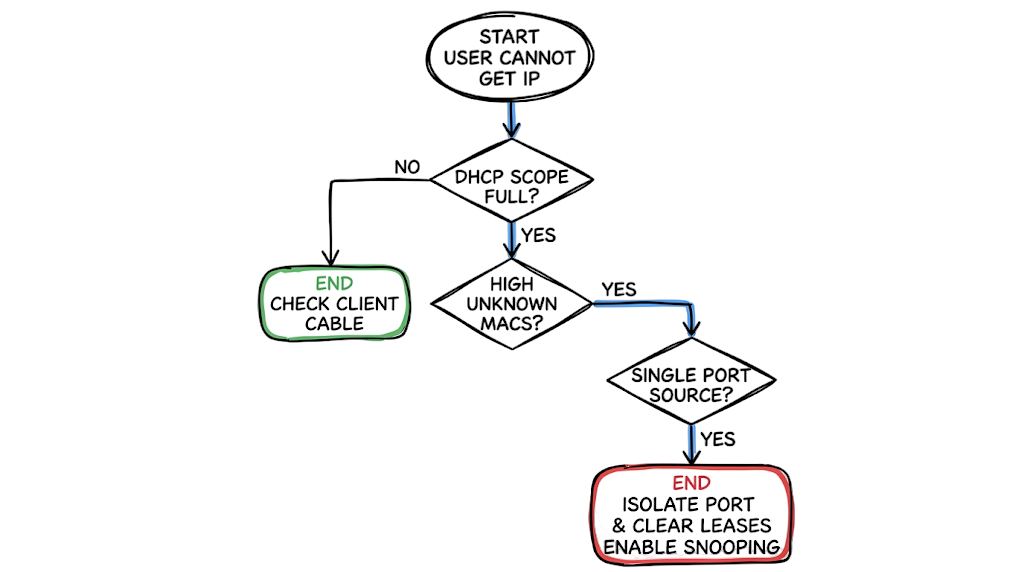
Symptom: A branch office calls the helpdesk complaining that half the staff cannot connect to the network. Their machines show “Identifying…” and eventually fall back to a 169.254.x.x APIPA address.
Wrong Assumption: The junior engineer logs into the DHCP server, sees that the scope is 100% full, and assumes the branch office simply hired too many people or that the lease times are too long. They attempt to expand the subnet from a /24 to a /23 to give out more addresses.
Actual Fix: Expanding the scope just gives the attacker more IPs to eat. The engineer should check the DHCP leases and notice that hundreds of IPs are leased to sequential or entirely randomized MAC addresses with no active hostname. The fix is to log into the access switch, run show mac address-table count, identify the port with an absurdly high MAC count, issue a shutdown command on that interface, and then clear the bad leases from the Windows/Linux DHCP server. Afterward, implement DHCP Snooping so it doesn’t happen again tomorrow.
DHCP Starvation Attack Interview Questions and Answers
Question: What is a DHCP starvation attack? Answer: It is a deliberate denial-of-service attack at Layer 2 where an adversary exhausts a DHCP server’s IP address pool by flooding it with requests using spoofed MAC addresses.
Question: Which OSI layer is primarily targeted during this attack? Answer: The attack primarily manipulates Layer 2 (Data Link Layer) by spoofing MAC addresses, though the ultimate goal is to deny Layer 3 (Network Layer) IP addressing to clients.
Question: What is the main goal of the attack? Answer: The attacker’s objective is to prevent legitimate clients from obtaining IP addresses, causing a network outage and forcing users off the network.
Question: Which attack often follows DHCP starvation? Answer: A Rogue DHCP server attack usually follows. Once the legitimate server is starved and unable to respond, the attacker introduces their own malicious DHCP server to hand out IPs and route traffic through their machine for interception.
Question: How can DHCP starvation be prevented? Answer: The most effective method is enabling DHCP Snooping combined with MAC address rate limiting and strict port security on all access-layer switches.
Question: Which tool is commonly used by pentesters to execute this? Answer: Yersinia and DHCPig are two of the most popular and highly effective open-source tools used to automate DHCP broadcast floods.
Question: Why are spoofed MAC addresses used in the payload? Answer: The DHCP server relies on the MAC address to identify unique clients. By randomizing this address, the attacker tricks the server into believing thousands of separate physical devices are requesting network access.
Future of DHCP Security and Layer 2 Protection (2026 and Beyond)
Network security attacks are evolving, and the way we handle them is shifting heavily toward automation. AI-Based Network Analytics are becoming standard in enterprise environments. Instead of waiting for a scope to hit 100% utilization, modern telemetry tools analyze the velocity of DHCP requests. If a port requests 50 IPs in three seconds, the AI orchestrator automatically isolates the port via API calls to the switch.
Furthermore, we are seeing a massive push toward Zero Trust Network Access (ZTNA) and strict NAC Integration. With compliance frameworks pushing tighter access controls, plugging a random laptop into a wall jack will no longer grant basic DHCP access. Devices will be required to authenticate via 802.1X before the switchport even transitions to a forwarding state, effectively killing DHCP starvation attacks at the physical layer.
DHCP Starvation Attack FAQ
Question: Can a DHCP starvation attack steal data? Answer: Not directly. Its primary purpose is service disruption and resource exhaustion. However, it is frequently used as a precursor to man-in-the-middle attacks where data theft is the ultimate goal.
Question: Is DHCP starvation still relevant in 2026? Answer: Absolutely. While modern data centers are well-protected, it remains highly common in branch offices, older enterprise campuses, and environments with weak Layer 2 switch security.
Question: What is the difference between DHCP starvation and DHCP spoofing? Answer: Starvation is a DoS attack that exhausts the IP pool. Spoofing (or a rogue server attack) involves an attacker providing fake DHCP responses to assign malicious default gateways and DNS servers to victims.
Question: Does DHCP Snooping completely stop the attack? Answer: Yes, when configured correctly. It verifies the MAC address in the Ethernet frame against the payload and drops mismatched or rate-exceeding packets, making it highly effective.
Question: Can Wi-Fi networks be affected by this? Answer: Yes. Wireless networks that utilize dynamic IP assignment are equally vulnerable if the wireless controller or upstream switch does not enforce client rate limiting and snooping.
Question: How do SIEM tools detect the attack? Answer: Tools like Splunk or Microsoft Sentinel detect this by correlating massive spikes in DHCP Discover messages, rapid depletion of IP pools, and security violation logs forwarded from access switches.
Question: What is the fastest way to respond to an active attack? Answer: Find the offending switch port using MAC address table counts, administratively shut it down, clear the invalid leases from the DHCP server, and force a release/renew for affected clients.
Conclusion: Protecting Networks from DHCP Starvation Attacks
Understanding DHCP Starvation Attack Explained concepts is mandatory for anyone managing enterprise infrastructure because the attack is trivial to execute but devastating to user productivity. By manipulating a fundamental trust mechanism in the DHCP protocol, attackers can bring an entire floor of workers to a halt in mere minutes. Stop relying on default switch configurations; log into your access layer today and enable DHCP Snooping and rate limiting before a script kiddie does it for you.
Continue Learning Network Security
- What Is Cybersecurity and Why It Is Important Today
https://technaga.com/what-is-cybersecurity-and-why-it-is-important-today/ - Complete Network Security Basics Guide for Beginners 2026
https://technaga.com/what-is-networks-and-network-security-basics-2026/ - What is Firewall in Cybersecurity? Types, Examples and How it Works in 2026
https://technaga.com/firewall-in-cybersecurity-types-examples-explained/ - IP Address: 12 Essential Concepts Ultimate Guide 2026
https://technaga.com/ip-address-essential-concepts-guide-2026/ - OSI Model Guide: 7 Powerful Layers Every Engineer Must Know
https://technaga.com/osi-model-7-layers-troubleshooting-guide/ - 4 Secrets of the TCP IP Model for Security Analysts
https://technaga.com/tcp-ip-model-security-guide/ - 3-Way Handshake Troubleshooting: Critical Guide for Security Analysts
https://technaga.com/tcp-3-way-handshake-security-analyst-guide/ - Network Segmentation Explained with Real-World Example
https://technaga.com/network-segmentation-guide-ransomware-prevention/ - Security Information and Event Management: Complete SIEM Guide 2026
https://technaga.com/security-information-and-event-management-2026/ - Zero Trust Security in 2026: Architecture, Real Examples, and Implementation Guide
https://technaga.com/zero-trust-security-2026-guide/ - Top 10 Cybersecurity Best Practices for 2026
https://technaga.com/top-10-cybersecurity-best-practices-2026/ - Identity and Access Management in 2026: A Practical Guide for Cloud Security Professionals
https://technaga.com/identity-and-access-management-cloud-security-2026/
Official DHCP Security Documentation and References
Cisco DHCP Snooping Documentation
DHCP Snooping configuration and security controls.
MAC address limiting and switch port protection.
OWASP Network Security Resources
Network attack prevention best practices.
Security controls and risk management guidance.
Adversary techniques and attack mapping.
Microsoft DHCP Security Guidance
DHCP server hardening and management.
DHCP packet analysis and troubleshooting.
Fortinet DHCP Snooping Overview
Enterprise DHCP protection methods.
Palo Alto Networks Network Security Blog
Layer 2 attack mitigation strategies.
Threat intelligence and attack analysis.







