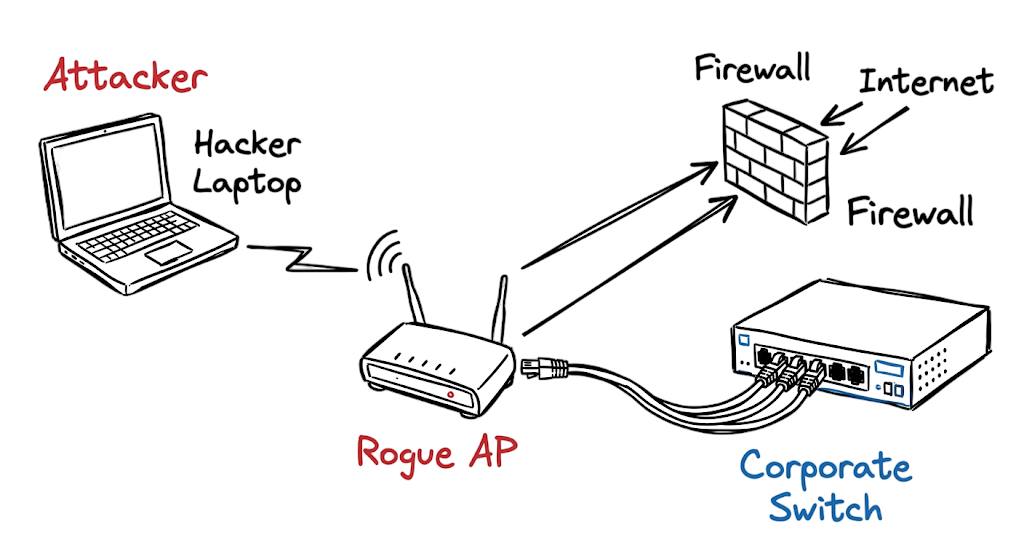
At 2:00 AM last Tuesday, our SIEM generated multiple alerts for unusual authentication failures originating from an unknown MAC address on the third floor of a client’s office in Mumbai. The investigation revealed that an employee had connected a commercial Wi-Fi router to an active network wall jack to improve wireless coverage at their desk. What seemed like a harmless convenience had created an Unauthorized Access Point, exposing the organization’s internal network to serious security risks.
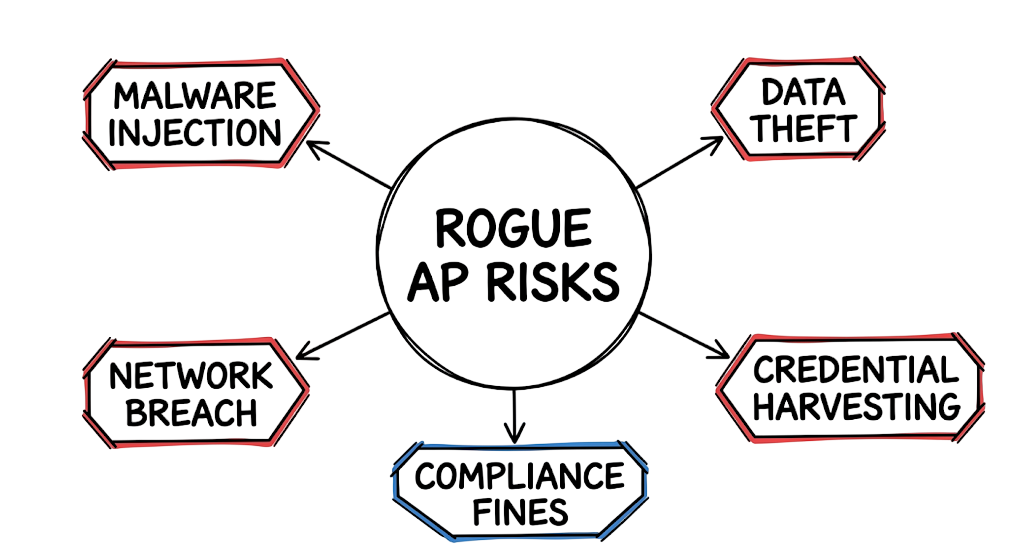
This incident demonstrates how Rogue Access Point Attacks can compromise enterprise networks without exploiting a firewall or endpoint vulnerability. Because the rogue device was connected inside the corporate LAN, it bypassed traditional perimeter security controls and created a direct entry point for attackers. Without effective Rogue Access Point Detection, these unauthorized wireless devices can remain active for weeks or even months, giving cybercriminals opportunities to intercept traffic, steal credentials, and gain unauthorized access to sensitive systems.
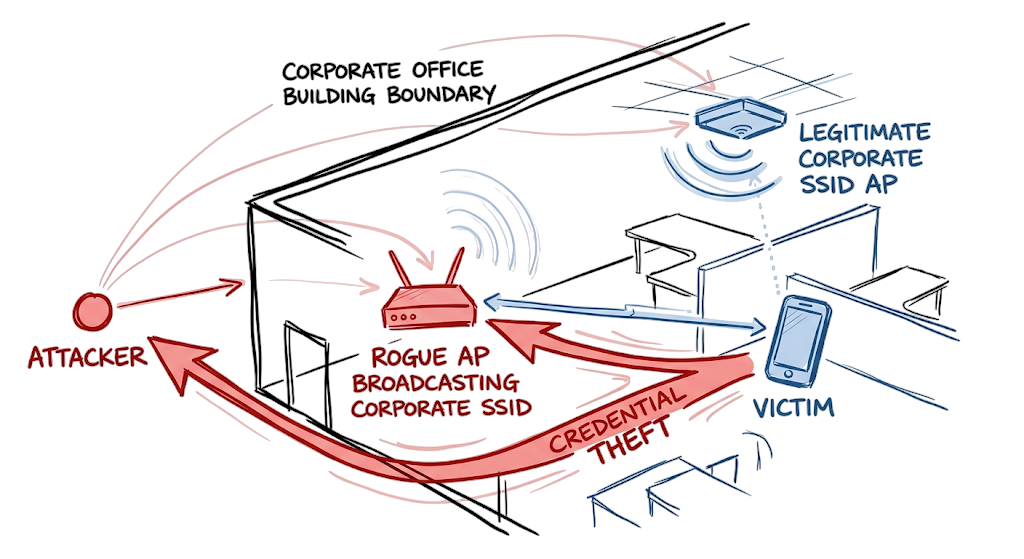
A common variation of Rogue Access Point Attacks is the Evil Twin Attack, where an attacker creates a fake Wi-Fi network that closely mimics the organization’s legitimate wireless network. Unsuspecting employees connect to the malicious access point, allowing attackers to capture login credentials, monitor network traffic, or launch Man-in-the-Middle (MITM) attacks.
Strong Wireless Security extends beyond firewalls and endpoint protection. Organizations invest millions in cloud security, endpoint detection, and identity management while often overlooking Unauthorized Access Points connected directly to their local networks. Even a single rogue wireless device can provide attackers with a direct path into the corporate environment.
In this guide, you’ll learn how Rogue Access Point Attacks work, why Evil Twin Attacks and other rogue wireless threats bypass traditional defenses, how Rogue Access Point Detection helps identify malicious devices, and the best practices for strengthening Wireless Security across enterprise environments.
What Is a Rogue Access Point Attack?
A rogue access point is an unauthorized WiFi router or wireless device connected to your corporate network without the knowledge of the IT or security team. Employees or attackers plug these devices into an active network port. The device immediately broadcasts a wireless signal. Anyone who connects to this signal bypasses your perimeter security checks completely. You need to understand the fundamental differences between various wireless network types to defend against them effectively. If you want to understand the broader context of defending networks, you should read about What Is Cybersecurity and Why It Is Important Today.
Definition of a Rogue Access Point
Rogue Access Point Attacks work because enterprise networks often lack physical port security and wireless visibility. When a user connects an unauthorized router to a corporate switch, the router requests an IP address via DHCP. The internal network trusts the physical connection and assigns an IP address. The rogue device then starts broadcasting its own Service Set Identifier, known as an SSID. Employees see a strong signal and connect to it. Because the rogue device routes all traffic straight into the internal network, attackers connecting from the parking lot gain the exact same internal access as a wired corporate desktop.
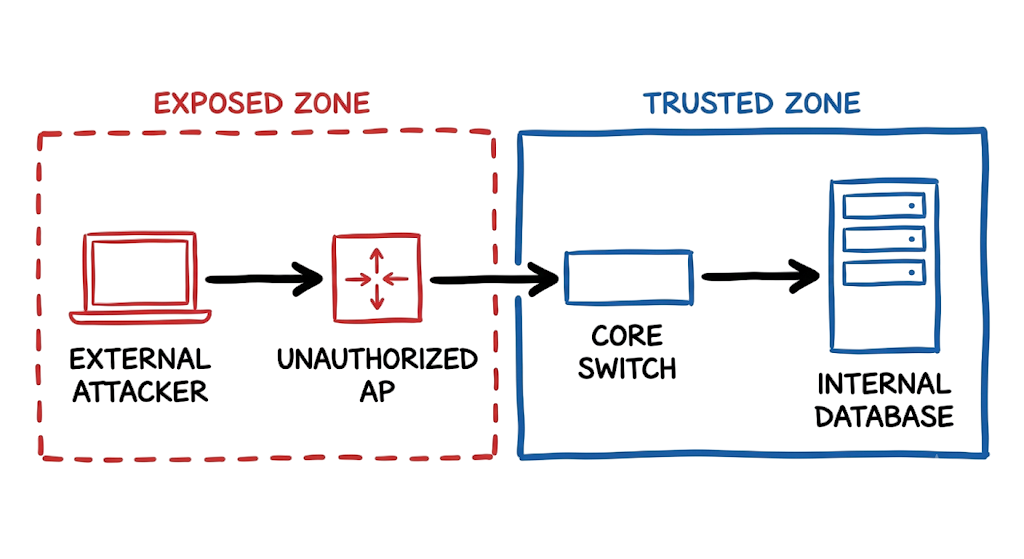
This is where most people get confused. They assume their perimeter security appliance inspects all traffic. You can learn more about how perimeter defenses operate by reading What is Firewall in Cybersecurity? Types, Examples and How it Works in 2026. The firewall never sees this rogue traffic because the connection happens entirely inside the local area network. The data flows directly from the attacker, through the unauthorized router, and into the core switch. The attacker effectively sits inside your trusted zone.
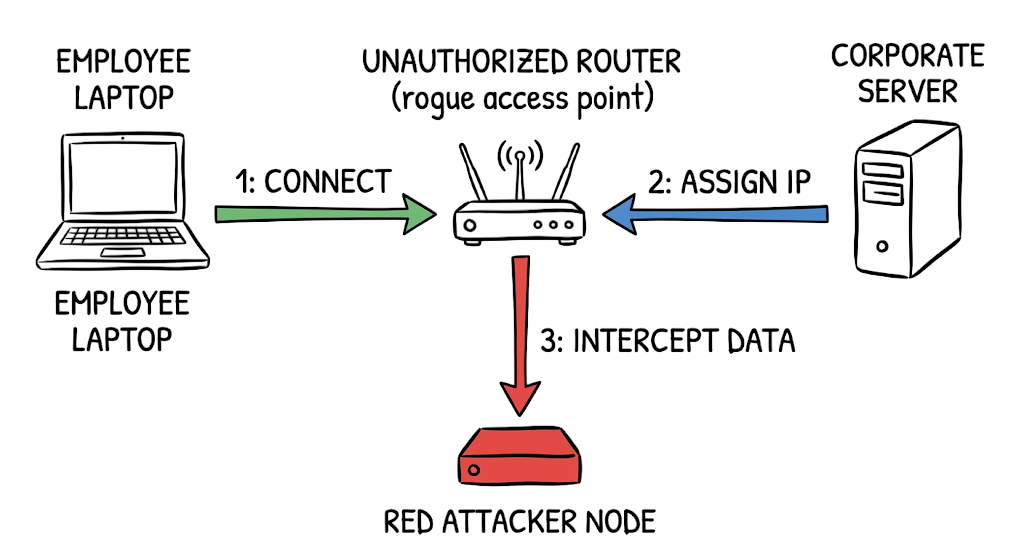
Rogue Access Point Detection Architecture and Technical Flow
Understanding how Rogue Access Point Attacks work is essential for strengthening enterprise Wireless Security. Although the attack appears simple, it follows a structured sequence that allows attackers to bypass traditional perimeter defenses and gain unauthorized access to internal network resources.
The attack typically begins when an Unauthorized Access Point, such as a personal wireless router or unauthorized Wi-Fi access point, is connected to an active Ethernet wall jack inside the corporate network. Once connected, the rogue device requests an IP address from the organization’s DHCP server and immediately begins broadcasting a wireless signal.
If employees or attackers connect to this unauthorized wireless network, the rogue device creates a bridge between the wireless clients and the internal corporate LAN. Without effective Rogue Access Point Detection, the malicious device may remain unnoticed while attackers intercept network traffic, capture user credentials, or move laterally across the environment.
A more advanced variation of Rogue Access Point Attacks is the Evil Twin Attack, where attackers configure the rogue device to imitate the organization’s legitimate Wi-Fi network. Victims unknowingly connect to the fake wireless network, allowing attackers to monitor communications, steal authentication credentials, and launch Man-in-the-Middle (MITM) attacks.
Attack Flow
Attacker Device
        │
        ▼
Unauthorized Access Point (Rogue Router)
        │
        ▼
Corporate Ethernet Wall Jack
        │
        ▼
Core Network Switch
        │
        ▼
Internal Corporate Network
        │
        ▼
Critical Database and Application Servers
In a typical scenario, an attacker remains outside the organization’s building while connecting remotely to the Unauthorized Access Point installed inside the office. The rogue router forwards all traffic through the physical Ethernet connection directly to the corporate network.
Because the traffic originates from an internal network port, it bypasses many traditional perimeter security controls, including internet-facing firewalls. This allows attackers to communicate directly with internal systems, perform reconnaissance, scan for vulnerabilities, access sensitive resources, or move laterally throughout the environment.
The success of Rogue Access Point Attacks depends on the implicit trust organizations place in physical network ports. This is why modern Wireless Security strategies should combine network access control (NAC), continuous Rogue Access Point Detection, port security, and regular wireless assessments to identify and remove unauthorized devices before they can be exploited.
Key Components of Rogue Access Point Attacks
To effectively prevent Rogue Access Point Attacks, it’s important to understand the key components that make these attacks possible. Each component plays a specific role in bypassing Wireless Security controls and providing attackers with unauthorized access to the corporate network.
Unauthorized Access Point
An Unauthorized Access Point is the rogue wireless router, hotspot, or Wi-Fi access point connected to the corporate network without approval from the IT or security team. This device broadcasts an unmonitored wireless signal that can be used by employees or attackers to gain access to internal network resources.
Without continuous Rogue Access Point Detection, these devices can remain active for extended periods, creating significant security risks.
Corporate Switch
The Corporate Switch is the internal networking device that provides physical connectivity for endpoints and infrastructure. During Rogue Access Point Attacks, the switch often accepts the unauthorized Ethernet connection because it trusts any device plugged into an active network port.
Without security controls such as 802.1X authentication, Network Access Control (NAC), or port security, the switch cannot distinguish between legitimate and unauthorized devices.
Wireless Client
A Wireless Client is any laptop, smartphone, tablet, or workstation that connects to the rogue wireless signal. In many Evil Twin Attack scenarios, employees unknowingly connect to a malicious Wi-Fi network that appears identical to the organization’s legitimate wireless network.
Once connected, attackers can intercept communications, capture credentials, monitor user activity, or perform Man-in-the-Middle (MITM) attacks.
Network Access Control (NAC)
Network Access Control (NAC) is a critical Wireless Security solution that verifies device identity before allowing access to the corporate network. NAC can authenticate endpoints, verify security posture, and prevent an Unauthorized Access Point from receiving an IP address or accessing sensitive network resources.
Properly configured NAC solutions significantly reduce the risk of Rogue Access Point Attacks by blocking unrecognized devices at the point of connection.
Wireless Intrusion Prevention System (WIPS)
A Wireless Intrusion Prevention System (WIPS) continuously monitors the wireless environment for suspicious activity, including Unauthorized Access Points, Evil Twin Attacks, and other wireless threats.
Effective Rogue Access Point Detection uses WIPS to identify unauthorized wireless broadcasts, locate rogue devices, alert security teams, and automatically contain malicious access points before they can compromise the network.
Real-World Rogue Access Point Attack Example
When I was working on a client environment in a large private bank in the GCC, an employee brought a home router to the office. Here is the exact alert our controller generated:
WIDS Alert ID 4092: Rogue AP Detected
Timestamp: 2026/10/12 14:22:05
Event: Unauthorized SSID Broadcast
BSSID: 00:14:22:01:23:45
SSID: TP_Link_Guest_5G
RSSI: 45 dBm
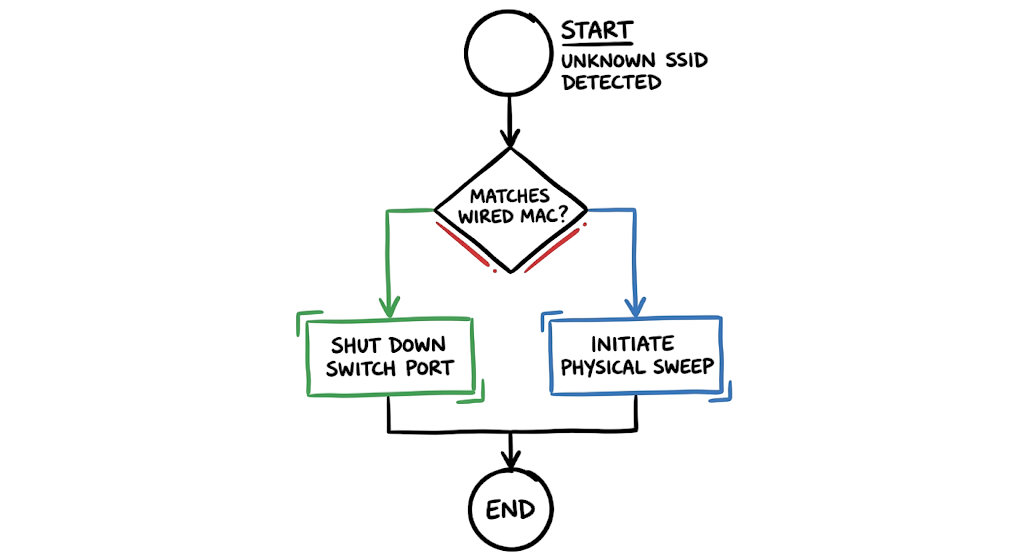
Matched Wired MAC: YES (Port Gi1/0/12)
Severity: CRITICAL
This log indicates that the Wireless Intrusion Detection System noticed a strong signal from a consumer router. The critical part is the Matched Wired MAC field. This confirms the wireless device is physically plugged into switch port Gi1/0/12. We immediately shut down that specific switch port to stop the exposure. You must monitor your logs precisely like this to catch hardware intrusions before data leaves your environment.
Practical Implementation of Rogue Access Point Detection
Implementing Rogue AP Prevention requires strict configuration. For foundational knowledge on securing environments, refer to the Complete Network Security Basics Guide for Beginners 2026.
- Configure Port Security: Do not leave unused wall jacks active. Shut down unused switch ports and set a maximum MAC address limit of one on active ports to prevent multiple devices from routing through a single jack.
- Deploy Network Access Control: Stop relying on static IP assignments. Force every wired connection to authenticate using 802.1X so an unauthorized router gets placed in a dead VLAN.
- Enable Wireless Intrusion Detection: Turn on the WIDS feature on your existing wireless controllers. Configure it to scan all channels.
- Correlate Logs in your SIEM: Send your wireless controller logs and DHCP logs to your central log manager. Set up an alert that triggers when a known wireless MAC address requests an IP on a wired subnet.
- Perform Physical Sweeps: Walk the floors once a quarter. Look under desks and behind printers. Technology fails. You need to visually verify that nobody plugged in a hidden hotspot.
Advantages and Limitations of Rogue Access Point Detection
Detecting these threats has clear benefits. Implementing comprehensive Wireless Network Monitoring provides absolute visibility into your airspace. You will immediately spot anomalies and unauthorized broadcasts. However, in real environments, it doesn’t work this cleanly. A major limitation is false positives. Your system will alert you about the coffee shop WiFi next door, the mobile hotspots in employee pockets, and the delivery drivers waiting in the lobby. Tuning these systems takes weeks of manual effort. Containment mechanisms that automatically block rogue signals often accidentally jam legitimate neighboring businesses. This creates legal and operational liabilities. You must test containment protocols carefully before enabling them globally.
Common Mistakes Organizations Make
The most frequent mistake engineers make is relying solely on endpoint security. You might have the best EDR installed on corporate laptops. That does not protect you if an attacker connects their own machine to a rogue access point. Another huge mistake is ignoring the alert fatigue. Security teams see hundreds of unauthorized SSID alerts from neighboring buildings and eventually create a rule to auto resolve them. When an actual attack happens internally, the alert gets buried. Engineers often forget to secure conference room network ports. People plug presentation devices and unmanaged switches into these ports constantly. This creates massive blind spots in your monitoring coverage.
Best Practices to Prevent Rogue Access Point Attacks
Secure your environment by enforcing absolute strictness at the physical layer. Implement MAC filtering combined with certificate based authentication for all wired connections. Standardize your Enterprise Wireless Security policies and explicitly state that plugging in personal networking equipment is a fireable offense. Segment your network so that even if a rogue device connects to a user port, the attacker only reaches a restricted user VLAN with zero access to production servers or databases. Configure your enterprise access points to actively scan for rogue devices during off peak hours to avoid degrading performance for legitimate users. Maintain an updated inventory of all authorized hardware MAC addresses.
Rogue Access Point Detection Troubleshooting Scenario
Symptom: Users in the accounting department complain that their WiFi connection drops randomly. They are occasionally prompted to re enter their domain credentials on a strange looking captive portal.
Wrong Assumption: Most junior engineers look at this and assume it is a coverage issue or a malfunctioning corporate access point. They reboot the nearest access point and close the ticket.
Actual Fix: This is a classic Evil Twin Attack, a specific variant of Wi Fi Security Risks where an attacker broadcasts an identical SSID to steal credentials. You must log into your wireless controller and check the BSSID of the access points broadcasting your corporate network name. You will find a rogue BSSID that does not belong to your inventory. Locate the physical device using the signal strength indicators. Unplug it and force a password reset for all users in the accounting department.
Rogue Access Point Attack Interview Questions and Answers
Q: What is an Unauthorized Access Point?
A: It is any unauthorized wireless device connected to a corporate network. It provides unmonitored wireless access to the internal wired infrastructure.
Q: How does a Rogue AP differ from an Evil Twin Attack?
A: A rogue device broadcasts any unauthorized signal. An evil twin specifically copies the exact name of the legitimate corporate network to deceive users into connecting.
Q: Why do rogue devices bypass perimeter firewalls?
A: The device sits inside the local area network. Traffic flowing from the rogue device to internal servers never crosses the perimeter firewall boundary.
Q: How do you perform Rogue Access Point Detection on a wired network?
A: You monitor switch ports for multiple MAC addresses originating from a single port. You correlate wireless detection logs with wired MAC address tables to see if a broadcasting device is physically connected to your switch.
Q: What is the primary function of Network Access Control in preventing this threat?
A: Network Access Control requires cryptographic proof of identity before a device is allowed onto the network. If an unmanaged router is plugged in, it lacks the required certificate and is blocked from getting an IP address.
Future Trends in Rogue Access Point Detection (2026 and Beyond)
By 2026, Rogue AP Prevention is shifting heavily toward AI driven spatial awareness. Controllers now use machine learning to map the physical dimensions of an office and instantly flag if an unauthorized signal originates from inside the building walls versus the public street. We are seeing strict regulatory shifts in India and the GCC regarding wireless audits. Compliance frameworks like the UAE NESA and RBI cybersecurity guidelines now explicitly mandate automated containment and zero trust wireless architectures. Devices are no longer trusted simply because they have the correct WiFi password. They must prove continuous compliance through XDR telemetry before accessing any segment.
Frequently Asked Questions (FAQ)
What is a rogue access point?
It is an unauthorized wireless router or hotspot connected to a secure network. Attackers use it to bypass security controls and access internal data directly.
Are Rogue Access Point Attacks common?
Yes. They happen frequently because employees unknowingly connect personal routers for convenience. Attackers also actively plant them in hidden locations during physical penetration tests.
How are Rogue APs detected?
Security teams use Wireless Intrusion Detection Systems to scan the airspace. They also monitor physical switch ports and use Network Access Control to identify unauthorized hardware.
Can a rogue AP steal passwords?
Absolutely. If users connect to the rogue device, the attacker can intercept their web traffic. They can present fake login pages to harvest corporate credentials.
Does WPA3 prevent rogue AP attacks?
WPA3 provides excellent encryption for your legitimate network, but it does nothing to stop a rogue device. If a user connects to an unauthorized device, the WPA3 encryption of your main network is irrelevant.
Conclusion
Rogue Access Point Attacks represent a critical physical security failure that translates directly into a massive digital breach. You can spend millions on endpoint security, but a cheap consumer router plugged into an empty wall jack renders all of it useless. Now here’s where it gets interesting. The majority of these breaches are not caused by advanced persistent threats, but by employees just wanting a stronger signal for their phones. Go check your switch configurations today and verify that port security is actually enforced on all unused access layer ports.







