A group of employees suddenly reported intermittent connectivity issues on a Tuesday morning. Some users could no longer access internal business applications, while others experienced unusually slow network performance. During a real-world troubleshooting incident in a corporate environment, the helpdesk initially suspected that the core router or firewall had failed.
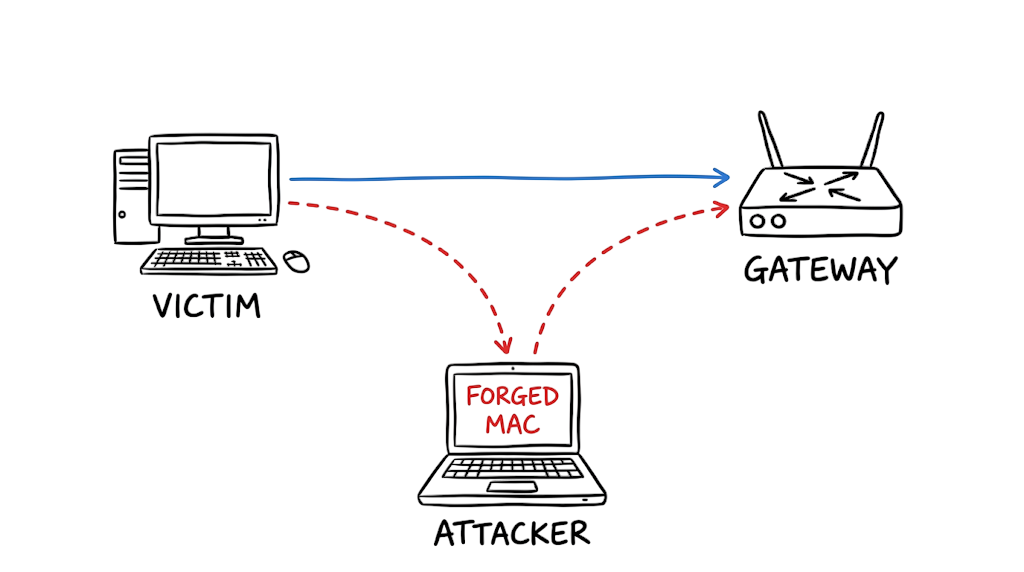
However, a closer inspection of the network traffic revealed a different cause. An ARP Spoofing Attack Explained the disruption perfectly. The attacker had performed ARP Cache Poisoning, causing the local switch to forward traffic to a compromised workstation instead of the legitimate default gateway. This Network Security Attack allowed the malicious device to intercept communication between users and critical network resources without immediately raising suspicion.
An ARP Spoofing Attack Explained demonstrates how attackers exploit weaknesses in the Address Resolution Protocol (ARP) to manipulate MAC address mappings on devices within the same Local Area Network (LAN). Because ARP lacks built-in authentication, attackers can send forged ARP replies that convince systems to update their ARP cache with incorrect MAC address information.
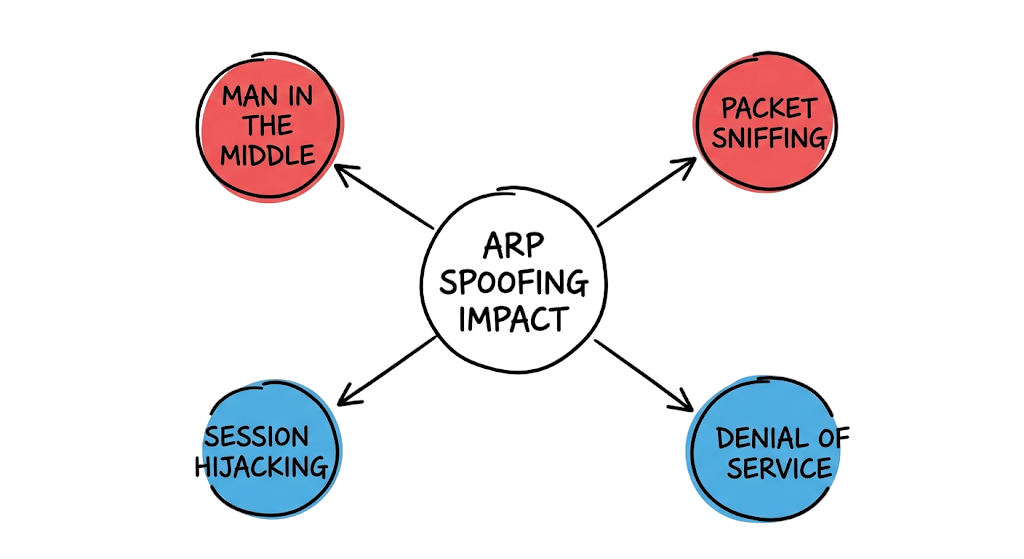
This technique is a well-known Layer 2 Attack because it targets the Data Link layer of the OSI model rather than higher network layers. As a result, it enables attackers to launch Man-in-the-Middle (MITM) attacks, capture sensitive credentials, hijack active sessions, inject malicious traffic, or disrupt normal communication. In enterprise environments, it is also considered a serious Ethernet Network Attack because it exploits trusted communications within switched Ethernet networks.
This incident demonstrates an important cybersecurity lesson: strong perimeter defenses alone are not enough. Organizations must also secure their internal network segments against threats such as ARP Cache Poisoning and other Layer 2 Attacks.
In this ARP Spoofing Attack Explained guide, you’ll learn how ARP Cache Poisoning works, why it remains a dangerous Network Security Attack, how to detect suspicious ARP activity, and the best practices for preventing this Ethernet Network Attack in modern enterprise networks.
What Is an ARP Spoofing Attack Explained?
An ARP Spoofing Attack involves tricking devices on a local area network into associating an attacker’s Media Access Control (MAC) address with the IP address of a legitimate network gateway or server. This form of ARP Cache Poisoning is one of the most common techniques used in a Network Security Attack targeting internal networks.
Address Resolution Protocol (ARP) operates entirely on implicit trust. When a machine needs to communicate with the default gateway, it asks the network for the physical hardware address associated with a specific IP address. If an attacker responds first or sends an unsolicited ARP reply, the victim device accepts the forged mapping without verification. As a result, all outgoing traffic is redirected through the attacker’s system.
In this ARP Spoofing Attack Explained guide, you will learn how attackers exploit this weakness to intercept traffic and manipulate network communications. This Layer 2 Attack takes advantage of a fundamental flaw in Ethernet networking and can be used to launch an Ethernet Network Attack, steal credentials, capture sensitive information, or perform a Man-in-the-Middle (MITM) attack.
How ARP Cache Poisoning Works in a Local Network
ARP operates at Layer 2 of the OSI model and is responsible for mapping logical IP addresses to physical MAC addresses. This fundamental process is essential for communication within an Ethernet network. However, the protocol has no built-in authentication mechanism, making it vulnerable to ARP Cache Poisoning and other forms of Network Security Attacks.
If a computer receives an ARP reply, it immediately updates its local ARP cache without verifying whether it actually sent a request. It also does not check whether the IP address was previously associated with a different MAC address. This weakness is what makes ARP spoofing attacks so dangerous in enterprise environments.
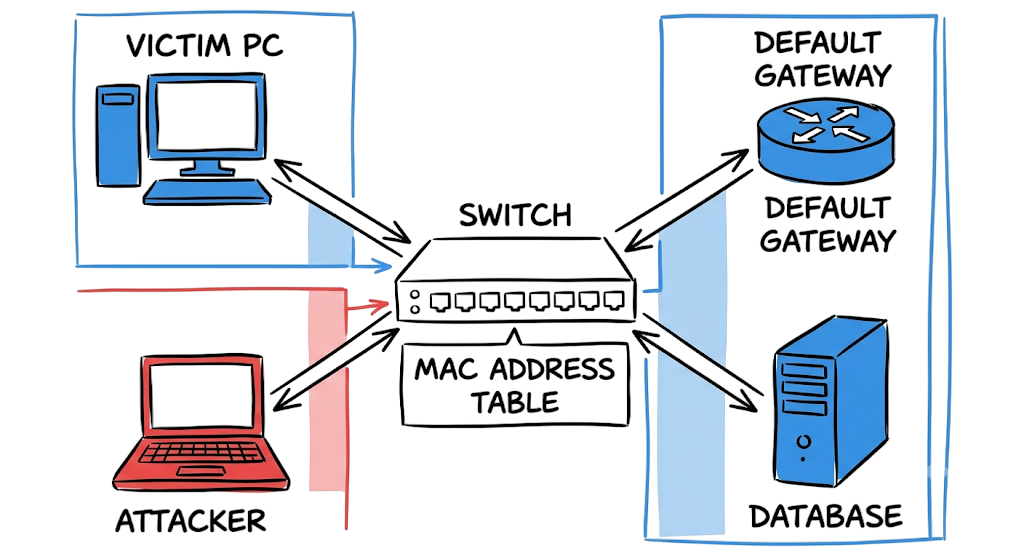
When an attacker floods the local network segment with forged ARP replies, the victim’s operating system overwrites the legitimate gateway entry with the attacker’s MAC address. As a result, traffic destined for the router flows directly to the attacker’s machine because the switch forwards frames based solely on the destination MAC address.
In this ARP Spoofing Attack Explained guide, you will learn how attackers exploit this weakness to intercept, monitor, and manipulate network traffic. This Layer 2 Attack is a common technique used in an Ethernet Network Attack and can ultimately lead to a Man-in-the-Middle (MITM) attack, credential theft, and data interception.
Real-World ARP Spoofing Attack Investigation and Packet Flow Analysis
ARP Spoofing Attack Packet Flow Explained
To understand an Ethernet Network Attack, you must follow the precise sequence of traffic. The sequence begins when a victim PC needs to reach the internet. The victim PC sends a broadcast ARP request asking the network: “Who has 192.168.1.1? Tell 192.168.1.100”. The legitimate gateway responds with its true hardware address, stating “192.168.1.1 is at AA:AA:AA:AA:AA:AA”.
Now here’s where it gets interesting. The attacker simultaneously sends a fake ARP reply stating “192.168.1.1 is at BB:BB:BB:BB:BB:BB”. The victim receives this forged packet and instantly updates its ARP cache with the attacker’s MAC address. All traffic destined for the gateway is now forwarded directly to the attacker. The attacker can capture sensitive traffic, modify packets, redirect users to malicious websites, or simply forward the traffic to the real gateway to remain completely undetected.
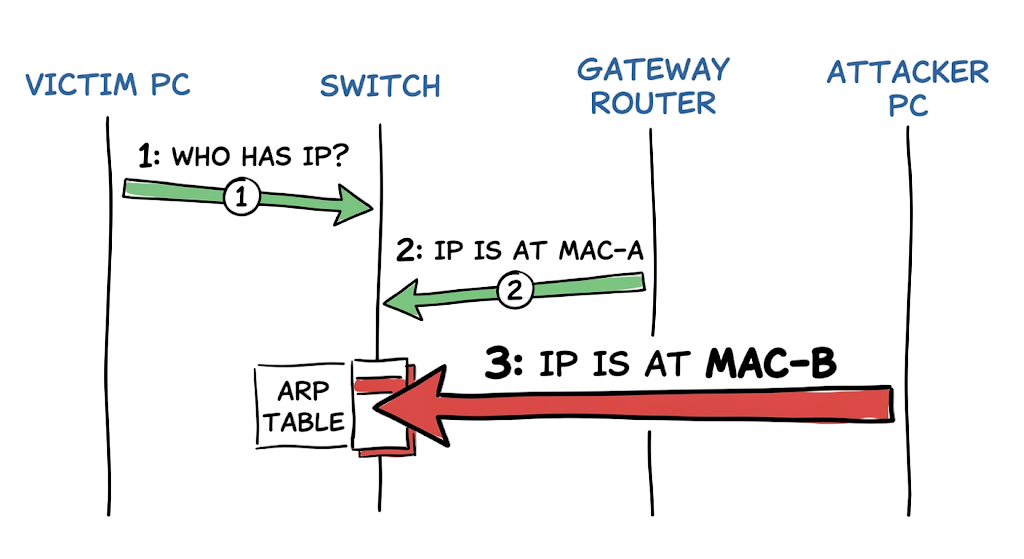
ARP Spoofing Attack Packet Flow Explained
The underlying mechanism relies on a few core infrastructure elements. You must understand these elements to build an effective defense.
- ARP Cache: A local table maintained by the operating system that stores temporary mappings between IP addresses and physical MAC addresses.
- Gratuitous ARP: An unsolicited broadcast message used legitimately to update network devices about a MAC change but frequently weaponized by attackers.
- Default Gateway: The router that connects the local subnet to external networks and serves as the primary target for Gateway Impersonation.
- Switch MAC Address Table: The memory bank inside a network switch that records which physical port corresponds to which MAC address for frame delivery.
- DHCP Snooping Binding Database: A security table built by the switch tracking valid IP addresses to their corresponding physical ports.
How the ARP Spoofing Attack Was Discovered
During our ARP Spoofing Attack Investigation, we required hard evidence. The network team initially suspected a broadcast storm. We took a Network Packet Capture from the affected endpoints and opened the file. We immediately saw multiple ARP replies arriving for the default gateway IP address. Each reply claimed a completely different MAC address.
Plaintext
14:22:10.123456 ARP Reply 192.168.1.1 is at AA:AA:AA:AA:AA:AA (Legitimate Gateway)
14:22:10.198765 ARP Reply 192.168.1.1 is at BB:BB:BB:BB:BB:BB (Compromised Device)
14:22:11.002341 ARP Reply 192.168.1.1 is at BB:BB:BB:BB:BB:BB (Compromised Device)
14:22:11.105432 ARP Reply 192.168.1.1 is at BB:BB:BB:BB:BB:BB (Compromised Device)
This output confirmed a classic ARP Spoofing scenario. The compromised device on the same LAN segment was continuously broadcasting forged responses. This rapid duplication forces the victim’s operating system to constantly overwrite its correct routing information with the malicious hardware address.
ARP Spoofing Prevention and Remediation Steps
You cannot rely on endpoint antivirus to stop Layer 2 attacks. You must enforce security at the switch level.
- Isolate the compromised device immediately: Shut down the physical switch port connecting the offending machine to stop the flood of malicious packets.
- Clear the local ARP caches: Run the command arp -d * on Windows or ip neigh flush all on Linux to purge the poisoned entries from affected endpoints.
- Enable DHCP Snooping: Configure your switches to track valid IP allocation so the hardware knows exactly which IP belongs to which physical port.
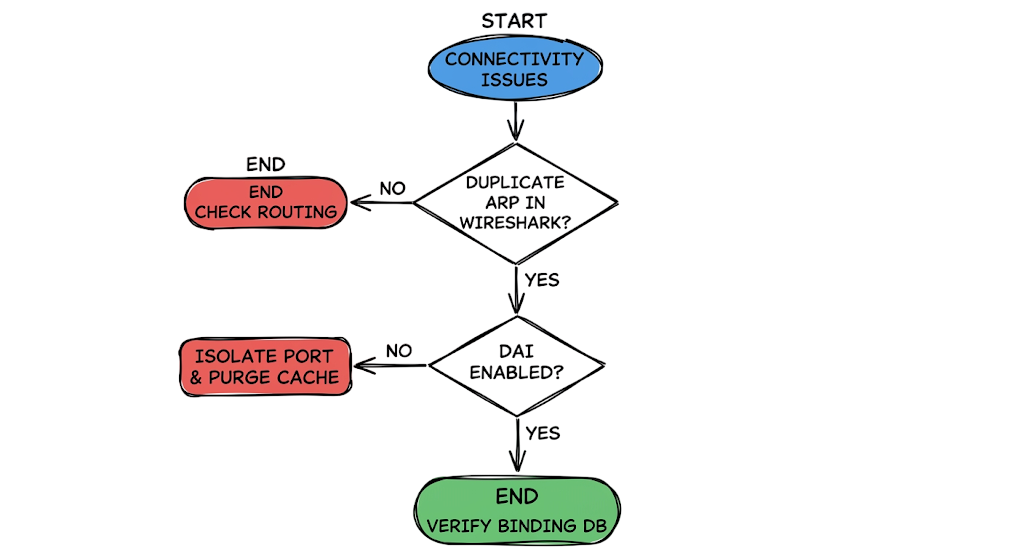
- Apply Dynamic ARP Inspection Configuration: Turn on DAI to force the switch to validate every incoming ARP packet against the trusted DHCP snooping binding database.
- Configure trusted interfaces: Explicitly mark your switch uplink ports as trusted so DAI does not accidentally drop valid routing traffic between core switches.
- Hardcode critical MAC addresses: Map the default gateway physically in your critical servers’ network configuration to reject any unauthorized dynamic updates.
- Enforce encrypted protocols: Use HTTPS and TLS exclusively so that if a Network Traffic Interception occurs, the attacker only intercepts unreadable cipher text.
How Attackers Perform Man-in-the-Middle Attacks
Dynamic ARP Inspection prevents malicious frame propagation at the hardware level. The switch intercepts and drops invalid packets before they reach the victim. However, DAI consumes switch CPU cycles. If you apply it globally without rate limiting, a heavy packet flood will spike processor utilization and crash your distribution switches. Implementing DHCP Snooping and ARP Spoofing Prevention requires a centralized DHCP architecture. If you use static IP addresses for legacy servers, DAI will drop their traffic unless you manually configure access control lists for every single static host. You must accept the administrative overhead of maintaining these manual bindings.
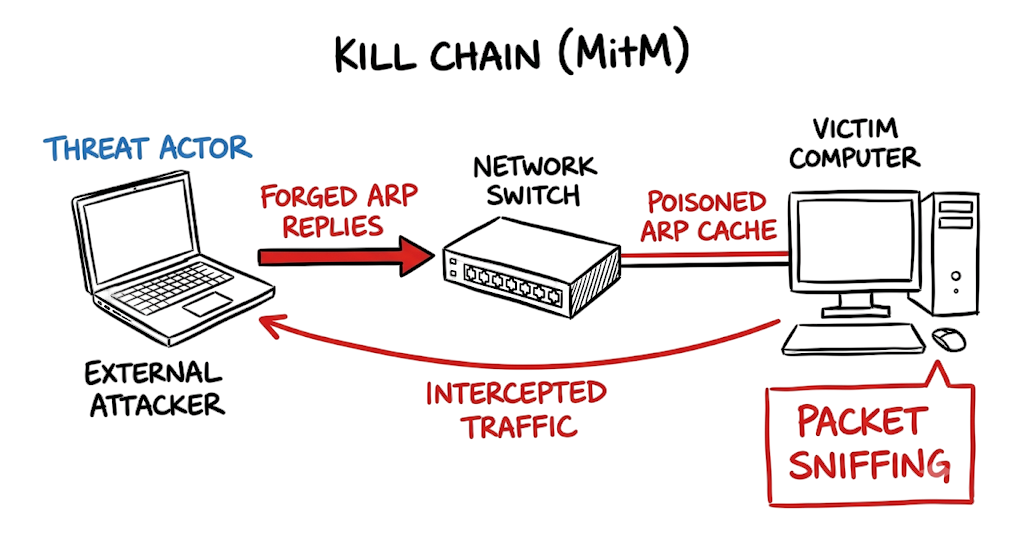
This is where most people get confused. Engineers often try to solve a MAC Address Spoofing issue by simply deploying static ARP entries across all corporate workstations via group policy. This approach breaks scaling immediately. If you replace the core router or fail over to a backup firewall, you must manually update hundreds of endpoints before they can reach the internet again. Another frequent error involves enabling Dynamic ARP Inspection on trunk ports connecting two core switches. The switch will suddenly block all inter-vlan routing because those uplink ports were left as untrusted interfaces.
You need constant visibility to stop an Internal Network Attack. Configure your Network Intrusion Detection tools to trigger immediate alerts on duplicate IP address conflicts. You should enforce port security to restrict the number of MAC addresses allowed per physical switch interface. When executing an ARP Spoofing Man in the Middle Attack Example in a controlled penetration test, verify that your security logging system actually records the malicious ARP Request and ARP Response. Encrypt your internal traffic entirely. A Man-in-the-Middle Attack (MITM) loses its critical impact if the payload remains unreadable to the attacker.
Detecting ARP Cache Poisoning Using Wireshark
Symptom: A major banking client reported that their internal financial reporting application was dropping database connections randomly during peak hours.
Wrong assumption: The infrastructure team blamed the firewall for dropping stateful connections due to asymmetric routing.
Actual root cause: A rogue testing server was running an automated network discovery script that inadvertently broadcasted aggressive Gratuitous ARP packets claiming the database server’s IP address.
Fix: We ran Wireshark and filtered the traffic using the syntax arp.duplicate-address-detected. In real environments, it doesn’t work this cleanly. We had to correlate the rogue MAC address to the physical switch port using the switch MAC address table. We then logged into the access switch and shut down the specific interface to restore application stability.
Q: What exact mechanism makes an ARP spoofing attack possible?
A: The protocol lacks any form of cryptographic authentication. Devices implicitly trust any ARP response they receive and update their local cache immediately.
Q: How do you differentiate between normal ARP broadcast traffic and an active attack?
A: Normal traffic consists of periodic requests and single responses. An attack generates a massive volume of unsolicited replies or multiple conflicting MAC addresses claiming the exact same IP address.
Q: What is the primary purpose of Dynamic ARP Inspection?
A: DAI is a security feature on enterprise network switches that validates ARP packets. It drops packets with invalid IP to MAC bindings by verifying them against the trusted DHCP snooping database.
Q: Why would an attacker choose to forward traffic to the real gateway instead of dropping it?
A: Forwarding the traffic maintains the victim’s internet connection and prevents immediate suspicion. This allows the attacker to sustain a Packet Sniffing Attack for a longer duration to steal active session tokens.
Q: How do you verify your current ARP table on a Windows machine?
A: You open a command prompt and execute arp -a. This command lists all current IP to physical address resolutions cached by the operating system.
Network architectures are shifting toward Zero Trust principles to eliminate the implicit trust vulnerabilities inherent in legacy protocols. Technologies like MACsec are gaining enterprise adoption to provide point to point encryption directly at Layer 2. Furthermore, regional compliance mandates, specifically the India Digital Personal Data Protection Act, require stricter internal network segmentation. Organizations face severe regulatory fines if a simple Cybersecurity Threats execution like ARP spoofing leads to customer data exfiltration.
Q: Can a virtual private network protect against ARP spoofing?
A: Yes. A VPN encrypts your traffic before it leaves your machine. Even if an attacker intercepts the packets locally, they cannot read or alter the encrypted payload.
Q: Does ARP spoofing work over wireless networks?
A: Yes. Wireless networks use the exact same address resolution mechanisms as wired Ethernet. Attackers routinely perform ARP Spoofing Attack Detection Methods on public Wi-Fi to intercept credentials.
Q: What is the difference between ARP spoofing and DNS spoofing?
A: ARP spoofing redirects traffic on the local physical network by forging hardware addresses. DNS spoofing redirects traffic at the application layer by returning false IP addresses for domain names.
Q: How long does an ARP cache poisoning attack last?
A: The attack lasts as long as the attacker continues to send forged packets. Once the attacker stops, the victim’s operating system will eventually time out the bad entry and query for the correct address.
Q: Is ARP spoofing a targeted attack?
A: It can be highly targeted against a specific executive or database server. Attackers also frequently run automated tools that poison the entire subnet to capture as much data as possible.
Conclusion: Protecting Your Network from ARP Spoofing Attacks
This ARP Spoofing Attack Explained guide shows how attackers exploit weaknesses in the Address Resolution Protocol to perform ARP Cache Poisoning and redirect network traffic. Once successful, attackers can intercept sensitive data, monitor communications, and launch a serious Network Security Attack against an organization.
Because ARP operates without authentication, it remains vulnerable to manipulation within local networks. This makes ARP spoofing one of the most common forms of Layer 2 Attack used to establish a Man-in-the-Middle (MITM) position.
The foundation of ARP protocol security relies on verifying every connection at the hardware level. Organizations should implement switch-level protections such as Dynamic ARP Inspection (DAI), DHCP Snooping, port security, and encrypted communication protocols.
Regular monitoring, proper switch configuration, and network segmentation can significantly reduce the risk of an Ethernet Network Attack. Take a moment to verify that Dynamic ARP Inspection is enabled on your core switches and that suspicious ARP activity is actively monitored across your network.
Reference:
1. ARP (Address Resolution Protocol) – Cisco
2. Dynamic ARP Inspection – Cisco
Cisco Dynamic ARP Inspection Guide
3. MITRE ATT&CK – Adversary-in-the-Middle
4. OWASP Network Security Resources
5. Wireshark Official Documentation
6. NIST Cybersecurity Framework
7. CISA Network Security Guidance
Related Articles
Zero Trust Security in 2026: Architecture, Real Examples, and Implementation Guide
https://technaga.com/zero-trust-security-2026-guide/
What Is Cybersecurity and Why It Is Important Today
https://technaga.com/what-is-cybersecurity-and-why-it-is-important-today/
Complete Network Security Basics Guide for Beginners 2026
https://technaga.com/what-is-networks-and-network-security-basics-2026/
What is Firewall in Cybersecurity? Types, Examples and How it Works in 2026
https://technaga.com/firewall-in-cybersecurity-types-examples-explained/
IP Address: 12 Essential Concepts Ultimate Guide 2026
https://technaga.com/ip-address-essential-concepts-guide-2026/
OSI Model Guide: 7 Powerful Layers Every Engineer Must Know
https://technaga.com/osi-model-7-layers-troubleshooting-guide/
4 Secrets of the TCP IP Model for Security Analysts
https://technaga.com/tcp-ip-model-security-guide/
Network Segmentation Explained with Real-World Example
https://technaga.com/network-segmentation-guide-ransomware-prevention/







