You get a call at 3 AM. The primary banking application for a client in Riyadh is crawling, or worse, completely unreachable. Your junior engineer is panic-checking the firewall rules. Another person is restarting the web server. Everyone is guessing. This is where most people Many beginners get confused because they try to fix every network issue at once without following a structured troubleshooting approach. Without understanding how data moves from a user’s laptop to a server, troubleshooting often becomes guesswork instead of a logical process.
During my five years working as a cybersecurity analyst with Zscaler and enterprise firewalls, I learned that the OSI Model is one of the most valuable tools for troubleshooting network and security issues. It provides a structured framework that breaks complex network communication into seven manageable layers. Once you understand these layers, you can quickly identify where a problem exists instead of testing random solutions.
What Is the OSI Model?
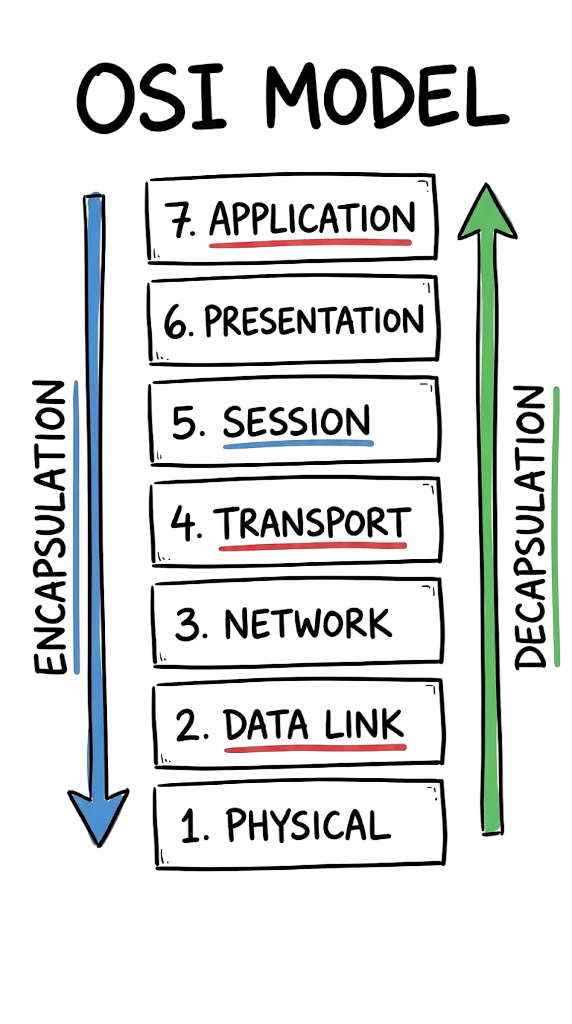
The OSI Model (Open Systems Interconnection Model) is a conceptual framework developed by the International Organization for Standardization (ISO). It divides network communication into seven distinct layers, with each layer performing a specific function.
By separating communication into layers, different networking vendors such as Cisco, Juniper, Microsoft, and Zscaler can build products that work together using standardized protocols.
Although modern networks primarily use the TCP/IP model, the OSI framework remains the industry standard for troubleshooting, network design, and cybersecurity analysis.
For example, when a network engineer says, “This is a Layer 3 issue,” they immediately know the problem is related to IP addressing or routing.
Encapsulation and Decapsulation
When you send an email, browse a website, or transfer a file, the data does not travel across the network in its original form. Instead, it moves through multiple layers, where each layer adds information required for successful communication.
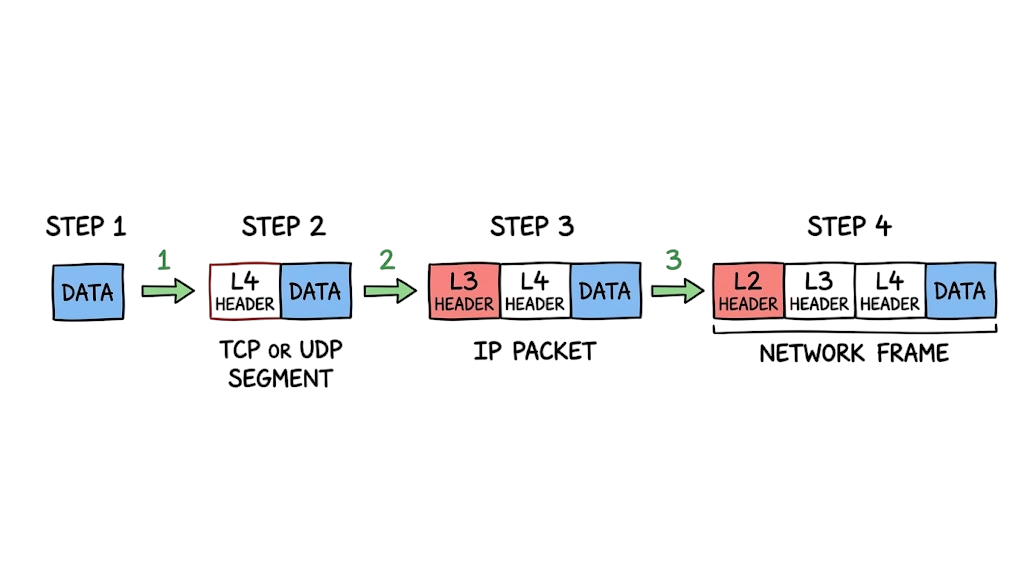
This process of adding protocol information is called encapsulation. Each layer adds its own header, and in some cases a trailer, containing information such as IP addresses, port numbers, error-checking data, and routing details.
When the data reaches the destination device, the reverse process takes place. Each layer removes the information added by its corresponding layer until the original data is delivered to the application. This process is known as decapsulation.
At every stage, the receiving device validates the information before passing it to the next layer. If a header is missing, corrupted, or invalid, the communication may fail and the packet can be discarded. This layered approach makes troubleshooting much easier because engineers can identify the exact stage where communication breaks down.
The Technical Flow of Data
To understand how the OSI Model works, let’s follow what happens when you visit a website like Tech Naga.
- Your web browser creates an HTTP or HTTPS request at the Application layer.
- The Presentation layer encrypts the data using protocols such as SSL/TLS to protect it during transmission.
- The Session layer establishes and maintains the communication session between your device and the web server.
- The Transport layer divides the data into smaller segments and assigns port numbers using TCP or UDP.
- The Network layer adds the source and destination IP addresses, creating packets that can be routed across different networks.
- The Data Link layer encapsulates the packets into frames and adds the source and destination MAC addresses for communication within the local network.
- Finally, the Physical layer converts the frames into electrical signals, light pulses, or radio waves and transmits the data through cables, fiber-optic links, or wireless networks.
At the destination, the same process happens in reverse. Each layer removes its corresponding header until the original data reaches the web application.
Key Components of the OSI Model
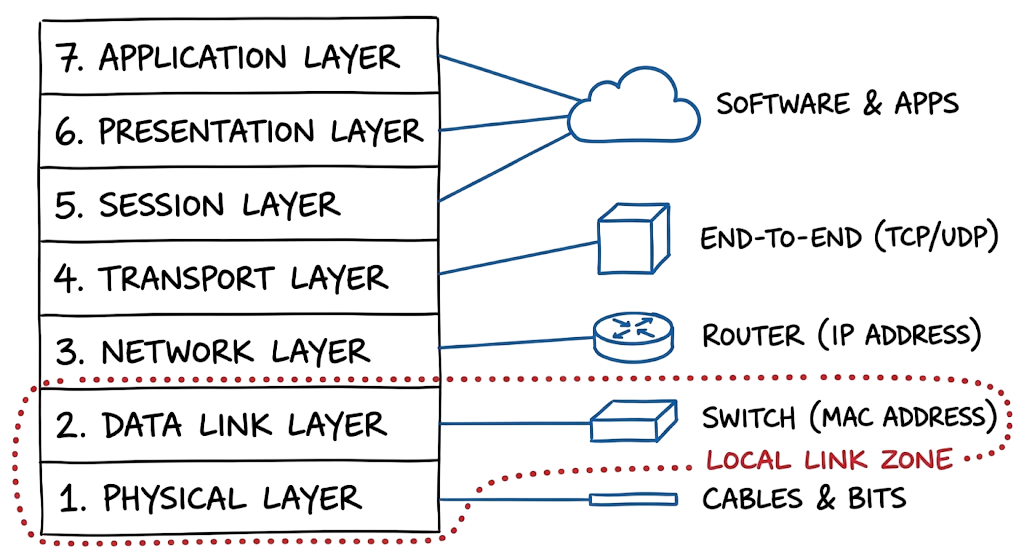
Each layer has a specific responsibility. Understanding these responsibilities makes troubleshooting much easier.
Layer 7: Application
This is the layer users interact with directly. It provides network services to applications and uses protocols such as HTTP, HTTPS, DNS, FTP, SMTP, and SSH.
Layer 6: Presentation
The Presentation layer translates data between applications, performs data compression when needed, and encrypts or decrypts information using technologies such as SSL/TLS.
Layer 5: Session
The Session layer establishes, manages, and terminates communication sessions between devices, ensuring data exchanges remain synchronized throughout the connection.
Layer 4: Transport
The Transport layer provides end-to-end communication between devices. It uses TCP for reliable, connection-oriented communication and UDP for faster, connectionless data transfer.
Layer 3: Network
The Network layer determines the best route for data using IP addresses and routing protocols. Routers primarily operate at this layer.
Layer 2: Data Link
The Data Link layer handles communication between devices on the same local network. It uses MAC addresses, detects transmission errors, and organizes data into frames. Network switches primarily operate at this layer.
Layer 1: Physical
The Physical layer consists of the hardware that carries data, including network cables, fiber-optic links, wireless radio signals, connectors, and network interface cards (NICs). It transmits raw bits between connected devices.
This layered design allows network engineers to isolate problems quickly, making the OSI Model one of the most valuable tools for troubleshooting enterprise networks.
Real-World Example: Analyzing a DNS Query
In enterprise environments, network traffic is often more complex than textbook examples, but logs provide valuable information for troubleshooting. Consider the following DNS query captured using a packet capture tool.
Example DNS Traffic
09:12:44.218321 IP 10.10.20.5.54322 > 8.8.8.8.53: 5234+ A? technaga.com. (32)

09:12:44.250412 IP 8.8.8.8.53 > 10.10.20.5.54322: 5234 1/0/0 A 104.18.2.161 (48)
Breaking Down the Packet
This DNS request contains information from multiple network layers:
- Layer 7 (Application): The DNS query requests the IP address for technaga.com.
- Layer 4 (Transport): The request uses source port 54322 and destination port 53, the standard port for DNS.
- Layer 3 (Network): The source IP address is 10.10.20.5, and the destination DNS server is 8.8.8.8.
Suppose the request leaves the client, but no reply is received. Instead of guessing, troubleshoot each layer one at a time.
For example:
- Can the client reach the DNS server’s IP address?
- Is DNS traffic on port 53 being blocked by a firewall?
- Is the DNS service available and responding?
- Are there routing or network connectivity issues between the client and the server?
By following a layered troubleshooting approach, you can quickly narrow down the actual cause instead of checking random settings.
Practical Troubleshooting Guide
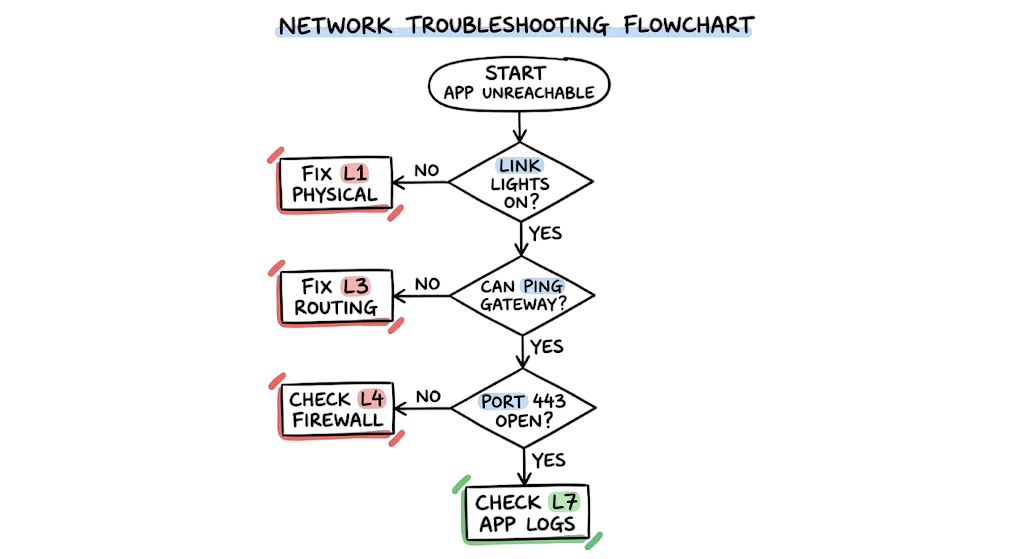
When a network problem occurs, work from the lowest layer upward. This systematic approach helps identify the root cause much faster.
Step 1: Verify Physical Connectivity
Check that the network cable is connected properly and confirm the link LEDs on the network interface card (NIC), switch, or router are active.
Step 2: Verify Local Network Communication
Confirm that the device has a valid MAC address and inspect the ARP table to ensure neighboring devices are being resolved correctly.
Step 3: Verify IP Configuration
Check the assigned IP address, subnet mask, default gateway, and DNS settings. Ping the default gateway to confirm basic Layer 3 connectivity.
Step 4: Verify Transport Connectivity
Use tools such as Test-NetConnection, Telnet, or Netcat (nc) to verify that the required TCP or UDP port is open and accepting connections.
Step 5: Check Session Stability
Review application and system logs for disconnected sessions, authentication failures, or session timeout events that may interrupt communication.
Step 6: Verify Encryption Settings
If secure communication is being used, ensure both the client and server support compatible encryption protocols such as TLS 1.2 or TLS 1.3, along with matching cipher suites.
Step 7: Test the Application
Finally, test the application itself using tools such as curl, a web browser, or Postman to verify that the server returns the expected response. For web applications, review HTTP status codes such as 200 OK, 404 Not Found, or 500 Internal Server Error to help identify application-level problems.
Advantages and Limitations of the OSI Model
The OSI Model remains one of the most valuable frameworks for understanding network communication and troubleshooting enterprise environments. Although modern networks primarily use the TCP/IP protocol suite, the OSI Model provides a standardized approach for analyzing how data moves across a network.
Advantages of the OSI Model
One of the biggest advantages of the OSI Model is standardization. Because each layer has a clearly defined responsibility, network engineers and cybersecurity professionals can troubleshoot problems systematically instead of relying on guesswork.
The OSI Model also helps organizations implement layered security. Different security controls can be applied at different layers of the network, including:
- Layer 2: MAC filtering, VLANs, and Port Security.
- Layer 3: IP filtering and routing controls.
- Layer 4: Stateful firewalls and access control lists (ACLs).
- Layer 7: Web Application Firewalls (WAFs), proxies, and application security policies.
This layered approach makes the OSI Model an essential reference for network design, security architecture, and incident response.
Limitations of the OSI Model
Despite its advantages, the OSI Model is a conceptual framework rather than a protocol that is directly implemented in production networks.
In practice, modern networks rely on the TCP/IP model, where some OSI Model layers, particularly the Session and Presentation layers, are combined into the Application layer.
It is also important to remember that not every networking technology fits perfectly into a single layer. Technologies such as MPLS and SD-WAN often span multiple layers, making the OSI Model a guide for understanding network communication rather than a strict rulebook.
Common Mistakes Beginners Make
One of the most common mistakes new engineers make is starting troubleshooting at the Application layer without first verifying the lower layers of the OSI Model.
For example, I have seen engineers spend hours reviewing Zscaler Client Connector policies or firewall rules, only to discover that the user’s Wi-Fi adapter was disabled or the network cable was disconnected.
Another common mistake is overlooking Layer 2 issues. When users cannot reach a remote server, many people immediately assume there is a routing problem. In reality, the issue may simply be:
- An incorrect VLAN assignment
- A missing ARP entry
- A duplicate IP address
- A switch port configuration error
During one enterprise banking deployment, a technician accidentally connected both ends of a network cable to the same core switch, creating a Layer 2 switching loop. The resulting broadcast storm affected the entire network. Initially, the investigation focused on firewall policies and routing, but the root cause was ultimately identified through switch logs. This experience reinforced an important lesson: always troubleshoot from the lowest layer upward.
Best Practices for Network Security
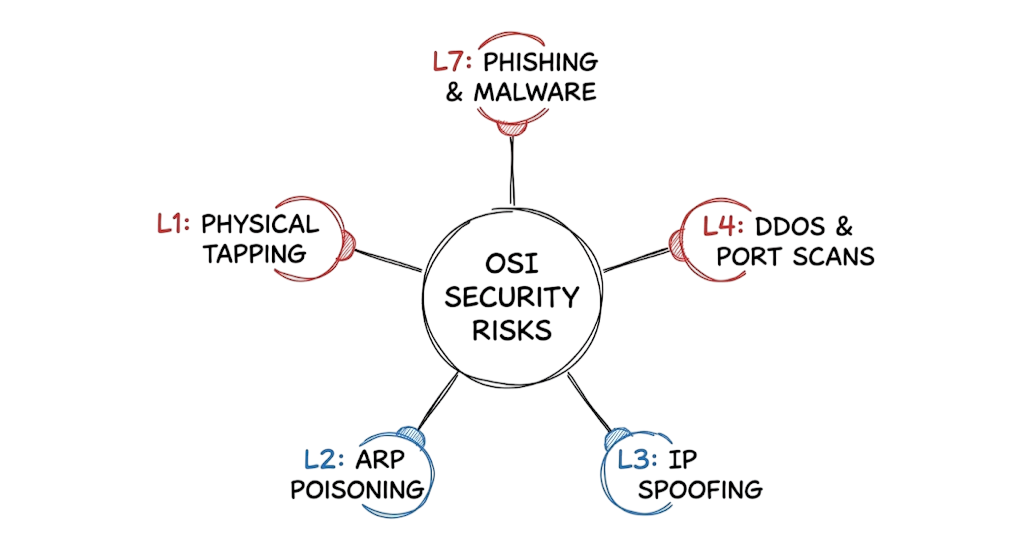
The OSI Model is also useful when designing a layered security strategy because each layer can be protected using different security controls.
Layer 1: Physical Security
- Secure server rooms and network racks.
- Disable unused switch ports.
- Protect network hardware from unauthorized access.
Layer 2: Data Link Security
- Enable Port Security.
- Use VLAN segmentation.
- Implement MAC address filtering.
- Enable features such as DHCP Snooping and Dynamic ARP Inspection where supported.
Layer 3 and Layer 4: Network Security
- Configure stateful firewalls.
- Restrict unnecessary inbound and outbound traffic.
- Apply Access Control Lists (ACLs).
- Monitor network traffic for suspicious activity.
Layer 6 and Layer 7: Application Security
Strong encryption is essential for protecting sensitive information. Organizations should disable outdated protocols such as SSL 3.0, TLS 1.0, and TLS 1.1, and use TLS 1.2 or TLS 1.3 wherever possible.
Many regulatory frameworks, including those issued by the Reserve Bank of India (RBI) and the Saudi Central Bank (SAMA), require organizations to use modern encryption standards to protect customer and financial data.
Applying security controls across multiple layers instead of relying on a single defense significantly improves an organization’s resilience against cyber threats. This layered defense strategy is one of the key principles demonstrated by the OSI Model and remains a best practice for enterprise network security.
Troubleshooting Scenario: The Mystery of the Dropped Z-Tunnel 2.0
Imagine you are deploying Zscaler Client Connector, and users report that the Z-Tunnel 2.0 connection establishes successfully but disconnects a few seconds later. The tunnel repeatedly connects and drops, creating an unstable user experience.
Many engineers immediately begin troubleshooting the authentication process, assuming the issue is related to user credentials or identity services. They review authentication logs, verify SAML or OAuth configuration, and look for “Invalid Credentials” errors, but everything appears normal.
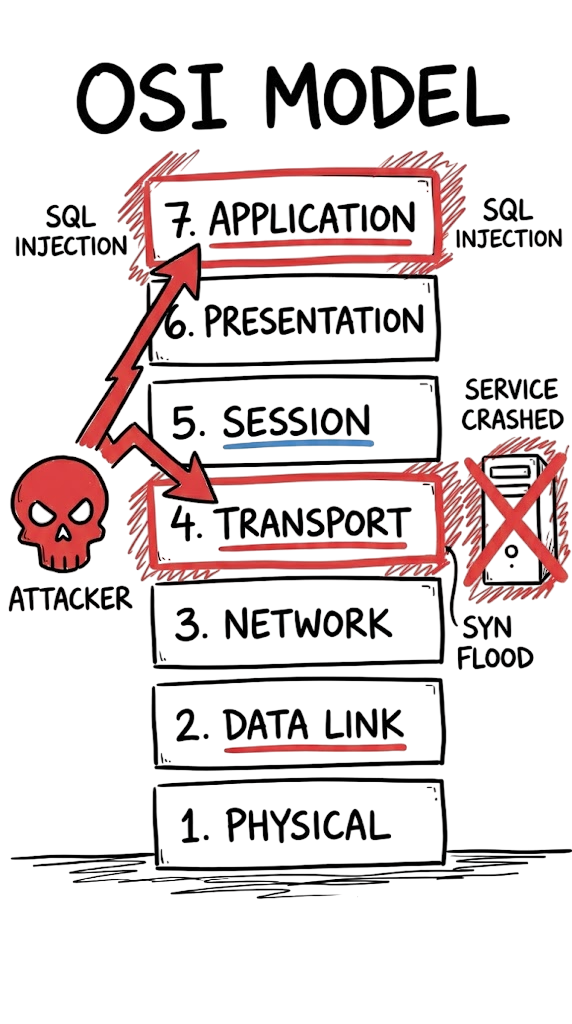
The actual root cause is at the Transport layer.
In this scenario, the Maximum Segment Size (MSS) is larger than the available path MTU after tunnel encapsulation. As packets travel through the ISP network, they become fragmented or are dropped because intermediate devices cannot properly handle the oversized packets.
Reducing the MSS to an appropriate value prevents fragmentation and allows the tunnel to remain stable throughout the session.
This example demonstrates why understanding the OSI Model is essential for effective troubleshooting. Although the symptoms appeared to indicate an application or authentication problem, the real issue originated at a lower network layer. Following a structured, layer-by-layer troubleshooting approach helps engineers identify the root cause faster and avoid unnecessary configuration changes.
Cybersecurity Interview Questions
The OSI Model is one of the most frequently discussed networking concepts during cybersecurity and network engineering interviews. Here are some common questions and answers.
Q1. What is the difference between a Layer 2 switch and a Layer 3 router?
Answer:
A Layer 2 switch forwards data within the same local network using MAC addresses. A Layer 3 router forwards packets between different networks using IP addresses and routing tables.
Q2. At which layer does a traditional firewall operate?
Answer:
Traditional firewalls primarily operate at Layer 3 (Network) and Layer 4 (Transport) by filtering traffic based on IP addresses, protocols, and port numbers. Modern Next-Generation Firewalls (NGFWs) also inspect Layer 7 (Application) traffic to identify applications, users, and advanced threats.
Q3. What is the purpose of the Presentation Layer?
Answer:
The Presentation Layer ensures that data is formatted correctly before it reaches the application. It performs tasks such as data translation, encryption, decryption, compression, and character encoding using standards like UTF-8 and security protocols such as TLS.
Q4. What is encapsulation?
Answer:
Encapsulation is the process of adding protocol information to data as it moves down through the OSI Model. Each layer adds its own header, allowing the receiving device to correctly process and deliver the information when the data reaches its destination.
Q5. At which layer does DNS operate?
Answer:
DNS (Domain Name System) operates at the Application Layer (Layer 7). It converts domain names such as technaga.com into IP addresses that lower network layers use to deliver packets across the network.
Future Trends
Although the OSI Model has remained unchanged for decades, the technologies built on top of it continue to evolve.
AI-Driven Networking
Artificial intelligence is increasingly being integrated into network management, security monitoring, and automated troubleshooting. AI-powered systems can detect anomalies, optimize traffic flows, and respond to network incidents much faster than traditional manual processes.
Post-Quantum Cryptography
As quantum computing advances, organizations are preparing to replace traditional public-key cryptography with post-quantum cryptographic algorithms. This transition primarily affects the Presentation Layer, where encryption protocols protect sensitive data during transmission.
Zero Trust Networking
Modern enterprise networks are increasingly adopting Zero Trust Architecture, where every user, device, and application must be continuously verified before being granted access. Identity, device posture, and contextual information are becoming critical components of network security alongside traditional network controls.
Frequently Asked Questions (FAQ)
Why is the OSI Model still important if modern networks use TCP/IP?
Although today’s networks use the TCP/IP protocol suite, the OSI Model remains the industry standard for learning networking concepts, designing secure architectures, and troubleshooting communication problems because it provides a more detailed layered framework.
Which OSI layer is the most important for security?
Every layer contributes to network security. Organizations should implement a defense-in-depth strategy by applying appropriate security controls at multiple layers instead of relying on a single technology or device.
What is a Layer 8 problem?
“Layer 8” is an informal industry term that refers to human error rather than a technical issue. Examples include incorrect configurations, weak passwords, phishing attacks, or operational mistakes made by users or administrators.
Do all networking protocols fit into a single OSI layer?
No. Some technologies interact with multiple layers or do not fit perfectly within the theoretical model. Examples include ARP, MPLS, and certain tunneling protocols, which are often described as operating between layers.
How does Zscaler relate to the OSI Model?
Zscaler’s cloud security platform primarily inspects web traffic at the Application Layer (Layer 7) while using secure tunnels and network connectivity established through lower layers to transport traffic between endpoints and the cloud security platform.
Conclusion
The OSI Model remains one of the most valuable frameworks for understanding how modern networks communicate. By learning the responsibilities of each layer, you can troubleshoot problems more efficiently, design more reliable networks, and strengthen your organization’s security posture.
Instead of guessing where a failure has occurred, the OSI Model provides a structured, layer-by-layer approach for identifying the root cause. Whether you are diagnosing connectivity issues, analyzing packet captures, or securing enterprise infrastructure, this methodology helps you work more systematically.
As networking technologies continue to evolve with cloud computing, Zero Trust, artificial intelligence, and post-quantum cryptography, the principles behind the OSI Model remain just as relevant. Building a strong foundation in these concepts will make you a better network engineer, cybersecurity professional, and problem solver throughout your career.
Networking Fundamentals
Complete Network Security Basics Guide for Beginners 2026
4 Secrets of the TCP/IP Model for Security Analysts
3-Way Handshake Troubleshooting: Critical Guide for Security Analysts
What Are Network Devices? 9 Essential Types & OSI Model Guide
IP Address: 12 Essential Concepts Ultimate Guide 2026
https://technaga.com/ip-address-essential-concepts-guide-2026
Network Security
What is Firewall in Cybersecurity? Types, Examples and How It Works
NGFW Guide: 5 Critical Reasons Your Firewall is Failing
Network Segmentation Explained with Real-World Example
Cloud Security Basics 2026: Complete Beginner Guide
Zero Trust Security in 2026: Architecture, Real Examples, and Implementation Guide
Security Operations
Essential Endpoint Security Guide 2026
Security Information and Event Management (SIEM): Complete Guide 2026
Best SOC Analyst Roadmap 2026
Top 10 Cybersecurity Best Practices for 2026
What Is Cybersecurity and Why It Is Important Today
External References
IEEE
IEEE Computer Society
https://www.computer.org/
Cisco
Cisco OSI Model Overview
https://www.cisco.com/
Cisco Networking Academy
https://www.netacad.com/
Microsoft
Microsoft Learn Networking
https://learn.microsoft.com/
Microsoft Windows Networking Documentation
https://learn.microsoft.com/windows-server/networking/
Cloudflare
What is the OSI Model?
https://www.cloudflare.com/learning/ddos/glossary/open-systems-interconnection-model-osi/
Learning Center
https://www.cloudflare.com/learning/
IBM
OSI Model Explained
https://www.ibm.com/topics/osi-model
IETF
Internet Engineering Task Force
https://www.ietf.org/
RFC Editor
https://www.rfc-editor.org/
NIST
NIST Cybersecurity Framework
https://www.nist.gov/cyberframework
Wireshark
Official Documentation
https://www.wireshark.org/
Zscaler
Zero Trust Exchange
https://www.zscaler.com/products/zero-trust-exchange
Zscaler Learning Center
https://www.zscaler.com/resources
NOTE:This content is written based on my personal research and practical understanding. Before applying any concepts or configurations in real-world scenarios, make sure to verify the details from official documentation or trusted sources.








4 thoughts on “OSI Model Guide: 7 Powerful Layers Every Engineer Must Know”