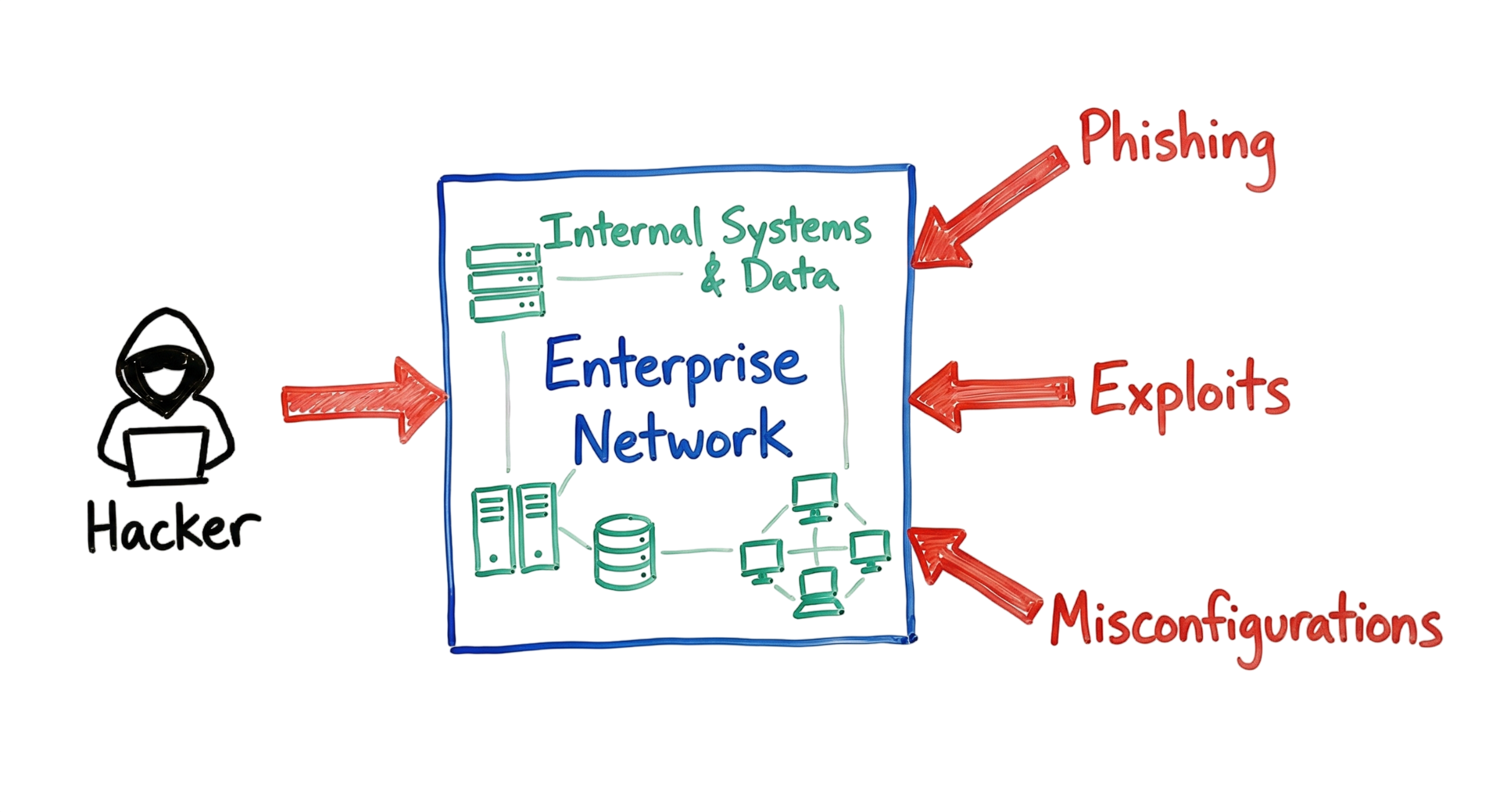
You have just sat down with your morning coffee and opened your Security Information and Event Management (SIEM) dashboard. Suddenly, you notice a spike in Windows Event ID 4625, indicating multiple failed logon attempts against a domain controller. Within minutes, a single Event ID 4624 appears, confirming a successful login. Your heart sinks because the account belongs to a contractor who left the company three months ago. This is a classic Initial Access Cybersecurity scenario, where a threat actor has successfully gained an initial foothold inside the organization’s environment.
Initial Access Cybersecurity is the first stage of the MITRE ATT&CK Initial Access tactic and represents the moment an attacker transitions from the internet into a private network. Once this first barrier is breached, attackers can begin reconnaissance, escalate privileges, move laterally, and target critical systems. Although Hollywood often portrays hacking as highly sophisticated, most real-world compromises begin with simple security weaknesses such as exposed services, stolen credentials, or configuration errors.
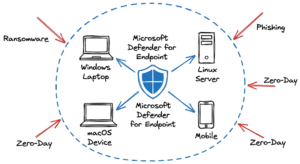
Many successful attacks originate through common Initial Access Attack Vectors, including phishing emails, exploitation of unpatched vulnerabilities, weak passwords, exposed Remote Desktop Protocol (RDP) services, and cloud misconfigurations. Understanding these attack methods is essential because preventing initial access is significantly easier than responding to a full-scale security breach.
One of the most common debates in enterprise security is Phishing vs Exploits. Phishing relies on tricking users into revealing credentials or executing malicious files, whereas exploits take advantage of software vulnerabilities to gain unauthorized access without user interaction. Both techniques remain among the most effective methods attackers use to compromise organizations, making strong security awareness, vulnerability management, and continuous monitoring critical components of a modern cybersecurity strategy.
What Is Initial Access in Cybersecurity?
Initial Access Cybersecurity refers to the techniques attackers use to gain their first foothold inside an organization’s network or systems. It serves as the bridge between the reconnaissance phase, where attackers gather information about their target, and the later stages of an attack, such as privilege escalation, lateral movement, credential theft, and data exfiltration.
Once attackers achieve initial access, they can begin scanning internal systems, identifying valuable assets, stealing credentials, and deploying malware or ransomware. This is why security professionals consider initial access one of the most critical stages of the cyberattack lifecycle. If organizations successfully prevent attackers from gaining that first entry point, the remaining stages of the attack cannot occur.
According to the MITRE ATT&CK Initial Access tactic, attackers use a variety of techniques to establish this foothold, making strong preventive security controls essential for reducing cyber risk.
How Initial Access Cybersecurity Works
Most cyberattacks begin long before malicious activity appears in security logs. Attackers first identify potential victims, search for exposed services, and look for weaknesses that can provide an entry point into the environment.
In many cases, the process starts with an Initial Access Broker (IAB). These specialized cybercriminals focus solely on obtaining unauthorized access to organizations through methods such as phishing campaigns, stolen credentials, exposed Remote Desktop Protocol (RDP) services, VPN compromises, or software vulnerabilities. Instead of launching the attack themselves, they sell this access to ransomware groups and other threat actors through underground marketplaces on the dark web.
These compromised access points become valuable commodities because they allow attackers to bypass the most difficult stage of the intrusion process. Understanding these Initial Access Attack Vectors helps security teams strengthen their defenses before attackers can establish a foothold.
Whether the attack begins through Phishing vs Exploits, compromised credentials, or vulnerable internet-facing applications, the objective remains the same: gain an initial foothold that can be used to compromise additional systems and expand control within the environment. Detecting and blocking these early attack attempts is one of the most effective ways to reduce the likelihood of a successful cyberattack.
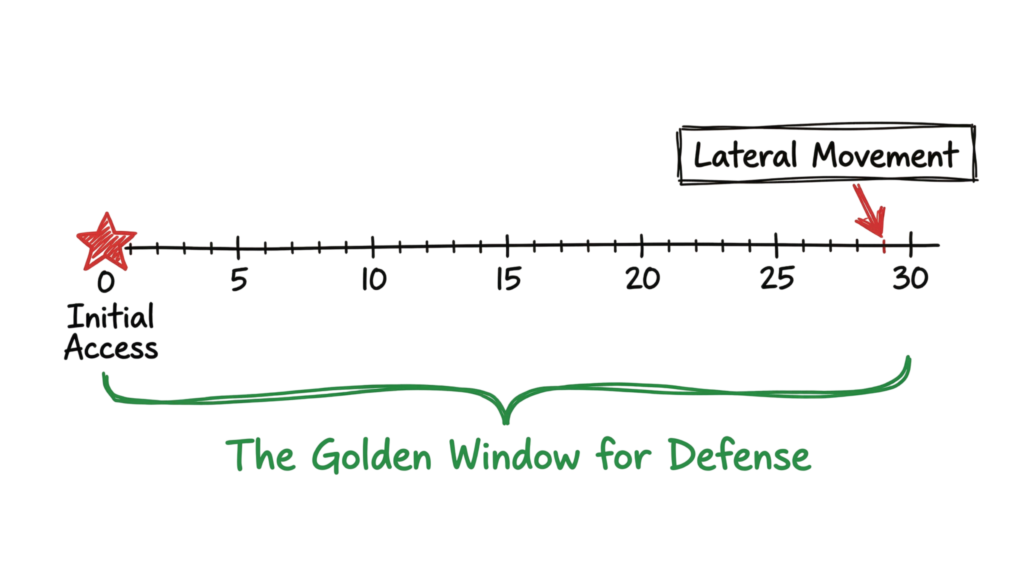
Modern attackers are faster than ever. Recent threat intelligence reports show that the average breakout time has dropped to approximately 29 minutes. This means security teams often have less than half an hour from the moment attackers gain Initial Access Cybersecurity to detect, investigate, and contain the intrusion before they move laterally across the environment.
A typical attack follows these stages:
- The attacker identifies an entry point such as a public IP address, internet-facing application, VPN gateway, or employee email account.
- They deliver a malicious payload or obtain valid user credentials.
- They establish a Command and Control (C2) channel to communicate with compromised systems.
- They verify the privileges they have obtained and determine the next stage of the attack.
These steps align closely with the MITRE ATT&CK Initial Access tactic, which describes the techniques adversaries use to establish a foothold before progressing to privilege escalation, credential access, and lateral movement.
The Big Three Initial Access Attack Vectors
Although attackers constantly develop new techniques, most successful compromises still begin with three common Initial Access Attack Vectors: phishing, software exploits, and security misconfigurations. Understanding these attack methods helps organizations build stronger preventive security controls.
1. Phishing and Social Engineering
Phishing continues to be the most successful method attackers use to gain Initial Access Cybersecurity. Modern phishing campaigns have evolved far beyond traditional email scams. Today, attackers use voice phishing (vishing), SMS phishing (smishing), QR code phishing (quishing), and AI-generated messages that closely imitate trusted individuals and organizations.
One growing concern is AI-powered voice cloning, where attackers generate audio that sounds almost identical to a company’s CEO or senior executive. These attacks are designed to convince employees to disclose sensitive information, approve fraudulent transactions, or reset account credentials.
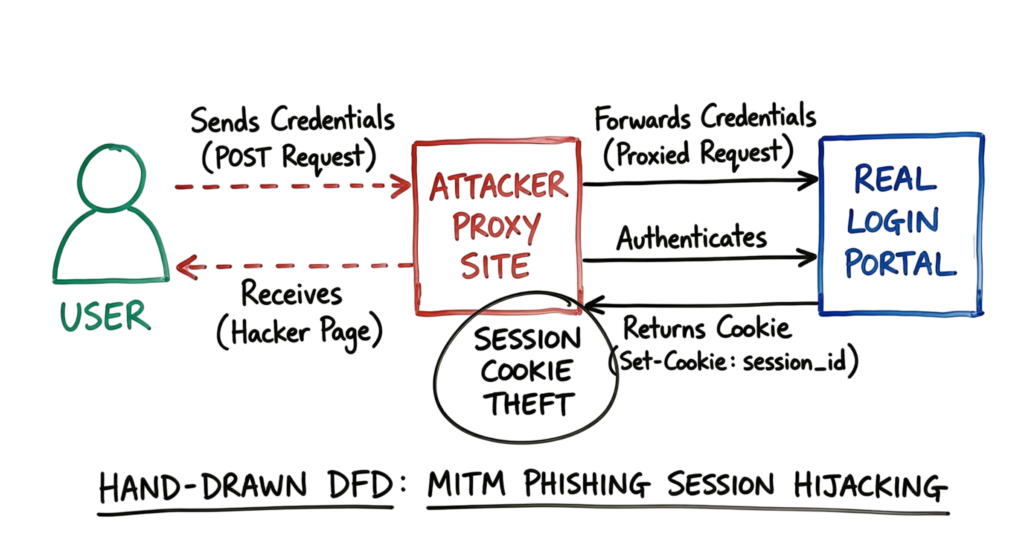
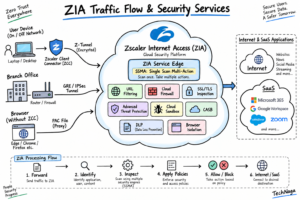
During a recent investigation, I analyzed a Zscaler Internet Access (ZIA) log that showed a user visiting a website that looked identical to our organization’s Okta login portal. At first glance, the page appeared legitimate, but further investigation revealed that the domain had been registered only two hours earlier.
The attacker was using an Adversary-in-the-Middle (AiTM) phishing kit that acted as a transparent proxy between the victim and the legitimate authentication service. Instead of stealing only usernames and passwords, the proxy intercepted authentication cookies and Multi-Factor Authentication (MFA) session tokens in real time. This demonstrates why the discussion around Phishing vs Exploits remains important. While phishing manipulates users into providing access, exploits target software vulnerabilities directly. Both remain highly effective Initial Access Attack Vectors used by modern threat actors, making continuous security awareness training, strong identity protection, and proactive monitoring essential for defending against MITRE ATT&CK Initial Access techniques.
2. Exploits and Vulnerabilities
Another common method attackers use to gain Initial Access Cybersecurity is by exploiting software vulnerabilities. Every year, organizations face thousands of newly disclosed Common Vulnerabilities and Exposures (CVEs), but not all vulnerabilities pose the same level of risk.
Although zero-day vulnerabilities often receive significant media attention, N-day vulnerabilities remain one of the most frequently exploited Initial Access Attack Vectors. An N-day vulnerability is a publicly known security flaw for which a vendor has already released a patch, but the organization has not yet applied it. Attackers actively scan the internet for these unpatched systems because exploiting them requires far less effort than discovering new vulnerabilities.
Consider internet-facing devices such as firewalls, VPN gateways, web servers, or remote access appliances. If a critical vulnerability, such as CVE-2024-XXXX, is disclosed and patching is delayed by even a few days, automated scanning bots can quickly identify exposed systems running vulnerable software versions.
Many organizations believe they were specifically targeted by sophisticated attackers. In reality, most compromises occur because automated tools continuously scan the internet for vulnerable devices. Once a vulnerable system is discovered, attackers exploit it to establish a foothold, making vulnerability management one of the most important defenses against MITRE ATT&CK Initial Access techniques.
Keeping operating systems, applications, and network devices fully patched significantly reduces the number of available attack opportunities before attackers can gain access.
3. Misconfigurations
Security misconfigurations are often called the silent killer of cloud security because they unintentionally expose systems and sensitive data to attackers. A misconfiguration occurs when a service, application, or cloud resource is deployed without appropriate security controls.
One common example is an Amazon S3 bucket configured with public read or write permissions, allowing anyone on the internet to access confidential information. Similar risks exist with exposed databases, overly permissive firewall rules, unsecured Kubernetes clusters, or publicly accessible administrative interfaces.
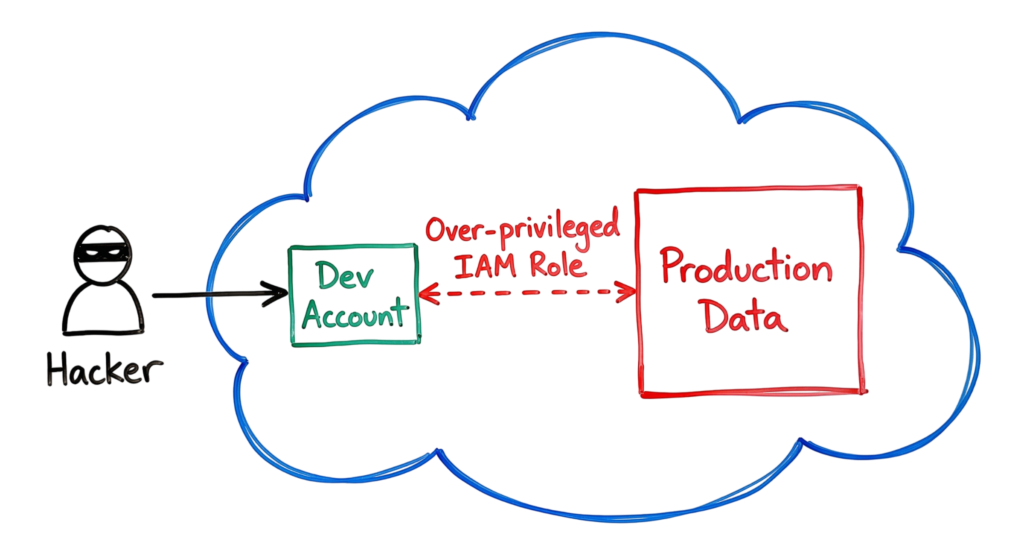
In enterprise environments, misconfigurations are frequently more complex than a single incorrect setting. Cloud infrastructures often contain hundreds of Identity and Access Management (IAM) roles, service accounts, and permission policies. Over time, users may accumulate excessive privileges that are no longer required for their job responsibilities.
For example, a developer might retain unnecessary AssumeRole permissions within an AWS environment. If an attacker compromises that developer’s workstation through one of several Initial Access Attack Vectors, they can inherit those elevated permissions and potentially gain administrative access to production workloads, cloud storage, or sensitive business applications.
Whether the compromise begins through Phishing vs Exploits or insecure cloud configurations, the outcome is often the same: attackers establish a foothold, escalate privileges, and expand their access across the environment. Regular security assessments, cloud configuration reviews, vulnerability scanning, and least-privilege access controls are essential for reducing the risk of successful Initial Access Cybersecurity attacks.
Technical Flow and Architecture of Initial Access Cybersecurity
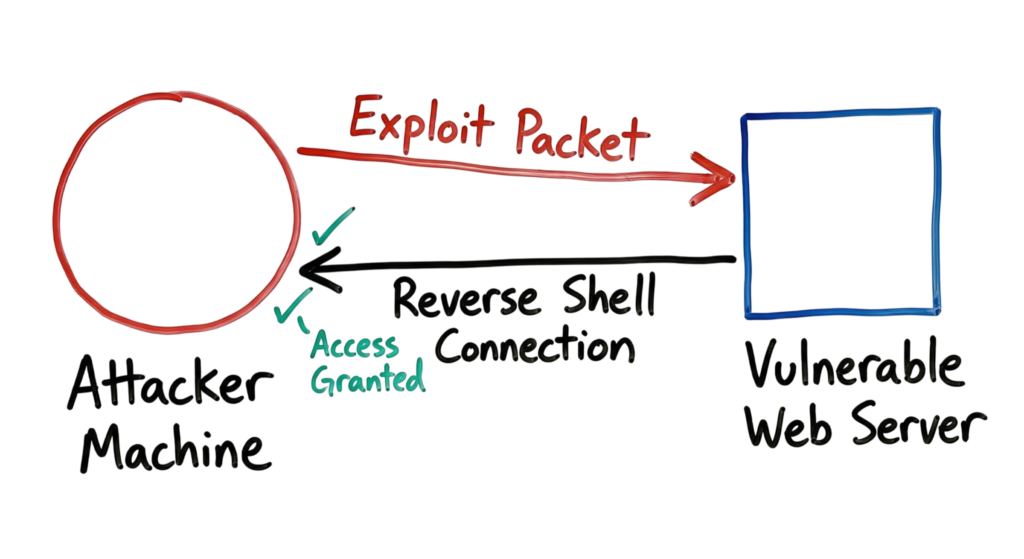
In cases where the attacker uses the exploit approach, the process becomes technical in nature. In essence, the attacker sends a specially crafted packet to a service such as a web server that does not have a patch. This packet causes the buffer to be overflowed or injection to happen. Subsequently, the service will execute one liner, which prompts the service to connect back to the attacker’s computer.
Key Components of an Initial Access Attack
- In initial access cybersecurity, an attack is not a single action. It is a combination of multiple components working together to give the attacker entry and control. Understanding these components helps you detect suspicious activity early and stop the attack before it spreads.
- The payload is the core of the attack. It is the malicious code or script that runs on the target system after delivery. In real environments, this is often not a visible file. Attackers prefer fileless techniques such as PowerShell scripts or in-memory execution to avoid detection. For example, a base64-encoded PowerShell command can download additional tools without writing anything to disk.
- The delivery vector is how the payload reaches the target. This is one of the most common entry points in initial access cybersecurity. Attackers use phishing emails, fake login pages, malicious links, or compromised websites to trick users into executing the payload or giving away credentials. In many incidents, no malware is needed because the attacker simply captures valid login details through a fake portal.
- The Command and Control (C2) server is what allows the attacker to maintain control after gaining access. Once the system is compromised, it connects back to the attacker’s server. This enables the attacker to run commands, upload tools, and move deeper into the network. From a detection perspective, this often appears as unusual outbound traffic, DNS queries to unknown domains, or encrypted connections to suspicious IP addresses.
- An Initial Access Broker (IAB) plays a key role in modern attacks. Instead of carrying out the full attack, these individuals focus only on breaking into systems and then selling that access. This creates a separation between the person who gains access and the one who launches ransomware or data theft operations. It also increases the speed and scale of attacks because multiple threat actors can buy and use the same access.
- In many cases, credentials and session tokens are more valuable than malware. Attackers target usernames, passwords, and active session cookies to bypass authentication controls. For example, if a session cookie is stolen, the attacker can access an account without triggering MFA because the session is already trusted.
- Finally, every initial access cybersecurity attack depends on a vulnerability or misconfiguration. This could be an unpatched server, an exposed service, or excessive permissions in a cloud environment. These weaknesses are often overlooked because they appear as normal configurations rather than active threats. Attackers take advantage of this gap to gain entry quickly and quietly.
Real-World Example: The Session Cookie Theft
Last year, I investigated a real-world initial access cybersecurity incident involving an employee’s personal laptop. The device was infected with an infostealer after the user downloaded a cracked software package. The employee had also logged into their work Gmail account on that same laptop, which created the perfect entry point for the attacker. Instead of targeting the password, the malware focused on stealing active session cookies stored in the browser.
This is where initial access cybersecurity becomes more dangerous. The attacker imported those stolen cookies into their own browser. Since the session was already authenticated, there was no need to enter a password or pass MFA checks. Within seconds, the attacker gained direct access to the organization’s Google Workspace environment. This type of attack bypasses traditional security controls because it abuses trust in active sessions rather than breaking authentication.
From a detection standpoint, the only way to catch this initial access cybersecurity activity was through log analysis. In our SIEM, I identified “New Session” events where the user’s IP address suddenly changed. Within a five-minute window, the login location jumped from New York to a VPN exit node in another country. That abnormal behavior was the key indicator. We immediately revoked all active sessions, reset credentials, and enforced stricter session monitoring policies.
This case clearly shows that in initial access cybersecurity, attackers are no longer dependent on stealing passwords. They target session tokens and browser data because it gives them faster and stealthier access. If you are not monitoring session behavior and login anomalies, this type of attack can go completely unnoticed.
Practical Implementation: How Hackers Test Your Doors
Hackers use tools like Shodan to find your public-facing assets. They look for:
- Open RDP ports (3389).
- Old versions of Apache or Nginx.
- Exposed API endpoints without authentication.
They also use “Living off the Land” techniques. Instead of downloading obvious malware, they use built-in Windows tools like PowerShell or bitsadmin to download their files. This helps them stay hidden from basic antivirus programs.
Advantages and Limitations
For the hacker, phishing is cheap and easy to scale. The limitation is that it requires a human to make a mistake. Exploits are more reliable but harder to find or more expensive to buy. Misconfigurations are great for hackers because they look like legitimate traffic.
For you as a defender, you can block phishing with better filters and training. You can stop exploits with a solid patching cycle. But misconfigurations are hard to catch because they don’t always trigger an “alert” in the traditional sense. A public S3 bucket is just a configuration choice, not a virus.
Common Mistakes
I see these errors constantly in enterprise environments:
- Leaving “Default” passwords on new hardware.
- Giving every user “Local Admin” rights.
- Not monitoring logs for service accounts.
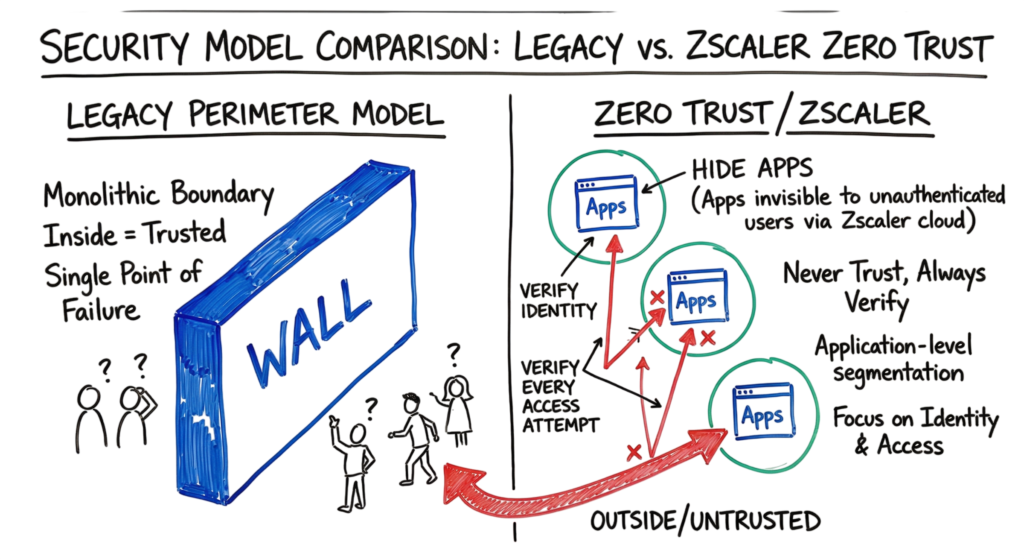
- Treating the internal network as “trusted” once someone passes the VPN.
This is where I tell my junior engineers: never trust a packet just because it came from a known IP.
Best Practices for Defense
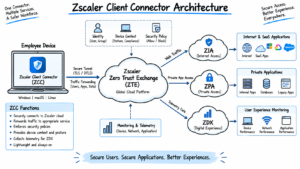
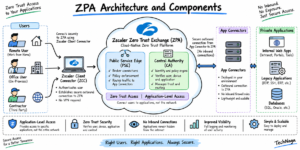
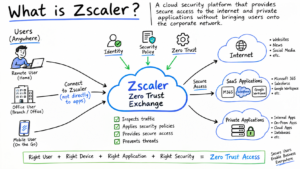
- Zero Trust Architecture: Start with an assumption that the hacker is already there. Authenticate all requests. Utilize Zscaler Private Access to conceal your apps from the public internet so that they can’t be scanned.
- Phishing-Resistant MFA: Use physical authentication methods like Yubikeys. These keys can’t be proxied by hackers.
- Management of Attack Surface: Ensure regular scanning of your own public IP ranges. What Shodan finds, hackers will find.
- Logging: It’s necessary that you have access to all your DNS logging, firewall logging, and EDR alerts at once.
- Automated Patching: In case any patch is found to be critical, it needs to be applied within 24-48 hours.
Troubleshooting Scenario: The “Ghost” Login
Problem: Your SIEM shows a successful login for an executive at 3:00 AM from a Linux machine. The executive only uses a Mac.
Investigation: * Check the Zscaler logs. You see the executive’s account accessed a file-sharing site five minutes before the login.
- Check the EDR logs. You find a suspicious “curl” command executed on the executive’s Mac.
- Check the DNS logs. You see the Mac made a request to a known C2 domain.
Solution: The executive was phished. The attacker ran a script to steal their session token. You must revoke all active sessions for that user and reset their credentials immediately.
Interview Questions
- What is the difference between an N-day and a Zero-day vulnerability?
- How does an Adversary-in-the-Middle attack bypass MFA?
- Why is “breakout time” a critical metric for a SOC?
- What are Initial Access Brokers and how do they impact the threat environment?
- Explain how a reverse shell works.
- How can Zscaler help prevent initial access via public-facing exploits?
Future Trends (2026)
The use of Agentic AI is a major trend in initial access cybersecurity this year. About 87% of security teams are now using or evaluating AI to detect and respond at machine speed. At the same time, attackers are using AI agents to automate reconnaissance. Instead of manually searching for weak points, these bots scan for misconfigurations, exposed services, and valid credentials 24/7, making initial access cybersecurity attacks faster and more scalable.
We are also seeing a shift toward identity-focused threats in initial access cybersecurity. As traditional network perimeters fade, user identity has become the primary target. Attackers are no longer focused only on firewalls or network access. They are targeting OAuth tokens, session data, and service principals to gain entry. If identity security is weak, attackers can move inside the environment without triggering traditional security controls.
FAQ
Q: Is antivirus enough to stop initial access? A: No. Antivirus catches known files. It does not catch stolen passwords or misconfigured cloud settings. You need an EDR and a SIEM.
Q: Why do hackers sell access instead of using it themselves? A: Risk management. Selling access is fast money with lower risk. The person who buys the access is the one who has to do the hard work of stealing data and avoiding the FBI.
Q: Can we stop 100% of phishing? A: No. You can only reduce the risk. This is why you need layers of security. If one person clicks a link, your EDR should stop the payload from running.
Q: What is the most dangerous port to leave open? A: Port 3389 (RDP). It is a direct invitation for brute force attacks.
Q: How do I find my company’s leaked credentials? A: You can monitor darknet forums or use threat intelligence services that scan for your domain name in data dumps.
Conclusion
Access forms the cornerstone of all breaches in initial access cybersecurity. If you can build the skill of locking down entry points, you will significantly reduce the risk of becoming a victim. Most attackers do not use complex techniques. They look for the simplest path into your environment. In real scenarios, this often means a phishing email, an unpatched server, or a misconfigured cloud role.
Be vigilant when working on initial access cybersecurity. Keep analyzing your logs, especially authentication, DNS, and endpoint activity. The indicators are usually there, but you need to recognize patterns like unusual login times, IP changes, or suspicious commands. Strong monitoring and fast response make a real difference. See you in our next post on Tech Naga.
Related Cybersecurity Guides
Continue learning with these in-depth cybersecurity guides from TechNaga.
- What Is Cybersecurity and Why It Is Important Today
https://technaga.com/what-is-cybersecurity-and-why-it-is-important-today/ - How to Identify Phishing Attacks in 2026 (Complete Guide)
https://technaga.com/how-to-identify-phishing-attacks-in-2026/ - Password Security Guide 2026: 10 Essential Tips
https://technaga.com/password-security-guide-2026/ - Essential Endpoint Security Guide 2026 for Every Organization
https://technaga.com/endpoint-security-2026-guide/ - Network Segmentation Explained with Real-World Example
https://technaga.com/network-segmentation-guide-ransomware-prevention/ - Multi-Factor Authentication (MFA): Critical Guide to Secure Your Systems (2026)
https://technaga.com/multi-factor-authentication-mfa-guide-2026/ - Identity and Access Management in 2026: A Practical Guide for Cloud Security Professionals
https://technaga.com/identity-and-access-management-cloud-security-2026/ - Cloud Security Basics 2026: Complete Beginner Guide
https://technaga.com/cloud-security-basics-2026/
External References
- MITRE ATT&CK Framework
https://attack.mitre.org/ - MITRE ATT&CK Initial Access (TA0001)
https://attack.mitre.org/tactics/TA0001/ - CISA Secure by Design
https://www.cisa.gov/securebydesign - NIST Cybersecurity Framework (CSF 2.0)
https://www.nist.gov/cyberframework - OWASP Top 10
https://owasp.org/www-project-top-ten/ - Microsoft Security Blog
https://www.microsoft.com/security/blog/ - AWS Security Best Practices
https://aws.amazon.com/security/security-learning/ - Zscaler ThreatLabz
https://www.zscaler.com/resources/security-research
1 thought on “Initial Access in Cybersecurity: Top 3 Attack Vectors You Must Know (2026)”