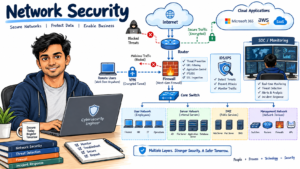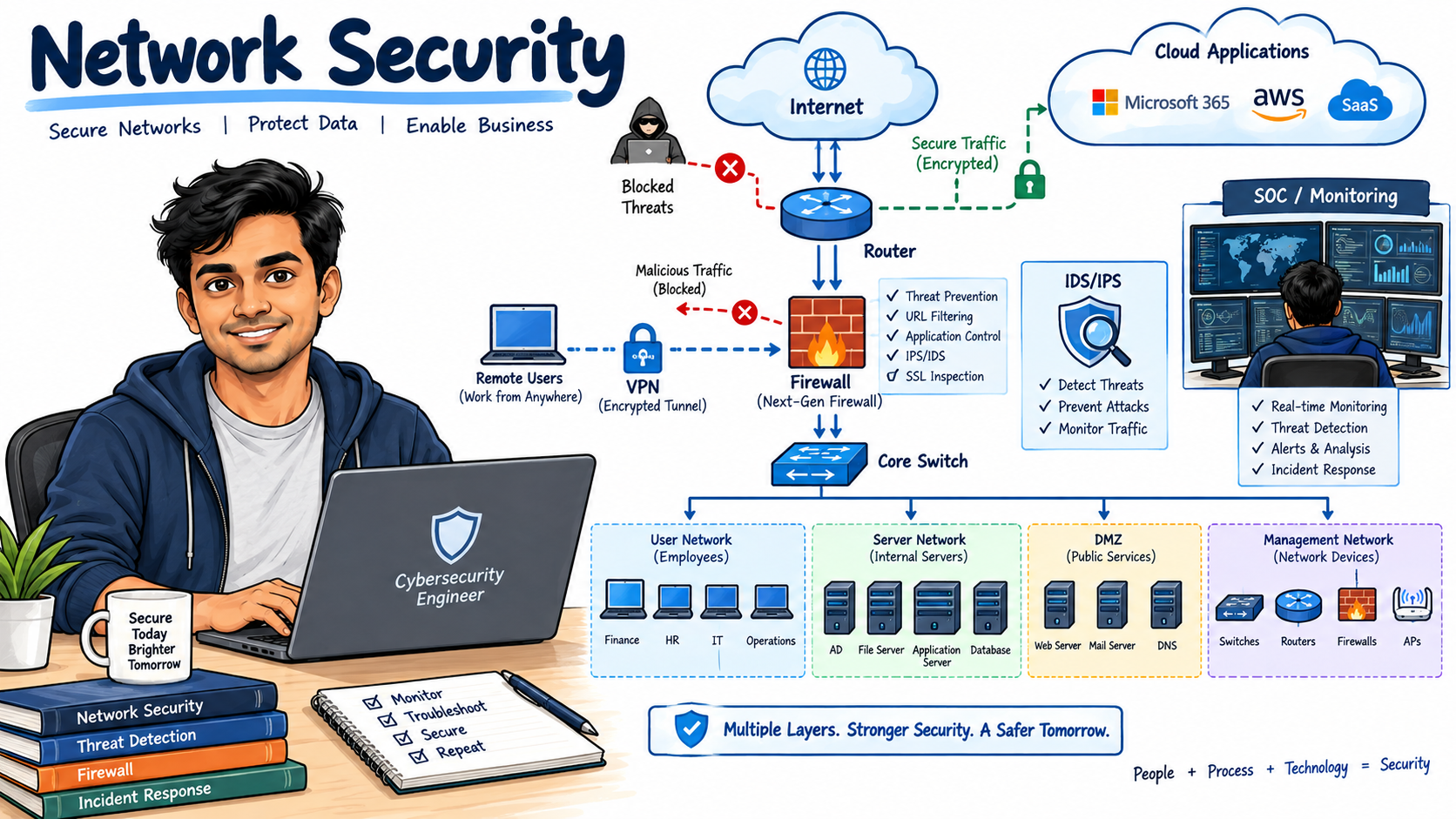
Network security is one of the most important areas for cybersecurity, network security, SOC, firewall, cloud security, and IT infrastructure roles. Interviewers commonly test your understanding of firewalls, VPNs, IDS/IPS, network segmentation, Zero Trust, encryption, authentication, DDoS attacks, secure protocols, and network security troubleshooting.
This guide covers 50 Network Security Interview Questions and Answers for 2026, ranging from basic concepts to scenario-based questions.
1. What is Network Security?
Answer:
Network security is the practice of protecting network infrastructure, devices, applications, and data from unauthorized access, attacks, misuse, and disruption.
It uses technologies and security controls such as:
- Firewalls
- IDS and IPS
- VPN
- Network segmentation
- Access control
- Encryption
- Authentication
- Secure network protocols
- Security monitoring
For example, an organization may use a firewall to control traffic between the internet and its internal network.
Network Security Interview Questions
2. What are the main goals of Network Security?
Answer:
The main goals of network security are commonly described using the CIA Triad:
- Confidentiality: Prevent unauthorized access to information.
- Integrity: Prevent unauthorized modification of data.
- Availability: Ensure systems and services remain accessible.
For example, encryption protects confidentiality, file integrity monitoring helps detect unauthorized changes, and DDoS protection helps maintain availability.
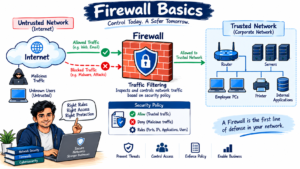
3. What is a Firewall in Network Security?
Answer:
A firewall is a security control that monitors and controls network traffic based on predefined rules.
A firewall can inspect traffic using information such as:
- Source IP address
- Destination IP address
- Source port
- Destination port
- Protocol
- Application
- User identity
For example, a firewall rule may allow HTTPS traffic on TCP port 443 while blocking unauthorized inbound connections.
Network Security Interview Questions
4. What is the difference between a Stateful Firewall and a Stateless Firewall?
Answer:
A stateless firewall evaluates each packet independently based on predefined rules.
A stateful firewall maintains information about active network connections and uses that connection state when making filtering decisions.
For example, if a client initiates an HTTPS connection to a server, a stateful firewall can track the session and allow the corresponding return traffic.
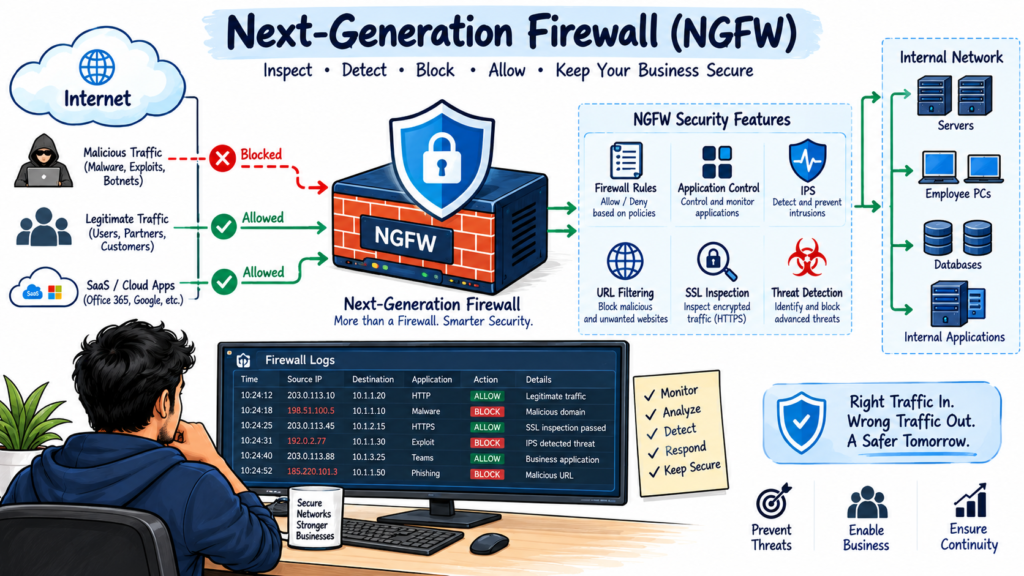
5. What is a Next-Generation Firewall (NGFW)?
Answer:
A Next-Generation Firewall (NGFW) provides traditional firewall capabilities along with advanced security features.
Common NGFW capabilities include:
- Application control
- Intrusion prevention
- User identification
- URL filtering
- SSL/TLS inspection
- Malware detection
- Threat intelligence
- Advanced logging
NGFWs provide more visibility than traditional Layer 3 and Layer 4 firewalls.
Network Security Interview Questions
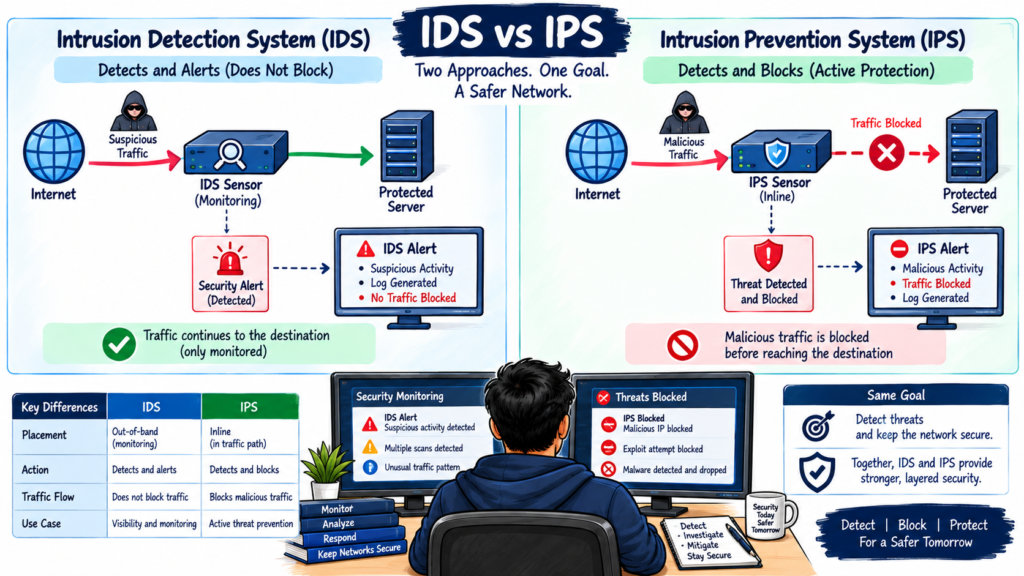
6. What is IDS in Network Security?
Answer:
IDS stands for Intrusion Detection System.
An IDS monitors network or system activity and identifies suspicious or malicious behavior.
When an IDS detects a potential attack, it normally generates an alert rather than directly blocking the traffic.
Common detection methods include:
- Signature-based detection
- Anomaly-based detection
- Behavior-based detection
7. What is IPS and how is it different from IDS?
Answer:
IPS stands for Intrusion Prevention System.
The main difference is that an IDS primarily detects and alerts, while an IPS can actively block or prevent malicious traffic.
For example:
IDS: Detects a known exploit and generates an alert.
IPS: Detects the exploit and drops the malicious packet or blocks the connection.
IPS is generally deployed inline so that it can take preventive action.
Network Security Interview Questions
8. What is the difference between IDS and IPS?
Answer:
The key difference is their response to detected threats.
| Feature | IDS | IPS |
|---|---|---|
| Detection | Yes | Yes |
| Alerting | Yes | Yes |
| Traffic blocking | Usually no | Yes |
| Deployment | Often out-of-band | Usually inline |
| Main purpose | Detection | Detection and prevention |
An organization may use both technologies as part of a broader network security architecture.
9. What is a VPN in Network Security?
Answer:
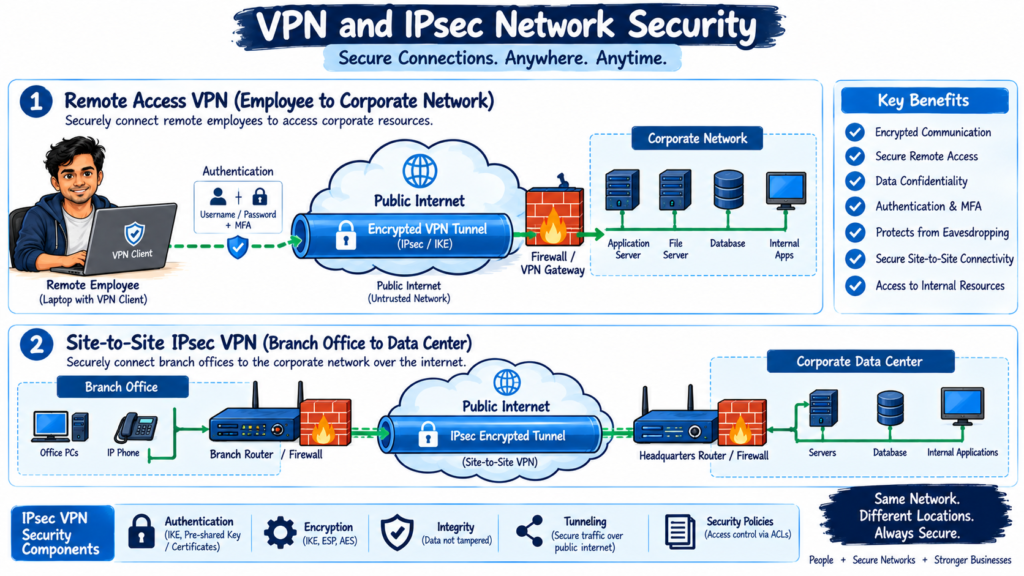
VPN stands for Virtual Private Network.
A VPN creates an encrypted connection between endpoints or networks over an untrusted network such as the internet.
Common VPN types include:
- Site-to-site VPN
- Remote-access VPN
- SSL VPN
- IPsec VPN
For example, a remote employee can use a VPN to securely connect to corporate resources.
10. What is IPsec VPN?
Answer:
IPsec is a suite of protocols used to secure IP communications.
IPsec provides security services such as:
- Encryption
- Authentication
- Integrity
- Anti-replay protection
IPsec VPNs are commonly used for secure site-to-site communication between branch offices and data centers.
Network Security Interview Questions
11. What is the difference between Site-to-Site VPN and Remote Access VPN?
Answer:
A Site-to-Site VPN connects two networks.
Example:
Branch Office → VPN Tunnel → Corporate Data Center
A Remote Access VPN connects an individual user or device to a corporate network.
Example:
Employee Laptop → VPN → Corporate Network
Site-to-site VPNs are commonly used between offices, while remote-access VPNs are commonly used by remote users.
12. What is SSL/TLS in Network Security?
Answer:
SSL/TLS protocols are used to secure communication between systems.
TLS provides:
- Encryption
- Authentication
- Data integrity
HTTPS uses TLS to protect web traffic.
For example:
uses HTTP over a TLS-protected connection.
Network Security Interview Questions
13. What is SSL Inspection?
Answer:
SSL inspection, also called TLS inspection, allows a security device to decrypt encrypted traffic, inspect it for threats or policy violations, and then re-encrypt it before forwarding it.
It can help security teams detect:
- Malware
- Data leakage
- Malicious websites
- Suspicious applications
- Policy violations
However, organizations must carefully manage certificates, privacy requirements, and applications that cannot support inspection.
14. What is Network Segmentation?
Answer:
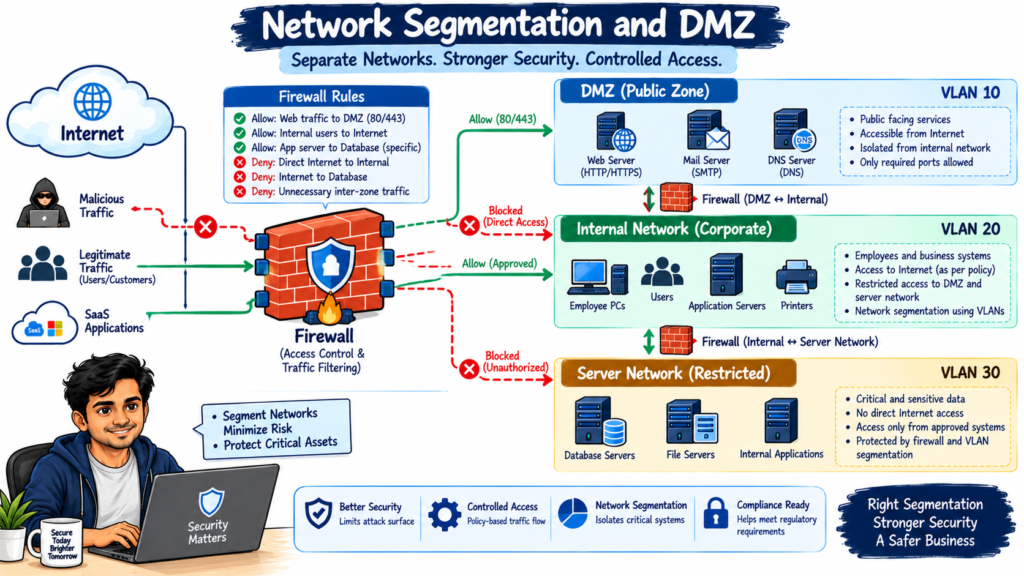
Network segmentation divides a network into separate security zones.
For example:
- User network
- Server network
- Guest network
- Management network
- DMZ
Segmentation limits unnecessary communication between systems and can reduce the impact of a security incident.
15. What is a VLAN and how does it improve Network Security?
Answer:
VLAN stands for Virtual Local Area Network.
A VLAN logically separates devices within a physical network.
For example:
- VLAN 10: Employees
- VLAN 20: Servers
- VLAN 30: Guest users
- VLAN 40: Network management
VLANs can support network segmentation, but VLANs alone should not be treated as a complete security boundary. Firewalls and access controls can provide stronger enforcement between security zones.
Network Security Interview Questions
16. What is a DMZ in Network Security?
Answer:
DMZ stands for Demilitarized Zone.
A DMZ is a network segment used to host systems that need to be accessible from less-trusted networks while separating them from the internal network.
Examples include:
- Public web servers
- Reverse proxies
- Mail gateways
- Public DNS servers
A firewall can control traffic between the internet, DMZ, and internal network.
17. What is Zero Trust Network Security?
Answer:
Zero Trust Network Security follows the principle of continuously verifying access instead of automatically trusting users or devices based on network location.
Important Zero Trust principles include:
- Verify explicitly
- Apply least privilege
- Continuously evaluate access
- Monitor activity
- Assume breach
For example, a user inside the corporate network may still need authentication and device verification before accessing a sensitive application.
18. What is the Principle of Least Privilege?
Answer:
The Principle of Least Privilege means users, applications, and systems should receive only the access required to perform their tasks.
For example, a database administrator may need administrative access to a database but may not need access to unrelated network devices.
Least privilege reduces the potential impact of compromised accounts.
Network Security Interview Questions
19. What is Network Access Control (NAC)?
Answer:
Network Access Control (NAC) controls which users and devices are allowed to connect to a network.
NAC can evaluate:
- User identity
- Device identity
- Device security posture
- Operating system
- Antivirus or EDR status
- Authentication status
An organization may place non-compliant devices into a restricted or remediation network.
20. What is Network Authentication?
Answer:
Network authentication verifies the identity of a user, device, or service before granting access.
Common authentication methods include:
- Username and password
- Multi-factor authentication
- Certificates
- Smart cards
- Biometrics
- RADIUS
- TACACS+
Authentication should be combined with authorization and access controls.
21. What is the difference between Authentication and Authorization?
Answer:
Authentication answers:
Who are you?
Authorization answers:
What are you allowed to access?
For example, a user may successfully authenticate using MFA but still be denied access to a restricted server because the user does not have the required authorization.
22. What is RADIUS?
Answer:
RADIUS stands for Remote Authentication Dial-In User Service.
It is commonly used for centralized authentication, authorization, and accounting.
RADIUS is frequently used with:
- VPN
- Wireless networks
- Network Access Control
- Network devices
For example, a VPN gateway can use RADIUS to authenticate employees against a centralized identity service.
Network Security Interview Questions
23. What is TACACS+?
Answer:
TACACS+ is a protocol commonly used for centralized authentication, authorization, and accounting for network device administration.
It provides granular authorization controls and is commonly associated with administrative access to routers, switches, and other network infrastructure.
24. What is DDoS Attack and how can it be prevented?
Answer:
DDoS stands for Distributed Denial-of-Service.
A DDoS attack attempts to overwhelm a system, application, or network with large volumes of traffic or requests.
Common DDoS protection techniques include:
- Rate limiting
- Traffic filtering
- Anycast distribution
- CDN protection
- DDoS mitigation services
- Firewall policies
- Network monitoring
The appropriate protection depends on the type and scale of the attack.
Network Security Interview Questions
25. What is a DoS Attack?
Answer:
A Denial-of-Service (DoS) attack attempts to make a service unavailable to legitimate users.
Unlike a distributed attack, a traditional DoS attack may originate from a single system or a smaller number of sources.
Examples include:
- SYN floods
- UDP floods
- Application-layer request floods
26. What is a SYN Flood Attack?
Answer:
A SYN flood is a type of denial-of-service attack that abuses the TCP connection establishment process.
Normally:
Client → SYN → Server
Server → SYN-ACK → Client
Client → ACK → Server
During a SYN flood, an attacker sends many SYN requests without completing the TCP handshake. This can consume server resources.
Security controls may include:
- SYN cookies
- Rate limiting
- Firewall protection
- Load balancers
- DDoS mitigation
27. What is DNS Security?
Answer:
DNS security protects the Domain Name System from attacks and unauthorized manipulation.
Common DNS threats include:
- DNS spoofing
- DNS cache poisoning
- DNS tunneling
- DNS hijacking
- Malicious domains
Security controls may include:
- DNS filtering
- DNSSEC
- Secure DNS resolvers
- Threat intelligence
- DNS monitoring
28. What is DNSSEC?
Answer:
DNSSEC stands for Domain Name System Security Extensions.
DNSSEC uses digital signatures to help validate the authenticity and integrity of DNS responses.
It helps protect against certain DNS attacks such as DNS cache poisoning by allowing resolvers to validate signed DNS data.
Network Security Interview Questions
29. What is DNS Tunneling?
Answer:
DNS tunneling is a technique where DNS queries and responses are abused to transfer data through DNS traffic.
Attackers may use DNS tunneling for:
- Command and control
- Data exfiltration
- Malware communication
Security teams can detect potential DNS tunneling by analyzing unusual query patterns, high query volumes, long domain names, and suspicious domains.
30. What is ARP Spoofing?
Answer:
ARP spoofing is an attack where an attacker sends forged ARP messages to associate their MAC address with another device’s IP address.
This can allow an attacker to perform:
- Man-in-the-middle attacks
- Traffic interception
- Traffic manipulation
Security controls can include Dynamic ARP Inspection, network segmentation, and appropriate switch security configurations.
31. What is a Man-in-the-Middle (MITM) Attack?
Answer:
A Man-in-the-Middle attack occurs when an attacker positions themselves between two communicating parties and intercepts or potentially modifies their communication.
For example:
User → Attacker → Server
Encryption, certificate validation, secure protocols, and network security controls can reduce the risk of MITM attacks.
32. What is Network Encryption?
Answer:
Network encryption converts readable data into an encoded format that unauthorized users cannot easily understand.
Common technologies include:
- TLS
- IPsec
- SSH
- WPA3
Encryption helps protect sensitive information while it travels across networks.
33. What is the difference between Symmetric and Asymmetric Encryption?
Answer:
Symmetric encryption uses the same key for encryption and decryption.
Example:
AES
Asymmetric encryption uses a public key and a private key.
Examples include:
RSA
ECC
TLS commonly uses asymmetric cryptography during connection establishment and symmetric cryptography for efficient protection of the session data.
34. What is SSH and why is it more secure than Telnet?
Answer:
SSH stands for Secure Shell.
SSH provides encrypted remote administration and protects credentials and session data.
Telnet sends communication without encryption, which can expose credentials and data to interception.
For secure network device administration, SSH should generally be preferred over Telnet.
Network Security Interview Questions
35. What is Network Security Monitoring?
Answer:
Network Security Monitoring involves continuously analyzing network activity to identify suspicious behavior, attacks, and security incidents.
Security teams may monitor:
- Firewall logs
- IDS/IPS alerts
- DNS traffic
- NetFlow
- Authentication logs
- Proxy logs
- Packet captures
- Endpoint telemetry
SIEM platforms can collect and correlate this information for investigation.
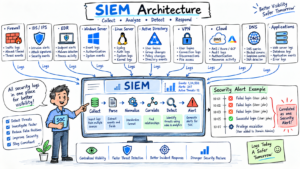
36. What is SIEM in Network Security?
Answer:
SIEM stands for Security Information and Event Management.
A SIEM collects and analyzes security logs from multiple sources.
Common sources include:
- Firewalls
- VPN gateways
- IDS/IPS
- Servers
- Endpoints
- Cloud platforms
- Identity systems
SIEM can help security teams detect suspicious activity and investigate incidents.
37. What is Network Traffic Analysis?
Answer:
Network Traffic Analysis involves examining network communications to identify normal and suspicious behavior.
Security analysts may analyze:
- Source and destination IP addresses
- Ports
- Protocols
- Packet sizes
- Connection frequency
- DNS requests
- TLS connections
- Application behavior
Tools such as Wireshark can help analysts inspect packet-level traffic.
38. How do you use Wireshark for Network Security Troubleshooting?
Answer:
Wireshark captures and analyzes network packets.
During troubleshooting, I would typically:
- Identify the affected source and destination.
- Capture traffic during the issue.
- Check DNS resolution.
- Check TCP handshake.
- Check retransmissions.
- Verify ports and protocols.
- Analyze TCP resets.
- Check TLS negotiation if applicable.
- Compare successful and failed traffic.
For example, repeated TCP SYN packets without a SYN-ACK may indicate a connectivity or firewall-related issue.
39. What is a Proxy Server in Network Security?
Answer:
A proxy server acts as an intermediary between a client and a destination server.
A security proxy can provide controls such as:
- URL filtering
- Malware scanning
- Content filtering
- User-based policies
- SSL inspection
- Data Loss Prevention
For example, a secure web gateway can inspect outbound web traffic before allowing the user to access an internet destination.
Network Security Interview Questions
40. What is a Secure Web Gateway (SWG)?
Answer:
A Secure Web Gateway protects users from web-based threats and enforces internet access policies.
Common SWG capabilities include:
- URL filtering
- Malware protection
- SSL inspection
- Cloud application control
- Data Loss Prevention
- Browser isolation
- Threat intelligence
SWGs are commonly used as part of modern security architectures such as SSE and SASE.
41. What is SASE in Network Security?
Answer:
SASE stands for Secure Access Service Edge.
SASE combines networking and security capabilities through a cloud-delivered architecture.
Common security services include:
- Secure Web Gateway
- Cloud Access Security Broker
- Zero Trust Network Access
- Firewall as a Service
- Data Loss Prevention
SASE is designed to support users and applications regardless of where users connect from.
Network Security Interview Questions
42. What is SSE and how is it different from SASE?
Answer:
SSE stands for Security Service Edge.
SSE focuses primarily on cloud-delivered security services, while SASE combines security services with networking capabilities.
SSE commonly includes:
- SWG
- CASB
- ZTNA
- DLP
SASE adds networking functions such as SD-WAN to the broader architecture.
43. What is Zero Trust Network Access (ZTNA)?
Answer:
Zero Trust Network Access (ZTNA) provides application-specific access based on identity, device posture, policy, and other contextual signals.
Unlike traditional network access approaches, ZTNA does not necessarily provide broad network-level access after authentication.
For example, a user may receive access to:
hr.internal.example
without receiving unrestricted access to the entire internal network.
44. What is Microsegmentation in Network Security?
Answer:
Microsegmentation divides a network or environment into smaller security zones and applies access policies between workloads, applications, users, or devices.
For example, an application server may be allowed to communicate with a database server only on TCP port 5432.
Microsegmentation can reduce unnecessary east-west communication.
45. What is an ACL in Network Security?
Answer:
ACL stands for Access Control List.
An ACL contains rules that permit or deny network traffic.
Rules can be based on:
- Source IP
- Destination IP
- Protocol
- Port
Example:
Permit TCP 10.10.10.0/24 → 10.20.20.10 → Port 443
ACLs are commonly used on routers, switches, firewalls, and other network security devices.
Network Security Interview Questions
46. How would you troubleshoot a user who cannot access a website?
Answer:
I would troubleshoot the issue systematically:
- Check whether the device has network connectivity.
- Verify IP configuration.
- Test the default gateway.
- Test DNS resolution.
- Check whether the website is reachable by IP where appropriate.
- Check proxy or secure web gateway policies.
- Check firewall rules.
- Check URL filtering.
- Check SSL/TLS inspection.
- Capture traffic using Wireshark if required.
- Review firewall, proxy, DNS, or security logs.
- Compare the affected user with a working user.
This approach helps determine whether the issue is related to DNS, routing, firewall policy, proxy configuration, or the destination application.
47. A firewall is blocking legitimate traffic. How would you troubleshoot it?
Answer:
I would first identify the exact traffic flow:
Source → Destination → Protocol → Port
Then I would:
- Check firewall logs.
- Identify the rule that handled the traffic.
- Verify source and destination IPs.
- Verify the destination port.
- Check NAT configuration.
- Check routing.
- Review security policies.
- Confirm whether application control or IPS is blocking the traffic.
- Capture packets if required.
- Make the smallest required policy change through the organization’s change-management process.
I would avoid creating a broad allow any rule just to resolve the issue.
48. How would you troubleshoot a VPN connectivity issue?
Answer:
I would troubleshoot the VPN from the client toward the destination.
First, I would check:
- Internet connectivity
- DNS resolution
- VPN client status
- Authentication
- MFA
- VPN gateway reachability
- Certificate validity
- VPN tunnel status
- IP address assignment
- Routing
- Firewall policies
- Required ports and protocols
For an IPsec VPN, I would also check IKE negotiation, authentication, encryption parameters, and IPsec security associations.
49. What is the difference between North-South and East-West Network Traffic?
Answer:
North-South traffic generally refers to traffic moving between internal environments and external networks.
Example:
User Network → Internet
East-West traffic generally refers to traffic moving between systems inside an environment.
Example:
Application Server → Database Server
Security controls such as firewalls and microsegmentation can be used to control both traffic directions.
50. How would you investigate a suspected Network Security Attack?
Answer:
I would follow a structured incident investigation process.
Step 1: Identify the Alert
Determine what triggered the investigation, such as:
- IDS/IPS alert
- Firewall alert
- SIEM correlation
- Endpoint detection
- Unusual network traffic
Step 2: Identify the Source
Determine:
- Source IP
- Destination IP
- Source port
- Destination port
- Protocol
- User
- Device
Step 3: Analyze the Traffic
Use available tools such as:
- Firewall logs
- SIEM
- Wireshark
- NetFlow
- DNS logs
- Proxy logs
- Endpoint telemetry
Step 4: Determine the Attack Type
Look for indicators of:
- Port scanning
- Brute-force attacks
- Malware communication
- DDoS
- Data exfiltration
- DNS tunneling
- Command-and-control traffic
- Exploitation attempts
Step 5: Contain the Threat
Depending on the incident, containment may include:
- Blocking an IP address
- Disabling a compromised account
- Isolating an endpoint
- Blocking a malicious domain
- Updating firewall rules
Step 6: Investigate and Recover
Review logs and evidence to determine the scope and timeline of the incident. After containment, remediate the underlying issue and monitor for recurrence.
Final Tips for a Network Security Interview
When answering Network Security Interview Questions, avoid giving only definitions. Interviewers often want to know how you would troubleshoot a real production issue.
For example, instead of saying:
“A firewall blocks traffic based on rules.”
You can explain:
“I would check the source, destination, protocol, and port, then review firewall logs to identify which rule handled the traffic. I would also verify NAT, routing, and any application or security inspection policies.”
Focus on these areas before your interview:
- Network security fundamentals
- TCP/IP
- OSI model
- Firewalls
- NGFW
- IDS/IPS
- VPN
- IPsec
- SSL/TLS
- SSL inspection
- Network segmentation
- VLAN
- DMZ
- NAC
- Zero Trust
- ZTNA
- SASE
- SSE
- Secure Web Gateway
- DNS security
- DDoS protection
- Network monitoring
- SIEM
- Wireshark
- Incident response
- Network security troubleshooting
Conclusion
These 50 Network Security Interview Questions and Answers 2026 cover the fundamental concepts, security technologies, protocols, and troubleshooting scenarios commonly discussed in network security and cybersecurity interviews.
If you are preparing for a Network Security Engineer, Cybersecurity Analyst, SOC Analyst, Firewall Engineer, Security Engineer, or Network Security Administrator role, focus on understanding how these technologies work together rather than memorizing definitions.
For external links, I’d use authoritative sources rather than other interview-question websites:
- NIST Cybersecurity Framework
NIST Cybersecurity Framework - CISA Cybersecurity Resources
CISA Cybersecurity Resources - OWASP
OWASP Foundation - IETF RFC Database
IETF RFCs - Wireshark Documentation
Wireshark Documentation
Related Network Security Guides
- Network Security Basics Guide for Beginners 2026
- What is Firewall in Cybersecurity? Types, Examples and How it Works in 2026
- Network Segmentation Explained with Real-World Example
- NGFW Guide: 5 Critical Reasons Your Firewall is Failing
- Network Devices: Types, Functions and OSI Model Guide
- Network Protocols and Ports: Critical Security Facts
- ARP Spoofing Attack Explained
- DNS Tunneling: Detection and Prevention
- DNS Amplification Attack Detection and Mitigation
- VLAN Hopping Attacks in Enterprise Networks
Disclaimer
The information provided in this Network Security Interview Questions and Answers 2026 article is intended for educational and interview preparation purposes only. Network security technologies, configurations, protocols, and security practices can vary depending on the organization, network architecture, vendor, and environment. While every effort has been made to provide accurate and up-to-date information, this article should not be considered a substitute for official vendor documentation, professional security guidance, or organizational security policies. Always verify technical details with official documentation before implementing security configurations in a production environment.