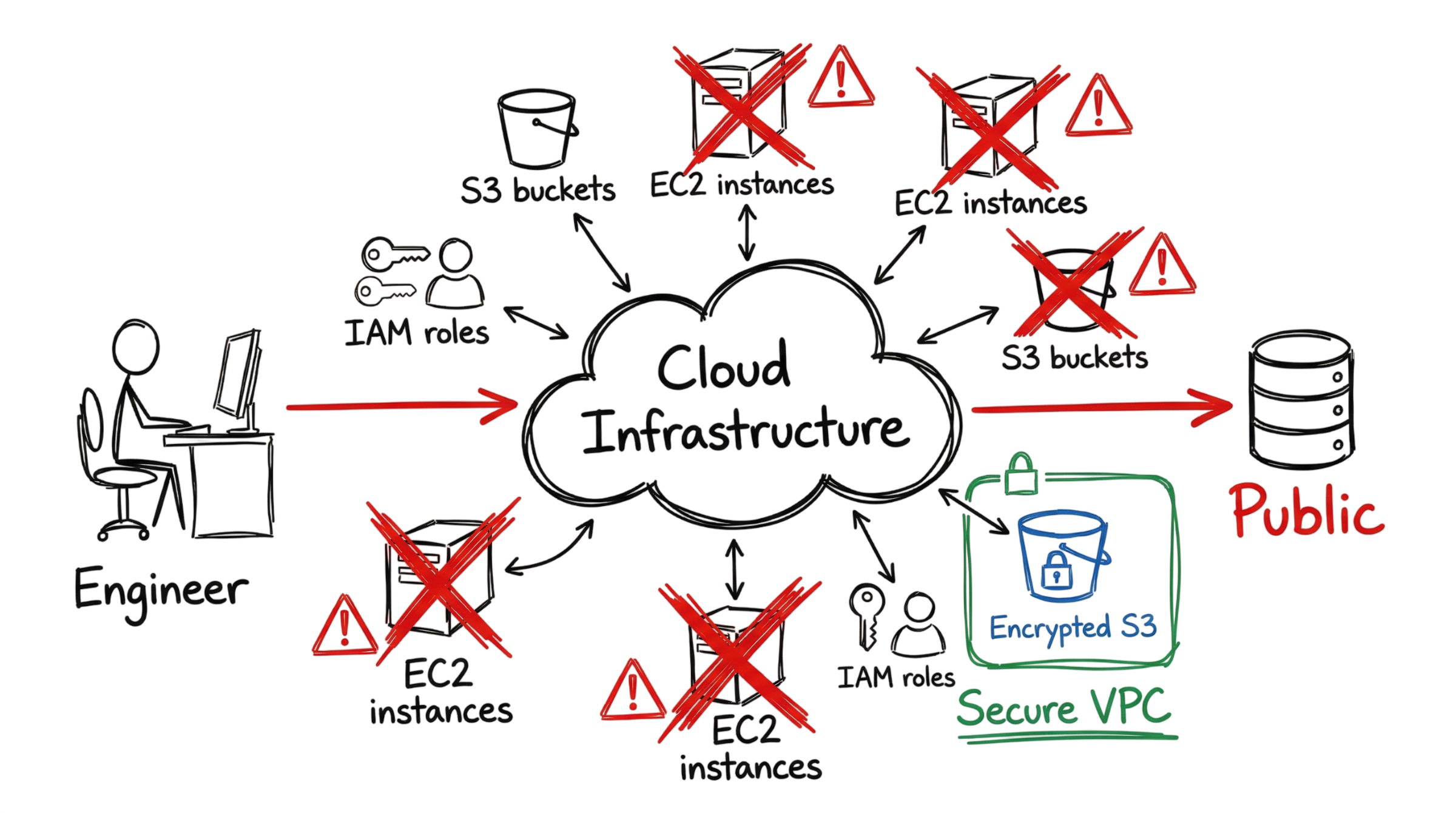
It is 2:00 AM, and the Splunk dashboard is already filled with high-severity alerts. A critical notification from AWS CloudTrail appears, and this time it is not a false positive.
A Jenkins service account identified as AROA123456789:jenkins-worker has executed a PutBucketPolicy command against a production storage bucket named prod-customer-data-2026.
The CloudTrail logs reveal exactly what happened. The bucket policy was changed to Allow with a Principal value of “*”, making sensitive customer data publicly accessible over the internet. Within seconds, confidential information could be exposed if the change is not immediately reversed.
This is a classic example of Cloud Misconfiguration. In many organizations, these incidents occur because service accounts have excessive permissions, Identity and Access Management (IAM) policies are poorly configured, or an automated CI/CD deployment unintentionally modifies security settings.
In this case, the Jenkins worker had enough privileges to overwrite the bucket’s security policy without additional approval. A single configuration mistake placed an entire production environment at risk. Incidents like this clearly demonstrate why preventing Cloud Security Misconfiguration should be a top priority for every organization using cloud services.
What Is Cloud Misconfiguration?
A Cloud Misconfiguration occurs when cloud resources, security controls, or infrastructure settings are configured in a way that exposes systems, applications, or sensitive data to unauthorized access. These errors are among the leading causes of cloud security incidents because they are usually introduced during deployment, maintenance, or infrastructure changes rather than through software vulnerabilities.
Most Cloud Misconfiguration issues happen because engineers prioritize speed over security. During troubleshooting, administrators may temporarily expose storage buckets, disable encryption, open firewall ports, or grant excessive IAM permissions to keep applications running. Unfortunately, these temporary changes are often forgotten and later become serious security weaknesses.
It is important to understand that a Cloud Misconfiguration is not a failure of the cloud provider. Instead, it represents a customer-side configuration error under the Shared Responsibility Model. Cloud providers such as AWS, Microsoft Azure, and Google Cloud are responsible for securing the cloud infrastructure, while customers remain responsible for securing their identities, applications, storage, networks, and configuration settings.
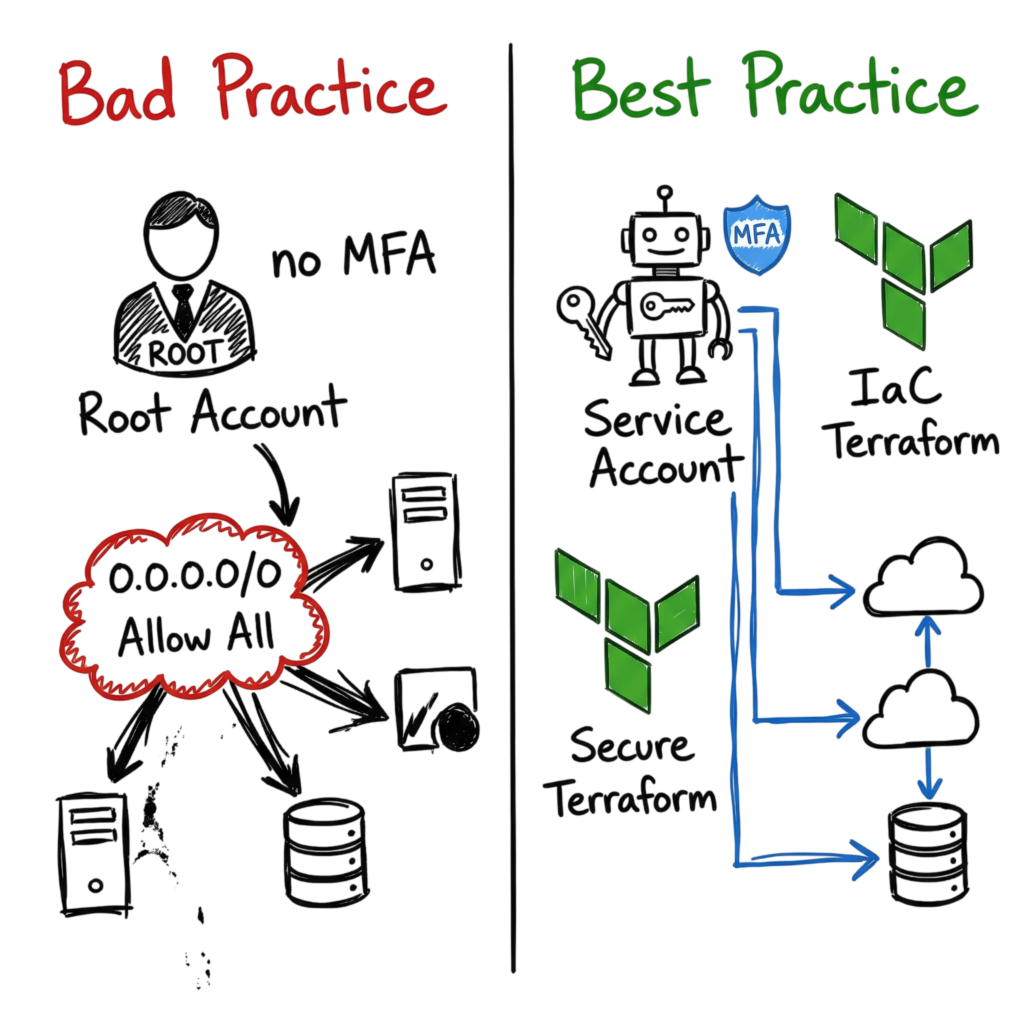
Following Cloud Misconfiguration Best Practices helps organizations reduce unnecessary exposure by implementing least-privilege access, secure default configurations, continuous monitoring, automated compliance checks, and Infrastructure as Code (IaC) validation before deployments reach production.
Industry guidance, including NIST SP 800-210, emphasizes that organizations must actively secure their cloud environments regardless of whether they use Infrastructure as a Service (IaaS), Platform as a Service (PaaS), or Software as a Service (SaaS). Ignoring these responsibilities significantly increases Cloud Security Risks, including unauthorized data exposure, privilege escalation, ransomware attacks, compliance violations, and costly data breaches..
How Cloud Misconfiguration Works
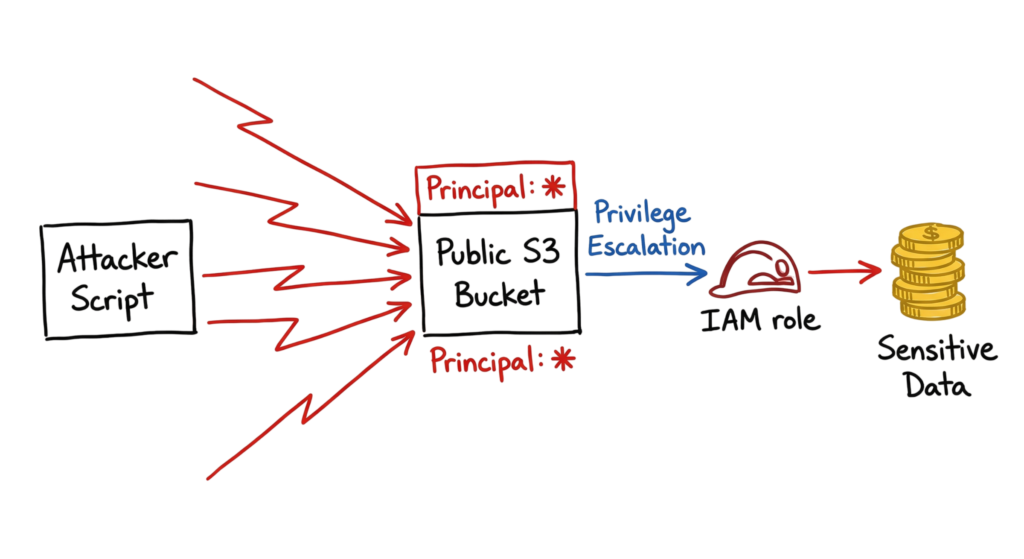
Many people assume every cloud breach begins with a sophisticated hacking technique. In reality, many attacks start with a simple Cloud Misconfiguration that unintentionally exposes resources to the internet.
Cybercriminals use automated scanning tools that continuously search cloud environments for common Cloud Security Misconfiguration issues. These tools look for publicly accessible Amazon S3 buckets, exposed Azure Blob Storage containers, unsecured Elasticsearch clusters, Kubernetes dashboards, open management ports, or cloud services that lack proper authentication.
Once a Cloud Misconfiguration is discovered, attackers move quickly to exploit it. Their first objective is usually to identify sensitive information such as hardcoded API keys, access tokens, configuration files, environment variables, or service accounts with excessive Identity and Access Management (IAM) permissions.
With elevated privileges, attackers can quietly move through the cloud environment, access additional workloads, modify security policies, create new accounts, or steal sensitive data. Because these actions often use legitimate cloud credentials, traditional security controls may not immediately detect the activity.
The ultimate goal is lateral movement and privilege escalation. A single Cloud Misconfiguration can expose customer databases, backup storage, virtual machines, Kubernetes clusters, or even provide attackers with enough access to deploy ransomware across the environment. These are some of the most serious Cloud Security Risks organizations face in modern cloud environments.
The Jenkins service account from our earlier example illustrates this perfectly. Because it had excessive permissions, it was able to overwrite security settings on a production storage bucket without additional approval. A similar Cloud Misconfiguration affecting an IAM role, storage account, or CI/CD pipeline could expose an organization’s entire cloud infrastructure within minutes.
Technical Flow and Architecture
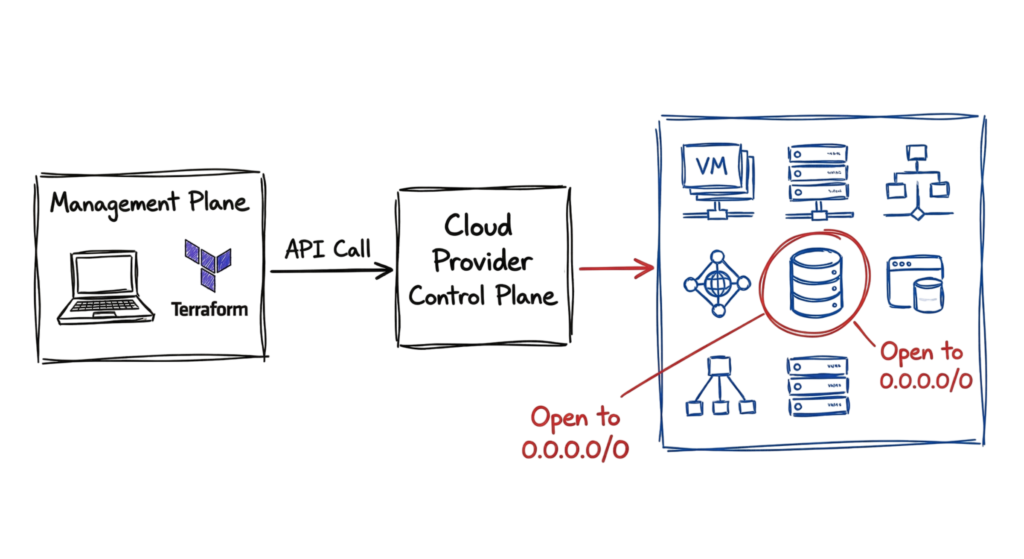
Most Cloud Misconfiguration incidents begin in the cloud management plane, where administrators and developers create or modify cloud resources. Whether you deploy infrastructure using Terraform, AWS CloudFormation, Azure Resource Manager (ARM) templates, or directly through the AWS, Azure, or Google Cloud consoles, every configuration change is sent to the cloud provider through secure APIs.
If an Infrastructure as Code (IaC) template contains a mistake, that Cloud Misconfiguration is automatically deployed into the production environment. Automation makes deployments faster, but it also means configuration errors can spread across hundreds of cloud resources within minutes.
A common example is a developer temporarily changing a database security group to allow inbound traffic from 0.0.0.0/0 while troubleshooting a connectivity issue. The change solves the immediate problem, but if it is never removed, the database becomes accessible from anywhere on the internet. Attackers continuously scan cloud environments for these exposed services and can quickly launch brute-force attacks or attempt to exploit known vulnerabilities.
This is one of the most common Cloud Security Misconfiguration scenarios seen in AWS, Microsoft Azure, and Google Cloud environments. Similar mistakes include publicly accessible storage buckets, unrestricted IAM roles, exposed Kubernetes dashboards, disabled encryption, and overly permissive network security groups.
To reduce these Cloud Security Risks, organizations should deploy Cloud Security Posture Management (CSPM) solutions that continuously monitor cloud environments for insecure configurations. CSPM platforms automatically compare deployed resources against security policies, compliance frameworks, and industry standards, then generate alerts or automatically remediate risky configurations before attackers can exploit them.
One of the most effective Cloud Misconfiguration Best Practices is integrating security directly into the CI/CD pipeline. Infrastructure as Code templates should be scanned before deployment using automated security tools, ensuring insecure configurations are detected and corrected before reaching production. Combining IaC scanning, CSPM, least-privilege access, and continuous monitoring helps organizations significantly reduce the risk of cloud configuration errors becoming major security incidents.
Key Components
Several parts of your cloud setup create Cloud Misconfiguration risk. Identity and Access Management is where I see the most errors. Giving service accounts a role with the AdministratorAccess policy is a huge risk. Your VPCs and Security Groups are your perimeter. If those are open, your internal servers are visible.
This is where most people get confused. You have to worry about your storage services too. If you do not turn on encryption or if you grant public access to S3, your data is wide open. You also need logging services like CloudWatch or Azure Monitor. If you turn these off, you will have no way to see how an attacker got in.
Real-World Example
We saw a major case of this with Toyota in 2023. A bad cloud setup exposed car location data for over two million people. That data was accessible for almost ten years. This happened because their teams did not have continuous monitoring to check for public servers. Capital One is another case you should study.
An attacker used a Server Side Request Forgery attack to exploit a bad Web Application Firewall config. That WAF had an IAM role with too many permissions. We had a client running Palo Alto NGFWs alongside Zscaler ZIA, and their split-tunnel config was sending DNS queries outside the tunnel, making their internal cloud addresses visible. This led to a Cloud Misconfiguration risk that was entirely preventable.
Practical Implementation
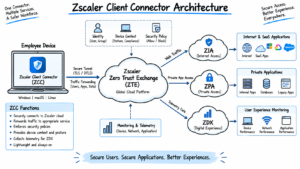
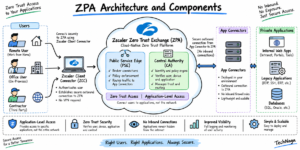
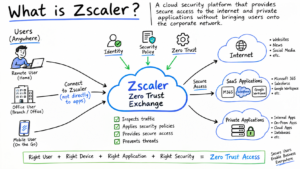
To stop these errors, you need automated policies. You can set up a check using Zscaler Private Access to make sure only your team can reach your management consoles.
Open the Zscaler ZPA admin dashboard and go to the Application Segments tab.
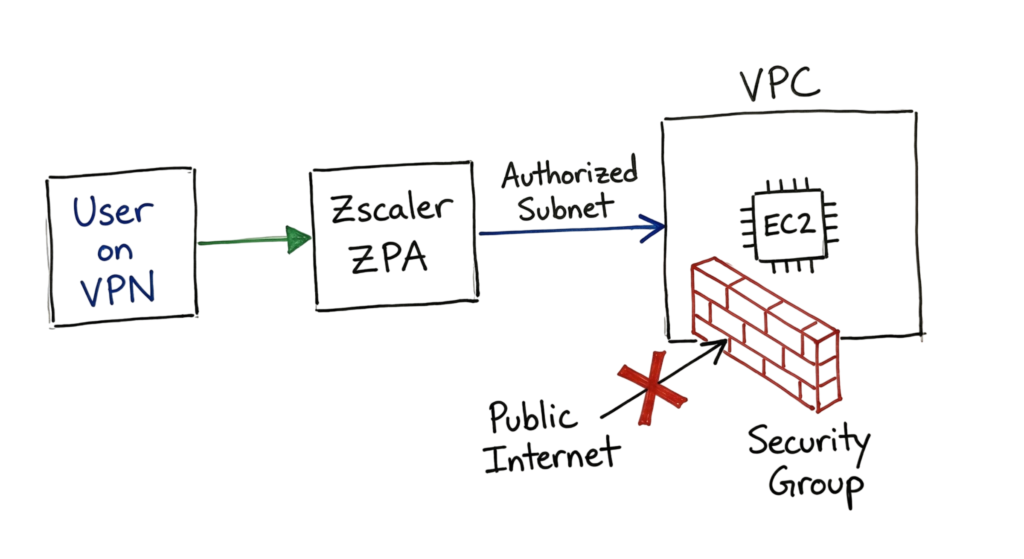
- Create a new Application Segment using the IP address of either your AWS management console or Azure management console and add the required ports such as port 443 and set network type to Internal.
- Go to Access Policies, click New and select Require MFA & Device Posture Check as conditions for allowing access.
- Add a condition where you will target a specific group of users such as Cloud-Engineers and allow access for the group.
- Check if the policy is working properly by attempting to connect to the console from an unauthorized device; the client should block your access.
Advantages and Limitations
You can provision resources within seconds using cloud computing. This allows businesses to scale quickly.
However, this speed also increases the risk of a Cloud Misconfiguration.
A single click can remove a security control without you realizing it.
Tools like Prisma Cloud or Wiz provide strong visibility, but they often generate too many alerts.
In real environments, engineers start ignoring these alerts over time.
This is where problems grow. A missed alert linked to a Cloud Misconfiguration can turn into a serious incident.
I once spent six hours tracking a rogue Jenkins script. It was using an administrative key from a former employee who had left two years earlier.
Common Mistakes
There are several frequent errors that lead to a high Cloud Misconfiguration risk.
- Insecure Inbound Ports: Allowing traffic into Security Group from 0.0.0.0/0 on ports like 22 and 3389 results in rapid security breaches.
- Overly Privileged IAM Roles: Granting S3:* permission to an IAM user which requires only read access to a single file goes against the principle of least privilege.
- Inadequate Storage Security: The lack of server-side encryption leads to plaintext access to all data at rest if someone gains access to the underlying physical and/or logical storage.
- Root Account without MFA: If an attacker takes over the root account of an AWS customer without using MFA, he can do anything within his company’s AWS infrastructure.
- CloudTrail/VPC Flow Logs Disabled: Disabling logging via CloudTrail and VPC Flow Logs saves some cost at the expense of being unable to investigate a potential breach.
- Sensitive Data in Repository: Saving AWS Access Key IDs, DB access credentials, or any other sensitive data in a public repository such as GitHub enables anyone with access to read them.
- Making Snapshots Public: While engineers make snapshots of RDS databases and EBS volumes public intentionally for tests, it still causes a risk of security leaks.
- Insufficient WAF Configuration: Configuring a web application firewall but not setting up particular protection rules against SQL injection and SSRF vulnerabilities leaves apps unprotected.
- Leftover Resources in Development Environment: Old and outdated VMs left unpatched in a separate developer VPC serve as a quick way into the company’s infrastructure.
- Default Login Credentials: Launching a marketplace image of a database software or a program and forgetting to change the admin credentials.
Best Practices
To maintain a secure environment, you should adopt a proactive stance. For more on Zero Trust, see our IAM guide. Follow these core principles to reduce your attack surface:
- Deploy infrastructure using Infrastructure as Code to ensure all configurations get reviewed prior to deployment.
- Create automated fixes for repetitive mistakes, like scripts that automatically terminate S3 buckets identified as public.
- Introduce Cloud Security Posture Management to give you one dashboard to identify risks within multi-cloud environments.
- Require Multi-Factor Authentication for every user account with no exceptions.
- Conduct routine checks of permissions to terminate redundant IAM roles and limit others.
Troubleshooting Scenario
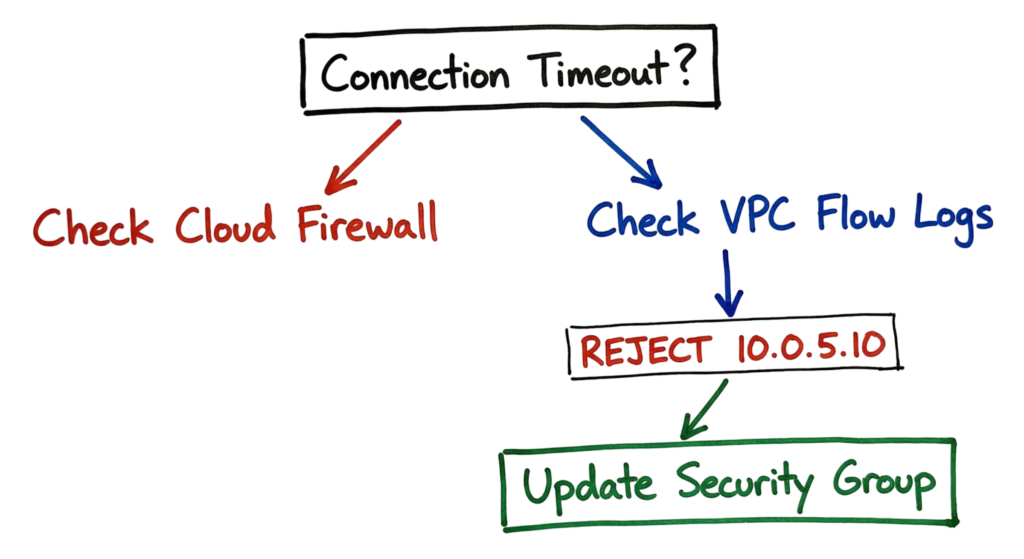
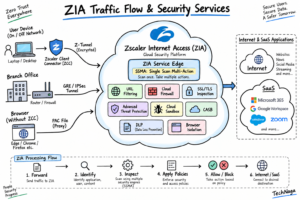
You get a ticket saying a developer cannot reach a new API on an EC2 instance. They are on the VPN, but the connection times out. You check the Zscaler ZIA logs and see the firewall is allowing the traffic. Next, you check the VPC Flow Logs in your SIEM with this query: source_ip=”10.0.1.25″ dest_ip=”10.0.5.10″ dest_port=”8080″.
The log shows REJECT for every packet. You look at the Security Group for that API and see it only allows traffic from 10.0.1.0/24. But the Zscaler Private Access connector uses a different subnet. By adding that ZPA subnet to your Security Group, you fix the connection. You did this without opening the port to the public web.
Interview Questions
Q: What is the most common cause of cloud data breaches?
A: Customer misconfiguration is the leading cause. This includes issues like open storage buckets, weak IAM policies, and exposed management ports.
Q: How does the Shared Responsibility Model apply to security groups?
A: The cloud provider ensures the firewall software works. The customer is responsible for writing the specific rules that allow or deny traffic.
Q: Explain the risk of an overly permissive IAM role.
A: If a service is hacked, the attacker gets those permissions. If a web server can delete databases, the attacker can delete them too.
Q: What is CSPM?
A: Cloud Security Posture Management tools monitor your cloud for configuration errors and compliance issues.
Q: How can you find a leaked secret in a cloud environment?
A: You use tools like Trufflehog to scan your code for things that look like API keys or certificates.
Future Trends (2026)
By 2026, Cloud Misconfiguration management will become increasingly automated as organizations rely on artificial intelligence to deploy, monitor, and optimize cloud infrastructure. AI-powered agents will be capable of provisioning virtual machines, configuring storage, updating security groups, rotating credentials, and managing cloud resources with minimal human intervention.
While this automation improves efficiency, it also introduces new Cloud Security Risks. A single incorrect decision made by an AI agent can propagate a Cloud Security Misconfiguration across hundreds of cloud resources within seconds. For example, an AI-driven deployment tool could accidentally assign excessive IAM permissions, expose a storage bucket to the public internet, or modify firewall rules that leave critical workloads accessible from anywhere.
To address these challenges, the cybersecurity industry is moving toward Agentic Security, where intelligent security platforms do more than generate alerts. These systems analyze security events, identify the root cause of a Cloud Misconfiguration, assess business impact, and automatically apply remediation actions without waiting for manual intervention. Instead of taking hours to investigate and fix configuration errors, remediation can occur in seconds or even milliseconds.
Another growing trend is the wider adoption of Cloud Security Posture Management (CSPM) and Cloud Native Application Protection Platforms (CNAPP). These platforms continuously monitor cloud environments, compare configurations against security policies and compliance frameworks, detect risky changes, and automatically recommend or apply corrections before attackers can exploit them. Implementing these technologies is becoming one of the most effective Cloud Misconfiguration Best Practices for large cloud environments.
Organizations are also integrating security directly into their DevSecOps pipelines. Infrastructure as Code (IaC) templates, Kubernetes manifests, and Terraform configurations are automatically scanned before deployment to detect insecure settings early in the software development lifecycle. This proactive approach significantly reduces Cloud Security Misconfiguration issues before they ever reach production.
As cloud environments continue to expand, the role of security professionals will also evolve. Instead of manually reviewing firewall rules or configuration files, cloud security engineers will increasingly focus on governing AI-driven automation, validating security policies, reviewing automated remediation actions, and ensuring compliance across multi-cloud environments. Understanding Cloud Misconfiguration, adopting modern Cloud Misconfiguration Best Practices, and continuously monitoring Cloud Security Risks will remain essential skills for protecting cloud infrastructure in 2026 and beyond.
FAQ
Can a cloud provider fix my misconfigurations?
No. They give you tools to find errors, but they will not change your settings. They do not know your specific needs.
Is an open S3 bucket always a breach?
Not always. Some buckets must be public to host website images. But if the bucket has private customer data, it is a serious incident.
How often should I audit my cloud permissions?
Use tools to audit them in real time. You should also do a manual review every three months to catch things the tools miss.
Does using a VPN protect me from cloud misconfigurations?
A VPN only secures the path to the cloud. If your database is set to public, an attacker can skip your VPN and go straight to the data.
What is the difference between CSPM and CWPP?
CSPM looks at your cloud settings and control plane. CWPP secures the actual applications and operating systems running on your servers.
Conclusion
A Cloud Misconfiguration remains one of the leading causes of cloud data breaches in modern organizations. Most cloud incidents do not happen because attackers discover sophisticated zero-day vulnerabilities. Instead, they succeed because storage buckets are left public, Identity and Access Management (IAM) permissions are overly permissive, security groups expose critical services, or sensitive credentials are accidentally published. Understanding how these mistakes occur is the first step toward preventing them.
Following proven Cloud Misconfiguration Best Practices significantly reduces the likelihood of security incidents. Apply the principle of least privilege to every IAM role, disable unnecessary public access, encrypt sensitive data, review network security rules regularly, and continuously scan your cloud environment for insecure configurations. Automating security checks through Infrastructure as Code (IaC) scanning, Cloud Security Posture Management (CSPM), and continuous compliance monitoring helps identify risks before they reach production.
Organizations should also recognize that Cloud Security Misconfiguration is an ongoing operational challenge rather than a one-time setup task. Cloud environments change every day as developers deploy new applications, create resources, and update infrastructure. Continuous monitoring, regular configuration reviews, automated remediation, and security audits are essential for maintaining a strong security posture.
As cloud adoption continues to grow, so do Cloud Security Risks. AI-driven automation, serverless computing, containers, Kubernetes, and multi-cloud environments introduce new opportunities as well as new attack surfaces. Security teams must continuously improve their visibility, validate cloud configurations, monitor activity logs, and respond quickly to suspicious changes.
Cloud security is a shared responsibility between the cloud provider and the customer. The provider secures the underlying infrastructure, but you are responsible for protecting your identities, applications, configurations, and data. By understanding Cloud Misconfiguration, adopting modern Cloud Misconfiguration Best Practices, and proactively reducing Cloud Security Risks, you can build a resilient cloud environment that protects your business against today’s evolving cyber threats and tomorrow’s challenges.
Related Articles
- What Is Cybersecurity and Why It Is Important Today
https://technaga.com/what-is-cybersecurity-and-why-it-is-important-today/ - Cloud Security Basics 2026: Complete Beginner Guide
https://technaga.com/cloud-security-basics-2026/ - Identity and Access Management (IAM): Complete Guide 2026
https://technaga.com/identity-and-access-management-cloud-security-2026/ - API Security Explained: Best Practices, Risks, and Authentication (2026)
https://technaga.com/api-security-best-practices-2026/ - Zero Trust Security: Complete Implementation Guide 2026
https://technaga.com/zero-trust-security-2026-guide/ - Multi-Factor Authentication (MFA): Complete Guide 2026
https://technaga.com/multi-factor-authentication-mfa-guide-2026/ - Initial Access in Cybersecurity: Top Attack Vectors You Must Know
https://technaga.com/initial-access-cybersecurity-attack-vectors-2026/ - Top 10 Cybersecurity Best Practices for 2026
https://technaga.com/top-10-cybersecurity-best-practices-2026/ - Network Segmentation: Best Practices to Stop Lateral Movement
https://technaga.com/network-segmentation-best-practices-2026/ - Security Information and Event Management (SIEM): Complete Guide 2026
https://technaga.com/security-information-and-event-management-siem-guide-2026/
External References
- NIST SP 800-210: General Access Control Guidance for Cloud Systems
https://csrc.nist.gov/pubs/sp/800/210/final - NIST Cybersecurity Framework (CSF 2.0)
https://www.nist.gov/cyberframework - AWS Security Best Practices
https://docs.aws.amazon.com/wellarchitected/latest/security-pillar/ - AWS IAM Best Practices
https://docs.aws.amazon.com/IAM/latest/UserGuide/best-practices.html - AWS Config Documentation
https://docs.aws.amazon.com/config/ - Microsoft Defender for Cloud Documentation
https://learn.microsoft.com/azure/defender-for-cloud/ - Microsoft Azure Security Benchmark
https://learn.microsoft.com/security/benchmark/azure/ - Google Cloud Security Foundations Guide
https://cloud.google.com/architecture/security-foundations - CIS Benchmarks
https://www.cisecurity.org/cis-benchmarks - OWASP Cloud Security Project
https://owasp.org/www-project-cloud-security/ - MITRE ATT&CK Framework
https://attack.mitre.org/ - HashiCorp Terraform Documentation
https://developer.hashicorp.com/terraform/docs - Cloud Security Alliance (CSA)
https://cloudsecurityalliance.org/
2 thoughts on “Cloud Misconfiguration: 10 Critical Errors Leading to Data Breaches in 2026”