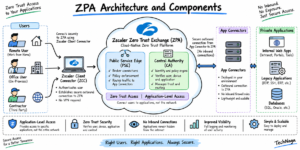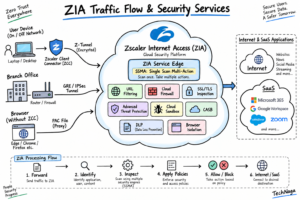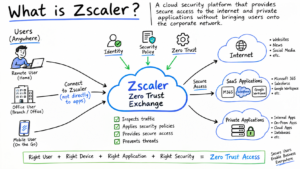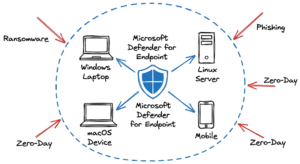
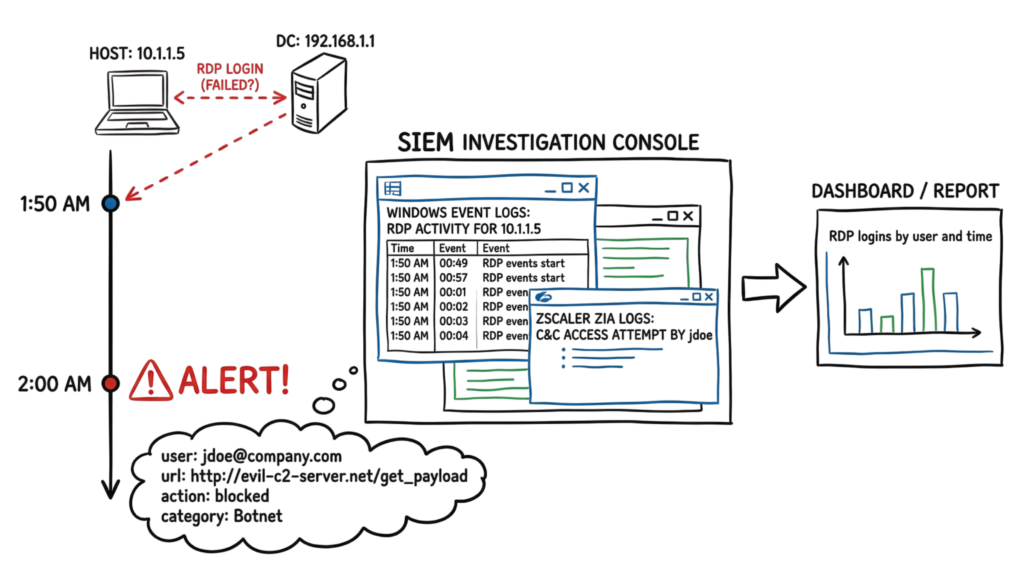
It is Tuesday at 2:00 AM, and you are sitting in the Security Operations Center (SOC) reviewing security alerts from hundreds of devices. Suddenly, a high-priority alert appears in Zscaler Internet Access (ZIA).
A user’s workstation has attempted to communicate with a known Command and Control (C2) server.
Incident Log
2026-05-12 02:00:05
ZIA_Web_Log
User: jdoe@company.com
URL: http://evil-c2-server.net/get_payload
Action: Blocked
Category: Botnet
The web request was successfully blocked, but the investigation has only just begun.
You immediately begin correlating security data from Microsoft Defender, Windows Event Logs, Active Directory, and Zscaler. A few minutes later, you discover that the same endpoint attempted an RDP connection to a domain controller shortly before contacting the malicious server.
This is exactly where Security Information and Event Management (SIEM) becomes indispensable.
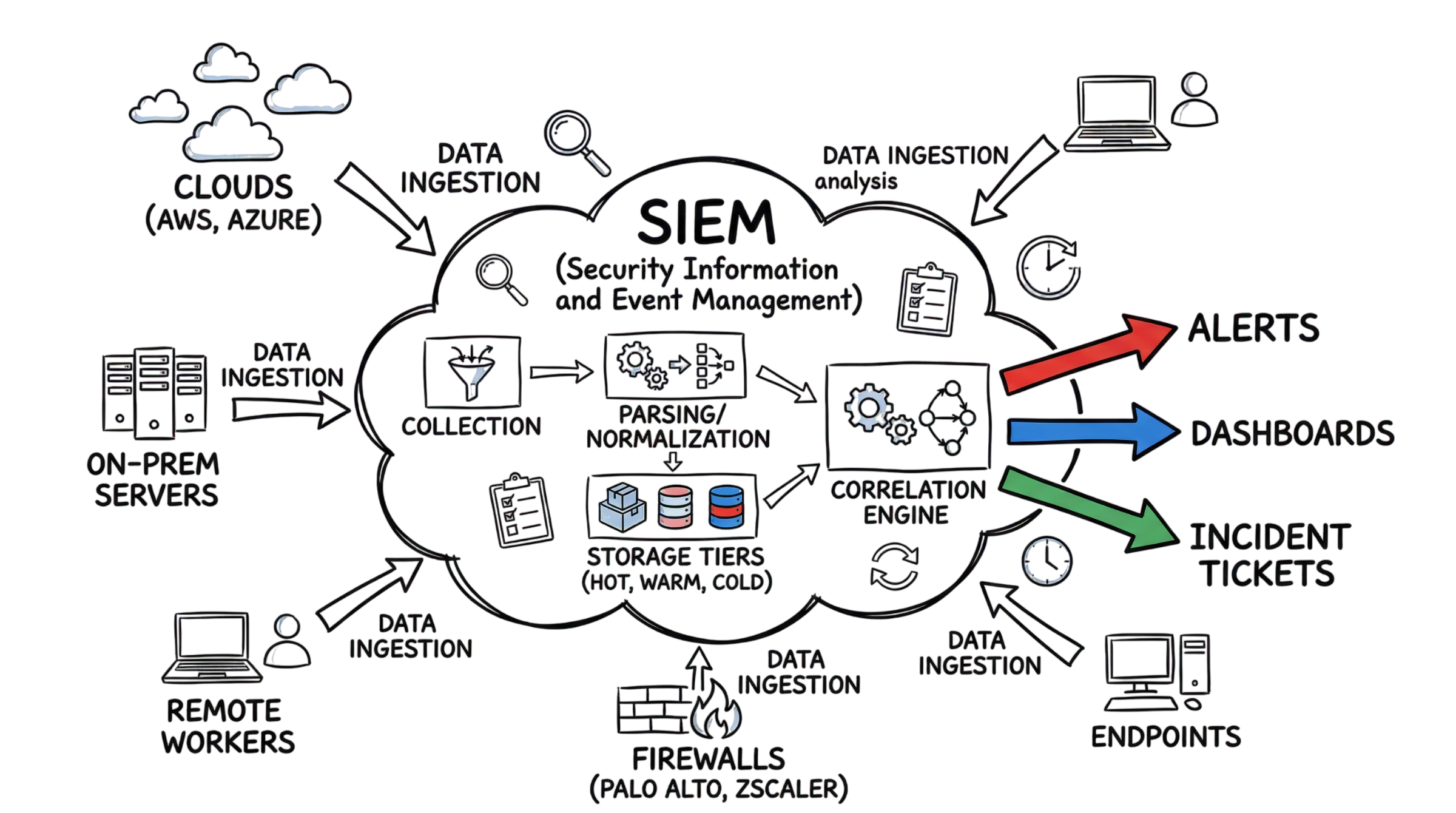
Modern Security Information and Event Management platforms collect, normalize, correlate, analyze, and store security events from every part of your infrastructure, giving security analysts a complete picture of an attack instead of isolated alerts.
In 2026, organizations generate billions of security events every day from cloud services, endpoints, firewalls, identity providers, SaaS applications, and remote users. Without centralized visibility, analysts must manually search multiple consoles during an incident, delaying response times and increasing the risk of missing critical indicators of compromise.
Understanding Security Information and Event Management is therefore essential for every SOC analyst, cloud security engineer, and cybersecurity professional responsible for detecting and responding to modern threats.
What Is Security Information and Event Management?
Security Information and Event Management (SIEM) is a centralized security platform that collects, stores, correlates, and analyzes security events from multiple systems in real time. It combines the capabilities of Security Information Management (SIM) and Security Event Management (SEM) into a single solution that provides continuous monitoring, threat detection, investigation, and compliance reporting.
Unlike traditional log management systems, Security Information and Event Management does far more than store logs. Modern SIEM Tools transform millions of raw events into meaningful security intelligence by applying correlation rules, threat intelligence feeds, behavioral analytics, and machine learning to identify suspicious activity.
For example, a firewall log may simply record an outbound HTTPS connection over port 443. Independently, this event appears harmless. However, a SIEM platform can correlate that connection with threat intelligence databases, determine that the destination IP belongs to a known ransomware command-and-control infrastructure, and immediately generate a high-priority alert for the Security Operations Center.
One of the biggest advantages of modern Security Information and Event Management platforms is their ability to centralize telemetry from diverse environments. A typical enterprise collects security events from:
- Zscaler ZIA and ZPA
- Palo Alto Networks firewalls
- Microsoft Defender for Endpoint
- Windows Event Logs
- Active Directory
- AWS CloudTrail
- Microsoft Azure Activity Logs
- Microsoft Entra ID
- VPN gateways
- Email security platforms
- Endpoint Detection and Response (EDR) solutions
- Identity and Access Management (IAM) systems
Instead of investigating each platform separately, Security Information and Event Management consolidates every authentication event, file access, network connection, privilege escalation, API request, and endpoint alert into a unified investigation timeline.
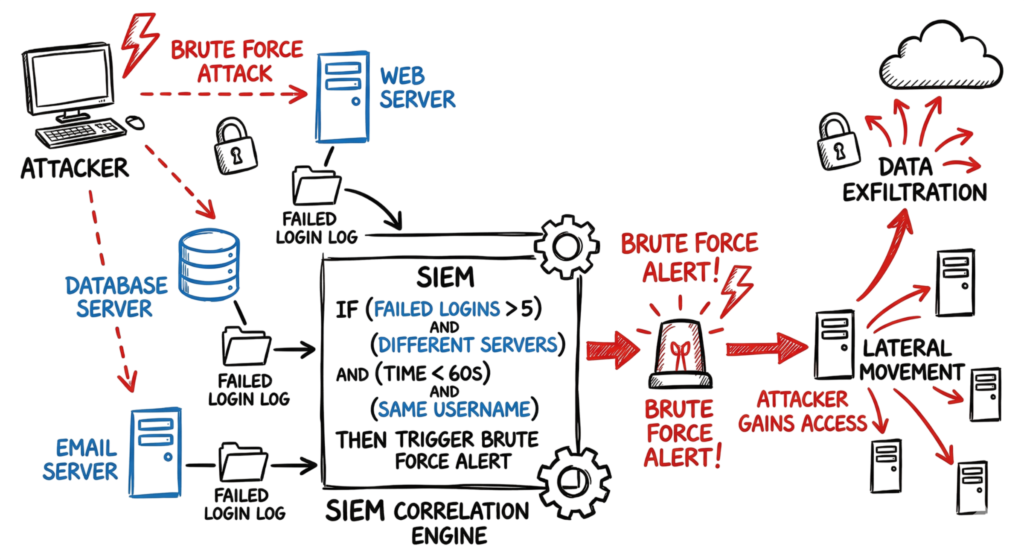
This centralized visibility represents one of the most valuable SIEM Use Cases, enabling analysts to identify attack patterns that individual security products cannot detect on their own. A single failed login, suspicious PowerShell execution, or outbound connection may appear harmless in isolation. When correlated across multiple security controls, however, these events often reveal credential theft, lateral movement, ransomware activity, or insider threats.
Following established SIEM Best Practices, organizations should continuously onboard new log sources, normalize event formats, fine-tune correlation rules, integrate threat intelligence feeds, and regularly review detection logic. These practices improve detection accuracy, reduce false positives, and help security teams investigate incidents much faster.
In today’s hybrid cloud environments, Security Information and Event Management has become the operational foundation of every modern Security Operations Center, providing the visibility, context, and intelligence required to detect sophisticated cyberattacks before they cause significant damage.
How it Works
We begin by gathering data. We may send our logs in a number of methods, such as through agents, syslog, or API requests. For instance, we can install Microsoft Monitoring Agent or Splunk Universal Forwarder on a Windows server. We will utilize UDP port 514 for syslog if it is a Cisco router. We proceed to the next stage of parsing once the data has been entered into the system.
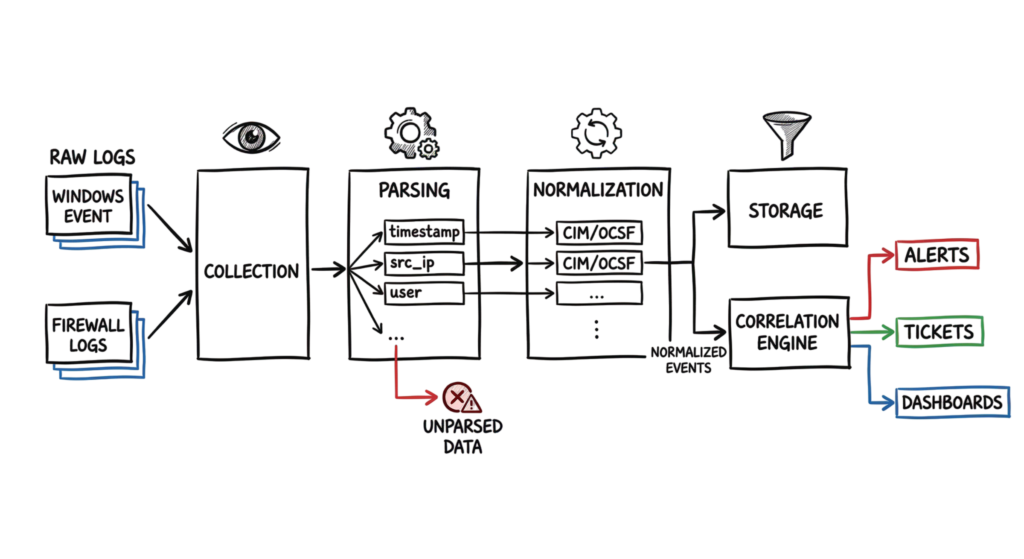
This is the stage that confuses many people. After parsing, the system has to normalize the data. Every vendor writes logs differently. One firewall calls a source IP src_ip, while another calls it source. The SIEM maps these to a common data model, like the CIM in Splunk or the OCSF standard. This means I can run one search and find activity across every device we own. Finally, the correlation engine looks for patterns. If it sees five failed logins followed by a success on the same account within a minute, it fires a brute force alert.
Technical Flow and Architecture
The architecture of a Security Information and Event Management system usually works in tiers. The first tier is the collection layer. These are collectors sitting at the edge of the network or inside cloud VPCs. They compress and encrypt the data before sending it off. This does not hold true in practical cases, however. We once had a customer who used Palo Alto NGFWs along with Zscaler ZIA. The split-tunneling setup that the client had implemented would make DNS requests go outside the tunnel, making it appear as though the SIEM logs were coming from the ISP and not the user’s host machine.
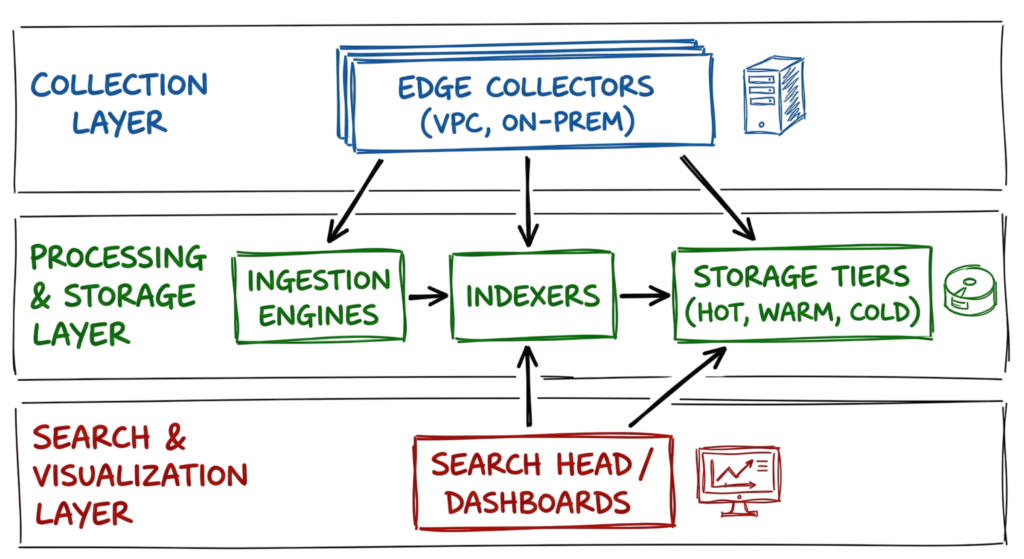
The second tier is for indexing and storage. The data gets written to disk and organized so we can search it fast. Systems in 2026 use hot, warm, and cold storage to keep costs down. We keep fresh logs in high-performance storage for active hunts and move older logs to cheaper storage for compliance. The top tier is the search and visualization layer. This is where we write queries in KQL or SPL to build our dashboards and track down threats.
Key Components
You need a few specific pieces to make a SIEM work. The ingestion engine is the heavy lifter. It has to handle multiple protocols and stay up during a massive spike in traffic. Then you have the correlation engine, which provides the actual intelligence. It compares every event against known attack patterns or a baseline of what is normal for your users.
You also need threat intelligence integration. By linking to services like CrowdStrike Falcon Intel or MISP, the system automatically flags bad files or IPs. Case management is another big one. When an alert triggers, the system should open a ticket in ServiceNow or Jira and attach all the relevant logs. This saves us from wasting time copying and pasting data between windows while a threat is active.
Real-World Example
Let’s look at how we catch a compromised account. I might see a successful VPN login from a country where we don’t have any staff. This triggers a “geographically improbable travel” alert. I check the SIEM and see the details: [ALERT: IMPOSSIBLE_TRAVEL] user: ssmith@company.com prev_login_ip: 12.34.56.78 (New York, US) curr_login_ip: 91.23.45.67 (Moscow, RU) time_delta: 15 minutes.
I then pivot to see what that user did next. The logs show the account hitting a sensitive file share on a local server. A Palo Alto NGFW log shows a huge data transfer to that Russian IP. The log looks like this: May 15 14:10:02 PA-5220 1,2026/05/15 14:10:02,0012345678,TRAFFIC,end,0,10.1.1.5,91.23.45.67,0.0.0.0,0.0.0.0,Allow_Data_Srv,ssmith,web-browsing,vsys1,trust,untrust,ethernet1/1,ethernet1/2,Log_All,2026/05/15 14:10:02,15600,1,443,443,0,0,0×400000,tcp,allow,5000000000,5000000000,0,50,2026/05/15 14:05:01,300,any,0,0,0,0,0,vsys1,New_York_DC,RU,0,25,25,0,0,0,0,,0,0,0,0,0,no-policy,no-policy,0,0,0,0. That 5GB transfer is a clear data exfiltration event. Without the SIEM connecting these dots, those logs would just be noise.
Practical Implementation
Setting up Security Information and Event Management takes a plan. If you just turn everything on, you will drown in useless data. For more on identity protection, see our IAM guide. Follow these steps to get a log source working right:
- Determine which of your network’s vital systems—such as domain controllers, firewalls, and database servers—need to be monitored.
- Find out how each source system collects data; if the approach depends on an agent working inside the OS, find out if the syslog protocol is used to send the data.
- To avoid wasting disk space on needless “Debug” logs, make sure the source system delivers only the essential log levels (“Informational” and higher).
- Verify that your SIEM system has properly swallowed the logs by looking via the interface and examining ingestion statistics.
- Apply or write a parser to ensure the fields like src_ip and user are being correctly identified and mapped to the common data model.
- Create a basic correlation rule, such as an alert for any login from a service account, to test the alerting pipeline.
Advantages and Limitations
One of the biggest advantages of Security Information and Event Management is its ability to correlate security events across multiple layers of the security infrastructure. Individually, each security solution provides only part of the story. A firewall monitors network traffic, an Endpoint Detection and Response (EDR) platform tracks endpoint activity, and an Identity and Access Management (IAM) system records user authentication and access events. Security Information and Event Management brings all of these data sources together into a single platform, allowing security analysts to identify attack patterns that would otherwise go unnoticed.
This centralized visibility is one of the most valuable SIEM Use Cases because it enables analysts to detect sophisticated attacks such as credential theft, lateral movement, insider threats, and ransomware before they spread across the environment. In addition to improving threat detection, SIEM platforms simplify compliance by securely storing security logs for audits and regulatory requirements such as ISO 27001, PCI DSS, HIPAA, and SOC 2.
However, Security Information and Event Management also comes with operational challenges. The biggest concern for many organizations is log storage cost. Most SIEM Tools charge based on the amount of data ingested or retained. Large enterprises can generate terabytes of logs every day, making storage and licensing costs increase rapidly if log sources are not properly managed.
Another limitation is visibility. A SIEM platform can only analyze the data it receives. If a critical server, firewall, cloud service, or endpoint is not forwarding logs, the SIEM has no visibility into that system. Missing log sources create security blind spots that attackers can exploit.
From my experience, security teams should also avoid assuming that a “Blocked” event automatically means there is no risk. I have investigated incidents where Zscaler successfully blocked malicious outbound traffic, but forensic analysis showed that the malware had already communicated with its command-and-control server before the latest threat signature was available. This highlights why SIEM Best Practices include continuous monitoring, threat hunting, and validating alerts instead of relying solely on automated detections
Common Mistakes
One of the most common mistakes organizations make when deploying Security Information and Event Management is trying to ingest every available log source on the first day. While collecting more data may seem beneficial, it often creates a data swamp where millions of routine system events hide the security incidents that actually matter.
Instead, follow SIEM Best Practices by prioritizing log sources that directly support threat detection and incident response. Focus first on high-value data such as authentication logs, endpoint telemetry, firewall events, cloud activity logs, and privileged account activity. Mapping detection rules to the MITRE ATT&CK framework also helps ensure that every log source contributes to detecting real attacker techniques instead of simply consuming storage.
Another critical issue is poor data quality. Even the most advanced SIEM Tools cannot produce accurate alerts if the incoming data is incomplete or incorrectly parsed. Missing usernames, incorrect timestamps, absent IP addresses, or failed log normalization can prevent correlation rules from identifying suspicious activity. Regularly validate parsers, normalize log formats, and verify that important security fields are being collected correctly.
Organizations also frequently overlook the importance of keeping threat intelligence up to date. Attackers continuously rotate command-and-control servers, phishing domains, malicious IP addresses, and malware indicators. If your Security Information and Event Management platform relies on outdated threat intelligence feeds, it may fail to detect the latest ransomware campaigns or emerging threats. Integrating trusted, continuously updated threat intelligence feeds is one of the most effective SIEM Best Practices for improving detection accuracy.
Best Practices
You have to treat your monitoring system like a product that needs constant care. Use this checklist for your daily tasks:
- Review and tune top-firing alerts weekly to reduce false positives.
- Validate log ingestion from all critical assets every 24 hours.
- Update threat intelligence feeds and detection rules regularly.
- Conduct quarterly tabletop exercises to ensure analysts know how to respond to SIEM alerts.
- Archive logs older than 90 days to cold storage to manage costs.
Troubleshooting Scenario
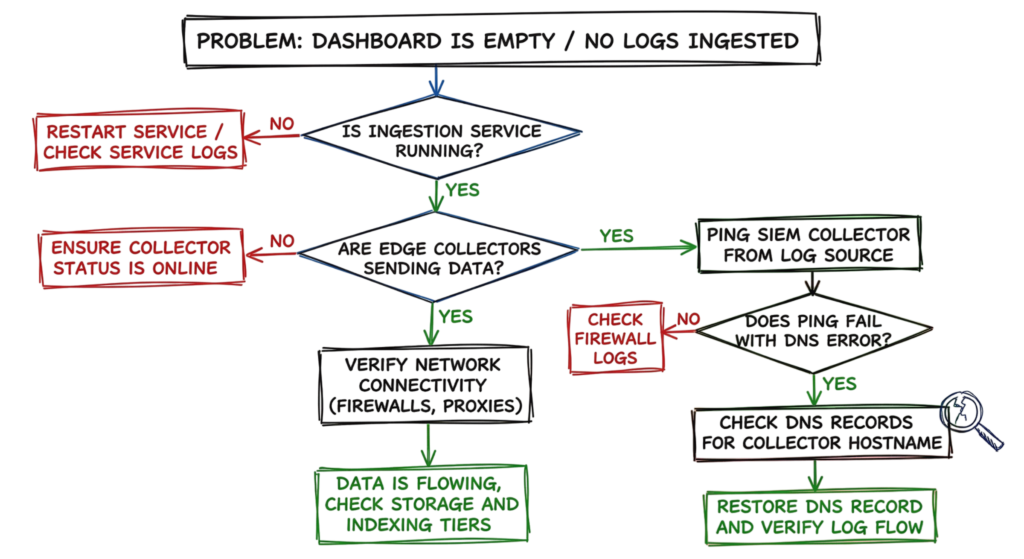
I once checked a dashboard and saw that the “Failed Login” count was zero for the last two days. For a company with 5,000 people, that is impossible. I started by checking the Windows Event Log connector. The service was running, but no new data was hitting the index.
I logged into a domain controller and tried to ping the collector. I ran a test command and saw a DNS error: nslookup siem-collector.internal came back with NXDOMAIN. This was a DNS issue, not a SIEM failure. A recent change to a zone file had accidentally deleted the record for our collector. Once I put the record back, the logs started flowing. I then checked the search console to make sure the system was catching up on the backlog of events.
Interview Questions
1. What is the difference between Security Information and Event Management and a Log Management tool?
Answer: Traditional log management focuses primarily on collecting, storing, and searching logs for troubleshooting and compliance. Security Information and Event Management goes much further by correlating events from multiple security devices, applying detection rules, integrating threat intelligence, and generating real-time alerts. This makes Security Information and Event Management one of the most important security platforms in a modern Security Operations Center (SOC).
2. How do you handle a log source that sends data in an unsupported format?
Answer: One of the most important SIEM Best Practices is ensuring data quality. I create a custom parser using Regular Expressions (Regex) or vendor-supported parsing methods to extract important fields such as timestamps, usernames, IP addresses, event IDs, and hostnames. After parsing, I normalize the data according to the SIEM’s Common Information Model (CIM) so correlation rules can analyze it correctly.
3. Why is time synchronization important in Security Information and Event Management?
Answer: Accurate timestamps are critical for Security Information and Event Management because correlation engines rely on event chronology. If systems are not synchronized through Network Time Protocol (NTP), attack timelines become inaccurate, making it difficult to detect lateral movement, privilege escalation, or multi-stage attacks. Maintaining synchronized clocks is one of the fundamental SIEM Best Practices.
4. How would you reduce SIEM costs without losing visibility?
Answer: I would first identify noisy and low-value events before they reach expensive storage. Using observability pipelines or log filtering, routine events such as health checks or repetitive network pings can be excluded while retaining critical security logs. Modern SIEM Tools also support data tiering, allowing frequently accessed logs to remain in hot storage while older logs are archived in lower-cost storage.
5. How do you identify a false positive alert?
Answer: I verify whether the activity matches authorized business operations. For example, scheduled maintenance jobs, vulnerability scanners, backup software, or approved service accounts can generate alerts that appear suspicious. Correlating multiple log sources within Security Information and Event Management helps analysts distinguish legitimate administrative activity from actual threats.
6. How does the MITRE ATT&CK Framework help SIEM engineering?
Answer: The MITRE ATT&CK Framework provides a structured approach for building detection rules. One of the most valuable SIEM Use Cases is mapping correlation rules to ATT&CK techniques to identify detection gaps, improve threat coverage, and prioritize log sources that provide the highest security value.
Future Trends (2026)
The future of Security Information and Event Management is becoming increasingly AI-driven. Modern platforms now allow analysts to search logs using natural language instead of writing complex query syntax. Security analysts can simply ask questions such as:
“Show every user who accessed the finance share from an unmanaged device last night.”
Generative AI automatically converts the request into search queries, analyzes the results, and produces an investigation summary within seconds. These AI capabilities are becoming standard features across leading SIEM Tools, significantly reducing investigation time.
Another major trend is Federated Search. Instead of copying every log into expensive centralized storage, organizations leave logs in cloud storage services such as Amazon S3, Azure Data Lake, or Google Cloud Storage. The Security Information and Event Management platform searches the data where it already exists, reducing ingestion costs while maintaining full visibility.
We are also seeing the rise of the Agentic SOC, where AI agents automatically perform initial alert triage, enrich incidents with threat intelligence, gather forensic evidence, and recommend remediation actions. Human analysts then focus only on high-confidence incidents requiring investigation. These innovations are quickly becoming SIEM Best Practices for organizations managing large-scale security operations.
Frequently Asked Questions (FAQ)
How long should security logs be retained?
Most organizations retain logs for approximately 90 days in hot storage and one year or longer in cold storage. Compliance requirements such as PCI DSS, HIPAA, or ISO 27001 may require longer retention periods depending on regulatory requirements.
Does Security Information and Event Management replace a firewall?
No. A firewall blocks or allows network traffic, while Security Information and Event Management collects and analyzes logs from firewalls, endpoints, cloud platforms, and identity systems to identify attack patterns that individual devices cannot detect alone.
Can a SIEM be deployed on-premises?
Yes. Many organizations still deploy SIEM Tools on-premises, although cloud-native deployments are becoming more common because they offer better scalability, easier maintenance, and simplified upgrades.
Which log source should be onboarded first?
Authentication logs from Active Directory, Microsoft Entra ID, Okta, or another Identity Provider should usually be the highest priority because most cyberattacks involve compromised user credentials.
How many people are required to manage a SIEM?
The answer depends on the organization’s size and security maturity. A medium-sized Security Operations Center typically requires one SIEM engineer for platform administration and two to three analysts providing continuous monitoring and incident response.
What does EPS mean in SIEM?
Events Per Second (EPS) measures the volume of security events entering the platform. Many SIEM Tools use EPS or data ingestion volume when calculating licensing costs and platform capacity.
Are open-source SIEM platforms suitable for enterprises?
Open-source platforms such as the ELK Stack, Wazuh, or Graylog provide powerful capabilities but require significant engineering effort for deployment, maintenance, parser development, and correlation rule tuning. Commercial SIEM Tools often reduce operational overhead by providing built-in integrations, threat intelligence, and vendor support.
Conclusion
Security Information and Event Management has become one of the most important technologies for modern cybersecurity operations. As organizations adopt hybrid cloud environments, remote work, and Zero Trust architectures, centralized visibility across endpoints, networks, cloud platforms, and identity systems is essential for detecting sophisticated cyber threats.
Successful deployments require more than simply collecting logs. Following SIEM Best Practices means prioritizing high-value log sources, maintaining accurate data, continuously tuning correlation rules, integrating threat intelligence, and regularly reviewing detection coverage against frameworks such as MITRE ATT&CK and NIST. Modern SIEM Tools transform millions of security events into actionable intelligence, enabling analysts to detect ransomware, insider threats, credential theft, and advanced persistent threats much faster.
Whether you are investigating a blocked Zscaler connection, suspicious cloud activity, or abnormal user behavior, Security Information and Event Management provides the centralized visibility needed to connect isolated events into a complete attack timeline. By understanding common SIEM Use Cases and continuously improving your detection strategy, you can build a stronger, more resilient Security Operations Center capable of defending against today’s rapidly evolving cyber threats.
Related Articles
Continue learning with these in-depth cybersecurity guides from TechNaga.
- What Is Cybersecurity and Why It Is Important Today
https://technaga.com/what-is-cybersecurity-and-why-it-is-important-today/ - Best SOC Analyst Roadmap 2026: Complete Guide to L1, L2, L3 Roles, Skills, and Tools
https://technaga.com/complete-soc-analyst-roadmap-2026/ - Essential Endpoint Security Guide 2026 for Every Organization
https://technaga.com/endpoint-security-2026-guide/ - Identity and Access Management in 2026: A Practical Guide for Cloud Security Professionals
https://technaga.com/identity-and-access-management-cloud-security-2026/ - Cloud Security Basics 2026: Complete Beginner Guide
https://technaga.com/cloud-security-basics-2026/ - Top 10 Cybersecurity Best Practices for 2026
https://technaga.com/top-10-cybersecurity-best-practices-2026/ - Multi-Factor Authentication (MFA): Critical Guide to Secure Your Systems (2026)
https://technaga.com/multi-factor-authentication-mfa-guide-2026/ - Initial Access in Cybersecurity: Top 3 Attack Vectors You Must Know (2026)
https://technaga.com/initial-access-cybersecurity-attack-vectors-2026/ - Zero Trust Security in 2026: Architecture, Real Examples, and Implementation Guide
https://technaga.com/zero-trust-security-2026-guide/ - Cloud Misconfiguration: 10 Critical Errors Leading to Data Breaches in 2026
https://technaga.com/cloud-misconfiguration-data-breaches-2026/
External References
- MITRE ATT&CK Framework
https://attack.mitre.org/ - MITRE D3FEND Knowledge Graph
https://d3fend.mitre.org/ - NIST Cybersecurity Framework (CSF 2.0)
https://www.nist.gov/cyberframework - NIST SP 800-92: Guide to Computer Security Log Management
https://csrc.nist.gov/pubs/sp/800/92/final - CISA Cybersecurity Resources
https://www.cisa.gov/ - Microsoft Sentinel Documentation
https://learn.microsoft.com/azure/sentinel/ - Splunk Documentation
https://docs.splunk.com/ - IBM QRadar Documentation
https://www.ibm.com/docs/en/qradar-common - Elastic Security Documentation
https://www.elastic.co/guide/en/security/current/index.html - Google Security Operations (Chronicle)
https://cloud.google.com/security/products/security-operations - Sigma Detection Rules
https://sigmahq.io/ - YARA Rules Project
https://virustotal.github.io/yara/