Welcome to Tech Naga, your trusted source for cybersecurity knowledge and practical technology guides.
As digital payments continue to grow, UPI fraud has become one of the fastest-growing cyber threats affecting individuals and businesses. Millions of people rely on the Unified Payments Interface (UPI) every day to transfer money, pay bills, shop online, and make instant transactions. While UPI offers speed and convenience, cybercriminals constantly develop new techniques to steal money through phishing, fake payment requests, malicious apps, QR code scams, and social engineering attacks.
Understanding UPI fraud is no longer optional. Whether you are a student, working professional, business owner, or frequent online shopper, knowing how these scams work can help you recognize suspicious activity and protect your financial information.
This comprehensive Tech Naga guide explains the most common UPI fraud techniques, real-world examples, warning signs, prevention tips, and security best practices. By understanding these attacks and following the recommended safeguards, you can make digital payments with greater confidence and reduce the risk of becoming a victim of online financial fraud.
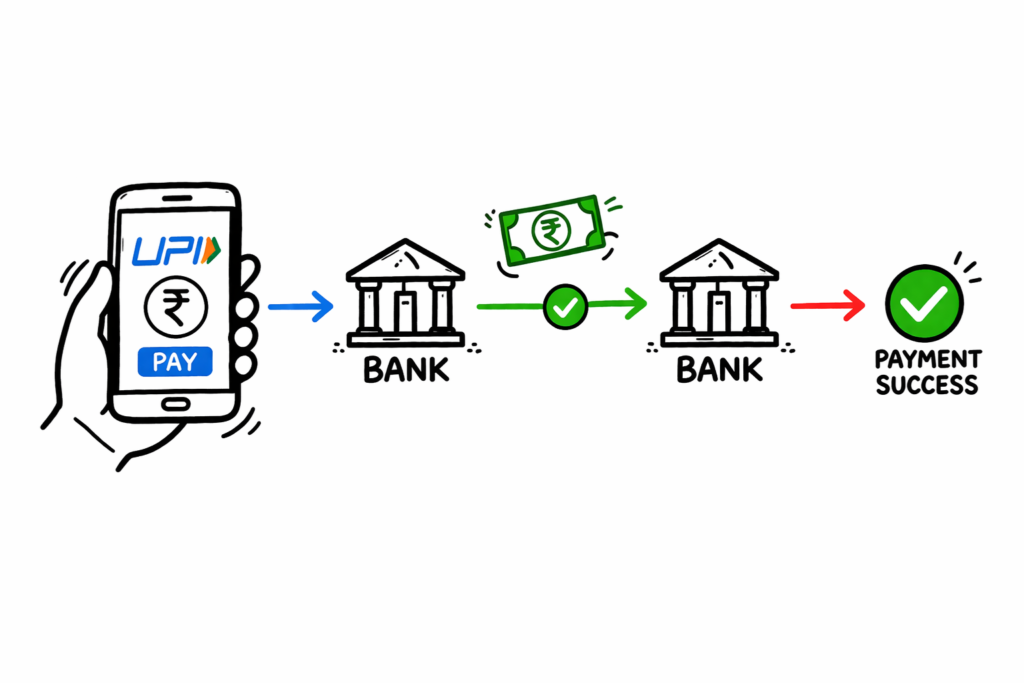
In this comprehensive guide, you’ll learn what UPI (Unified Payments Interface) is, how UPI fraud works, the most common scam techniques used by cybercriminals, and the practical steps you can take to protect your money. We also cover real-world examples, warning signs, security best practices, and prevention tips recommended by cybersecurity professionals. By the end of this guide, you’ll be able to identify common UPI fraud attempts and make digital payments more safely and confidently.
What is UPI and How Does It Work?
Before we can defeat a threat, we must understand the system it attacks.
What Is Unified Payments Interface (UPI)?
Unified Payments Interface (UPI) is a real-time digital payment system developed by the National Payments Corporation of India (NPCI). It enables users to send and receive money instantly between bank accounts using a mobile device. With UPI, you can make peer-to-peer (P2P) and person-to-merchant (P2M) transactions without repeatedly entering your bank account number or IFSC code.
How Does UPI Work?
UPI operates on top of the Immediate Payment Service (IMPS) infrastructure. Instead of sharing sensitive banking details, users create a Virtual Payment Address (VPA), also known as a UPI ID (for example, yourname@bank). This unique identifier acts like a digital payment address, making transactions faster, more secure, and convenient.
UPI Transaction Flow (Step-by-Step)
Understanding the transaction flow helps explain how UPI fraud occurs and why users should verify every payment request.
Step 1: Payment Initiation
The sender opens a UPI application such as Google Pay, PhonePe, Paytm, or another UPI-enabled banking app. The sender enters the recipient’s UPI ID or scans a QR code before entering the payment amount.
Step 2: Payment Routing
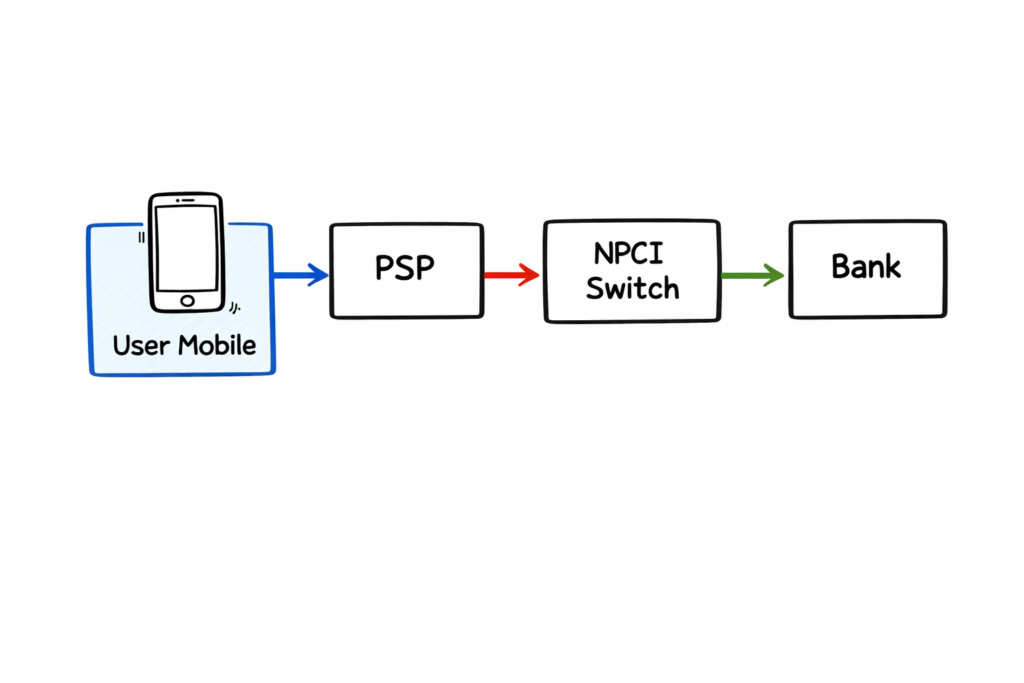
The payment request is securely routed through the sender’s Payment Service Provider (PSP) to the NPCI network.
Step 3: Verification
The NPCI verifies the recipient’s Virtual Payment Address (VPA) and identifies the destination bank.
Step 4: Authentication
The sender authorizes the transaction by entering the confidential UPI PIN. This PIN is known only to the account holder and should never be shared with anyone.
Step 5: Settlement
After successful authentication, the sender’s bank debits the account, and the recipient’s bank credits the amount instantly. Both users receive a transaction confirmation within seconds.
How Does UPI Fraud Work?
Although UPI uses strong encryption and secure banking infrastructure, most UPI fraud incidents do not result from weaknesses in the payment system itself. Instead, cybercriminals exploit human behavior through social engineering techniques.
Social Engineering and Phishing
Most attackers do not attempt to break the encryption protecting UPI transactions. Instead, they manipulate users into voluntarily revealing sensitive information such as their UPI PIN, OTP, banking credentials, or personal details.
Common techniques include:
- Fake customer support calls
- Phishing emails and SMS messages
- Fraudulent QR codes
- Fake payment requests
- Malicious mobile applications
- Social media scams
- Screen-sharing application fraud
Attackers do not attempt to hack the secure NPCI infrastructure directly. Instead, they rely on social engineering to manipulate people into revealing sensitive information or approving fraudulent transactions themselves.
By creating a false sense of urgency, fear, or excitement, scammers pressure victims into making quick decisions without verifying the request. Common tactics include messages such as, “Your bank account will be blocked unless you complete KYC immediately,” or “Congratulations! You’ve won a cash reward. Click here to claim it.”
These scams are designed to trick users into sharing their UPI PIN, OTP, banking credentials, or approving payment requests. Understanding these manipulation techniques is the first step toward protecting yourself from UPI fraud and making secure digital payments.
Screen Sharing Scams
Remote Access Scams
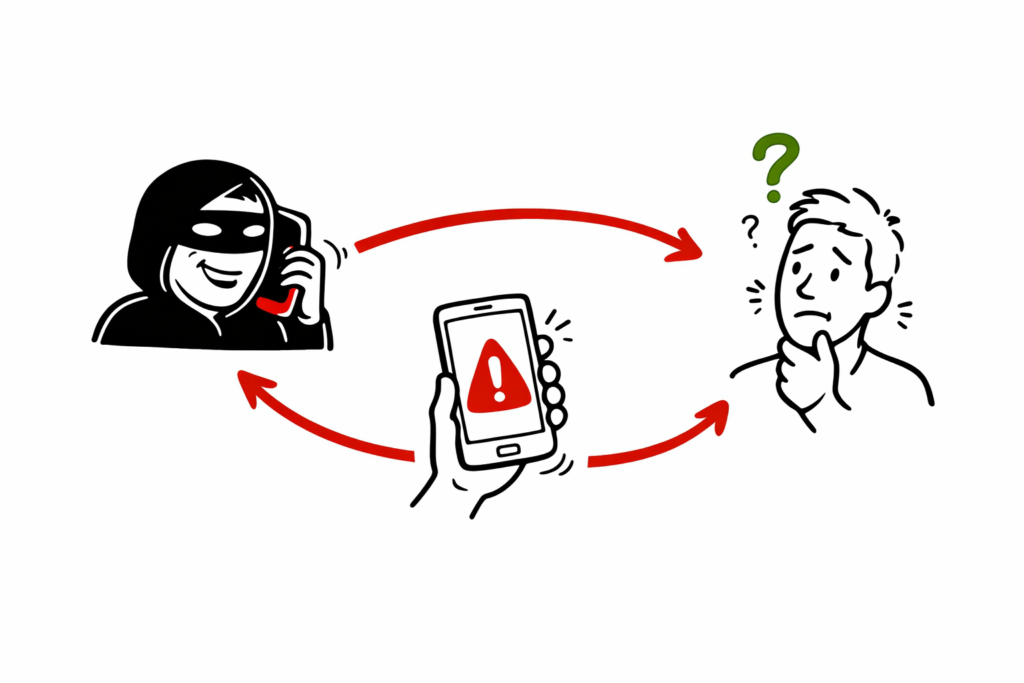
One of the fastest-growing forms of UPI fraud involves remote access applications. Cybercriminals impersonate bank representatives, UPI customer support executives, or technical support agents and convince victims to install remote desktop applications such as AnyDesk, TeamViewer, or similar tools.
Once the application is installed and permission is granted, the attacker can view the victim’s screen, control the device remotely, monitor banking activities, capture OTPs, and observe the UPI PIN being entered. In some cases, attackers trick users into authorizing fraudulent transactions while pretending to resolve a payment issue or verify their bank account.
Real-World Example
A victim receives a call from someone claiming to be a bank support executive. The caller says there is a problem with a recent UPI transaction and asks the victim to install a remote access application to “fix” the issue. After gaining access to the phone, the scammer observes the victim entering the UPI PIN and completes unauthorized fund transfers within minutes.
Security Tip: Banks, NPCI, Google Pay, PhonePe, Paytm, and other legitimate UPI providers never ask customers to install remote access software, share their UPI PIN, OTP, or give remote control of their mobile device. If anyone requests this, disconnect the call immediately and report the incident to your bank.
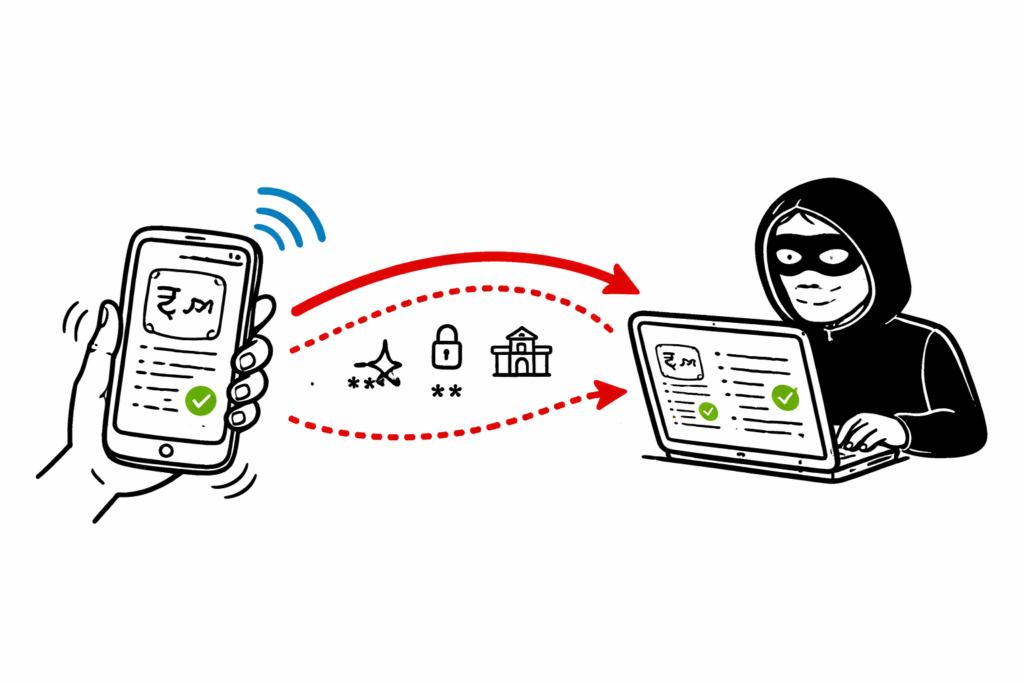
UPI Fraud Architecture Explained
The Technical Blueprint of a UPI Scam
Understanding the technical flow behind UPI fraud helps you recognize how scammers manipulate users without breaking the security of the banking system itself. Most attacks rely on social engineering rather than bypassing the encrypted infrastructure used by banks and the National Payments Corporation of India (NPCI).
Layer 1: The Hook
The scam begins when attackers send phishing messages through SMS, WhatsApp, email, or social media platforms. These messages often claim that your KYC has expired, your bank account will be blocked, or you have won a cashback reward.
The message usually contains a fake website link that closely resembles the official website of a bank or payment provider. The goal is to convince the victim to click the link and continue the scam.
Layer 2: The Fake Interface
The victim is redirected to a fraudulent website or application that imitates a legitimate UPI payment app or banking portal. Some scams use UPI deep links to open the victim’s payment application with pre-filled transaction details.
The fake interface is designed to gain the user’s trust and encourage them to approve a payment or reveal confidential information.
Layer 3: The Transaction
Believing the request is legitimate, the victim enters their UPI PIN to approve the transaction. Since the payment is authorized by the account holder, the banking system processes it as a valid transaction, allowing funds to be transferred to the fraudster’s account.
Payment Gateway Risks
UPI itself is built on a secure banking infrastructure. However, organizations that integrate online payment gateways must also secure their applications and APIs.
For example, if a merchant’s payment gateway is poorly configured, attackers may attempt to exploit weaknesses in application logic, session handling, or API validation. These vulnerabilities can sometimes lead to payment verification issues, unauthorized transactions, or fraudulent order processing if appropriate security controls are not implemented.
Businesses should regularly perform security testing, validate payment responses, secure API communications, and monitor transactions for suspicious activity.
Common Types of UPI Fraud
Cybercriminals constantly develop new techniques to steal money. Understanding these scams is the best way to avoid becoming a victim of UPI fraud.
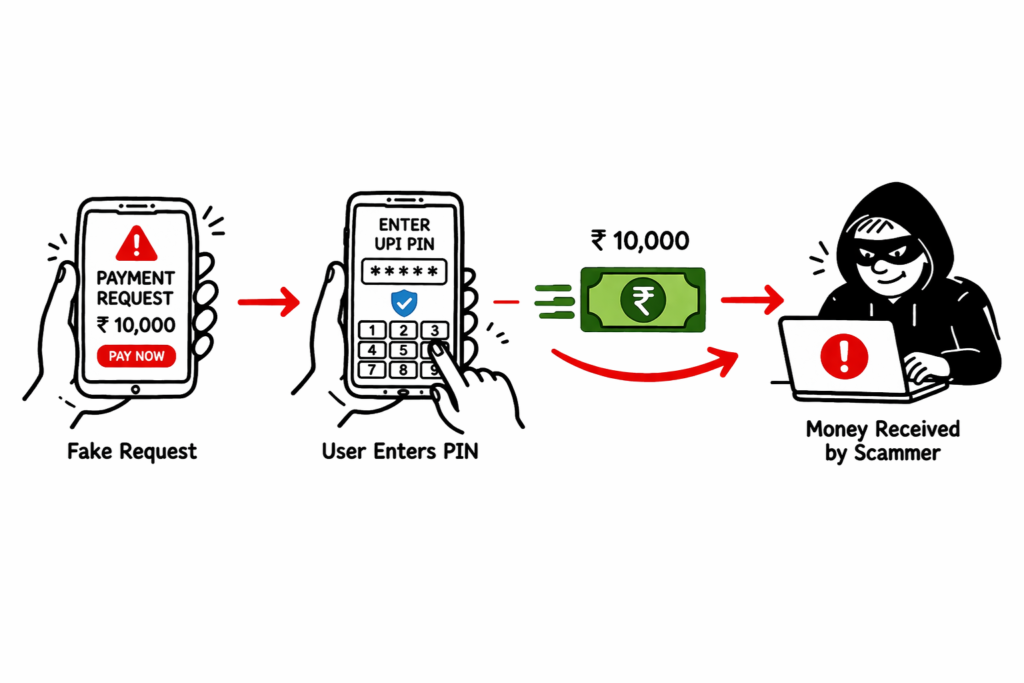
1. Collect Request Fraud
This is one of the most common UPI scams. Instead of sending money, the scammer sends a Collect Request to the victim’s UPI application. They then call or message the victim, falsely claiming that the request is required to receive a refund, cashback, prize money, or salary payment.
When the victim enters their UPI PIN, they unknowingly authorize a payment to the scammer rather than receiving money.
Remember: You never need to enter your UPI PIN to receive money. The UPI PIN is required only when sending money or approving a payment request.ng you money for an item you listed online, and tell you to “enter your PIN to receive the funds.”
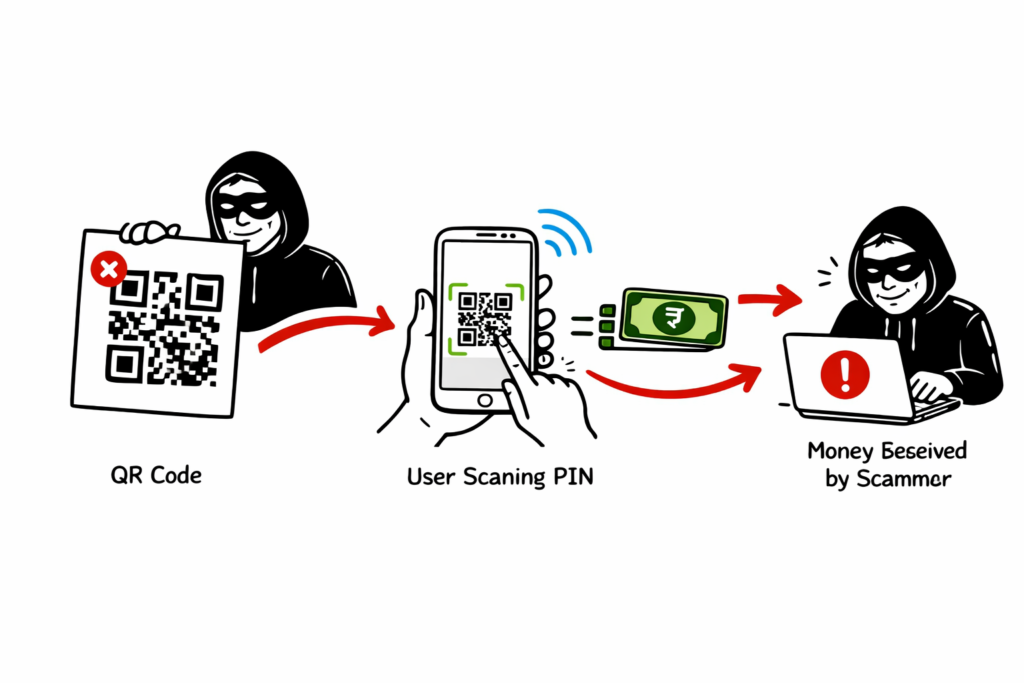
2. Fake QR Code Scams
Fake QR Code scams are among the fastest-growing forms of UPI fraud targeting customers at retail stores, restaurants, parking areas, and petrol pumps. In this scam, fraudsters replace a legitimate merchant’s QR code with their own malicious QR code.
When a customer scans the fake QR code to make a payment, the money is transferred directly to the scammer’s UPI account instead of the merchant’s account. Because the payment appears successful on the customer’s phone, many victims do not realize they have been scammed until the merchant reports that no payment was received.
Real-World Example
A customer visits a local grocery store and scans the QR code displayed at the billing counter. Unknown to the customer, a fraudster had placed a fake QR code sticker over the original merchant QR code earlier that day. The payment is completed successfully, but the money is credited to the scammer’s account instead of the store owner.
How to Protect Yourself
- Verify the merchant’s name before confirming the payment.
- Check the UPI ID displayed on the payment confirmation screen.
- Avoid scanning damaged, altered, or suspicious QR code stickers.
- Confirm with the merchant that the payment has been received before leaving.
- Report suspicious or tampered QR codes to the merchant immediately.
Security Tip: Always verify the recipient’s name displayed in your UPI app before entering your UPI PIN. A few seconds of verification can help prevent UPI fraud and protect your money.
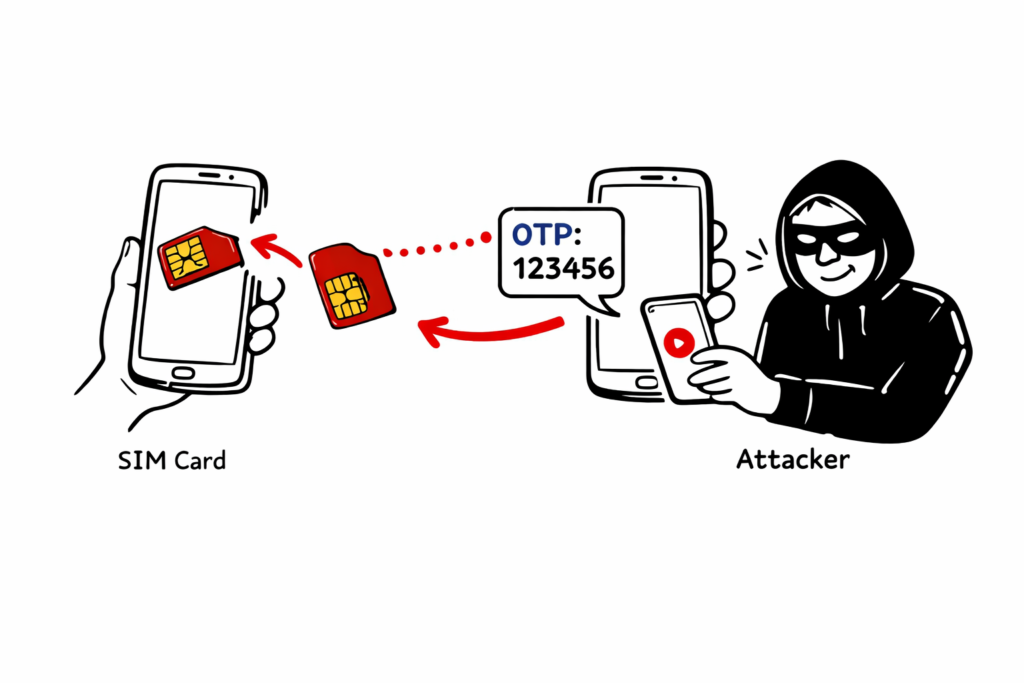
3. SIM Swapping and Device Binding Exploits
SIM swapping is a sophisticated form of UPI fraud in which cybercriminals fraudulently obtain a duplicate SIM card linked to the victim’s mobile number. Attackers may use fake identity documents or social engineering techniques to convince a telecom provider to activate a new SIM card for the victim’s number.
Once the duplicate SIM is activated, the victim’s original SIM stops working, and the attacker gains control of incoming calls and SMS messages. This allows them to receive OTPs and complete mobile number verification required for banking and UPI services.
The attacker may then attempt to register a UPI application on their own device. If other security checks are bypassed or the victim is tricked into revealing confidential information, the attacker can try to gain unauthorized access to financial accounts.
Real-World Example
A victim suddenly loses mobile network connectivity and assumes it is a temporary service issue. Meanwhile, an attacker activates a duplicate SIM card using the victim’s mobile number and begins receiving OTPs. The attacker attempts to register banking and UPI services linked to that number, increasing the risk of unauthorized transactions.
Warning Signs
- Your mobile network suddenly stops working without explanation.
- You stop receiving calls or SMS messages.
- You receive alerts about SIM replacement or mobile number registration that you did not request.
- Unauthorized banking or UPI notifications appear on your account.
How to Protect Yourself
- Contact your mobile service provider immediately if your SIM suddenly loses service.
- Enable app-based authentication and biometric verification whenever available.
- Never share OTPs, banking credentials, or your UPI PIN with anyone.
- Monitor your bank account and UPI transaction history regularly.
- Report suspected SIM swapping to your telecom operator and bank as soon as possible.
Security Tip: If your mobile number unexpectedly stops receiving calls or SMS messages, treat it as a potential security incident. Acting quickly can help prevent UPI fraud and protect your bank account.
Real-Life Scam Examples
Understanding real-world scams helps you recognize how attackers manipulate victims and avoid making the same mistakes.
Customer Care Number Scam
One of the most common scams begins when a user searches online for a customer care number of a popular company or service. Fraudsters create fake websites or advertisements that display fraudulent support numbers, making them appear legitimate in search results.
When the victim calls the number, the scammer pretends to be a customer support representative and offers to process a refund, resolve a payment issue, or verify the user’s account. The victim is then asked to click a malicious link or approve a payment request through a UPI application.
In one such case, a user searching for a food delivery customer care number contacted a fake support agent. The scammer claimed a refund could be processed by following a payment link. After opening the link, a pre-filled payment request appeared in the user’s UPI app. Believing it was part of the refund process, the user entered the UPI PIN and unknowingly authorized a ₹10,000 payment to the scammer.
Lesson Learned
Verify every payment request before approving it, even if it appears to come from a trusted company.
Always obtain customer support numbers from the company’s official website or mobile application.
Never trust phone numbers displayed on unknown websites or social media posts.
Remember that customer support representatives will never ask you to enter your UPI PIN to receive a refund.
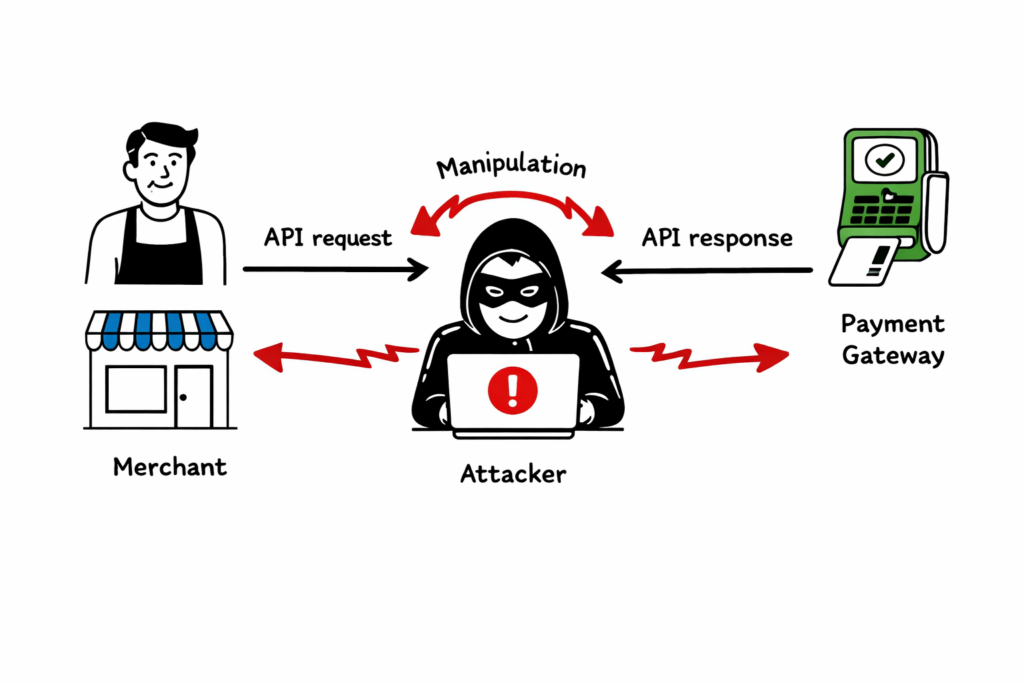
Enterprise-Level Incident: The Fake Merchant Onboarding
Understanding How UPI Fraud Works is essential for recognizing advanced financial scams targeting businesses and individuals. Leading banks and fintech companies use multiple layers of security to protect digital payment ecosystems and reduce fraudulent transactions.
AI-Driven Fraud Monitoring
One of the best ways to understand How UPI Fraud Works is by looking at how banks detect suspicious transactions. Banks use artificial intelligence and machine learning to analyze transactions in real time. These systems evaluate transaction amount, location, device information, spending patterns, and beneficiary details to calculate a risk score within milliseconds.
For example, if a customer who usually spends ₹500 at local stores suddenly attempts to transfer ₹1,00,000 to a newly created UPI ID late at night, the system may temporarily hold the transaction and request additional verification before processing it. This is an example of how financial institutions prevent fraud after identifying patterns that indicate How UPI Fraud Works.
Multi-Factor Authentication (MFA)
Modern banking applications use multiple authentication methods to verify users before approving sensitive transactions. Along with OTPs and UPI PINs, many banking apps support fingerprint and facial recognition to provide an additional layer of protection. These security measures make How UPI Fraud Works much more difficult for cybercriminals to exploit.
Common Mistakes Users Make
Even with advanced security technologies, user awareness remains the strongest defense against financial fraud. Learning How UPI Fraud Works helps users avoid mistakes that attackers commonly exploit.
Believing You Need a UPI PIN to Receive Money
Mistake: Many users believe they must enter their UPI PIN to receive money.
Reality: Your UPI PIN is required only to send money, approve a payment request, or perform certain account-related actions. You never need to enter your UPI PIN simply to receive money. This misunderstanding is one of the most common examples of How UPI Fraud Works.
Best Practices for Safe UPI Transactions
Once you understand How UPI Fraud Works, follow these best practices:
- Verify the recipient’s name before confirming any payment.
- Double-check the UPI ID before sending money.
- Set daily transaction limits whenever possible.
- Never share your UPI PIN or OTP with anyone.
- Avoid installing remote access applications at the request of unknown callers.
- Enable biometric authentication if your banking app supports it.
- Keep your banking and UPI applications updated.
- Monitor your transaction history regularly and report suspicious activity immediately.
Future Trends in Digital Payment Security
As digital payments continue to evolve, so do cyber threats. Keeping up with How UPI Fraud Works helps users stay prepared for emerging attack techniques.
AI-Generated Voice Scams
Fraudsters increasingly use artificial intelligence to clone the voices of family members, friends, or bank representatives. Victims may receive urgent calls requesting immediate money transfers or confidential banking information. These attacks demonstrate How UPI Fraud Works by exploiting trust instead of technology.
Contactless Payment Risks
The growth of contactless and offline payment technologies provides convenience but also creates new security challenges. Users should keep their mobile devices physically secure, enable screen locks, and monitor transaction alerts regularly. Staying informed about How UPI Fraud Works helps reduce these risks.
Expert Insights: Cybersecurity Q&A
Q: How can organizations improve the security of digital payment systems?
A: Organizations should implement multiple layers of protection, including secure API design, encryption, rate limiting, transaction monitoring, fraud detection, and continuous security testing. Regular audits and anomaly detection help identify suspicious activities before they become major incidents.
Q: What is the biggest challenge in preventing digital payment fraud?
A: The speed of modern payment systems is both an advantage and a challenge. Since transactions are processed within seconds, fraudulent transfers can be completed before victims realize they have been deceived. Understanding How UPI Fraud Works enables organizations to detect suspicious activity much earlier.
Frequently Asked Questions
Can I recover money lost in a fraudulent UPI transaction?
Recovery depends on how quickly the incident is reported. Contact your bank immediately and report the fraud through the National Cyber Crime Reporting Portal. Faster reporting increases the chances of blocking or recovering the funds.
Does UPI Lite require a PIN?
UPI Lite supports PIN-free transactions for small-value payments. While this improves convenience, users should protect their mobile devices with a screen lock and biometric authentication.
Are biometric authentication methods safe for UPI?
Yes. Fingerprint and facial recognition add an additional layer of security and make unauthorized access significantly more difficult when combined with a secure device and strong account protection.
Conclusion
Understanding How UPI Fraud Works is the first step toward protecting yourself from digital payment scams. Most financial fraud succeeds because attackers manipulate people rather than breaking secure banking systems. By learning How UPI Fraud Works, verifying payment requests, protecting your UPI PIN, and following safe digital payment practices, you can significantly reduce the risk of becoming a victim.
Stay informed, keep your banking applications updated, verify every transaction carefully, and share this knowledge with your family and friends. Knowing How UPI Fraud Works is one of the most effective ways to stay safe while using digital payment services.
Cybersecurity Fundamentals
- What Is Cybersecurity and Why It Is Important Today
https://technaga.com/what-is-cybersecurity-and-why-it-is-important-today/ - Top 10 Cybersecurity Best Practices for 2026
https://technaga.com/top-10-cybersecurity-best-practices-2026/ - Password Security Guide 2026: 10 Essential Tips
https://technaga.com/password-security-guide-2026/ - How to Identify Phishing Attacks in 2026 (Complete Guide)
https://technaga.com/how-to-identify-phishing-attacks-in-2026/ - Essential Steps: Hacked Android, iPhone Guide 2026
https://technaga.com/android-iphone-mobile-hack-remediation/ - Multi-Factor Authentication (MFA): Critical Guide to Secure Your Systems (2026)
https://technaga.com/multi-factor-authentication-mfa-guide-2026/ - Identity and Access Management in 2026: A Practical Guide for Cloud Security Professionals
https://technaga.com/identity-and-access-management-cloud-security-2026/ - Cloud Security Basics 2026: Complete Beginner Guide
https://technaga.com/cloud-security-basics-2026/ - Security Information and Event Management: Complete SIEM Guide 2026
https://technaga.com/security-information-and-event-management-2026/ - 15 Common Online Scams in India: Complete Guide 2026
https://technaga.com/tech-naga-com-online-scams-india-2026-guide/
External References
- National Payments Corporation of India (NPCI) – UPI
https://www.npci.org.in/what-we-do/upi/product-overview - NPCI – UPI Safety Guidelines
https://www.npci.org.in/what-we-do/upi/security-awareness - Reserve Bank of India (RBI) – Safe Digital Banking
https://www.rbi.org.in/ - Indian Cyber Crime Coordination Centre (I4C)
https://cybercrime.gov.in/ - CERT-In (Indian Computer Emergency Response Team)
https://www.cert-in.org.in/ - Ministry of Electronics and Information Technology (MeitY)
https://www.meity.gov.in/ - Google Pay Safety Center
https://support.google.com/pay/ - PhonePe Safety Center
https://www.phonepe.com/safety/ - Paytm Safety & Security
https://paytm.com/security - National Cyber Crime Reporting Portal
https://cybercrime.gov.in/ - RBI Digital Payment Security Controls
https://www.rbi.org.in/Scripts/NotificationUser.aspx - CISA – Phishing Guidance
https://www.cisa.gov/topics/cybersecurity-best-practices/phishing-guidance - NIST Cybersecurity Framework
https://www.nist.gov/cyberframework - OWASP Mobile Security Project
https://owasp.org/www-project-mobile-top-10/ - Google Android Security
https://security.googleblog.com/
Important Note: This article is based on hands-on cybersecurity experience and research from reliable sources. While every effort has been made to ensure accuracy, you should validate the information based on your specific environment and security requirements before applying it.







