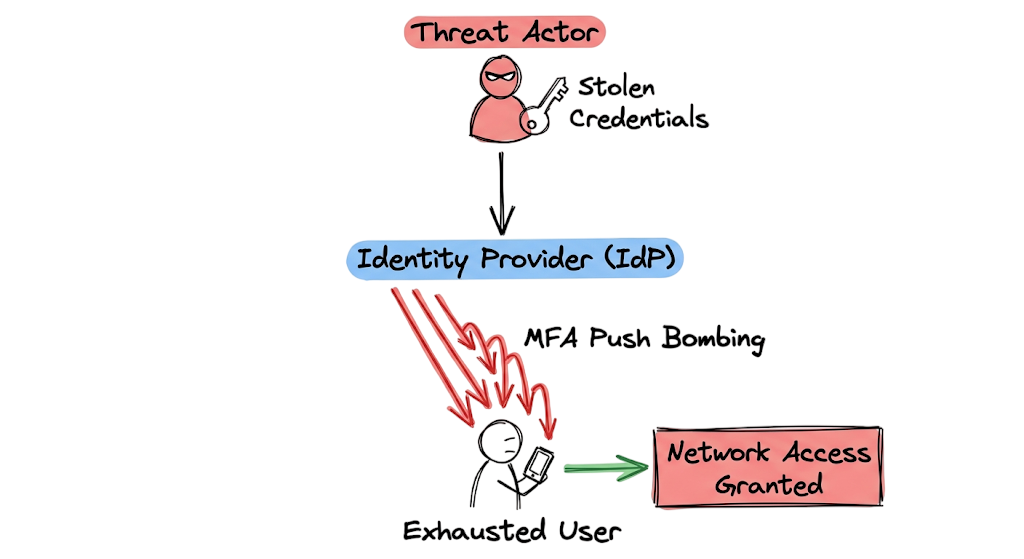
An MFA Fatigue Attack can turn a simple authentication prompt into a major security breach.
It is two in the morning and your phone vibrates on the nightstand. You ignore it. Ten seconds later it vibrates again. Then again. By the fifteenth notification, you just want to sleep. You press the approve button.
At that moment, you have unknowingly granted a threat actor access to your account.
An MFA Fatigue Attack, also known as MFA Bombing, works by overwhelming users with repeated authentication requests until they accidentally or intentionally approve one. Rather than exploiting software vulnerabilities, attackers rely on social engineering, user frustration, and persistence.
The attack often begins when credentials are stolen through phishing emails, credential stuffing, or password reuse. Once attackers obtain valid credentials, they repeatedly trigger authentication prompts and wait for the victim to make a mistake.
Despite investments in identity security, many organizations remain vulnerable to MFA fatigue attacks because the human element is often the weakest link. This is why modern security strategies increasingly rely on Conditional Access Policies, Risk-Based Authentication, Passwordless Authentication, and Zero Trust Security principles.
In this guide, you will learn how an MFA Fatigue Attack works, real-world attack examples, detection methods, and 10 proven ways to prevent attackers from bypassing Multi-Factor Authentication.
What Is an MFA Fatigue Attack and Why Is It Dangerous?
An MFA Fatigue Attack occurs when an attacker obtains valid user credentials and repeatedly triggers authentication requests until the victim eventually approves one of them.
Security professionals often refer to this technique as MFA Bombing. Unlike traditional cyberattacks that exploit software vulnerabilities, an MFA Fatigue Attack relies heavily on social engineering, user frustration, and human error.
The authentication system itself is not compromised. In most cases, it functions exactly as designed. The identity provider receives a valid username and password combination and generates a legitimate authentication prompt for the registered device.
The attacker continuously repeats the login process, causing the victim to receive dozens of MFA notifications within a short period. Over time, the user may assume the prompts are the result of a system malfunction or an application issue.
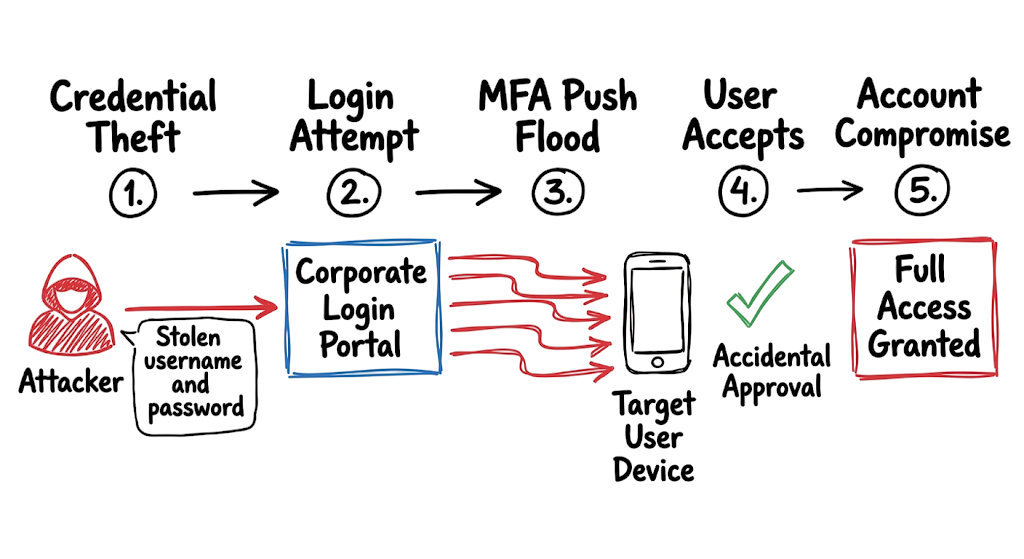
Eventually, the victim approves one of the requests simply to stop the notifications. At that moment, the attacker gains access using a legitimate authentication process.
This is what makes an MFA Fatigue Attack particularly dangerous. Instead of attacking technology, attackers exploit human behavior to bypass Multi-Factor Authentication controls.
How an MFA Fatigue Attack Works Step by Step
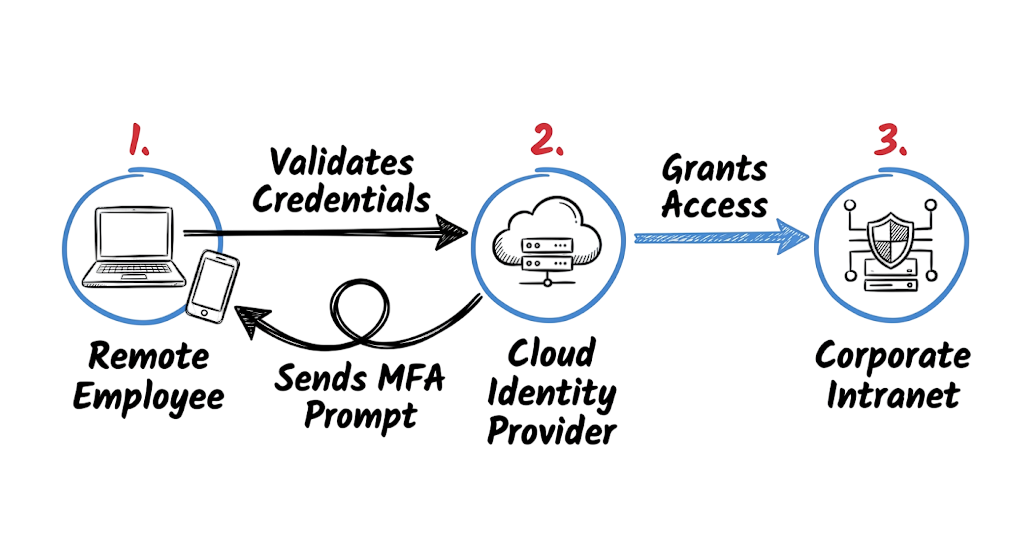
To execute this attack an adversary must first compromise a valid username and password. They typically harvest these credentials through targeted Phishing emails or by testing massive lists of breached passwords against your external portals in a process known as Credential stuffing. Once they possess the correct password they write an automated script to initiate the login sequence.
The script hits the authentication endpoint of your cloud provider or virtual private network. The provider validates the password and sends a prompt to the registered mobile device. The script does not wait for a response. It immediately drops the session and initiates a brand new authentication request. The attacker repeats this API call fifty or a hundred times in a tight loop.
Your authentication infrastructure dutifully spams the employee. The employee experiences a barrage of sounds, screen flashes, and vibrations. Eventually the user approves the prompt out of sheer annoyance. The identity provider immediately issues an authorization token to the attacker. The attacker imports this token into their browser session and gains full access to the environment. They do not need to break your cryptography. They just need to annoy your staff.
Real-World MFA Fatigue Attack Example
Let us look at what this actually looks like in your logging environment. When an attacker runs a spam script against a Microsoft Entra ID tenant you will see a highly distinct pattern in your raw sign in logs.
JSON
{
  "TimeGenerated": "2026-10-14T02:14:15Z",
  "UserPrincipalName": "j.smith@corp.com",
  "ResultType": "500121",
  "ResultDescription": "Authentication failed during strong authentication request.",
  "AppDisplayName": "Office 365 Exchange Online",
  "ClientAppUsed": "Browser",
  "Location": "Moscow, RU",
  "AuthenticationRequirement": "multiFactorAuthentication"
}
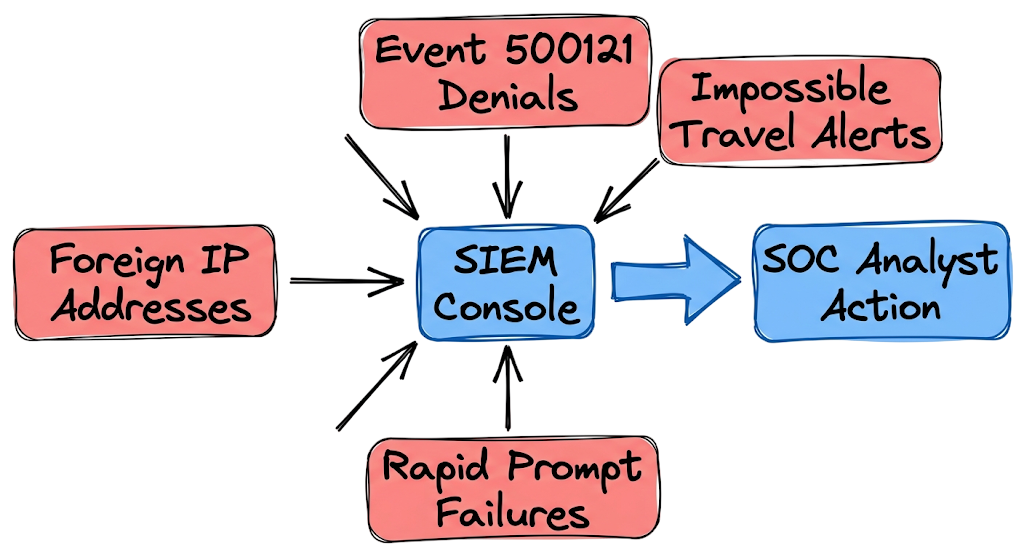
This exact log will repeat thirty times within a three minute window. Every single entry shows a result type of 500121 which indicates the user denied the prompt or the prompt timed out. On the thirty first attempt the result type changes to zero indicating a successful login. The location remains a foreign IP address but the authentication succeeds because the user finally pressed the approve button on their phone. You must configure your monitoring tools to alert on this specific sequence of failures followed immediately by a success.
Common MFA Fatigue Attack Techniques Used by Hackers
Attackers rarely rely solely on automated scripts during an MFA Fatigue Attack. To increase their success rate, they often combine notification spam with various social engineering techniques.
A common tactic involves repeatedly triggering authentication requests and then immediately calling the victim. The attacker impersonates a trusted individual such as an IT help desk technician, security analyst, or system administrator.
The attacker may claim that the organization is performing an urgent system migration, security update, or account synchronization process. The victim is instructed to approve the MFA prompt to complete the activity.
Caller ID Spoofing
Many attackers use spoofed internal phone numbers to make the call appear legitimate. Because the incoming number looks familiar, employees often trust the caller without verifying their identity.
As a result, victims may approve the authentication request without realizing they are granting access to a threat actor.
SMS and Text Message Deception
Another popular technique involves sending fraudulent text messages immediately after MFA notifications begin.
The message typically warns about suspicious account activity and instructs the user to approve the next authentication request to secure their account.
In reality, the attacker is creating a sense of urgency and confusion. The victim believes they are protecting their account when they are actually authorizing a malicious login session.
Timing-Based MFA Fatigue Attacks
Attackers carefully choose when to launch an MFA Fatigue Attack.
Many attacks occur late at night, early in the morning, during weekends, or on public holidays. During these periods, users are often tired, distracted, or less likely to verify authentication requests carefully.
Security teams may also have reduced staffing during off-hours, increasing the likelihood that suspicious authentication activity goes unnoticed.
How to Detect an MFA Fatigue Attack in Your Environment
Detecting an MFA Fatigue Attack requires continuous monitoring of authentication logs and user sign-in activity. Traditional endpoint alerts may not identify this threat because the attacker is using valid credentials rather than malware or exploits.
Security Operations Center (SOC) teams should focus on authentication events generated by identity providers such as Microsoft Entra ID, Okta, or Duo Security. These logs often provide the earliest indicators of an attack.
Monitor Excessive Authentication Failures
One of the most common signs of an MFA Fatigue Attack is a high volume of denied authentication requests associated with a single user account.
Many security teams configure alerts for incorrect passwords. However, MFA fatigue attacks are different because the password is usually valid. The attacker has already obtained legitimate credentials through phishing emails, credential stuffing, or password reuse.
Instead of monitoring password failures alone, organizations should monitor repeated MFA denials and authentication timeouts.
Create SIEM Correlation Rules
Security teams should build correlation rules within their SIEM platform to identify suspicious authentication patterns.
For example, an alert should trigger when:
- A user denies three or more MFA prompts within five minutes.
- Multiple MFA requests originate from unfamiliar locations.
- Authentication failures are immediately followed by a successful login.
- Authentication activity spikes significantly above normal behavior.
These patterns often indicate MFA Bombing attempts.
Detect Impossible Travel Events
Impossible travel detection is another effective control against MFA fatigue attacks.
Consider a scenario where a user successfully authenticates from Mumbai and then appears to log in from London ten minutes later. Such travel is physically impossible and strongly suggests account compromise.
Most modern identity providers can automatically generate alerts for these situations.
Analyze Identity Provider Logs
Identity provider logs contain critical evidence during an investigation. Security teams should forward authentication logs to centralized monitoring platforms such as Microsoft Sentinel, Splunk, or QRadar.
By analyzing authentication trends, organizations can quickly identify unusual login behavior, repeated MFA prompts, and suspicious sign-in attempts before an attacker gains long-term access.
Watch for Authentication Volume Spikes
A sudden increase in authentication requests is often an early warning sign of an MFA Fatigue Attack.
SOC analysts should create dashboards that track:
- MFA request volume
- Authentication failures
- Authentication approvals
- User sign-in frequency
- Geographic login locations
Monitoring these metrics can help security teams detect attacks before users approve a malicious authentication request.
Business Impact of an MFA Fatigue Attack
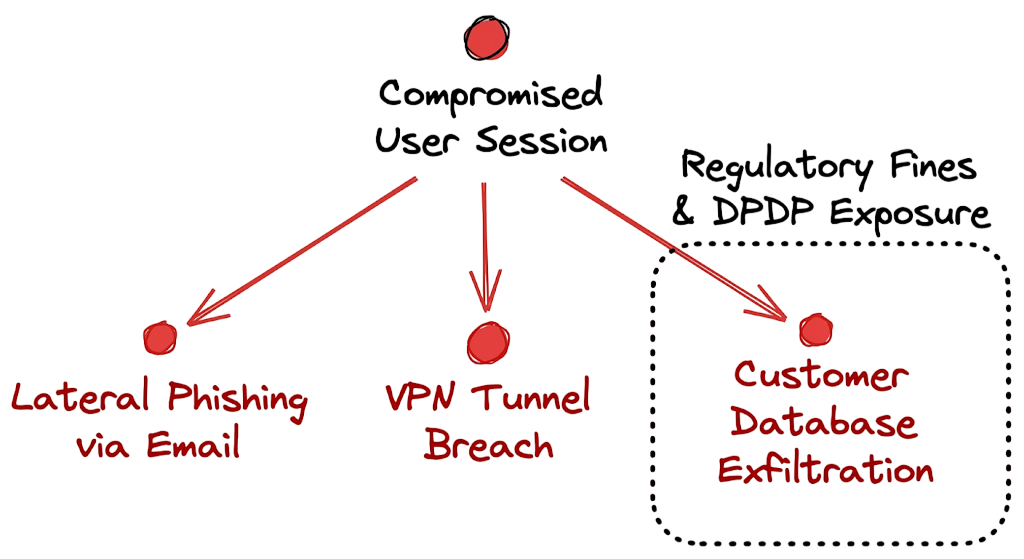
Consider a scenario within the banking sector. A mid level loan officer falls victim to notification spam while watching television. The attacker gains access to the employee email account and the internal loan origination system. The attacker uses the compromised email account to send lateral phishing messages to the database administrators. Once they compromise a senior administrator they access the core banking customer database. They extract unencrypted financial records, loan applications, and identity documents.
Under the Reserve Bank of India cybersecurity frameworks and the DPDP Act your organization must report this breach immediately. You face severe regulatory fines, massive incident response contractor costs, and a total loss of customer trust. The blast radius of a single approved notification extends across your entire corporate infrastructure. The attacker will sit in the network for weeks exfiltrating data before you even realize the initial access occurred.
How to Prevent MFA Fatigue Attacks
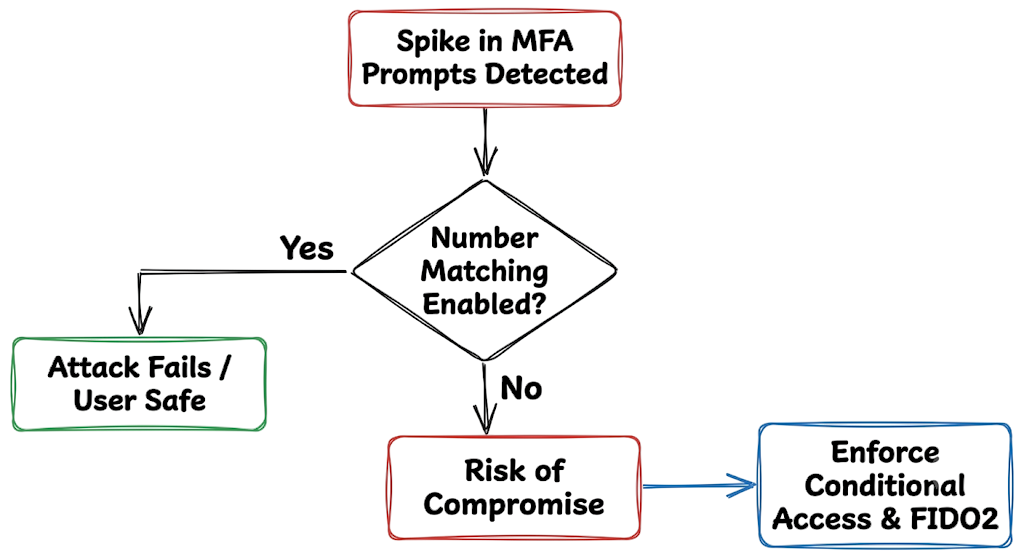
You cannot train away human fatigue. You must implement technical controls that remove the simple approve button from the equation entirely. The most critical step you can take today is enabling number matching on your authenticator applications. This forces the user to look at their computer screen, read a two digit number, and type that exact number into their mobile phone. A user sleeping in bed cannot accidentally type a specific number. They have to actively participate in the session.
You must also implement strict Conditional Access Policies. These policies should restrict administrative logins to known corporate devices and trusted geographic locations. If the attacker tries to log in from an unmanaged device in another country the system blocks the attempt before ever generating a notification. When I was working on an incident response case for a logistics firm, I saw firsthand how quickly a frustrated user will hit approve just to make their phone stop vibrating.
To prevent that exact scenario you must use Risk-Based Authentication to evaluate the context of the login attempt. If the login originates from an anonymous proxy or a known malicious network the system should force a password reset rather than sending a prompt. Ultimately your goal should be moving your entire organization toward Passwordless Authentication using FIDO2 security keys or device bound biometrics. A physical security key cannot be spammed. It requires physical touch and proximity to the authenticating device.
Security Tools That Help Stop MFA Fatigue Attacks
Microsoft Entra ID provides native identity protection features that automatically calculate sign in risk based on billions of daily signals. You can configure Entra to block access entirely when it detects an impossible travel event or a known malicious IP address.
Microsoft Defender for Identity monitors your on premises domain controllers and detects when an attacker uses compromised credentials to move laterally across your legacy network. It provides excellent visibility into Kerberos ticketing anomalies.
Okta offers robust policy frameworks that let you limit the total number of authentication prompts a user can receive in a specified time window. This directly neutralizes the scripting tools attackers use to flood devices.
Duo Security provides strong phishing resistant options and gives administrators granular control over which authentication methods users can access based on their risk profile.
Zscaler Zero Trust Security Exchange inspects traffic and ensures users only access the specific applications they need rather than granting broad network access. In real environments, it doesn’t work this cleanly because enabling strict geographic blocking often locks out legitimate executives traveling for business. You have to tune these tools carefully to balance rigid security with actual operational reality.
MFA Fatigue Attack Frequently Asked Questions
Q: Can MFA be bypassed?
A: Yes. Attackers bypass authentication controls by exploiting human psychology through notification spam or by using proxy servers to steal session cookies. The technology works but the human element remains highly vulnerable.
Q: Is MFA still secure?
A: Yes. Multi factor authentication blocks the vast majority of automated credential attacks. You simply need to upgrade your configuration to include number matching and context aware access policies to stop advanced threats.
Q: What is number matching?
A: Number matching requires a user to type a specific code displayed on their login screen into their mobile authenticator app. This completely stops fatigue exploits because the user must actively view the primary screen.
Q: How can organizations stop these specific attacks?
A: Organizations must move away from simple push notifications. You need to enforce number matching, restrict logins to trusted devices, and rate limit the number of authentication requests a single user can generate.
Q: Does user training help prevent notification spam?
A: Training helps users recognize the social engineering calls that often accompany the spam. However training fails when users are tired or overwhelmed so you must rely on technical controls first.
CONCLUSION
The growing popularity of the MFA Fatigue Attack demonstrates that attackers do not always need sophisticated malware, zero-day vulnerabilities, or advanced exploitation techniques to compromise an organization.
Instead, they exploit human behavior through persistence, social engineering, and repeated authentication requests. A single approved notification can provide an attacker with the same level of access as a legitimate user.
Organizations should strengthen their identity security posture by implementing number matching, enforcing device trust, deploying Conditional Access Policies, and adopting Risk-Based Authentication controls. These measures significantly reduce the likelihood of successful MFA Bombing attempts.
Security teams should also continuously monitor authentication logs, investigate unusual sign-in activity, and configure alerts for repeated MFA failures and impossible travel events.
As identity-based attacks continue to evolve, organizations should move toward Passwordless Authentication and Zero Trust Security architectures to reduce reliance on traditional authentication methods.
Take a few minutes today to review your identity provider settings. Verify that number matching is enabled, authentication policies are properly configured, and suspicious sign-in activity is actively monitored. A proactive approach can prevent an MFA Fatigue Attack from becoming your next security incident.
Related Articles
If you found this guide helpful, explore these related cybersecurity resources:
Identity and Authentication Security
- Multi-Factor Authentication (MFA): Critical Guide to Secure Your Systems (2026)
https://technaga.com/multi-factor-authentication-mfa-guide-2026/ - Identity and Access Management in 2026: A Practical Guide for Cloud Security Professionals
https://technaga.com/identity-and-access-management-cloud-security-2026/ - Password Security Guide 2026: 10 Essential Tips
https://technaga.com/password-security-guide-2026/ - Zero Trust Security in 2026: Architecture, Real Examples, and Implementation Guide
https://technaga.com/zero-trust-security-2026-guide/ - Forget the Perimeter: Zero Trust vs Traditional Security Technical Comparison 2026
Threats and Attack Techniques
- How to Identify Phishing Attacks in 2026 (Complete Guide)
https://technaga.com/how-to-identify-phishing-attacks-in-2026/ - Initial Access in Cybersecurity: Top 3 Attack Vectors You Must Know (2026)
https://technaga.com/initial-access-cybersecurity-attack-vectors-2026/ - 15 Common Online Scams in India: Complete Guide 2026
https://technaga.com/tech-naga-com-online-scams-india-2026-guide/
Detection and Monitoring
- Security Information and Event Management: Complete SIEM Guide 2026
https://technaga.com/security-information-and-event-management-2026/ - Best SOC Analyst Roadmap 2026: Complete Guide to L1, L2, L3 Roles, Skills, and Tools
https://technaga.com/complete-soc-analyst-roadmap-2026/
Security Fundamentals
- What Is Cybersecurity and Why It Is Important Today
https://technaga.com/what-is-cybersecurity-and-why-it-is-important-today/ - Top 10 Cybersecurity Best Practices for 2026
https://technaga.com/top-10-cybersecurity-best-practices-2026/
Additional Resources and References
The following resources provide further information on Multi-Factor Authentication, identity security, Zero Trust Security, and MFA Fatigue Attack prevention strategies.
- Microsoft Entra ID Number Matching Documentation
https://learn.microsoft.com/en-us/entra/identity/authentication/how-to-mfa-number-match - Microsoft Zero Trust Identity Guidance
https://learn.microsoft.com/en-us/security/zero-trust/identity - CISA Phishing-Resistant Multi-Factor Authentication
https://www.cisa.gov/resources-tools/resources/implementing-phishing-resistant-mfa - NIST Digital Identity Guidelines (SP 800-63)
https://pages.nist.gov/800-63-3/ - MITRE ATT&CK Framework
https://attack.mitre.org - OWASP Authentication Cheat Sheet
https://cheatsheetseries.owasp.org/cheatsheets/Authentication_Cheat_Sheet.html - Google BeyondCorp Zero Trust Model
https://cloud.google.com/beyondcorp - FIDO Alliance Passwordless Authentication Resources
https://fidoalliance.org - CERT-In Official Website
https://www.cert-in.org.in - Ministry of Electronics and Information Technology (MeitY)
https://www.meity.gov.in







