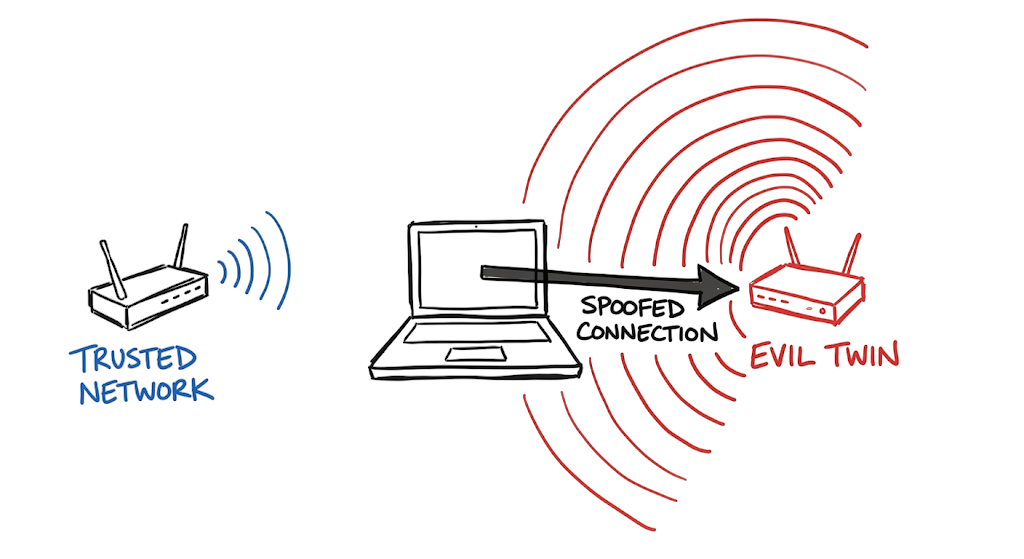
A few months ago, a corporate finance director sat in a busy airport lounge and opened his laptop to review a quarterly report. He clicked on a wireless network named “Premium Lounge Guest” and typed in his corporate Active Directory credentials when the captive portal prompted him. Three hours later, security operations received an alert for an impossible travel login attempt from a completely different continent. The director had connected straight into a trap.
Attackers understand human behavior and rely on the fact that users prioritize convenience over security. This is why Evil Twin Wi-Fi Attacks Explained has become an increasingly important topic for security professionals, network engineers, and enterprise administrators.
In this Evil Twin Wi-Fi Attacks Explained guide, you will learn how attackers create fake wireless networks that mimic legitimate Wi-Fi services. We will examine the technical architecture behind these attacks, review real-world examples, explore detection methods, and discuss practical prevention strategies. Understanding Evil Twin Wi-Fi Attacks Explained is essential because a single connection to a rogue hotspot can expose corporate credentials, sensitive business data, and internal systems.
Whether you work in cybersecurity, network security, or enterprise IT, this Evil Twin Wi-Fi Attacks Explained article will help you understand how fake Wi-Fi networks operate and how to protect users from one of the most effective wireless security threats in modern environments.
What Is an Evil Twin Wi-Fi Attack?
An Evil Twin attack is a targeted wireless compromise where an attacker deploys a malicious access point designed to perfectly imitate a legitimate corporate or public network. As discussed in this Evil Twin Wi-Fi Attacks Explained guide, the attacker’s objective is to trick client devices into connecting to rogue hardware instead of the genuine wireless infrastructure.
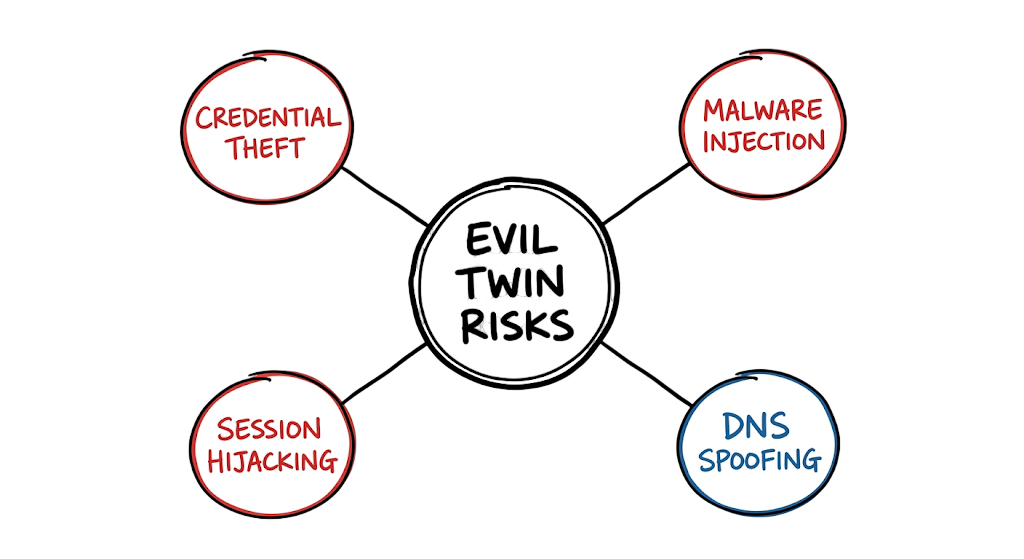
Once a victim connects, the attacker gains control over the network traffic flow and can intercept sensitive information, monitor user activity, inject malicious content, or steal credentials through a fake login portal. These attacks are particularly effective in airports, hotels, coffee shops, and other public locations where users routinely connect to unfamiliar wireless networks.
Understanding Evil Twin Wi-Fi Attacks Explained is critical for security professionals because a successful attack can lead to credential theft, account compromise, data leakage, and unauthorized access to corporate resources. If you want to understand the broader category of wireless threats that enable these attacks, you should also review Rogue Access Point Attacks Explained.
How an Evil Twin Attack Works on a Wireless Network
To understand how an Evil Twin attack succeeds, you have to look at how the 802.11 wireless standard handles client associations. As discussed throughout this Evil Twin Wi-Fi Attacks Explained guide, attackers exploit normal wireless communication processes to impersonate trusted networks and capture sensitive information.
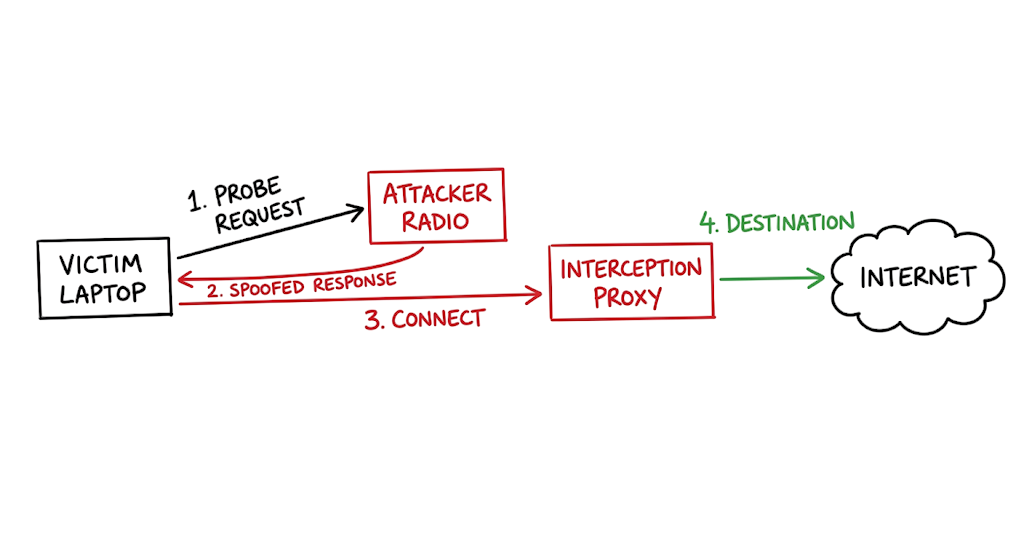
When a smartphone or laptop has wireless networking enabled, it actively searches for known networks. The device broadcasts a frame called a Probe Request containing the names of networks it has connected to previously.
Now here’s where it gets interesting. An attacker running specialized software listens for these Probe Requests. Instead of waiting for the client to find a matching network, the attacker’s radio immediately fires back a Probe Response claiming to be that exact network. The client device receives this response, assumes it found a trusted network, and connects automatically. This specific technique is known as a Karma attack and is frequently referenced in discussions about Evil Twin Wi-Fi Attacks Explained.
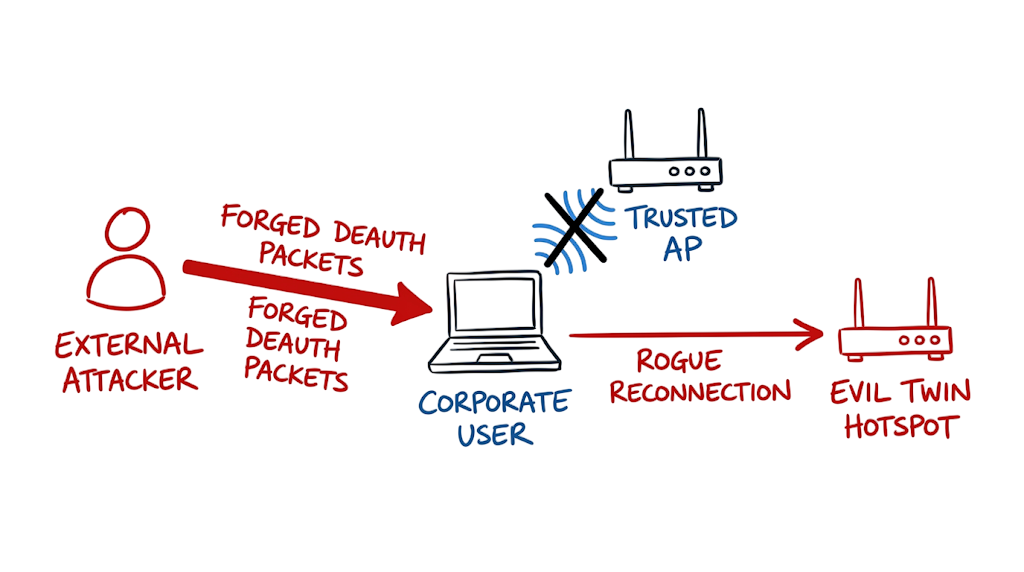
Attackers often combine this behavior with a deauthentication flood. Because traditional wireless management frames are typically unencrypted, an attacker can spoof a disconnect command that appears to come from the legitimate access point. The victim’s device drops its existing connection, searches for a network, and finds the attacker’s rogue Wi-Fi hotspot broadcasting with a stronger signal.
Once the client joins the malicious network, the attacker assigns an IP address and routes all traffic through their own system. This allows them to intercept credentials, monitor communications, inject malicious content, or redirect users to fraudulent login pages. Understanding this attack flow is essential to understanding Evil Twin Wi-Fi Attacks Explained and the risks posed by fake wireless networks.
For context on IP exhaustion tactics that may be used alongside wireless attacks, read DHCP Starvation Attack Explained. You should also review Rogue Access Point Attacks Explained to understand how unauthorized wireless devices create similar security risks within enterprise environments.
Evil Twin Wi-Fi Attack Technical Flow and Architecture
The traffic flow during an Evil Twin Wi-Fi Attack changes the normal client-to-gateway communication path. As explained throughout this Evil Twin Wi-Fi Attacks Explained guide, the attacker inserts themselves directly between the victim and the legitimate network, creating a classic man-in-the-middle scenario.
Client Device (Victim)
- Sends a Probe Request searching for a known wireless network.
- Receives a spoofed Probe Response from the attacker’s fake access point.
- Automatically connects to the malicious wireless network.
Attacker Hardware (Evil Twin Access Point)
- Assigns an IP address to the victim device.
- Redirects HTTP or HTTPS traffic to a fake captive portal.
- Captures usernames, passwords, session cookies, or other sensitive information entered by the victim.
Legitimate Internet or Corporate Gateway
- Forwards traffic normally to maintain the illusion of a legitimate connection.
Destination Server
The user experiences what appears to be a normal internet connection, while the attacker silently monitors network activity in the background. During successful Evil Twin Wi-Fi Attacks Explained scenarios, the attacker can log DNS requests, inspect unencrypted traffic, steal credentials, and redirect users to fraudulent websites without raising immediate suspicion.
This traffic flow demonstrates why Evil Twin Wi-Fi Attacks Explained remains one of the most effective wireless security threats against travelers, remote workers, and enterprise users who frequently connect to public Wi-Fi networks. To better understand how attackers manipulate network infrastructure during similar attacks, review MAC Flooding Attack Explained.
Key Components of an Evil Twin Wi-Fi Attack
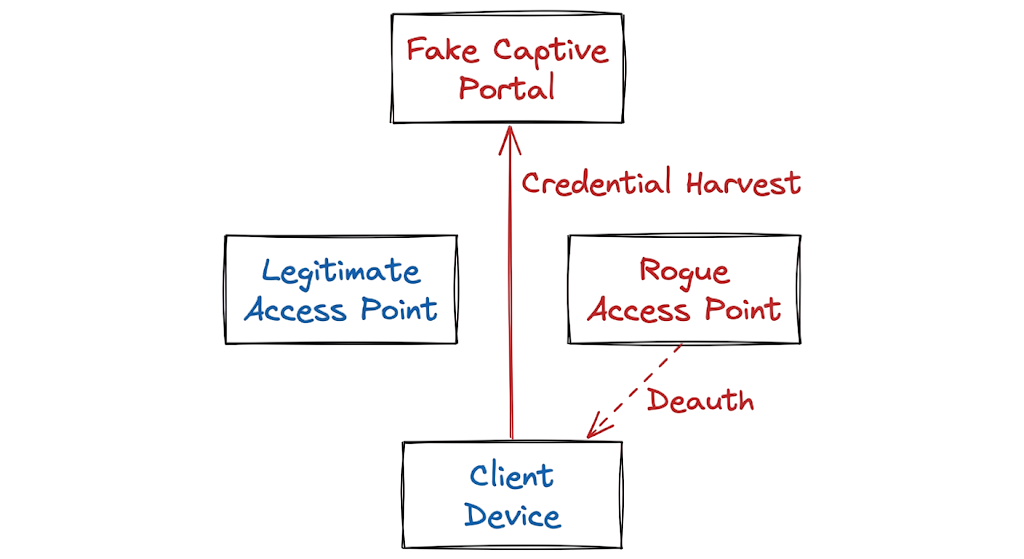
- Rogue Access Point: The physical hardware or virtual interface broadcasting the malicious wireless signal.
- Deauthentication Frames: Forged management packets that force clients to disconnect from their legitimate corporate access point.
- Captive Portal: A fraudulent web page designed to perfectly mimic a corporate login screen to harvest credentials.
- Packet Sniffer: Software capturing raw network traffic and extracting session cookies or authentication tokens.
- Fake RADIUS Server: A malicious authentication server used to capture password hashes from enterprise client devices.
Real-World Evil Twin Attack Example
When I was working in a client environment in Dubai for a major telecommunications organization, we received a high-severity alert from our Wireless Intrusion Detection System (WIDS). The incident occurred during a board meeting on the executive floor and quickly became a textbook example for understanding Evil Twin Wi-Fi Attacks Explained in a real enterprise environment.
Alert ID: WIDS-EVIL-TWIN-009
Timestamp: 2026-06-13T09:24:12Z
Event: Deauthentication Flood and SSID Spoofing Detected
Target BSSID: Broadcast (FF:FF:FF:FF:FF:FF)
Spoofed SSID: Telecom_Corp_Secure
Attacker MAC: 00:13:37:A1:B2:C3
Channel: 11
RSSI: -45 dBm
Action: Alert Generated
The alert indicated that an attacker was broadcasting deauthentication frames across Channel 11, forcing legitimate users to disconnect from the corporate wireless network. At the same time, a second access point appeared using the exact same SSID as the organization’s secure Wi-Fi network. This combination of deauthentication flooding and SSID spoofing is one of the most common techniques discussed in Evil Twin Wi-Fi Attacks Explained because it significantly increases the chances of users connecting to the malicious access point.
In real-world environments, however, detection is rarely straightforward. Wireless security teams regularly encounter false positives caused by neighboring businesses, misconfigured access points, and legitimate guest networks using similar names. Before taking any containment action, we had to verify that the alert represented a genuine security incident.
Using a spectrum analyzer and wireless survey tools, we performed a physical sweep of the executive floor. After tracing the signal strength, we located a small battery-powered Wi-Fi penetration testing device hidden behind a decorative plant in the visitor waiting area. The rogue device was impersonating the corporate wireless network and operating as a fake enterprise authentication server.
Further investigation revealed that the attacker was attempting to capture user credentials and domain authentication hashes from employees who unknowingly connected to the malicious network. This incident demonstrates why Evil Twin Wi-Fi Attacks Explained remains a critical topic for enterprise security teams, especially in organizations that rely heavily on wireless connectivity for executive, guest, and remote workforce operations.
Practical Implementation of Evil Twin Wi-Fi Attack Detection
You must configure your wireless infrastructure to actively reject these attacks rather than relying entirely on user awareness.
- Enforce Protected Management Frames on all corporate wireless networks to prevent attackers from sending forged deauthentication packets to your clients.
- Migrate all corporate authentication from pre-shared keys to 802.1X using EAP-TLS.
- Deploy client certificates via your Mobile Device Management platform so devices authenticate mathematically instead of relying on user passwords.
- Segment your guest network entirely from your corporate infrastructure and enforce strict firewall rules to prevent lateral movement.
- Install and tune a Wireless Intrusion Prevention System to continuously monitor the radio frequency spectrum for unauthorized devices broadcasting your corporate names.
- Use Wireshark Official Documentation to train your security analysts on how to manually identify anomalies in 802.11 packet captures.
- Integrate tools like Kismet Wireless IDS Documentation into your continuous monitoring pipeline to alert the security operations center when an unknown BSSID appears.
Advantages and Limitations of Evil Twin Attack Detection
Attackers favor the Fake Wi-Fi network approach because it exploits fundamental flaws in how legacy client devices trust radio signals. The hardware required costs less than fifty dollars. The attack boasts a massive success rate against users traveling through airports or staying in hotels.
However, this attack has strict limitations. The attacker must maintain physical proximity to the target. If the corporate infrastructure requires client certificates for authentication, the attack fails completely because the attacker cannot forge the cryptographic handshake. Modern endpoint protection tools also inspect captive portals and block connections to known Wi-Fi phishing attack frameworks. Security-aware users who configure their devices to forget open networks drastically reduce the attacker’s success rate.
Common Mistakes That Lead to Evil Twin Attacks
I constantly see engineers make the same configuration errors when deploying corporate wireless networks.
Hiding the corporate network name does absolutely nothing for security. Client devices looking for a hidden network actively broadcast the name in plain text anyway. You are simply giving attackers the exact information they need to target your users.
Relying on MAC address filtering is another massive mistake. An attacker can use a basic packet capture tool to view approved MAC addresses in the air and spoof their own network interface to match. You are wasting administrative hours updating a list that provides zero cryptographic security.
Finally, allowing users to connect to Public Wi-Fi security networks without forcing a strictly configured Always-On VPN exposes your endpoints. When users connect to hotel networks, their traffic is completely open to interception unless the VPN tunnel establishes immediately and blocks all local traffic.
Best Practices to Prevent Evil Twin Wi-Fi Attacks
Your wireless architecture must assume the radio frequency environment is hostile. For banking and fintech clients operating under RBI or UAE NESA frameworks, you must implement strict logical isolation. Move away from password-based authentication completely. Deploy EAP-TLS. If an attacker sets up an Evil Twin, your corporate laptops will refuse to connect because the attacker’s server lacks the proper cryptographic certificate signed by your internal Certificate Authority.
You must continuously monitor your airspace. Configure your access points to act as dedicated sensors part-time. If they detect a neighboring device broadcasting your corporate name, the controller should alert the security operations center immediately. Review the NIST Wireless Network Security Guidelines for baseline configurations. You should also read VLAN Hopping Attacks in Enterprise Networks to ensure your wireless controllers map traffic to the correct isolated segments.
Troubleshooting an Evil Twin Attack Scenario
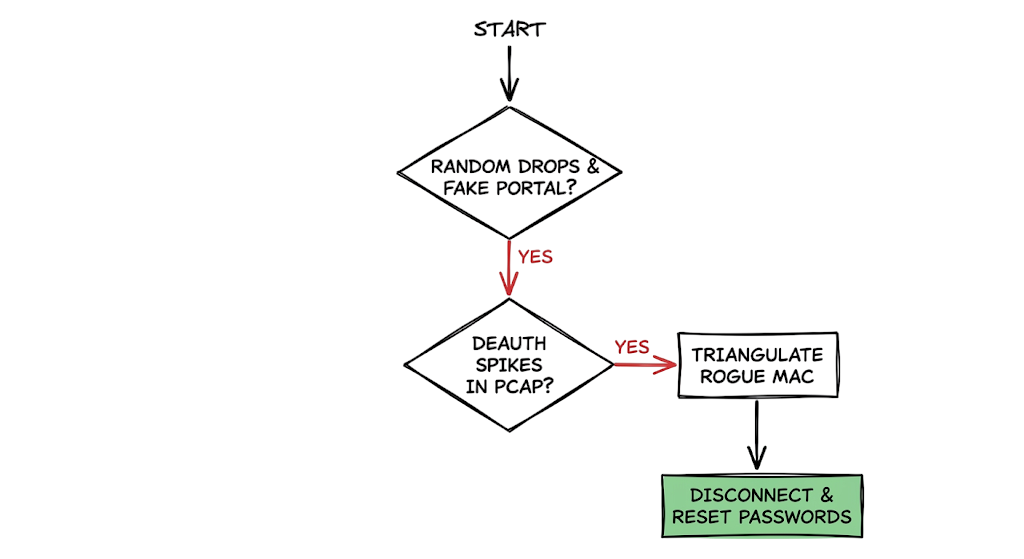
Symptom: Multiple users in the branch office complain that their wireless connection drops randomly, and they are suddenly prompted to re-enter their Windows credentials on a strange web page.
Wrong Assumption: This is where most people get confused. The junior network engineers assume there is severe radio frequency interference from a microwave or a faulty access point firmware upgrade causing connection drops. They spend hours rebooting controllers and changing channels.
Actual Fix: The packet capture reveals massive spikes in deauthentication frames originating from an unknown MAC address. The strange web page is a captive portal hosted by an attacker. You must use your wireless management dashboard to triangulate the signal strength of the unauthorized MAC address. Locate the physical rogue device, disconnect it, and initiate an incident response process to force password resets for any user who interacted with the fake portal.
Evil Twin Wi-Fi Attack Interview Questions and Answers
Q: What defines an Evil Twin attack compared to a standard rogue access point?
A: A rogue access point is any unauthorized wireless device plugged into the corporate network. An Evil Twin specifically impersonates a legitimate network by cloning the exact name and security settings to trick users into connecting.
Q: How does an attacker force a user to connect to their malicious hardware?
A: The attacker sends forged deauthentication frames to the victim’s device. The device disconnects from the real network and automatically reconnects to the attacker’s hardware if it has a stronger signal.
Q: Will HTTPS protect a user who connects to an Evil Twin?
A: HTTPS encrypts the traffic payload, but the attacker can still see DNS requests and destination IP addresses. Furthermore, attackers often use tools to strip HTTPS or present a fake captive portal to steal credentials directly.
Q: How does Protected Management Frames mitigate wireless attacks?
A: Protected Management Frames add cryptographic protection to 802.11 management packets. This prevents an attacker from successfully forging the deauthentication frames used to kick users off the legitimate network.
Q: Why is EAP-TLS considered the strongest defense against wireless spoofing?
A: EAP-TLS requires both the client and the authentication server to present valid digital certificates. An attacker cannot fake the server certificate, causing the client device to terminate the connection before any credentials are exchanged.
Future Trends in Evil Twin Attack Detection (2026 and Beyond)
The wireless security landscape is shifting rapidly. The Wi-Fi Alliance WPA3 Security Overview outlines how WPA3 is becoming a strict requirement for enterprise deployments. WPA3 mandates Protected Management Frames, effectively killing the traditional deauthentication attack vector.
We are seeing heavy integration with Zero Trust architectures. Organizations no longer trust a device simply because it connects to the corporate wireless network. To understand this shift, read What is Network Access Control (NAC)?. Access is granted based on device posture, user identity, and real-time risk assessment regardless of whether the user is on corporate Wi-Fi or a hotel hotspot.
Artificial Intelligence in Wireless Intrusion Prevention Systems is improving Evil Twin detection. Modern platforms analyze connection behaviors, signal strength variations, and client roaming patterns to identify malicious access points instantly.
Evil Twin Wi-Fi Attack FAQ
Q: Can a VPN completely protect me from an Evil Twin?
A: A properly configured Always-On VPN encrypts all traffic leaving the device. The attacker only sees encrypted gibberish. However, if the user interacts with a fake captive portal before the VPN establishes, their credentials can still be stolen.
Q: Are hidden networks safe from cloning?
A: No. Devices configured to connect to hidden networks broadcast the network name constantly in their probe requests. Attackers capture these requests and clone the network easily.
Q: How can I detect an Evil Twin in a public place?
A: It is difficult without specialized tools. Look for sudden disconnects, unexpected certificate warnings in your browser, or captive portals asking for sensitive credentials like email passwords.
Q: Does MAC address filtering stop unauthorized connections?
A: MAC filtering is practically useless against a targeted attack. Attackers monitor the airwaves, capture the MAC addresses of approved devices, and spoof their own hardware to match.
Q: Is it illegal to run an Evil Twin network?
A: Yes. Intercepting electronic communications and impersonating legitimate infrastructure violates cybercrime laws in almost all jurisdictions globally.
Conclusion: Protecting Against Evil Twin Wi-Fi Attacks
Evil Twin Wi-Fi Attacks Explained demonstrates that manipulating human trust is often easier for attackers than breaking modern encryption algorithms. Rather than targeting cryptographic weaknesses, attackers exploit user behavior, wireless protocol limitations, and the tendency to connect to familiar-looking networks without verification.
Throughout this Evil Twin Wi-Fi Attacks Explained guide, we examined how attackers create fake Wi-Fi networks, use deauthentication attacks to force reconnections, deploy rogue hotspots, and harvest credentials through fraudulent captive portals. These attacks remain highly effective in airports, hotels, coffee shops, conferences, and even corporate environments where users expect seamless wireless connectivity.
Organizations must adopt a proactive wireless security strategy instead of relying solely on traditional perimeter defenses. Certificate-based authentication, Protected Management Frames (PMF), Wireless Intrusion Detection Systems (WIDS), Network Access Control (NAC), and continuous wireless monitoring significantly reduce the risk of successful Evil Twin attacks. Security awareness training is equally important because informed users are far less likely to connect to suspicious networks.
The key lesson from Evil Twin Wi-Fi Attacks Explained is simple: never trust a wireless network solely because its name looks familiar. Verify network authenticity, enforce strong authentication controls, and continuously monitor your wireless environment. By combining modern wireless security technologies with user awareness, organizations can effectively defend against fake Wi-Fi networks and protect sensitive business data from interception and theft.
Further Reading and Security Resources
- NIST Cybersecurity Framework
- CISA Cybersecurity Resources
- OWASP Foundation
- MITRE ATT&CK Framework
- Wi‑Fi Alliance Security Resources
- SANS Institute Security Resources
- Cisco Wireless Security Guide
- Aruba Wireless Security Solutions
- Fortinet Wireless Security Resources
- Cloudflare Learning Center: Wi‑Fi Security
Related TechNaga Articles
What Is Cybersecurity and Why It Is Important Today
Complete Network Security Basics Guide for Beginners 2026
What is Firewall in Cybersecurity? Types, Examples and How it Works in 2026
How to Identify Phishing Attacks in 2026 (Complete Guide)
Multi-Factor Authentication (MFA): Critical Guide to Secure Your Systems (2026)
Identity and Access Management in 2026: A Practical Guide for Cloud Security Professionals
Zero Trust Security in 2026: Architecture, Real Examples, and Implementation Guide







