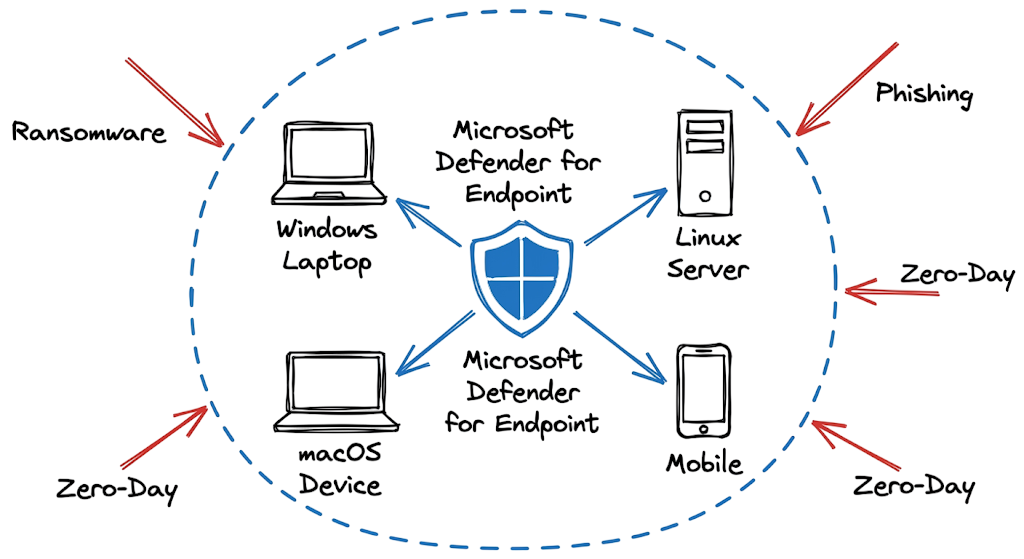
You get a critical alert at two in the morning because a remote user clicked a malicious attachment. By the time you authenticate into the network, the local sensor already isolated the device and the malicious process is completely dead.
That is the exact security outcome every organization wants to achieve.
Endpoint security remains the final line of defense when network perimeters fail. Attackers regularly bypass email filters, web gateways, and traditional firewalls through phishing campaigns, zero-day exploits, and social engineering techniques.
If an attacker compromises a device, the endpoint agent becomes the last barrier preventing a single infected laptop from turning into a company-wide ransomware incident.
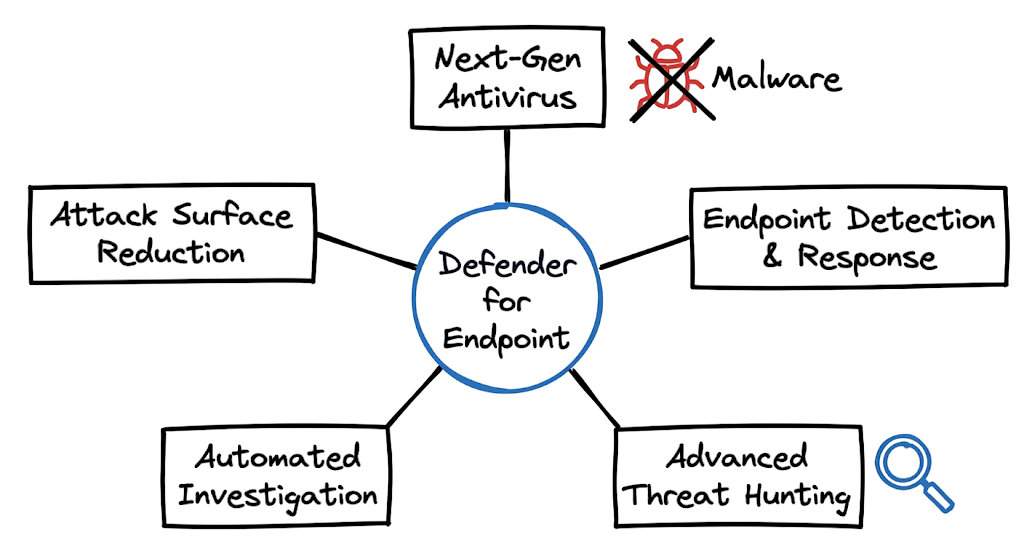
Microsoft Defender for Endpoint is designed to provide that protection. It combines next-generation antivirus, endpoint detection and response (EDR), threat intelligence, automated investigation, and remediation capabilities into a single platform.
In this Microsoft Defender for Endpoint: Complete Security Guide (2026), you will learn how the sensor works, how security telemetry is collected, how threat detection occurs, and how automated response actions can stop attacks before they spread throughout your environment.
Whether you are a cybersecurity analyst, security administrator, SOC engineer, or IT professional, this guide will help you understand how to deploy, manage, and maximize Microsoft Defender for Endpoint in modern enterprise environments.
Microsoft Defender for Endpoint Concepts
Microsoft Defender for Endpoint operates as an enterprise security platform that actively monitors devices and blocks malicious activity before it can impact the organization. It functions as an Extended Detection and Response (XDR) solution that provides visibility across endpoints and security events.
The platform collects telemetry from Windows, Linux, macOS, Android, and iOS devices. This data is continuously analyzed to identify suspicious behavior, attacker techniques, and potential security incidents.
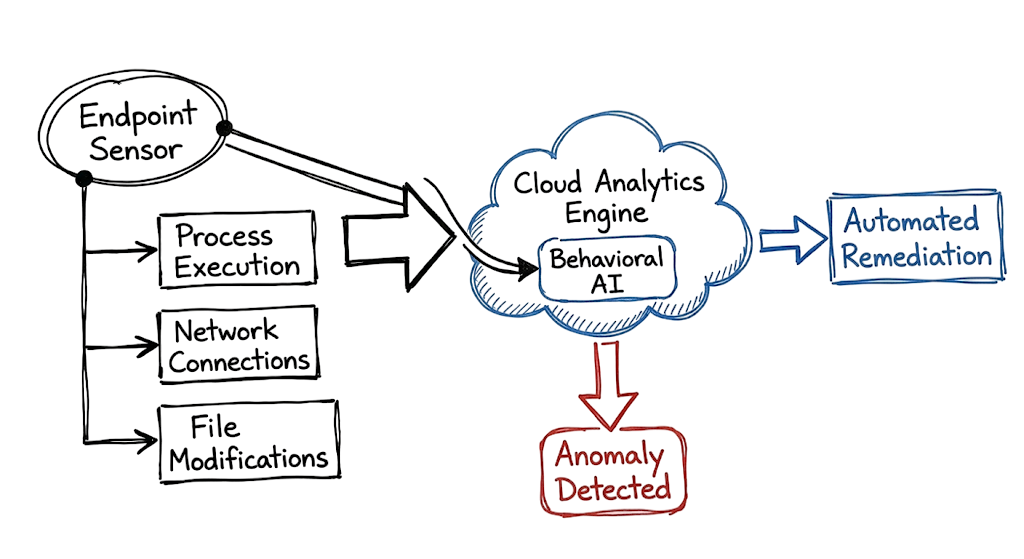
A lightweight sensor is installed on each protected device. The sensor monitors process execution, file activity, user actions, registry changes, and network connections in real time.
When suspicious activity is detected, Microsoft Defender for Endpoint can generate alerts, block malicious actions, isolate devices, or initiate automated investigation and remediation workflows.
Unlike traditional antivirus solutions that primarily rely on file signatures, Next-Generation Antivirus (NGAV) focuses on behavior-based detection. This allows the platform to identify threats that have never been seen before.
For example, if an unknown executable attempts to modify boot sectors, disable security controls, or establish persistence mechanisms, the agent can immediately stop the activity. These behaviors are rarely associated with legitimate business applications and often indicate malware or ransomware activity.
Organizations can deploy Microsoft Defender for Endpoint across physical devices, virtual machines, mobile endpoints, and cloud workloads. This broad coverage helps security teams maintain visibility and protection throughout the entire enterprise environment.
How Microsoft Defender for Endpoint Works
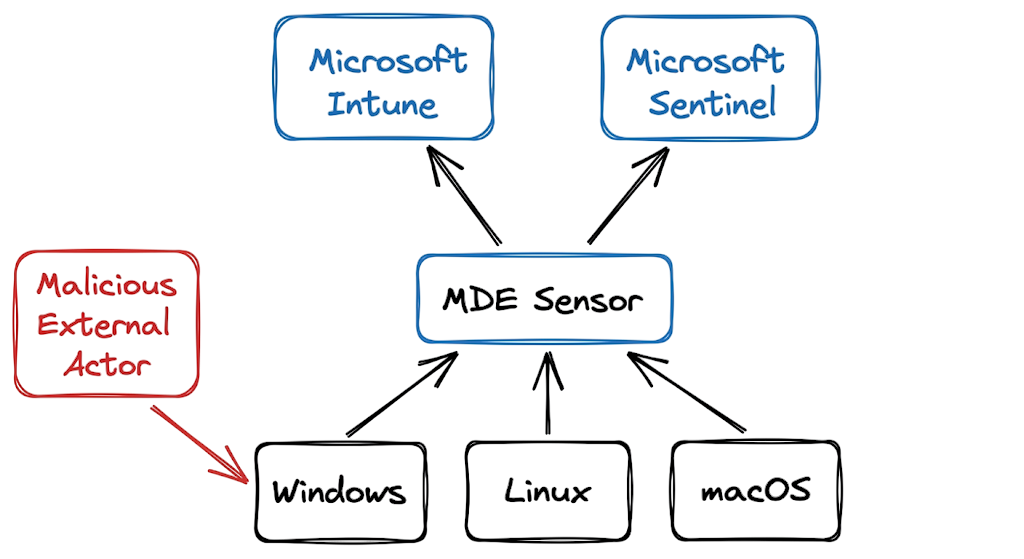
The Microsoft Defender for Endpoint architecture relies on a sensor that is built directly into modern Windows operating systems. Organizations can activate this sensor through an onboarding package, Group Policy, Microsoft Intune, or other deployment methods.
Once onboarded, the endpoint continuously records security-related activities. These activities include process creation, file modifications, registry changes, user actions, and network connections. The collected telemetry is securely streamed to Microsoft’s cloud analytics platform.
The cloud engine processes this telemetry using artificial intelligence, machine learning, and threat intelligence data. Its goal is to identify suspicious behaviors that may indicate malware, ransomware, or other advanced threats.
For example, a user might download a malicious file from the internet. The local sensor immediately detects the file creation event and checks the file against Microsoft’s threat intelligence database.
If the file hash matches a known threat, the system blocks it automatically. If the hash is unknown, Microsoft Defender for Endpoint evaluates the file’s behavior instead of relying solely on signatures.
Suppose the file attempts to inject code into a legitimate system process or establish persistence on the device. These actions are commonly associated with malicious software and can trigger an immediate detection.
To reduce alert fatigue, Microsoft Defender for Endpoint correlates related events into a single incident. Security analysts can review the complete attack chain instead of investigating dozens of separate alerts.
Automated investigation and remediation workflows can then terminate malicious processes, quarantine infected files, isolate compromised devices, and remove persistence mechanisms without requiring immediate analyst intervention.
This automated response cycle helps stop threats within seconds of execution. As a result, organizations can contain attacks quickly and reduce the risk of malware spreading across the environment.
Microsoft Defender for Endpoint Real-World Example
Plaintext
DeviceProcessEvents
| where ProcessCommandLine contains "powershell"
| where ProcessCommandLine contains "-enc"
| where InitiatingProcessFileName =~ "winword.exe"
| project Timestamp, DeviceName, InitiatingProcessFileName, FileName, ProcessCommandLine
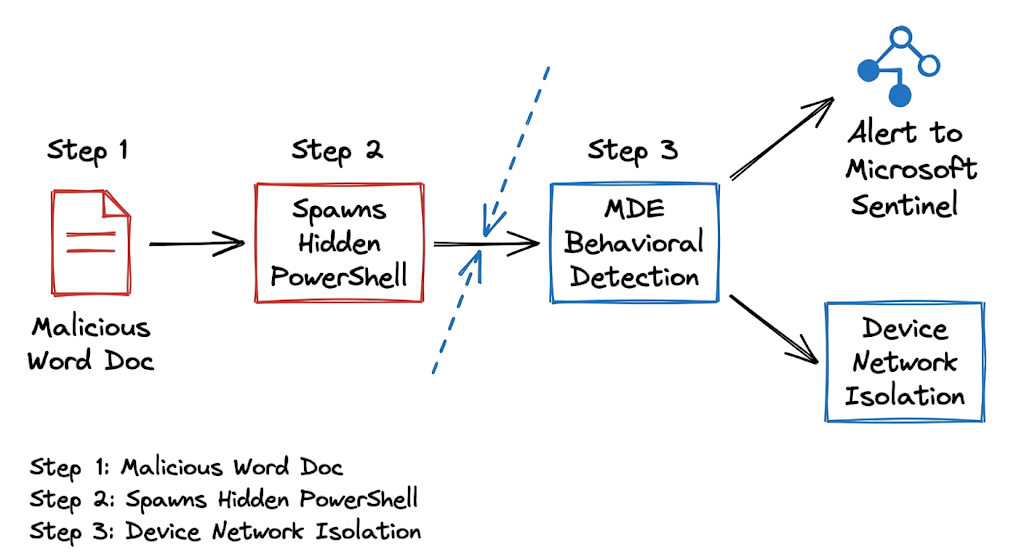
This Advanced Hunting KQL output shows a classic living off the land attack. Microsoft Word initiated a PowerShell process using an encoded command string. Legitimate documents rarely need to spawn hidden PowerShell sessions. When you see this specific chain of execution in your advanced hunting logs, it strongly indicates a malicious macro successfully bypassed your initial email filters. You must immediately isolate the targeted machine and decode the base64 string to understand what external domains the script attempted to contact.
Microsoft Defender for Endpoint Security Techniques
Attackers frequently bypass perimeter defenses through phishing emails that deliver fileless malware directly into memory. Instead of using traditional malware files, they often rely on legitimate system tools such as PowerShell and Windows Management Instrumentation (WMI) to execute malicious commands.
These techniques are effective because trusted system binaries can appear legitimate to traditional security solutions. As a result, malicious activity may blend in with normal operating system behavior.
Ransomware groups commonly target unpatched applications and outdated software. A single vulnerable browser extension or application can provide an initial foothold inside the environment.
After gaining access, attackers often attempt credential theft by targeting the Local Security Authority Subsystem Service (LSASS). Stolen credentials can then be used to access additional systems and move laterally across the network.
Many attacks succeed because organizations do not enforce strong controls around credential access, script execution, or macro usage. Weak security policies create opportunities for attackers to expand their access.
Advanced persistent threat groups may also disable local logging and monitoring services before launching their final stage of attack. This reduces visibility and makes incident response more difficult.
To defend against these tactics, organizations need strong endpoint protection, continuous monitoring, timely patch management, and automated response capabilities. These controls help detect suspicious behavior early and limit the impact of a successful compromise.
Microsoft Defender for Endpoint Detection Methods
Security teams detect these activities by monitoring process trees, network connections, and endpoint telemetry within the security portal. Analysts investigate indicators such as service creation events, scheduled task modifications, privilege escalation attempts, and unusual outbound network traffic.
Advanced hunting queries help identify suspicious behaviors that may not generate high-priority alerts. Common examples include web browsers spawning command shells, Office applications launching PowerShell, or unexpected child processes executing from user directories.
Many analysts focus only on individual alerts. This approach often leads to missed indicators because a single alert rarely provides enough context to understand the full attack.
Instead, investigators should correlate multiple events across the attack timeline. A seemingly harmless file download may be followed by command execution, credential theft attempts, persistence mechanisms, and outbound communications to an attacker-controlled server.
When these events are analyzed together, the attack pattern becomes much clearer. Context is often more valuable than any single alert.
Organizations that rely only on critical-severity alerts risk missing low-severity indicators that appear during the early stages of an intrusion. Early detection frequently depends on identifying these subtle warning signs before the attacker achieves their objective.
Reviewing the device timeline helps analysts reconstruct the complete attack sequence. Endpoint telemetry can reveal executed processes, contacted IP addresses, modified registry keys, created services, scheduled tasks, and other activities associated with the compromise.
This visibility allows security teams to understand how the attack started, what actions were performed, and whether additional systems may have been affected.
Microsoft Defender for Endpoint Business Impact
A compromised endpoint in a banking environment can create significant financial, operational, and regulatory risks. Attackers often target employee workstations because they provide a potential path into critical banking systems.
If an adversary gains access to a teller workstation and moves laterally toward core banking applications, they may attempt to access sensitive customer information, manipulate records, or disrupt essential business operations.
Financial institutions must comply with strict regulatory requirements. Any unauthorized access to critical infrastructure typically triggers incident reporting obligations, forensic investigations, and extensive security reviews.
The impact extends beyond the initial compromise. Customer trust can decline rapidly after a public security incident, especially when financial or personal data is exposed.
Operational disruptions can also be severe. Organizations may need to isolate systems, suspend services, or rebuild affected infrastructure while incident response teams investigate the attack.
Recovery costs can quickly escalate due to forensic analysis, legal expenses, regulatory compliance activities, technology restoration efforts, and lost business revenue.
For these reasons, strong endpoint security is a critical component of modern banking cybersecurity programs. Early detection and rapid containment help reduce the impact of an attack before it spreads across the organization.
Microsoft Defender for Endpoint Prevention Best Practices
The most effective way to prevent endpoint compromises is to reduce the available attack surface before an attacker gains access. Strong preventive controls can stop many attacks before they have an opportunity to execute.
Attack Surface Reduction (ASR) rules should be configured to block executable content launched from email clients and prevent Office applications from creating suspicious child processes. These controls are highly effective against phishing campaigns and malware delivery techniques.
Before enforcing ASR rules across production environments, organizations should consider deploying them in audit mode. This approach helps identify potential compatibility issues with legacy applications and business processes before moving to full enforcement.
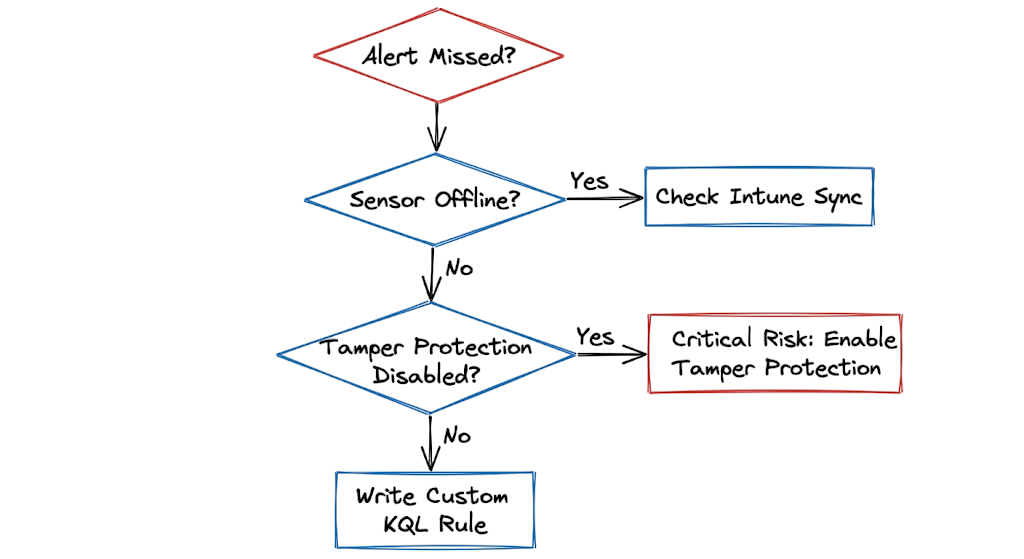
Tamper Protection should also be enabled to prevent attackers from disabling security controls, modifying configurations, or stopping endpoint protection services.
Administrative access to security management portals should always require multi-factor authentication (MFA). If an attacker compromises an administrator account, they may attempt to weaken or disable security controls across the environment.
Organizations should also implement a continuous vulnerability management program. Waiting for monthly scans can leave critical systems exposed to known vulnerabilities for extended periods.
Continuous vulnerability assessment helps security teams identify high-risk software, prioritize remediation efforts, and deploy security updates more quickly.
Regular operating system and application updates remain essential for reducing exposure to known threats. Unpatched systems are among the most common entry points used by attackers.
Finally, conduct regular incident response exercises and ransomware simulations. Security teams should be prepared to investigate alerts, isolate affected devices, and contain threats as quickly as possible when a security incident occurs.
Microsoft Defender for Endpoint Security Tools
Modern endpoint security environments rely on multiple integrated platforms working together to provide visibility, protection, and centralized management.
Microsoft Intune is commonly used to deploy security configurations, compliance policies, and Attack Surface Reduction (ASR) rules across managed endpoints. This ensures consistent security controls throughout the organization.
Microsoft Sentinel serves as a centralized security operations platform. It collects telemetry from endpoints, identities, networks, cloud services, and third-party security products, enabling broader threat detection and investigation capabilities.
Microsoft Defender for Cloud extends security monitoring and protection to servers, virtual machines, and cloud workloads. This helps organizations maintain consistent security coverage across both on-premises and cloud environments.
In practice, endpoint security deployments often involve operational challenges. Legacy systems may not support modern security sensors, while remote devices can lose connectivity and miss critical policy updates.
Organizations with multiple subsidiaries or business units may also operate different endpoint protection platforms. Common examples include SentinelOne, CrowdStrike, and other enterprise security solutions.
Managing security data across multiple products can create visibility gaps. Security teams frequently need to normalize and correlate information from different platforms to obtain a complete view of potential threats.
To address this challenge, many organizations integrate endpoint, network, identity, and cloud security data into a centralized security operations platform. Custom API integrations and automated data pipelines help ensure that analysts have access to consistent information for threat hunting, incident response, and security reporting.
A centralized approach improves visibility, reduces investigation time, and helps security teams detect threats that might otherwise remain hidden across separate security tools.
Microsoft Defender for Endpoint FAQ
Q: What is the main difference between Plan 1 and Plan 2?
A: Plan 1 focuses on prevention features like Next Generation Antivirus and attack surface reduction. Plan 2 adds advanced capabilities including EDR, automated investigation, and threat hunting.
Q: Can this software run alongside other antivirus products?
A: Yes, the sensor can run in passive mode. This allows another primary antivirus solution to handle active blocking while the local sensor continues to collect telemetry for behavioral analysis.
Q: How does the system handle disconnected devices?
A: The local sensor continues to apply prevention rules and records telemetry locally. Once the device reconnects to the internet, it uploads the cached event logs to the cloud for analysis.
Q: What are attack surface reduction rules?
A: They are specific security controls that block common attack vectors. Examples include stopping office applications from launching executable files and preventing credential dumping from system memory.
Q: Do I need a separate agent for vulnerability management?
A: No, the vulnerability management capabilities are built directly into the standard sensor. It continuously evaluates installed applications and operating system configurations for known weaknesses.
Q: What happens when an endpoint gets isolated?
A: The device loses all normal network connectivity to prevent malware from spreading. It only maintains a secure connection to the security portal so analysts can run remote forensic commands.
Q: How do you deploy the sensor to thousands of machines?
A: You deploy the onboarding scripts through configuration management tools like Microsoft Intune or Group Policy. The machines register with your tenant automatically and begin streaming telemetry immediately.
Microsoft Defender for Endpoint Conclusion
Understanding the concepts behind Microsoft Defender for Endpoint proves that traditional signature-based detection alone is no longer sufficient against modern cyber threats. Attackers constantly change their techniques, making behavioral analysis, threat intelligence, and automated response essential components of an effective security strategy.
Microsoft Defender for Endpoint provides organizations with advanced endpoint detection and response capabilities, continuous monitoring, threat hunting, vulnerability management, and automated remediation. These capabilities help security teams detect and contain attacks before they spread across the environment.
As covered throughout this Microsoft Defender for Endpoint: Complete Security Guide (2026), strong endpoint security requires more than simply deploying an antivirus solution. Organizations must combine proactive security controls, continuous monitoring, rapid incident response, and regular security assessments to reduce risk.
Take a few minutes to review your Microsoft Defender for Endpoint deployment today. Verify that Tamper Protection is enabled, Attack Surface Reduction rules are properly configured, automated investigation features are active, and critical endpoints are reporting telemetry successfully. Small improvements made today can prevent a major security incident tomorrow.
For further reading on endpoint security, threat detection, and modern cybersecurity practices, explore these related guides:
- What Is Cybersecurity and Why It Is Important Today
https://technaga.com/what-is-cybersecurity-and-why-it-is-important-today/ - Complete Network Security Basics Guide for Beginners 2026
https://technaga.com/what-is-networks-and-network-security-basics-2026/ - What is Firewall in Cybersecurity? Types, Examples and How it Works in 2026
https://technaga.com/firewall-in-cybersecurity-types-examples-explained/ - Essential Endpoint Security Guide 2026 for Every Organization
https://technaga.com/endpoint-security-2026-guide/ - How to Identify Phishing Attacks in 2026 (Complete Guide)
https://technaga.com/how-to-identify-phishing-attacks-in-2026/ - Multi-Factor Authentication (MFA): Critical Guide to Secure Your Systems (2026)
https://technaga.com/multi-factor-authentication-mfa-guide-2026/ - Identity and Access Management in 2026: A Practical Guide for Cloud Security Professionals
https://technaga.com/identity-and-access-management-cloud-security-2026/ - Security Information and Event Management: Complete SIEM Guide 2026
https://technaga.com/security-information-and-event-management-2026/ - Zero Trust Security in 2026: Architecture, Real Examples, and Implementation Guide
https://technaga.com/zero-trust-security-2026-guide/ - Top 10 Cybersecurity Best Practices for 2026
https://technaga.com/top-10-cybersecurity-best-practices-2026/
For deeper technical knowledge about Microsoft Defender for Endpoint, threat hunting, endpoint detection and response (EDR), and security operations, explore these authoritative resources:
- Microsoft Defender for Endpoint Documentation
https://learn.microsoft.com/en-us/defender-endpoint/ - Microsoft Defender XDR Documentation
https://learn.microsoft.com/en-us/defender-xdr/ - Microsoft Security Blog
https://www.microsoft.com/security/blog/ - Microsoft Learn Security Training
https://learn.microsoft.com/en-us/training/security/ - Microsoft Sentinel Documentation
https://learn.microsoft.com/en-us/azure/sentinel/ - MITRE ATT&CK Framework
https://attack.mitre.org/ - CISA Cybersecurity Resources
https://www.cisa.gov/cybersecurity - NIST Cybersecurity Framework
https://www.nist.gov/cyberframework - CIS Benchmarks
https://www.cisecurity.org/cis-benchmarks - OWASP Security Resources
https://owasp.org/www-project-top-ten/







