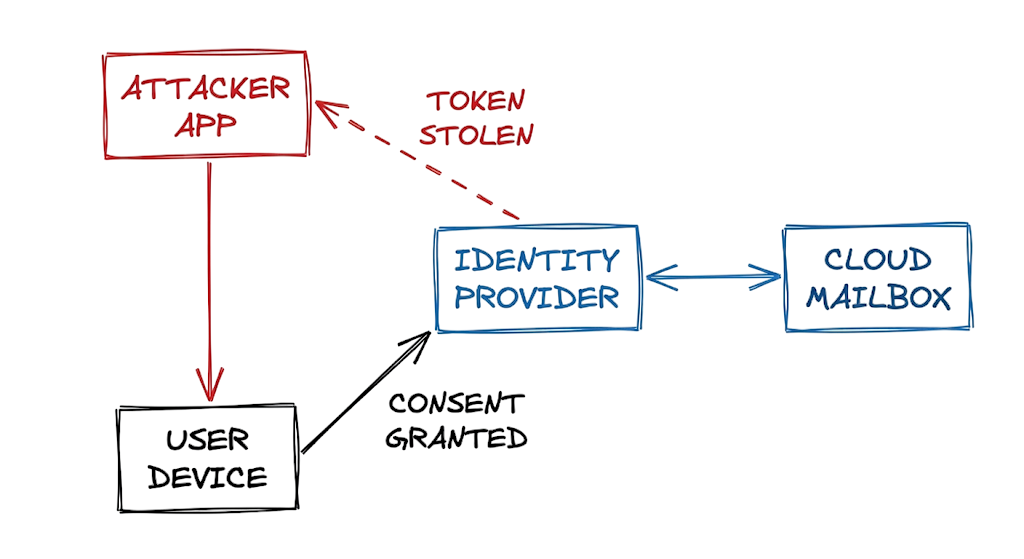
OAuth Phishing Attacks: How Attackers Steal Cloud Access have become one of the fastest-growing cloud security threats targeting Microsoft 365, Google Workspace, and other Software-as-a-Service (SaaS) platforms. Unlike traditional phishing campaigns that focus on stealing usernames and passwords, modern OAuth phishing attacks abuse OAuth permissions, malicious applications, and access tokens to gain persistent access to cloud resources without ever knowing a user’s credentials.
At 2:00 AM, a security alert reports the creation of a suspicious inbox rule in a Microsoft 365 mailbox. Surprisingly, the user successfully completed Multi-Factor Authentication (MFA) only ten minutes earlier. Security logs reveal no failed login attempts, no suspicious IP addresses, and no evidence of password spraying or brute-force attacks.
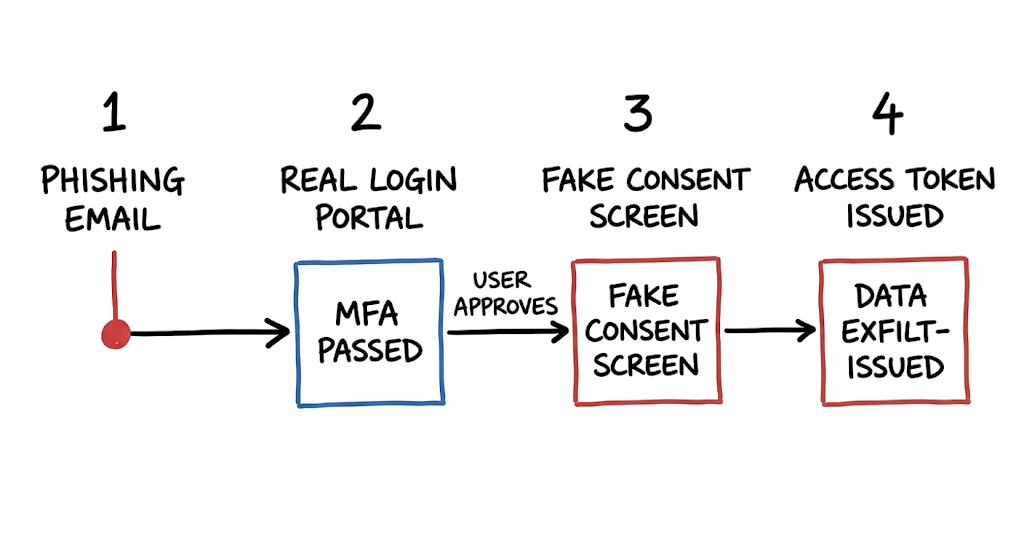
During the investigation, analysts discover that the user clicked a phishing email, authenticated through the legitimate Microsoft sign-in portal, and unknowingly approved a malicious application on an OAuth consent screen. That single approval granted attackers an OAuth access token, allowing them to access the mailbox, emails, contacts, and cloud resources without stealing the user’s password.
This scenario illustrates OAuth Phishing Attacks: How Attackers Steal Cloud Access in today’s enterprise environments. Cybercriminals are shifting away from traditional credential theft and instead exploiting OAuth authorization flows to trick users into granting excessive permissions to malicious third-party applications. These attacks often bypass password-based defenses because authentication occurs through trusted identity providers.
As organizations continue migrating to Microsoft 365, Google Workspace, and other cloud platforms, users increasingly authenticate through centralized identity providers instead of creating separate credentials for every application. While this improves productivity and user experience, it also introduces new attack vectors, including OAuth consent phishing, where attackers manipulate users into authorizing malicious applications that maintain long-term cloud access.
Attackers understand they no longer need to steal passwords if they can obtain valid OAuth access tokens directly from a trusted authorization process. Once permission is granted, malicious applications can continue accessing cloud data until the OAuth token or application permissions are revoked.
In this guide, you’ll learn how OAuth Phishing Attacks: How Attackers Steal Cloud Access work, how attackers abuse OAuth consent phishing techniques, how malicious applications compromise Microsoft 365 OAuth security and Google Workspace OAuth attacks, and the best practices for detecting, preventing, and responding to OAuth-based cloud security threats.
What Are OAuth Phishing Attacks and How Do They Steal Cloud Access?
When you connect a new productivity application to your corporate calendar, you do not share your password directly. Instead, you rely on OAuth, an open authorization framework that grants specific permissions to trusted applications.
The framework issues access tokens that represent those approved permissions. The application uses these access tokens to read your calendar, access files, or send emails on your behalf without ever seeing your actual credentials.
Attackers abuse this same mechanism during OAuth phishing attacks. Rather than stealing passwords, they create malicious applications designed to look trustworthy. Common examples include fake apps named Payroll Verification Portal, Zoom Productivity Assistant, or Document Review Center.
The attacker sends a phishing email urging the user to verify a document, upgrade mailbox storage, or review an urgent request. When the user clicks the link, they are redirected to the legitimate Microsoft 365 or Google Workspace login page and complete authentication successfully.
After authentication, an OAuth consent screen appears requesting permissions such as reading emails, accessing files, viewing contacts, or managing calendars. Because the login page is genuine, many users trust the request and approve the permissions without careful review.
Once approved, the identity provider generates valid access tokens and grants them to the malicious application. The attacker now has authorized cloud access without ever knowing the user’s password.
This makes OAuth phishing particularly dangerous. The attacker gains persistent access to email, files, and other cloud resources through a legitimate authorization process, making detection more difficult than traditional credential phishing attacks.
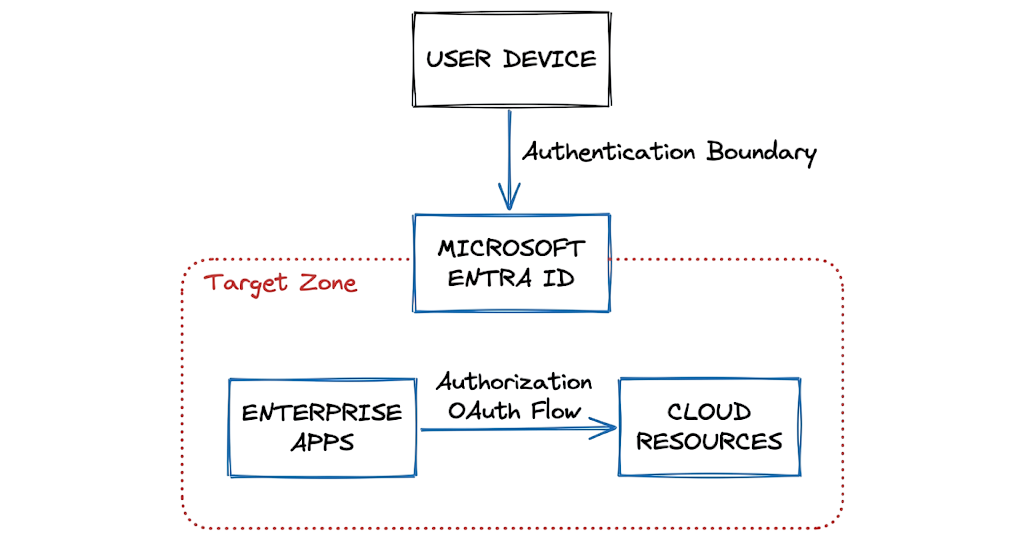
How OAuth Phishing Attacks Work
The attack mechanism relies entirely on exploiting user trust and the standard authorization flow. The sequence begins when a victim clicks a malicious link and is redirected to a genuine login portal. Because the portal is hosted by a trusted provider like Google or Microsoft, the victim sees the correct domain name and a valid security certificate. If the user is already authenticated on their machine, the system might skip the password prompt entirely. The flow then presents the permissions consent screen.
This screen lists the precise data the malicious applications want to access, such as reading emails or writing files. If the user clicks approve, the identity provider generates a short lived authorization code. The malicious application exchanges this code for an access token and a refresh token behind the scenes.
The access token acts as a temporary pass card for the requested resources and usually expires in one hour. The refresh token allows the attacker to silently request new access tokens for months without any further user interaction. If you change the user password, the existing tokens remain perfectly valid. If you trigger a multifactor authentication challenge, the tokens bypass MFA completely because the initial authorization already satisfied the requirement. The attacker maintains a persistent connection to the environment until a security engineer explicitly revokes the application consent from the administrative portal.
Real World OAuth Phishing Attack Example
JSON
{
  "ActionType": "ConsentAction",
  "Status": "Success",
  "TargetContext": "AzureActiveDirectory",
  "TargetUser": "finance.lead@company.com",
  "ApplicationName": "Payroll Verification Update",
  "DelegatedClientId": "b8a9c3x1",
  "GrantedPermissions": "Mail.ReadWrite, Contacts.Read",
  "IpAddress": "192.168.1.50"
}
This audit log shows a successful consent grant within an enterprise cloud environment. The user authorized an application called Payroll Verification Update to read and write emails. The IP address belongs to the legitimate user because the user is the one performing the authorization flow locally on their machine.
When I was working on an incident response case involving a compromised finance department, we saw this exact log entry immediately before the attacker created hidden forwarding rules to steal vendor invoices. To fix this situation, you must locate the delegated client ID in your enterprise applications directory, revoke all user consent globally, and forcefully delete the associated token bindings.
Common OAuth Phishing Techniques Used by Attackers
Attackers deploy several variations of this attack to maximize their success rate and evade detection. One common method involves homoglyph applications. The attacker registers an application name that looks identical to a trusted software publisher by swapping characters, such as using a zero instead of the letter O.
The consent screen looks entirely standard to the untrained eye, so users approve the request without noticing the typographical deception. Another technique targets device codes. Attackers display an authorization code on a phishing site and instruct the user to enter it into the real device authentication portal. The user authenticates their own session securely, but the resulting access token routes directly to the attacker infrastructure. Now here’s where it gets interesting. Some attackers scope their malicious applications to request very low level permissions initially.
They might only ask to read basic user profiles to avoid triggering automated security alerts. Once the user grants consent, the attacker uses that minimal access to map the corporate directory and identify high value targets for secondary, highly targeted phishing campaigns. They chain these small authorizations together to map the entire corporate structure before escalating to full mailbox access.
OAuth Phishing Detection Methods
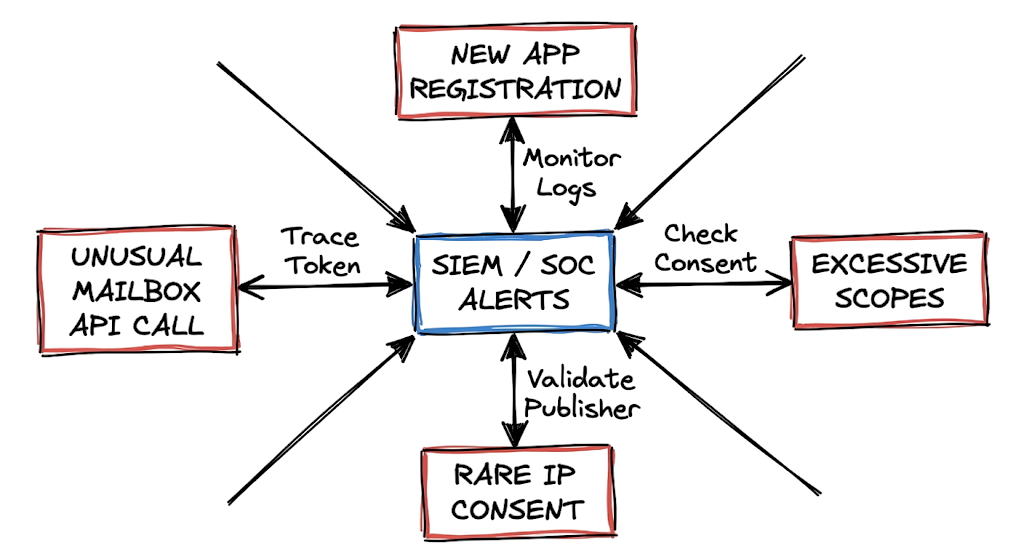
Catching these attacks requires a fundamental shift from monitoring login failures to monitoring authorization events. You must track exactly when a user grants consent to an unknown external application. In Microsoft environments, this means watching the central audit logs for new application registrations and tracking the specific permissions requested by those applications. If an application suddenly requests the ability to read all files or send emails on behalf of a user, that event should trigger an immediate high severity alert for the security operations center.
You should also look for applications that have very few active users. A legitimate enterprise software tool will typically show hundreds of consent grants across the company within a few days. Rogue applications will usually only have one or two victims. This is where most people get confused. They look at the sign in logs and see a successful login originating from the user home IP address, followed by a successful multifactor authentication claim. The sign in log looks perfectly clean and legitimate. You have to pivot away from authentication logs and analyze the enterprise application audit logs to see the actual token generation and the exact permissions granted to the rogue application.
Business Impact of OAuth Phishing Attacks
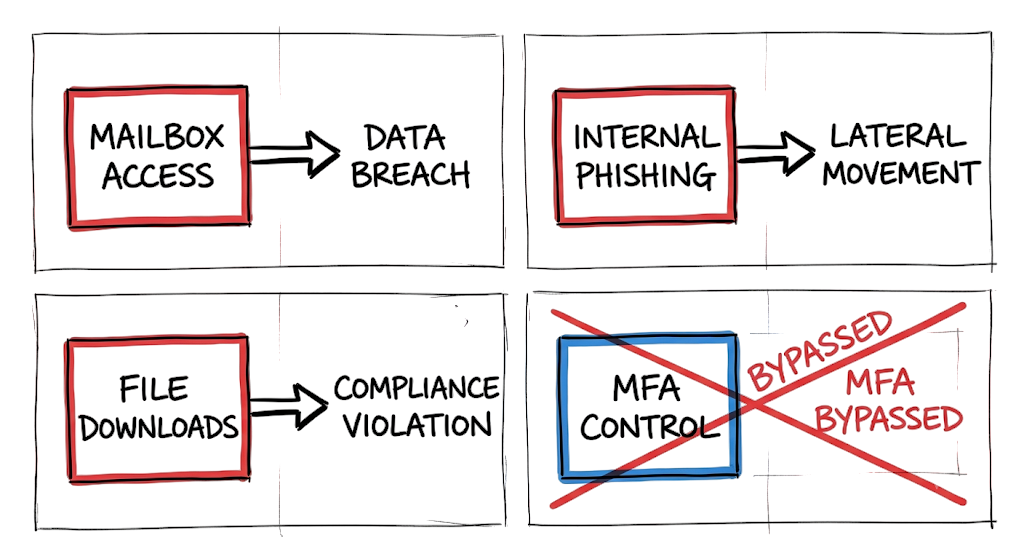
A successful token theft in a banking environment carries massive regulatory and financial consequences. Imagine a medium sized bank in India where an attacker tricks a senior loan officer into granting consent to a fake document signing application. The attacker gains silent read access to the officer mailbox and internal file repositories. The attacker downloads thousands of loan applications containing national identification numbers, financial statements, and sensitive contact details. Because the attacker uses the cloud provider native application programming interfaces to extract the data, the network traffic blends in completely with normal daily operations.
Under the Reserve Bank of India guidelines and the Digital Personal Data Protection Act, the bank must report this data breach immediately and faces severe financial penalties for failing to secure customer data. The blast radius extends far beyond the initial data loss. The attacker can use the compromised loan officer mailbox to send authenticated phishing emails to branch managers, requesting urgent fraudulent wire transfers. Since the emails originate from the genuine corporate mail server, they bypass standard email security gateways and sender policy framework checks completely.
OAuth Phishing Prevention Best Practices
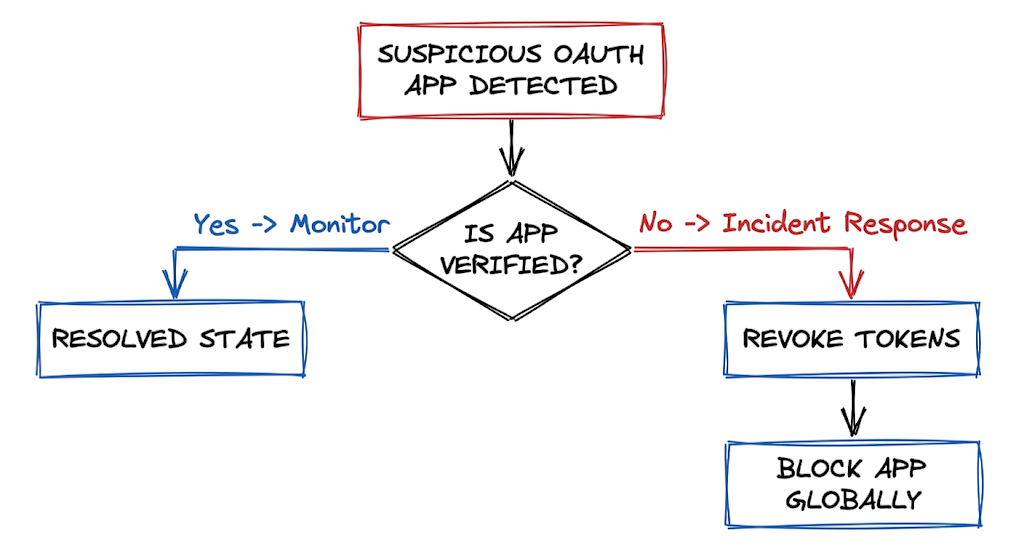
You must lock down the ability for end users to grant consent to unverified applications globally. The most effective technical control involves configuring a strict administrator consent workflow. When a user tries to connect a new application, the system should block the request automatically and send a notification to the security team for formal review. You should restrict user consent entirely for any application requesting access to sensitive corporate data like mailboxes or file storage.
You also need to audit your existing cloud environment to find applications that users authorized years ago. Security teams often discover hundreds of obsolete productivity tools and calendar plugins that still hold active access tokens to corporate data. Revoke access immediately for any application that is no longer actively used or lacks a verified cryptographic publisher badge. You must train your employees to read the consent screen just as carefully as they read a banking login page.
They need to understand clearly that clicking the approve button on a permission request is the exact equivalent of handing over their corporate password. Finally, implement conditional access policies that restrict token issuance based on strict device compliance rules. If the device requesting the authorization token is not a managed corporate asset, block the authorization flow entirely.
Security Tools for Detecting OAuth Phishing
Microsoft Defender for Cloud Apps acts as a specialized security broker that monitors and controls application access across your entire cloud environment. It allows you to create active policies that automatically revoke tokens for applications exhibiting suspicious data exfiltration behavior. Microsoft Sentinel provides the central logging capability necessary to aggregate consent events and correlate them with unusual mailbox activities across your infrastructure. You can build custom hunting queries in Sentinel to alert on high risk permission scopes explicitly.
Google Workspace Security Center offers similar deep visibility for Google environments, allowing administrators to review external access and block unverified authorization scopes globally. AppOmni specializes in complex software security management and excels at mapping third party integrations that native cloud tools might miss. Wiz provides broad cloud security posture management and can rapidly identify forgotten enterprise applications retaining excessive privileged permissions. In real environments, it doesn’t work this cleanly. Native security tools often generate massive alert fatigue when legitimate internal developers register testing applications, requiring constant rule tuning and strict baseline adjustments to separate actual rogue applications from messy internal development practices.
OAuth Phishing Attacks FAQ
Q: Do password resets stop this type of attack?
A: No. Access tokens and refresh tokens remain valid even after you change the user password completely. You must explicitly revoke the application consent and the associated tokens to terminate the attacker access.
Q: Can multifactor authentication block these malicious applications?
A: Multifactor authentication protects the initial login session but does not prevent the user from making a bad authorization decision. The user completes the authentication challenge successfully before the malicious application asks for data permissions.
Q: How long do these malicious tokens last?
A: Access tokens typically expire within an hour. However, the attacker also receives a refresh token that can be used to generate new access tokens for months unless an administrator revokes the active session.
Q: Why do attackers target email permissions specifically?
A: Mailbox access allows attackers to read sensitive internal communications and intercept password reset links for other corporate systems. They also use the compromised mailbox to launch internal phishing campaigns that bypass external email filters.
Q: How do I find out which applications have access to my environment?
A: You can view all authorized applications in the central identity portal under enterprise applications or in your workspace administrator console. You should review these permission lists regularly to identify unapproved integrations.
Conclusion: Protecting Cloud Access from OAuth Phishing Attacks
The rapid transition to cloud identities requires a fundamental shift in how organizations protect internal user accounts. Traditional password security alone is no longer enough to defend against modern OAuth phishing attacks.
Organizations must treat authorization requests, consent screens, and access token generation with the same level of scrutiny as password-based authentication. A single approval on a malicious application can provide attackers with persistent cloud access without ever stealing credentials.
To prevent OAuth Phishing Attacks: How Attackers Steal Cloud Access, organizations should restrict user consent wherever possible. Users should not be able to grant high-risk permissions to unverified third-party applications without security oversight.
One of the most effective security controls is implementing an administrator approval workflow. This ensures that every request for sensitive OAuth permissions is reviewed before access is granted.
By controlling consent management, monitoring access tokens, and auditing OAuth applications regularly, security teams can significantly reduce the risk of cloud account compromise, data theft, and unauthorized access to Microsoft 365 or Google Workspace environments.
For a deeper understanding of cloud identity security, phishing prevention, and Zero Trust architecture, explore these related guides:
- Cloud Security Basics 2026: Complete Beginner Guide
https://technaga.com/cloud-security-basics-2026/ - Identity and Access Management in 2026: A Practical Guide for Cloud Security Professionals
https://technaga.com/identity-and-access-management-cloud-security-2026/ - Multi-Factor Authentication (MFA): Critical Guide to Secure Your Systems (2026)
https://technaga.com/multi-factor-authentication-mfa-guide-2026/ - How to Identify Phishing Attacks in 2026 (Complete Guide)
https://technaga.com/how-to-identify-phishing-attacks-in-2026/ - Critical API Security Risks in the Cloud and Best Practices for 2026
https://technaga.com/api-security-cloud-risks-best-practices-2026/ - Cloud Misconfiguration: 10 Critical Errors Leading to Data Breaches in 2026
https://technaga.com/cloud-misconfiguration-data-breaches-2026/ - Zero Trust Security in 2026: Architecture, Real Examples, and Implementation Guide
https://technaga.com/zero-trust-security-2026-guide/ - Security Information and Event Management: Complete SIEM Guide 2026
https://technaga.com/security-information-and-event-management-2026/ - Top 10 Cybersecurity Best Practices for 2026
https://technaga.com/top-10-cybersecurity-best-practices-2026/ - Password Security Guide 2026: 10 Essential Tips
https://technaga.com/password-security-guide-2026/
Additional Resources
For further reading on OAuth security, cloud identity protection, access tokens, and phishing-resistant authentication, explore these authoritative resources:
- OAuth 2.0 Authorization Framework (IETF)
https://datatracker.ietf.org/doc/html/rfc6749 - OAuth 2.0 Security Best Current Practice (IETF)
https://datatracker.ietf.org/doc/html/rfc9700 - OpenID Connect Documentation
https://openid.net/developers/how-connect-works/ - Microsoft Entra ID OAuth and Permissions Documentation
https://learn.microsoft.com/en-us/entra/identity-platform/v2-oauth2-auth-code-flow - Microsoft Guidance on Consent and Permissions
https://learn.microsoft.com/en-us/entra/identity/enterprise-apps/configure-user-consent - Google Identity OAuth 2.0 Documentation
https://developers.google.com/identity/protocols/oauth2 - Google Workspace OAuth App Verification
https://support.google.com/cloud/answer/9110914 - OWASP OAuth 2.0 Cheat Sheet
https://cheatsheetseries.owasp.org/cheatsheets/OAuth2_Cheat_Sheet.html - NIST Digital Identity Guidelines (SP 800-63)
https://pages.nist.gov/800-63-4/ - CISA Identity and Access Management Resources
https://www.cisa.gov/topics/cybersecurity-best-practices/identity-and-access-management







