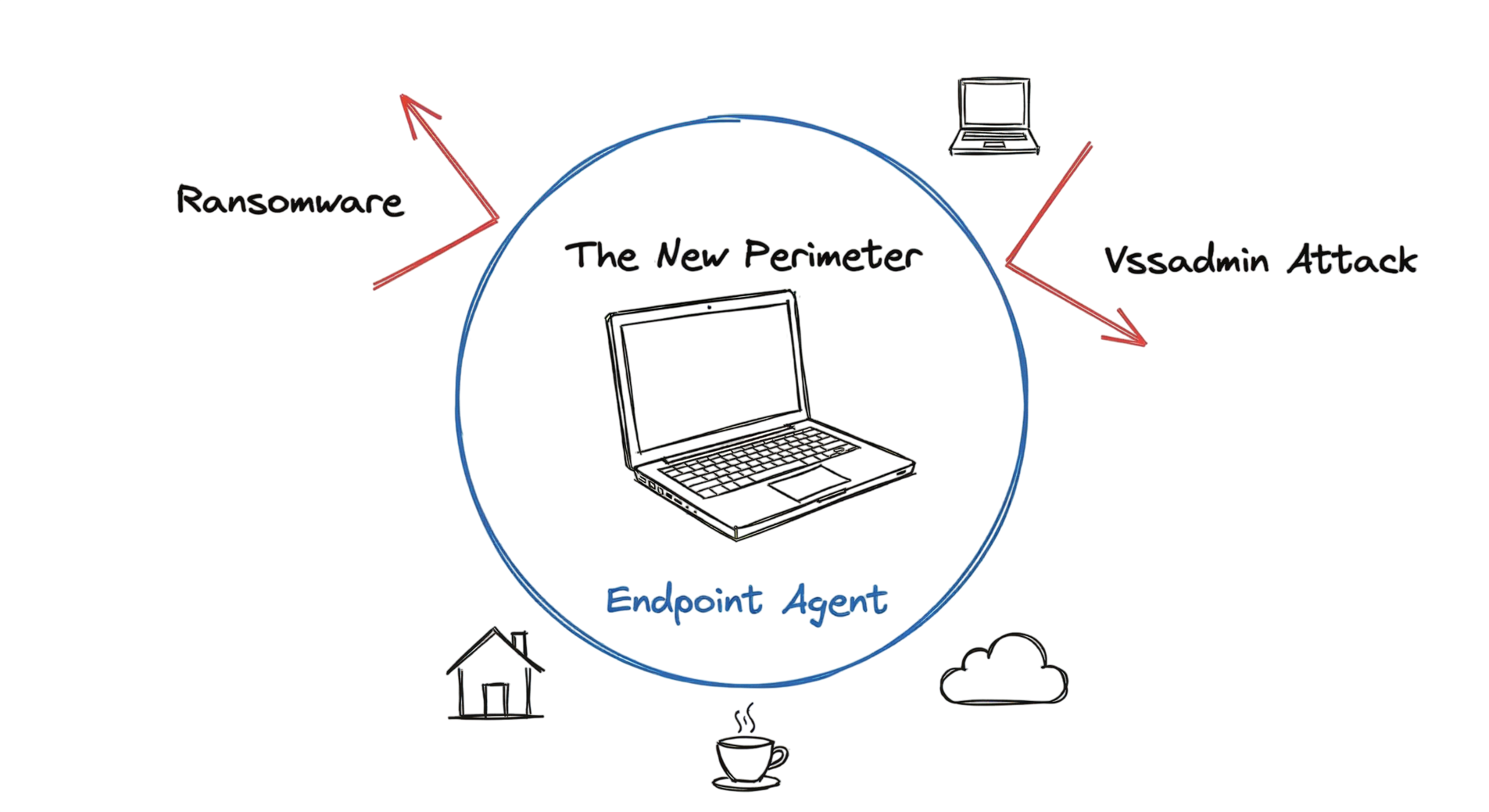
It is 2:00 AM. My phone starts vibrating on the nightstand. The SOC lead is calling. They have detected a sudden spike in vssadmin.exe delete shadows commands across three marketing laptops. If you’ve worked in cybersecurity, you immediately recognize the warning signs. Ransomware is attempting to delete shadow copies before encrypting files. This is exactly the type of attack that a modern Endpoint Detection and Response (EDR) solution is designed to detect and contain before it spreads.
A decade ago, the first step would have been checking firewall logs. Today, that approach is no longer enough. Those laptops are scattered across different home offices, connected through personal Wi-Fi networks, and operating outside the traditional corporate perimeter. Attackers now target individual devices because they often have direct access to sensitive business data and cloud applications.
This is the reality of endpoint security in 2026. Organizations can no longer rely solely on network-based defenses because employees work from anywhere using laptops, desktops, smartphones, tablets, and other remote devices. Every endpoint has become a potential entry point for cyberattacks, making endpoint protection a critical part of every organization’s cybersecurity strategy.
Modern endpoint security combines technologies such as Endpoint Detection and Response (EDR), Endpoint Protection Platform (EPP), next-generation antivirus (NGAV), behavioral analytics, threat intelligence, and continuous monitoring to detect, investigate, and stop threats before they spread across the organization. Understanding these technologies, including the differences in EDR vs Antivirus solutions, is essential for protecting today’s distributed workforce against ransomware, malware, fileless attacks, and other advanced cyber threats. Following proven Endpoint Security Best Practices helps organizations strengthen their defenses and reduce the risk of successful attacks.

What Is Endpoint Security?
Endpoint security is the practice of protecting every device that connects to an organization’s network. These devices, known as endpoints, include laptops, desktops, servers, smartphones, tablets, and Internet of Things (IoT) devices. As organizations continue to adopt hybrid work, cloud computing, and remote work, endpoint security has become one of the most important layers of modern cybersecurity because every connected device can become a target for attackers.
In 2026, endpoint security goes far beyond simply blocking malicious files. Modern security solutions continuously monitor running processes, user identities, application behavior, and network connections to detect suspicious activity before it becomes a serious security incident. This proactive approach helps organizations defend against ransomware, fileless malware, phishing attacks, insider threats, and other advanced cyber threats.
Many people assume endpoint security is simply another antivirus program. That is no longer true. Modern protection combines multiple technologies, including an Endpoint Protection Platform (EPP), Endpoint Detection and Response (EDR), behavioral analytics, threat intelligence, and Zero Trust principles. Together, these solutions verify user identities, monitor application behavior, detect suspicious activities, and stop malicious actions before attackers can compromise a device or move laterally across the network.
Understanding the difference between EDR vs Antivirus is essential when building an effective security strategy. Traditional antivirus primarily detects known malware using signatures, while EDR continuously monitors endpoint activity, investigates suspicious behavior, and enables rapid threat response. Implementing these technologies alongside proven Endpoint Security Best Practices helps organizations reduce cyber risk and strengthen their overall security posture.
How Endpoint Security Works in Real Environments
Modern endpoint security begins by installing a lightweight security agent on every managed device. This agent continuously collects security telemetry and monitors system activity to identify suspicious behavior before it becomes a security incident. It typically monitors:
- Running processes
- File creation and modification
- Registry changes
- User logins
- Network connections
- PowerShell and command-line activity
- USB device usage
This continuous visibility allows security teams to detect malicious activity in real time, even when attackers use legitimate system tools to evade traditional defenses.
Traditional antivirus products relied primarily on signature-based detection, comparing files against a database of known malware. While this approach remains useful for detecting known threats, it struggles to identify new malware variants, fileless attacks, and sophisticated techniques used by modern cybercriminals.
This is where Endpoint Detection and Response (EDR) provides a significant advantage. Rather than relying only on malware signatures, EDR continuously analyzes endpoint behavior to establish a baseline of normal activity. If a trusted application, such as Calculator or Notepad, suddenly attempts to contact an unfamiliar external IP address, download an executable file, or launch suspicious PowerShell commands, the EDR platform recognizes the abnormal behavior and responds automatically.
Depending on the organization’s security policies, the solution can isolate the affected device from the network, terminate the malicious process, quarantine infected files, or alert the Security Operations Center (SOC) for immediate investigation. These automated response capabilities help security teams contain threats before they spread across the environment.
Understanding EDR vs Antivirus is important because they serve different purposes. Traditional antivirus focuses on preventing known malware infections using signatures, while EDR continuously monitors endpoint activity, investigates suspicious behavior, and provides rapid detection and response for advanced threats. Most organizations now deploy both technologies together as part of an Endpoint Protection Platform (EPP) to achieve comprehensive endpoint protection.
By combining continuous monitoring, behavioral analytics, automated response, and threat intelligence, modern endpoint security provides stronger protection against ransomware, fileless malware, insider threats, zero-day exploits, and other advanced cyber attacks. Following established Endpoint Security Best Practices ensures these security controls remain effective as new threats continue to evolve.
Endpoint Security Architecture and Technical Flow
Modern endpoint security has evolved beyond on-premises management servers. Today, most organizations use cloud-native security platforms that provide centralized visibility, real-time threat detection, and automated response across thousands of endpoints, regardless of their location. This architecture allows security teams to protect remote employees, branch offices, and cloud workloads from a single management console.
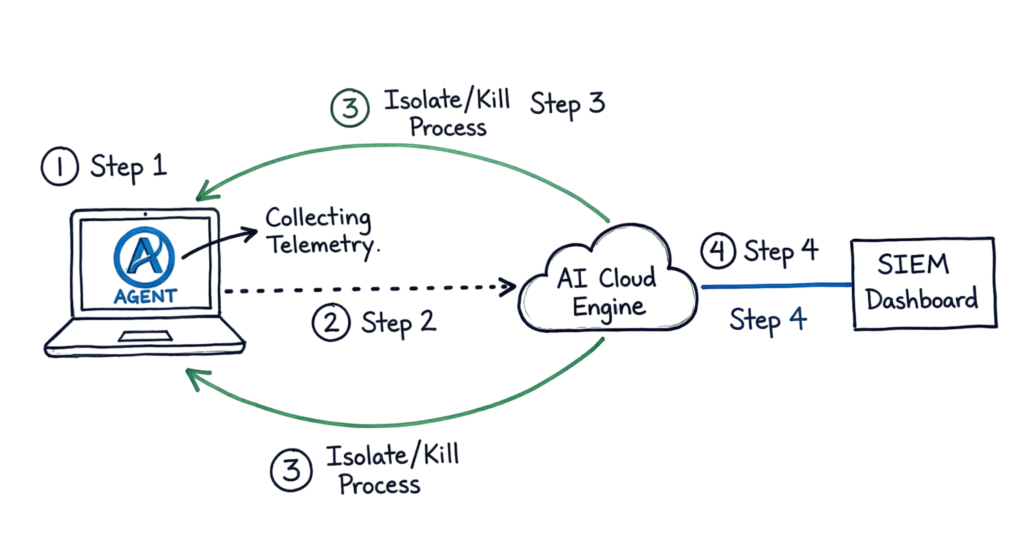
1. Endpoint Security Agent
A lightweight security agent is installed on every managed endpoint, including laptops, desktops, servers, and mobile devices. The agent continuously collects security telemetry, such as:
- Process execution
- Registry changes
- File creation and modification
- Network connections
- User logins
- PowerShell and command-line activity
- USB device usage
This real-time telemetry provides the visibility needed to identify suspicious activity before it develops into a security incident.
2. Cloud Analysis Engine
The agent securely sends telemetry data to a cloud-based management console, where advanced analytics perform the heavy processing. Modern Endpoint Detection and Response (EDR) platforms use artificial intelligence (AI), machine learning, behavioral analytics, and threat intelligence to analyze data collected from millions of endpoints worldwide. By comparing current activity with known attack patterns and normal endpoint behavior, the platform can quickly identify potential threats.
3. Automated Threat Response
When the cloud engine detects malicious or suspicious activity, it immediately sends response actions back to the endpoint agent. Depending on the severity of the threat, the platform can:
- Isolate the compromised device from the network
- Terminate malicious processes
- Quarantine infected files
- Block malicious network connections
- Alert the Security Operations Center (SOC) for investigation
These automated response capabilities are one of the biggest advantages in EDR vs Antivirus. While traditional antivirus mainly blocks known malware, EDR continuously monitors endpoint activity and responds to advanced attacks in real time.
4. Security Integration
Modern Endpoint Protection Platform (EPP) and EDR solutions integrate seamlessly with other enterprise security tools. Security events and telemetry are shared with:
- Security Information and Event Management (SIEM) platforms
- Identity and Access Management (IAM) solutions
- Security Orchestration, Automation, and Response (SOAR) platforms
- Threat intelligence platforms
- Cloud security monitoring solutions
This integration gives security teams a centralized view of threats, accelerates incident investigation, and improves response times across the organization. As part of Endpoint Security Best Practices, organizations should ensure endpoint security solutions are integrated with their broader security ecosystem to improve visibility and strengthen overall cyber resilience.
Key Components
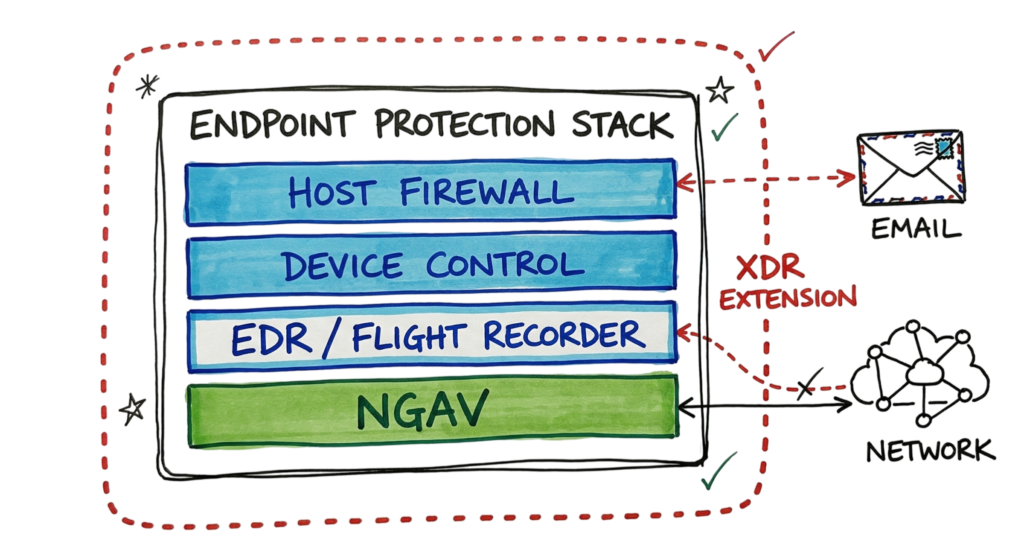
To understand endpoint security in 2026, you need to know the core technologies that work together to protect every managed device. A modern Endpoint Protection Platform (EPP) combines multiple security capabilities to prevent, detect, investigate, and respond to cyber threats.
1. Next-Generation Antivirus (NGAV)
Next-Generation Antivirus (NGAV) uses artificial intelligence (AI), machine learning, and behavioral analysis to detect and block malware without relying solely on traditional signatures. Unlike legacy antivirus, NGAV can identify previously unknown threats, fileless malware, and suspicious application behavior.
2. Endpoint Detection and Response (EDR)
Endpoint Detection and Response (EDR) acts as the endpoint’s digital flight recorder. It continuously records security events, process execution, user activity, registry modifications, and network connections. When a security incident occurs, EDR enables analysts to reconstruct the attack timeline, determine how the attacker gained access, identify affected systems, and respond quickly to contain the threat.
3. Device Control
Device Control manages how removable media and peripheral devices interact with an endpoint. Security teams can allow, block, or restrict USB storage devices, external hard drives, printers, and other connected hardware. This helps prevent malware infections, unauthorized data transfers, and accidental data loss. Even organizations with strong security controls have experienced breaches because an employee connected an unknown USB drive found in a public location.
4. Host-Based Firewall
A host-based firewall controls inbound and outbound network traffic directly on the endpoint, regardless of whether the device is connected to the corporate network, a home Wi-Fi connection, or a public hotspot. This additional layer of protection helps reduce unauthorized access and limits an attacker’s ability to communicate with compromised devices.
Together, these technologies form the foundation of modern endpoint security, providing multiple layers of protection against ransomware, malware, insider threats, and advanced cyber attacks.
Real-World Example
While monitoring the Security Information and Event Management (SIEM) dashboard, a high-priority alert was generated from a developer’s workstation. The alert indicated a Suspicious PowerShell Command, similar to the following:
powershell.exe -ExecutionPolicy Bypass -WindowStyle Hidden -EncodedCommand [Long Base64 String]After decoding the Base64-encoded command, it became clear that the script was attempting to steal credentials stored in system memory, a technique commonly used by attackers after gaining initial access.
Fortunately, the organization’s Endpoint Detection and Response (EDR) solution detected the malicious behavior before any credentials were transmitted. The endpoint agent automatically terminated the PowerShell process, isolated the device from the network, and generated an alert for the Security Operations Center (SOC). This rapid response prevented the attack from progressing into a larger security incident.
This example demonstrates one of the biggest differences in EDR vs Antivirus. Traditional antivirus may miss sophisticated PowerShell-based attacks because they often do not involve malicious files. EDR continuously monitors system behavior, making it far more effective at detecting and responding to fileless attacks.
Endpoint Security Deployment Best Practices
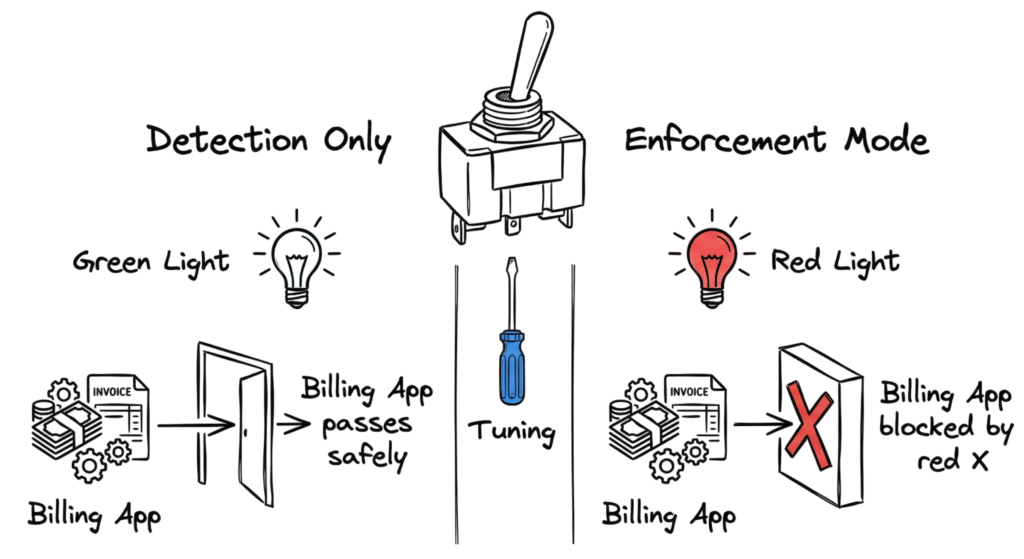
Deploying endpoint security successfully requires careful planning. One of the most important Endpoint Security Best Practices is to avoid enabling enforcement across every endpoint at once.
Instead, begin by deploying the endpoint agent to a small pilot group using a Detection Only policy. During this phase, monitor alerts, review false positives, and identify legitimate applications that may require exclusions.
Moving directly to Enforcement Mode can unintentionally disrupt business operations. For example, internally developed finance or billing applications may perform actions that resemble malicious behavior, causing the security platform to block them even though they are legitimate.
A phased deployment approach typically includes:
- Deploy the agent to a small test group.
- Enable Detection Only mode initially.
- Review alerts and investigate false positives.
- Create approved exclusions for trusted applications.
- Validate business-critical workflows.
- Gradually enable prevention and enforcement policies across the organization.
Following this staged rollout minimizes operational disruptions while maximizing protection. It also helps organizations fully benefit from modern Endpoint Protection Platform (EPP) and Endpoint Detection and Response (EDR) capabilities without negatively affecting end users.
AdvAdvantages of Endpoint Security
Modern endpoint security provides organizations with continuous visibility into every managed device, regardless of its location. Whether employees work from home, travel frequently, or connect through public Wi Fi networks, security teams can monitor endpoint health and detect threats in real time.
Some of the key advantages include:
- Continuous visibility: Monitor endpoint activity even when devices are outside the corporate network.
- Rapid threat detection: Endpoint Detection and Response (EDR) identifies suspicious behavior before it escalates into a security incident.
- Automated response: Security teams can isolate compromised devices, terminate malicious processes, and contain attacks with a single action.
- Centralized management: Cloud-based dashboards simplify monitoring, investigation, and policy management across thousands of endpoints.
- Improved compliance: Continuous monitoring helps organizations meet regulatory and security compliance requirements.
These capabilities make endpoint security one of the most effective defenses against ransomware, phishing, insider threats, and advanced cyber attacks.
Limitations of Endpoint Security
Although modern Endpoint Protection Platform (EPP) and EDR solutions provide strong protection, they are not without limitations.
In enterprise environments, endpoint agents consume system resources such as CPU, memory, and disk I/O. Developers, engineers, or users running resource-intensive applications may experience performance degradation, especially during software builds or large data processing tasks.
Another challenge occurs when an endpoint loses connectivity to its cloud management platform. While the local agent continues enforcing existing security policies, some advanced detection capabilities may be reduced because the device cannot receive the latest threat intelligence, behavioral models, or response instructions until connectivity is restored.
Like every security control, endpoint security should be combined with network security, identity protection, vulnerability management, and user awareness training to provide layered defense.
Common Endpoint Security Mistakes
One of the most common mistakes organizations make is adopting a “set it and forget it” approach. Installing the endpoint agent is only the beginning. Security teams must continuously review alerts, tune detection policies, investigate false positives, and update security configurations as new threats emerge.
Alert fatigue is another major challenge. If analysts receive hundreds of low-priority alerts every day, they may overlook the one alert that indicates a genuine compromise. Regular tuning of detection rules helps reduce unnecessary noise while improving incident response.
Another critical mistake is failing to protect the endpoint agent itself. Modern attackers often attempt to disable or uninstall security software before launching ransomware or stealing sensitive data.
As part of Endpoint Security Best Practices, organizations should enable Tamper Protection to prevent unauthorized users, malware, or even local administrators from stopping or modifying the endpoint protection service without proper authorization.
Endpoint Security Best Practices
Following proven Endpoint Security Best Practices helps organizations maximize protection while reducing operational risks.
Enforce Multi-Factor Authentication (MFA)
The endpoint management console is a high-value target because it controls every protected device. Require Multi-Factor Authentication (MFA) for all administrator accounts to reduce the risk of unauthorized access.
Automate Patch Management
Integrate endpoint security with vulnerability management and automated patching solutions. When a device contains a critical vulnerability, security policies can automatically become more restrictive until the system is updated.
Apply the Principle of Least Privilege
Limit local administrator privileges whenever possible. Users who cannot install unauthorized software are significantly less likely to introduce malware or unintentionally weaken endpoint security.
Monitor and Tune Security Policies
Review alerts regularly, remove false positives, and update detection policies based on emerging threats. Continuous policy tuning improves detection accuracy and reduces analyst workload.
Enable Tamper Protection
Protect the endpoint security agent from being disabled or modified by attackers. Tamper protection prevents unauthorized changes to critical security services and helps maintain continuous protection during an attack.
Endpoint Security Troubleshooting Scenario
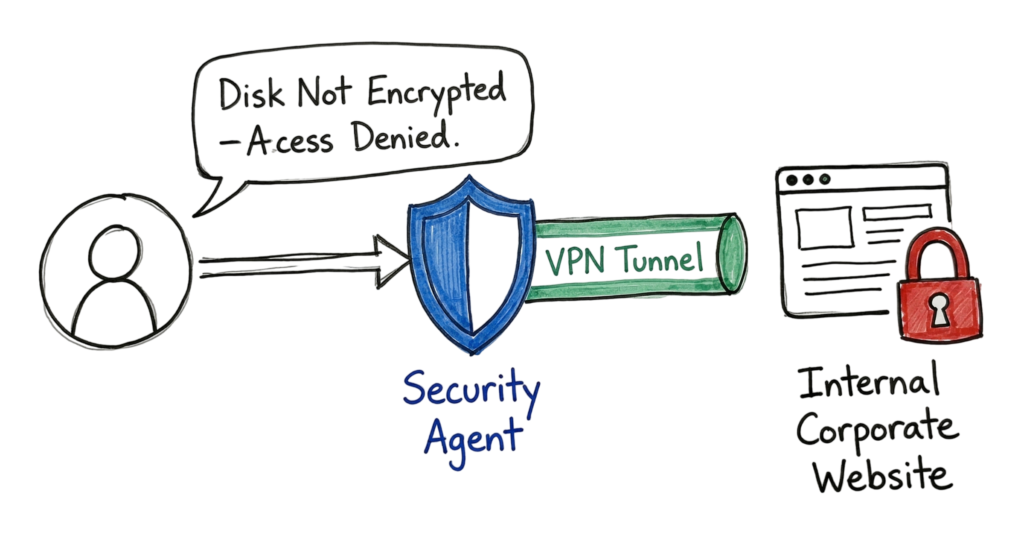
Imagine a user reports that they cannot access internal applications while connected to the corporate VPN. VPN authentication succeeds, DNS resolution works correctly, and firewall logs show no obvious issues.
At this stage, one of the first places to investigate should be the endpoint security agent logs.
Many modern Endpoint Detection and Response (EDR) solutions perform continuous endpoint health checks before allowing devices to access corporate resources. If the device fails a compliance check because the operating system is outdated, disk encryption is disabled, antivirus signatures are outdated, or a required security policy is missing, the endpoint agent can automatically block network access.
In many cases, what initially appears to be a VPN or network issue is actually the endpoint security platform enforcing organizational security policies exactly as designed.
This is another reason why understanding EDR vs Antivirus is important. Traditional antivirus focuses primarily on malware prevention, whereas EDR continuously evaluates device health, user activity, and system behavior to enforce security policies and respond to potential threats in real time.
Interview Questions
Here are some common interview questions that help assess your understanding of endpoint protection technologies and incident response:
- What is the difference between Endpoint Protection Platform (EPP) and Endpoint Detection and Response (EDR)?
- How does a behavioral detection engine identify a zero-day threat without relying on malware signatures?
- A user’s laptop is infected with ransomware while they are working remotely. What are the first three actions you would take using the EDR console?
- What is a false positive, and how would you investigate and resolve it in an enterprise environment?
- Why is Tamper Protection important for an endpoint agent?
- How does an endpoint agent support a Zero Trust security architecture?
Future Trends
Modern endpoint protection is rapidly evolving with the adoption of local AI. Instead of depending entirely on cloud connectivity, security agents are becoming intelligent enough to analyze threats and make response decisions directly on the device. This improves response times and maintains protection even when systems are offline or connected through unstable networks.
Advanced security agents now use local AI models to identify abnormal behavior such as unusual process execution, suspicious memory access, privilege escalation attempts, and malicious command execution in real time. This behavioral approach improves the detection of previously unknown threats and reduces dependence on frequent signature updates.
Another emerging trend is Continuous Identity Assurance. Rather than verifying users only during login, security platforms continuously evaluate user behavior throughout an active session. Signals such as typing patterns, mouse movements, device health, and session activity help determine whether the current user is legitimate. If suspicious behavior is detected, the platform can trigger actions such as requesting re-authentication, limiting user privileges, or isolating the device until the activity is verified.
Frequently Asked Questions (FAQ)
Is endpoint protection a replacement for a network firewall?
No. A network firewall protects traffic entering and leaving the network, while endpoint protection secures individual devices. Both technologies complement each other and should be deployed together as part of a layered security strategy.
Can an endpoint agent be installed on BYOD (Bring Your Own Device) systems?
Yes. Many organizations deploy endpoint agents on personal devices used for work. However, this should be supported by a clear privacy policy that limits monitoring to business-related applications and corporate data while protecting the user’s personal files and activities.
What is XDR?
Extended Detection and Response (XDR) expands threat detection by combining telemetry from endpoints with data from networks, email systems, cloud workloads, identity services, and other security tools. This provides a broader view of attacks and improves incident investigation.
How much data does an endpoint agent send to the cloud?
Typically, the agent uploads security telemetry, metadata, and alerts rather than entire files. Additional forensic data is collected only when required for threat investigation or based on organizational policies.
What happens if the endpoint agent is uninstalled?
In most enterprise deployments, Tamper Protection prevents standard users from uninstalling or disabling the agent. If the agent is removed or becomes inactive, the management console generates an alert so administrators can investigate and restore protection.
Conclusion
Protecting modern devices requires more than traditional antivirus. Organizations need a layered security approach that combines prevention, detection, automated response, identity verification, and continuous monitoring to reduce cyber risk.
Start by securing the highest-risk users and devices, then gradually expand security policies across the environment. Regularly review alerts, investigate suspicious activity, keep systems updated, and fine-tune detection rules to reduce false positives while maintaining strong protection.
Cyber threats continue to evolve every day, making continuous improvement essential. The more you understand how security tools detect, analyze, and respond to attacks, the better prepared you will be to protect your organization from ransomware, malware, insider threats, and other advanced cyber attacks. Continuous learning, proactive monitoring, and a well-defined incident response process remain the foundation of an effective cybersecurity program.
Related Cybersecurity Guides
Continue learning with these in-depth cybersecurity resources from TechNaga:
- What Is Cybersecurity and Why It Is Important Today
https://technaga.com/what-is-cybersecurity-and-why-it-is-important-today/ - Top 10 Cybersecurity Best Practices for 2026
https://technaga.com/top-10-cybersecurity-best-practices-2026/ - Zero Trust Security in 2026: Architecture, Real Examples, and Implementation Guide
https://technaga.com/zero-trust-security-2026-guide/ - Identity and Access Management in 2026: A Practical Guide
https://technaga.com/identity-and-access-management-cloud-security-2026/ - Security Information and Event Management (SIEM): Complete Guide 2026
https://technaga.com/security-information-and-event-management-2026/ - Best SOC Analyst Roadmap 2026
https://technaga.com/complete-soc-analyst-roadmap-2026/
External Resources
For additional technical guidance and industry standards, refer to these trusted resources:
- NIST Cybersecurity Framework (CSF 2.0)
https://www.nist.gov/cyberframework - MITRE ATT&CK Framework
https://attack.mitre.org/ - CISA Stop Ransomware
https://www.cisa.gov/stopransomware - Microsoft Defender for Endpoint Documentation
https://learn.microsoft.com/en-us/defender-endpoint/








4 thoughts on “Essential Endpoint Security Guide 2026 for Every Organization”