Passwordless authentication is transforming how organizations protect user identities by eliminating one of the weakest links in cybersecurity—the password. Imagine sitting in a Security Operations Center (SOC) as another wave of credential stuffing alerts floods your dashboard. An attacker has purchased millions of breached usernames and passwords from the dark web and is systematically testing them against your organization’s external login portal.
Although many organizations have deployed Multi-Factor Authentication (MFA), attackers continue to bypass traditional defenses through techniques such as MFA fatigue attacks, phishing campaigns, credential theft, and session hijacking. As long as passwords remain part of the authentication process, they can be stolen, guessed, reused, or exposed in data breaches, making them a persistent target for cybercriminals.
Passwordless authentication eliminates this dependency by replacing passwords with stronger, phishing-resistant authentication methods. Instead of relying on shared secrets that users must remember, it uses passkeys, FIDO2 authentication, biometric authentication (such as fingerprint or facial recognition), hardware security keys, and device-based public key cryptography to verify user identities securely.
As organizations embrace cloud computing, remote work, and Zero Trust security models, passwordless authentication has become a critical component of modern Identity and Access Management (IAM). By removing passwords from the login process, organizations can reduce credential-based attacks, improve the user experience, and strengthen protection for Microsoft 365, Google Workspace, AWS, Salesforce, and other enterprise applications.
In this guide, you’ll learn how passwordless authentication works, explore technologies such as passkeys, FIDO2, WebAuthn, and biometric authentication, understand the benefits and potential implementation challenges, and discover best practices for deploying passwordless authentication as part of a comprehensive Zero Trust identity security strategy.
What Is Passwordless Authentication?
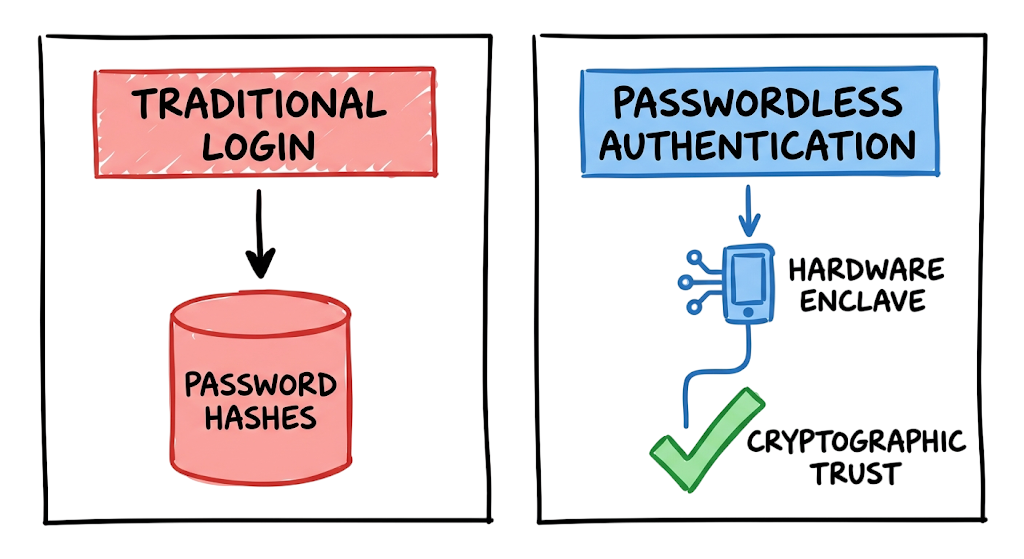
Passwordless authentication is an identity verification architecture that grants access to systems without requiring users to enter a traditional password. Instead of typing a memorized secret, users prove their identity through an authenticator device they possess or a biometric trait they exhibit.
In a passwordless authentication model, the security approach shifts from “something you know” to “something you have” and “something you are.” This significantly reduces the risks associated with weak passwords, password reuse, and phishing attacks.
Modern passwordless authentication solutions commonly use passkeys, FIDO2 authentication standards, security keys, and biometric authentication methods such as fingerprint or facial recognition. These technologies provide a stronger foundation for identity security.
When organizations implement passwordless authentication, the server no longer stores a hashed password that could be exposed during a database breach. There is no shared secret for attackers to steal, intercept, or reuse.
Instead, passwordless authentication relies on asymmetric cryptography. The user’s device securely stores a private key within a trusted hardware enclave, while the server maintains only the corresponding public key.
Even if attackers compromise the authentication database, the exposed public keys cannot be used to authenticate or forge a login session. This makes passwordless authentication a critical component of modern Zero Trust architecture and enterprise identity security strategies.
How Passwordless Authentication Works
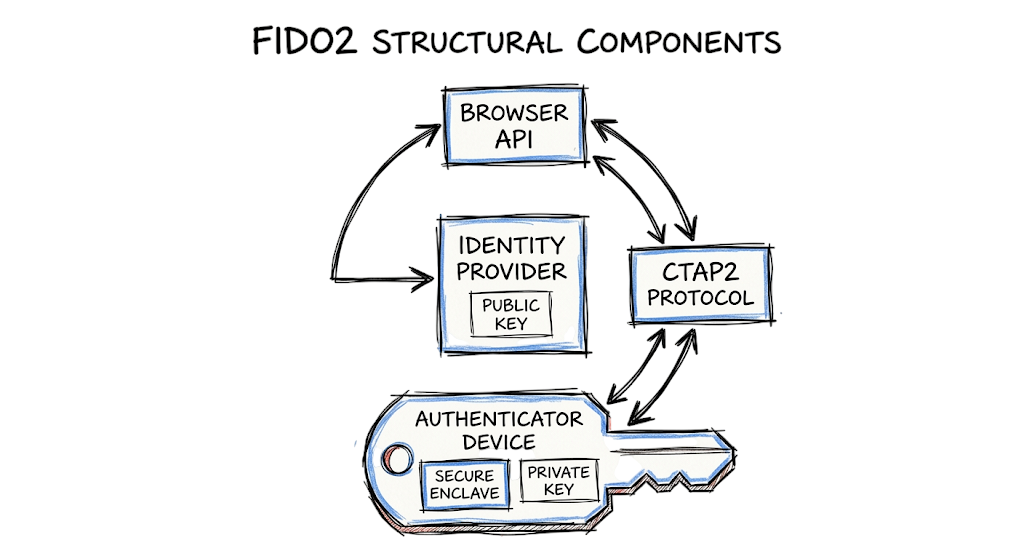
Understanding how passwordless authentication works begins with the FIDO2 standard, an open authentication framework designed to replace passwords with phishing-resistant cryptographic authentication. FIDO2 combines two complementary protocols that enable secure, password-free logins while maintaining compatibility across modern browsers, operating systems, and enterprise applications.
The first protocol is Web Authentication (WebAuthn), a web standard developed by the World Wide Web Consortium (W3C). WebAuthn enables websites and cloud applications to communicate securely with trusted authenticators, allowing users to sign in without entering a password.
The second protocol is the Client to Authenticator Protocol (CTAP), which defines how a computer, smartphone, or tablet communicates with an authenticator such as a FIDO2 security key over USB, NFC, or Bluetooth. Together, WebAuthn and CTAP form the foundation of modern passwordless authentication.
Registration Process
When a user registers for a passwordless authentication service, the authenticator generates a unique public-private key pair for that specific application or website.
The private key is securely stored inside the device’s Trusted Platform Module (TPM), Secure Enclave, or a certified hardware security key. This private key never leaves the device and cannot be exported or copied.
The corresponding public key is sent to the organization’s Identity Provider (IdP) or authentication server, where it is associated with the user’s account. Because only the public key is stored on the server, there is no shared secret for attackers to steal in the event of a database breach.
Authentication Process
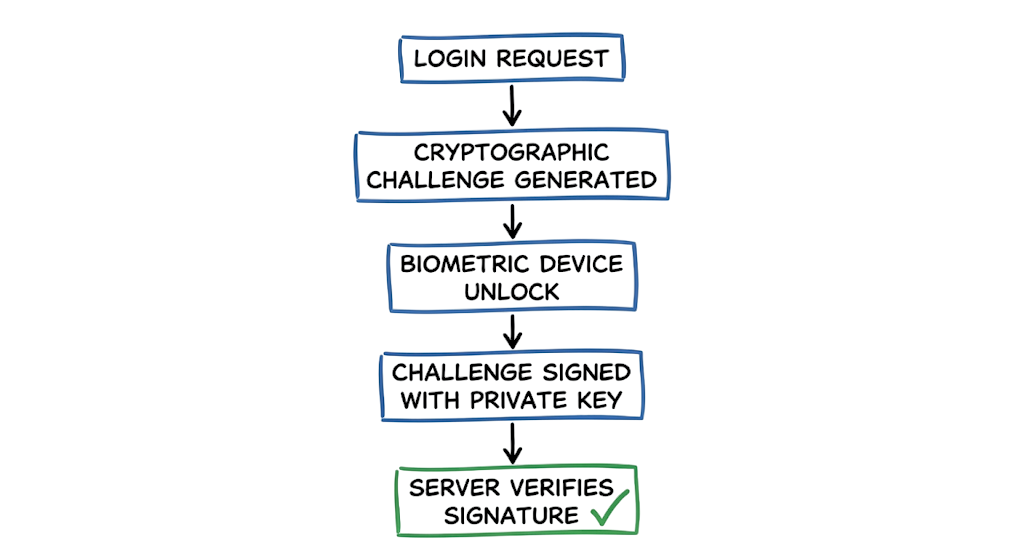
When the user later attempts to sign in, the Identity Provider generates a unique cryptographic challenge and sends it to the registered device.
To approve the login, the user verifies their identity locally using a fingerprint, facial recognition, or a device PIN. This local verification unlocks the private key, allowing the authenticator to digitally sign the cryptographic challenge.
The signed response is then returned to the Identity Provider, which validates the digital signature using the stored public key. If the signature is verified successfully, the user is authenticated and granted access to the requested application or service.
Unlike traditional password-based authentication, no password is transmitted, stored, or shared during this process.
Why Passwordless Authentication Is More Secure
The security of passwordless authentication is based on public key cryptography, making it highly resistant to modern identity attacks. Since the private key never leaves the user’s device, attackers cannot capture or reuse it through phishing websites, credential stuffing, password database breaches, or network interception.
Additionally, each key pair is uniquely bound to the website or application where it was created. This means authentication responses cannot be reused on fraudulent websites, providing strong protection against phishing attacks and eliminating one of the biggest weaknesses of traditional password-based authentication.
By combining FIDO2, WebAuthn, CTAP, passkeys, and hardware-backed cryptographic protection, passwordless authentication delivers a secure, user-friendly authentication experience that aligns with modern Zero Trust and Identity and Access Management (IAM) strategies.
Real-World Passwordless Authentication Example
When you configure your identity provider to accept passkeys, you will start seeing backend validation logs that look entirely different from traditional credential checks. Instead of a simple password validation true/false flag, the identity provider evaluates a signed JSON payload.
JSON
{
  "id": "cGFzc2tleV9pZGVudGlmaWVyX2V4YW1wbGU",
  "rawId": "cGFzc2tleV9pZGVudGlmaWVyX2V4YW1wbGU",
  "type": "public-key",
  "response": {
    "authenticatorData": "SZYN5YgOjGh0NBcPZHZgW4_krrmihjLHmVzzuoMdl2MBAAAAew",
    "clientDataJSON": "eyJ0eXBlIjoid2ViYXV0aG4uZ2V0IiwiY2hhbGxlbmdlIjoiWkdsMGFHVnVkR2xqWVhSbGIzSTBZMkpoYkd4bGJtZGxJbjAifQ",
    "signature": "MEUCIDKaPoyM_Pj3Q_hO9oW3Y7r9G_0B_vQZ_M_Q_Q_Q_Q_QAiEA_Q_Q_Q_Q_Q_Q_Q_Q_Q_Q_Q_Q_Q_Q_Q_Q_Q_Q_Q",
    "userHandle": "dXNlcl9pZGVudGlmaWVyX2V4YW1wbGU"
  }
}
This log shows a successful WebAuthn authentication ceremony. The clientDataJSON contains the original challenge provided by your server, proving the response is fresh and not a replay attack. The authenticatorData confirms that the user successfully completed a local biometric check to authorize the key usage.
When I was working on deploying passwordless access for Microsoft 365 environments, I spent days staring at these exact WebAuthn payload logs troubleshooting why legacy Android devices were failing the attestation check. You have to ensure your policies allow for specific device platform authenticators, otherwise valid signatures will be rejected by your conditional access rules.
Common Passwordless Authentication Techniques
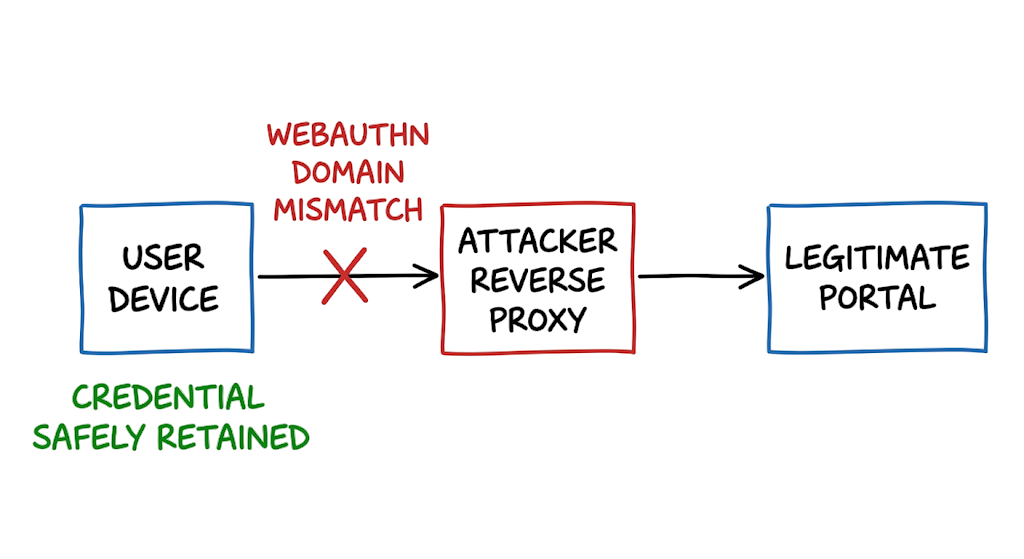
The push toward passwordless systems is driven by the failure of traditional multi-factor authentication against modern attack techniques. The most prevalent threat is the Adversary-in-the-Middle phishing attack. Attackers use reverse proxies to sit between the user and the legitimate login portal. The user enters their password and their SMS code into the fake site, and the proxy forwards them to the real site, capturing the authenticated session cookie. Because traditional MFA does not cryptographically bind the login attempt to the actual domain name in the browser, the proxy succeeds perfectly.
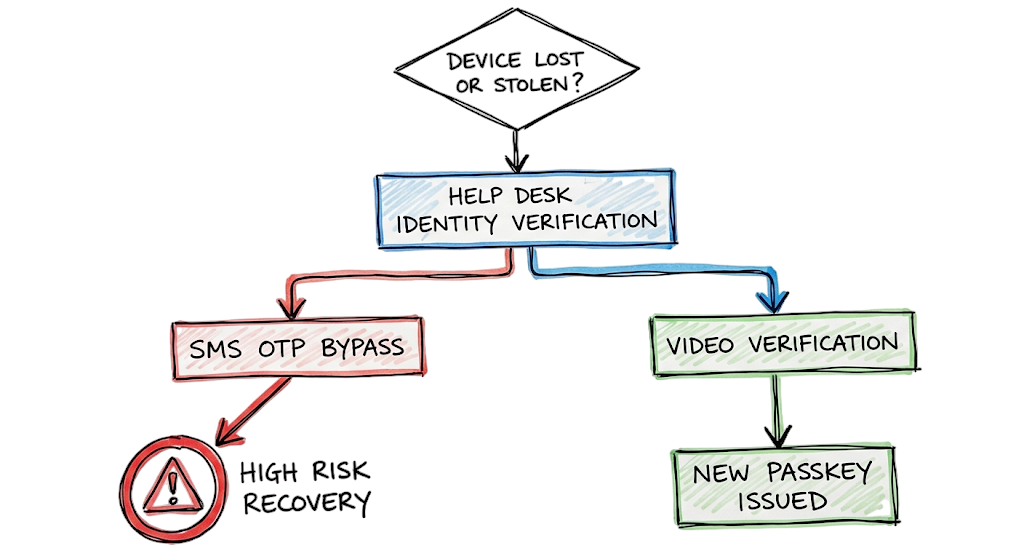
Now here’s where it gets interesting. Once you deploy passkeys, attackers can no longer use reverse proxies because WebAuthn inherently verifies the origin domain. If the user is on a fake domain, the browser refuses to sign the challenge. Attackers are adapting by targeting the recovery workflows instead. If an attacker can convince your IT helpdesk that they lost their phone, the helpdesk might issue a temporary bypass code or register a new security key on the attacker’s behalf. Alternatively, attackers are deploying infostealer malware to extract active session tokens directly from the user’s browser cache. They bypass the authentication layer entirely by stealing the access token after the legitimate user has already completed the passwordless login.
Detecting Threats in Passwordless Authentication Environments
Catching attacks against a passwordless infrastructure requires you to shift your monitoring strategy from failed logins to anomalous session behaviors. You are no longer looking for brute-force password failures. Instead, you need to monitor your identity provider logs for authentication method downgrades. If a user who consistently authenticates with a hardware security key suddenly logs in using an email one-time passcode, you have a massive red flag indicating a potential account recovery abuse.
This is where most people get confused. You have to separate the authentication event from the session evaluation. An attacker stealing an OAuth token via malware will not generate a login event in your SIEM because they are reusing an already authenticated session. To detect token theft, you must ingest continuous access evaluation logs. You look for impossible travel between the IP address where the token was issued and the IP address where the token is currently being used. You also need to alert on new devices being registered to existing accounts, especially if those registrations occur from untrusted networks outside your normal operating baseline.
Passwordless Authentication Benefits and Business Impact
Consider a major fintech provider operating out of Singapore under strict Monetary Authority of Singapore Technology Risk Management guidelines. If an initial access broker successfully phishes a database administrator’s VPN credentials and intercepts their push notification, the attacker gains access to the core infrastructure segment. From there, they pivot into the SWIFT transaction environment and initiate fraudulent transfers.
The blast radius extends far beyond the stolen funds. The organization faces immediate regulatory sanctions for failing to enforce strong authentication controls on privileged accounts. Incident response retainers, forensic investigations, and mandatory customer breach notifications will cost millions. Furthermore, the operational paralysis during the containment phase halts transaction processing, leading to catastrophic reputational damage and lost institutional trust. Implementing hardware-backed cryptographic authentication completely severs this attack path, turning a potentially business-ending crisis into a minor, failed blip in the proxy logs.
Passwordless Authentication Security Monitoring Best Practices
Rolling out a new authentication framework requires aggressive testing and rigid phased deployments. You never switch the entire organization overnight. Start by assessing your current authentication methods and map out your high-risk user groups. Domain administrators, financial controllers, and cloud infrastructure engineers should be the first cohort to migrate to hardware security keys. You issue the keys, force enrollment, and then build conditional access policies that strictly require phishing-resistant authentication for all administrative portals.
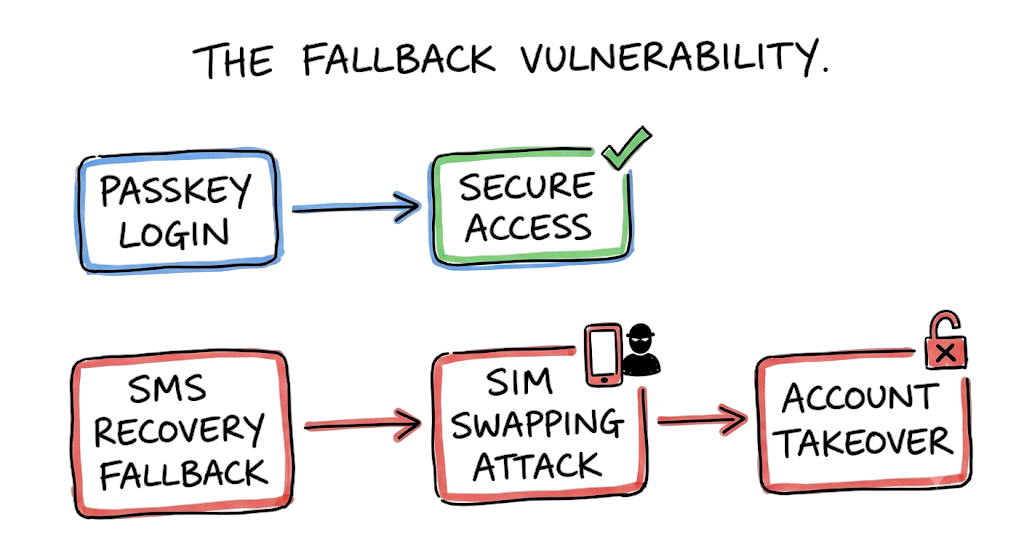
Your biggest vulnerability will be the fallback mechanisms. If you deploy passkeys but allow users to fall back to SMS codes when they forget their phone, you have accomplished nothing. The attacker will simply force the SMS fallback flow. You must secure the account recovery workflow by requiring identity verification through a manager or a video call before the helpdesk can register a new authenticator. Additionally, tie your identity provider to your endpoint management system. Enforce device compliance checks so that even if an attacker successfully registers a passkey, they cannot access corporate resources from an unmanaged, untrusted device.
Passwordless Authentication Security Tools
Microsoft Entra ID serves as a dominant identity provider for enterprise environments, offering deep integration with Windows Hello for Business and native conditional access policies. It excels at enforcing device compliance before granting access, but managing hardware key lifecycles for external contractors can require significant administrative overhead.
Okta provides a highly flexible authentication orchestration engine that bridges cloud applications and legacy on-premises infrastructure. Its policy framework allows you to easily enforce WebAuthn across diverse application stacks. However, configuring the routing rules for complex multi-tenant environments requires precise engineering to avoid accidental lockout loops.
Yubico manufactures the YubiKey, which remains the gold standard for hardware-backed security keys. These physical devices offer unparalleled protection against remote phishing and support multiple protocols simultaneously. In real environments, it doesn’t work this cleanly, as you will inevitably deal with supply chain logistics, lost keys, and users leaving them plugged into coffee shop laptops.
Cisco Duo provides a robust multi-factor and passwordless platform that integrates smoothly with remote access VPNs and edge appliances. It allows for a gradual transition by supporting push notifications alongside biometric passkeys. The limitation is that older on-premises applications often require custom proxy configurations to fully support Duo’s modern authentication prompts.
Passwordless Authentication FAQ
Q: Are passkeys the same as password managers?
A: No. A password manager securely stores and autofills traditional passwords. Passkeys use cryptographic key pairs generated by your device, meaning there is no password to store, forget, or intercept.
Q: What happens if a user loses their smartphone containing their passkey?
A: Modern ecosystems sync passkeys to a cloud account, allowing the user to restore them on a new device. In enterprise environments using device-bound keys, the user must undergo a secure identity verification process with the helpdesk to revoke the lost key and register a new one.
Q: Is a one-time passcode sent via SMS considered passwordless?
A: While it technically does not require a permanent password, SMS is not considered a secure passwordless method. SMS codes are highly vulnerable to SIM swapping and interception, making them unsuitable for enterprise security.
Q: Can passwordless authentication be phished?
A: If implemented using FIDO2 standards like WebAuthn, it is mathematically immune to traditional proxy-based phishing. The browser validates the domain cryptography, preventing the authenticator from responding to fake websites.
Q: Does this replace Single Sign-On platforms?
A: No, it enhances them. Your Single Sign-On platform becomes the central identity provider that challenges the user for their passkey. Once authenticated, the platform issues standard tokens to access downstream applications.
Conclusion: Is Passwordless Authentication the Future?
The transition to passwordless authentication is one of the most effective security improvements an organization can implement. By eliminating passwords and replacing them with passkeys, FIDO2 authentication, and biometric authentication, organizations significantly reduce the risk of credential theft, phishing attacks, and account compromise.
A well-designed passwordless authentication strategy removes shared secrets from the authentication process. Instead of relying on passwords that can be stolen or reused, users authenticate through cryptographic trust anchored to trusted devices and secure hardware.
This approach makes credential harvesting, proxy phishing, and password-based attacks far less effective. Attackers can no longer simply steal a password and log in because passwordless authentication requires possession of a trusted device or a valid biometric factor.
As a result, cybercriminals are forced to pursue more complex attack techniques, increasing the cost and difficulty of compromising enterprise accounts. This makes passwordless authentication a key component of modern identity security and Zero Trust architecture.
Before you leave, open your identity provider console and review your current authentication methods policy. Check which legacy authentication methods, password-based login options, and fallback mechanisms remain enabled, as these may weaken your overall passwordless authentication deployment.
Related Cybersecurity Guides
- What Is Cybersecurity and Why It Is Important Today
https://technaga.com/what-is-cybersecurity-and-why-it-is-important-today/ - Multi-Factor Authentication (MFA): Critical Guide to Secure Your Systems (2026)
https://technaga.com/multi-factor-authentication-mfa-guide-2026/ - Identity and Access Management in 2026: A Practical Guide for Cloud Security Professionals
https://technaga.com/identity-and-access-management-cloud-security-2026/ - Zero Trust Security in 2026: Architecture, Real Examples, and Implementation Guide
https://technaga.com/zero-trust-security-2026-guide/ - Password Security Guide 2026: 10 Essential Tips
https://technaga.com/password-security-guide-2026/ - Cloud Security Basics 2026: Complete Beginner Guide
https://technaga.com/cloud-security-basics-2026/ - Top 10 Cybersecurity Best Practices for 2026
https://technaga.com/top-10-cybersecurity-best-practices-2026/ - Essential Endpoint Security Guide 2026 for Every Organization
https://technaga.com/endpoint-security-2026-guide/ - Security Information and Event Management: Complete SIEM Guide 2026
https://technaga.com/security-information-and-event-management-2026/ - Network Segmentation Explained with Real-World Example
https://technaga.com/network-segmentation-guide-ransomware-prevention/
Additional Resources
- FIDO Alliance Passkeys
https://fidoalliance.org/passkeys/ - WebAuthn Level 3 Specification (W3C)
https://www.w3.org/TR/webauthn-3/ - Google Passkeys Documentation
https://developers.google.com/identity/passkeys - Microsoft Entra ID Passkey Authentication
https://learn.microsoft.com/en-us/entra/identity/authentication/how-to-enable-passkey-fido2 - Apple Passkeys User Guide
https://support.apple.com/guide/iphone/sign-in-with-passkeys-iphf538ea8d0/ios - NIST Digital Identity Guidelines (SP 800-63)
https://pages.nist.gov/800-63-4/ - OWASP Authentication Cheat Sheet
https://cheatsheetseries.owasp.org/cheatsheets/Authentication_Cheat_Sheet.html - CISA Guidance on Phishing-Resistant MFA
https://www.cisa.gov/resources-tools/resources/implementing-phishing-resistant-mfa - Yubico FIDO2 Authentication Guide
https://www.yubico.com/resources/glossary/fido2/ - FIDO2 Project Documentation
https://fidoalliance.org/fido2/







