Your phone buzzes at 2 AM with a Microsoft Authenticator approval prompt. You ignore it. It buzzes again. And again. The attacker already bought your password from an initial access broker on Telegram and is now trying to wear you down until you accidentally tap Approve.
This is the reality of legacy authentication systems. Despite strong password policies and multi-factor authentication, attackers continue to exploit human behavior through phishing, credential stuffing, and MFA fatigue attacks.
The biggest difference between traditional credentials and modern passkeys is how they prove identity. Passwords depend on users creating, remembering, and protecting secrets. Passkeys use cryptographic authentication, removing many of the weaknesses that attackers commonly exploit.
Built on industry standards such as FIDO2 and WebAuthn, passkeys generate unique cryptographic key pairs for each account. Even if a service experiences a data breach, there is no reusable password available for attackers to steal.
Another important benefit is protection against phishing attacks. Unlike traditional login methods that can be tricked by fake websites or reverse proxies, passkeys verify the legitimacy of the service before authentication is completed.
In this guide, you will learn how modern authentication works, how cryptographic credentials protect enterprise identities, common attack scenarios, detection methods, security tools, and practical steps organizations can take to reduce the risk of credential theft.
What Is Passkeys vs Passwords?
When engineers search for a Passkeys vs Passwords: Complete Security Comparison for 2026, they usually want to understand the fundamental architectural difference between these authentication methods.
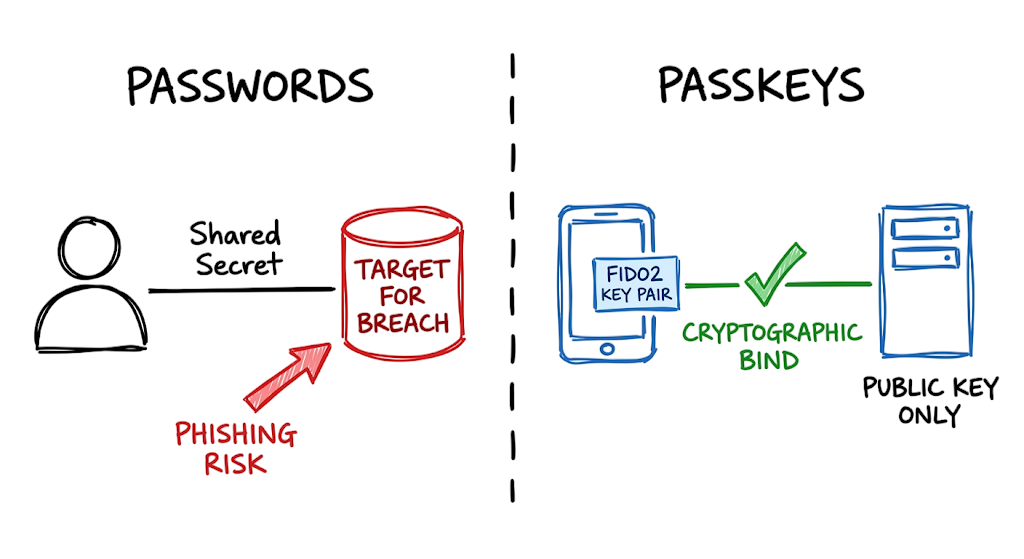
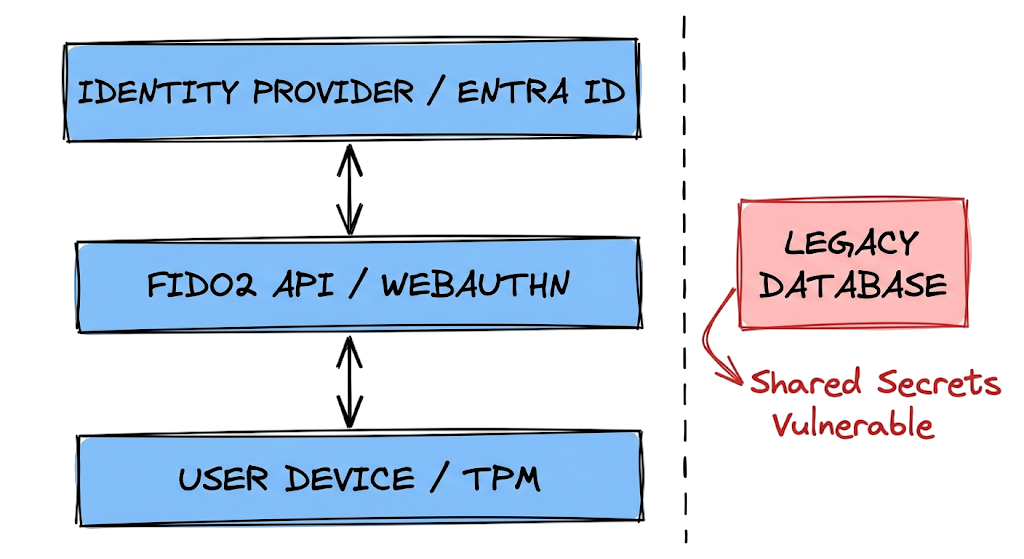
A password is a shared secret stored in a database that users must remember and transmit over the internet to prove their identity. If an attacker intercepts that credential through phishing or obtains it from a breached database, they can authenticate as the victim. This weakness has made passwords one of the most targeted assets in modern cyberattacks.
A passkey takes a completely different approach. Built on the FIDO2 and WebAuthn standards, passkeys eliminate shared secrets and replace them with public-key cryptography. Instead of creating a password, the user’s device generates a unique cryptographic key pair.
The private key remains permanently protected inside secure hardware such as a Trusted Platform Module (TPM), Secure Enclave, or trusted security chip. The service stores only the corresponding public key, which cannot be used to impersonate the user if compromised.
This design is the foundation of modern passwordless authentication. Users no longer need to remember complex passwords or enter credentials into websites. Authentication is completed by unlocking a trusted device using a fingerprint, facial recognition scan, or local PIN.
Another major advantage in the Passkeys vs Passwords debate is support for phishing-resistant MFA. Because FIDO2 and WebAuthn cryptographically bind authentication to the legitimate website, passkeys cannot be reused on fraudulent domains. Even sophisticated phishing kits and reverse proxy attacks cannot capture a reusable credential.
The result is a stronger authentication model where the server has no secret password to protect, attackers have no credential to steal, and users have nothing to accidentally disclose during a phishing attack.
How Passkeys, FIDO2, and WebAuthn Work
Authentication based on a shared secret depends heavily on users making the right decision at the right time. In a traditional Passkeys vs Passwords comparison, passwords require users to enter a credential into a login page and trust that the website is legitimate.
The process is straightforward. You type a password into a login form, the browser sends it over a TLS-encrypted connection, and the server compares the password hash against a stored value. If the credentials match, access is granted.
The problem is that attackers can place a malicious reverse proxy between the user and the legitimate service. The victim enters their username and password into the attacker’s fake login page, and the attacker silently forwards those credentials to the real service while capturing the authenticated session.
Modern passwordless authentication eliminates this weakness by removing the shared secret entirely. Instead of sending a password, a passkey uses public-key cryptography based on the FIDO2 and WebAuthn standards.
When a user attempts to log in with a passkey, the server generates a cryptographically secure random challenge. The browser then verifies the exact origin domain requesting authentication.
If the domain matches the website where the passkey was originally registered, the device retrieves the private key stored securely in hardware and signs the challenge. The server validates the signature using the associated public key and grants access.
This architecture forms the foundation of phishing-resistant MFA. Because the private key is cryptographically bound to a specific website origin, it cannot be used on a fraudulent domain.
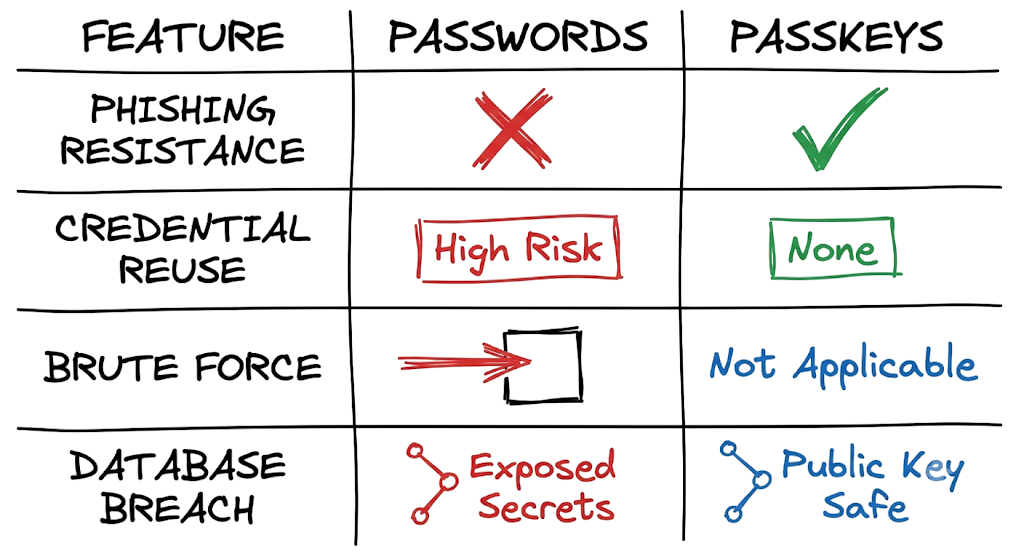
If an attacker attempts to intercept the login process through a fake website, the browser immediately detects the origin mismatch. The WebAuthn protocol refuses to access the private key, the challenge cannot be signed, and authentication fails automatically.
One of the biggest advantages in the Passkeys vs Passwords debate is that users no longer need to identify sophisticated phishing pages manually. The browser, operating system, and FIDO2 security model enforce trust boundaries automatically, preventing credential theft before it can occur.
Real-World Example of Passkeys vs Passwords Authentication
JSON
{
  "code": 11,
  "name": "NotAllowedError",
  "message": "The relying party ID 'login-microsoftonline-secure.com' is not a valid entity for this credential.",
  "clientExtensionResults": {},
  "type": "webauthn.get"
}
This example demonstrates what happens when an adversary-in-the-middle phishing attack encounters modern passwordless authentication.
The victim clicks a malicious link that leads to a fake website designed to look identical to a legitimate Microsoft login portal. Behind the scenes, the attacker uses a reverse proxy to relay traffic between the victim and the real service in an attempt to steal authentication tokens.
In a traditional Passkeys vs Passwords scenario, a stolen password could allow the attacker to authenticate successfully. Even multi-factor authentication can sometimes be bypassed through sophisticated phishing frameworks that capture session cookies.
Passkeys work differently. Authentication is performed using cryptographic credentials built on the FIDO2 and WebAuthn standards rather than shared secrets.
When the attacker’s reverse proxy requests authentication, the WebAuthn API immediately validates the relying party ID and verifies the website origin. The browser compares the requesting domain against the domain where the passkey was originally registered.
Because the phishing domain does not match the legitimate Microsoft domain, the validation process fails instantly. The browser refuses to access the private key and rejects the authentication request before any credential can be exposed.
This behavior is a key component of phishing-resistant MFA. Instead of relying on users to recognize suspicious URLs, the authentication protocol enforces trust boundaries automatically.
The result is simple: the challenge cannot be signed, authentication fails, and the attacker gains nothing. The user does not need to identify the phishing site manually because FIDO2, WebAuthn, and modern passwordless authentication prevent the credential exchange from occurring in the first place.
Common Techniques Used to Attack Password-Based Authentication
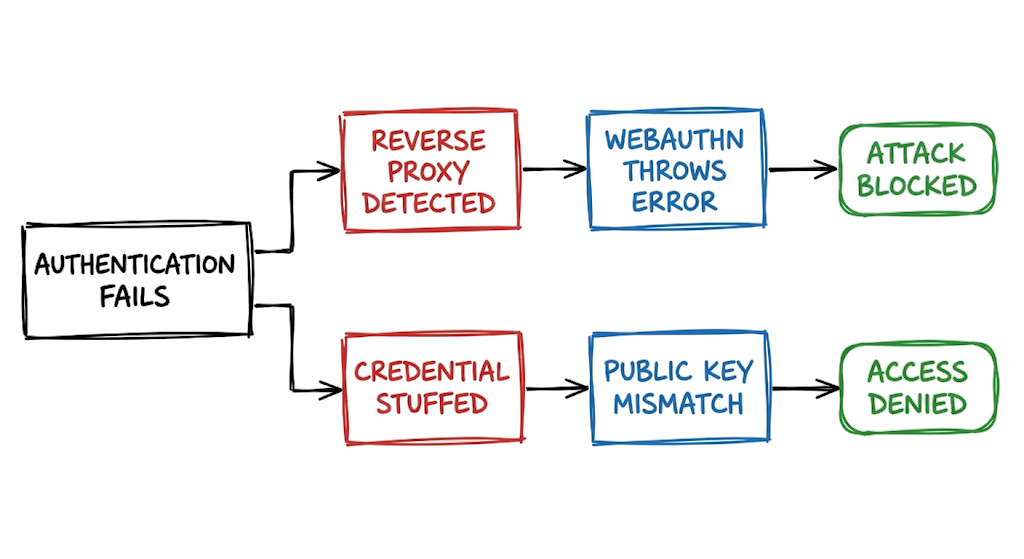
Attackers compromise traditional authentication using three primary methods. First, they dump backend databases to extract password hashes and run offline cracking rigs to expose the plaintext strings. Second, they deploy automated credential stuffing scripts that take passwords breached from a consumer fitness app and test them against corporate email accounts, knowing users recycle their logins across platforms. Third, they set up adversary-in-the-middle phishing infrastructure using tools like Evilginx to intercept the username, password, and the session cookie simultaneously by stripping TLS encryption in real time. Now here’s where it gets interesting.
Passkeys neutralize all three of these methods fundamentally. Since there is no database of shared secrets, a server breach yields only public keys, which are mathematically useless to an attacker trying to forge a login. Because every key pair is uniquely generated for a specific domain origin, a credential stolen or exposed from one site cannot be replayed anywhere else. And because the authentication process demands a cryptographic signature bound to the legitimate domain name, reverse proxies fail to capture anything they can use to authenticate. The attacker cannot steal a secret because no secret is ever transmitted over the wire.
Detection Methods for Password and Authentication Attacks
Catching authentication abuse requires monitoring the logs generated by your identity provider. With traditional credentials, you configure your SIEM to look for brute force patterns, such as fifty failed login attempts from a single IP address followed by a successful login. You look for impossible travel alerts where an account signs in from Mumbai and then London within ten minutes. You monitor for MFA fatigue attacks, checking if a single user account receives twenty push notifications in five minutes and eventually accepts one. This is where most people get confused.
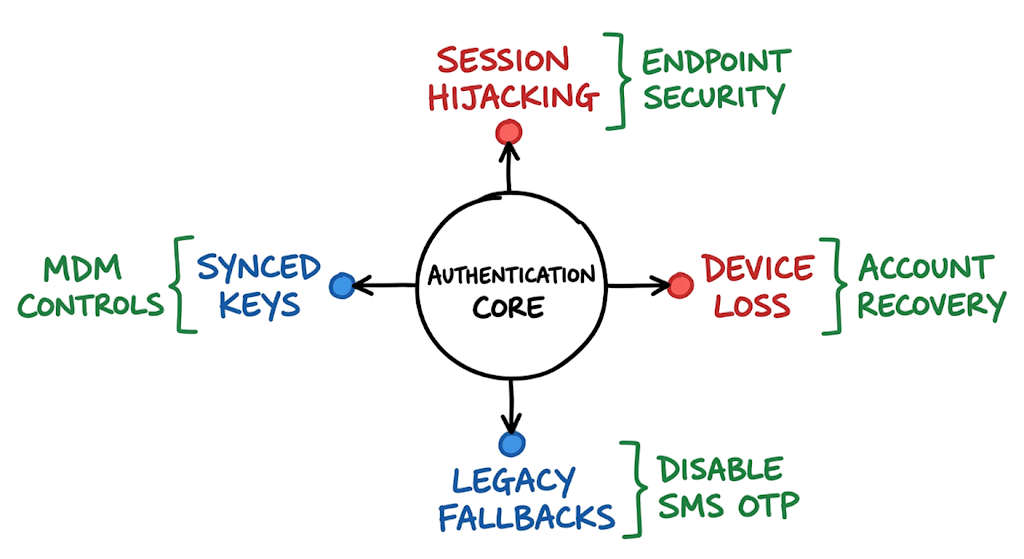
They assume that moving to passkeys means they no longer need to monitor authentication logs at all. The reality is that attackers simply shift their focus from credential theft to token theft. You must tune your detection rules to look for session anomalies instead of failed logins. You monitor for sudden changes in user agent strings, access from untrusted device profiles, or continuous access evaluation flags indicating a session cookie is being replayed from a foreign IP address. The initial authentication step becomes highly secure, so the SOC must pivot to watching what happens after the session token is issued.
Business Impact of Password Breaches and Account Takeovers
A successful credential compromise in the banking sector carries massive financial and regulatory consequences. If an attacker bypasses traditional authentication to access a fintech employee’s internal administrative portal, they can manipulate customer accounts, initiate unauthorized wire transfers, or export sensitive personal data. The Reserve Bank of India strictly mandates strong access controls and data protection under its cybersecurity guidelines, and a breach directly triggers severe penalties, loss of customer trust, and operational paralysis.
An attacker does not need to hack the banking infrastructure directly to cause this damage. They just need to trick one mid-level analyst into entering their password into a convincing clone of the company’s SSO portal. The blast radius of that single human error can cost millions in direct losses, forensic investigations, and regulatory fines. Implementing FIDO2 authentication limits this exposure by ensuring that even if an employee falls for a targeted social engineering campaign, the technical controls prevent the attacker from obtaining a usable credential to execute the breach.
Prevention Best Practices Using Passkeys and Phishing-Resistant MFA
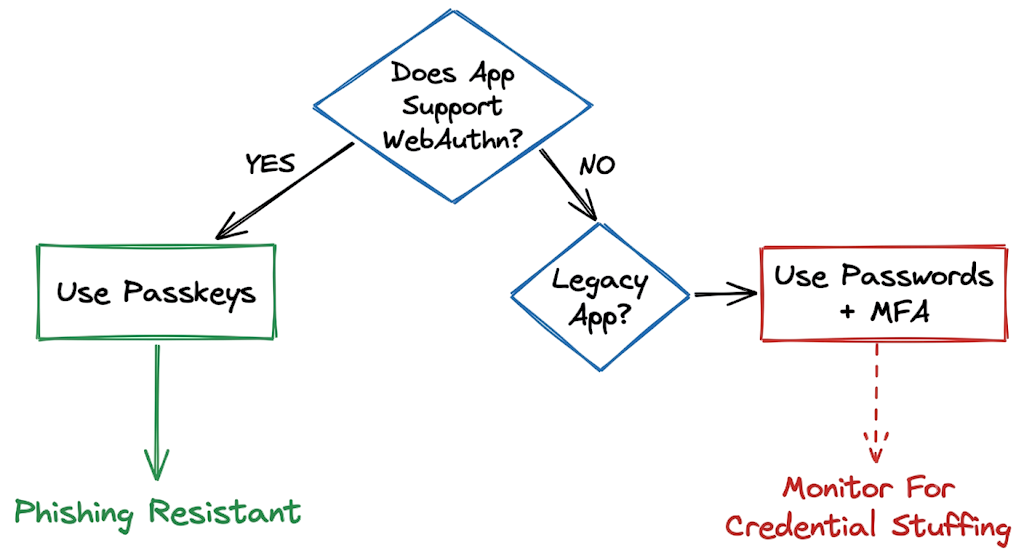
Securing your enterprise identity requires phasing out shared secrets entirely. You start by auditing your current identity provider to map out which applications support modern authentication protocols and which rely on legacy integrations. You roll out phishing-resistant MFA to your highest-risk users first, typically the IT administrators, executives, and financial controllers. You issue hardware security keys to these users and configure conditional access policies that strictly require phishing-resistant authentication for any administrative action. When I was working on an Entra ID migration last year, we realized leaving SMS as a fallback completely destroyed the value of the passkey rollout.
Attackers simply clicked the recovery link and triggered an SMS code instead, bypassing the hardware key entirely. You must actively disable weak fallback methods like text messages and basic push notifications as you deploy stronger controls. You train your helpdesk to verify user identity strictly before issuing temporary access passes, because attackers will call your support team pretending to be an executive who lost their security key. If you are presenting a Passkeys vs Passwords: Complete Security Comparison for 2026 to management, emphasize that removing weak fallbacks is just as critical as deploying the new technology. Finally, you configure session lifetimes to be short and require re-authentication for high-impact actions.
Security Tools Supporting FIDO2, WebAuthn, and Passwordless Authentication
Microsoft Entra ID serves as a core identity provider that supports issuing and enforcing passkeys across enterprise environments. You configure conditional access policies here to demand phishing-resistant methods based on real-time user risk. YubiKey hardware tokens provide device-bound passkeys that meet the highest regulatory requirements because the private key physically cannot be extracted from the silicon chip.
Cisco Duo integrates with existing applications to provide an authentication gateway, allowing you to enforce WebAuthn checks before users reach internal corporate networks. Dashlane and 1Password operate as enterprise credential managers that can store synced passkeys, making it easier for users to log in directly across their laptops and mobile phones without carrying a separate hardware token. In real environments, it doesn’t work this cleanly. You will quickly find that synced credentials in a password manager create compliance headaches if your security policy demands that keys never leave a physical corporate device. You have to carefully choose between the usability of synced keys and the strict assurance of hardware-bound keys based on your specific threat model and regulatory obligations.
FAQ About Passkeys vs Passwords
Q: What happens if I lose the device holding my passkey?
A: Account recovery depends entirely on whether you use synced or device-bound keys. If you use a password manager or cloud ecosystem like Apple iCloud, your keys sync across your other devices automatically. If you use a strict hardware token, you must rely on the service’s account recovery process or use a backup hardware key you registered previously.
Q: Do passkeys prevent all forms of phishing?
A: Passkeys prevent adversary-in-the-middle attacks and credential harvesting because the browser verifies the domain cryptographically. However, they do not stop attackers who use malware to hijack your active session cookie after you have already logged in. They secure the authentication step, but you still need endpoint security to protect the active session.
Q: Are passwords going away completely in 2026?
A: Passwords will remain in use for legacy applications and services that lack the development budget to support modern protocols. The industry is moving toward passwordless authentication for all primary identity providers, but the long tail of older software ensures passwords will linger for years. You will still need a password manager to handle those legacy systems.
Q: What is the difference between WebAuthn and FIDO2?
A: FIDO2 is the overarching project created by the FIDO Alliance to standardize passwordless authentication across the industry. WebAuthn is the specific web API built into modern browsers that allows web applications to communicate with your device’s authenticators. You use the WebAuthn API to implement the FIDO2 standard on a website.
Q: Does an MFA fatigue attack work against passkeys?
A: No, the mechanics of the protocol prevent it entirely. MFA fatigue attacks rely on sending repeated push notifications to a user’s phone until they hit approve out of frustration. Passkeys do not use remote push approvals. You must physically interact with the device requesting the login, making remote prompt bombing impossible.
Conclusion
To summarize this Passkeys vs Passwords: Complete Security Comparison for 2026, traditional passwords and other shared-secret authentication methods have become a structural security liability. Organizations can no longer rely on password complexity requirements, security awareness training, or policy enforcement alone to defend against phishing, credential theft, and account takeover attacks.
Modern passwordless authentication built on FIDO2 and WebAuthn eliminates many of these risks by replacing reusable credentials with cryptographic key pairs. This approach blocks credential dumping, credential stuffing, and adversary-in-the-middle phishing attacks while providing true phishing-resistant MFA for high-value accounts.
Organizations should begin their transition today. Review your identity provider configuration, audit conditional access policies, identify privileged accounts, and require passkeys or phishing-resistant MFA for all administrators. As cyber threats continue to evolve, the move from passwords to passkeys is no longer just a security improvement. It is becoming a fundamental requirement for modern identity protection.
Related Cybersecurity Articles
If you want to strengthen your understanding of authentication, identity security, and modern cyber threats, check out these guides:
- What Is Cybersecurity and Why It Is Important Today
https://technaga.com/what-is-cybersecurity-and-why-it-is-important-today/ - Password Security Guide 2026: 10 Essential Tips
https://technaga.com/password-security-guide-2026/ - Multi-Factor Authentication (MFA): Critical Guide to Secure Your Systems (2026)
https://technaga.com/multi-factor-authentication-mfa-guide-2026/ - Identity and Access Management in 2026: A Practical Guide for Cloud Security Professionals
https://technaga.com/identity-and-access-management-cloud-security-2026/ - How to Identify Phishing Attacks in 2026 (Complete Guide)
https://technaga.com/how-to-identify-phishing-attacks-in-2026/ - Initial Access in Cybersecurity: Top 3 Attack Vectors You Must Know (2026)
https://technaga.com/initial-access-cybersecurity-attack-vectors-2026/ - Zero Trust Security in 2026: Architecture, Real Examples, and Implementation Guide
https://technaga.com/zero-trust-security-2026-guide/ - Forget the Perimeter: Zero Trust vs Traditional Security Technical Comparison 2026
- Top 10 Cybersecurity Best Practices for 2026
https://technaga.com/top-10-cybersecurity-best-practices-2026/ - Security Information and Event Management: Complete SIEM Guide 2026
https://technaga.com/security-information-and-event-management-2026/ - Essential Endpoint Security Guide 2026 for Every Organization
https://technaga.com/endpoint-security-2026-guide/
Additional Resources
For further reading on passkeys, FIDO2, WebAuthn, and phishing-resistant MFA, explore these authoritative resources:
- FIDO Alliance Passkeys
https://fidoalliance.org/passkeys/ - WebAuthn Level 3 Specification (W3C)
https://www.w3.org/TR/webauthn-3/ - Google Passkeys Documentation
https://developers.google.com/identity/passkeys - Microsoft Entra ID Passkey Authentication
https://learn.microsoft.com/en-us/entra/identity/authentication/how-to-enable-passkey-fido2 - Apple Passkeys User Guide
https://support.apple.com/guide/iphone/sign-in-with-passkeys-iphf538ea8d0/ios - NIST Digital Identity Guidelines
https://pages.nist.gov/800-63-4/ - OWASP Authentication Cheat Sheet
https://cheatsheetseries.owasp.org/cheatsheets/Authentication_Cheat_Sheet.html - CISA Guidance on Phishing-Resistant MFA
https://www.cisa.gov/resources-tools/resources/implementing-phishing-resistant-mfa - Yubico FIDO2 Authentication Guide
https://www.yubico.com/resources/glossary/fido2/ - Microsoft Security Blog: Passwordless Authentication
https://www.microsoft.com/en-us/security/blog/







