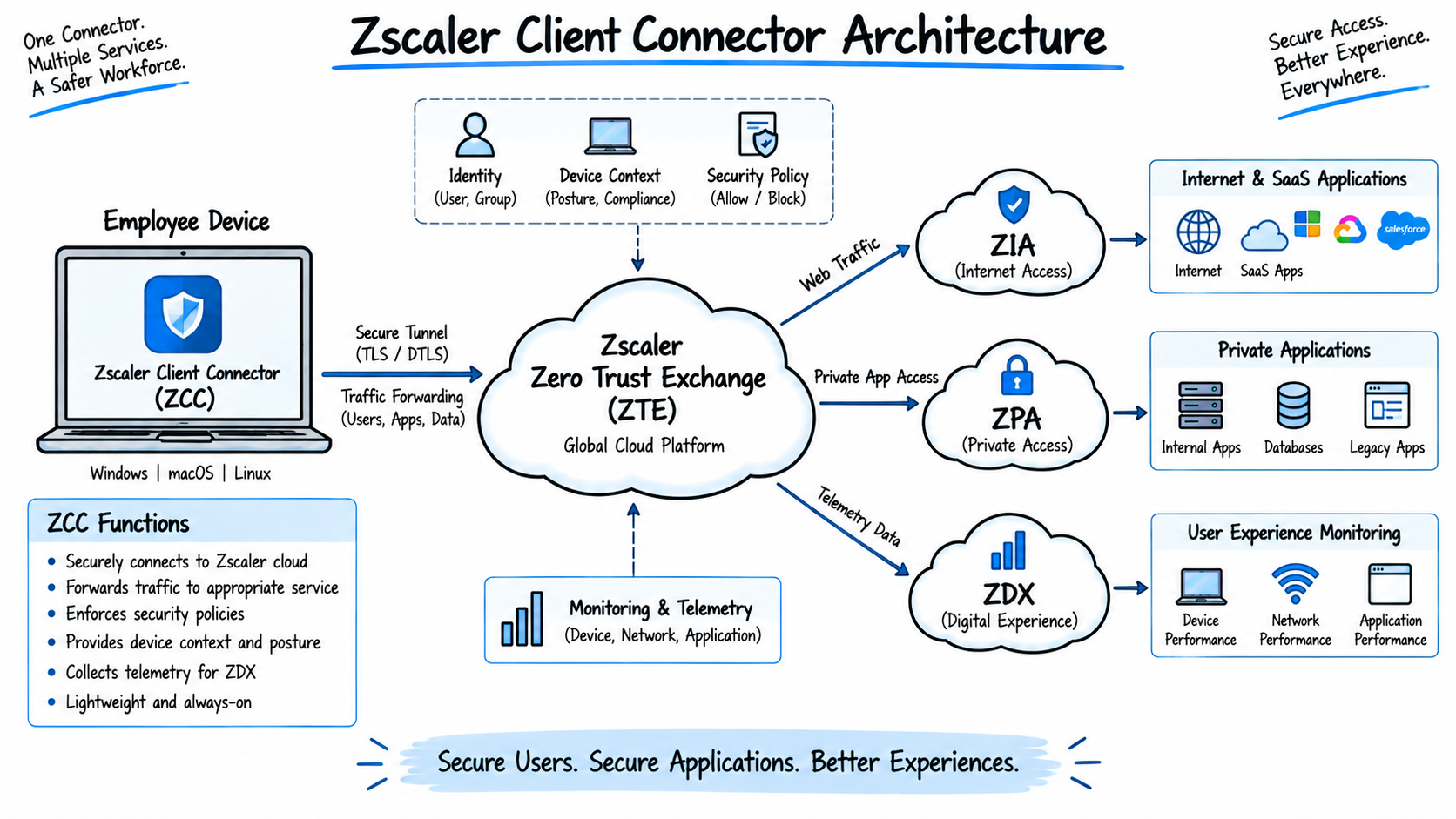
Zscaler Client Connector (ZCC) is a key component of the Zscaler Zero Trust Exchange architecture. It provides endpoint connectivity to Zscaler services such as ZIA, ZPA, and ZDX and can apply different traffic-forwarding behavior based on the user’s identity, device, and network environment.
This guide covers 50 Zscaler Client Connector interview questions and answers, including App Profiles, Forwarding Profiles, Trusted Network Detection, Z-Tunnel 1.0 and 2.0, VPN environments, Sub-Cloud, Source IP Anchoring, Static IP, Cascading, Surrogate IP, NSS, Cloud Connector, Branch Connector, and troubleshooting scenarios.
Section 1: Zscaler Client Connector Fundamentals
1. What is Zscaler Client Connector (ZCC)?
Answer:
Zscaler Client Connector (ZCC) is endpoint software installed on user devices such as laptops, desktops, smartphones, and tablets. It provides an on-ramp from the endpoint to the Zscaler Zero Trust Exchange.
ZCC can identify and forward user traffic to Zscaler services such as Zscaler Internet Access (ZIA) and Zscaler Private Access (ZPA) according to the organization’s configuration and security policies.
It can also provide endpoint telemetry for Zscaler Digital Experience (ZDX).
For Zscaler Client Connector interview questions, remember that ZCC is an endpoint agent, while ZIA, ZPA, and ZDX are cloud services that use information and traffic provided by the client.
2. Why is Zscaler Client Connector used in enterprise environments?
Answer:
Enterprises use Zscaler Client Connectorto provide consistent security and access controls for users regardless of whether they are working from an office, home, or another network.
Key benefits include:
- Centralized cloud-based security enforcement
- Secure Internet and SaaS access through ZIA
- Private application access through ZPA
- Device and network awareness
- Consistent policies for roaming users
- Integration with identity and device posture controls
- Digital experience visibility through ZDX
Zscaler Client Connector can also help organizations consolidate endpoint connectivity and security functions instead of deploying multiple independent agents, depending on their Zscaler services and architecture.
3. What are the main functions of Zscaler Client Connector?
Answer:
The main functions of Zscaler Client Connector include:
- Traffic steering and forwarding to Zscaler services.
- User authentication and identity association.
- Network environment detection using Trusted Network Detection.
- Device posture collection for supported Zscaler policies.
- ZIA connectivity for Internet and SaaS traffic.
- ZPA connectivity for private applications.
- ZDX telemetry and monitoring where enabled.
- Application and IP bypass handling according to policy.
- Support for different forwarding modes and tunnel configurations.
4. How does ZCC work with Zscaler Internet Access (ZIA)?
Answer:
When a user accesses an Internet or SaaS application, Zscaler Client Connector can capture the traffic according to its Forwarding Profile and send it to ZIA.
A simplified flow is:
User Device → ZCC → Z-Tunnel → ZIA Service Edge → Security Policies → Internet/SaaS Application
At the ZIA Service Edge, applicable security controls can include:
- URL Filtering
- Cloud Firewall
- SSL/TLS Inspection
- Cloud App Control
- DLP
- Malware and advanced threat protection
The exact services applied depend on the organization’s ZIA policy configuration.
5. How does ZCC work with Zscaler Private Access (ZPA)?
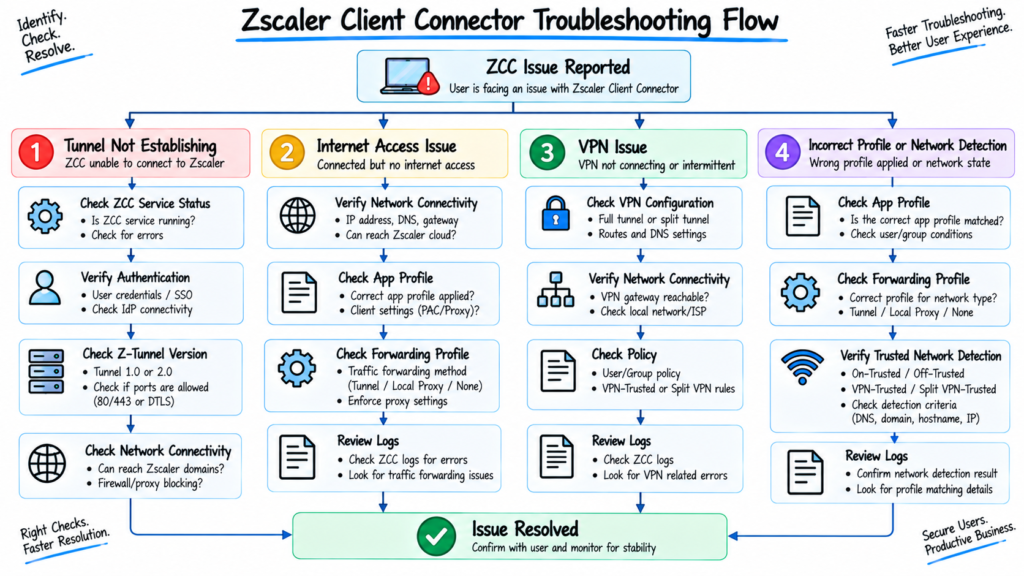
Answer:
Zscaler Client Connector provides the endpoint-side connectivity for ZPA.
A simplified flow is:
User Device → ZCC → ZPA Service Edge → App Connector → Private Application
When a user requests an authorized private application, Zscaler Client Connector identifies the application and establishes connectivity through ZPA. The App Connector provides the connection to the private application from inside the application environment.
ZPA creates an application-specific Microtunnel rather than placing the user directly on the corporate network.
6. What is the role of ZCC in the Zero Trust Exchange architecture?
Answer:
Zscaler Client Connector provides the endpoint-side connectivity and context required by Zscaler services.
It can provide information such as:
- User identity
- Device information
- Network environment
- Client state
- Device posture signals
Zscaler services use this information together with configured policies to determine how traffic or application access should be handled.
The important interview point is that Zscaler Client Connector is the endpoint component, while policy decisions and security enforcement are performed by the applicable Zscaler cloud services.
7. What operating systems and platforms does Zscaler Client Connector support?
Answer:
Zscaler Client Connector supports major enterprise endpoint platforms, including:
- Windows
- macOS
- Linux
- iOS/iPadOS
- Android
- ChromeOS/Android on ChromeOS
Supported operating-system versions and capabilities can change with Zscaler Client Connector releases. Therefore, administrators should always verify the current Zscaler compatibility documentation before deployment.
Avoid memorizing specific OS versions for an interview unless the interviewer asks about a particular Zscaler Client Connector release.
8. How does ZCC identify and forward user traffic?
Answer:
Zscaler Client Connector uses its configured forwarding mechanism to capture or steer traffic from the endpoint.
Depending on the platform and configuration, forwarding can use:
- Z-Tunnel 1.0
- Z-Tunnel 2.0
- Tunnel with Local Proxy
- Enforce Proxy
- PAC-based mechanisms
- Configured bypasses
Z-Tunnel 2.0 provides broader network-layer traffic forwarding than the proxy-oriented Z-Tunnel 1.0.
The Forwarding Profile determines how Zscaler Client Connector behaves for different network environments.
Section 2: ZCC App Profiles
9. What is an App Profile in Zscaler Client Connector?
Answer:
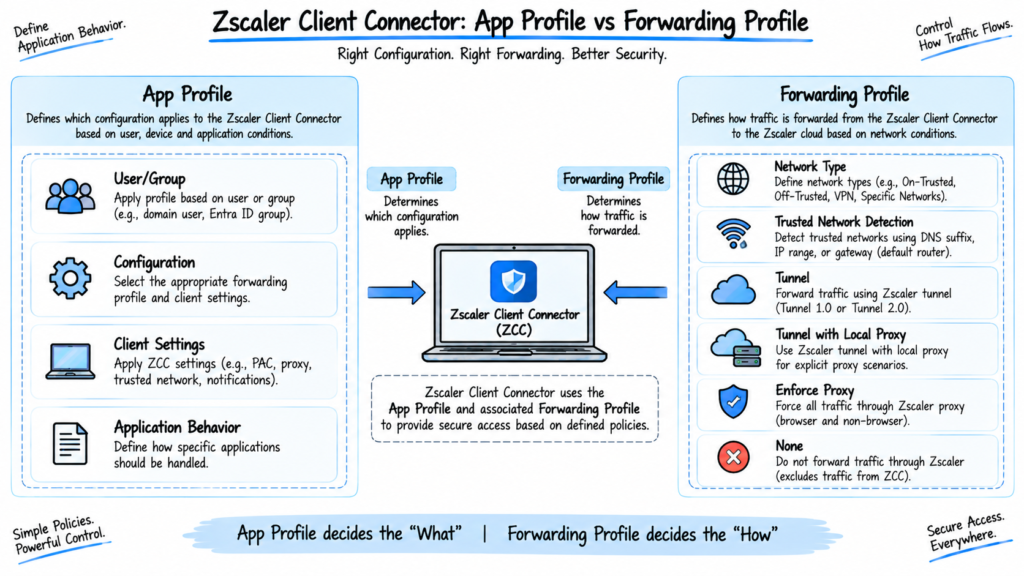
An App Profile defines the Zscaler Client Connector configuration assigned to a particular set of users or devices.
It can control settings such as:
- Forwarding Profile assignment
- User or group targeting
- Application and IP bypasses
- PAC configuration
- Password controls
- Diagnostic settings
- Client behavior
- Platform-specific settings
In simple terms:
App Profile = Who receives the configuration and how the ZCC application behaves.
10. Why are App Profiles used in ZCC?
Answer:
App Profiles allow administrators to apply different Zscaler Client Connector configurations to different users, groups, or platforms.
For example:
- Employees can receive one configuration.
- Contractors can receive another.
- IT administrators can receive a more restrictive configuration.
- Windows and macOS devices can have platform-specific settings.
App Profiles also associate users with the appropriate Forwarding Profile.
11. What is the difference between an App Profile and a Forwarding Profile?
Answer:
The easiest way to explain the difference in a ZCC interview is:
| App Profile | Forwarding Profile |
|---|---|
| Defines who receives the configuration | Defines how traffic is forwarded |
| Controls ZCC application behavior | Controls traffic-forwarding behavior |
| Can target users/groups/platforms | Uses network environment conditions |
| Can configure bypasses and client settings | Defines Tunnel, Enforce Proxy, None, etc. |
| Links the user to a Forwarding Profile | Determines behavior for network states |
Simple explanation:
App Profile tells ZCC who gets the configuration. Forwarding Profile tells ZCC how traffic should be handled.
12. How does ZCC determine which App Profile applies to a user?
Answer:
Zscaler Client Connector receives its configuration based on the App Profile policies configured by the administrator.
Administrators can create multiple App Profiles and place them in a specific rule order.
If multiple profiles could apply, rule order becomes important because a higher matching rule can take precedence.
Administrators should therefore check:
- User/group membership
- App Profile rule order
- Platform conditions
- Default App Profile
- Policy refresh on the endpoint
13. What configurations can be controlled through an App Profile?
Answer:
Depending on the platform and Zscaler Client Connector version, an App Profile can control settings such as:
- Forwarding Profile assignment
- PAC settings
- Application bypasses
- IP bypasses
- Password requirements
- Diagnostic/log settings
- Client behavior
- Captive portal-related settings
- Driver-related settings
- Service-specific controls
The exact available options depend on the ZCC platform and release.
14. Can different groups of users have different ZCC App Profiles?
Answer:
Yes.
Organizations can create different App Profiles for different user groups.
For example:
Employees → Standard App Profile
Contractors → Restricted App Profile
IT Administrators → Administrative App Profile
Each profile can be associated with a different Forwarding Profile and endpoint behavior.
15. How would you troubleshoot an App Profile that is not being applied?
Answer:
I would follow these steps:
- Verify the user’s identity and group membership.
- Check App Profile rule order.
- Verify platform or OS conditions.
- Check whether another higher-priority rule matches the user.
- Verify the Forwarding Profile associated with the App Profile.
- Refresh the ZCC policy.
- Check the ZCC client status and diagnostic information.
- Review ZCC logs if required.
- Verify deployment or enrollment configuration.
The first things I would check are group membership and rule order, because an earlier matching profile can cause the expected profile not to be selected.
Section 3: Forwarding Profiles
16. What is a Forwarding Profile in Zscaler Client Connector?
Answer:
A Forwarding Profile determines how ZCC handles traffic based on the user’s network environment.
It can define different forwarding actions for:
- On-Trusted Network
- VPN-Trusted Network
- Off-Trusted Network
- Split VPN-Trusted Network
Depending on the service and platform, actions can include Tunnel, Tunnel with Local Proxy, Enforce Proxy, or None.
17. How does a Forwarding Profile control traffic?
Answer:
The process can be understood in two stages:
Stage 1: Identify the network
ZCC evaluates the endpoint’s network state using configured Trusted Network Criteria and VPN detection.
Stage 2: Apply the forwarding action
ZCC then applies the action configured for that network state.
For example:
Off-Trusted Network → Tunnel
On-Trusted Network → None
Split VPN-Trusted Network → configured split-VPN behavior
The actual configuration depends on the organization’s architecture.
18. What is the difference between Tunnel, Tunnel with Local Proxy, Enforce Proxy, and None?
Answer:
Tunnel
Traffic is captured at the network layer and forwarded through a Zscaler tunnel.
Tunnel with Local Proxy
ZCC uses a local proxy mechanism for applicable web traffic and forwards the traffic to Zscaler according to the configured tunnel behavior.
Enforce Proxy
ZCC uses system proxy settings/PAC-based proxy forwarding without using the same network-layer tunnel mechanism as Tunnel mode.
None
ZCC does not forward that service’s traffic through the Zscaler forwarding mechanism.
The exact behavior and available options vary by platform and service.
19. How does ZCC select forwarding behavior based on network location?
Answer:
ZCC identifies the current network state and applies the corresponding Forwarding Profile action.
The main network states are:
- On-Trusted Network
- Off-Trusted Network
- VPN-Trusted Network
- Split VPN-Trusted Network
For example, a company may configure:
On-Trusted → None
Off-Trusted → Tunnel
This allows the organization to use existing corporate network security controls in the office while providing Zscaler cloud security for remote users.
Zscaler documents these network states and their forwarding configuration in the Forwarding Profile.
20. What is the relationship between App Profiles and Forwarding Profiles?
Answer:
The relationship is:
User/Group → App Profile → Forwarding Profile → Network State → Forwarding Action
For example:
Employee → Employee App Profile → Standard Forwarding Profile → Off-Trusted → Z-Tunnel 2.0
The App Profile assigns the appropriate Forwarding Profile, while the Forwarding Profile determines how traffic is handled for the current network environment.
21. How would you troubleshoot a Forwarding Profile that is not working?
Answer:
I would check:
- Which App Profile the user received.
- Which Forwarding Profile is associated with that App Profile.
- Current network state in ZCC.
- Trusted Network Criteria.
- Forwarding action for the detected network state.
- Z-Tunnel version.
- Driver/proxy configuration.
- Bypass rules.
- ZCC logs.
- Whether the endpoint has received the latest policy.
ZCC also displays the detected network type and tunnel information in its Internet Security interface.
Section 4: Trusted Network Detection
22. What is Trusted Network Detection (TND) in ZCC?
Answer:
Trusted Network Detection (TND) allows ZCC to determine the network environment in which the endpoint is operating.
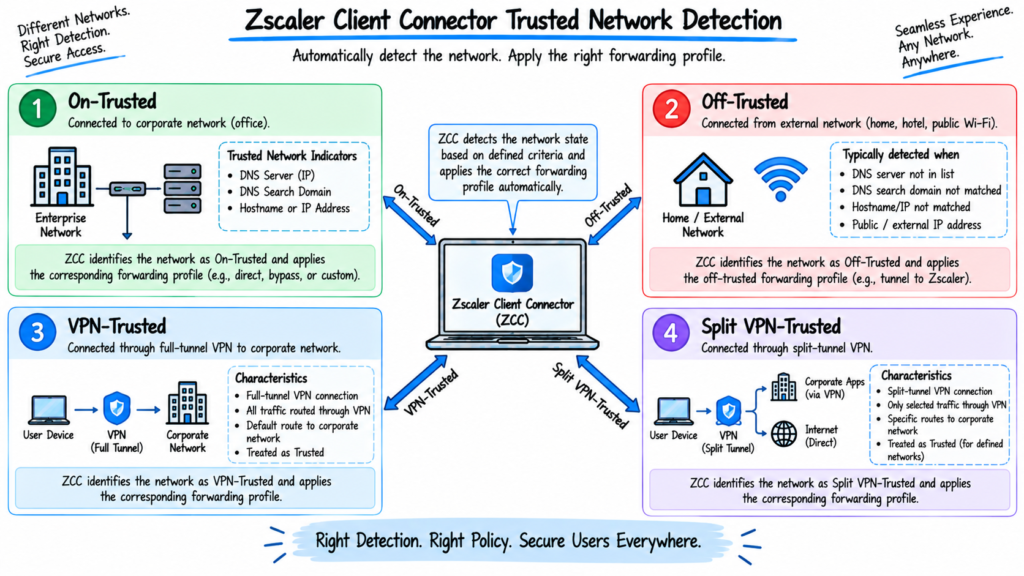
ZCC can evaluate administrator-defined network criteria and classify the device as:
- Trusted
- Off-Trusted
- VPN-Trusted
- Split VPN-Trusted
The detected state can then determine the forwarding behavior defined in the Forwarding Profile.
23. What is an On-Trusted Network?
Answer:
An On-Trusted Network is a network that matches the organization’s configured Trusted Network Criteria.
For example, an organization’s office network may be identified using:
- Corporate DNS servers
- DNS search domains
- Gateway
- DHCP server
- Hostname/IP
- Egress IP
- Network range
Once ZCC identifies the network as trusted, it applies the On-Trusted forwarding action.
It does not automatically mean that traffic is bypassed. The administrator decides what action should occur.
24. What is an Off-Trusted Network?
Answer:
An Off-Trusted Network is a network that does not satisfy the configured Trusted Network Criteria.
Examples include:
- Home Wi-Fi
- Hotel Wi-Fi
- Airport Wi-Fi
- Public hotspots
The organization can configure ZCC to use Z-Tunnel or another forwarding mechanism when the device is Off-Trusted.
25. What is a VPN-Trusted Network?
Answer:
A VPN-Trusted Network is detected when ZCC identifies a supported full-tunnel VPN configuration that captures the user’s traffic and installs a default route.
Zscaler documentation specifies that the VPN must capture all user traffic through a default route for this state to be detected.
The Forwarding Profile can then apply a specific action for the VPN-Trusted state.
26. What is a Split VPN-Trusted Network?
Answer:
A Split VPN-Trusted Network occurs when a device uses a split-tunnel VPN where only selected traffic is sent through the VPN.
For example:
Corporate subnets → Corporate VPN
Internet/SaaS traffic → ZIA
ZCC can identify this environment when Split VPN-Trusted Network detection is enabled and apply the configured forwarding actions.
Zscaler specifically provides an Enable Split VPN-Trusted Network option in Forwarding Profile configuration.
27. What is the difference between On-Trusted, Off-Trusted, VPN-Trusted, and Split VPN-Trusted?
Answer:
| Network Type | Description |
|---|---|
| On-Trusted | Device matches configured trusted network criteria |
| Off-Trusted | Device is on a network that does not match trusted criteria |
| VPN-Trusted | Supported full-tunnel VPN is detected |
| Split VPN-Trusted | Supported split-tunnel VPN environment is detected |
The important point is that network state and forwarding action are separate concepts.
Zscaler Client Connector detects the state, and the Forwarding Profile determines what ZCC does in that state.
28. How does ZCC determine whether a device is on a trusted network?
Answer:
Administrators can configure Trusted Network Criteria such as:
- DNS Server
- DNS Search Domain
- Hostname and IP
- Egress IP
- Network range
- Default gateway
- DHCP server
- Predefined Trusted Networks
When multiple criteria are configured, administrators can choose Any or All matching logic.
Zscaler Client Connector can also evaluate trusted criteria across default-route adapters when configured.
29. What happens when a user moves from an On-Trusted Network to an Off-Trusted Network?
Answer:
Suppose an employee disconnects from the corporate office and connects to home Wi-Fi.
Zscaler Client Connector detects the network change and reevaluates the network environment.
If the new network no longer satisfies the Trusted Network Criteria:
On-Trusted → Off-Trusted
ZCC then applies the Off-Trusted forwarding action configured in the Forwarding Profile.
For example, if Off-Trusted is configured for Z-Tunnel 2.0, ZCC establishes the configured Z-Tunnel connection to Zscaler.
30. How would you troubleshoot Trusted Network Detection issues?
Answer:
I would follow these steps:
- Check the network state shown in ZCC.
- Verify DNS servers.
- Verify DNS search domains.
- Check the default gateway.
- Check DHCP information.
- Check egress IP if used.
- Verify Hostname/IP criteria if configured.
- Check whether the criteria use Any or All logic.
- Check multiple active network adapters.
- Review the Forwarding Profile configuration.
- Refresh the ZCC policy.
- Review diagnostic logs.
ZCC exposes the current network state in its client interface, which makes this a useful first troubleshooting step.
Section 5: Z-Tunnel
31. What is Z-Tunnel in Zscaler Client Connector?
Answer:
Z-Tunnel is the traffic-forwarding mechanism used by ZCC to send applicable endpoint traffic to Zscaler services.
It provides an encrypted connection between the endpoint and the Zscaler cloud.
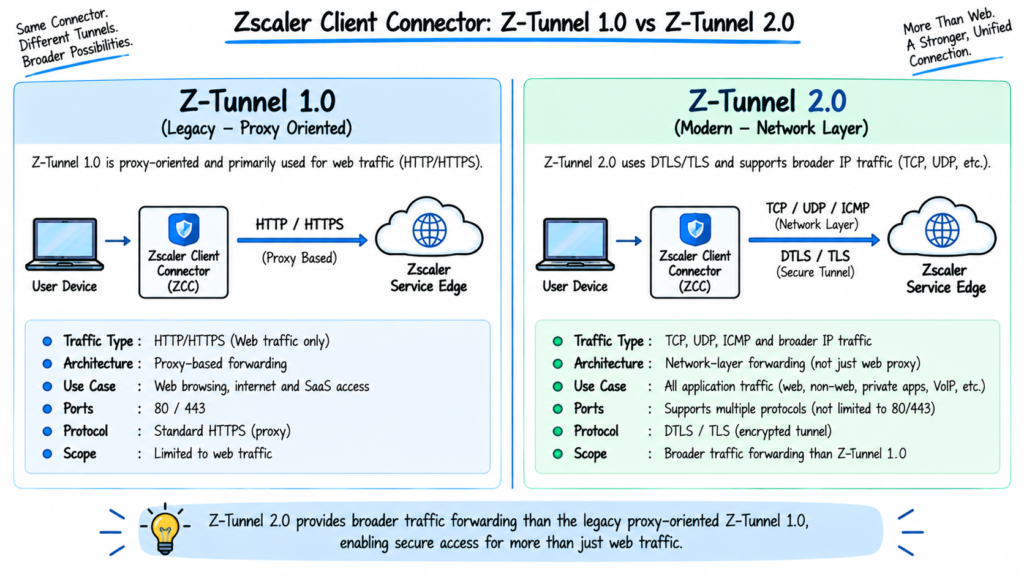
Zscaler Client Connector supports different Z-Tunnel versions, with Z-Tunnel 2.0 providing broader network-layer forwarding capabilities than Z-Tunnel 1.0.
32. What is the difference between Z-Tunnel 1.0 and Z-Tunnel 2.0?
Answer:
| Feature | Z-Tunnel 1.0 | Z-Tunnel 2.0 |
|---|---|---|
| Architecture | Proxy-oriented | Network-layer forwarding |
| Traffic coverage | Primarily web/proxy traffic | Broader IP traffic |
| Transport | TCP-based | DTLS or TLS, depending on configuration |
| Typical use | Legacy/compatibility scenarios | Modern ZCC deployments |
| Non-web traffic | Limited | Supports broader traffic types |
| TLS fallback | Not applicable in the same way | Available when configured |
Zscaler recommends Z-Tunnel 2.0 for modern deployments where its supported capabilities and platform requirements are appropriate.
33. How does Z-Tunnel 2.0 handle TCP, UDP, and other traffic?
Answer:
Z-Tunnel 2.0 provides network-layer forwarding that can support a broader range of traffic than Z-Tunnel 1.0.
Depending on platform and configuration, traffic can include:
- TCP
- UDP
- Other supported IP traffic
Zscaler Client Connector encapsulates traffic for transport to the Zscaler service using the configured Z-Tunnel 2.0 transport.
The exact supported traffic and behavior depend on the operating system and ZCC configuration.
34. What happens when Z-Tunnel 2.0 cannot establish a connection?
Answer:
The behavior depends on the Z-Tunnel 2.0 setup failure behavior configured by the administrator.
Possible approaches can include:
- Falling back to Z-Tunnel 1.0 for applicable traffic
- Blocking non-web traffic
- Blocking traffic completely
- Using TLS fallback for DTLS connectivity problems
The organization’s fail-open or fail-close design should therefore be checked in the Forwarding Profile rather than assuming one universal behavior.
35. What is TLS fallback in Z-Tunnel 2.0?
Answer:
Z-Tunnel 2.0 can use DTLS as a transport and can be configured to fall back to TLS when DTLS cannot establish successfully.
For example:
Primary: DTLS over UDP
Fallback: TLS over TCP
This is useful on networks where UDP traffic is blocked or restricted.
Zscaler documents TLS fallback as a configurable Z-Tunnel 2.0 option.
36. How does ZCC handle traffic when connected to a VPN?
Answer:
Zscaler Client Connector uses network-state detection to determine whether the endpoint is connected to a supported full-tunnel or split-tunnel VPN environment.
For a full-tunnel VPN, ZCC can identify the VPN-Trusted Network state and apply the configured forwarding action.
For a split-tunnel VPN, ZCC can identify the Split VPN-Trusted Network state when enabled and apply separate forwarding behavior.
The purpose is to avoid unwanted routing conflicts or double forwarding while maintaining the organization’s required security controls.
Section 6: Advanced ZCC Features
37. What is a Sub-Cloud in Zscaler?
Answer:
A Zscaler Sub-Cloud is a defined Zscaler cloud environment used to provide an organization with a specific set of Zscaler service infrastructure.
Organizations may use specific cloud environments to address requirements related to:
- Regulatory requirements
- Data residency
- Regional operations
- Deployment architecture
- Service availability
The exact capabilities and configuration depend on the organization’s Zscaler cloud environment.
38. What is SIPA and how is it used with ZCC?
Answer:
SIPA stands for Source IP Anchoring.
Source IP Anchoring allows selected traffic to reach a destination with a predictable source IP address while still using ZIA security controls.
A simplified flow is:
User → ZCC → ZIA inspection → Source IP Anchoring → ZPA App Connector → Destination
A common use case is when a SaaS application or external service requires traffic to originate from a known, allowlisted IP address.
Zscaler documents Source IP Anchoring as using ZIA forwarding policies and ZPA App Connectors to selectively forward the relevant traffic.
39. What is Static IP in a Zscaler deployment and when is it required?
Answer:
A static public IP is a fixed IP address that does not change.
It can be important when:
- A third-party SaaS application requires IP allowlisting.
- A partner restricts access based on source IP.
- A fixed-site ZIA deployment uses GRE/IPSec.
- A Private Service Edge requires customer-controlled addressing.
- Source IP Anchoring is used.
The Zscaler Client Connector endpoint itself normally does not require a static public IP. For a roaming user who needs a predictable source IP, a service such as Source IP Anchoring can provide the required architecture.
40. What is Cascading in Zscaler Client Connector?
Answer:
Cascading, also called proxy chaining, means traffic passes through one proxy before being forwarded to another proxy or destination.
In an enterprise migration, for example:
Endpoint → Existing Corporate Proxy → Zscaler → Internet
It can be useful when an organization needs to coexist with an existing proxy infrastructure during a migration or in a specific proxy architecture.
The exact configuration depends on the proxy and Zscaler deployment.
41. What is Surrogate IP and how does it work with ZCC?
Answer:
Surrogate IP is a ZIA identity-mapping mechanism used primarily for traffic forwarded from locations such as branch offices where an endpoint ZCC agent may not be available.
ZIA can associate a user’s authenticated identity with a private source IP address for a configured period.
This allows subsequent traffic from that source IP to be associated with the user’s identity when direct authentication is not available for that traffic.
Surrogate IP should not be confused with ZCC identity handling. ZCC sessions can provide explicit user/device context, while Surrogate IP is useful for location-based traffic where the endpoint agent is not present.
42. How does ZCC handle applications that cannot use traditional proxy-based forwarding?
Answer:
Applications that are not proxy-aware may require network-layer forwarding.
Z-Tunnel 2.0 can provide broader traffic forwarding for supported TCP, UDP, and other IP traffic.
For private applications, ZPA can provide application-specific connectivity through Microtunnels and App Connectors.
In some cases, applications that conflict with ZCC interception can also be handled through configured application or IP bypasses.
The correct approach depends on whether the application is Internet-facing, private, proxy-aware, and supported by the selected forwarding mode.
Section 7: ZCC and Other Zscaler Components
43. What is Nanolog Streaming Service (NSS) and how is it related to ZCC?
Answer:
Nanolog Streaming Service (NSS) is a Zscaler log integration capability used to stream supported Zscaler logs to external systems such as SIEM platforms.
For example:
ZCC User Traffic → ZIA → Zscaler Logging → NSS → SIEM
NSS is not a component of ZCC.
Instead, ZCC-generated traffic can result in Zscaler transaction and security logs, and NSS can stream supported logs from Zscaler to external analytics or security systems.
This distinction is important in a ZCC interview.
44. What is Zscaler Cloud Connector and how is it different from ZCC?
Answer:
Zscaler Client Connector is an endpoint agent designed for user devices.
Zscaler Cloud Connector is a virtual machine used in cloud environments to forward workload traffic to Zscaler services.
| ZCC | Cloud Connector |
|---|---|
| Installed on endpoints | Deployed as a VM |
| Protects user/device traffic | Handles cloud workload traffic |
| User/device focused | Cloud infrastructure focused |
| Supports ZIA/ZPA/ZDX capabilities depending on configuration | Extends ZIA/ZPA capabilities to cloud workloads |
Zscaler describes Cloud Connector as a VM that extends ZIA and ZPA capabilities to cloud-native workloads.
45. What is Zscaler Branch Connector and how does it work with ZCC?
Answer:
Zscaler Branch Connector extends Zscaler connectivity and security to branch environments.
It is useful for devices that cannot run ZCC, such as:
- IoT devices
- Printers
- Cameras
- Sensors
- OT systems
- Other headless devices
Zscaler Client Connector and Branch Connector can coexist in the same branch environment.
For example:
Employee Laptop → ZCC
IoT/Printer/Camera → Branch Connector
The appropriate forwarding and security architecture is then applied to each type of traffic.
Zscaler provides separate Cloud and Branch Connector architectures for workload and branch connectivity.
46. What is the difference between Client Connector, Cloud Connector, and Branch Connector?
Answer:
| Feature | Client Connector | Cloud Connector | Branch Connector |
|---|---|---|---|
| Deployment | User endpoint | Cloud environment | Branch environment |
| Primary users/devices | Employees and endpoint users | Cloud workloads | Branch/IoT/OT devices |
| Main purpose | User-to-Internet/private app access | Workload connectivity | Branch connectivity |
| Identity focus | User/device | Workload/environment | Site/workload/device |
| Example | Laptop accessing SaaS | AWS workload accessing Internet | Branch camera accessing a service |
The key distinction is where the connector is deployed and what type of traffic it is designed to handle.
Section 8: ZCC Troubleshooting
47. How would you troubleshoot ZCC if the tunnel is not establishing?
Answer:
I would follow a structured troubleshooting process:
Step 1: Check ZCC status
Verify:
- Service status
- Network type
- Authentication
- Tunnel status
Step 2: Check the endpoint
Verify:
- ZCC services
- Network adapter
- Local firewall
- Endpoint security software
- ZCC driver status
Step 3: Check network connectivity
Verify whether the endpoint can reach the required Zscaler infrastructure and whether required transport is being blocked.
Step 4: Check Forwarding Profile
Verify:
- Network state
- Tunnel version
- Driver type
- TLS fallback
- Bypass configuration
Step 5: Check logs
Collect ZCC diagnostic logs and correlate the failure timestamp with tunnel and authentication events.
Step 6: Check policy
Verify that the correct App Profile and Forwarding Profile are assigned.
48. How would you troubleshoot a ZCC Internet access issue?
Answer:
I would first determine the scope.
Check:
- Is one website affected or all websites?
- Is one user affected or multiple users?
- Is the user On-Trusted or Off-Trusted?
- Is ZCC connected?
- Which Z-Tunnel version is being used?
- Is the traffic being bypassed?
- Is the request reaching ZIA?
- Is a ZIA policy blocking the request?
- Is SSL inspection involved?
- Is the destination returning an error?
If the site works directly but fails through ZIA, I would compare:
Direct path vs Zscaler path
and investigate policy, DNS, SSL inspection, destination restrictions, Zscaler Service Edge behavior, and the actual HTTP response.
I would not assume that a 5xx response automatically means Zscaler is the cause.
49. How would you troubleshoot ZCC when connected to a corporate VPN?
Answer:
I would first check the network state displayed in Zscaler Client Connector.
If the VPN is full-tunnel, I would verify whether ZCC detects:
VPN-Trusted Network
If the VPN is split-tunnel, I would check:
Split VPN-Trusted Network
Then I would verify:
- Forwarding Profile action
- VPN routes
- Default route
- VPN adapter
- DNS configuration
- VPN gateway bypasses
- ZCC tunnel status
- Routing loops
- Double encapsulation
If the VPN gateway itself is being intercepted by Zscaler Client Connector, I would verify the appropriate VPN gateway bypass configuration.
Zscaler’s documentation specifically notes that a full-tunnel VPN must install a default route for VPN-Trusted detection, while split-tunnel VPNs are handled separately.
50. Explain a real-world Zscaler Client Connector troubleshooting scenario.
Answer:
Scenario
A remote employee reports that ZPA is showing an authentication problem in ZCC and private applications are unavailable.
Step 1: Check ZCC
I would verify:
- ZCC service status
- ZPA authentication status
- Network type
- ZPA connectivity
Step 2: Verify Internet connectivity
I would check whether ZIA or normal Internet access is working.
If ZIA works but ZPA authentication fails, I would narrow the issue to the ZPA authentication or private-access path.
Step 3: Check identity provider
I would verify the organization’s IdP and confirm whether authentication is succeeding.
Step 4: Collect ZCC logs
I would export the ZCC diagnostic logs and examine the authentication and tunnel events around the failure time.
Step 5: Check device and policy state
I would verify:
- App Profile
- Forwarding Profile
- Device posture
- ZPA authentication
- Application Segment
- Access Policy
- App Connector availability
Step 6: Resolve based on the actual error
If the logs show a client authentication or enrollment problem, I would follow the documented Zscaler remediation rather than immediately reinstalling ZCC.
This approach follows:
Localize → Isolate → Diagnose → Resolve → Validate
and prevents unnecessary endpoint changes.
Related Articles
- Zscaler Interview Questions and Answers: Fundamentals
- ZIA Interview Questions and Answers
- ZPA Interview Questions and Answers
- Zscaler Digital Experience Interview Questions and Answers
- What Is Cybersecurity and Why Is It Important Today?
- Network and Network Security Basics
- Firewall in Cybersecurity: Types and Examples
Official Zscaler Resources
- Zscaler Client Connector
- Zscaler Client Connector Documentation
- Configuring Forwarding Profiles for Zscaler Client Connector
- About Forwarding Profiles
- Configuring Source IP Anchoring
- What Is Zscaler Cloud Connector?
- Zscaler Cloud & Branch Connector Help
- Zero Trust Branch Connectivity with Zscaler Branch Connector
Disclaimer
This article is based on my own professional experience working with Zscaler, along with knowledge gained through Zscaler-related interviews, technical discussions, and product documentation. The questions and answers are provided for educational and interview-preparation purposes and may not represent the exact questions asked by every organization.
Zscaler features, product capabilities, documentation, terminology, supported platforms, and configuration options can change over time. Always verify technical details, supported features, configurations, and current product behavior against the official Zscaler documentation before implementing any configuration in a production environment.







