Your pager goes off at 2:00 AM. A critical security alert reports that a user has successfully logged in to your corporate financial platform from an unfamiliar IP address. However, your central identity platform shows no corresponding Multi-Factor Authentication (MFA) prompt, no suspicious login attempts, and no failed authentication events. During the investigation, you discover that the attacker bypassed the normal login process by presenting a forged SAML assertion directly to the application.
Incidents like this demonstrate why understanding SAML Authentication is essential for today’s cybersecurity professionals. As organizations adopt cloud services and Software-as-a-Service (SaaS) applications, identity has become the new security perimeter. A single weakness in a SAML Authentication workflow can allow attackers to impersonate legitimate users, gain unauthorized access to sensitive business applications, and compromise critical corporate data.
If you’re reading this SAML Authentication Explained: Real Enterprise Examples and Security Risks (2026 Guide), you’re likely looking to understand how Single Sign-On (SSO) works, how Security Assertion Markup Language (SAML) enables secure authentication between trusted systems, and how attackers exploit trust relationships between Identity Providers (IdPs) and Service Providers (SPs).
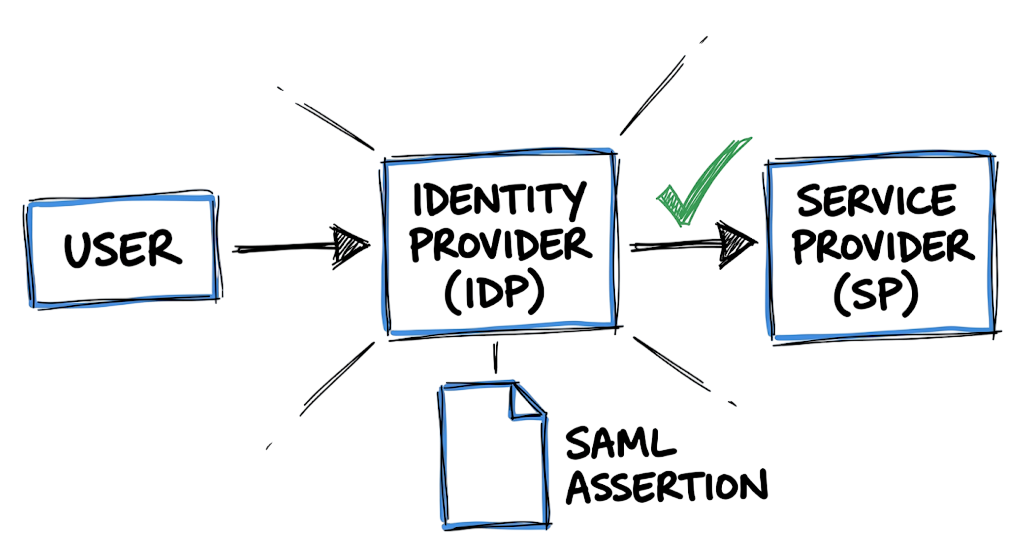
Managing separate usernames and passwords for Microsoft 365, Salesforce, ServiceNow, AWS, Google Workspace, and other cloud applications is both inefficient and difficult to secure. SAML Authentication addresses this challenge by enabling centralized authentication, seamless Single Sign-On (SSO), and secure identity federation across multiple enterprise applications. Instead of authenticating to every application individually, users authenticate once through a trusted Identity Provider, which issues a digitally signed SAML assertion that proves their identity to participating applications.
In this guide, you’ll learn how SAML Authentication works, understand the complete SAML Authentication flow, explore real enterprise deployment examples, examine common attack techniques such as forged SAML assertions and SAML token abuse, discover effective detection methods, and follow security best practices to protect your cloud environment from identity-based attacks.
What is SAML Authentication?
SAML Authentication (Security Assertion Markup Language) is an open standard that allows organizations to securely exchange identity and authorization data between trusted systems. It is one of the most widely used technologies for enterprise Single Sign-On (SSO) and centralized authentication.
Instead of forcing employees to remember separate passwords for Salesforce, ServiceNow, AWS, Microsoft 365, and other cloud applications, organizations establish a trusted Identity Provider (IdP) that verifies user identities from a central location.
When a user attempts to access an application, the Identity Provider validates their credentials and generates a cryptographically signed SAML assertion. This digital assertion acts as proof that the user has already been authenticated successfully.
The target application, known as the Service Provider (SP), verifies the signature, checks the trust relationship, and grants access automatically. The user gains seamless access without entering another username or password.
One of the biggest advantages of SAML Authentication is that it reduces password-related risks. Users no longer need to reuse weak passwords across multiple systems, and applications no longer need to store large numbers of password hashes locally. This improves both security and user experience while simplifying identity management for enterprise security teams.
How SAML Authentication Works
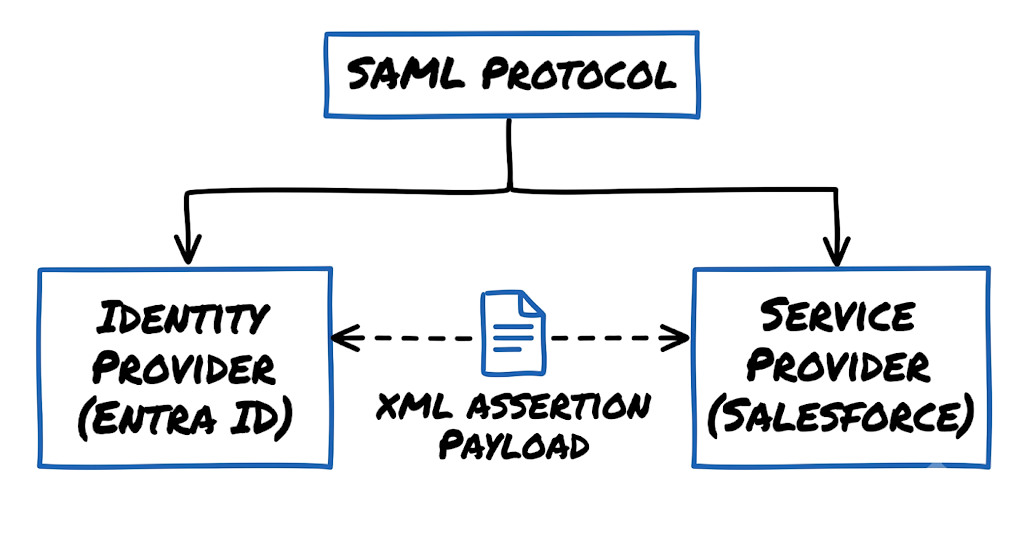
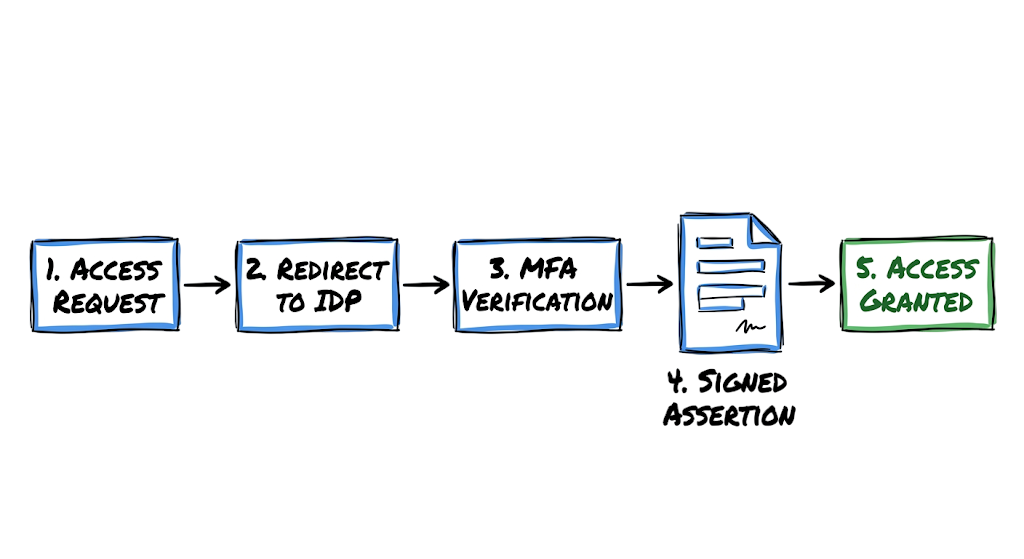
The entire mechanism relies on a strict cryptographic trust relationship between two specific entities. The Identity Providers verify the actual human using credentials, biometrics, or hardware keys. The Service Providers are the target applications the user wants to access. When an employee tries to open a cloud application, that service intercepts the web request and redirects the user’s browser to the central identity system. The user proves their identity there.
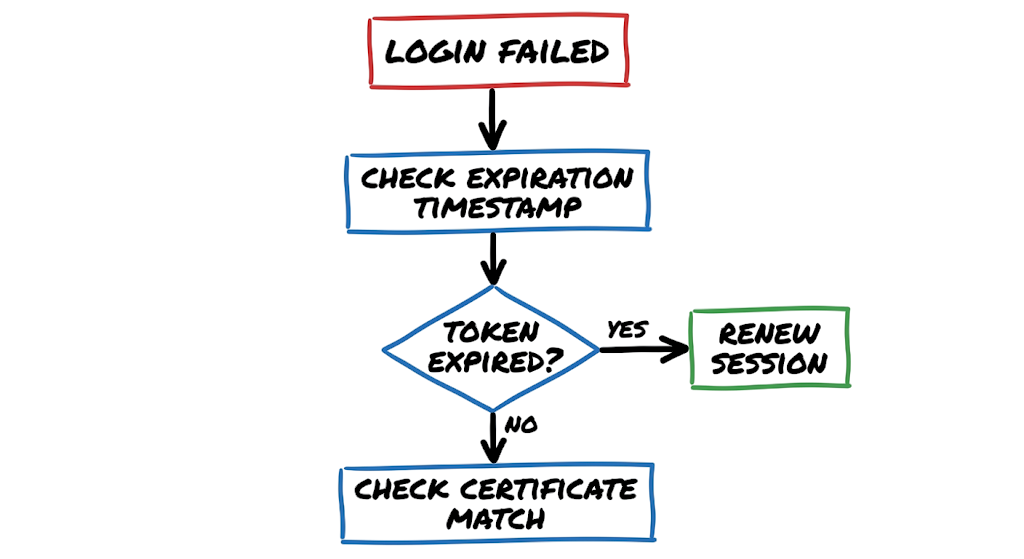
Once the user is verified, the identity system generates a digitally signed XML document called an assertion. This document contains critical facts, such as the user’s email address, their corporate department, their group memberships, and a strict expiration timestamp. The user’s browser then forwards this XML assertion back to the original application via an HTTP POST request.
The application inspects the document and checks the digital signature against a public certificate it previously exchanged with the identity system. Because the signature matches, the application knows the identity system successfully vouched for this user, and access is granted immediately. The user gets to work, and the target application never handles or stores the user’s actual password.
Real-World SAML Authentication Examples
You will encounter raw XML payloads constantly when troubleshooting access issues or investigating compromised sessions. Below is a simplified, decoded snippet of what an authentication response looks like when a user logs into a cloud platform via Microsoft Entra ID.
XML
<saml2p:Response Destination="https://tech-naga.my.salesforce.com" IssueInstant="2026-06-14T08:14:00Z" Version="2.0">
  <saml2:Issuer>https://sts.windows.net/TENANT_ID/</saml2:Issuer>
  <ds:Signature>
    <ds:SignedInfo>
      <ds:CanonicalizationMethod Algorithm="http://www.w3.org/2001/10/xml-exc-c14n#"/>
      <ds:SignatureMethod Algorithm="http://www.w3.org/2001/04/xmldsig-more#rsa-sha256"/>
    </ds:SignedInfo>
    <ds:SignatureValue>Base64_Signature_String_Here</ds:SignatureValue>
  </ds:Signature>
  <saml2:Assertion IssueInstant="2026-06-14T08:14:00Z">
    <saml2:Subject>
      <saml2:NameID Format="urn:oasis:names:tc:SAML:1.1:nameid-format:emailAddress">analyst@technaga.com</saml2:NameID>
    </saml2:Subject>
    <saml2:Conditions NotBefore="2026-06-14T08:14:00Z" NotOnOrAfter="2026-06-14T09:14:00Z"/>
  </saml2:Assertion>
</saml2p:Response>
This payload represents the exact moment trust is transferred. The XML snippet shows the identity system issuing an assertion for a specific security analyst trying to access an environment. Pay close attention to the conditions block containing the NotOnOrAfter timestamp, which dictates the absolute maximum lifespan of this specific token. If an attacker intercepts this document after that exact minute passes, the receiving service will reject it outright. The digital signature block above the assertion is the cryptographic lock preventing an attacker from simply intercepting the traffic, changing the NameID email address to the CEO’s email, and elevating their privileges.
Common SAML Authentication Techniques
Attackers understand that identity has become the ultimate target, so they focus heavily on exploiting the protocols that generate and consume these tokens. One frequent method is stealing the assertions directly from a compromised endpoint. If a threat actor uses infostealer malware to scrape a valid session token from a browser before it hits the expiration timestamp, they can inject it into their own browser to bypass your multi-factor authentication controls completely.
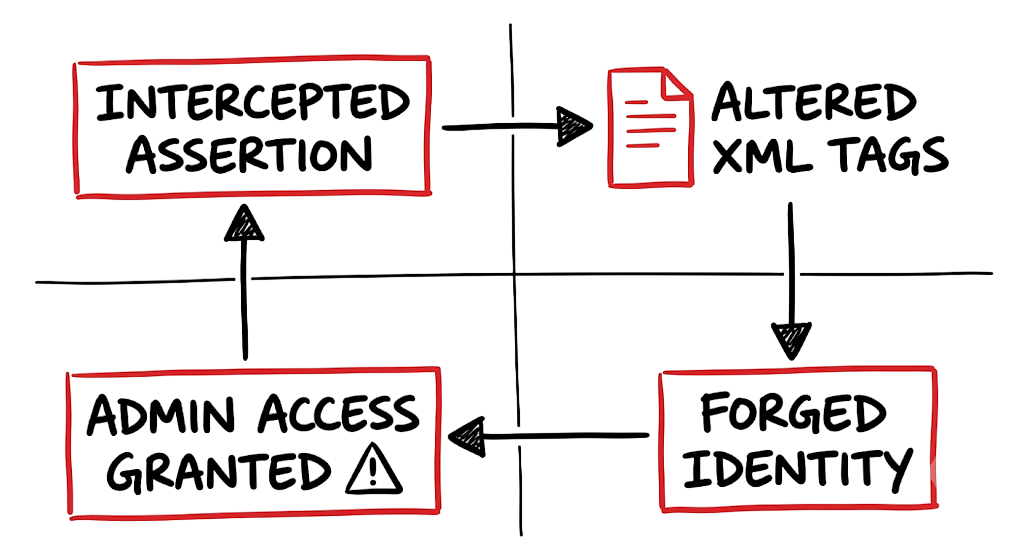
Now here’s where it gets interesting. Threat actors also exploit discrepancies in how applications read XML documents using a vulnerability known as XML Signature Wrapping. In this scenario, the attacker intercepts a legitimate, signed assertion and alters the structural hierarchy of the XML tags. They copy the valid signature and move it to a different part of the document, then inject a forged administrative identity payload into the expected location.
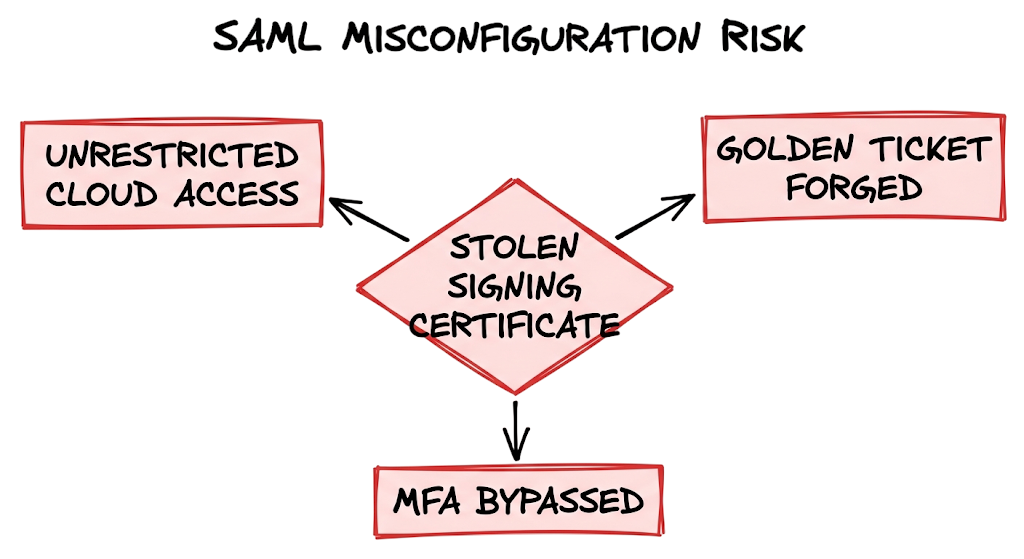
Poorly coded applications will validate the copied signature but process the forged identity, granting full administrative access. Another catastrophic attack involves breaching the core infrastructure to steal the master token-signing certificate. With that private key in hand, attackers can forge their own golden tickets, minting completely valid assertions for any user and accessing any connected system without ever touching your login portal.
SAML Authentication Detection Methods
Catching these identity protocol abuses requires you to actively correlate events across multiple distinct environments. You cannot rely solely on failed password attempts because a successful token replay attack looks identical to a normal, healthy session establishment in the logs. This is where most people get confused. You must actively look for impossible travel anomalies where a token is officially generated for a user sitting in an office in Jakarta, but the target application logs show that exact token being consumed by an IP address in Eastern Europe just three minutes later.
Security analysts must also watch for unexpected modifications to enterprise application settings within the identity portal itself. If an attacker gains privileged access, their first move is often adding a new rogue credential or secondary signing certificate to an existing application integration. You should configure your SIEM to trigger an immediate high-severity alert anytime an application’s trust configuration is altered, especially if that change occurs outside of an approved change management window.
Comparing the authentication timestamps from your central logs against the access timestamps in the downstream applications will reveal if an attacker is bypassing the identity provider entirely using forged offline certificates.
Business Impact of SAML Authentication
When centralized authentication protocols are compromised within the banking sector, the resulting blast radius is fatal to the business. Consider a regional bank operating across Southeast Asia and India that uses a single identity platform to manage employee access to SWIFT terminals, core banking mainframes, and customer data repositories. If an advanced persistent threat group manages to forge identity assertions, they do not just gain access to a single inbox. They gain lateral, unverified access to every downstream financial system that employee is authorized to use, completely bypassing localized application security.
Regulatory agencies treat these infrastructure failures with zero tolerance. Under the Reserve Bank of India (RBI) cybersecurity guidelines and the Monetary Authority of Singapore Technology Risk Management (MAS TRM) framework, failing to protect your cryptographic trust anchors directly violates access control mandates.
A successful breach of this magnitude leads to massive compliance penalties and total operational paralysis. The incident response teams must sever access to all cloud applications, revoke and regenerate every single trust certificate, and rebuild the identity architecture from scratch while business operations grind to a complete halt.
SAML Authentication Prevention Best Practices
You must architect your centralized access systems with the assumption that your endpoints are already compromised. Always mandate phishing-resistant multi-factor authentication at the central portal level before any token is generated for the user. You must strictly configure short expiration times on your tokens to minimize the window of opportunity for session hijacking.
When I was working on an identity infrastructure migration for a massive healthcare organization, I saw exactly what happens when security teams leave assertion lifetimes set to the default twenty-four hours. An attacker scraped a stale token from an unpatched workstation in the emergency room and enjoyed unrestricted access to electronic medical records for an entire night because the token was technically still valid.
You should also instruct your identity system to encrypt the entire payload, rather than just signing it, which ensures that sensitive authorization attributes remain completely unreadable to anyone intercepting the traffic. Rotate your signing certificates regularly, because allowing stale cryptographic keys to linger in your environment gives attackers a wider window to attempt offline cracking. These configuration choices directly reduce your attack surface.
SAML Authentication Security Tools
Microsoft Entra ID serves as the central identity authority for millions of corporate networks, handling the heavy computational lifting of user verification, risk analysis, and token generation. Okta operates as a highly customizable alternative, allowing engineers to build complex routing rules and conditional access policies across thousands of distinct software platforms.
Splunk acts as the correlation brain of your security operations center, ingesting raw authentication logs from the central identity portal and the downstream applications to automatically identify impossible travel anomalies. Zscaler secures the network edge by intercepting traffic and checking device posture before even allowing a remote user to reach the central authentication page.
In real environments, it doesn’t work this cleanly. Legacy on-premises applications often lack native support for modern XML-based identity protocols, requiring translation software. Ping Identity often fills this gap by acting as a protocol bridge between outdated internal databases and modern cloud standards. Each of these tools must be integrated tightly and configured to share telemetry, otherwise you create visibility blind spots that attackers will absolutely exploit.
SAML Authentication FAQ
Q: What is the primary difference between SAML and OAuth?
A: The main difference lies in their functional purpose within an architecture. The former is used strictly for authentication to prove who a user is, while OAuth is used for authorization to grant an application limited access to a user’s data. You use the former to log into a portal, and you use OAuth to let a third-party application read your calendar.
Q: Can SAML SSO be used to secure mobile applications?
A: It can be used, but it is rarely the optimal choice because the protocol was originally designed heavily around web browser redirects. Modern mobile applications typically use OpenID Connect, which is built on top of OAuth and handles native mobile session states much more efficiently.
Q: What are the main security benefits of centralizing authentication?
A: The primary advantage is drastically reducing the attack surface by eliminating password reuse across dozens of separate applications. It also provides your security team with a single choke point to enforce multi-factor authentication and instantly revoke a terminated employee’s access across all corporate systems at once.
Q: What happens to users if the central Identity Provider goes offline?
A: If the central authority experiences an outage, users cannot establish new sessions for any connected applications. Users who already have active, unexpired tokens may continue working in their specific applications until those tokens time out, at which point they will be locked out until the provider is restored.
Q: Why do advanced threat actors target XML assertions instead of stealing passwords?
A: Attackers target the assertions because stealing a password still requires them to bypass multi-factor authentication prompts. Stealing or forging a valid assertion allows the attacker to bypass the authentication phase entirely, granting them immediate, frictionless access to the target systems.
Q: Are there inherent risks to deploying centralized identity systems?
A: The biggest risk is creating a single point of failure and a massive target for attackers. If a threat actor successfully compromises the central authority or steals the private signing keys, they gain the ability to impersonate any user across the entire connected ecosystem.
SAML Authentication Conclusion
Centralizing identity and access management is a foundational security practice for modern enterprises. SAML Authentication helps eliminate password sprawl, reduce credential-related risks, and provide security teams with a centralized view of authentication activity across cloud and on-premises applications.
As organizations continue adopting Single Sign-On (SSO), cloud services, and Zero Trust architectures, understanding SAML Authentication becomes increasingly important. A properly configured SAML environment improves both security and user experience while simplifying identity management.
Keep this SAML Authentication Explained with Real Enterprise Examples (2026 Guide) bookmarked for future reference. During infrastructure audits, security assessments, or identity modernization projects, it can help you identify common misconfigurations, trust relationship issues, and potential attack vectors before they lead to compromise.
As a best practice, review your Identity Provider settings regularly. Verify assertion signing certificates, monitor authentication logs, enforce Multi-Factor Authentication (MFA), and keep SAML assertion validity periods as short as business requirements allow. Shorter token lifetimes can significantly reduce the effectiveness of token replay attacks and unauthorized session reuse.
By implementing strong SAML Authentication controls and following identity security best practices, organizations can strengthen their overall security posture and better protect critical business applications from modern cyber threats.
Related Articles
For a deeper understanding of cybersecurity, network security, authentication, and enterprise attack techniques, explore these related guides from TechNaga:
- What Is Cybersecurity and Why It Is Important Today
https://technaga.com/what-is-cybersecurity-and-why-it-is-important-today/ - Complete Network Security Basics Guide for Beginners 2026
https://technaga.com/what-is-networks-and-network-security-basics-2026/ - What is Firewall in Cybersecurity? Types, Examples and How it Works in 2026
https://technaga.com/firewall-in-cybersecurity-types-examples-explained/ - OAuth Phishing Attacks Explained
https://technaga.com/oauth-phishing-attacks-explained/ - VLAN Hopping Attacks in Enterprise Networks
https://technaga.com/vlan-hopping-attacks-in-enterprise-networks/ - MAC Flooding Attack Explained
https://technaga.com/mac-flooding-attack-explained/ - DHCP Starvation Attack Explained
https://technaga.com/dhcp-starvation-attack-explained/ - Rogue Access Point Attacks Explained
https://technaga.com/rogue-access-point-attacks-explained/ - Evil Twin Wi-Fi Attacks Explained
https://technaga.com/evil-twin-wi-fi-attacks-explained/ - Network Pivoting Techniques Used by Attackers
https://technaga.com/network-pivoting-techniques-used-by-attackers/ - Passkeys vs Passwords: Which Is More Secure in 2026?
https://technaga.com/passkeys-vs-passwords/ - IP Address Explained: Types, Classes, and How It Works
https://technaga.com/ip-address-explained/
Additional Resources
For further reading on SAML Authentication, Single Sign-On (SSO), Identity Providers, and enterprise identity security, explore these authoritative resources:
- OASIS SAML 2.0 Standard
https://www.oasis-open.org/standards/#samlv2.0 - Microsoft Entra ID SAML Protocol Documentation
https://learn.microsoft.com/en-us/entra/identity-platform/single-sign-on-saml-protocol - Microsoft Entra ID Documentation
https://learn.microsoft.com/en-us/entra/ - Okta SAML Concepts Guide
https://developer.okta.com/docs/concepts/saml/ - Ping Identity SAML Authentication Guide
https://www.pingidentity.com/en/resources/identity-fundamentals/authentication/saml.html - AWS IAM Identity Center Documentation
https://docs.aws.amazon.com/singlesignon/ - Salesforce SAML Single Sign-On Documentation
https://help.salesforce.com/s/articleView?id=sf.sso_saml.htm - OWASP Authentication Cheat Sheet
https://cheatsheetseries.owasp.org/cheatsheets/Authentication_Cheat_Sheet.html - NIST Digital Identity Guidelines (SP 800-63)
https://pages.nist.gov/800-63-3/ - NIST Zero Trust Architecture (SP 800-207)
https://csrc.nist.gov/pubs/sp/800/207/final - CISA Zero Trust Maturity Model
https://www.cisa.gov/zero-trust-maturity-model - MITRE ATT&CK Identity and Credential Access Techniques
https://attack.mitre.org/ - SANS Identity and Access Management Resources
https://www.sans.org/white-papers/ - W3C XML Signature Specification
https://www.w3.org/TR/xmldsig-core/ - OWASP SAML Security Cheat Sheet
https://cheatsheetseries.owasp.org/cheatsheets/SAML_Security_Cheat_Sheet.html







