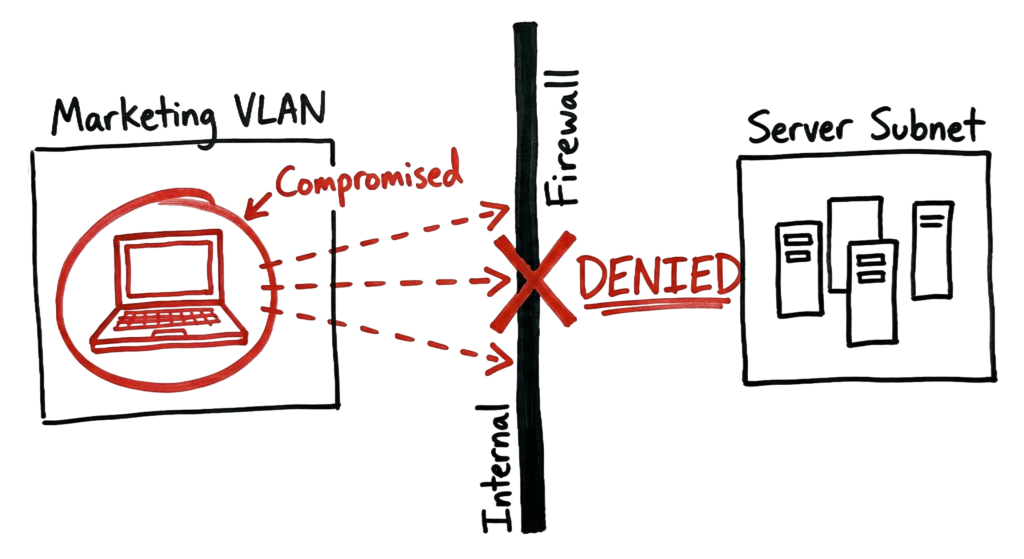
It is 2:00 AM, and the SOC analyst is monitoring the Security Information and Event Management (SIEM) dashboard when several critical alerts suddenly appear. A workstation in the marketing department is attempting to scan multiple IP addresses within the server subnet, behavior that immediately stands out as suspicious. Minutes later, the Endpoint Detection and Response (EDR) platform generates another alert. An unauthorized PowerShell script is running on the database server, even though there is no previous record of this activity.
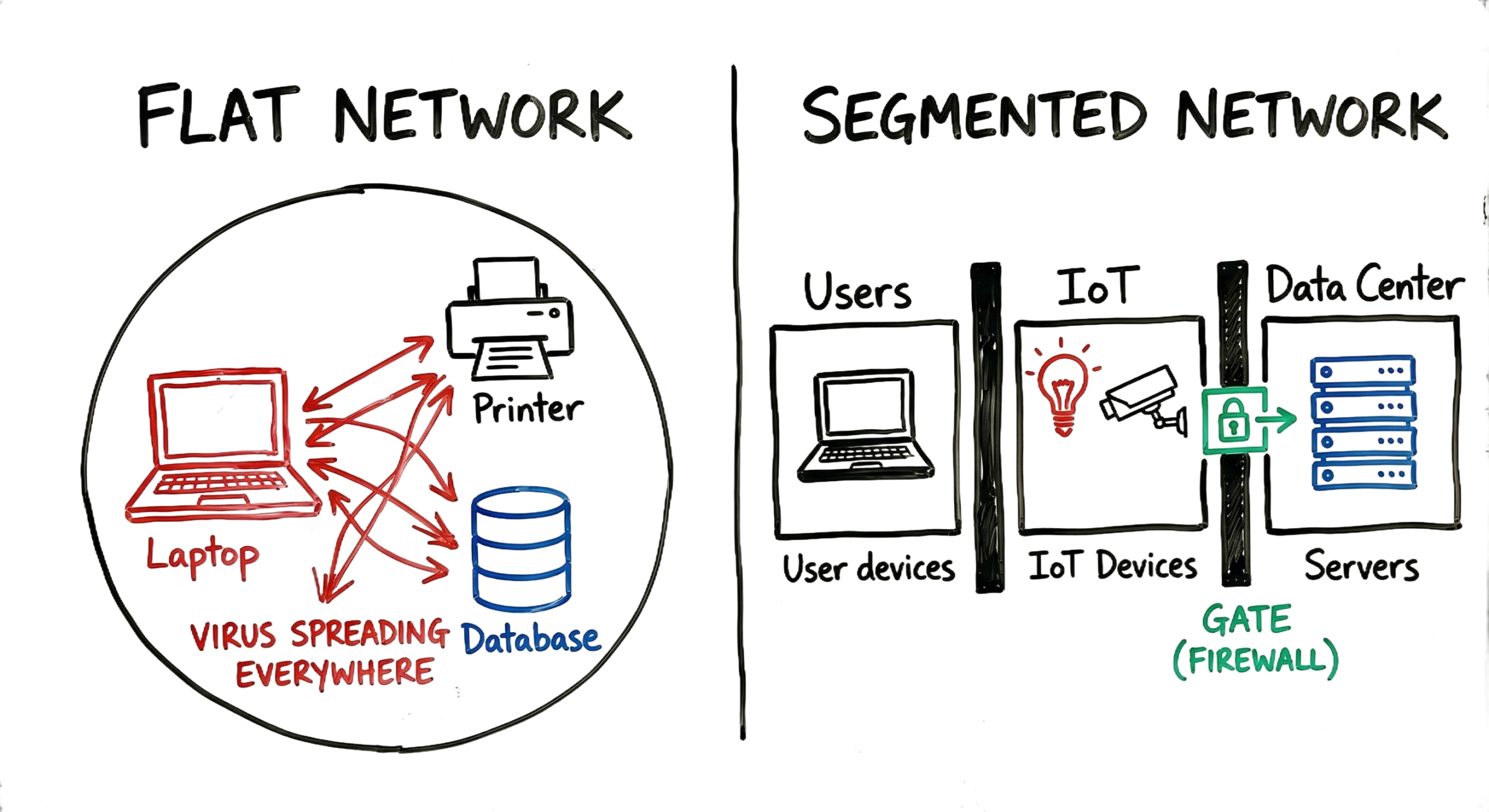
In an environment without network segmentation, a single compromised workstation can communicate with almost every system inside the data center. Once attackers gain initial access, they can move laterally across the network, discover high-value assets, steal sensitive data, and deploy ransomware on multiple servers. Without proper internal security boundaries, a small compromise can quickly escalate into a large-scale security incident.
This real-world scenario demonstrates why network segmentation is a critical cybersecurity control. Many organizations invest heavily in firewalls and perimeter defenses but overlook internal network security. Without effective segmentation, attackers who bypass the perimeter often move freely between users, servers, and applications, significantly increasing the impact of a breach.
In this guide, you’ll learn what network segmentation is, how it works, and why it is essential for protecting modern enterprise networks. You’ll also explore Network Segmentation Best Practices, understand the role of Microsegmentation in Zero Trust architectures, and learn the differences between Network Segmentation vs VLAN to build a stronger and more resilient security strategy.
What is Network Segmentation?
Network segmentation is the process of dividing a network into smaller, isolated segments to improve security, control traffic flow, and limit unauthorized access. Instead of treating the entire network as one large environment, segmentation creates separate zones where communication is allowed only when it meets defined security policies.
A simple way to understand network segmentation is to think of it as controlled isolation. If a security incident occurs in one segment, it can be contained within that area, reducing the likelihood of the attack spreading across the entire network.
In a flat network, every device can communicate with every other device without restrictions. This lack of internal security makes it easier for attackers to move laterally after compromising a single endpoint. Without proper network segmentation, cybercriminals can quickly reach critical assets such as databases, domain controllers, file servers, and business applications.
Network segmentation addresses this risk by limiting direct communication between different parts of the network. Instead of allowing unrestricted access, traffic is inspected and controlled by security devices such as firewalls, routers, or access control lists (ACLs). These security controls evaluate each connection and allow or deny traffic based on predefined policies.
By implementing network segmentation, organizations gain greater visibility into internal network traffic, reduce the attack surface, and improve their ability to contain cyber threats. Following established Network Segmentation Best Practices further strengthens security by ensuring sensitive systems are isolated and accessible only to authorized users and applications.
How Network Segmentation Works?
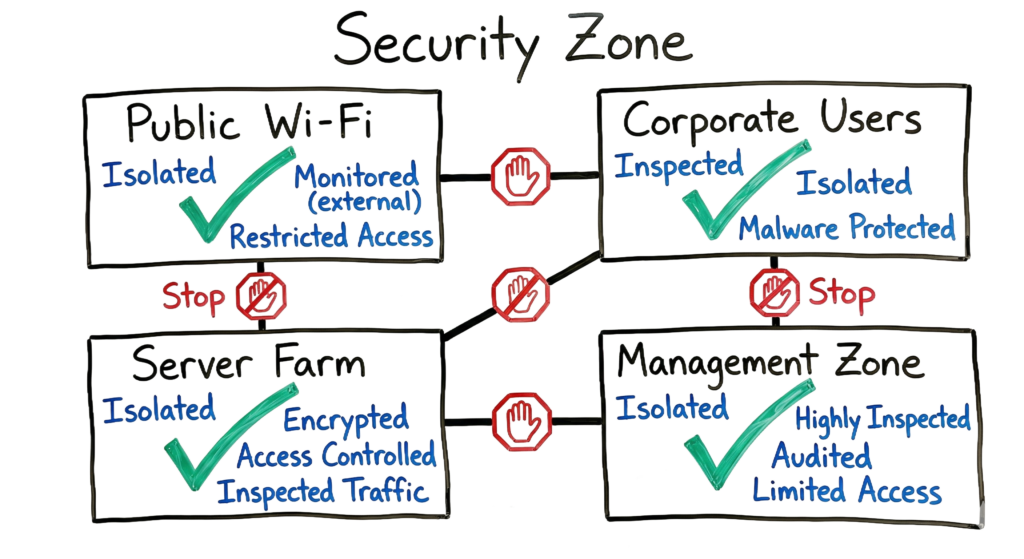
The primary goal is to group similar assets together and place security boundaries around them. For example, office printers should not be able to communicate directly with SQL databases, and users connected to a guest Wi-Fi network should never have access to domain controllers or other critical business systems.
Network segmentation achieves this by creating isolated network zones with controlled communication paths. Each segment operates as its own broadcast domain, and traffic moving from one segment to another must pass through a Layer 3 device, typically a router or firewall. This allows security teams to enforce the principle of least privilege, permitting only the specific ports, protocols, and services required for legitimate business operations while blocking all unnecessary traffic.
Technical Flow and Architecture of Network Segmentation
In enterprise environments, segmentation is implemented at multiple layers of the OSI model to provide different levels of security and traffic control.
Layer 2 Segmentation (VLANs)
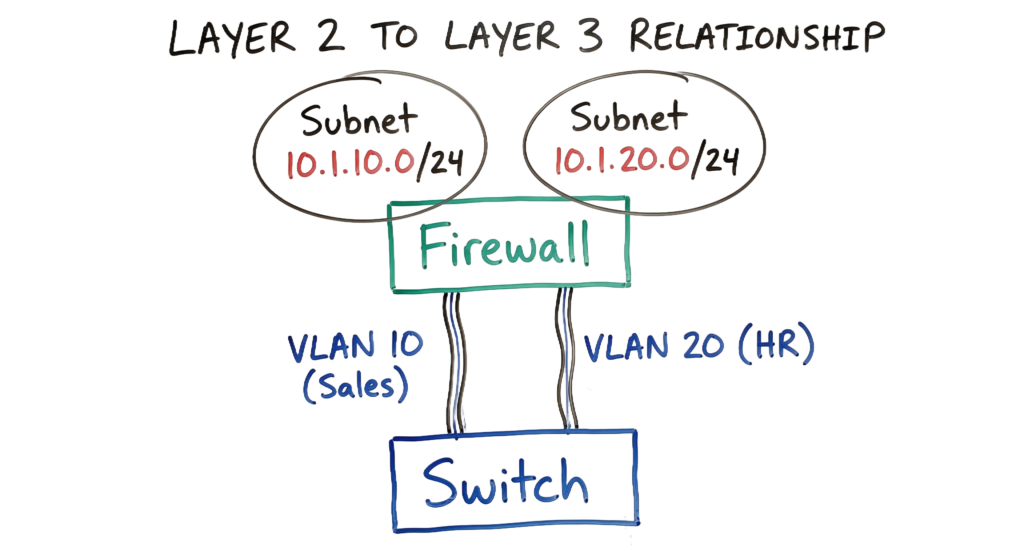
At Layer 2, organizations use Virtual Local Area Networks (VLANs) to separate devices into different broadcast domains. Each VLAN is assigned a unique VLAN ID, preventing devices in one VLAN from communicating directly with devices in another unless routing is explicitly allowed.
For example, devices in VLAN 10 cannot communicate directly with devices in VLAN 20 without passing through a Layer 3 device where security policies can be enforced.
Layer 3 Segmentation (Subnets and VRFs)
At Layer 3, each VLAN is assigned its own IP subnet, allowing traffic to be routed between network segments in a controlled manner. Large enterprise networks often use Virtual Routing and Forwarding (VRF) to create separate routing tables, ensuring that departments or business units remain logically isolated even when sharing the same physical network infrastructure.
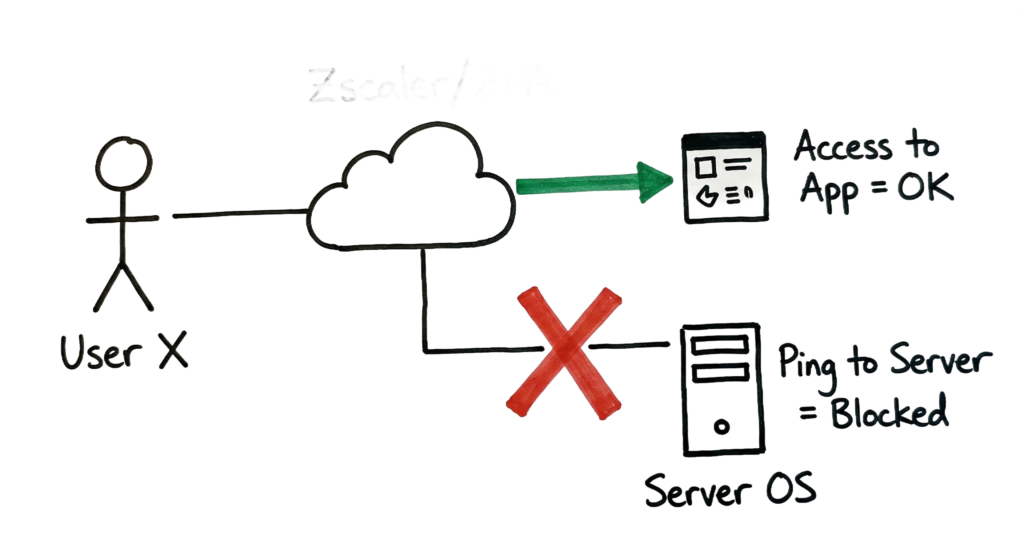
The most advanced form of segmentation operates at the application layer through Microsegmentation. Instead of making decisions based only on IP addresses or network ports, security policies are applied to individual users, applications, and workloads.
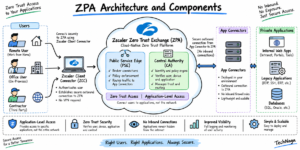
For example, using solutions such as Zscaler Private Access (ZPA) or distributed firewalls, an administrator can allow a finance employee to access only the Finance application without providing direct network connectivity to the underlying server. This application-centric approach significantly reduces the risk of lateral movement and aligns with modern Zero Trust security architectures.
Key Components
Building a secure segmented network requires several core technologies that work together to control communication between users, devices, and applications.
Internal Firewalls
Unlike perimeter firewalls that protect the organization’s external boundary, internal firewalls are deployed between internal security zones, such as the user network, server network, and data center. They inspect traffic moving between these zones and enforce security policies to reduce the risk of lateral movement.
Access Control Lists (ACLs)
Access Control Lists (ACLs) are security rules configured on routers and Layer 3 switches to allow or deny network traffic. ACLs provide granular control by permitting only approved IP addresses, ports, and protocols while blocking unauthorized communication.
Network Access Control (NAC)
Network Access Control (NAC) solutions, such as Cisco Identity Services Engine (ISE), verify the security posture of a device before granting network access. Devices that fail compliance checks, such as unmanaged laptops or systems with outdated security patches, can be placed into a quarantine VLAN or denied access entirely.
SD-WAN and SASE
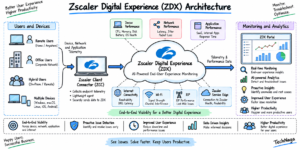
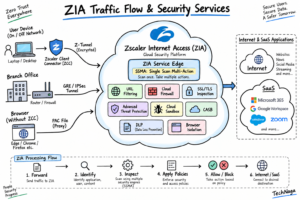
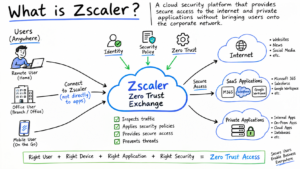
Modern Software-Defined Wide Area Networking (SD-WAN) and Secure Access Service Edge (SASE) platforms extend security beyond the corporate office. Solutions such as Zscaler provide secure, identity-based access for remote users, treating every connection as untrusted until it is verified according to Zero Trust principles.
A Real-World Enterprise Scenario
Consider a manufacturing company with three primary environments:
- Office Network
- Factory Floor (Operational Technology and IoT)
- Data Center
Before implementing network segmentation, a contractor connected a laptop to a factory floor network to update industrial equipment. The laptop was unknowingly infected with malware. Because the network lacked internal security boundaries, the malware scanned the environment, discovered a route to the data center, and eventually encrypted the payroll server.
After segmentation was implemented, the factory floor was isolated into its own security zone. Firewall policies allowed only a specific backup service to communicate with the data center while blocking all other traffic. When the malware attempted to scan other systems, the firewall denied more than a thousand connection attempts. The SIEM platform detected the unusual activity, generated high-priority alerts, and the security team isolated the contractor’s laptop before the attack could spread beyond the factory environment.
Practical Experience
In enterprise environments, designing security zones requires careful planning. Over-segmentation can introduce unnecessary complexity and increase operational overhead.
During one deployment, more than fifty VLANs were created for an organization with fewer than one hundred employees. The environment became difficult to troubleshoot, and identifying routing issues consumed several hours because there was no accurate network diagram.
A more practical approach is to begin with broad security zones such as:
- Users
- Servers
- Data Center
- IoT Devices
- Guest Network
Additional segmentation should only be introduced when there is a clear security or business requirement.
Practical Implementation
If you are designing a segmented network from the ground up, follow these recommended steps:
1. Inventory Network Assets
Identify every connected device, including servers, workstations, printers, network appliances, IoT devices, and cloud workloads. You cannot secure assets that are unknown.
2. Define Security Zones
Group systems according to business function, sensitivity, and risk level. For example, separate user devices, production servers, development environments, and guest networks.
3. Analyze Existing Traffic
Review firewall logs and network flow data to understand communication patterns between systems before creating security policies. This helps prevent accidental disruption of critical business applications.
4. Create Allow Rules
Permit only the traffic required for legitimate business operations. Restrict unnecessary ports, protocols, and network communication wherever possible.
5. Apply a Default Deny Policy
After required traffic has been explicitly allowed, block all remaining communication by default. This significantly reduces the attack surface.
6. Test Before Enforcement
Enable logging or monitoring mode before enforcing new security policies. Reviewing blocked traffic helps identify missing rules and minimizes disruptions during deployment.
Advantages and Limitations
Advantages
- Reduces the attack surface by limiting lateral movement.
- Improves network performance by reducing unnecessary broadcast traffic.
- Helps organizations meet compliance requirements such as PCI DSS, HIPAA, and ISO 27001.
- Limits the impact of malware and ransomware outbreaks.
- Provides better visibility and control over internal network communication.
Limitations
- Requires additional investment in security infrastructure and management.
- Policy administration becomes more complex as the environment grows.
- Misconfigured security rules can interrupt legitimate business applications.
- Routing traffic through inspection points may introduce small amounts of network latency.
Common Mistakes
One of the most common mistakes is relying entirely on perimeter security while leaving internal systems largely unrestricted. This approach is often described as an “M&M Network”, where the outside is protected but the internal network remains vulnerable once attackers gain access.
Another frequent issue is leaving the native VLAN (VLAN 1) enabled on trunk ports. Poor VLAN configuration can increase the risk of VLAN hopping attacks, allowing attackers to bypass network boundaries through techniques such as double-tagging.
Excessive segmentation without proper documentation is another challenge. As environments grow, maintaining firewall rules, routing policies, and network diagrams becomes increasingly important for efficient troubleshooting and change management.
Best Practices
Follow these recommendations to build a secure and manageable environment:
- Apply the principle of least privilege, allowing only the required ports, protocols, and services.
- Continuously monitor network traffic using SIEM and network detection solutions.
- Combine physical and logical isolation for high-value systems and sensitive departments.
- Implement identity-based access controls using Zero Trust principles.
- Regularly review firewall rules and remove obsolete or unused policies.
- Document network architecture and validate security policies through periodic audits and penetration testing.
Troubleshooting Scenario
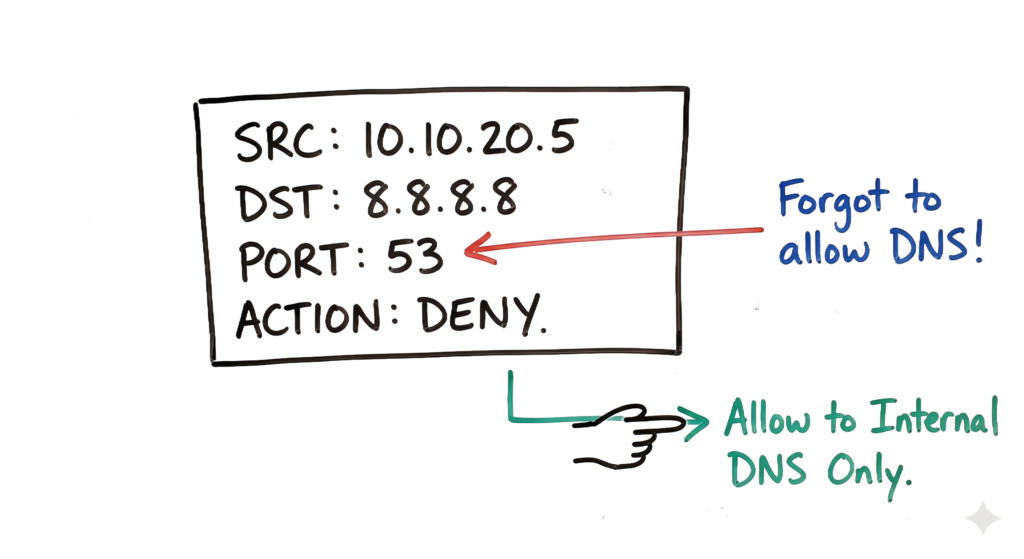
Imagine a junior engineer reports that a newly deployed Marketing server cannot access the internet. You check the Zscaler logs and confirm that the traffic is reaching the cloud, but the DNS lookup is failing.
Next, you review the internal firewall logs and find the following entry:
Deny: Source: 10.10.20.5 (Marketing) | Destination: 8.8.8.8 | Port: 53 (UDP)
The issue quickly becomes clear. The Marketing VLAN was successfully isolated, but the required firewall rule allowing DNS traffic was never configured. Instead of opening UDP port 53 to any external DNS server, you update the firewall policy to allow the server to communicate only with the organization’s approved internal DNS forwarders.
This scenario highlights one of the most important Network Segmentation Best Practices: verify essential services such as DNS, DHCP, Active Directory, and NTP before enforcing restrictive security policies. Proper testing helps maintain strong security without disrupting legitimate business operations.
Interview Questions
1. What is the difference between a VLAN and a Subnet?
A VLAN (Virtual Local Area Network) is a Layer 2 technology used to logically separate devices into different broadcast domains on a switch. A subnet is a Layer 3 concept that defines an IP address range and determines how devices communicate through routing. In most enterprise environments, each VLAN is mapped to a unique subnet, making network management and security policy enforcement much easier.
2. How does network segmentation prevent lateral movement?
After compromising an endpoint, attackers often attempt to move laterally to locate sensitive systems such as domain controllers, database servers, and file servers. Network segmentation interrupts this process by forcing traffic to cross security devices such as firewalls, routers, or access control lists (ACLs). These devices inspect every connection request and block unauthorized communication based on predefined security policies, significantly reducing the attacker’s ability to move across the network.
3. What is a flat network?
A flat network is an environment where most devices belong to the same broadcast domain and can communicate freely with each other. While this design is simple to deploy, it creates a significant security risk because a compromised device can easily communicate with other systems. Modern enterprise networks avoid flat architectures by dividing users, servers, IoT devices, and business applications into separate security zones.
4. Why is Microsegmentation better than traditional segmentation?
Traditional segmentation isolates entire departments or subnets using VLANs and firewalls. Microsegmentation provides much finer control by applying security policies at the workload, application, or individual server level. Instead of trusting every device within a subnet, administrators can define exactly which users, services, or applications are allowed to communicate. This approach greatly improves security in cloud, hybrid, and Zero Trust environments.
5. How do you secure a guest Wi-Fi network?
Guest wireless users should never have direct access to corporate resources. A secure design places guest devices in a dedicated VLAN with its own subnet and routing table. Firewall policies should follow a Default Deny approach, allowing internet access while blocking communication with internal networks. Additional controls such as web filtering, DNS security, and bandwidth limitations further improve protection.
Future Trends (2026)
Enterprise networking is rapidly evolving beyond traditional perimeter-based security. By 2026, organizations will increasingly rely on identity-driven security policies instead of trusting users based on their physical network location. Whether employees connect from an office, home, or public Wi-Fi, access decisions will depend on identity, device health, user behavior, and application sensitivity rather than IP addresses alone.
Artificial Intelligence (AI) and Machine Learning (ML) will play a larger role in continuously analyzing network traffic and user behavior. Instead of relying only on static firewall rules, security platforms will learn normal communication patterns and automatically detect anomalies such as unexpected lateral movement, privilege escalation attempts, or suspicious data transfers.
Microsegmentation will continue to grow as organizations migrate workloads to cloud platforms and containerized environments. Security policies will become application-aware, allowing communication only between verified users, approved workloads, and trusted services. This approach significantly reduces the attack surface and aligns with modern Zero Trust architectures.
Automation will also become a standard feature. Security platforms will automatically quarantine compromised devices, update firewall policies, and notify security teams without requiring manual intervention. This reduces response time and helps contain threats before they spread across the enterprise.
Frequently Asked Questions (FAQ)
1. Does Network Segmentation replace a firewall?
No. Firewalls and Network Segmentation complement each other. Segmentation divides the network into separate security zones, while firewalls enforce the security policies that control communication between those zones.
2. Can I use a router for segmentation?
Yes. Routers can perform segmentation using routing policies and Access Control Lists (ACLs). However, modern next-generation firewalls provide additional capabilities such as application awareness, intrusion prevention, threat intelligence, SSL inspection, and user-based policy enforcement.
3. Is Network Segmentation expensive?
The overall cost depends on the organization’s size and security requirements. Expenses may include firewalls, switches, management platforms, and ongoing administration. Although implementation requires investment, preventing a ransomware attack or data breach often saves significantly more than the initial deployment cost.
4. What is the blast radius in cybersecurity?
The blast radius refers to the amount of damage an attacker can cause after compromising a single system. Proper segmentation reduces the blast radius by limiting access to other devices, applications, and sensitive resources. Even if one segment is compromised, the attack is contained before affecting the rest of the environment.
5. How should IoT devices be segmented?
Internet of Things (IoT) devices should always be isolated from user workstations and production servers. They should be placed in dedicated VLANs or security zones with strict firewall policies that allow communication only with approved management servers or manufacturer update services. This reduces the risk of compromised IoT devices becoming an entry point for attackers.
Conclusion
Network Segmentation is one of the most effective ways to strengthen an organization’s cybersecurity posture. Rather than assuming every device inside the corporate network is trustworthy, segmentation enforces controlled communication between users, applications, servers, and business systems. This significantly reduces the risk of lateral movement, ransomware propagation, insider threats, and unauthorized access.
Successful implementations begin with understanding your environment. Identify business-critical assets, map existing traffic flows, and group systems according to their function and security requirements. Once those security zones are established, apply the principle of least privilege so that only required communication is permitted. Regularly review firewall policies, monitor network activity, and remove outdated access rules as your infrastructure evolves.
Following proven Network Segmentation Best Practices helps organizations improve visibility, simplify compliance, and reduce the impact of security incidents. As cloud computing, hybrid work, and Zero Trust architectures continue to expand, Microsegmentation will become an increasingly important strategy for protecting modern enterprise environments.
Security is never a one-time project. Review your segmentation strategy regularly, validate your firewall rules, monitor security logs, and test your defenses through vulnerability assessments and penetration testing. A well-designed segmented network not only protects critical business assets but also gives security teams greater confidence in detecting, containing, and responding to cyber threats before they become major incidents.
Related Cybersecurity Guides
Continue learning with these in-depth cybersecurity guides from TechNaga.
- Complete Network Security Basics Guide for Beginners 2026
https://technaga.com/what-is-networks-and-network-security-basics-2026/ - What Are Network Devices? 9 Essential Types & OSI Model Guide
https://technaga.com/network-devices-functions-osi-layers/ - OSI Model Guide: 7 Powerful Layers Every Engineer Must Know
https://technaga.com/osi-model-7-layers-troubleshooting-guide/ - Network Protocols and Ports: 10 Critical Security Facts
https://technaga.com/network-protocols-ports-security-guide/ - Zero Trust Security in 2026: Architecture, Real Examples, and Implementation Guide
https://technaga.com/zero-trust-security-2026-guide/ - Forget the Perimeter: Zero Trust vs Traditional Security Technical Comparison 2026
https://technaga.com/zero-trust-vs-traditional-security-2026/ - Security Information and Event Management: Complete SIEM Guide 2026
https://technaga.com/security-information-and-event-management-2026/ - Initial Access in Cybersecurity: Top 3 Attack Vectors You Must Know (2026)
https://technaga.com/initial-access-cybersecurity-attack-vectors-2026/
External References
- NIST Cybersecurity Framework (CSF 2.0)
https://www.nist.gov/cyberframework - CISA Cybersecurity Resources
https://www.cisa.gov/ - MITRE ATT&CK Framework
https://attack.mitre.org/ - CIS Critical Security Controls v8
https://www.cisecurity.org/controls - Cisco Secure
https://www.cisco.com/ - Zscaler Zero Trust Architecture
https://www.zscaler.com/

3 thoughts on “Network Segmentation Explained with Real-World Example”