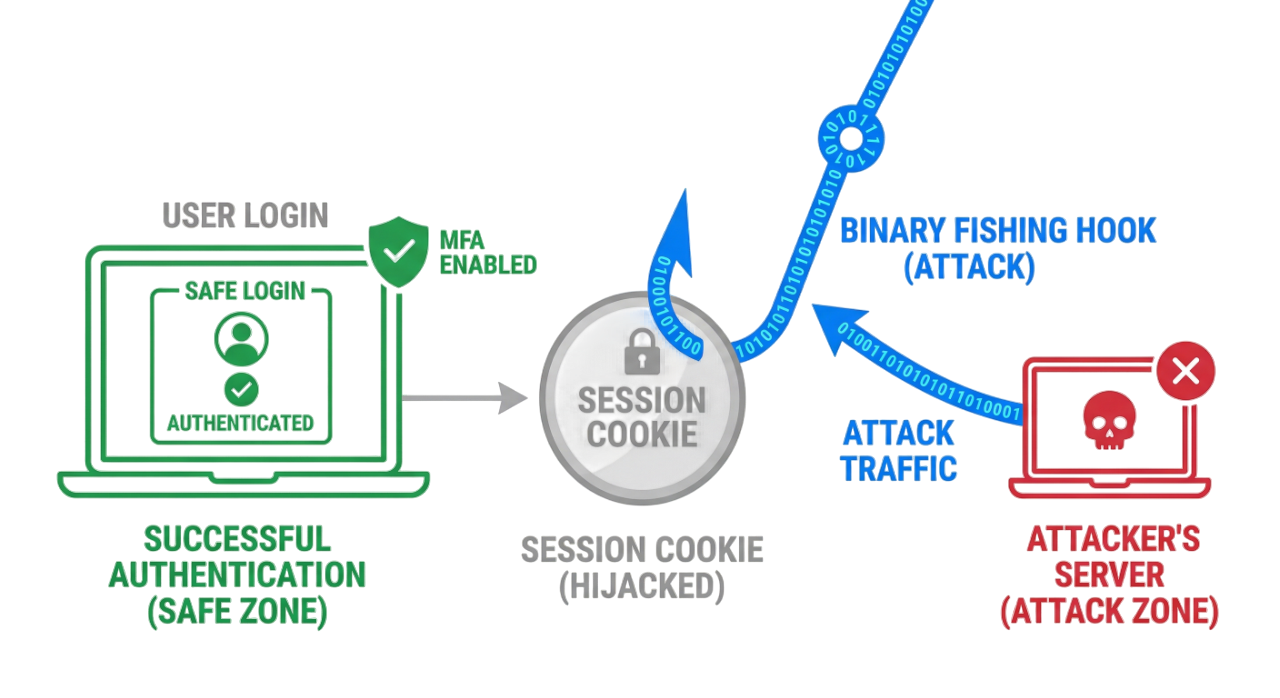
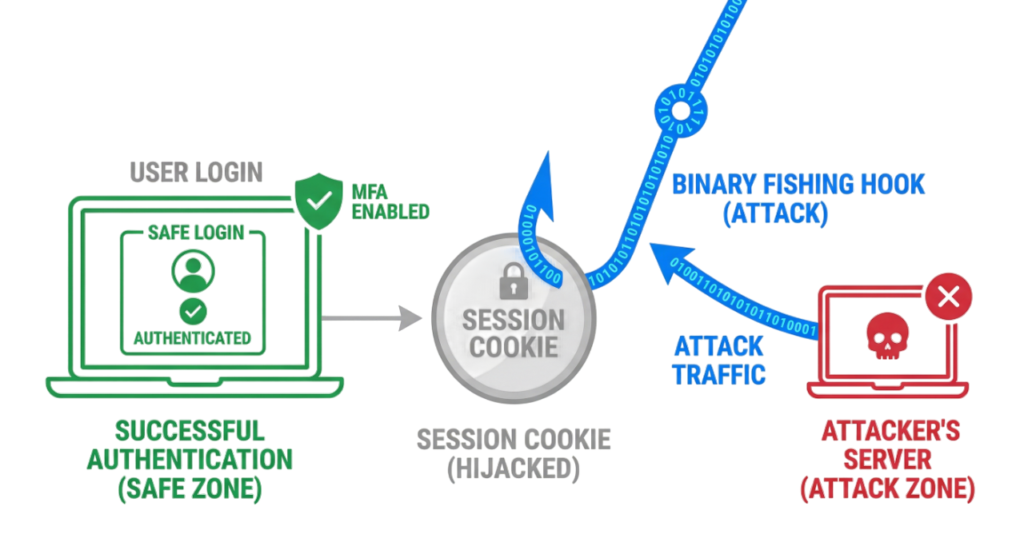
Phishing attacks have changed dramatically. Modern attackers no longer rely only on fake emails with spelling mistakes or suspicious attachments. Today, they use artificial intelligence, stolen session cookies, Adversary-in-the-Middle (AiTM) phishing kits, QR code phishing, and social engineering to bypass traditional security controls.
One of the fastest-growing techniques is AiTM phishing, where attackers steal authenticated browser sessions instead of passwords. In many cases, they can gain access to an account without knowing the user’s password or bypassing multi-factor authentication.
Understanding how to identify phishing attacks in 2026 is more important than ever because traditional warning signs are no longer enough. Modern phishing campaigns use legitimate cloud services, trusted domains, AI-generated content, and realistic login pages that closely mimic genuine websites.
In this Tech Naga guide, you will learn how to identify phishing attacks in 2026, understand AiTM phishing explained with real-world examples, recognize common phishing techniques, and apply practical security measures to protect your personal and business accounts.
What is Phishing?
Phishing is a type of social engineering attack in which cybercriminals impersonate a trusted person, organization, or service to steal sensitive information, financial data, or account access. Attackers commonly use emails, SMS messages (smishing), phone calls (vishing), fake websites, QR codes, and messaging applications to trick victims into clicking malicious links, downloading malware, or revealing confidential information.
Modern phishing attacks are designed to appear legitimate, making it increasingly difficult for users to distinguish between genuine and fraudulent communications. Understanding how to identify phishing attacks in 2026 is essential for protecting both personal and business accounts.
How to Identify Phishing Attacks in 2026 (Step-by-Step)
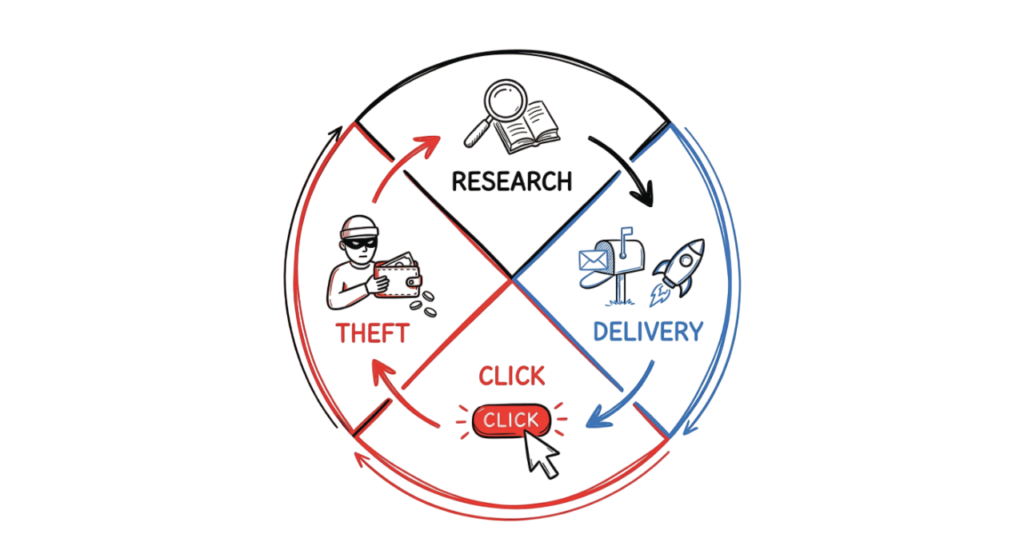
Modern phishing campaigns are highly automated and often completed within minutes. Understanding each stage of the attack helps you recognize suspicious activity before your credentials or sensitive information are compromised.
1. Reconnaissance
Attackers begin by collecting publicly available information from sources such as LinkedIn, company websites, social media platforms, and previous data breaches. Artificial intelligence is increasingly used to build detailed profiles of potential victims, including their job role, reporting manager, email address, and organization.
2. Weaponization
Using the information gathered, attackers create convincing phishing content. This may include fake Microsoft 365, Google Workspace, Okta, or banking login pages that closely resemble legitimate websites. Many phishing kits now include Adversary-in-the-Middle (AiTM) capabilities that can intercept authentication sessions.
3. Delivery
The phishing message is delivered through email, SMS, messaging applications, collaboration platforms, or QR codes. The message often creates urgency by claiming that your account has expired, a payment has failed, a security alert has been triggered, or immediate action is required.
Examples include:
- “Your Microsoft 365 password expires today.”
- “Your Zscaler session has expired.”
- “Suspicious login detected. Verify your identity immediately.”
Learning how to identify phishing attacks in 2026 means recognizing these urgency-based messages before interacting with them.
4. Credential Capture
If the victim clicks the phishing link, they are directed to a fake login page that appears identical to the legitimate service. They may enter their username, password, and even approve a Multi-Factor Authentication (MFA) request, believing they are accessing the real website.
5. Account Compromise
In modern AiTM phishing attacks, attackers use a reverse proxy server to intercept authentication traffic in real time. Instead of stealing only the password, they capture authentication cookies or session tokens. This allows them to access the victim’s account without repeatedly requesting credentials and, in some cases, even after the password has been changed.
Understanding how to identify phishing attacks in 2026 requires recognizing that attackers increasingly target authenticated sessions rather than just passwords, making awareness and strong security controls more important than ever.
AiTM Phishing Explained
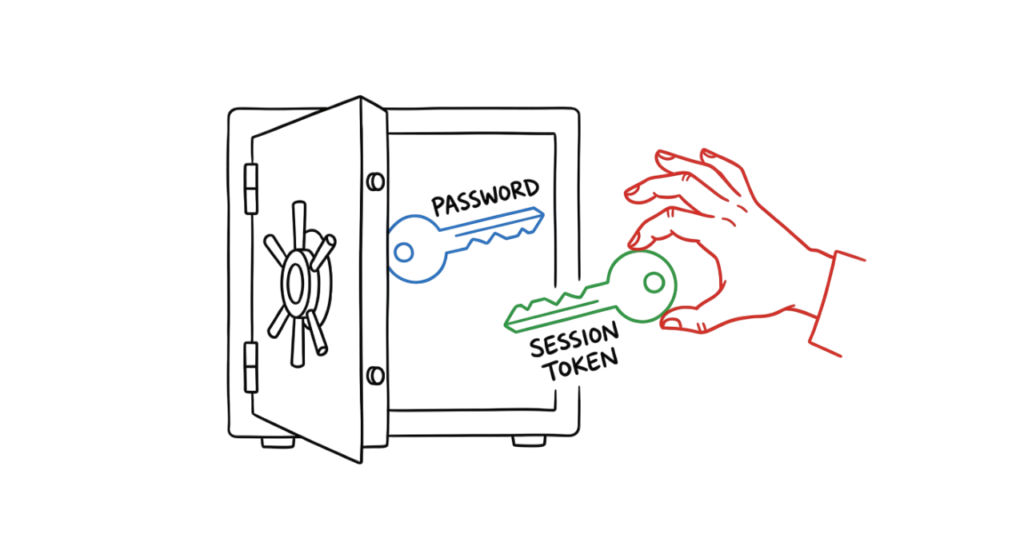
Adversary-in-the-Middle (AiTM) phishing is one of the most dangerous phishing techniques used in 2026. Unlike traditional phishing attacks that only attempt to steal usernames and passwords, AiTM phishing places the attacker between you and the legitimate website.
Instead of communicating directly with the real website, your browser unknowingly communicates with the attacker’s proxy server. The proxy forwards your requests to the legitimate website while capturing everything you enter, including your username, password, multi-factor authentication (MFA) approval, session cookies, and authentication tokens.
Because the attacker captures your authenticated session, they can access your account without needing your password again. In many cases, changing your password alone does not immediately terminate the stolen session.
How AiTM Phishing Works
- You receive a convincing phishing email or message containing a fake login link.
- The link opens a phishing website that looks identical to the legitimate login page.
- The phishing site acts as a reverse proxy between your browser and the real website.
- You enter your username, password, and approve the MFA request.
- The attacker captures your authenticated session cookie or access token.
- The attacker reuses the stolen session to access your account as if they were you.
Why AiTM Phishing Is Dangerous
Traditional phishing focuses on stealing passwords. AiTM phishing steals authenticated sessions, allowing attackers to bypass many security controls, including Multi-Factor Authentication (MFA). This technique is commonly used to compromise Microsoft 365, Google Workspace, Okta, and other cloud applications.
Real-World Example
An employee receives an email claiming their Microsoft 365 session has expired. After clicking the link, they sign in through what appears to be the normal Microsoft login page and successfully complete MFA. Behind the scenes, an AiTM proxy captures the authenticated session cookie. Within seconds, the attacker gains access to the employee’s mailbox without triggering another login prompt.
How AiTM Phishing Steals Your Session
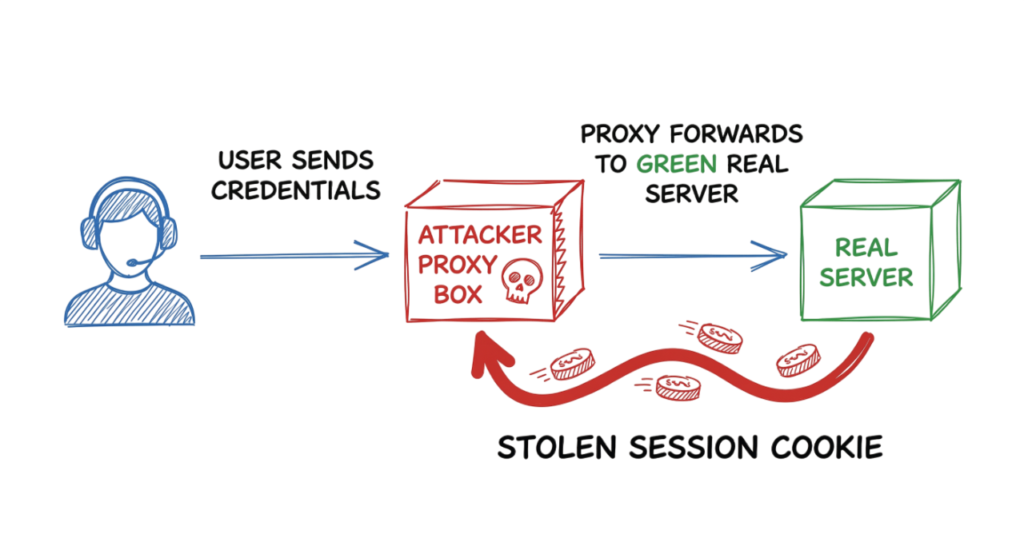
When you visit an AiTM phishing website, you are not simply viewing a fake login page with copied text and images. Instead, the phishing site acts as a reverse proxy between your browser and the legitimate website.
As you enter your username and password, the phishing server forwards your credentials to the real website in real time. When the legitimate website requests Multi-Factor Authentication (MFA), the phishing site displays the same MFA prompt to you, making the login process appear completely normal.
After you successfully approve the MFA request, the legitimate website creates an authenticated session cookie and sends it back to your browser. Instead of allowing that cookie to reach only your device, the AiTM proxy secretly captures a copy.
Because a session cookie represents an already authenticated user session, the attacker can import that cookie into their own browser and access your account without needing your password or MFA approval again. In many cases, the attacker remains logged in until the session expires or is revoked by the service.
This is one of the main reasons why AiTM phishing has become one of the most effective phishing techniques used against cloud services such as Microsoft 365, Google Workspace, Okta, and other identity platforms.
Key Components of a Phishing Email
Learning to recognize the common indicators of phishing can help you stop an attack before it succeeds.
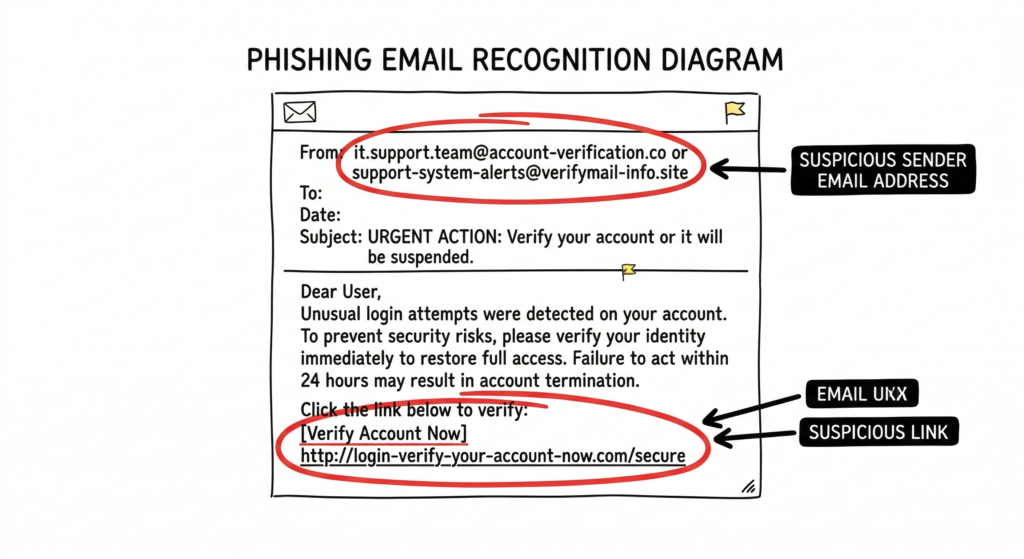
1. Sender Email Address
Do not rely only on the sender’s display name. Attackers can easily change the display name to appear as Microsoft Support, Google Security, PayPal, or your organization’s IT Help Desk.
Instead, carefully examine the actual email address and domain.
Example
Legitimate
support@microsoft.comPhishing
support@microsft-security-updates.comAlthough the display name may appear legitimate, the domain name contains subtle spelling changes designed to trick recipients into trusting the email.
Always verify the sender’s domain before clicking links, opening attachments, or entering your credentials. This simple habit is one of the most effective ways to identify phishing attacks before they compromise your account.
2. Inspect Links Carefully
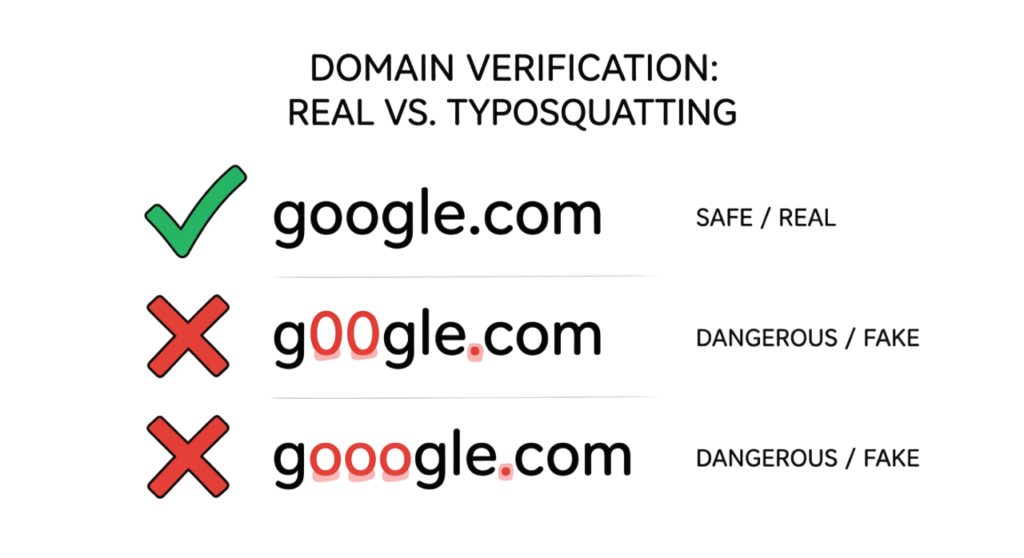
Before clicking any link or button, verify where it actually leads. On a computer, hover your mouse over the link to preview the destination URL. On a mobile device, press and hold the link to view the web address before opening it.
Pay close attention to the domain name. Cybercriminals frequently use typosquatting, where they register fake domains that closely resemble legitimate websites by replacing letters with similar-looking numbers or characters.
Examples
Legitimate Website
https://google.comPhishing Website
https://g00gle.comhttps://micr0soft-login.comIf the URL looks unusual or contains extra words, numbers, or spelling mistakes, do not click it.
3. Watch for Urgency and Fear Tactics
Most phishing attacks rely on creating panic or urgency to pressure victims into acting without thinking. Attackers often claim that your account will be suspended, your payment has failed, or immediate action is required.
Common examples include:
- “Your account will be deleted within 2 hours.”
- “Suspicious login detected. Verify your account immediately.”
- “Your mailbox is full. Click here to keep your account active.”
Legitimate organizations rarely threaten immediate account deletion through unsolicited emails or text messages. Always verify such requests through official channels.
4. Be Careful with Attachments
Unexpected email attachments are one of the most common ways attackers deliver phishing pages and malware.
Be especially cautious with files such as:
.html.htm.exe.js.zip
HTML (.html and .htm) files are particularly dangerous because they can open a fake login page directly in your browser. These pages often imitate Microsoft 365, Google Workspace, banking portals, or other trusted websites to steal your username, password, and multi-factor authentication details.
Real-World Example
Real-World Example: Session Hijacking Through AiTM Phishing
A manufacturing company became the victim of a sophisticated phishing attack after an employee received what appeared to be a legitimate invoice notification. The email directed the employee to a fake Microsoft 365 login page that looked identical to the genuine website.
Believing the request was legitimate, the employee entered their username, password, and approved the Multi-Factor Authentication (MFA) prompt. However, the phishing website was an Adversary-in-the-Middle (AiTM) proxy that intercepted the authenticated session and captured the session cookie.
Instead of immediately stealing data, the attacker quietly accessed the employee’s mailbox and monitored email conversations for several weeks. After learning the organization’s payment process, the attacker modified banking details in a legitimate invoice and sent it from the compromised email account. Because the email originated from a trusted account, the customer transferred the payment to the attacker’s bank account.
Lessons Learned
This incident demonstrates that traditional MFA alone may not stop modern phishing attacks. Organizations should strengthen their defenses by implementing:
- Phishing-resistant MFA such as FIDO2 security keys or passkeys.
- Conditional Access and Zero Trust policies.
- Session risk monitoring and anomaly detection.
- User security awareness training.
- Email authentication technologies such as SPF, DKIM, and DMARC.
Modern phishing attacks increasingly target authenticated sessions rather than passwords, making phishing-resistant authentication and continuous monitoring essential for protecting enterprise accounts.
How to Prevent Phishing?
Phishing prevention 2026 tactics that go beyond user training must be set into practice.
Email Authentication Technologies
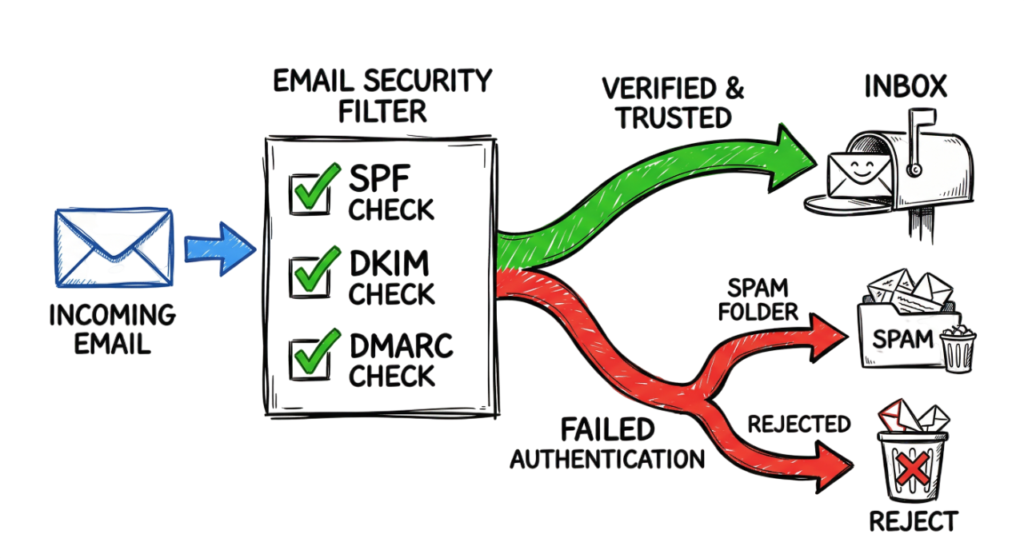
Organizations can significantly reduce email spoofing and impersonation attacks by implementing industry-standard email authentication protocols.
DMARC (Domain-based Message Authentication, Reporting, and Conformance)
DMARC tells receiving email servers how to handle messages that fail authentication checks. It works with SPF and DKIM to prevent attackers from sending fraudulent emails that appear to come from your domain.
A recommended security setting is p=reject, which instructs email providers to reject messages that fail authentication instead of delivering them to users’ inboxes.
SPF (Sender Policy Framework)
SPF specifies which mail servers or IP addresses are authorized to send emails on behalf of your domain. When an email is received, the recipient’s mail server verifies that it originated from an approved source.
DKIM (DomainKeys Identified Mail)
DKIM adds a cryptographic digital signature to every outgoing email. Receiving mail servers verify this signature to confirm that the message has not been modified during transit and that it genuinely originated from the authorized domain.
Together, SPF, DKIM, and DMARC provide a strong defense against email spoofing, business email compromise (BEC), and domain impersonation attacks. Implementing all three protocols is considered a security best practice for organizations of all sizes.
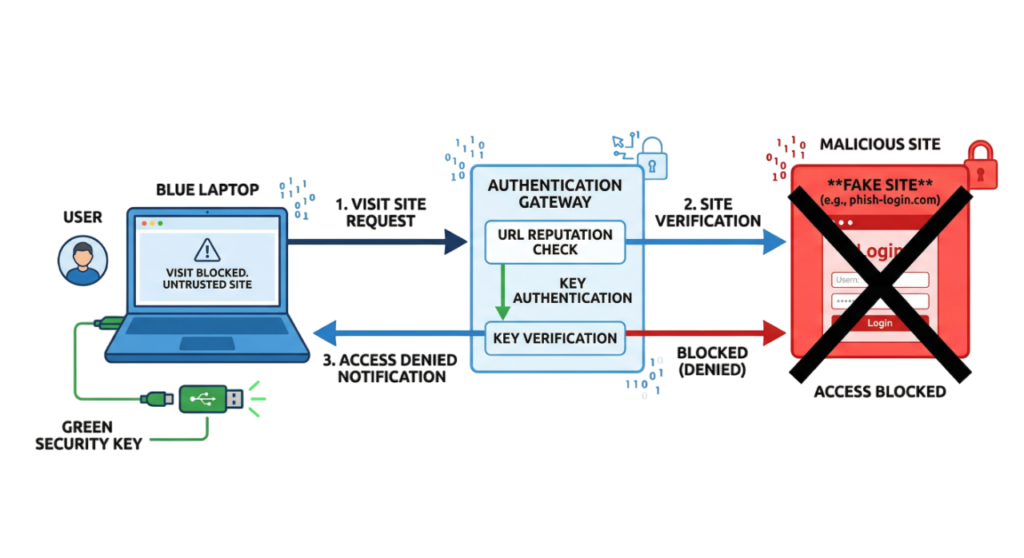
Use Passkeys or Hardware Security Keys
Whenever possible, use passkeys or hardware security keys instead of relying only on passwords and traditional multi-factor authentication.
These authentication methods are based on the FIDO2 standard, which provides strong protection against phishing and credential theft. Before completing a sign-in, the device verifies that you are communicating with the legitimate website. If the website’s address does not match the registered domain, authentication is automatically blocked.
Hardware security keys also require physical possession of the device, making it extremely difficult for attackers to gain unauthorized access remotely. Even if a user is tricked into visiting a fake login page, the authentication request will fail because the security key recognizes that the website is not genuine.
Using passkeys or hardware security keys is considered one of the most effective ways to protect online accounts from modern identity-based attacks.
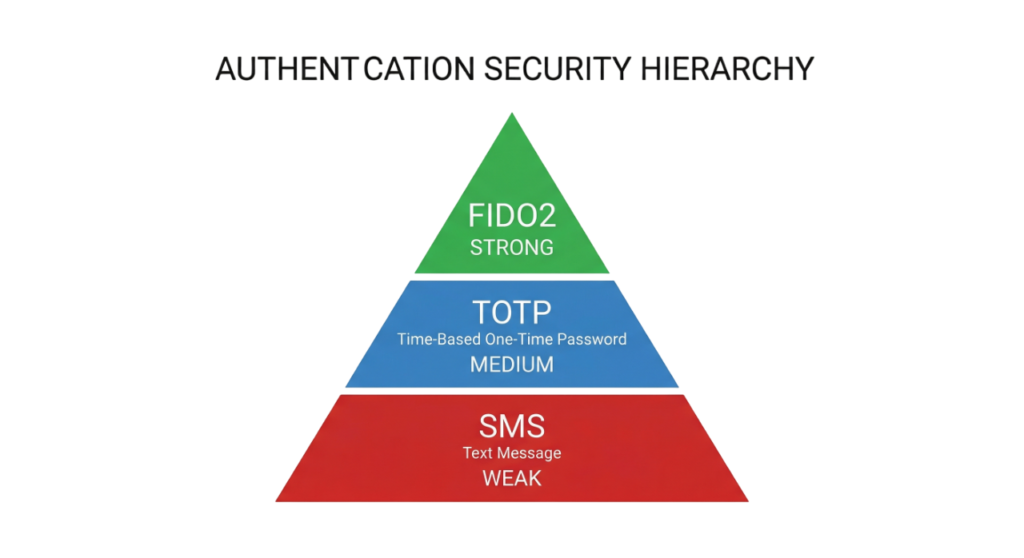
Authentication Comparison
| Method | Security Level | Resistance to AiTM |
| SMS / Voice Codes | Low | None |
| App Push (Standard) | Medium | Low |
| App Push (Number Match) | Medium | Low |
| FIDO2 / Passkeys | High | Total |
Common Mistakes
Even experienced IT professionals can become victims of sophisticated phishing attacks by placing too much trust in individual security controls.
Trusting “Verified” or “Safe Link” Banners
Many email security solutions display banners such as “Verified Sender” or “Safe Link” to help users identify potentially legitimate emails. While these technologies improve security, they should not be treated as a guarantee that an email is safe.
Attackers may use compromised business accounts, trusted cloud platforms, or newly created domains that have not yet been identified as malicious. Some phishing campaigns also abuse legitimate services to bypass reputation-based filtering.
Always verify the sender, inspect the destination URL, and confirm unexpected requests before clicking links or opening attachments.
Assuming Multi-Factor Authentication Prevents Every Attack
Multi-Factor Authentication (MFA) is one of the most effective security controls available today, but some advanced phishing techniques can still target traditional MFA methods such as SMS verification codes or push notifications.
Organizations should strengthen authentication by implementing phishing-resistant MFA, including FIDO2 security keys, passkeys, or certificate-based authentication. Combining strong authentication with additional security controls provides significantly better protection than relying on passwords and traditional MFA alone.
Best Practices
Implement Conditional Access Policies
Use Microsoft Entra ID Conditional Access to evaluate every authentication request based on user identity, device compliance, sign-in location, and risk level. Restrict or block sign-ins from countries or regions where your organization has no legitimate business operations.
Require Risk-Based Reauthentication
Configure authentication policies to require users to sign in again whenever suspicious activity is detected, such as:
- Sign-ins from unfamiliar locations
- Impossible travel events
- High-risk user activity
- New or unmanaged devices
- Significant changes in user behavior
This approach helps reduce the risk of unauthorized access when credentials or sessions are compromised.
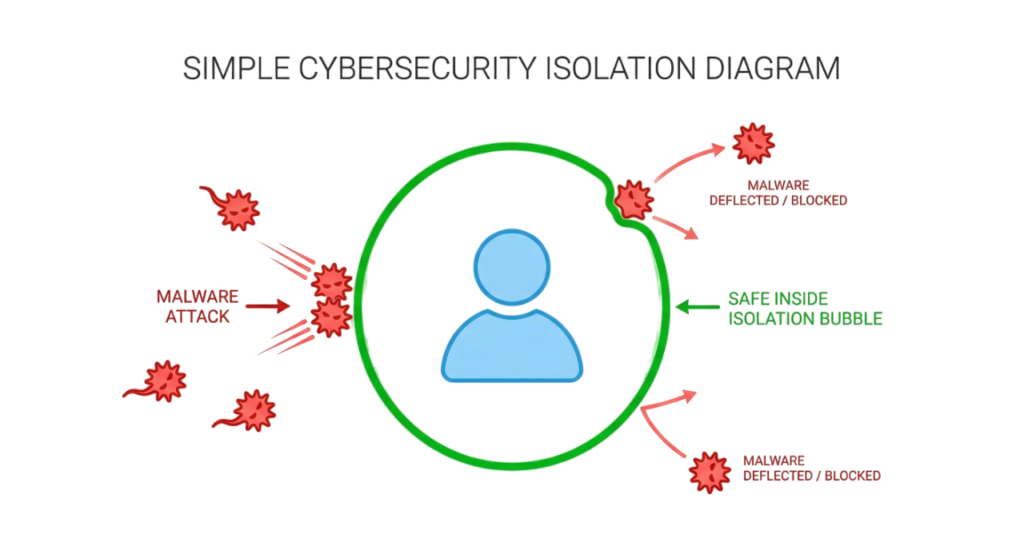
Use Remote Browser Isolation
Technologies such as Zscaler Browser Isolation allow users to open unknown or suspicious websites inside an isolated cloud-based browser instead of directly on their local device.
Because web content executes within a secure remote environment, malicious scripts, exploit kits, and drive-by downloads cannot interact directly with the user’s operating system. This significantly reduces the risk of browser-based attacks while allowing users to safely access potentially untrusted websites.
Combine Multiple Layers of Security
No single security control can stop every attack. The strongest defence combines phishing-resistant authentication, Conditional Access, endpoint protection, browser isolation, email authentication (SPF, DKIM, and DMARC), continuous monitoring, and regular user security awareness training. A layered security strategy greatly improves an organization’s ability to detect, prevent, and respond to modern phishing attacks.
Common Mistakes
Even experienced professionals can fall victim to modern phishing attacks by relying too heavily on individual security controls.
Trusting “Safe Link” or “Verified” Labels
Many email security platforms display banners such as “Safe Link” or “Verified Sender.” While these technologies help reduce malicious emails, they are not foolproof. Attackers sometimes use compromised accounts, trusted cloud services, or legitimate domains to make phishing emails appear more credible.
Always verify the sender, destination URL, and context of the message before clicking any links or opening attachments.
Assuming Multi-Factor Authentication Solves Everything
Multi-Factor Authentication (MFA) significantly improves account security, but traditional methods such as push notifications or one-time passcodes can still be targeted by advanced phishing techniques, including Adversary-in-the-Middle (AiTM) attacks.
Organizations should strengthen authentication by adopting phishing-resistant MFA, such as FIDO2 security keys or passkeys, whenever possible.
Best Practices
Implement Conditional Access Policies
Use Microsoft Entra ID Conditional Access to evaluate every sign-in request based on user identity, device compliance, location, and risk level. Restrict or block authentication attempts from countries or regions where your organization does not operate.
Require Risk-Based Reauthentication
Configure authentication policies to require users to sign in again whenever suspicious activity is detected, such as:
- Sign-in attempts from unfamiliar locations.
- New or unmanaged devices.
- High-risk user or session activity.
- Impossible travel events.
- Changes in device compliance status.
Risk-based authentication helps reduce the impact of stolen credentials and compromised sessions.
Use Browser Isolation
Remote Browser Isolation (RBI), such as Zscaler Browser Isolation, opens untrusted websites inside a secure, isolated cloud environment instead of directly on the user’s device.
This approach prevents malicious scripts, exploit kits, and drive-by downloads from interacting with the local operating system, significantly reducing the risk of malware infections and browser-based attacks.
Enable Continuous Monitoring
Deploy security solutions that continuously monitor user behavior, detect anomalous sign-in activity, and identify compromised sessions. Early detection enables security teams to respond quickly before attackers can move laterally or access sensitive data.
Here’s a cleaner, technically accurate version suitable for your cybersecurity blog.
Troubleshooting Scenario
Scenario
A user reports that after clicking a login link and entering their username, password, and Multi-Factor Authentication (MFA) code, the webpage simply refreshed without displaying an error or completing the login process.
This behavior can indicate a possible Adversary-in-the-Middle (AiTM) phishing attack where the attacker has captured the user’s authenticated session.
Recommended Response
If session theft is suspected, take the following actions immediately:
- Revoke all active refresh tokens and user sessions in Microsoft Entra ID.
- Force the user to sign out of all active devices and browser sessions.
- Reset the user’s password and require a new sign-in.
- Review Microsoft Entra ID Sign-in Logs for successful logins from unfamiliar IP addresses, devices, locations, or impossible travel events.
- Check for suspicious mailbox rules, email forwarding settings, or unauthorized application consent if the affected account is Microsoft 365.
- Investigate endpoint activity using your organization’s endpoint detection and response (EDR) solution.
- Monitor the account for additional suspicious authentication attempts after remediation.
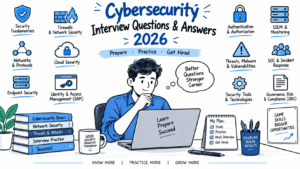
Cybersecurity Interview Questions
1. What is the difference between credential theft and session token theft?
Answer:
Credential theft involves stealing a user’s username and password.
Session token theft involves stealing an authenticated session cookie or access token, allowing attackers to access an account without repeatedly entering credentials or completing Multi-Factor Authentication.
2. How does a FIDO2 security key help prevent phishing attacks?
Answer:
FIDO2 security keys verify the identity of the website before authentication occurs. If a user visits a phishing website, the security key detects that the domain does not match the legitimate registered website and refuses to authenticate, preventing credential theft.
3. What does the p=reject policy mean in a DMARC record?
Answer:
A p=reject policy instructs receiving email servers to reject emails that fail both SPF and DKIM authentication checks. This helps prevent email spoofing and domain impersonation.
4. How can Microsoft Defender for Cloud Apps help detect an AiTM attack?
Answer:
Microsoft Defender for Cloud Apps can identify suspicious authentication behavior by monitoring unusual sign-ins, impossible travel events, session anomalies, risky OAuth applications, impossible device changes, and abnormal user activity. These indicators help security teams detect compromised accounts and respond quickly.
5. What is typosquatting?
Answer:
Typosquatting is a technique where attackers register domain names that closely resemble legitimate websites by changing letters, numbers, or spellings. Users who accidentally visit these fake domains may unknowingly submit their credentials or download malware.
Future Trends
Phishing attacks continue to evolve as attackers adopt artificial intelligence and advanced automation.
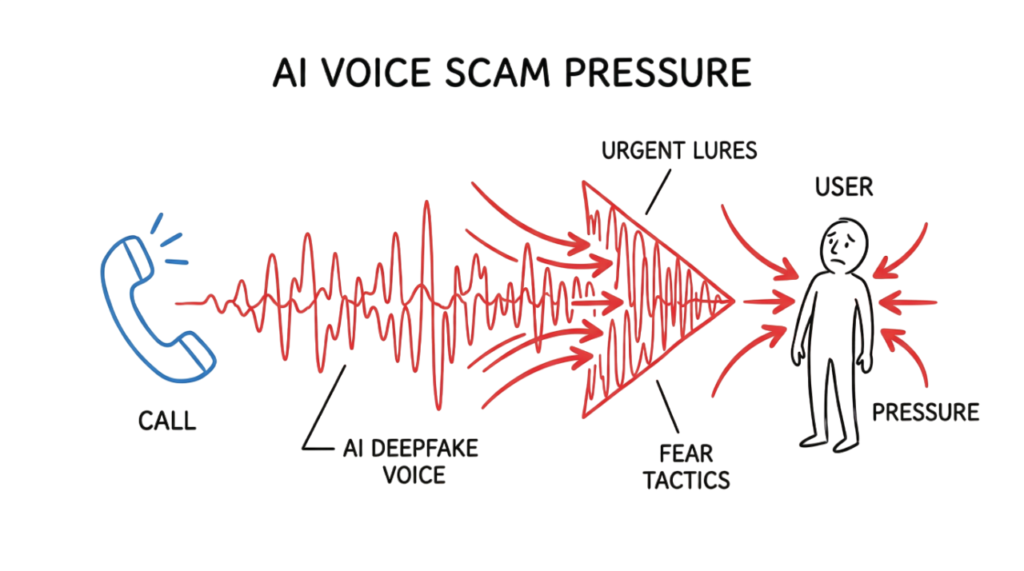
AI-Powered Voice Phishing
Cybercriminals increasingly use AI-generated voice cloning to impersonate executives, colleagues, or family members. These highly realistic calls may request confidential information, password resets, financial transfers, or urgent business actions.
AI-Generated Phishing Campaigns
Artificial intelligence enables attackers to generate convincing phishing emails tailored to specific industries, organizations, and individuals. Modern phishing messages often contain perfect grammar, accurate branding, and personalized content, making them much harder to detect than traditional phishing emails.
More Sophisticated Identity Attacks
Future phishing campaigns are expected to focus increasingly on stealing authenticated sessions, browser tokens, OAuth permissions, and cloud identities rather than simply collecting usernames and passwords. As a result, organizations are adopting phishing-resistant authentication, Zero Trust security, and continuous identity monitoring to defend against these evolving threats.
Frequently Asked Questions (FAQ)
1. Is Multi-Factor Authentication (MFA) enough to stop phishing attacks in 2026?
Traditional MFA methods, such as SMS codes and push notifications, significantly improve account security but may not stop advanced Adversary-in-the-Middle (AiTM) phishing attacks. Organizations should adopt phishing-resistant authentication, such as FIDO2 security keys or passkeys, which verify the legitimacy of the website before completing authentication.
2. What is smishing?
Smishing is a phishing attack delivered through SMS or text messages. Attackers typically impersonate banks, courier companies, government agencies, or service providers and include malicious links that lead to fake login pages or fraudulent websites designed to steal personal information.
3. How can I tell if my account session has been stolen?
Review your account’s sign-in history for suspicious activity, including:
- Successful logins from unfamiliar countries or cities.
- Sign-ins from unknown devices or browsers.
- Impossible travel alerts.
- Unexpected active sessions.
If you notice suspicious activity, immediately sign out of all devices, reset your password, revoke active sessions, and notify your organization’s security team if it is a work account.
4. Can Zscaler block every phishing website?
No security solution can block every phishing website. Platforms such as Zscaler continuously identify and block millions of known malicious websites, but newly created phishing domains may remain active until they are detected and classified. This is why layered security, user awareness, and phishing-resistant authentication remain essential.
5. What should I do if I clicked a phishing link but did not enter my credentials?
If you clicked a phishing link but did not submit any information:
- Close the webpage immediately.
- Disconnect if you notice suspicious downloads or browser activity.
- Run a full antivirus or endpoint security scan.
- Clear your browser cache if recommended by your security team.
- Monitor your accounts for unusual activity.
- Report the incident to your IT or security team if the affected device belongs to your organization.
6. Does DMARC stop all phishing attacks?
No. DMARC helps prevent attackers from sending emails that spoof your organization’s domain. However, it does not stop attackers from registering look-alike domains such as my-company-support.com or secure-company-login.com. Organizations should combine DMARC with SPF, DKIM, user awareness training, email security gateways, and strong authentication controls.
Conclusion
Modern phishing attacks are no longer limited to stealing usernames and passwords. Today’s attackers increasingly target authenticated sessions, cloud identities, and user trust through sophisticated techniques such as Adversary-in-the-Middle (AiTM) attacks, AI-generated phishing campaigns, and advanced social engineering.
Protecting against these threats requires a layered security approach. Organizations should implement phishing-resistant authentication, Conditional Access policies, email authentication standards such as SPF, DKIM, and DMARC, continuous identity monitoring, and regular security awareness training.
For individuals, the best defense is to verify every login request, inspect links carefully, avoid unexpected attachments, and never assume that a familiar-looking website or email is automatically trustworthy.
While phishing attacks continue to evolve, combining strong security controls with informed users can significantly reduce the risk of account compromise. Security is no longer about preventing every click. It is about building resilient systems that can detect, contain, and recover quickly when attacks occur.
Password Security Guide 2026: Ultimate Password Security Guide
Multi-Factor Authentication (MFA): Critical Guide to Secure Your Systems (2026)
Identity and Access Management in 2026: A Practical Guide for Cloud Security Professionals
Zero Trust Security in 2026: Architecture, Real Examples, and Implementation Guide
Forget the Perimeter: Zero Trust vs Traditional Security Technical Comparison 2026
Security Awareness
What Is Cybersecurity and Why It Is Important Today
Top 10 Cybersecurity Best Practices for 2026
15 Common Online Scams in India: Complete Guide 2026
https://technaga.com/tech-naga-com-online-scams-india-2026-guide
9 Essential Ways to Stop UPI Fraud: Complete Guide 2026
https://technaga.com/upi-fraud-complete-guide-2026
Essential Steps: Hacked Android, iPhone Guide 2026
https://technaga.com/android-iphone-mobile-hack-remediation
Enterprise Security
Security Information and Event Management (SIEM): Complete Guide 2026
Best SOC Analyst Roadmap 2026
Essential Endpoint Security Guide 2026
Cloud Security Basics 2026
Preventing Agentic AI Cyber Attacks in 2026
External References
Microsoft
Microsoft Security Blog
https://www.microsoft.com/security/blog/
Microsoft Entra ID Documentation
https://learn.microsoft.com/entra/
Microsoft Defender XDR
https://learn.microsoft.com/defender-xdr/
Microsoft Defender for Cloud Apps
https://learn.microsoft.com/defender-cloud-apps/
Microsoft Secure Score
https://learn.microsoft.com/defender-xdr/microsoft-secure-score
Zscaler
Zscaler ThreatLabz
https://www.zscaler.com/blogs/security-research
Zscaler Browser Isolation
https://www.zscaler.com/products/browser-isolation
Zero Trust Exchange
https://www.zscaler.com/products/zero-trust-exchange
Email Security
DMARC
https://dmarc.org/
SPF Project
https://www.openspf.org/
Security Standards
FIDO Alliance
https://fidoalliance.org/
Passkeys.dev
https://passkeys.dev/
NIST Digital Identity Guidelines
https://pages.nist.gov/800-63-3/
OWASP Phishing
https://owasp.org/www-community/attacks/Phishing
OWASP Authentication Cheat Sheet
https://cheatsheetseries.owasp.org/cheatsheets/Authentication_Cheat_Sheet.html
Government Resources
CISA Phishing Guidance
https://www.cisa.gov/topics/cybersecurity-best-practices/phishing-guidance
CERT-In
https://www.cert-in.org.in/
National Cyber Crime Reporting Portal
https://cybercrime.gov.in/
5 thoughts on “How to Identify Phishing Attacks in 2026 (Complete Guide)”