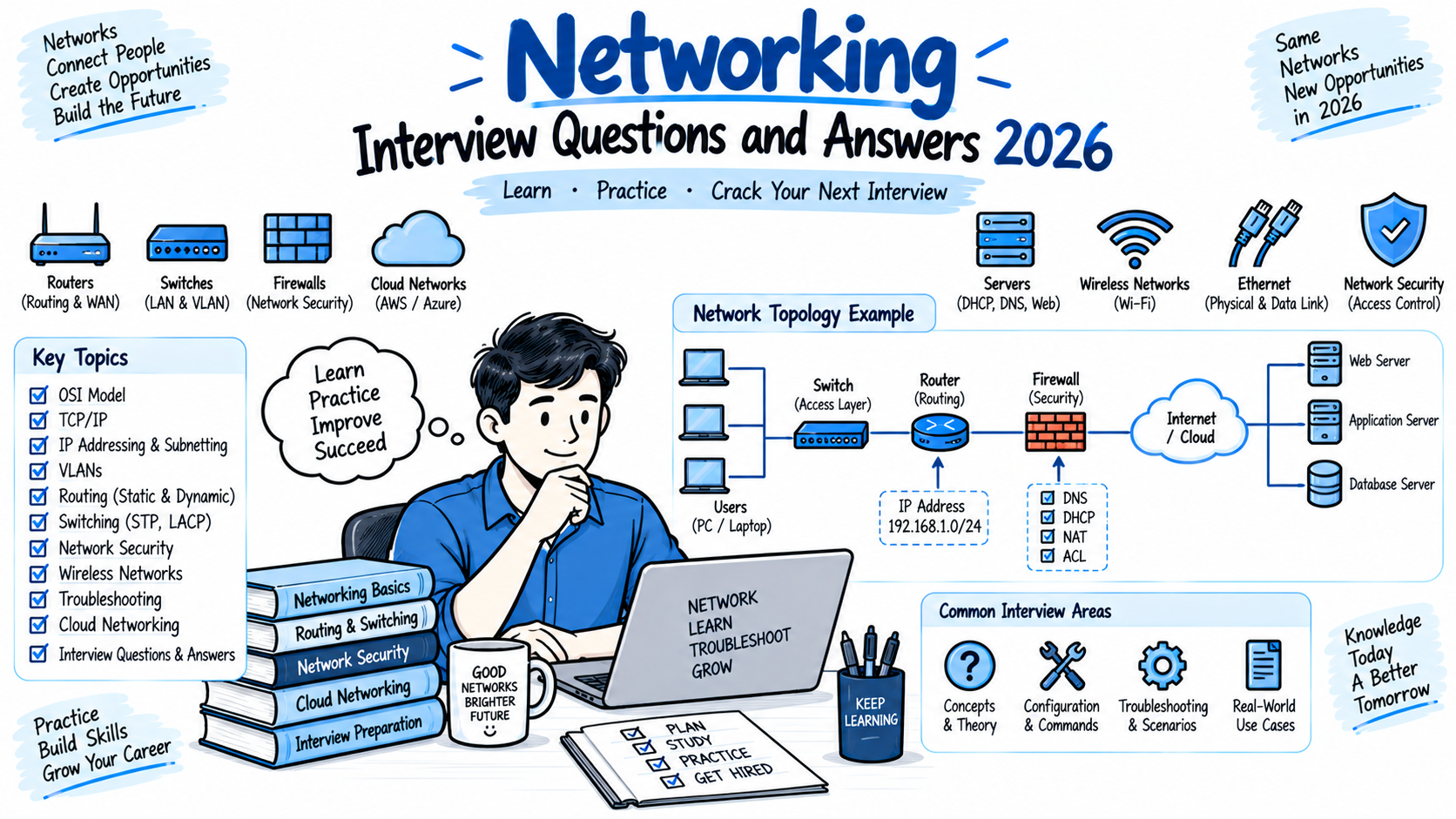
Networking is one of the most important areas to understand when preparing for IT, network security, cybersecurity, cloud, system administration, and SOC roles. A strong networking foundation helps you understand how devices communicate, how data travels across networks, and how protocols and security controls work together. This knowledge is especially important when preparing for networking interview questions for technical and network security roles.
If you are preparing for a networking interview in 2026, you should be comfortable with topics such as the OSI model, TCP/IP, IP addressing, subnetting, DNS, DHCP, routing, switching, VLANs, NAT, TCP, UDP, common ports, VPNs, firewalls, and network troubleshooting. Candidates preparing for networking interview questions for freshers should focus on fundamental concepts, while experienced professionals should also prepare for troubleshooting and scenario-based questions.
This guide covers 40 Networking Interview Questions and Answers 2026 with simple explanations and practical examples. These networking interview questions and answers are useful for freshers, network engineers, system administrators, cybersecurity analysts, SOC analysts, and professionals preparing for L1 and L2 technical interviews. If you are working on your networking interview preparation, these questions can help you review important networking concepts and practice explaining technical problems clearly.
Networking Interview Questions and Answers 2026
1. What is computer networking?
Answer:
Computer networking is the process of connecting two or more devices so they can communicate and exchange data.
A network can contain computers, servers, routers, switches, firewalls, wireless access points, printers, and other devices.
For example, when your laptop connects to a company network and accesses an internal application, multiple networking technologies work together to deliver the traffic.
Networking can be classified into different types, including LAN, WAN, MAN, and PAN.
2. What is the OSI model?
Answer:
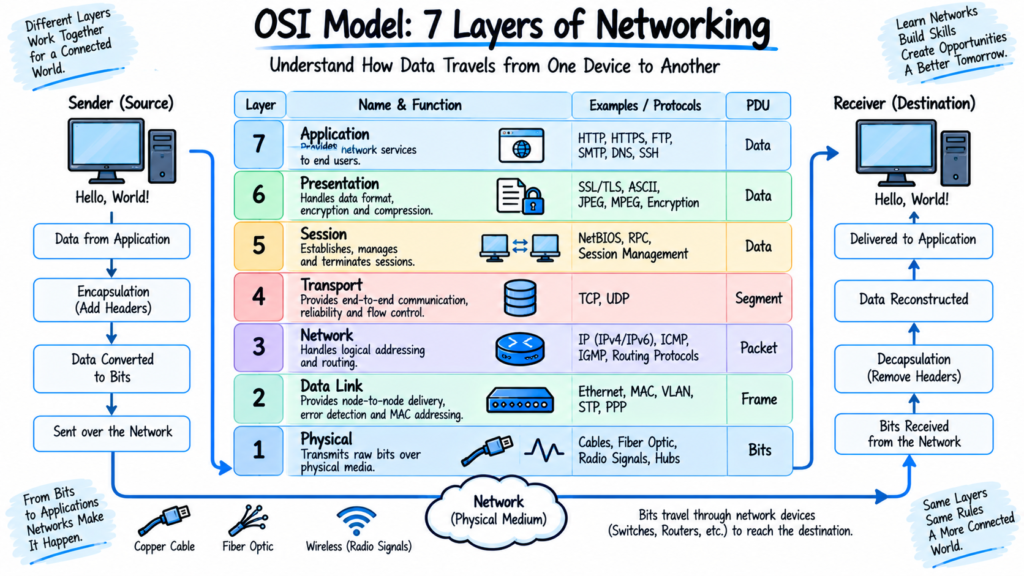
The OSI model is a seven-layer conceptual framework used to understand how network communication works.
The seven layers are:
- Physical: Cables, signals, and physical connections
- Data Link: MAC addresses and Ethernet frames
- Network: IP addressing and routing
- Transport: TCP and UDP
- Session: Session establishment and management
- Presentation: Data formatting, encryption, and compression
- Application: Network services used by applications
For troubleshooting, the OSI model helps you identify which layer may be responsible for a problem.
3. What is the TCP/IP model?
Answer:
The TCP/IP model is the networking framework used by the Internet and most modern networks.
It is commonly represented using four layers:
- Application
- Transport
- Internet
- Network Access
Protocols such as HTTP, DNS, TCP, UDP, IP, and Ethernet operate within different layers of the model.
The TCP/IP model is more closely aligned with practical Internet networking than the OSI model.
4. What is the difference between OSI and TCP/IP?
Answer:
The OSI model contains seven layers, while the traditional TCP/IP model contains four layers.
The OSI model is primarily used as a conceptual and troubleshooting framework. TCP/IP describes the protocol architecture used in real-world networks.
For example, the OSI Application, Presentation, and Session layers broadly map to the TCP/IP Application layer.
5. What is an IP address?
Answer:
An IP address is a logical address assigned to a network interface so that devices can communicate over an IP network.
There are two major versions:
- IPv4
- IPv6
An IPv4 address contains 32 bits and is normally written in dotted-decimal notation, such as:
192.168.1.10
IPv6 uses 128-bit addresses and was designed to provide a much larger address space.
6. What is the difference between IPv4 and IPv6?
Answer:
IPv4 uses 32-bit addresses, while IPv6 uses 128-bit addresses.
Example IPv4:
192.168.1.10
Example IPv6:
2001:db8::10
IPv6 provides a much larger address space and includes features designed for modern IP networking.
IPv6 also changes several aspects of addressing, neighbor discovery, and packet handling compared with IPv4.
7. What is a subnet mask?
Answer:
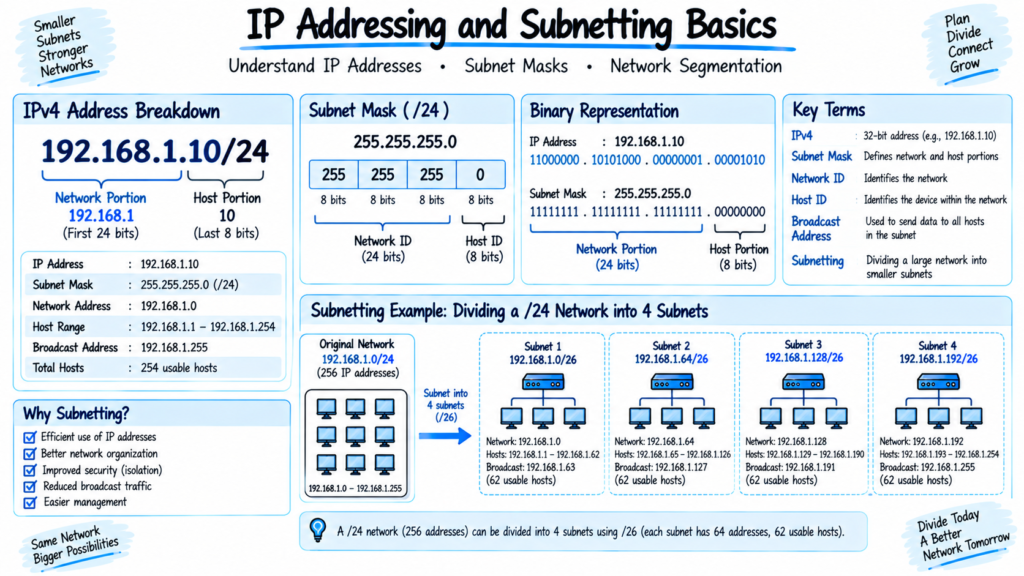
A subnet mask determines which portion of an IPv4 address represents the network and which portion represents the host.
For example:
192.168.1.10/24
The /24 prefix means that 24 bits are used for the network portion.
The corresponding subnet mask is:
255.255.255.0
Subnetting allows organizations to divide larger networks into smaller networks.
Networking Interview Questions and Answers 2026
8. What is subnetting?
Answer:
Subnetting is the process of dividing a larger IP network into smaller logical networks called subnets.
For example, a /24 IPv4 network can be divided into multiple smaller subnets.
Subnetting can help organizations:
- Organize networks
- Reduce broadcast domains
- Allocate IP addresses efficiently
- Improve network management
- Support security segmentation
Subnetting is a common topic in networking interviews, especially for network engineering roles.
9. What is a default gateway?
Answer:
A default gateway is the device that forwards traffic from a local network to another network.
In many environments, the default gateway is a router or Layer 3 switch.
For example, if your computer has:
IP: 192.168.1.20
Gateway: 192.168.1.1
Traffic destined for a different network is normally sent to 192.168.1.1.
Networking Interview Questions and Answers 2026
10. What is DNS?
Answer:
DNS stands for Domain Name System.
DNS translates human-readable domain names into IP addresses.
For example:
www.example.com → IP address
Without DNS, users would need to remember IP addresses instead of domain names.
DNS commonly uses UDP port 53, while TCP port 53 is also used in specific situations such as zone transfers and responses requiring TCP.
11. What is DHCP?
Answer:
DHCP stands for Dynamic Host Configuration Protocol.
It automatically provides network configuration information to clients.
A DHCP server can provide:
- IP address
- Subnet mask
- Default gateway
- DNS server
- Lease information
The common DHCP process is called DORA:
Discover → Offer → Request → Acknowledge
12. What is the difference between static IP and dynamic IP?
Answer:
A static IP address is manually assigned or reserved so that a device consistently receives the same address.
A dynamic IP address is assigned automatically, typically through DHCP.
Servers, network devices, and infrastructure systems may use static addressing or DHCP reservations, while end-user devices commonly receive addresses dynamically.
Networking Interview Questions and Answers 2026
13. What is a MAC address?
Answer:
A MAC address is a link-layer address associated with a network interface.
It is commonly represented as a hexadecimal value, for example:
00:1A:2B:3C:4D:5E
Switches use MAC addresses to make forwarding decisions within a Layer 2 network.
A MAC address and an IP address serve different purposes. IP addresses provide logical addressing, while MAC addresses are used for local network communication.
14. What is ARP?
Answer:
ARP stands for Address Resolution Protocol.
In IPv4 networks, ARP is used to determine the MAC address associated with a known IP address on the local network.
For example, if a computer needs to communicate with 192.168.1.1, it can use ARP to discover the corresponding MAC address.
The result is typically stored temporarily in the device’s ARP cache.
15. What is a switch?
Answer:
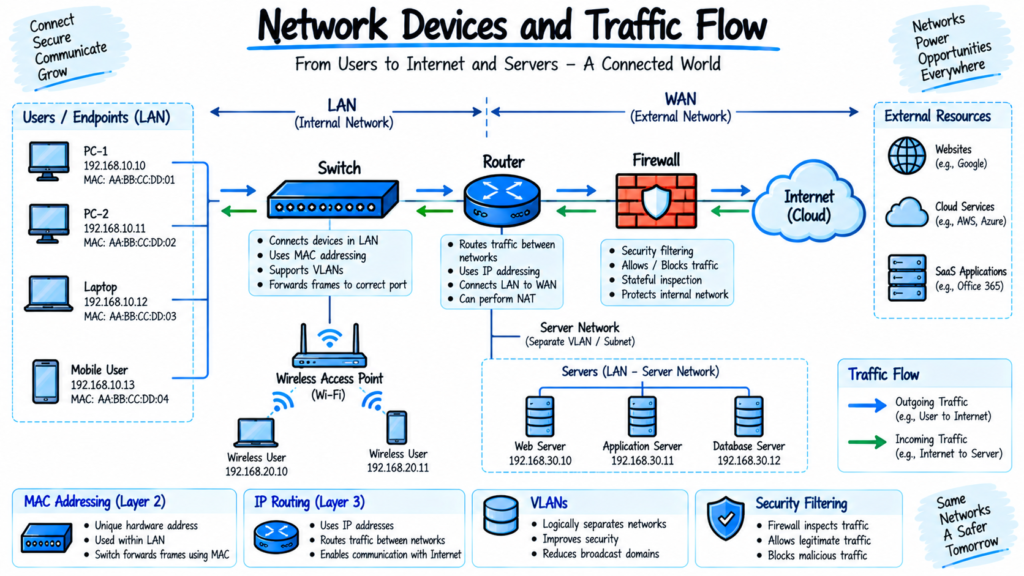
A network switch connects devices within a local network and forwards Ethernet frames based on MAC addresses.
A switch learns which MAC addresses are associated with its ports and stores this information in a MAC address table.
For example, if a switch learns that a particular server’s MAC address is connected to port 5, it can forward frames destined for that server toward port 5.
16. What is a router?
Answer:
A router connects different IP networks and forwards packets based on routing information.
For example, a router can connect:
10.10.10.0/24
to:
192.168.1.0/24
Routers use routing tables to determine where packets should be forwarded.
Routers can also perform functions such as NAT, depending on the device and configuration.
Networking Interview Questions and Answers 2026
17. What is the difference between a router and a switch?
Answer:
A switch primarily connects devices within a local network and makes forwarding decisions using MAC addresses.
A router connects different IP networks and makes forwarding decisions using IP addresses.
A simple example is:
Switch: Connects computers within an office LAN.
Router: Connects the office LAN to another network or the Internet.
Modern Layer 3 switches can also perform routing functions.
18. What is VLAN?
Answer:
VLAN stands for Virtual Local Area Network.
A VLAN logically separates devices into different Layer 2 broadcast domains even when they use the same physical switching infrastructure.
For example, an organization could create:
- VLAN 10: Employees
- VLAN 20: Servers
- VLAN 30: Guest users
- VLAN 40: Voice devices
VLANs are commonly used for network organization and segmentation.
Networking Interview Questions and Answers 2026
19. What is the difference between access port and trunk port?
Answer:
An access port normally carries traffic for a single VLAN.
A trunk port can carry traffic for multiple VLANs between networking devices using VLAN tagging.
For example, a connection between two switches may use a trunk so that VLAN 10, VLAN 20, and VLAN 30 traffic can cross the same physical link.
20. What is NAT?
Answer:
NAT stands for Network Address Translation.
NAT modifies IP addressing information as traffic passes through a network device.
A common use is allowing multiple private IP addresses to share a public IPv4 address when accessing the Internet.
For example:
192.168.1.10
may be translated to a public IP address when communicating with an Internet-based service.
NAT is widely used in IPv4 networks because private addresses are not directly routable on the public Internet.
Transport and Network Protocol Questions
Networking Interview Questions and Answers 2026
21. What is TCP?
Answer:
TCP stands for Transmission Control Protocol.
TCP is connection-oriented and provides reliable, ordered delivery of data.
Important TCP characteristics include:
- Three-way handshake
- Sequence numbers
- Acknowledgments
- Retransmission
- Flow control
- Congestion control
TCP is commonly used by protocols such as HTTPS and SSH.
22. What is UDP?
Answer:
UDP stands for User Datagram Protocol.
UDP is connectionless and has lower protocol overhead than TCP. It does not provide TCP-style guarantees for delivery, ordering, or retransmission.
UDP is commonly used for services such as DNS and applications where low overhead or real-time communication is important.
23. What is the TCP three-way handshake?
Answer:
The TCP three-way handshake establishes a TCP connection.
The process is:
Client → SYN → Server
Server → SYN-ACK → Client
Client → ACK → Server
After this exchange, the TCP connection can begin carrying application data.
During troubleshooting, packet captures can help identify whether the handshake is completing successfully.
Networking Interview Questions and Answers 2026
24. What is a port number?
Answer:
A port number identifies a specific service or application endpoint on a host.
For example:
- HTTP: TCP 80
- HTTPS: TCP 443
- SSH: TCP 22
- DNS: UDP/TCP 53
- DHCP: UDP 67 and 68
- SMTP: TCP 25
Port numbers help networking and security devices identify and control traffic.
25. What is the difference between HTTP and HTTPS?
Answer:
HTTP is an application-layer protocol used for web communication.
HTTPS is HTTP transmitted over a secure TLS connection.
HTTPS provides protection against unauthorized interception and modification of traffic when TLS is correctly implemented.
HTTPS commonly uses TCP port 443.
For example:
http://example.com
uses HTTP, while:
uses HTTPS.
Networking Interview Questions and Answers 2026
26. What is ICMP?
Answer:
ICMP stands for Internet Control Message Protocol.
It is used for network diagnostics and control messaging.
The ping utility commonly uses ICMP Echo Request and Echo Reply messages.
Network engineers can use ICMP to determine whether a destination is reachable, although a failed ping does not always mean that the destination is unavailable because firewalls may block ICMP.
27. What is the difference between ping and traceroute?
Answer:
Ping is primarily used to test reachability and measure round-trip time.
Traceroute, called tracert on Windows, shows the path traffic takes through intermediate network devices toward a destination.
For example, if a website is unreachable, ping can help determine whether the destination responds, while traceroute can help identify where traffic stops or experiences problems.
28. What is routing?
Answer:
Routing is the process of determining how packets move from one network to another.
Routers use routing tables containing information such as:
- Destination network
- Next hop
- Interface
- Route metric
Routing can be static or dynamic.
Dynamic routing protocols such as OSPF and BGP allow routers to exchange routing information.
29. What is the difference between static and dynamic routing?
Answer:
Static routing requires routes to be manually configured by an administrator.
Dynamic routing uses routing protocols to automatically learn and update routes.
Static routes can be useful in simple and predictable environments. Dynamic routing is commonly used in larger networks where network topology can change.
30. What is OSPF?
Answer:
OSPF stands for Open Shortest Path First.
It is a link-state interior gateway routing protocol used to exchange routing information within an autonomous system.
OSPF uses areas to support scalability. The backbone area is known as Area 0.
Network engineers commonly encounter OSPF in enterprise networks.
31. What is BGP?
Answer:
BGP stands for Border Gateway Protocol.
It is the primary routing protocol used to exchange routing information between autonomous systems on the Internet.
BGP makes routing decisions using attributes and policies rather than simply selecting a route based on the shortest physical path.
BGP is especially important for Internet service providers, large enterprises, cloud providers, and organizations with multiple network connections.
Networking Interview Questions and Answers 2026
32. What is a default route?
Answer:
A default route is used when a router does not have a more specific route for a destination.
In IPv4, the default route is commonly represented as:
0.0.0.0/0
For example, a branch router may send unknown Internet-bound traffic toward its ISP using the default route.
Network Security and Troubleshooting Questions
Networking Interview Questions and Answers 2026
33. What is a firewall?
Answer:
A firewall is a security control that monitors and controls network traffic based on predefined policies.
A firewall rule can consider information such as:
- Source IP
- Destination IP
- Source port
- Destination port
- Protocol
- Application
- User identity
For example, a firewall may allow HTTPS traffic to a web server while blocking unauthorized inbound connections.
Firewalls can be implemented as network appliances, software, cloud services, or virtual appliances.
34. What is a VPN?
Answer:
VPN stands for Virtual Private Network.
A VPN creates a protected communication channel over an untrusted or public network.
Common VPN technologies include:
- IPsec
- SSL/TLS-based VPNs
- WireGuard
Organizations commonly use VPNs for remote access and site-to-site connectivity.
For example, a remote employee may use a corporate VPN to securely access approved internal resources.
35. What is network segmentation?
Answer:
Network segmentation divides a network into separate security or operational zones.
For example:
User Network → Application Network → Database Network
Access between these segments can be controlled using firewalls, routers, ACLs, or other security controls.
Segmentation can limit unnecessary communication and help contain security incidents.
36. What is an ACL?
Answer:
ACL stands for Access Control List.
An ACL contains rules that permit or deny traffic based on defined conditions.
For example, an ACL could allow traffic from:
10.10.10.0/24
to a specific server while denying other sources.
ACLs can be configured on routers, switches, firewalls, cloud platforms, and other network security devices.
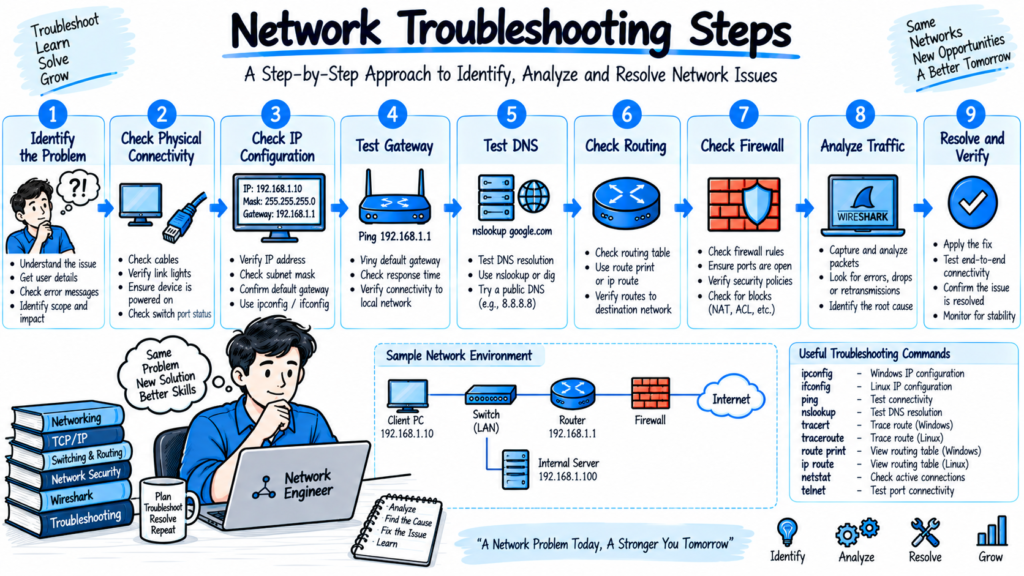
37. How would you troubleshoot a user who cannot access the Internet?
Answer:
I would follow a structured troubleshooting process.
First, I would check whether the issue affects one user or multiple users.
Then I would verify:
- Physical or wireless connectivity
- IP address
- Subnet mask
- Default gateway
- DNS configuration
- Routing
- Firewall policies
- Proxy configuration, if applicable
- Browser or application behavior
I could use commands such as:
ipconfig
ping
tracert
nslookup
For example, if the user can ping the default gateway but cannot resolve domain names, I would investigate DNS rather than immediately assuming there is a general connectivity problem.
Networking Interview Questions and Answers 2026
38. How would you troubleshoot DNS issues?
Answer:
I would first determine whether the problem affects one device or multiple users.
Then I would check:
- DNS server configuration
- Network connectivity to the DNS server
- DNS resolution
- DNS cache
- Firewall rules
- DNS server health
- Domain records
On Windows, I could use:
nslookup example.com
If the IP address is returned successfully but the application still cannot connect, I would continue investigating routing, firewall, TLS, or application-level issues.
39. How would you troubleshoot slow network performance?
Answer:
I would first identify the scope and location of the problem.
I would check:
- Latency
- Packet loss
- Bandwidth utilization
- Interface errors
- Duplex or speed issues
- CPU and memory utilization
- Routing path
- DNS response time
- Firewall or proxy performance
- Application behavior
Tools such as ping, traceroute, Wireshark, interface statistics, and network monitoring platforms can help identify the problem.
For example, packet loss at a particular network hop may indicate where further investigation is needed.
40. What is the difference between bandwidth, latency, and throughput?
Answer:
Bandwidth is the maximum data transfer capacity of a network connection.
Latency is the time required for data to travel between two points.
Throughput is the actual amount of data successfully transferred over the connection during a given period.
For example, a network connection may have high bandwidth but still provide poor application performance if latency or packet loss is high.
Understanding these differences is important when troubleshooting network performance.
Disclaimer
This Networking Interview Questions and Answers 2026 guide is provided for educational and interview preparation purposes. The networking interview questions, answers, examples, commands, and explanations are intended to help students, freshers, network engineers, system administrators, cybersecurity analysts, SOC analysts, and experienced IT professionals prepare for technical interviews.
Networking technologies, protocols, vendor configurations, security practices, and technical standards can change over time. Always verify important technical information with current documentation from the relevant vendor, standards organization, or trusted technical source before applying it in a production environment.
The information provided on TechNaga is for general educational purposes and should not be considered professional network engineering, cybersecurity, compliance, or consulting advice. Network configurations should be tested in an appropriate lab or controlled environment before being deployed to production systems.
TechNaga is not responsible for service interruptions, configuration errors, data loss, security incidents, or other consequences resulting from the application of information presented in this article.
Internal links
- Network Devices: Functions, OSI Layers and Types
- TCP 3-Way Handshake: Security Analyst Guide
- VLAN Hopping Attacks in Enterprise Networks
- MAC Flooding Attack Explained







